What is ERP? Enterprise Resource Planning Explained — A Complete Guide
What is ERP?
A complete guide — from the basics to the future, explained in plain English.
Most people have heard the acronym. Few can explain what it actually means in practice. ERP — Enterprise Resource Planning — sounds like classic corporate jargon. But the concept behind it is genuinely simple.
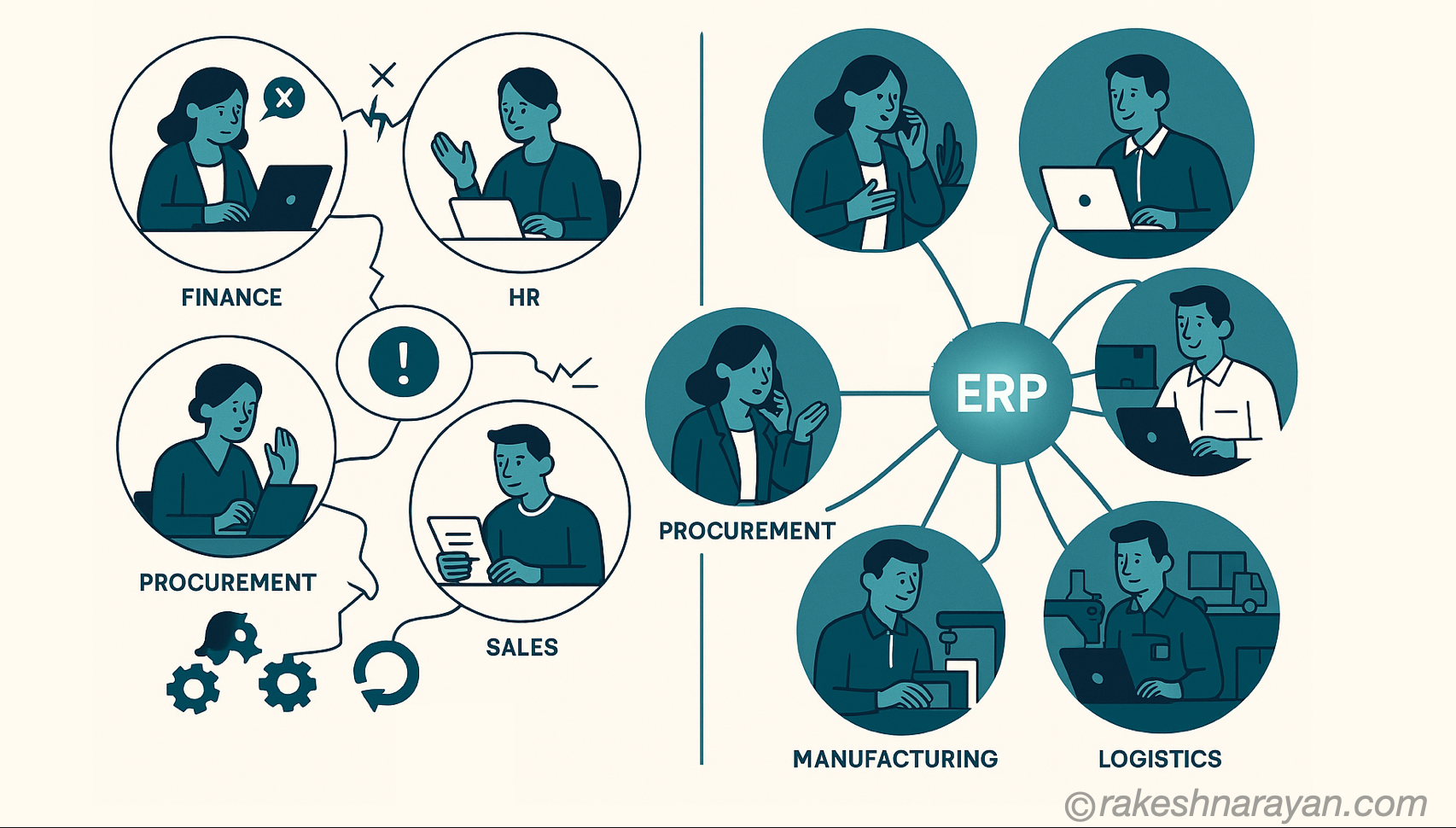
Every department in a company collects data. Finance tracks money. HR tracks people. Procurement tracks suppliers. Operations tracks inventory. Without a common system, each department lives in its own world — spreadsheets, emails, and disconnected software that never quite agree on the numbers.
ERP is the platform that connects all of it.
The One-Line Answer
ERP is software that connects all departments of a business into one system — sharing the same data, in real time.
Not just connected — integrated. A purchase order raised in procurement automatically updates inventory levels, triggers a financial commitment, and feeds into the production schedule. Nobody sends an email. Nobody re-enters data. It just flows.
That is the core promise of ERP. One source of truth for the entire organisation.
How ERP Came to Be
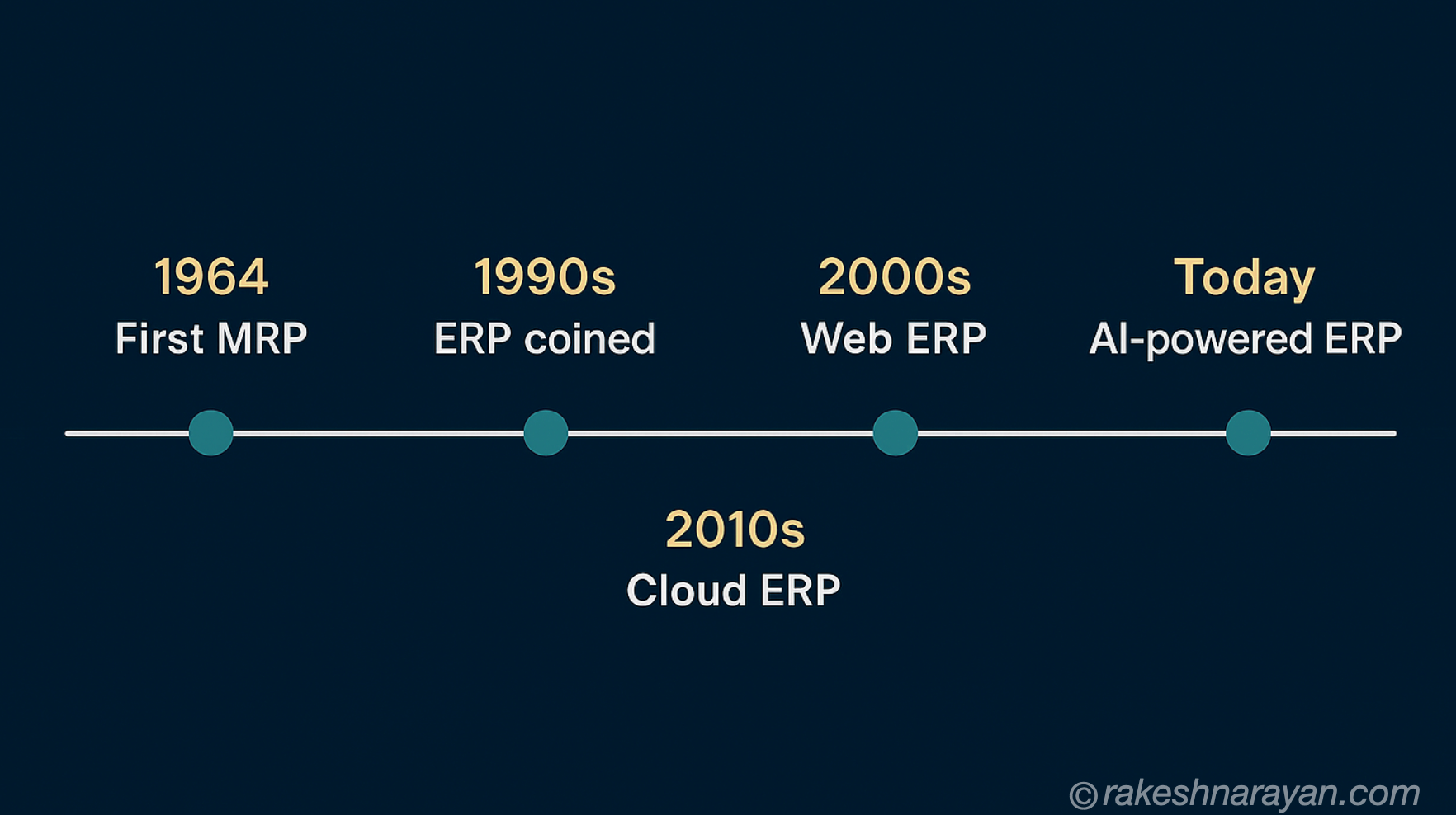
ERP did not appear overnight. It evolved over decades as businesses grew more complex and technology caught up with their needs.
| Era | What Happened |
|---|---|
| 1960s | Manufacturing companies build basic inventory control systems — the first seeds of ERP |
| 1964 | The first Material Requirements Planning (MRP) software is developed — focused on production scheduling and inventory |
| 1970s–80s | MRP expands to include capacity planning, procurement, and shop floor control — becomes MRP II |
| 1990s | Vendors like SAP, Oracle, and Microsoft extend MRP II to cover finance, HR, and the full business — the term ERP is coined |
| 2000s | ERP goes web-based. Integration with CRM, SCM, and BI becomes standard |
| 2010s | Cloud ERP emerges. SaaS models lower the barrier to entry for mid-size companies |
| Today | AI, machine learning, and real-time analytics are embedded directly into ERP platforms |
The global ERP market is now worth over $50 billion and growing. Almost every large organisation on the planet runs on some form of ERP.
How ERP Actually Works
At its core, ERP is built around one central database that all departments read from and write to. When something changes anywhere in the business, every part of the system that depends on that data is updated automatically.
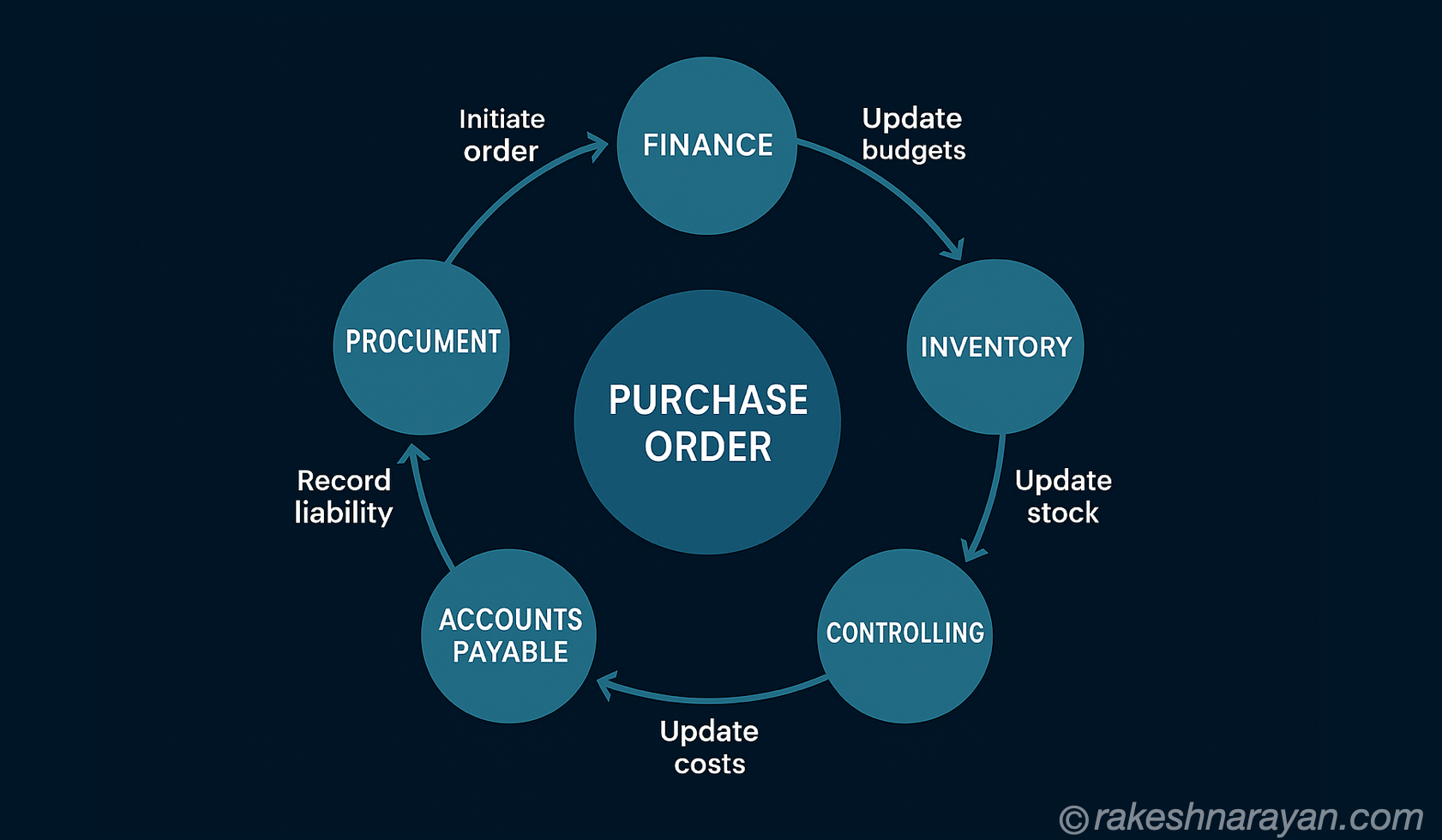
Follow a Purchase Order
A procurement manager raises a purchase order for 500 units of raw material. Here is what happens across the system:
| Step | Module | What Happens Automatically |
|---|---|---|
| 1 | Procurement (MM) | PO created, supplier notified, approval workflow triggered |
| 2 | Finance (FI) | Financial commitment recorded, budget impact visible immediately |
| 3 | Inventory (WM) | Expected stock arrival logged, warehouse space allocated |
| 4 | Production (PP) | Production schedule updated based on incoming material date |
| 5 | Accounts Payable | Invoice matching prepared, payment terms set |
| 6 | Controlling (CO) | Cost centre updated, project cost tracking adjusted |
The critical point: None of these updates require a phone call, email, or manual re-entry. One action triggers the chain. That is the efficiency ERP delivers.
Benefits of an ERP System
Done well, ERP transforms how a business operates. Here are the benefits that matter most — and what they actually mean in practice:
| Benefit | What It Actually Means |
|---|---|
| One source of truth | Every department works from the same data — no more conflicting spreadsheets or outdated reports |
| Real-time visibility | Leaders see what is happening across the business right now, not tomorrow morning after the reports run |
| Process automation | Manual tasks like data entry, approvals, and report generation are handled by the system |
| Reduced errors | When data flows automatically between modules, human re-entry errors disappear |
| Better collaboration | Finance and operations finally speak the same language because they share the same system |
| Cost reduction | Fewer manual processes, less duplication, better inventory control — savings compound over time |
| Regulatory compliance | Audit trails, financial controls, and reporting are built in — not bolted on |
| Scalability | As the business grows, ERP grows with it — add modules, users, or geographies without rebuilding |
Types of ERP — Which One Fits?
Not every ERP is the same. The right type depends on your organisation’s size, budget, and how much control you need over your data.
On-Premise ERP
The system runs on your own servers, managed by your own IT team. You own the software and control everything — configuration, security, upgrades.
Best for: Large enterprises with complex, highly customised processes and dedicated IT departments. Banks, defence, government.
Watch out for: High upfront cost, long implementation timelines, and the full burden of maintenance falls on you.
Cloud ERP (SaaS)
The vendor hosts and manages the software. You access it through a browser. Updates happen automatically. You pay a subscription.
Best for: Growing mid-size companies, businesses that want faster implementation and lower upfront cost.
Watch out for: Less customisation than on-premise. Data lives with the vendor — understand their security and data residency policies.
Open Source ERP
Community-built ERP platforms that anyone can download, modify, and run. Examples include Odoo and ERPNext.
Best for: Smaller organisations with technical teams who want full control without licensing costs.
Watch out for: Support and maintenance falls on your team. Can be complex to customise without experienced developers.
Hybrid ERP
Core ERP on-premise for the processes that need maximum control, cloud modules for everything else. Most large enterprises today are somewhere on this spectrum.
Best for: Organisations transitioning from legacy on-premise systems to the cloud, or those with mixed requirements across business units.
| Type | Hosted By | Upfront Cost | Customisation | Best For |
|---|---|---|---|---|
| On-Premise | You | High | Maximum | Large enterprise, regulated industries |
| Cloud (SaaS) | Vendor | Low | Moderate | Mid-size, fast-growing companies |
| Open Source | You | Low | High | Tech-savvy teams, smaller organisations |
| Hybrid | Both | Medium | High | Enterprises in cloud transition |
Common ERP Modules — What Each One Does
ERP systems are modular. You implement the modules your business needs. Most large organisations run most of them.
| Module | What It Manages |
|---|---|
| Financial Accounting (FI) | General ledger, accounts payable, accounts receivable, financial reporting |
| Controlling (CO) | Internal cost tracking, profit centre accounting, budgeting |
| Materials Management (MM) | Procurement, purchase orders, supplier management, goods receipt |
| Sales and Distribution (SD) | Customer orders, pricing, delivery, billing, revenue recognition |
| Production Planning (PP) | Manufacturing orders, capacity planning, shop floor management |
| Warehouse Management (WM/EWM) | Inventory tracking, stock movements, warehouse operations |
| Human Resources (HR/HCM) | Employee records, payroll, recruitment, performance management |
| Project System (PS) | Project planning, budgeting, and cost tracking |
| Quality Management (QM) | Inspection plans, quality notifications, certificate management |
| Plant Maintenance (PM) | Equipment maintenance schedules, breakdown management |
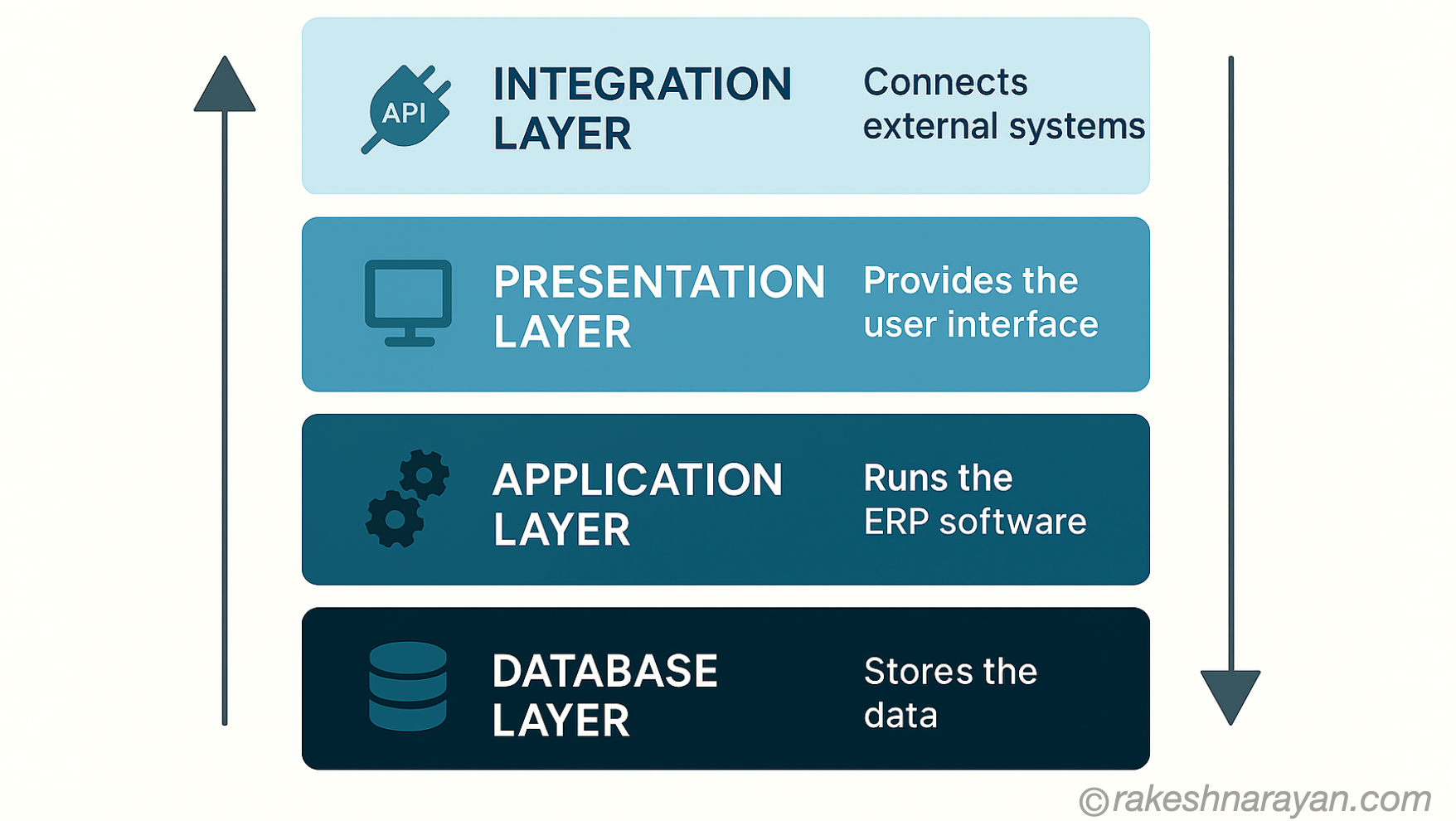
ERP Architecture — How It Is Built
Understanding the architecture helps explain both the power and the complexity of ERP systems.
| Layer | What It Does |
|---|---|
| Database Layer | The central data store — all business data lives here. One version of the truth for the entire organisation |
| Application Layer | The business logic — the rules, workflows, and calculations that process transactions |
| Presentation Layer | The user interface — what employees actually see and interact with (browser, Fiori, mobile) |
| Integration Layer | APIs and middleware that connect ERP to external systems — CRM, e-commerce, third-party tools |
What ERP Integrates With
ERP is rarely the only system in a large organisation. It works best when connected to the tools that extend its reach.
| System | What the Integration Enables |
|---|---|
| CRM (e.g. Salesforce) | Customer data, sales orders, and service requests flow between CRM and ERP automatically |
| SCM (Supply Chain Management) | End-to-end supply chain visibility — from supplier to delivery |
| BI / Analytics (e.g. SAP BW) | ERP data feeds dashboards and reports for business intelligence |
| E-commerce (Shopify, Magento) | Online orders flow directly into ERP for fulfilment and invoicing |
| HR / Payroll Systems | Employee data stays in sync across HR, payroll, and finance |
| IoT Platforms | Sensor data from machines feeds directly into production planning and maintenance modules |
| Banking / Treasury Systems | Payments, bank statements, and cash positions reconcile automatically |
ERP vs CRM vs SCM — What Is the Difference?
These three acronyms come up together constantly. Here is how to think about them:
| System | Focus | Typical Examples |
|---|---|---|
| ERP | Back-office operations — finance, HR, manufacturing, procurement | SAP, Oracle, Microsoft Dynamics |
| CRM | Front-office — customer relationships, sales pipeline, marketing | Salesforce, SAP CRM, HubSpot |
| SCM | Supply chain — suppliers, logistics, demand planning, distribution | SAP SCM, Oracle SCM, Blue Yonder |
In large organisations, all three coexist and integrate. ERP is the backbone. CRM and SCM are specialist extensions.
SAP ERP — The Market Leader
When people talk about ERP in large organisations, they are usually talking about SAP. With over 437,000 customers across 180 countries, SAP is the dominant force in enterprise ERP.
The SAP Product Family
| Product | What It Is |
|---|---|
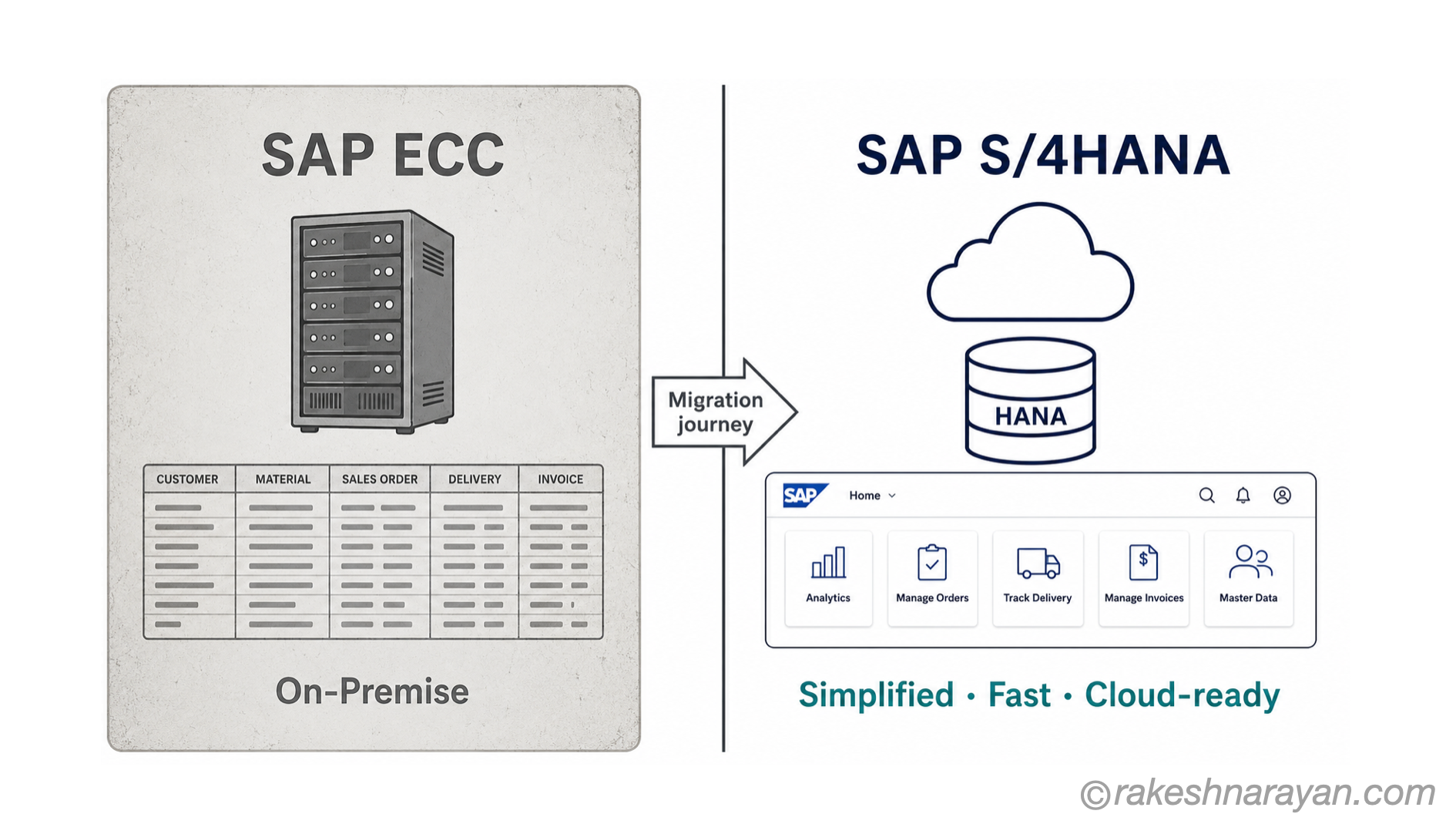
| SAP ECC | The classic SAP ERP — on-premise, widely deployed, being retired in 2027 |
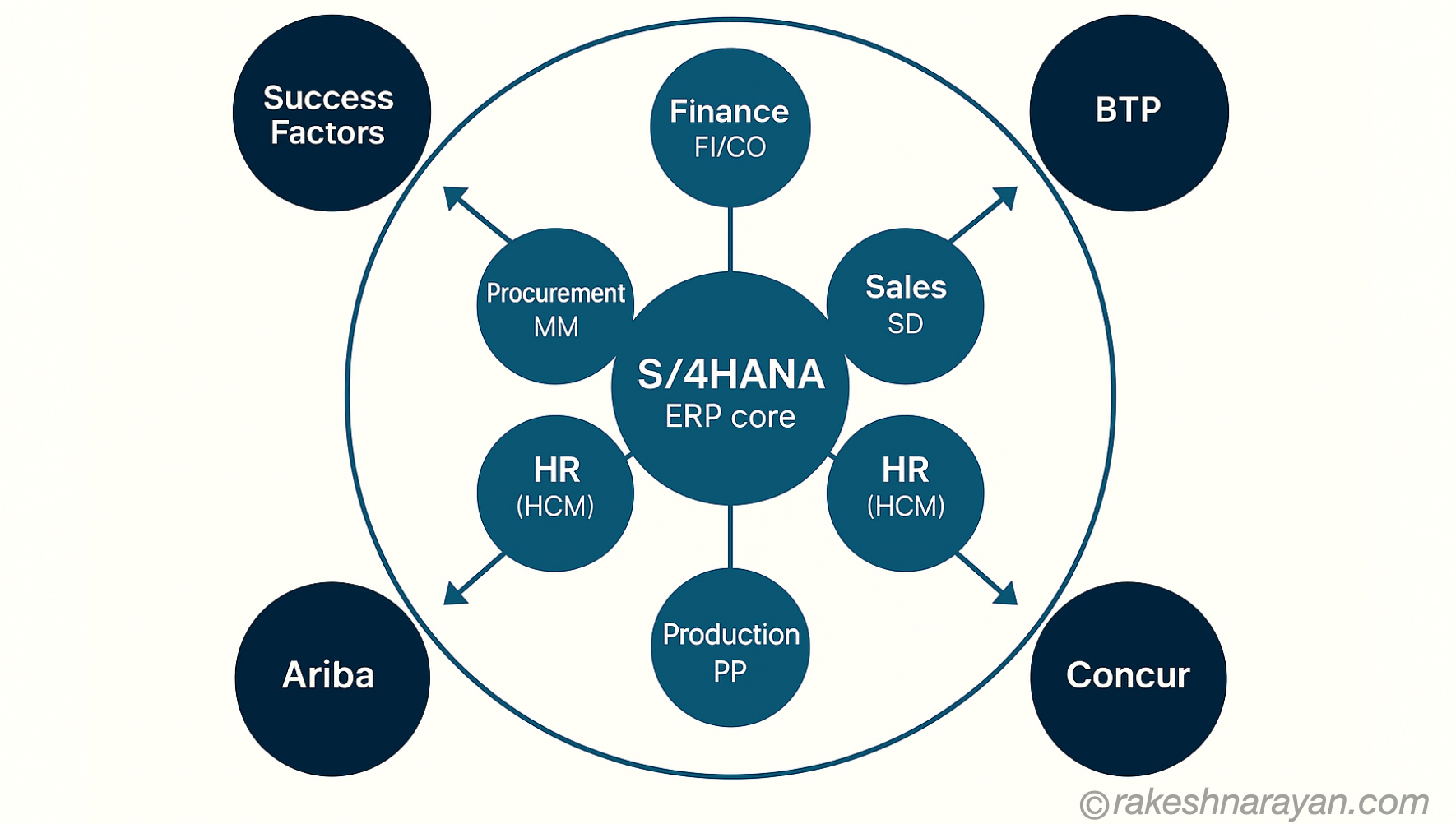
| SAP S/4HANA | The next-generation ERP — built on the HANA in-memory database, cloud-ready, real-time analytics |
| SAP Business One | ERP designed for small and medium-sized businesses — simpler, faster to implement |
| SAP Ariba | Cloud-based procurement and supplier management |
| SAP SuccessFactors | Cloud HR — hiring, payroll, performance, learning |
The key SAP message for 2025 and beyond: ECC is being retired. S/4HANA is the destination. Every SAP customer is either already on S/4HANA or planning the migration. The deadline is not optional.
The Future of ERP
ERP is not standing still. The platforms being deployed today look very different from the ERP of ten years ago — and the gap will only widen.
AI and Machine Learning
Modern ERP platforms embed AI directly into business processes. Intelligent invoice matching, predictive demand forecasting, automated anomaly detection in finance, and AI-assisted procurement recommendations are already live in platforms like SAP S/4HANA.
Real-Time Analytics
Traditional ERP ran batch reports — you got yesterday’s numbers this morning. In-memory databases like SAP HANA changed that. Leaders now see what is happening across the business as it happens.
Cloud-First Architecture
The shift from on-premise to cloud is accelerating. Vendors are investing almost exclusively in cloud capabilities. Companies still on legacy on-premise ERP face a widening gap in features and support.
IoT Integration
Sensors in factories, warehouses, and supply chains feed data directly into ERP. Equipment maintenance is triggered automatically before breakdowns happen. Inventory levels update in real time as goods move.
Composable ERP
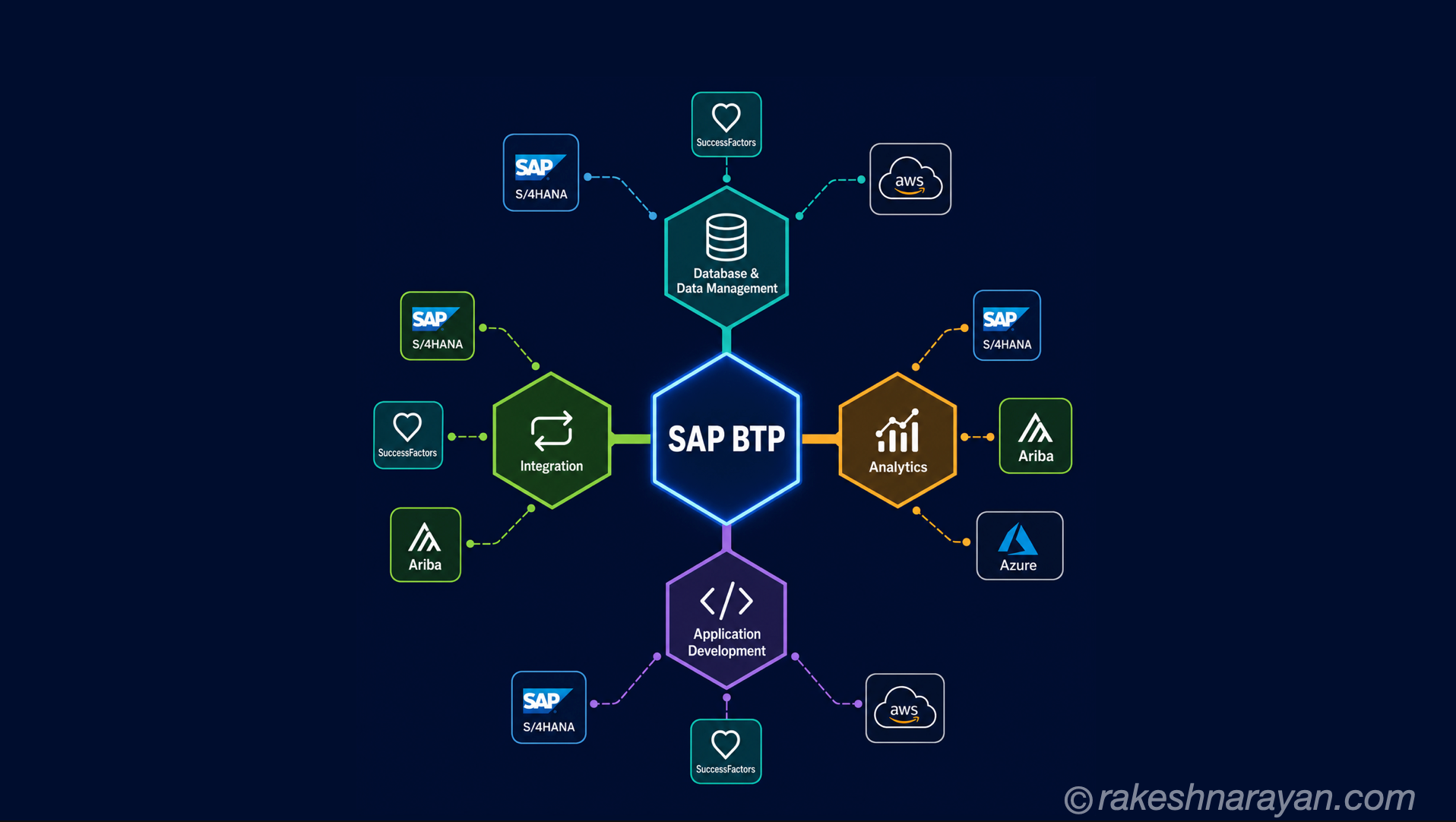
A newer concept — instead of one monolithic ERP, businesses assemble best-of-breed modules connected through open APIs and integration platforms. SAP BTP is SAP’s answer to this. The idea is flexibility without fragmentation.
Choosing an ERP — What to Consider
Choosing the wrong ERP is one of the most expensive mistakes a business can make. Here is what actually matters:
- Industry fit — does the vendor have deep experience in your sector?
- Total cost of ownership — licence, implementation, training, and ongoing support. Implementation often costs 3–5x the software licence.
- Integration capability — how well does it connect with your existing systems?
- Scalability — will it still work when you are twice the size in five years?
- Vendor stability — is this company going to exist and support you in ten years?
- Customisation vs configuration — customisation is expensive and creates upgrade risk. Favour configuration where possible.
- User adoption — the best ERP in the world fails if people do not use it. UI and training matter enormously.
ERP Implementation — What to Expect
ERP implementation is a serious undertaking. For a large organisation, it is one of the biggest projects they will ever run. Here is an honest picture:
| Phase | What Happens |
|---|---|
| Discovery | Define business requirements, choose the system, scope the project |
| Design | Map current processes, design future-state processes, configure the system |
| Build | Configuration, customisation, integrations, data migration preparation |
| Testing | Unit testing, integration testing, user acceptance testing (UAT) |
| Training | End users trained on new processes and the new system |
| Go-Live | Cutover from old system to new — the most stressful day of the project |
| Stabilisation | Hypercare period — intensive support for the first weeks after go-live |
⚠️ Honest warning: ERP projects routinely go over time and over budget. The technology is rarely the problem. Change management — getting people to adopt new processes — is where most projects struggle. Budget for it properly.
A mid-size ERP implementation typically takes 12 to 18 months. A large, global rollout can take three to five years. Done well, the return on investment is substantial and lasts decades.
Key Terms — Quick Reference
| Term | What It Means |
|---|---|
| ERP | Enterprise Resource Planning — integrated software for managing all business operations |
| MRP | Material Requirements Planning — the predecessor to ERP, focused on manufacturing and inventory |
| Module | A functional area within ERP — Finance, HR, Procurement, Sales, etc. |
| Go-Live | The moment the new ERP system switches on in production |
| Cutover | The process of migrating data and switching from the old system to the new one |
| UAT | User Acceptance Testing — end users verify the system works correctly before go-live |
| Change Management | The organisational work of getting people to adopt new processes and tools |
| SaaS ERP | Software as a Service — cloud ERP where the vendor manages everything |
| Integration | Connecting ERP to other systems so data flows automatically between them |
| Single source of truth | One central database where all departments read the same, consistent data |
FAQ — Common Questions Answered
What does ERP stand for?
Enterprise Resource Planning. The name comes from its origins in manufacturing resource planning — but modern ERP covers the entire business, not just manufacturing.
Is SAP an ERP system?
SAP is the world’s largest ERP software company. Its flagship products — SAP ECC and SAP S/4HANA — are ERP systems. SAP also makes cloud applications like SuccessFactors (HR) and Ariba (procurement) that extend beyond core ERP.
How long does ERP implementation take?
It depends heavily on the size and complexity of the organisation. A focused mid-size implementation can take 12 to 18 months. A global enterprise rollout can take three to five years. Scope creep and poor change management are the biggest causes of delay.
What is the difference between ERP and CRM?
ERP handles back-office operations — finance, procurement, manufacturing, HR. CRM handles front-office operations — customer relationships, sales, and marketing. In large organisations, both coexist and are integrated so data flows between them.
Can small businesses use ERP?
Yes. Products like SAP Business One, Microsoft Dynamics 365 Business Central, and Odoo are designed specifically for small and medium businesses. Cloud ERP has dramatically lowered the cost of entry — you no longer need to be an enterprise to benefit from integrated business software.
What are the biggest risks in an ERP implementation?
Poor change management and low user adoption are the most common causes of ERP failure. Other significant risks include unclear requirements, underestimated data migration complexity, insufficient testing, and scope creep. The technology itself is rarely the problem.
What is the difference between on-premise and cloud ERP?
On-premise ERP runs on your own servers — you control everything, including upgrades and security. Cloud ERP is hosted by the vendor, accessed through a browser, and updated automatically. Cloud is faster to deploy and cheaper upfront. On-premise gives more control and customisation, but carries higher maintenance cost.
What is the role of an ERP consultant?
An ERP consultant bridges the gap between the software and the business. They understand both the technical capabilities of the system and the practical realities of business processes. They configure the system, manage the implementation, train users, and help the organisation get the most from its investment.
The 60-Second Summary
- ERP connects all departments of a business into one integrated system sharing a single database
- It evolved from manufacturing software in the 1960s into a platform that runs entire global enterprises
- The four main types are on-premise, cloud, open source, and hybrid — each with different trade-offs
- Benefits include real-time visibility, process automation, cost reduction, and better decision-making
- SAP is the global ERP leader — S/4HANA is its current platform; ECC is being retired in 2027
- Implementation is complex and expensive — change management matters more than technology
- The future of ERP is AI-powered, cloud-first, and composable
This is part of an ongoing series on enterprise technology fundamentals. Next up: SAP S/4HANA — what is different about it, why the migration from ECC matters, and what you need to know before starting.