API Security Essentials
APIs are the connectors of the modern web. They power mobile apps, system integrations, cloud platforms, and nearly every digital product in use today. And because they handle so much data and business logic, they are also one of the most targeted attack surfaces.
This post covers the security essentials — what every developer, architect, and technical consultant needs to understand when building or working with APIs.
🔗 Before you read this
API security sits on top of two foundations covered in earlier posts on this site. If you are new to APIs, start with REST API Design Principles for how APIs are structured, and How HTTPS Works for how data is protected in transit. This post builds on both.
Why API security is different
Traditional web security protects what users see — login pages, forms, sessions. API security protects what systems talk to each other — endpoints, tokens, data payloads.
APIs are harder to secure because:
- They are designed to be accessible — often publicly exposed by intent
- They expose business logic directly, not just a user interface
- They carry structured data (JSON, XML) that is easy to parse and exploit
- They are often consumed by many clients — mobile apps, third-party services, internal systems — each with different trust levels
- Old or undocumented API versions frequently stay live and unpatched
The three questions every API must answer
Before getting into specific mechanisms, every API security decision comes back to three questions:
| Question | Security concern | Mechanism |
|---|---|---|
| Who are you? | Authentication — confirming identity | API keys, OAuth tokens, JWT |
| What are you allowed to do? | Authorisation — controlling access | Scopes, roles, permissions |
| How much can you do? | Rate limiting — preventing abuse | Request quotas, throttling |
Most API security failures come down to one of these three being missing, weak, or incorrectly implemented.
Authentication — proving who you are
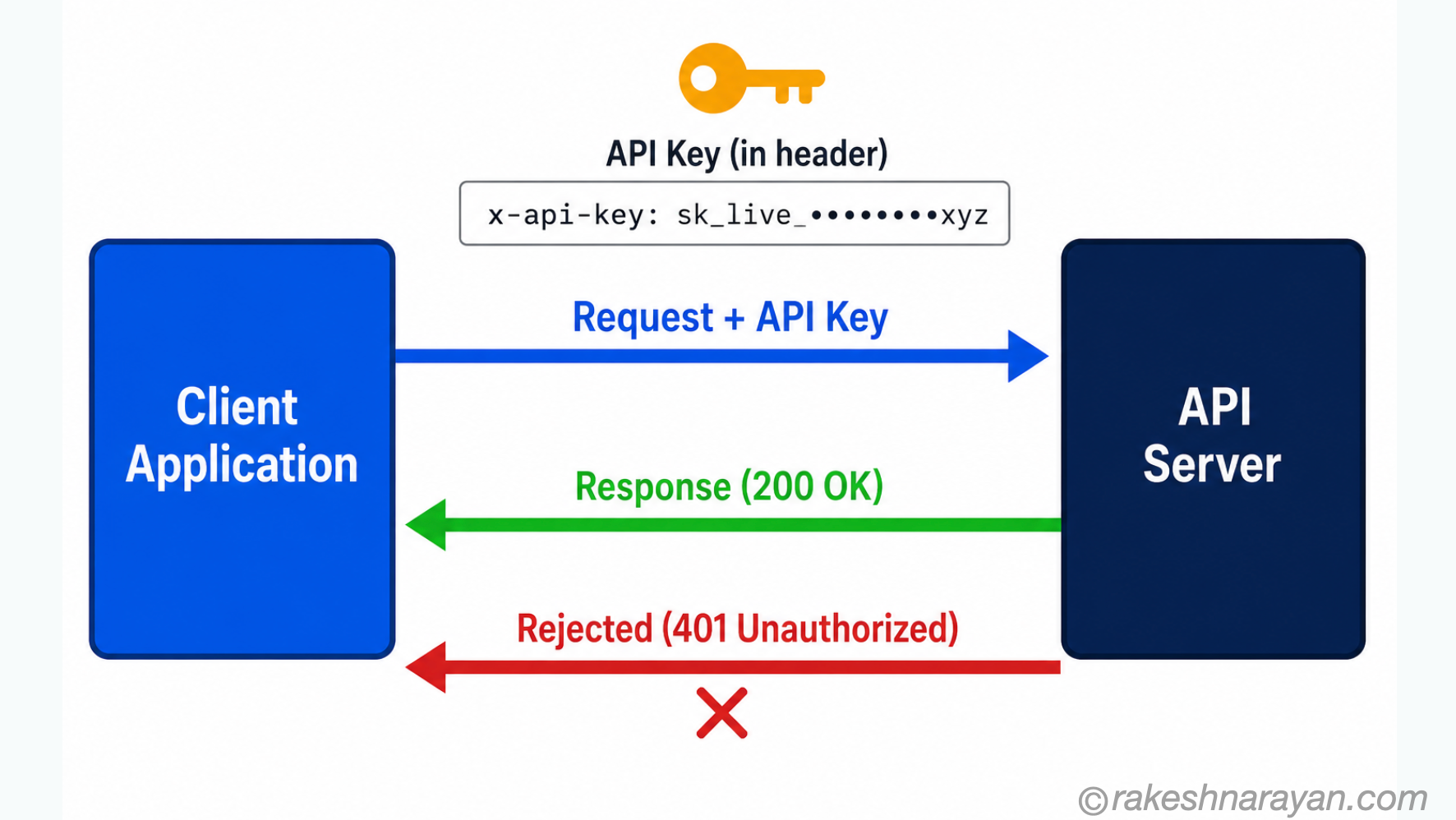
API Keys
An API key is a long, randomly generated string passed with every request. The server checks the key and either allows or rejects the request.
| Aspect | Detail |
|---|---|
| How it is sent | Usually in a request header: x-api-key: abc123xyz or as a query parameter (less secure) |
| Best for | Server-to-server calls, internal integrations, simple public APIs |
| Weakness | A stolen key gives full access until it is revoked — no user identity, no expiry by default |
| Best practice | Rotate keys regularly, use different keys per environment, never hardcode in source code |
OAuth 2.0 and Bearer Tokens
OAuth 2.0 is the standard for delegated access — letting a user or system grant an application access to resources without sharing a password.
Instead of a static API key, OAuth issues a short-lived access token (called a Bearer token). The client sends this token with every request.
| Aspect | Detail |
|---|---|
| How it is sent | Authorization header: Authorization: Bearer |
| Token format | Usually JWT (JSON Web Token) — a self-contained token carrying identity and permissions |
| Expiry | Tokens are short-lived — typically minutes to hours — reducing the impact of theft |
| Refresh tokens | A long-lived refresh token is used to get a new access token without re-authenticating |
| Best for | User-facing APIs, third-party integrations, SAP BTP service-to-service calls |
💡 JWT in plain English
A JWT (JSON Web Token) is a Base64-encoded string with three parts: a header (algorithm), a payload (claims like user ID and roles), and a signature. The server does not need to look up a session — it verifies the signature and reads the claims directly from the token. This is why JWT-based APIs scale well.
What not to do
| Bad practice | Why it is a problem |
|---|---|
| Sending API keys as URL parameters | URLs appear in server logs, browser history and referrer headers — the key gets exposed |
| Hardcoding credentials in source code | Anyone with repository access — including public GitHub repos — can read them |
| Using long-lived tokens with no expiry | A stolen token works forever until manually revoked |
| No token validation on the server | Trusting the token blindly without checking signature, expiry and issuer |
Authorisation — controlling what is allowed
Authentication confirms who you are. Authorisation decides what you can do. Both are required. A common mistake is implementing authentication well but leaving authorisation weak.
| Concept | What it means | Example |
|---|---|---|
| Authentication | You are who you say you are | Token verified — this is user 42 |
| Authorisation | You are allowed to do this specific thing | User 42 can read /orders/101 but not /orders/999 |
| Broken authorisation | Auth passes but object-level access is not checked | User 42 changes the ID to /orders/999 and gets someone else’s data |
⚠️ The most common API vulnerability
Broken Object Level Authorisation (BOLA) has been the number one API vulnerability on the OWASP list since 2019. It happens when an API returns data for any ID it receives without checking whether the requesting user owns or has access to that object. Always check access on the server side, for every request, every time.
Rate limiting — preventing abuse
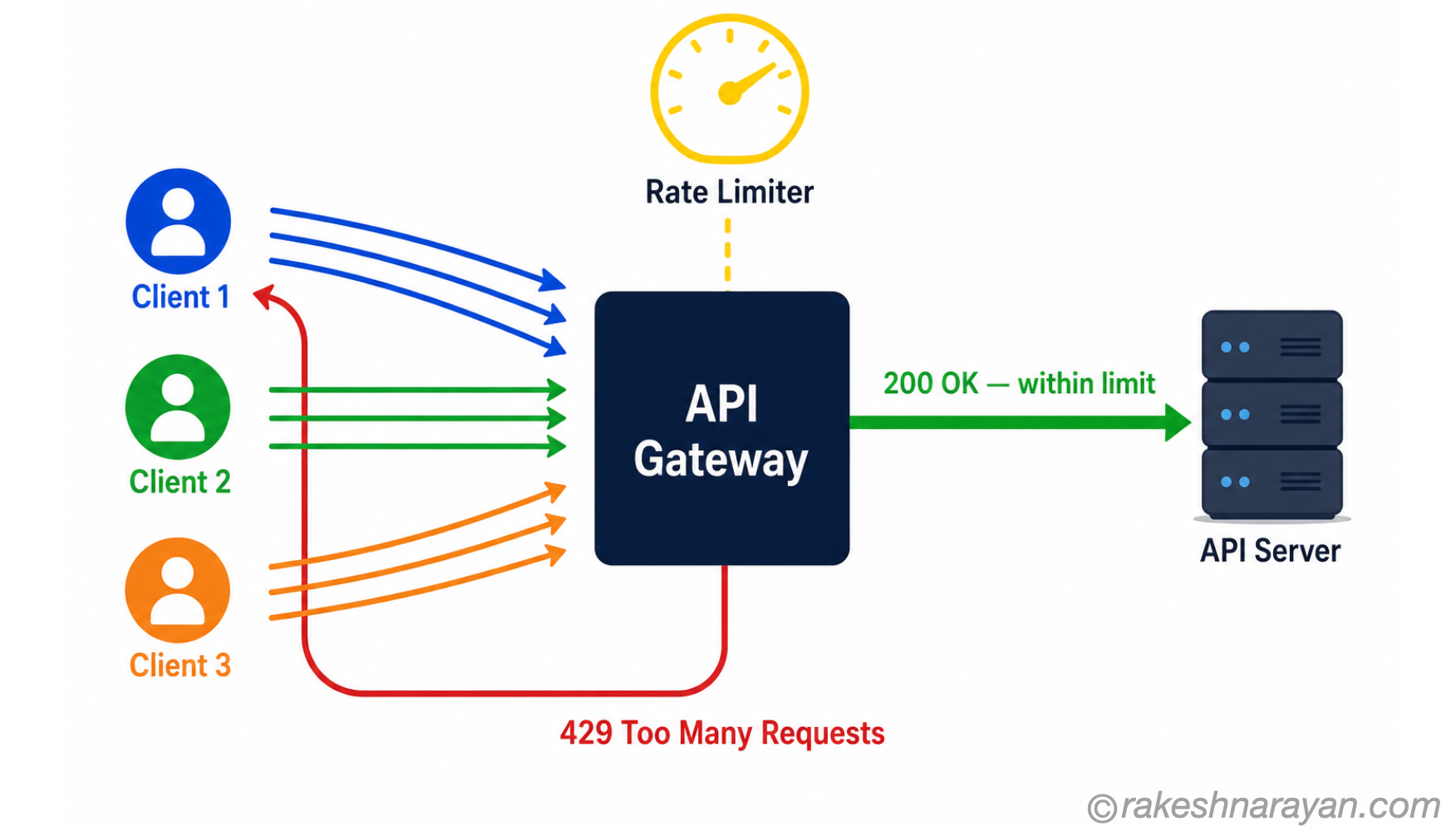
Rate limiting restricts how many requests a client can make in a given time window. Without it, an API is vulnerable to brute-force attacks, credential stuffing, and resource exhaustion.
| Rate limit type | What it controls | Example |
|---|---|---|
| Per API key / token | Requests per minute or hour per client | 100 requests per minute per key |
| Per IP address | Requests from a single IP | Blocks mass automated requests from one source |
| Per endpoint | Restricts specific sensitive endpoints more tightly | Login endpoint: 5 attempts per minute |
| Global | Total requests across all clients | Protects infrastructure from DDoS |
When a rate limit is hit, the API should return HTTP 429 Too Many Requests with a Retry-After header telling the client when to try again.
Input validation — never trust what comes in
Every piece of data an API receives from outside must be treated as untrusted. Input validation is the process of checking that data is in the expected format, type, length, and range before processing it.
| What to validate | Why it matters |
|---|---|
| Data type | Expecting a number, receiving a string with SQL — SQL injection attack |
| Field length | Extremely long inputs can crash systems or overflow buffers |
| Allowed values | A field expecting ‘active’ or ‘inactive’ should reject anything else |
| File uploads | File type, size and content must all be validated — not just the extension |
| Nested objects | Attackers can inject unexpected fields to manipulate business logic (mass assignment) |
💡 Validate on the server, always
Client-side validation (in a browser or app) is for user experience only. It can be bypassed by anyone with basic tools. The server must always validate inputs independently, regardless of what the client claims to have checked.
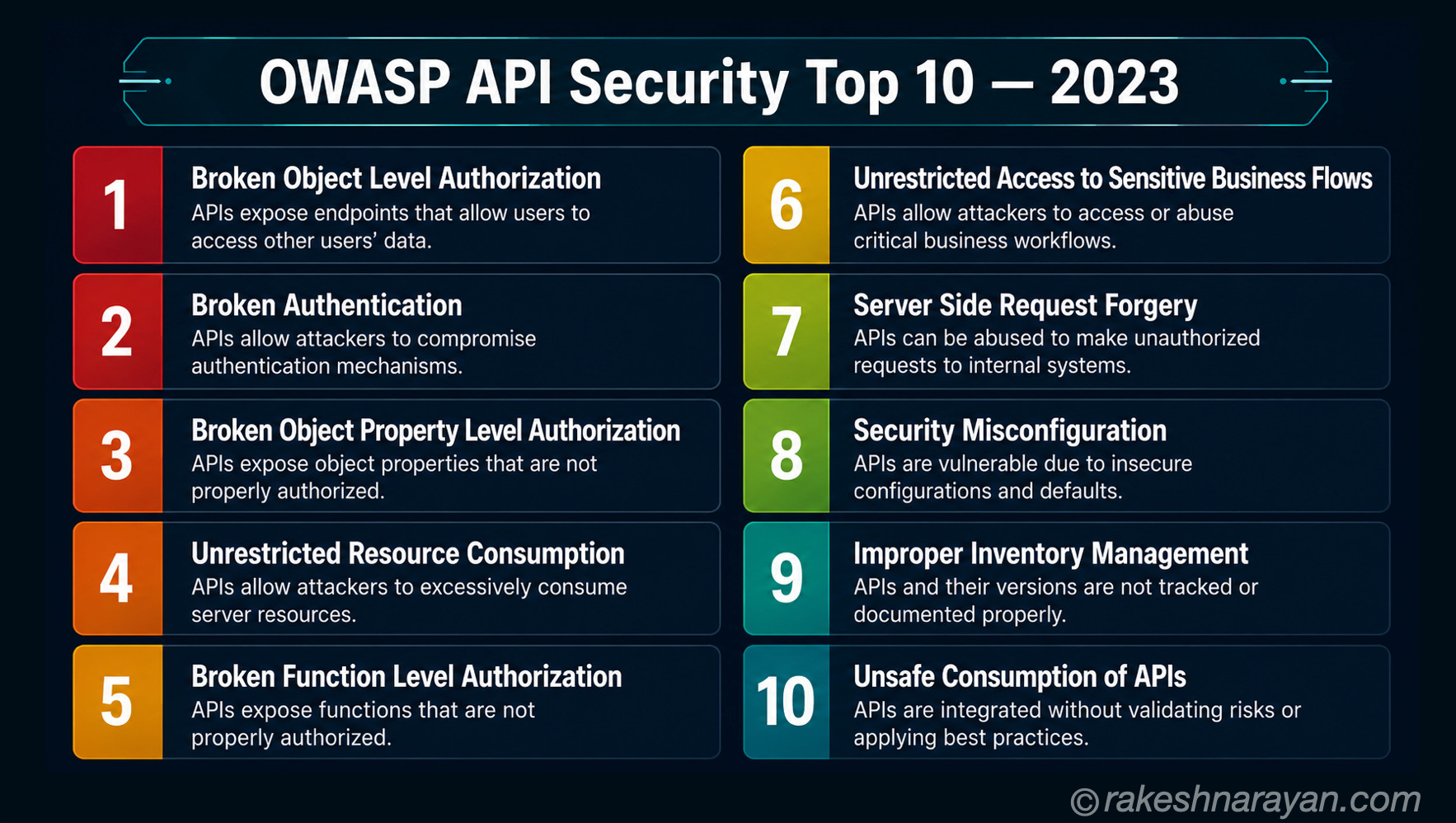
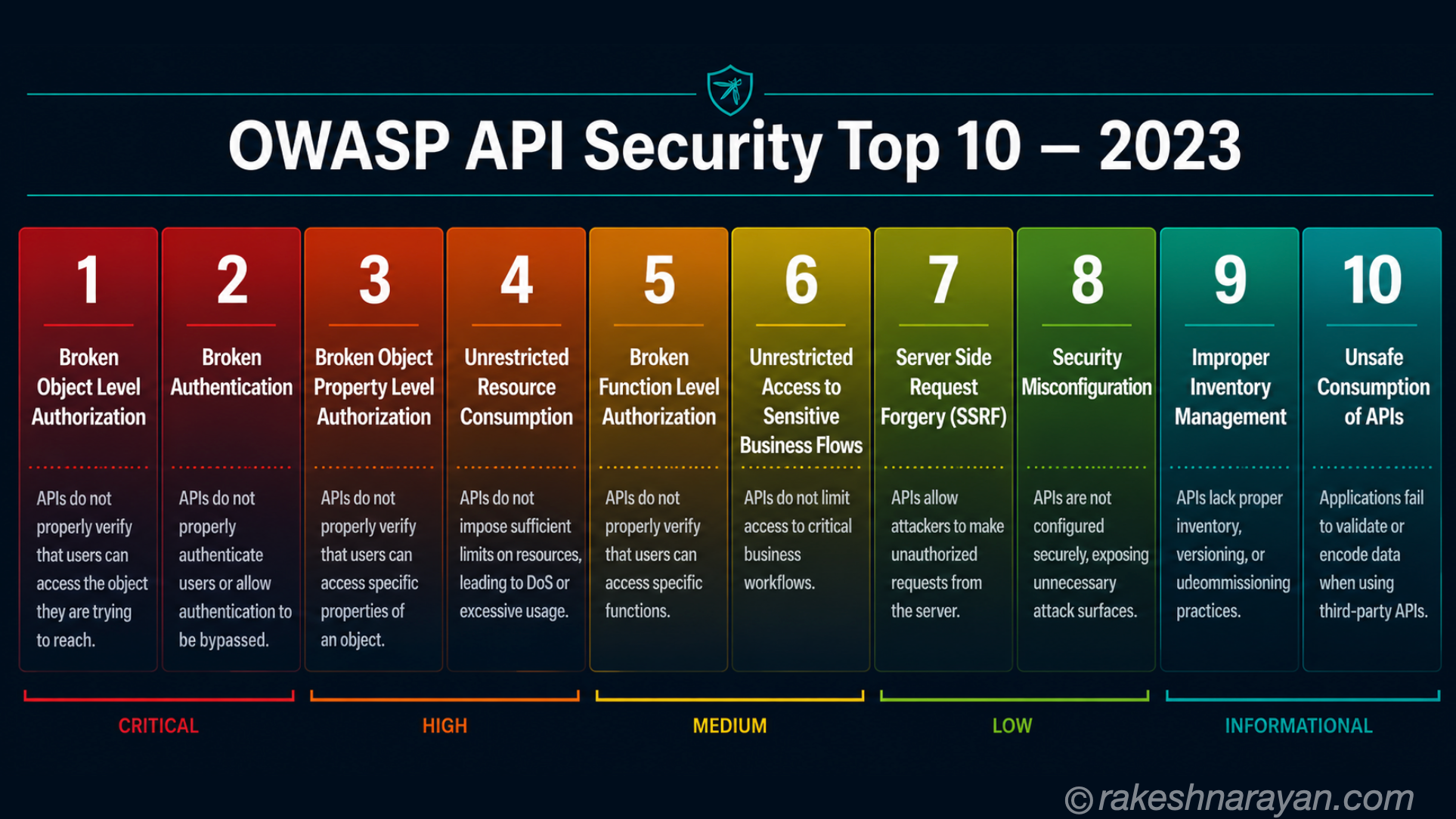
OWASP API Security Top 10 — 2023
OWASP (Open Web Application Security Project) publishes a list of the most critical API security vulnerabilities. The current version was published in 2023 and reflects how APIs are actually being attacked today.
| # | Vulnerability | What it means | Real-world impact |
|---|---|---|---|
| 1 | Broken Object Level Authorisation | API returns data for any ID without checking if the requester owns it | Attacker reads or modifies another user’s data |
| 2 | Broken Authentication | Weak tokens, missing expiry, no brute-force protection | Account takeover, unauthorised access |
| 3 | Broken Object Property Level Authorisation | API exposes or allows modification of fields the user should not access | Data leakage or privilege escalation |
| 4 | Unrestricted Resource Consumption | No limits on request size, frequency or compute — allows resource exhaustion | API becomes slow or unavailable (DoS) |
| 5 | Broken Function Level Authorisation | Admin or privileged endpoints accessible by regular users | Unauthorised actions, data deletion |
| 6 | Unrestricted Access to Sensitive Flows | Critical workflows (password reset, OTP) have no abuse protection | Account takeover, fraud |
| 7 | Server-Side Request Forgery (SSRF) | API fetches remote URLs from user input — attacker targets internal systems | Access to internal infrastructure |
| 8 | Security Misconfiguration | Open CORS, default passwords, debug mode on, missing headers, verbose errors | Broad attack surface, data exposure |
| 9 | Improper Inventory Management | Old API versions, undocumented endpoints and shadow APIs left running | Unpatched vulnerabilities exploited |
| 10 | Unsafe Consumption of APIs | Trusting data from third-party APIs without validation or sanitisation | Compromise via supply chain attack |
Source: OWASP API Security Top 10 2023
Security checklist for any API
Whether you are building a new API or reviewing an existing one, these are the things to check:
| Area | Check |
|---|---|
| Transport | All traffic uses HTTPS — no HTTP endpoints in production |
| Authentication | Every endpoint requires a valid token or key — no unauthenticated access to data |
| Authorisation | Object-level access is checked server-side on every request |
| Token handling | Tokens are short-lived, signed, and validated on every call |
| Rate limiting | Limits are in place, especially on auth endpoints |
| Input validation | All inputs validated for type, length and allowed values server-side |
| Error messages | Errors return useful messages to the client but no internal stack traces or system details |
| API inventory | All API versions and endpoints are documented — old versions are retired, not just abandoned |
| Secrets | No API keys or credentials in source code, URLs or logs |
| Dependencies | Third-party APIs and libraries are treated as untrusted — validated before use |
Testing your API security — the basic tools
Knowing the principles is not the same as verifying them. Three tools that every developer and architect working with APIs should know:
| Tool | What it does | Use it for |
|---|---|---|
| Postman | GUI tool for sending API requests manually — supports collections, environments, auth flows | Manually test authentication, authorisation and input validation |
| OWASP ZAP | Open-source web application security scanner — actively tests for OWASP vulnerabilities | Automated scanning for BOLA, injection, misconfiguration |
| Burp Suite | Intercepts and modifies HTTP/HTTPS traffic between client and server | Manual penetration testing — modify requests to test authorisation bypass |
The most valuable basic test you can do: take an authenticated request that returns a resource (say, GET /orders/101), change the ID in the URL to another user’s ID, and see what happens. If the API returns the other user’s data without checking ownership, you have a BOLA vulnerability — the number one API security risk. This test takes two minutes and finds the most common critical flaw.
API security in the SAP context
If you work with SAP systems, these same principles apply directly.
| SAP scenario | Security principle in play |
|---|---|
| SAP BTP service-to-service calls | OAuth 2.0 client credentials flow — short-lived tokens, no shared passwords |
| OData API calls from Fiori apps | Bearer token from the user’s session — authorisation checked via SAP roles |
| Integration Suite (CPI) flows | HTTPS for all connections, credential store for API keys and passwords |
| External API consumption | Third-party APIs treated as untrusted — validate responses before processing |
| API versioning in OData | V2 vs V4 are distinct paths — old versions must be explicitly managed |
The essentials at a glance
| Concept | One-line summary |
|---|---|
| HTTPS | All API traffic must be encrypted in transit — non-negotiable |
| API Keys | Static credentials for server-to-server auth — rotate regularly, never expose in URLs or code |
| OAuth / Bearer | Short-lived tokens for delegated access — the standard for modern APIs |
| JWT | Self-contained token carrying identity and permissions — verify signature and expiry always |
| Authentication | Who are you — verify identity on every request |
| Authorisation | What can you do — check object-level access server-side, every time |
| Rate Limiting | How much can you do — return 429 when limits are exceeded |
| Input Validation | Never trust incoming data — validate type, length and values server-side |
| OWASP Top 10 | The industry reference for API vulnerabilities — BOLA is #1 since 2019 |
| API Inventory | Know what is running — old versions are attack surface |
What to take away
API security is not a feature you add at the end of a project. It is a set of decisions you make from the start — in how you design endpoints, how you issue and validate tokens, how you restrict access, and how you handle input.
The good news: the principles are not complicated. Most API breaches come from well-known, avoidable mistakes — weak authentication, missing authorisation checks, no rate limiting. Getting the essentials right puts you ahead of most.
🔗 Related posts on this site
REST API Design Principles — how APIs are structured before security is applied.
How HTTPS Works — Certificate Chains and TLS Handshake — the transport layer that all secure API calls depend on.
Published on rakeshnarayan.com — Articles
URL: https://rakeshnarayan.com/articles/api-security-essentials/
Did you enjoy this article?
Let me know — it takes one click.
0 Comments
Leave a Comment
Looks like this one held your attention — I'd really appreciate a quick comment below.
Your comment has been submitted and will appear after review.