How Kubernetes Works — The Mental Model
You have sat in a kick-off and heard someone say the platform runs on Kubernetes. You nodded. So did everyone else. Nobody asked what that actually means — because nobody wanted to be the one who didn’t know.
That is the Kubernetes gap. Not the commands. The picture. What it is doing, what problem it was built to solve, and why the concepts are shaped the way they are.
This post builds that picture. Once it clicks, the rest of Kubernetes follows logically.
🔗 Foundation for this post
Kubernetes manages containers — so you need to understand what containers are first. Docker and Containers — The Why covers that. If you are already clear on containers, read on. If not, start there and come back.
The problem Kubernetes solves
Docker solved packaging. You put your application and everything it needs into a container. It runs the same way on your laptop, on a test server, in production. That is a genuinely big deal.
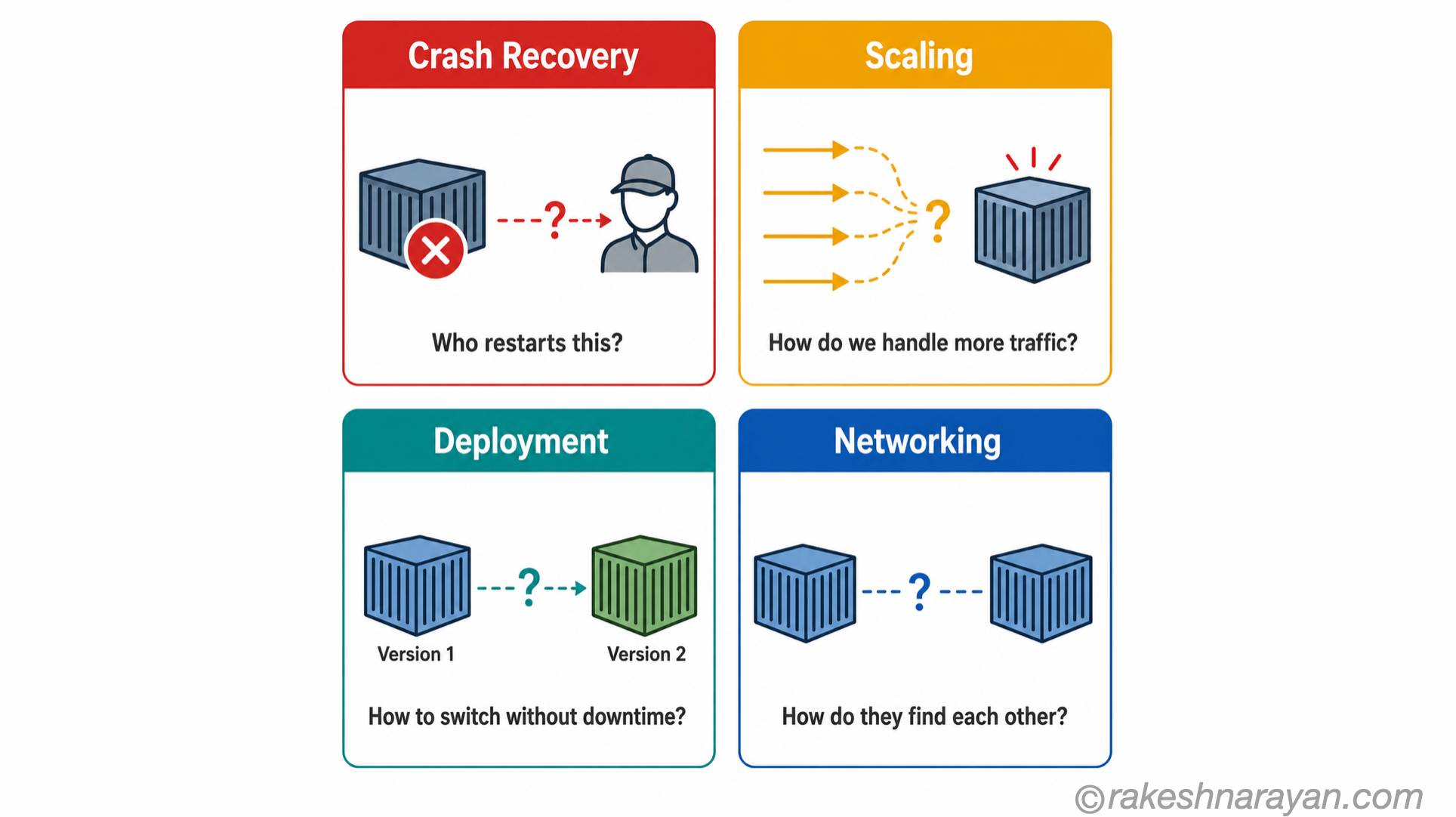
But then you ship it. And you are not running one container — you are running dozens. Hundreds. Different services, different versions, different resource needs. And immediately the questions become hard.
Which server does each container run on? What happens when one crashes — does something restart it? When traffic spikes, how do you run more copies? When you deploy a new version, how do you avoid downtime? How do containers in different services find and talk to each other?
The manual answers to these questions do not scale. You end up with a spreadsheet tracking which container lives on which server. You write shell scripts to restart crashed processes. You SSH into boxes at 2am because a deployment went wrong. This is the world before orchestration.
📌 The core problem
Containers are easy to run. Running hundreds of containers reliably — across multiple servers, with automatic recovery, scaling and zero-downtime deployments — is an entirely different problem. That is the problem Kubernetes was built to solve.
What Kubernetes actually is
Kubernetes is a container orchestration system. It runs your containers across a group of servers, handles failures automatically, scales up or down based on demand, and manages how containers communicate.
But the definition misses the most important shift. Kubernetes is a declarative system. You do not tell it what to do. You tell it what you want — and it figures out how to make that happen.
In a traditional system, you write instructions: start this container on server 3, connect it to port 8080. In Kubernetes, you declare intent: I want three copies of this container running at all times. Kubernetes then does whatever is necessary — placing them on available servers, restarting any that crash, adding more when load increases — to maintain that declared state.
💡 The mental shift that matters
You stop thinking about servers and start thinking about desired state. You say what you want. Kubernetes works out how. This is the idea that makes everything else in Kubernetes make sense.
Kubernetes was originally built at Google, which had been running containers at scale internally for years under a system called Borg. Google open-sourced Kubernetes in 2014. It is now governed by the Cloud Native Computing Foundation (CNCF) and has become the industry standard for container orchestration.
The cluster — the two things you need to know
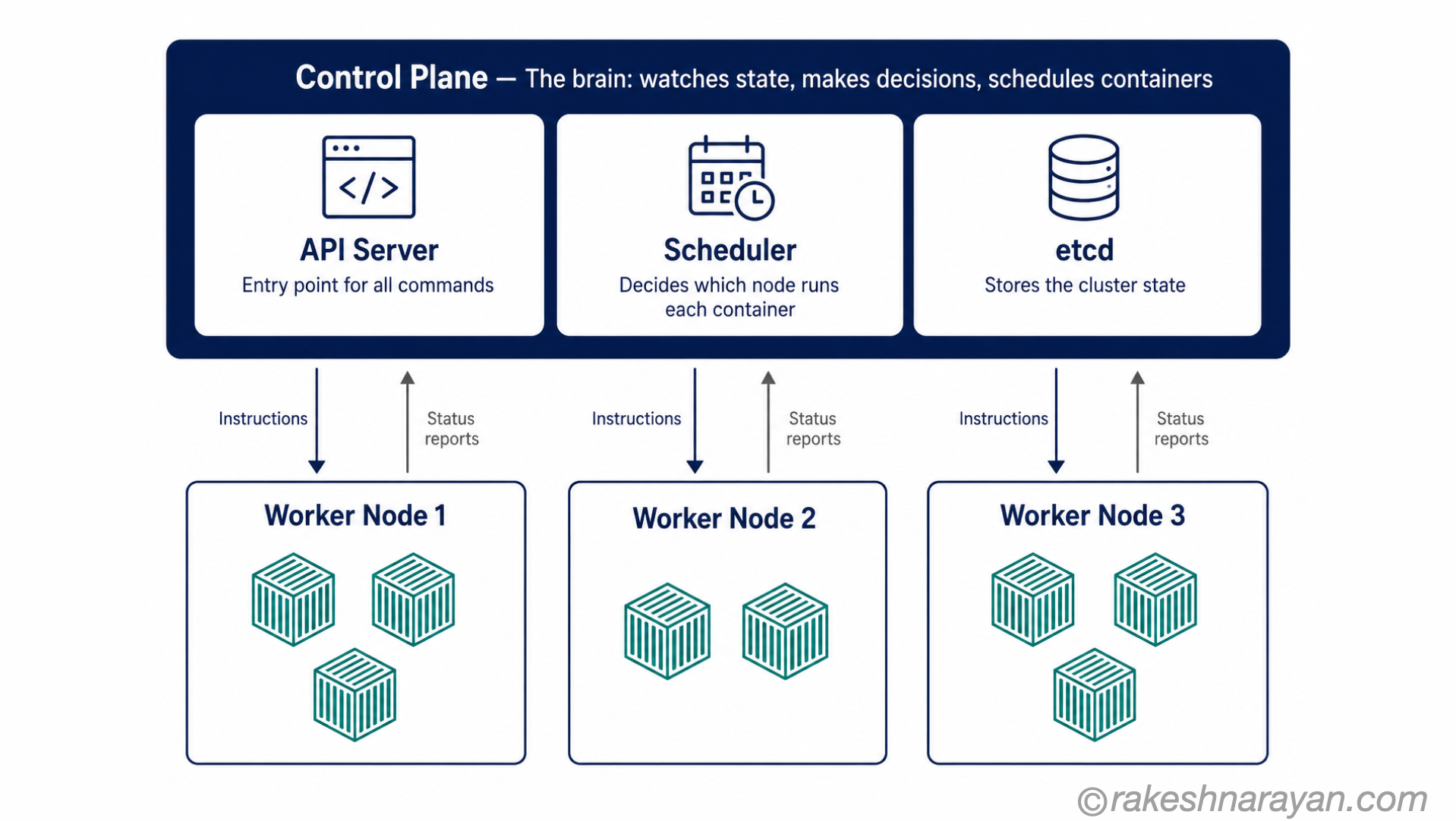
A Kubernetes cluster is the group of machines that Kubernetes manages. Every Kubernetes deployment is a cluster. Inside every cluster, there are two distinct roles — and understanding the difference between them is the foundation of the mental model.
| Role | What it is | The one-line job |
|---|---|---|
| Control Plane | The brain of the cluster — the set of components that make all decisions | Watches the cluster state, compares it to what you declared, and issues instructions to make them match |
| Worker Nodes | The machines that actually run your containers — could be physical servers or cloud VMs | Execute the instructions from the Control Plane — run containers, report status back |
You interact almost entirely with the Control Plane — through the Kubernetes API, using a command-line tool called kubectl. You declare what you want. The Control Plane works out where and how. The Worker Nodes do the actual running.
📝 You never tell a Worker Node what to do directly
All instructions go to the Control Plane via the API. The Control Plane schedules containers onto Worker Nodes based on available resources. This is deliberate — it is what allows Kubernetes to handle node failures automatically. If a node goes down, the Control Plane just schedules those containers elsewhere.
The objects — how you tell Kubernetes what you want
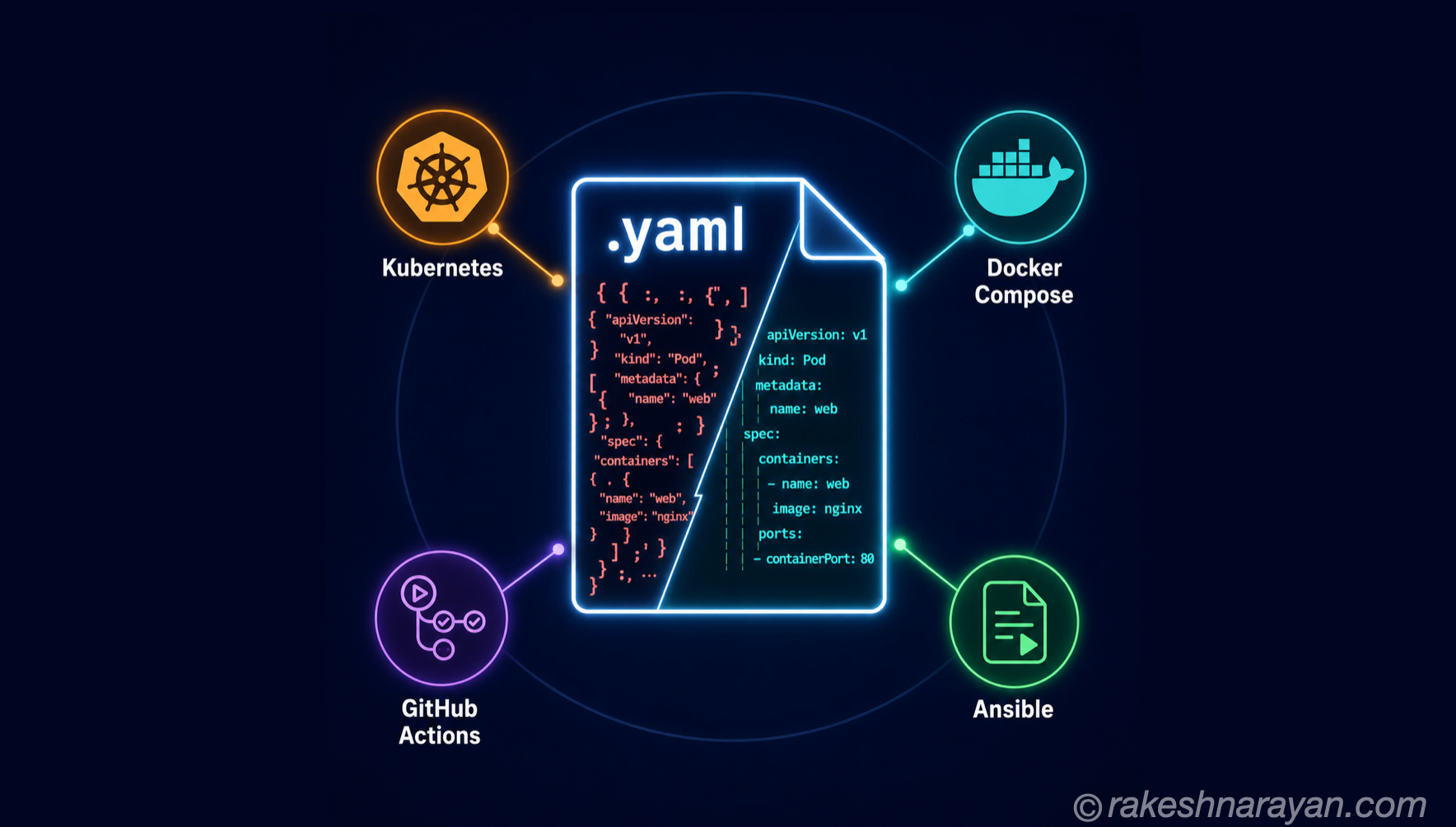
You communicate with Kubernetes by creating objects — YAML files that describe what you want to exist. Three objects cover the vast majority of what you need to understand.
| Object | What it is | Why it exists |
|---|---|---|
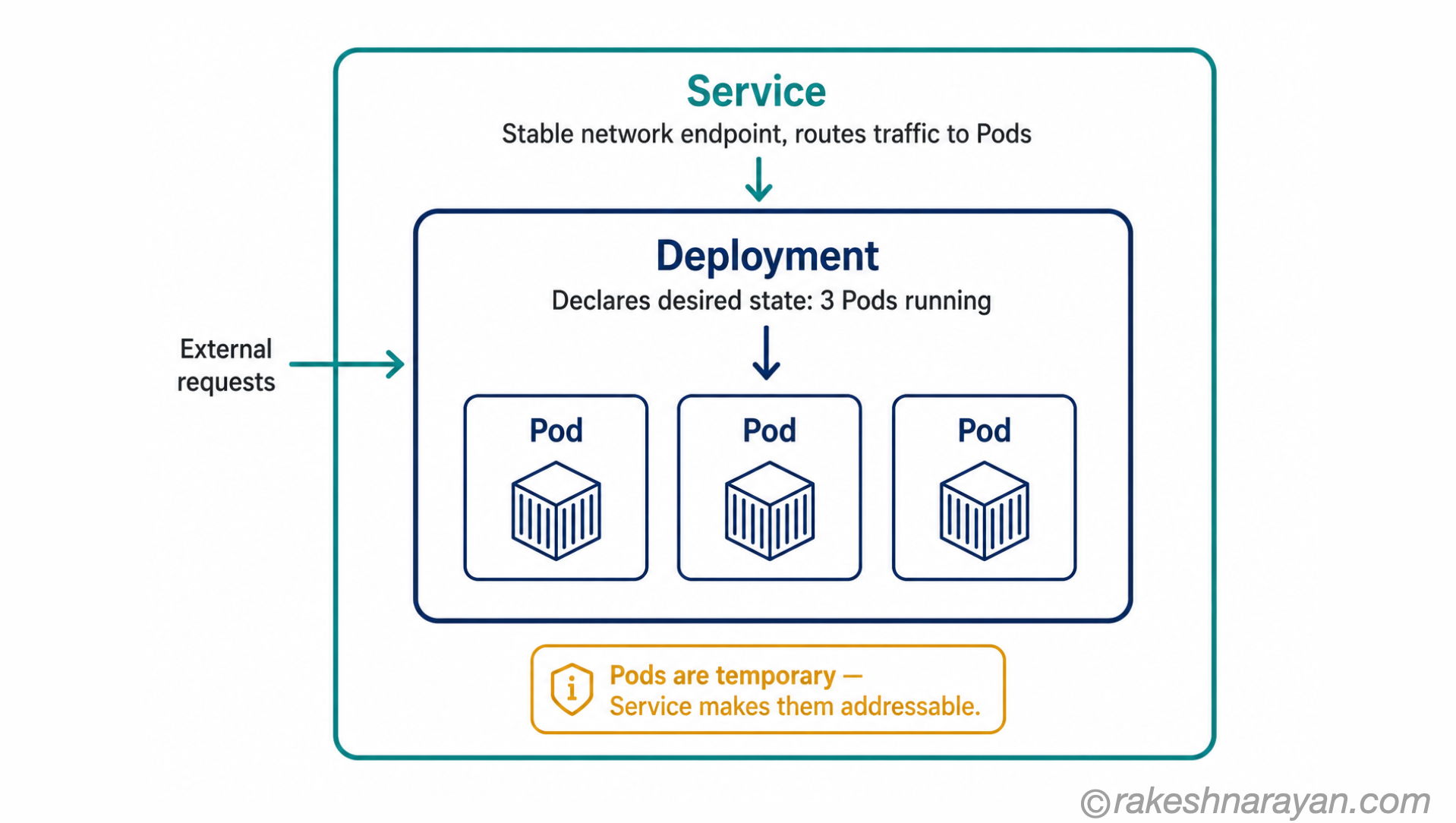
| Pod | The smallest deployable unit in Kubernetes — one or more containers that run together on the same node | Containers in the same Pod share networking and storage — used for tightly coupled processes that must co-locate |
| Deployment | A declaration of desired state for a set of Pods — how many copies, which container image, how to update | Tells Kubernetes: keep 3 copies of this Pod running at all times. Kubernetes handles the rest. |
| Service | A stable network endpoint that routes traffic to a set of Pods | Pods are temporary — they get new IP addresses when restarted. A Service gives you a permanent address that always finds the right Pods. |
In practice these three work together. A Deployment manages your Pods. A Service sits in front of your Deployment and gives it a stable address. External traffic hits the Service. The Service routes to whichever Pods the Deployment is running.
⚠️ Pods are not permanent
A common mistake when learning Kubernetes is treating Pods like long-running servers. They are not. Kubernetes creates and destroys Pods constantly — during scaling, deployments and node failures. Never rely on a Pod’s IP address or hostname. Always access Pods through a Service.
The four things Kubernetes does automatically
This is where the declarative model pays off. Because Kubernetes is constantly comparing actual state against declared state, four things happen without you doing anything.
| Capability | What it means in practice |
|---|---|
| Self-healing | A container crashes — Kubernetes detects it, restarts it, and routes traffic away from it until it is healthy. A Worker Node goes offline — Kubernetes reschedules its containers onto other nodes. No manual intervention. |
| Horizontal scaling | You define rules: if CPU usage exceeds 70%, add more Pods. Kubernetes adds them automatically. When load drops, it removes them. You declare the policy — Kubernetes acts on it. |
| Rolling updates | You push a new container image. Kubernetes replaces old Pods with new ones gradually — a few at a time — keeping the application live throughout. If something goes wrong, it stops and rolls back. |
| Load balancing | A Service automatically distributes incoming traffic across all healthy Pods in a Deployment. Add more Pods and they are included immediately. Remove them and traffic stops going there. |
✅ Best practice — let Kubernetes do the work
The most common Kubernetes mistake is trying to manage individual Pods manually — deciding which node they run on, restarting them yourself. Kubernetes is designed to manage that. Your job is to declare what you want. Trust the system to figure out how.
Where Kubernetes runs in practice
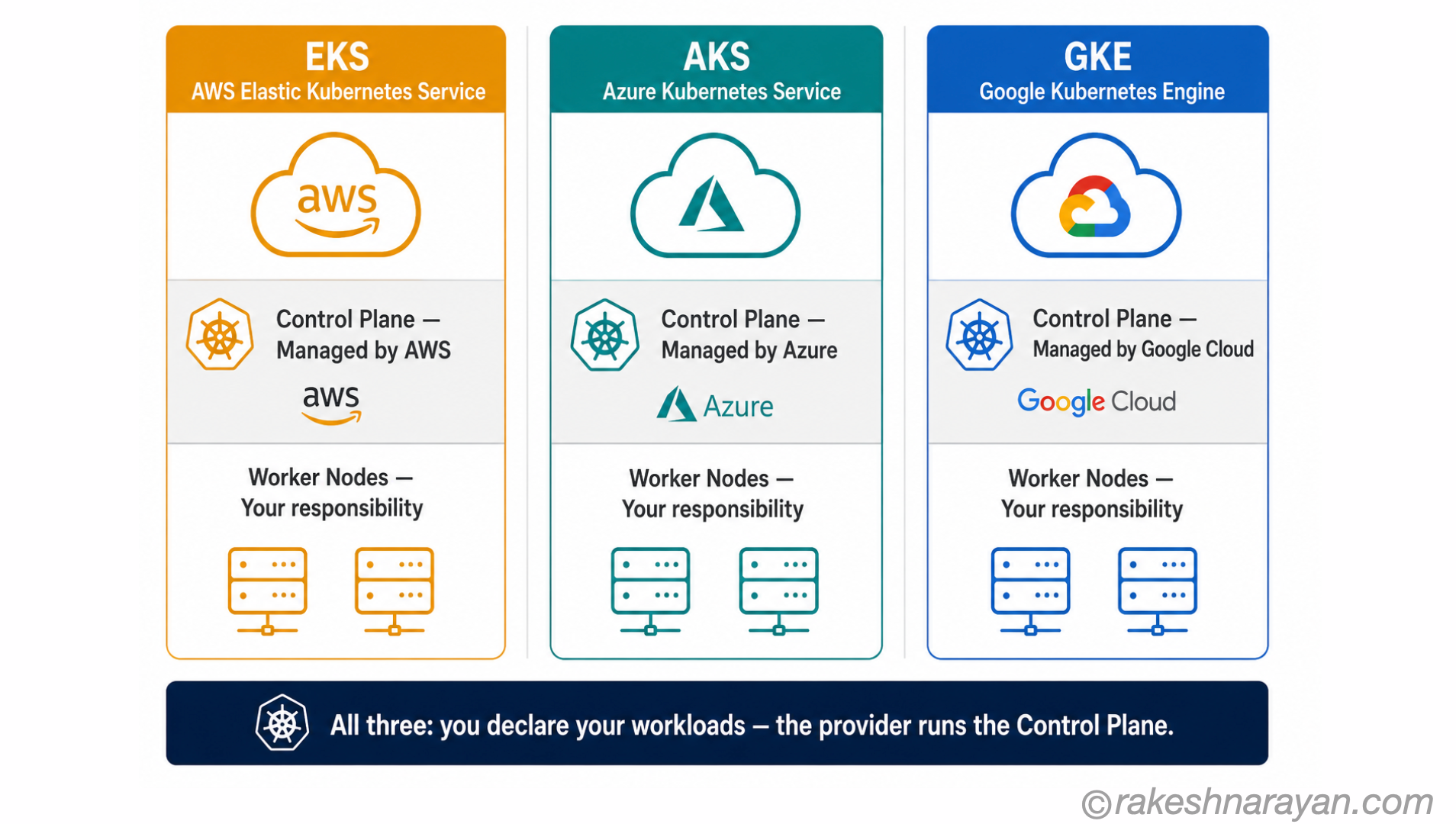
Running Kubernetes yourself — setting up and maintaining the Control Plane, managing upgrades, handling node failures — is a significant operational job. Most organisations do not do it. They use a managed Kubernetes service from a cloud provider.
| Service | Provider | What managed means |
|---|---|---|
| EKS — Elastic Kubernetes Service | AWS | AWS runs and maintains the Control Plane. You manage Worker Nodes and your workloads. |
| AKS — Azure Kubernetes Service | Microsoft Azure | Azure runs the Control Plane at no charge. You pay for Worker Node compute only. |
| GKE — Google Kubernetes Engine | Google Cloud | Google’s managed offering — widely considered the most mature, given Kubernetes originated at Google as an open-source version of their internal Borg system. |
With a managed service, the Control Plane is handled for you — upgrades, availability, scaling of the control plane itself. You focus on deploying your workloads, not on running Kubernetes infrastructure.
For SAP consultants and architects: SAP BTP runs on Kubernetes under the hood. When SAP talks about cloud-native services on BTP, container-based runtimes and the Kyma environment — all of that is Kubernetes. You do not need to manage it directly, but understanding what is underneath makes the platform decisions easier to reason about.
🔗 Related reading
SAP BTP — The Platform Explained covers the BTP platform including its Kyma Kubernetes environment. The Cloud Service Model — IaaS, PaaS and SaaS Explained explains where managed Kubernetes fits in the broader cloud landscape.
At a glance — the Kubernetes mental model
| Concept | One-line summary |
|---|---|
| Kubernetes | An orchestration system that manages containers across multiple servers — keeping them running, scaled and communicating |
| Container orchestration | Automating the deployment, scaling, networking and recovery of containers at scale |
| Declarative model | You describe what you want. Kubernetes figures out how to achieve and maintain it. |
| Cluster | The group of machines Kubernetes manages — every Kubernetes deployment is a cluster |
| Control Plane | The brain of the cluster — watches state, makes decisions, schedules containers |
| Worker Node | A machine in the cluster that runs containers as instructed by the Control Plane |
| Pod | The smallest unit in Kubernetes — one or more containers that run together on the same node |
| Deployment | A declaration of desired state — how many Pod replicas to run and how to update them |
| Service | A stable network endpoint that routes traffic to a set of Pods regardless of which node they are on |
| Self-healing | Kubernetes automatically restarts crashed containers and reschedules Pods from failed nodes |
| Managed Kubernetes | A cloud service (EKS, AKS, GKE) where the provider runs the Control Plane for you |
What to take away
Kubernetes is not a tool you operate the way you operate a server. You do not log in and make decisions. You write down what you want and hand it to a system that is permanently working to make reality match your description. That is the shift — from operational to declarative.
Once that shift is clear, the rest of Kubernetes follows logically. Of course a Pod is temporary — the system manages Pod lifecycle, not you. Of course a Service has a stable address while Pods come and go — because your declaration is about what you want running, not which specific instance serves the traffic. Of course self-healing is automatic — Kubernetes is checking declared state against actual state continuously.
The complexity of Kubernetes is real — production clusters have layers that this post does not touch. But almost all of that complexity sits on top of the same model: declare intent, let the system close the gap. Understand the model and you have the foundation for everything else.
🔗 Related posts on this site
Docker and Containers — The Why — Containers are what Kubernetes manages. Start here if you have not already.
The Cloud Service Model — IaaS, PaaS and SaaS Explained — Managed Kubernetes sits in the PaaS layer. That post puts it in context.
SAP BTP — The Platform Explained — BTP’s Kyma environment runs on Kubernetes. Understanding K8s makes BTP’s architecture easier to reason about.
Event-Driven Architecture — Kubernetes clusters are a common runtime for event-driven microservices architectures.
Microservices Architecture — What It Is and When It Makes Sense — Kubernetes is the orchestration layer for exactly the kind of many-small-services architecture this post covers.
Published on rakeshnarayan.com — Articles
url: https://rakeshnarayan.com/articles/how-kubernetes-works-the-mental-model/
Did you enjoy this article?
Let me know — it takes one click.
0 Comments
Leave a Comment
Looks like this one held your attention — I'd really appreciate a quick comment below.
Your comment has been submitted and will appear after review.