Kafka vs RabbitMQ — The Decision That Matters
Pick the wrong tool here and it haunts you for years. Use Kafka when RabbitMQ would have done, and you have just bought yourself a multi-node cluster, partition management and consumer group coordination — all to replace what would have been a single broker. Use RabbitMQ when Kafka was the right call, and you will be migrating when throughput overwhelms you, six months into production.
The problem is that the two tools look similar on the surface. Both sit between services. Both decouple producers from consumers. Both handle asynchronous messaging. But they are built on fundamentally different mental models — and that difference drives every other decision downstream.
This post gives you the model. Once it clicks, the decision is straightforward.
🔗 Foundation post
This post assumes you understand why asynchronous messaging exists. If you want the foundation first — decoupling, event-driven patterns, choreography vs orchestration — read Event-Driven Architecture before this one.
The core difference — a log versus a queue
Everything else flows from this one distinction. Get this wrong and no amount of configuration will save you.
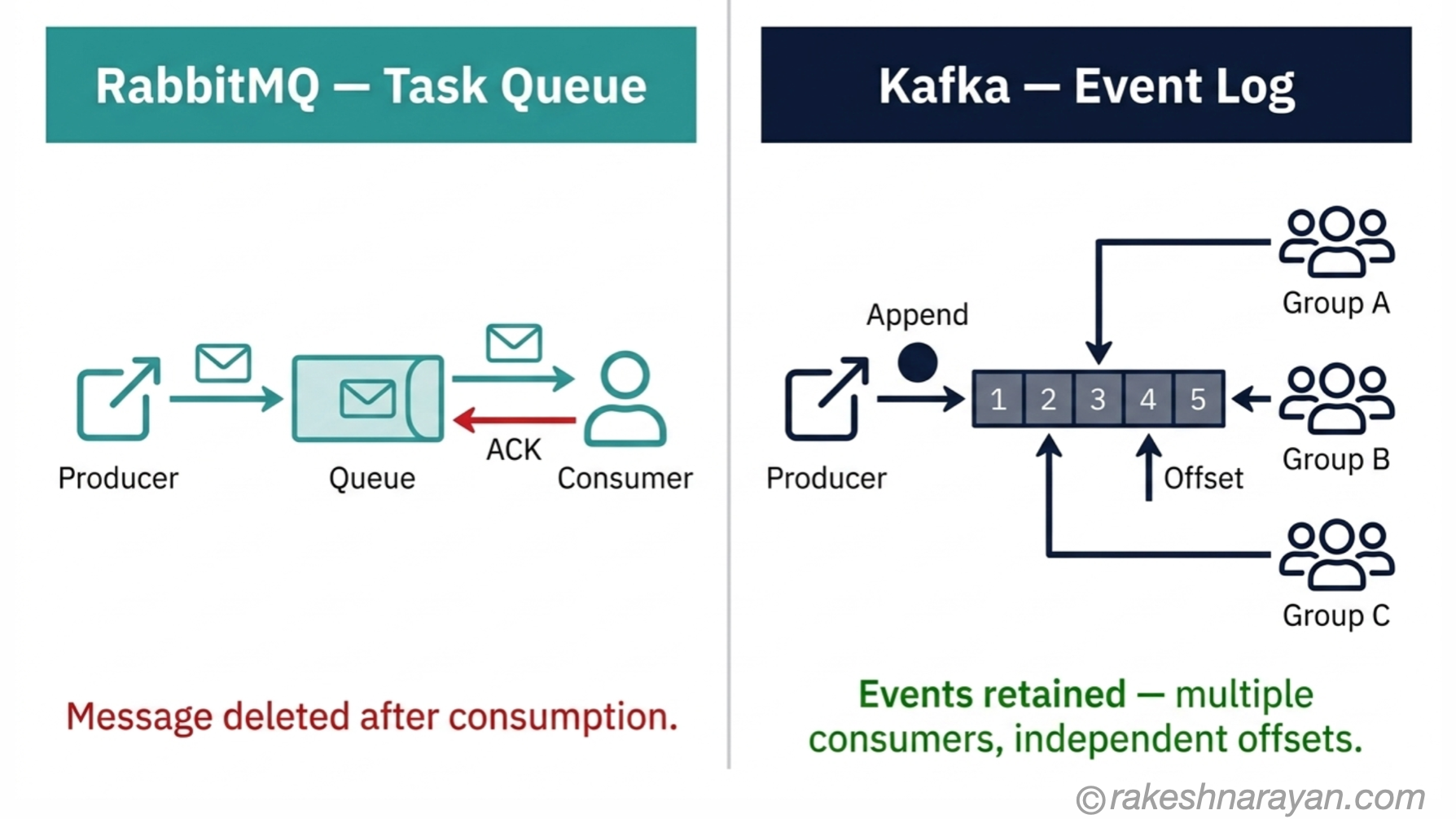
RabbitMQ is a message broker. A producer sends a message. The broker routes it to one or more queues. A consumer picks it up, acknowledges it, and the broker deletes it. The message is gone. This is the classic queue model — designed for task distribution.
Kafka is a distributed log. A producer appends an event to a topic. The event is retained on disk for a configurable period — hours, days, or indefinitely. Consumers read from the log using an offset — a position marker they control. Multiple independent consumer groups can each read the same event, at their own pace, without affecting each other. The event is not deleted when consumed.
That single difference — retain vs delete — is what makes them suitable for different problems.
📌 The one-line version
RabbitMQ: a message is a task to be done. Once done, it is gone.
Kafka: an event is a fact that happened. It stays in the log regardless of who has read it.
How Kafka works
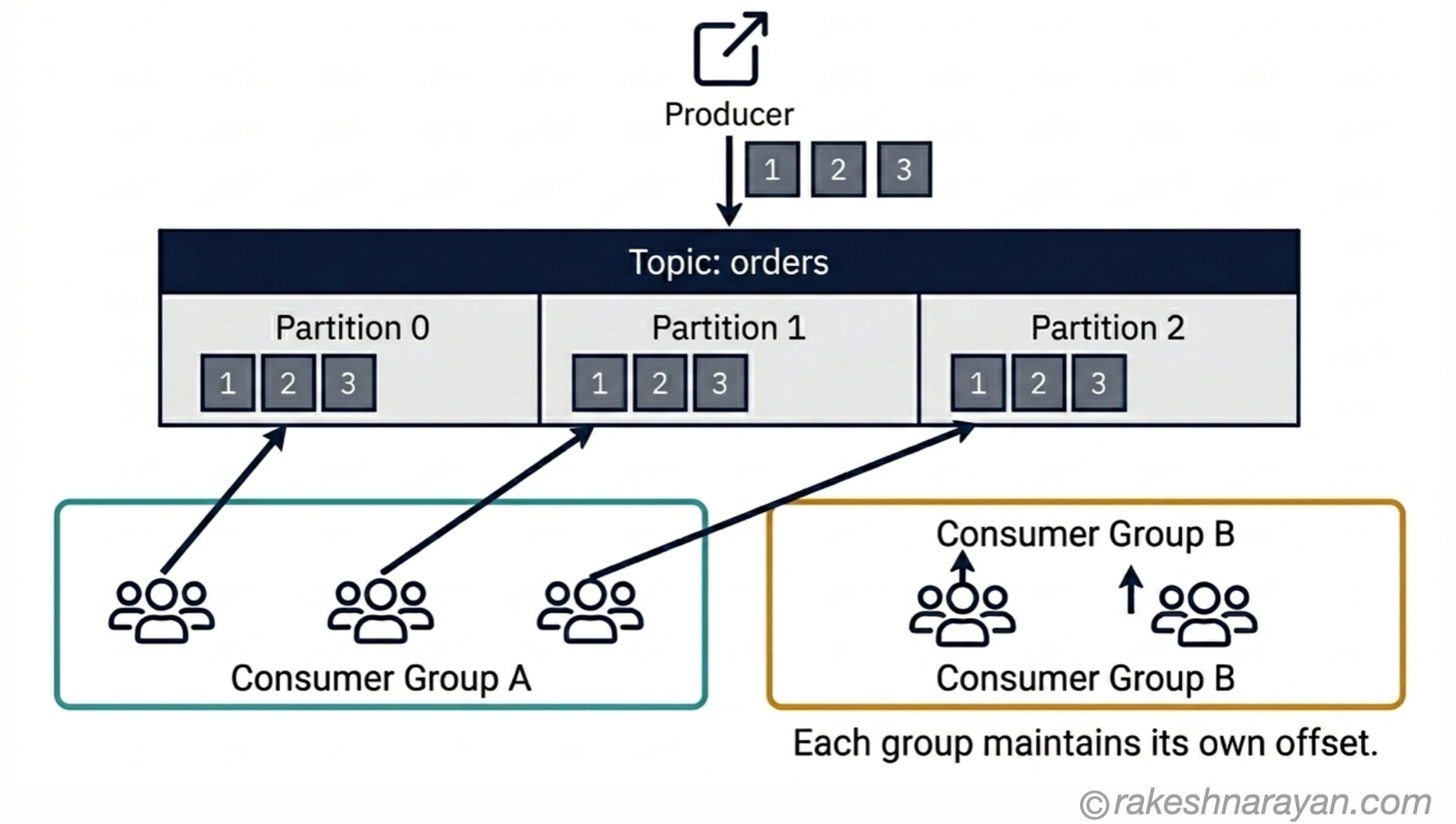
A Kafka topic is divided into partitions — ordered, append-only sequences of events. Each partition lives on a broker node and is replicated across other nodes for fault tolerance. Producers write to a topic (usually to a specific partition determined by a key). Consumers read from partitions using offsets they manage themselves.
Consumer groups are how Kafka scales consumption. Each consumer in a group handles a subset of partitions. Add more consumers, and Kafka redistributes the partitions across them — up to the number of partitions in the topic. Multiple independent consumer groups can each read the full topic, completely independently of each other.
As of Kafka 4.0 (released March 2025), ZooKeeper has been fully removed. KRaft — Kafka’s own Raft-based metadata system — is now the only supported mode. If you are running Kafka on ZooKeeper today, migration is mandatory before upgrading to 4.0 or later.
💡 Practical tip — partition count matters early
The number of partitions sets the ceiling for parallelism. You can add consumers, but if you have fewer partitions than consumers, the extra consumers sit idle. Get partition counts roughly right upfront — increasing them later is possible but operationally awkward.
How RabbitMQ works
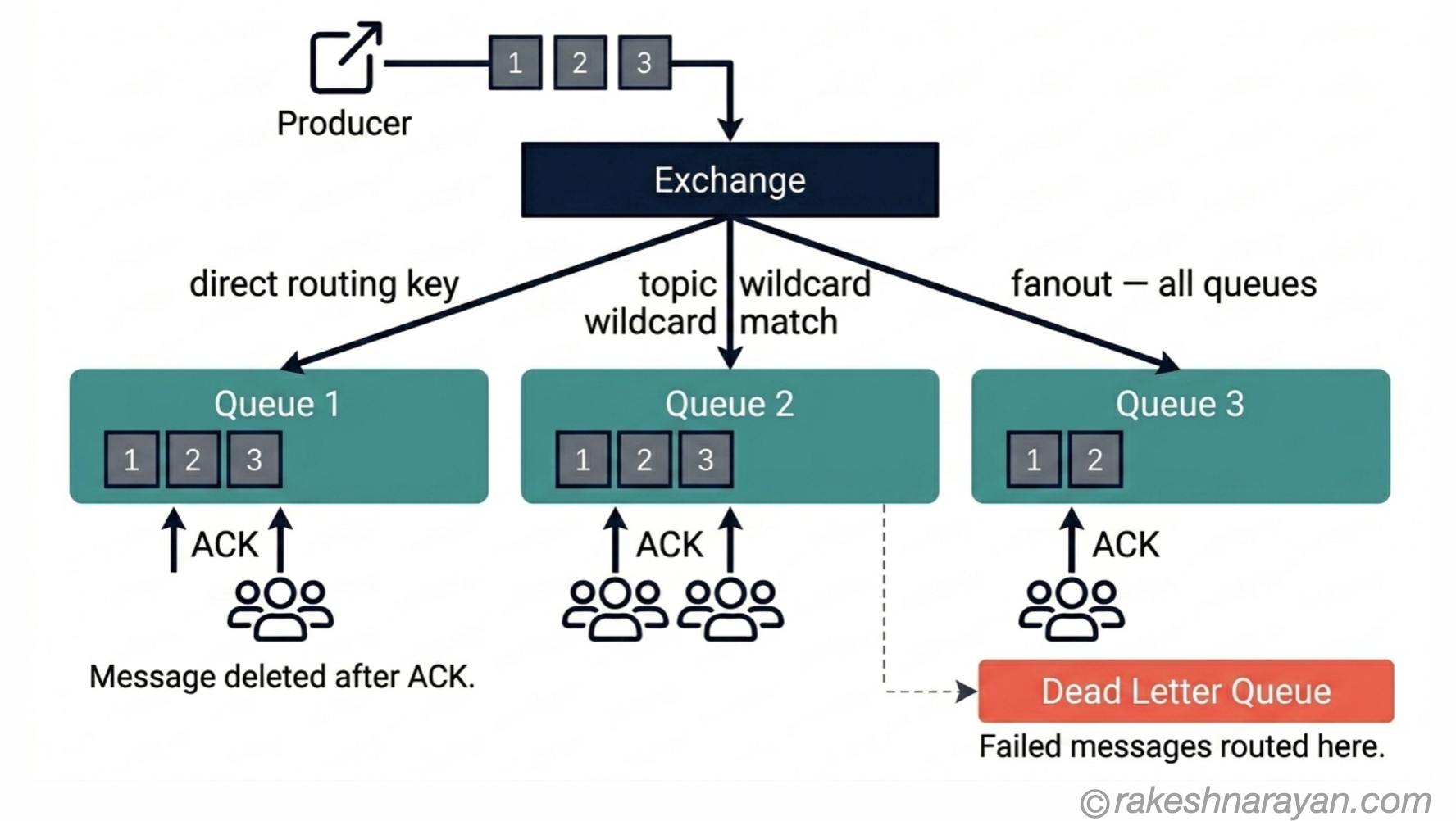
RabbitMQ’s model is built around exchanges and queues. A producer publishes a message to an exchange, not directly to a queue. The exchange applies routing rules and forwards the message to one or more queues. Consumers subscribe to queues and process messages.
RabbitMQ supports four exchange types: direct (exact routing key match), topic (wildcard matching), fanout (broadcast to all bound queues), and headers (match on message headers). This routing flexibility is something Kafka does not have — Kafka pushes all routing logic to producers and consumers.
The other key difference is the delivery model. RabbitMQ pushes messages to consumers. A consumer receives a message and must acknowledge it (ACK).
If a consumer fails before acknowledging, RabbitMQ requeues the message automatically. This per-message acknowledgement with requeue on failure is built into the broker — not something you implement in application code.
RabbitMQ 4.3 (the current release as of April 2026) continues to mature the Streams capability and introduced SQL filter expressions for stream queues in the 4.2 line.
💡 Practical tip — RabbitMQ’s dead letter queues
Configure a dead letter exchange (DLX) for every queue that handles critical work. When a message fails processing after your configured retry limit, RabbitMQ routes it to the DLX automatically. Without this, failed messages either requeue forever or disappear silently — both of which are worse than a dead letter queue.
The decision — which one for what
Most comparisons give you a feature table and leave the actual decision to you. This one does not. Here is the opinionated guide.
| Scenario | Use this | Why |
|---|---|---|
| Task distribution — work that must happen once and only once (order processing, email sending, payment jobs) | RabbitMQ | Built for per-message guarantees, ACK/NACK, dead letter queues, and requeue on failure. Kafka has no native equivalent. |
| Event streaming — multiple services need the same event (stock level changed, order placed, payment posted) | Kafka | Multiple consumer groups read the same event independently. RabbitMQ requires separate queues per consumer — operationally expensive at scale. |
| Audit log / event sourcing — you need to replay what happened | Kafka | Events are retained and replayable. RabbitMQ deletes messages on consumption — replay is not possible with standard queues. |
| High-throughput data pipelines — millions of events per second | Kafka | Designed for sequential I/O and batching. Handles millions of messages per second. RabbitMQ’s ceiling is lower — typically tens of thousands per second. |
| Request / reply patterns and RPC | RabbitMQ | Supports correlation IDs and reply queues natively. Kafka has no built-in RPC pattern. |
| IoT or sensor data ingestion at scale | Kafka | Log-based retention and high throughput are exactly right for continuous sensor streams. |
| Low-latency job queues with complex routing | RabbitMQ | Push model and exchange routing give sub-millisecond delivery with flexible routing logic baked in. |
| Change data capture (CDC) pipelines | Kafka | Kafka Connect has mature CDC connectors. Retention means downstream consumers can catch up after failures. |
Two situations where people consistently pick the wrong tool:
⚠️ Don’t use Kafka for simple task queues
If you need one message processed by one consumer exactly once — an order confirmation email, a PDF generation job, a payment — Kafka requires significant application-level logic to approximate what RabbitMQ gives you by default. ACK semantics, dead letter handling, per-message TTL — none of these exist natively in Kafka. Use RabbitMQ.
⚠️ Don’t use RabbitMQ when you need replay
RabbitMQ standard queues delete messages on consumption. If any downstream service needs to re-process events — for a new feature catchup, a failed consumer restart, or an audit requirement — RabbitMQ cannot do it. This is the most common migration trigger from RabbitMQ to Kafka.
Where they overlap — and what that means
The lines have blurred somewhat since 2022. RabbitMQ Streams — now a first-class feature, not just a plugin — adds an append-only log with consumer offsets and replay capability. It narrows the gap with Kafka for specific use cases.
In the other direction, Kafka 4.0 introduced early access to Queues for Kafka (KIP-932), which adds native queue semantics — point-to-point messaging, per-message acknowledgement — directly to Kafka. It is early access as of 2026, not yet production-ready for most use cases.
The honest take: acknowledge the overlap, but do not let it muddy the decision. RabbitMQ Streams lacks Kafka’s ecosystem maturity — connectors, stream processing, schema registry, wide cloud provider support. Kafka queues are early access. For 95% of decisions today, the original model still applies. Pick the tool whose native model fits your problem.
📝 Note on managed services
Both tools are available fully managed. Confluent Cloud and Amazon MSK are the leading managed Kafka options. Amazon MQ supports both RabbitMQ and ActiveMQ managed. For SAP BTP workloads, SAP Event Mesh (Advanced Event Mesh / AEM, powered by Solace) is the managed messaging layer — with native Kafka bridge support for hybrid scenarios.
The enterprise context — Kafka, RabbitMQ and SAP
For SAP-centric architectures, neither tool is the first choice for native SAP integration. That role belongs to SAP Event Mesh (also called Advanced Event Mesh or AEM on BTP), which implements the CloudEvents specification and integrates natively with S/4HANA business events.
Where Kafka becomes relevant in SAP landscapes: high-throughput data pipelines connecting SAP to external platforms — data lakes, analytics systems, third-party SaaS. AEM supports native Kafka bridge connectors for exactly this hybrid scenario. If you need event sourcing or replay capability that Event Mesh cannot provide (it does not support message replay), Kafka on SAP Kyma is the recommended path.
RabbitMQ appears in SAP landscapes mainly as part of custom microservices deployed on BTP Kyma or Cloud Foundry — typically for internal task distribution within a BTP application, not for SAP-to-SAP integration.
🔗 Related reading
SAP Integration Patterns — The Decisions That Matter — covers synchronous vs asynchronous integration patterns and where event-driven fits in SAP landscapes
SAP BTP — The Platform Explained — BTP is where SAP Event Mesh, Kyma and managed Kafka integrations run
At a glance — Kafka vs RabbitMQ
| Concept | One-line summary |
|---|---|
| Message broker (RabbitMQ) | Routes messages from producer to consumer — message deleted after acknowledgement |
| Event log (Kafka) | Appends events to a retained, ordered log — consumers read at their own offset |
| Consumer group (Kafka) | A set of consumers sharing a topic — each group gets all events, each member handles a partition |
| Exchange (RabbitMQ) | Routes messages to queues using direct, topic, fanout, or headers rules |
| ACK / NACK (RabbitMQ) | Consumer acknowledges success or signals failure — broker requeues on NACK |
| Dead letter queue (RabbitMQ) | Destination for messages that fail processing — configure for every critical queue |
| Offset (Kafka) | A consumer’s position in a partition log — managed per consumer group |
| Partition (Kafka) | The unit of parallelism in Kafka — more partitions = more parallel consumers |
| RabbitMQ Streams | Append-only log capability in RabbitMQ — narrows the gap with Kafka for replay use cases |
| Kafka Queues (KIP-932) | Early-access native queue semantics in Kafka 4.0 — not yet production-ready for most use cases |
| SAP Event Mesh / AEM | SAP’s managed messaging layer on BTP — supports Kafka bridge for hybrid enterprise scenarios |
What to take away
The reason Kafka and RabbitMQ seem interchangeable is that most comparisons focus on features. The right framing is mental models. RabbitMQ thinks in tasks — discrete units of work to be done and forgotten. Kafka thinks in events — facts about the world that are worth keeping a record of.
When the problem is “process this job once and confirm it”, RabbitMQ wins. When the problem is “give every interested system access to this stream of things that happened”, Kafka wins. The confusion usually comes from picking before you have clearly defined which problem you actually have.
Most systems that are large enough end up with both. Kafka for the event backbone — the high-throughput stream of what happened across the system. RabbitMQ for the internal work queues — the specific jobs that need to be done once, reliably, with dead letter handling and retries. They are not competing. They are complementary. The mistake is using one to do the job of the other.
✅ Best practice — start with the question, not the tool
Before reaching for either tool, answer two questions: Does any consumer need to replay these messages? Does more than one independent service need to consume the same message?
If yes to either — lean Kafka. If no to both — lean RabbitMQ. Most decision errors happen when these questions were never asked.
🔗 Related posts on this site
Event-Driven Architecture — The Concept Behind Modern Integration — the architectural pattern that Kafka and RabbitMQ both enable — essential context for understanding when to use either
Docker and Containers — The Why — both Kafka and RabbitMQ are almost always deployed in containers — this post covers the why behind containerisation
REST API Design Principles — the synchronous counterpart to this post — when REST is the right choice instead of async messaging
SAP Integration Patterns — The Decisions That Matter — where async messaging patterns fit in SAP integration architecture
Webhooks — Event-Driven Push vs REST API Pull — a lighter-weight push pattern than a full message broker, worth knowing before reaching for Kafka or RabbitMQ
Published on rakeshnarayan.com — Articles
URL: https://rakeshnarayan.com/articles/kafka-vs-rabbitmq-the-decision-that-matters/
Did you enjoy this article?
Let me know — it takes one click.
0 Comments
Leave a Comment
Looks like this one held your attention — I'd really appreciate a quick comment below.
Your comment has been submitted and will appear after review.