SAP BTP — The Platform Explained
Ask ten SAP people what BTP is and you will get ten different answers. Some say it is an integration platform. Some say it is a development platform. Some say it is where AI happens. They are all right — and that is exactly what makes BTP hard to explain.
BTP is not one product. It is a platform — a collection of services grouped into four main areas — that sits at the centre of SAP’s cloud strategy. Everything SAP is building for the future connects through it.
This post explains what BTP actually is, what lives inside it, and how it fits into a real SAP landscape.
🔗 Useful context before reading
This post makes more sense if you have read What is SAP? and The Cloud Service Model — IaaS, PaaS and SaaS . BTP is a PaaS — knowing what PaaS means makes the platform’s role immediately clearer.
What BTP is — the one-paragraph version
SAP Business Technology Platform (BTP) is SAP’s cloud platform — a PaaS — that provides the tools, services and runtime for integrating SAP systems, extending SAP applications, building new cloud-native applications, and running data and AI workloads. It runs on hyperscaler infrastructure (AWS, Azure, Google Cloud) across multiple regions worldwide.
The simplest way to think about it: BTP is the layer that sits between your SAP business applications (S/4HANA, SuccessFactors, Ariba) and everything else — other SAP systems, third-party applications, cloud services and your own custom applications.
The four pillars of BTP
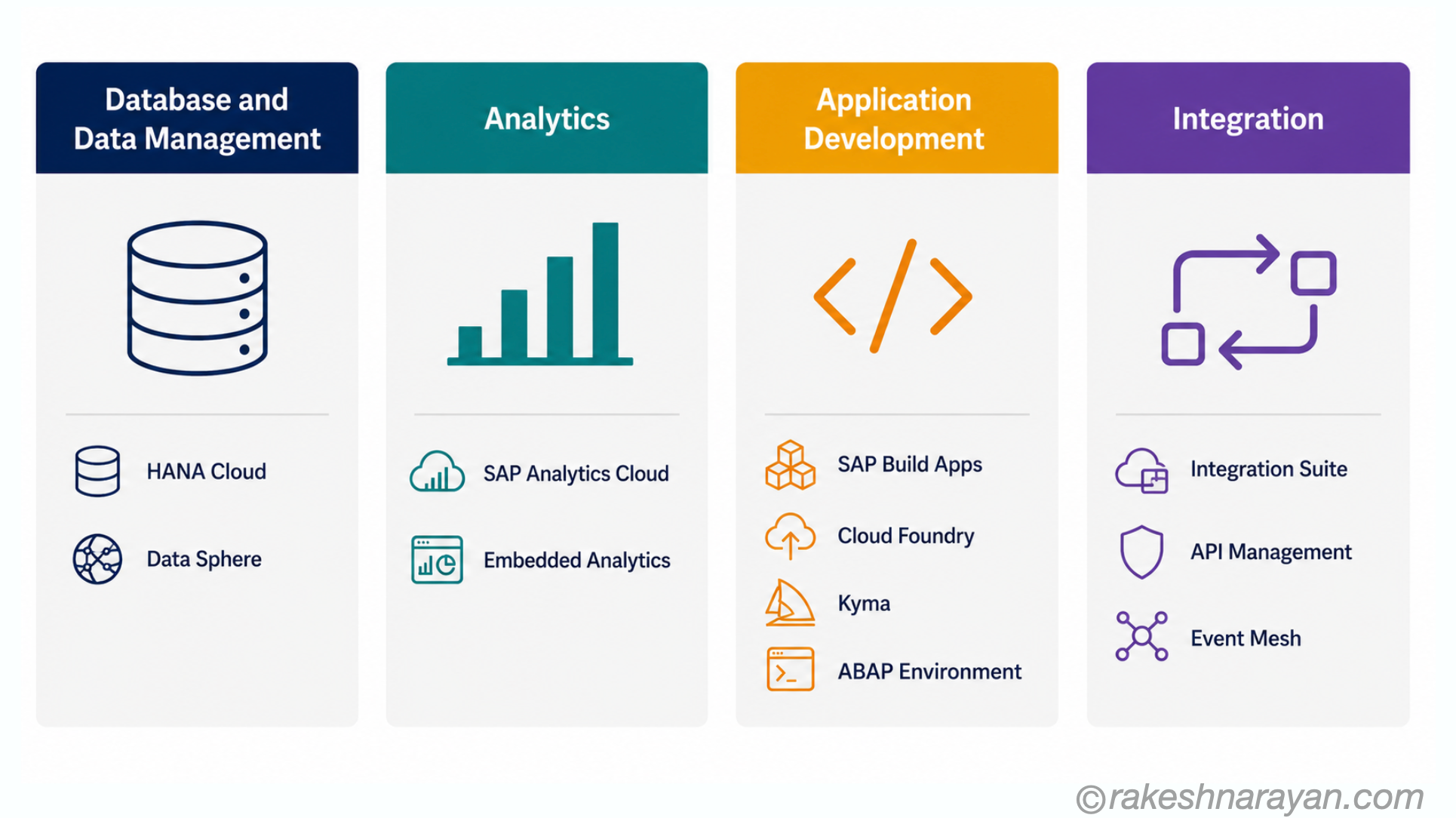
SAP organises BTP around four main capability areas. Every service on BTP belongs to one of these:
| Database & Data Management Store and manage data | Analytics Visualise and report | Application Development Build and extend | Integration Connect systems |
|---|---|---|---|
| SAP HANA Cloud | SAP Analytics Cloud | SAP Build Apps | SAP Integration Suite |
| SAP Data Sphere | Embedded Analytics | SAP Build Work Zone | API Management |
| SAP Datasphere | SAP Business Data Cloud | Cloud Foundry | Event Mesh |
| SAP Intelligent Data Apps | Planning & Forecasting | Kyma Runtime | Open Connectors |
| ABAP Environment | Data Intelligence |
The key services — what they actually do
SAP Integration Suite
The most widely used BTP service. Integration Suite is the hub for connecting systems — SAP to SAP, SAP to non-SAP, cloud to on-premise.
| Component | What it does |
|---|---|
| Cloud Integration (CPI) | Build and run integration flows — data transformation, routing, protocol conversion |
| API Management | Publish, protect and monitor APIs — rate limiting, OAuth, developer portal |
| Event Mesh | Asynchronous messaging between systems using events — decoupled integration |
| Open Connectors | Pre-built connectors to 170+ third-party services (Salesforce, ServiceNow, etc.) |
| Integration Advisor | AI-assisted B2B message mapping — EDI, IDOC and industry standards |
SAP Build — the low-code suite
SAP Build brings together three tools for building without deep coding:
| Tool | What it does |
|---|---|
| SAP Build Apps | Visual app builder — create Fiori-style business apps with drag and drop |
| SAP Build Process Automation | Automate workflows and robotic process automation (RPA) — form-based, no code |
| SAP Build Work Zone | Digital workplace portal — bring apps, tasks and communication into one place |
SAP HANA Cloud
The managed, cloud-native version of the SAP HANA in-memory database. It is the data backbone for BTP applications. You store application data here, run complex queries, and connect to S/4HANA data via federation — without moving the data.
Kyma Runtime
A Kubernetes-based runtime for containerised applications and microservices. If your development team works with Docker, containers and cloud-native architecture, Kyma is where custom extensions to SAP systems live. It supports serverless functions and event-driven applications.
ABAP Environment (Steampunk)
A managed ABAP runtime in the cloud — nicknamed Steampunk. It lets ABAP developers build cloud extensions using familiar ABAP language and tools, without managing any infrastructure. Extensions built here follow SAP’s clean core principle — they sit on BTP, not inside the S/4HANA system.
SAP AI Core and Joule
SAP AI Core is the BTP service for running AI models — both SAP’s own and custom ones. It powers Joule, SAP’s generative AI assistant, which is embedded across S/4HANA, SuccessFactors, Ariba and other SAP applications. Custom LLM scenarios, AI-assisted integration and intelligent automation all run through AI Core on BTP.
How BTP fits into a real SAP landscape
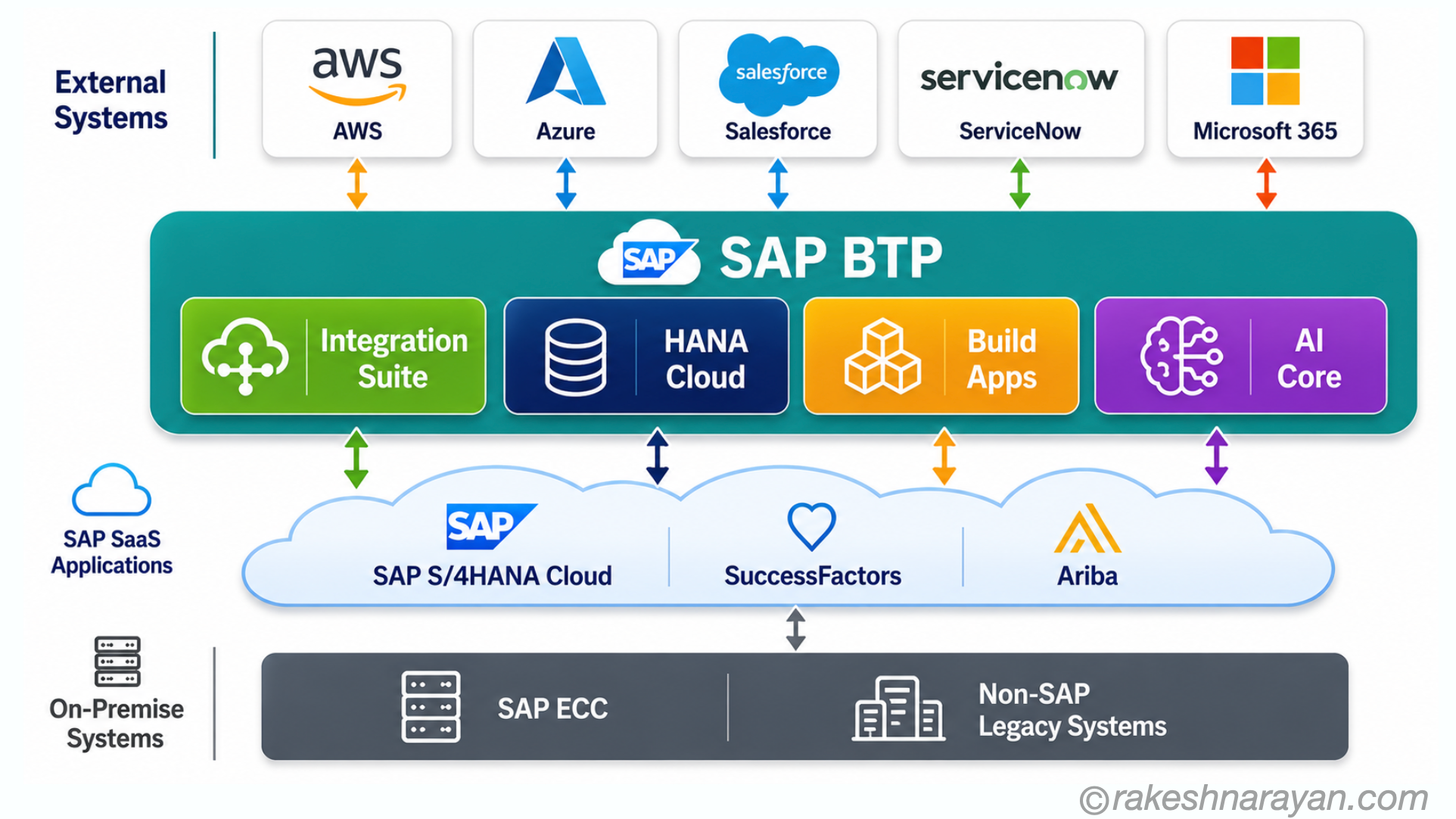
In practice, BTP sits in the middle of every modern SAP landscape:
- S/4HANA sends events to BTP Event Mesh — other systems react without tight coupling
- Integration Suite connects S/4HANA to Salesforce, ServiceNow or a logistics provider
- Custom apps built on Cloud Foundry or Kyma extend S/4HANA without touching the core
- SAP Analytics Cloud pulls data from HANA Cloud and S/4HANA for live reporting
- Joule on BTP surfaces AI assistance inside Fiori apps, drawing on BTP AI Core
BTP environments — where things run
BTP services can run in different environments depending on what you are building:
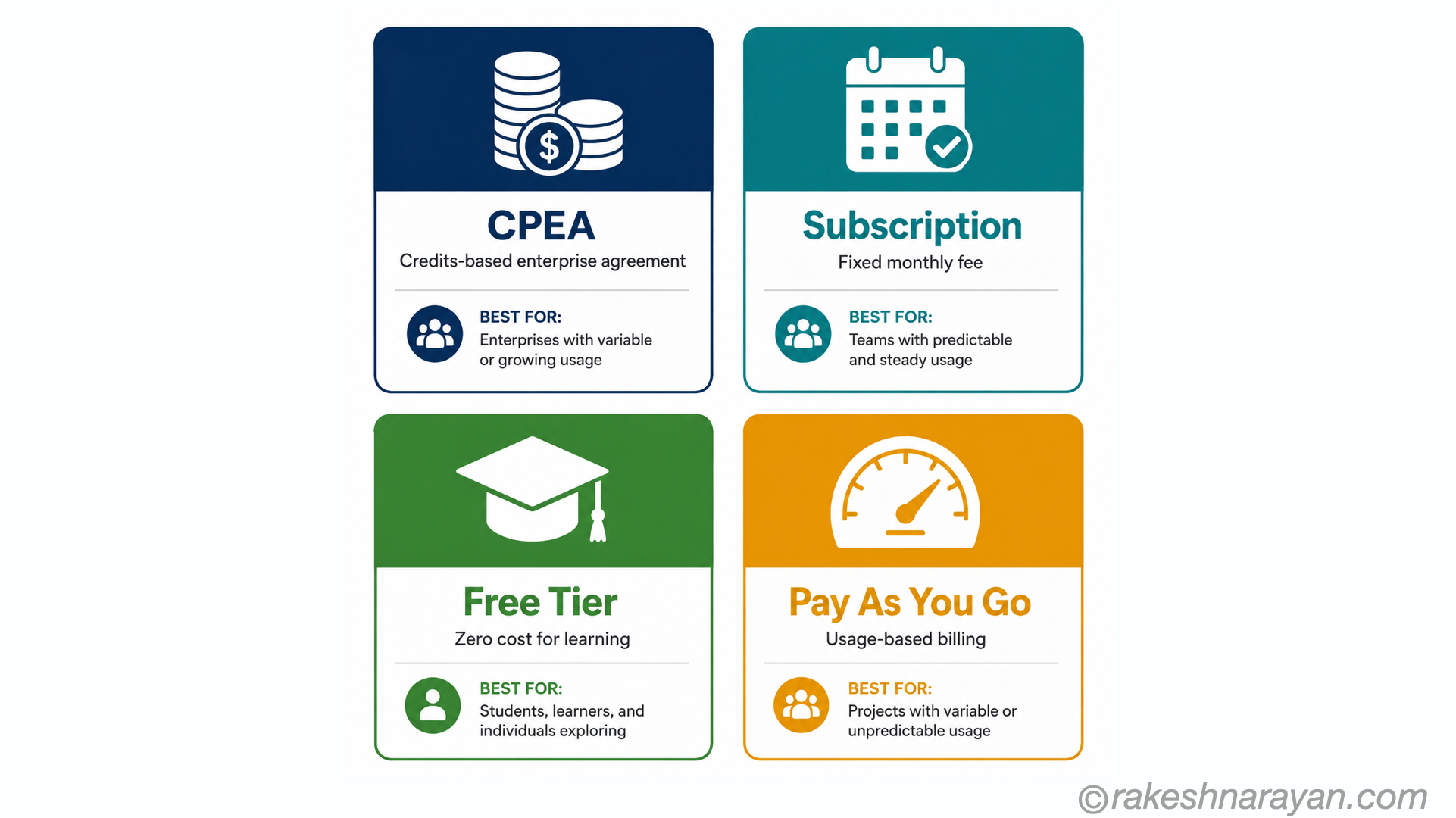
| Environment | Best for | Examples |
|---|---|---|
| Cloud Foundry | Java, Node.js, Python apps — traditional cloud-native development | CPI is Cloud Foundry based, most BTP apps default here |
| Kyma | Containerised workloads, Kubernetes, event-driven microservices | Custom extensions, serverless functions, Docker containers |
| ABAP | ABAP-based cloud extensions — clean core add-ons | RESTful ABAP apps, RAP objects, cloud ABAP APIs |
| Multi-Cloud | Runs on AWS, Azure or Google Cloud depending on region | Choose hyperscaler based on data residency requirements |
A practical guide to when BTP is the right answer: use BTP when you need to connect SAP to a non-SAP system (Integration Suite), build a custom app or extension without touching S/4HANA core (Cloud Foundry or Kyma), expose an S/4HANA API securely to external consumers (API Management), run AI or machine learning workloads (AI Core), or build a digital workplace portal that brings multiple apps together (Build Work Zone). You do not need BTP for standard S/4HANA configuration, simple Fiori app activation on S/4HANA, or basic report and form development — those live in the backend system. BTP is for the layer above and around S/4HANA, not inside it.
BTP commercial model — how it is consumed
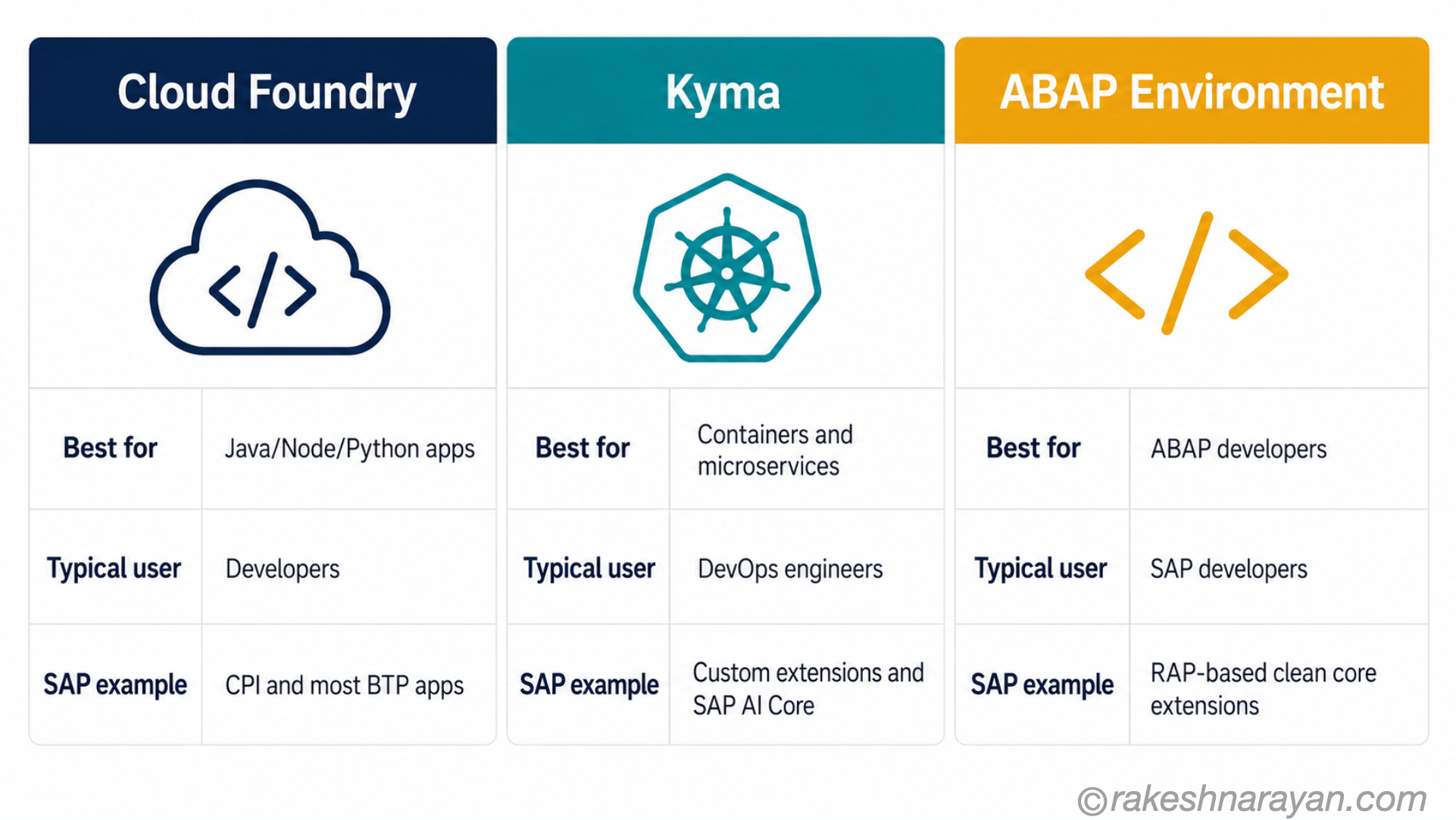
BTP is not a single licence. Services are consumed through a combination of:
- CPEA — Cloud Platform Enterprise Agreement: a credits-based model where you buy a pool of credits and consume services against it. Most enterprise customers use this. CPEA in practice: credits are allocated for the contract period (typically one to three years) and unused credits do not roll over. The most common mistake is underestimating Integration Suite consumption — CPI integration flows are metered by message volume, and a landscape with many high-frequency interfaces can burn through credits faster than projected. The second most common mistake is forgetting about the surrounding services — HANA Cloud instances, API Management calls and AI Core usage all consume credits and need to be sized in the initial estimate. Before signing a CPEA contract, run a pilot with your highest-volume integration flows metered — real usage data is always more reliable than vendor sizing tools.
- Pay-as-you-go: for trial, exploration and smaller workloads — you pay for what you use.
- Free tier: many BTP services have a free tier — useful for learning and prototyping.
- Subscription: some services (e.g. Integration Suite) are available as fixed monthly subscriptions.
💡 Start with a BTP trial
SAP offers a free BTP trial account at hanatrial.ondemand.com with access to most key services including Integration Suite, Build Apps, HANA Cloud and the ABAP environment. The trial is the best way to explore BTP without a project or a licence. SAP’s learning platform (learning.sap.com) has guided tutorials for each service.
BTP at a glance — quick reference
| Concept | One-line summary |
|---|---|
| SAP BTP | SAP’s cloud PaaS — the central platform for integration, development, data and AI |
| Integration Suite | Connect SAP and non-SAP systems via CPI, API Management and Event Mesh |
| SAP Build | Low-code tools for apps, automation and workplace portals |
| HANA Cloud | Managed in-memory database — the data backbone for BTP applications |
| Cloud Foundry | The default runtime — Java, Node.js, Python applications |
| Kyma | Kubernetes runtime for containers and event-driven microservices |
| ABAP Environment | Cloud ABAP runtime for clean-core extensions — no ABAP server required |
| AI Core / Joule | AI services on BTP — powers Joule and custom AI scenarios |
| CPEA | Credits-based licence for consuming BTP services at scale |
| Clean core | BTP is where extensions live — not inside S/4HANA — keeping the core upgradeable |
What to take away
BTP is not a single product you buy and deploy. It is a platform you build on — and the breadth of what you can build on it is what makes it difficult to summarise in one sentence.
The clearest way to think about it: BTP is where SAP’s cloud future is being built. Integration between systems, extensions to SAP applications, custom apps, AI capabilities, data management — all of it routes through BTP. Every SAP professional working in the cloud era will encounter it.
🔗 Related posts on this site
The Cloud Service Model — IaaS, PaaS and SaaS — BTP is a PaaS — understanding the cloud model puts BTP’s role in context.
SAP S/4HANA vs ECC — BTP’s clean core principle is central to the S/4HANA migration story.
REST API Design Principles — BTP API Management publishes and protects REST APIs — the design principles apply directly.
How HTTPS Works — all BTP service calls travel over HTTPS — OAuth and TLS are foundational to BTP security.
What is SAP? — the broader SAP product landscape that BTP sits within.
SAP BTP Runtimes — Cloud Foundry, ABAP and Kyma Compared — the three runtimes this post’s platform overview sits on top of, compared in full.
SAP Integration Suite — What It Is and How It Works — the iPaaS pillar of BTP this post introduces, covered end to end.
GROW with SAP vs RISE with SAP — Which Is Right for You — the BTP entitlements described here are included in both commercial bundles; this covers which one fits your starting point.
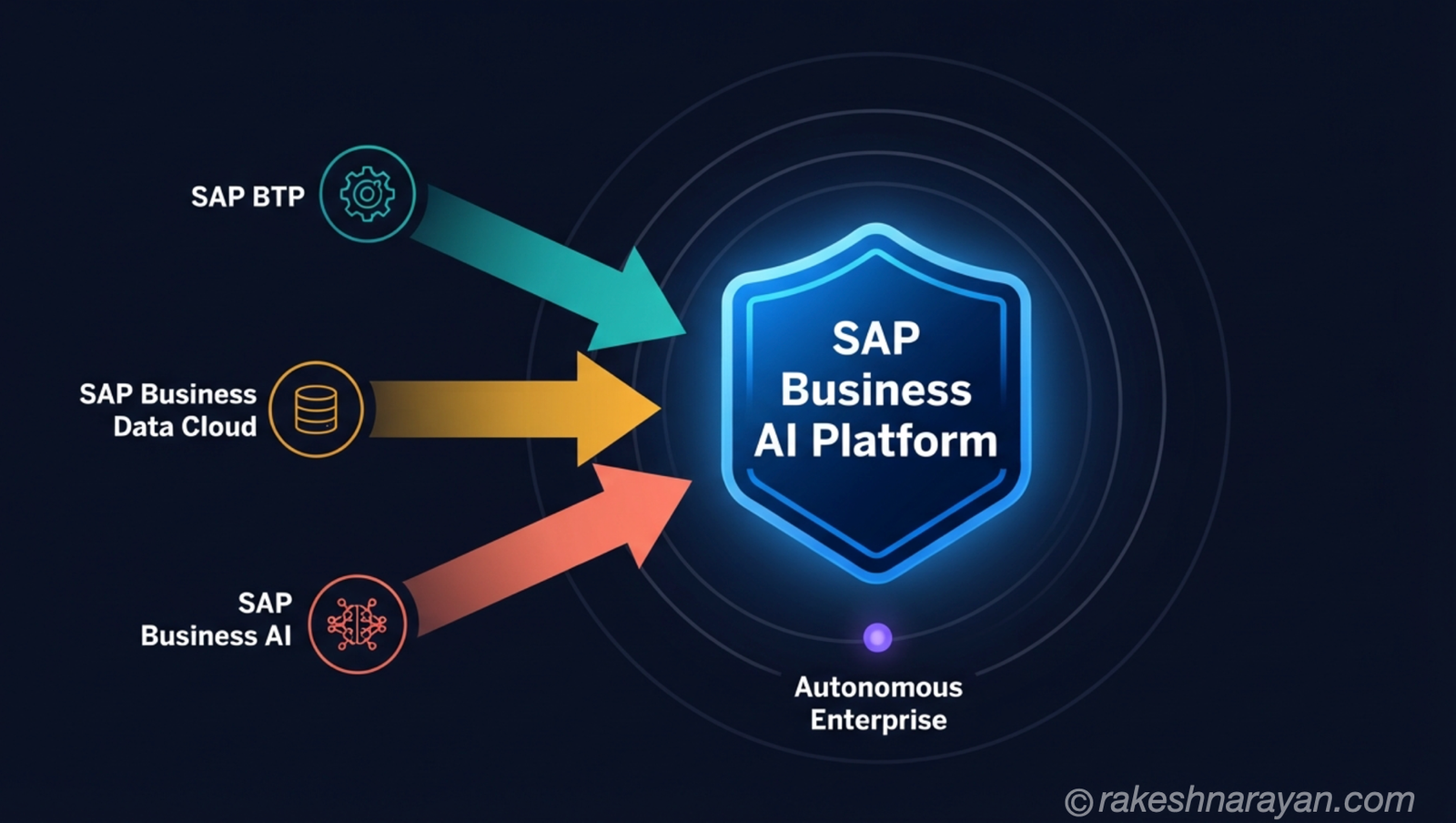
SAP Business AI Platform (BAIP) — BTP, BDC and AI Explained — how BTP becomes the build layer of SAP’s unified AI platform, and what actually changes.
Published on rakeshnarayan.com — Articles
URL: https://rakeshnarayan.com/articles/sap-btp-the-platform-explained/
Did you enjoy this article?
Let me know — it takes one click.
0 Comments
Leave a Comment
Looks like this one held your attention — I'd really appreciate a quick comment below.
Your comment has been submitted and will appear after review.