The Cloud Service Model — IaaS, PaaS and SaaS Explained
If you have spent any time in tech or business over the last decade, you have heard these three terms. IaaS, PaaS, SaaS. They get used constantly — in job descriptions, in product pitches, in architecture meetings.
Most people have a rough sense of what they mean. But rough is not good enough when you are making decisions about what platform to build on, what to migrate to, or how to explain your architecture to someone senior.
This post gives you the precise mental model — what each layer means, who is responsible for what, and where real products actually sit on the stack.
Start with the problem: what does the cloud replace?
To understand IaaS, PaaS and SaaS, you need to start with what came before them — on-premise infrastructure.
Before cloud computing, if you wanted to run a business application, you had to own everything: the physical servers, the networking, the storage, the operating system, the runtime, the database, the application itself. You bought it, racked it, patched it, backed it up and replaced it when it aged out.
Cloud computing changes that by letting you rent different layers of this stack. How much of the stack you rent — and how much you still manage yourself — is exactly what IaaS, PaaS and SaaS define.
IaaS — Infrastructure as a Service
With IaaS, the cloud provider gives you virtualised computing infrastructure — servers, storage, networking — over the internet. You rent the hardware layer. Everything above it is still yours to manage.
| Aspect | Detail |
|---|---|
| What the provider gives you | Virtual machines, storage, load balancers, networking, firewalls |
| What you still manage | Operating system, patches, runtime, middleware, data, application |
| Best suited for | Teams who need raw compute power and want full control over the stack |
| Real-world examples | AWS EC2, Microsoft Azure Virtual Machines, Google Compute Engine |
| SAP context | Running SAP systems on cloud VMs — e.g. SAP on AWS or Azure (lift and shift) |
💡 The analogy
IaaS is like renting an empty flat. The building, plumbing and electricity are sorted. You bring your own furniture, install your appliances, and maintain everything inside. Total flexibility — but total responsibility for what is inside.
PaaS — Platform as a Service
PaaS goes further. The provider gives you not just infrastructure but a managed platform — the operating system, runtime, middleware and scaling are all handled. You bring your application and your data. Nothing else.
| Aspect | Detail |
|---|---|
| What the provider gives you | Infrastructure + OS + runtime + middleware + scaling + deployment pipeline |
| What you still manage | Your application code and your data |
| Best suited for | Developers and architects who want to build and deploy without managing servers |
| Real-world examples | SAP BTP, Google App Engine, Azure App Service, Heroku |
| SAP context | SAP BTP is a PaaS — you deploy integrations, extensions and apps; SAP manages the platform |
💡 The analogy
PaaS is like renting a fully equipped kitchen in a restaurant. The kitchen, the ovens, the utilities are all maintained. You just bring your recipes and ingredients and cook. You focus entirely on what you are building — not on the infrastructure underneath it.
SaaS — Software as a Service
SaaS is the complete package. The provider manages everything — infrastructure, platform, and the application itself. You just use the software through a browser or an app. No installation, no patching, no server management.
| Aspect | Detail |
|---|---|
| What the provider gives you | Everything — the full application, ready to use |
| What you still manage | Your data and configuration — that is it |
| Best suited for | End users and businesses who want to use software without running it |
| Real-world examples | SAP S/4HANA Cloud, SAP SuccessFactors, Microsoft 365, Salesforce, Gmail |
| SAP context | SAP S/4HANA Public Cloud is SaaS — SAP runs the ERP, you configure and use it |
💡 The analogy
SaaS is like eating at a restaurant. The kitchen, the chefs, the ingredients, the cleaning — none of that is your concern. You sit down, order from the menu and eat. You get the outcome without any of the operational overhead.
Who manages what — the full comparison
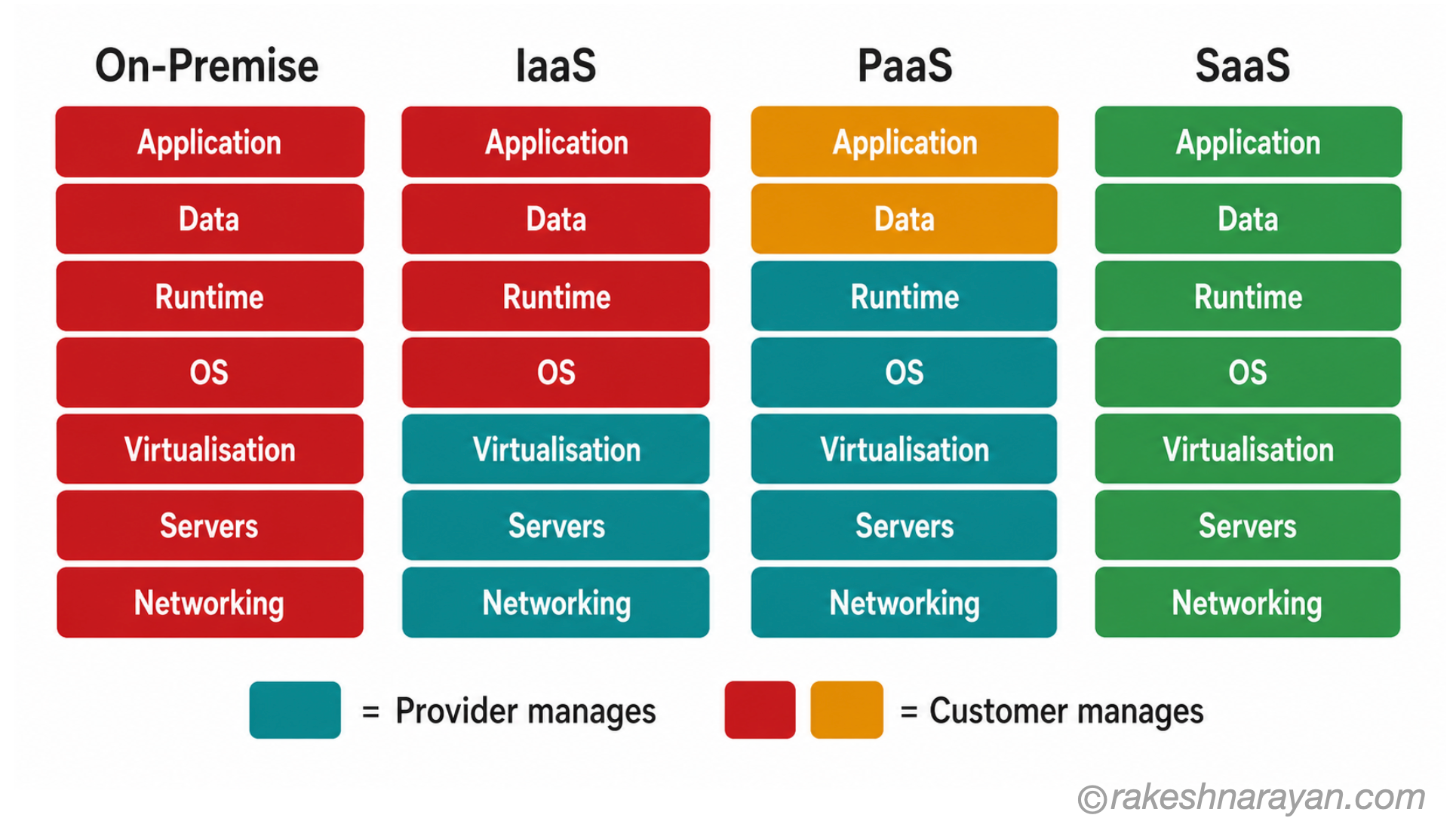
This is the most important table to understand. The colour tells you who owns that layer — you or the provider.
| Layer | IaaS | PaaS | SaaS |
|---|---|---|---|
| Application | You manage | You manage | Provider manages |
| Data | You manage | You manage | Provider manages |
| Runtime / Middleware | You manage | Provider manages | Provider manages |
| OS | You manage | Provider manages | Provider manages |
| Virtualisation | Provider manages | Provider manages | Provider manages |
| Servers / Storage | Provider manages | Provider manages | Provider manages |
| Networking | Provider manages | Provider manages | Provider manages |
Red = customer manages. Green = provider manages. The further right you move — IaaS → PaaS → SaaS — the less you manage and the more the provider takes on.
Where real products sit on the stack
| Product | Model | Why |
|---|---|---|
| AWS EC2 / Azure VMs / Google Compute | IaaS | Raw virtual machines — you manage OS and everything above |
| SAP BTP | PaaS | Managed platform — you deploy apps and integrations, SAP runs the platform |
| Google App Engine / Azure App Service | PaaS | Managed runtime and scaling — you deploy application code only |
| SAP S/4HANA Public Cloud | SaaS | SAP manages the ERP — you configure business processes and use it |
| SAP SuccessFactors | SaaS | Fully managed HR suite — no infrastructure or platform work required |
| SAP S/4HANA Private Cloud | Managed IaaS/PaaS hybrid | SAP manages infrastructure; customer has more configuration control than Public Cloud |
| Microsoft 365 / Gmail / Salesforce | SaaS | Fully managed — zero infrastructure responsibility for the customer |
| On-Premise SAP ECC | On-Premise | Customer owns and manages every layer — servers to application |
📌 SAP S/4HANA Private Cloud — where it sits
Private Cloud is often confusing. SAP (or a partner) manages the infrastructure, but the customer retains more control over customisations and release cycles than Public Cloud. It sits between IaaS and PaaS depending on the contract — sometimes called ‘managed cloud’ rather than fitting neatly into one model.
How to choose — the right questions to ask
| If you need… | Consider |
|---|---|
| Full control over the OS, patching and stack configuration | IaaS |
| To build and deploy an application without managing servers | PaaS |
| To use a business application with minimal IT overhead | SaaS |
| To extend or integrate a cloud platform with custom logic | PaaS (e.g. SAP BTP) |
| To run a full ERP with lowest IT management cost | SaaS (e.g. SAP S/4HANA Public Cloud) |
| To migrate an existing on-premise system with minimal change | IaaS (lift and shift first, optimise later) |
The model in one view
| Model | You manage | Provider manages | One-line summary |
|---|---|---|---|
| IaaS | OS, runtime, data, app | Hardware, virtualisation, networking | Rent the hardware — build everything else yourself |
| PaaS | Data and application | Everything below the app | Rent the platform — focus only on what you are building |
| SaaS | Configuration and data | Everything | Rent the software — just use it |
What to take away
IaaS, PaaS and SaaS are not just marketing terms. They describe a clear division of responsibility between you and the cloud provider. The further you move from IaaS toward SaaS, the less infrastructure you manage — but also the less control you have over the underlying stack.
In the SAP world, this distinction matters directly. SAP BTP is a PaaS — you build on it. SAP S/4HANA Public Cloud is SaaS — you configure and run your business on it. Knowing where each product sits helps you design solutions, set expectations, and have more precise conversations with customers and colleagues.
🔗 Related posts on this site
What is ERP? — understanding ERP is the foundation before understanding where SAP sits on the cloud stack.
REST API Design Principles — cloud platforms expose and consume APIs — the design principles apply regardless of which layer you are on.
How HTTPS Works — all cloud services communicate over HTTPS — the TLS layer applies across IaaS, PaaS and SaaS equally.
Published on rakeshnarayan.com — Articles
URL: https://rakeshnarayan.com/articles/cloud-service-model-iaas-paas-saas/