How HTTPS Works
Every time you open a banking app, log into a website, or submit a form, HTTPS is working in the background to keep that data private and secure.
Most people know it is something to do with the padlock in the browser. This post explains what is actually happening — without the cryptography deep-dive.
HTTP vs HTTPS — the difference in one sentence
HTTP sends data in plain text. HTTPS sends the same data but encrypted — so only the intended recipient can read it.
| HTTP | HTTPS | |
|---|---|---|
| Data in transit | Plain text — anyone who intercepts it can read it | Encrypted — intercepted data is unreadable |
| Authentication | No way to verify you are talking to the right server | Certificate proves the server’s identity |
| Port | Port 80 | Port 443 |
| Browser indicator | No padlock — some browsers show a warning | Padlock in the address bar |
| Use today | Should not be used for anything with user data | The standard for all websites |
⚠️ Why HTTP alone is never enough
On HTTP, every device between you and the server — your router, your ISP, any network middleman — can read your data in full. Usernames, passwords, form submissions, everything. This is called a man-in-the-middle attack. HTTPS prevents it.
What TLS is
TLS (Transport Layer Security) is the protocol that makes HTTPS secure. It is what does the actual encrypting.
You will also hear SSL mentioned. SSL was the original protocol, now retired. TLS replaced it. In practice, people still say SSL when they mean TLS — they are the same thing in everyday conversation, but TLS is what is actually in use today.
| Term | What it is | Status |
|---|---|---|
| SSL 2.0 / 3.0 | Original secure protocol | Retired — insecure, not used |
| TLS 1.0 / 1.1 | Early versions of TLS | Deprecated — disabled in modern browsers |
| TLS 1.2 | Widely used, still supported | Active — secure |
| TLS 1.3 | Current version — faster and more secure | Active — recommended |
What a certificate is
A TLS certificate is a digital document issued to a website. It contains two things that matter:
- The website’s public key — used to set up the encrypted connection
- Proof of identity — confirmation that the certificate was issued by a trusted authority
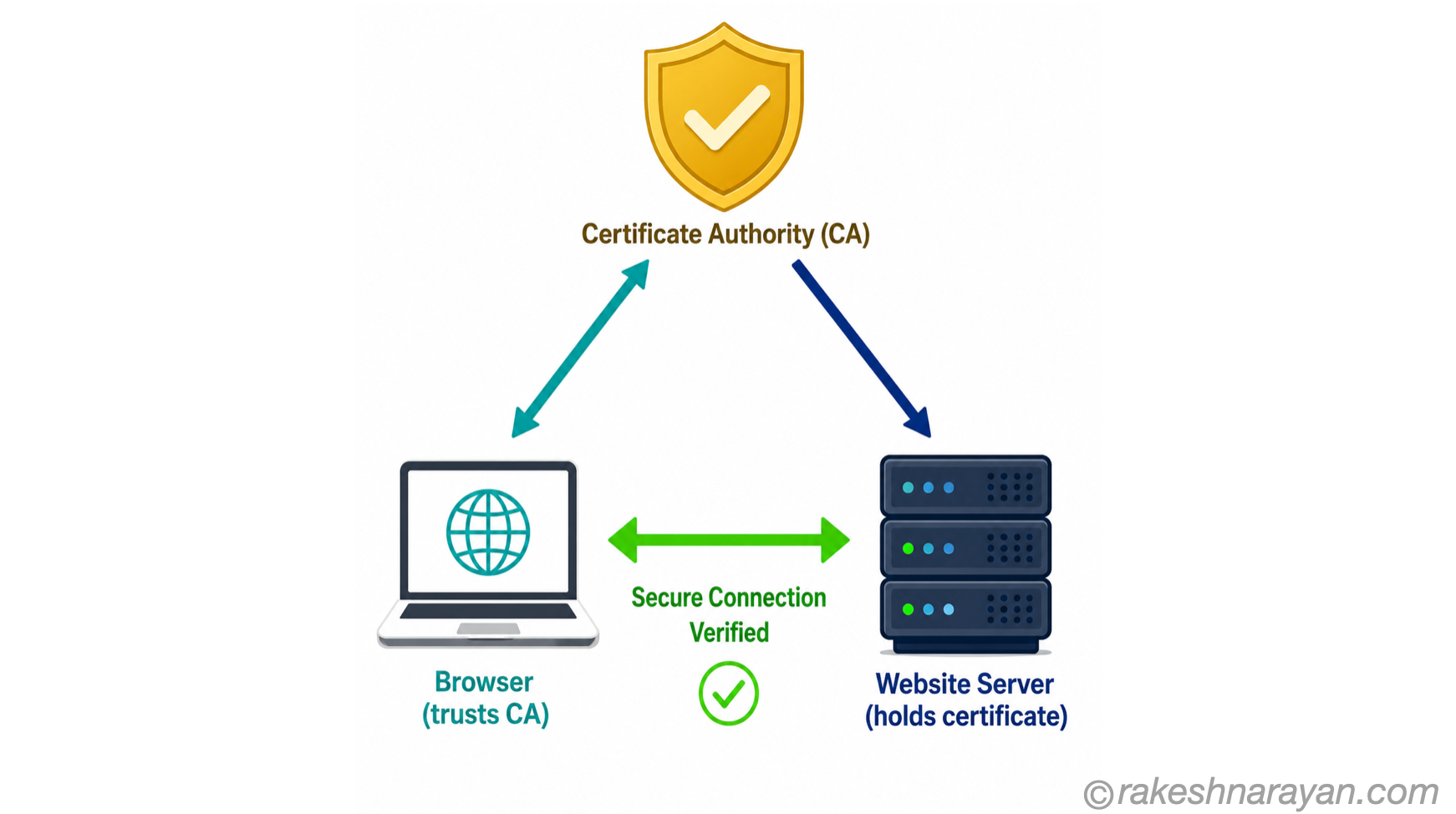
Certificates are issued by organisations called Certificate Authorities (CAs). A CA is a trusted third party — both your browser and the website’s server trust it. Examples include DigiCert, Let’s Encrypt, and Sectigo.
Your browser comes pre-installed with a list of trusted CAs. When you visit a site, the browser checks whether the site’s certificate was signed by one of them. If yes — the padlock appears. If no — you get a warning.
Types of certificates
| Type | What is verified | Common use |
|---|---|---|
| DV — Domain Validation | Proves control of the domain only | Blogs, personal sites, small projects |
| OV — Organisation Validation | Proves domain + organisation identity | Business websites, login portals |
| EV — Extended Validation | Thorough legal and identity verification | Banks, e-commerce, high-trust platforms |
| Wildcard | Covers a domain and all its subdomains | *.rakeshnarayan.com covers all subdomains |
The TLS handshake — step by step
Before any data is exchanged between your browser and a server, they go through a handshake. This happens in milliseconds and is invisible to you. Here is what is happening:
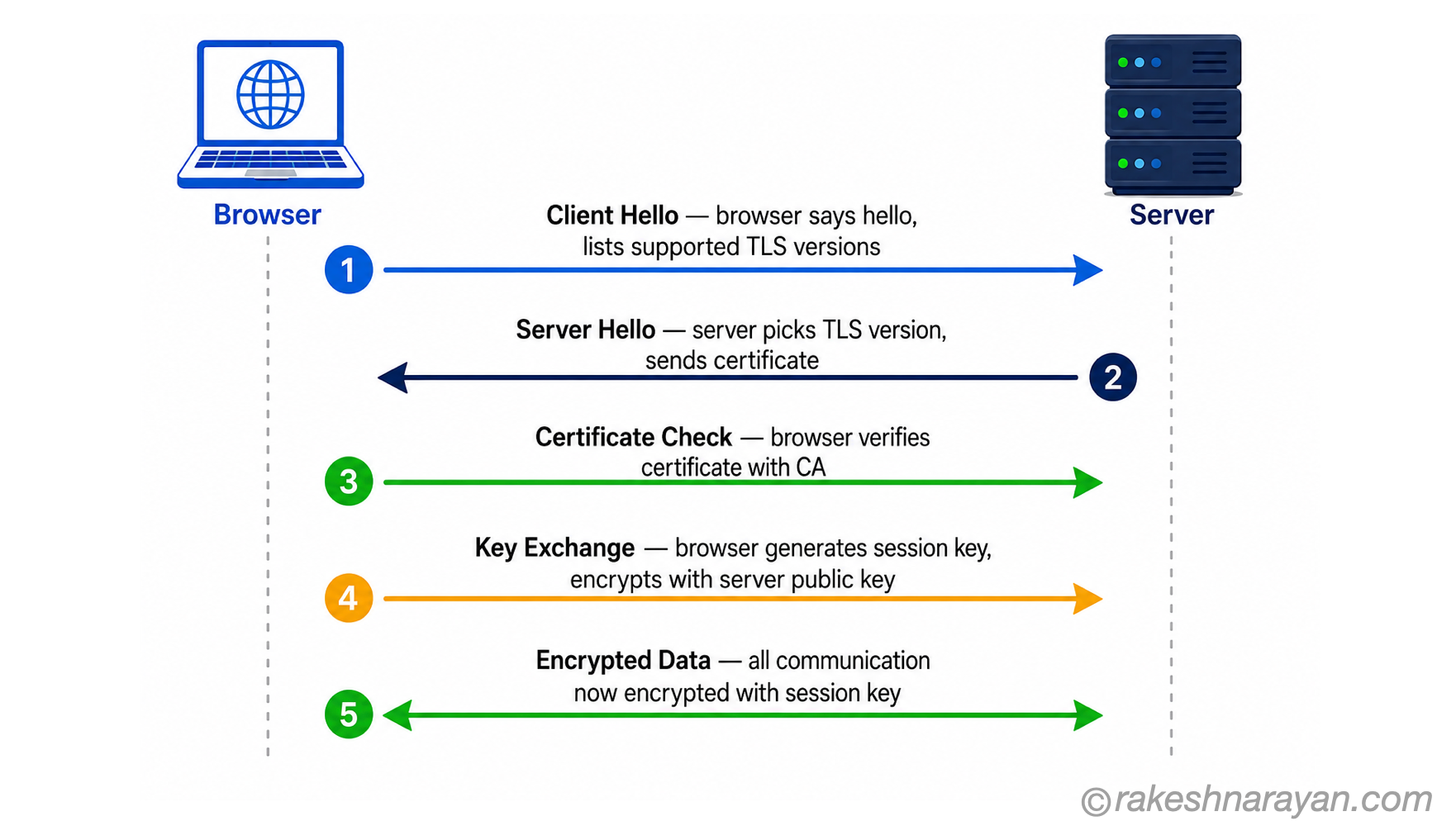
| # | Step | What happens |
|---|---|---|
| 1 | Client Hello | Your browser contacts the server and says: here are the TLS versions and encryption methods I support. |
| 2 | Server Hello | The server picks a TLS version and encryption method, then sends its certificate (containing its public key). |
| 3 | Certificate Check | Your browser verifies the certificate — checks it was signed by a trusted CA, has not expired, and matches the domain. |
| 4 | Key Exchange | Browser and server exchange information to generate a shared session key — a temporary secret key used only for this connection. |
| 5 | Encrypted Connection | Both sides confirm the handshake is complete. All data from this point is encrypted using the shared session key. |
Public key and private key — the short version
HTTPS uses two types of keys during the handshake:
| Key | Who holds it | What it does |
|---|---|---|
| Public key | Shared openly — included in the certificate | Anyone can use it to encrypt a message |
| Private key | Held only by the server — never shared | Only the server can decrypt messages encrypted with its public key |
Think of the public key as an open padlock that anyone can click shut. Only the server has the key to open it. This is how the browser can safely send a secret to the server without it being readable in transit.
Once the handshake is complete, both sides switch to symmetric encryption using the shared session key — it is faster and used for all actual data transfer.
What the padlock actually means
When you see the padlock in your browser address bar, it means three things:
| What the padlock confirms | What it does not confirm |
|---|---|
| The connection is encrypted — data in transit is private | That the website is legitimate or trustworthy |
| The certificate was issued by a trusted CA | That the website will not misuse your data |
| The domain in the certificate matches the site you are visiting | That the organisation behind the site is who they claim to be (for DV certificates) |
💡 Padlock does not mean safe
Phishing sites use HTTPS too. The padlock means the connection is encrypted — not that the site is trustworthy. Always check the domain in the address bar carefully, especially before entering credentials. Two things to check every time: the full domain name (not just the start —
paypa1.comis notpaypal.com), and whether the domain you are on is the one you intended to navigate to. Bookmarking frequently used sensitive sites (banking, email, company portals) removes most of the risk — you navigate from a known-correct URL rather than relying on a search result or a link.
Why this matters beyond the browser
HTTPS is not just for websites. Any API communication — including SAP BTP integrations, REST API calls, and mobile app data — travels over HTTPS. The same TLS mechanism protects all of it.
| Where HTTPS is used | Why it matters |
|---|---|
| Web browsers | Protects login credentials, form data, session tokens |
| REST APIs | Ensures requests and responses cannot be read or tampered with in transit |
| Mobile apps | All app-to-server communication should use HTTPS |
| SAP BTP / integrations | OAuth tokens and data payloads travel over HTTPS — required by all SAP cloud services |
| Webhooks and callbacks | Payloads sent between systems must be encrypted in transit |
The short version
| Concept | One-line summary |
|---|---|
| HTTP | Plain text — everything is readable in transit |
| HTTPS | HTTP with TLS encryption — data is private and server identity is verified |
| TLS | The protocol that does the actual encrypting (TLS 1.2 and 1.3 are current) |
| Certificate | A digital document that proves a server’s identity and carries its public key |
| Certificate Authority | A trusted organisation that issues and vouches for certificates |
| TLS Handshake | A quick negotiation between browser and server to agree on encryption before data flows |
| Public / Private key | Public key encrypts, private key decrypts — used during handshake only |
| Session key | A temporary shared key used to encrypt all actual data in the connection |
| The padlock | Confirms encryption and identity — does not confirm the site is trustworthy |
What to take away
HTTPS is not a feature you turn on at the end. It is the baseline for any system that handles user data, API traffic, or sensitive information. Understanding how it works — even at this level — helps you make better decisions about security, integrations, and system design.
🔗 Related reading on this site
REST APIs always travel over HTTPS. If you want to understand the API design principles that sit on top of this secure transport layer, see: REST API Design Principles
Published on rakeshnarayan.com — Articles

Did you enjoy this article?
Let me know — it takes one click.
0 Comments
Leave a Comment
Looks like this one held your attention — I'd really appreciate a quick comment below.
Your comment has been submitted and will appear after review.