XML — What It Is and Where SAP Still Uses It
At some point, you have seen it. A payload in a SOAP trace. A file that comes out of an IDoc download. A SuccessFactors template someone hands you and says needs editing.
The file is full of angle brackets and nested tags and it either makes immediate sense to you — or you close it and pretend it does not exist. Most people who work in and around SAP land in the second group.
They know XML is there, they know it matters in certain scenarios, and they have a vague sense that it is old and probably going away. None of that is accurate.
XML is not going away — and knowing how to read it is a consultant skill that saves real time when integrations break. This post explains what XML actually is, why it works the way it does, and the specific places in an SAP landscape where you will still encounter it in 2026.
🔗 Related reading
JSON — From Zero to Confident — XML and JSON solve the same problem differently. If you have read this post, this one will feel familiar in structure.
SAP Integration Patterns — The Decisions That Matter — covers where XML-based integration sits in the broader SAP integration landscape.
What XML actually is
XML stands for eXtensible Markup Language. It is a format for storing and transporting data — not a programming language, not a database, not a protocol. It does nothing on its own.
Its only job is to describe data in a structured way that any system can read. The ‘eXtensible’ part matters: unlike HTML, which has a fixed set of predefined tags (<p>, <div>, <h1>), XML has no predefined tags. You define your own to describe your own data. That is what makes it a universal format.
The difference from HTML is worth spelling out. HTML uses tags to control how content is displayed. XML uses tags to describe what data means. Same syntax, completely different purpose.
| HTML | XML | |
|---|---|---|
| Purpose | Display content in a browser | Describe and transport data between systems |
| Tags | Predefined — <p>, <div>, <table> | Custom — you define your own: <PurchaseOrder>, <Vendor> |
| Output | A rendered web page | Structured data a system can read and act on |
| Rendered by | A browser | Any software that processes XML — SAP, Java, Python, etc. |
The rules XML enforces
XML is strict by design. That strictness is a feature. It guarantees that any system, in any language, on any platform, can parse an XML file and know exactly what it contains.
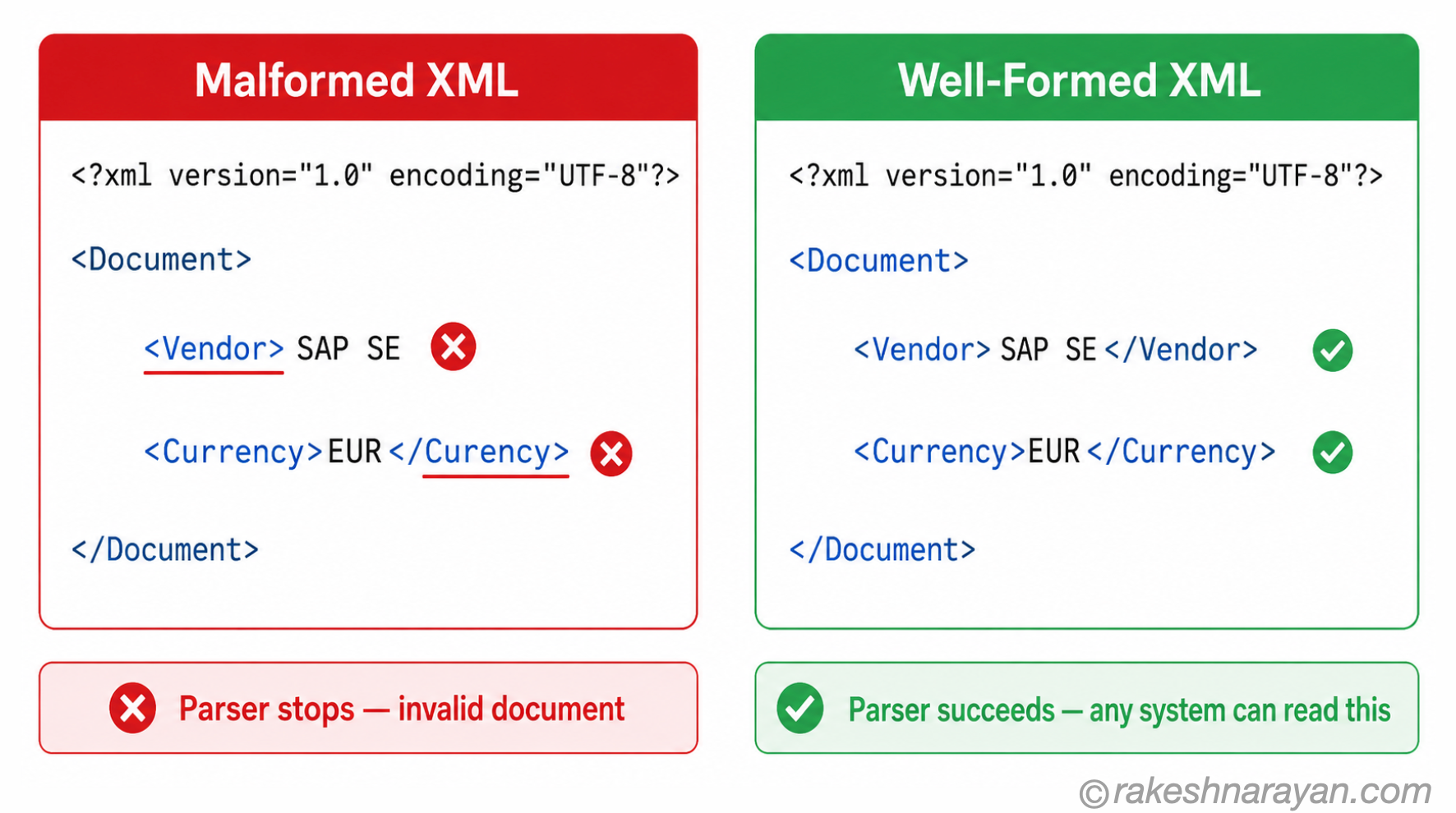
Every XML document that follows the rules is called ‘well-formed’. Three rules cover most of what you need to know:
| Rule | What it means |
|---|---|
| Every tag must close | An opening tag must have a matching closing tag, or self-close: <Vendor>SAP SE</Vendor> or <Note/> |
| Tags are case-sensitive | <Vendor> and <vendor> are different elements — SAP typically uses uppercase. Pick a convention and stick to it. |
| One root element | Every XML document must have a single parent element that wraps everything else. |
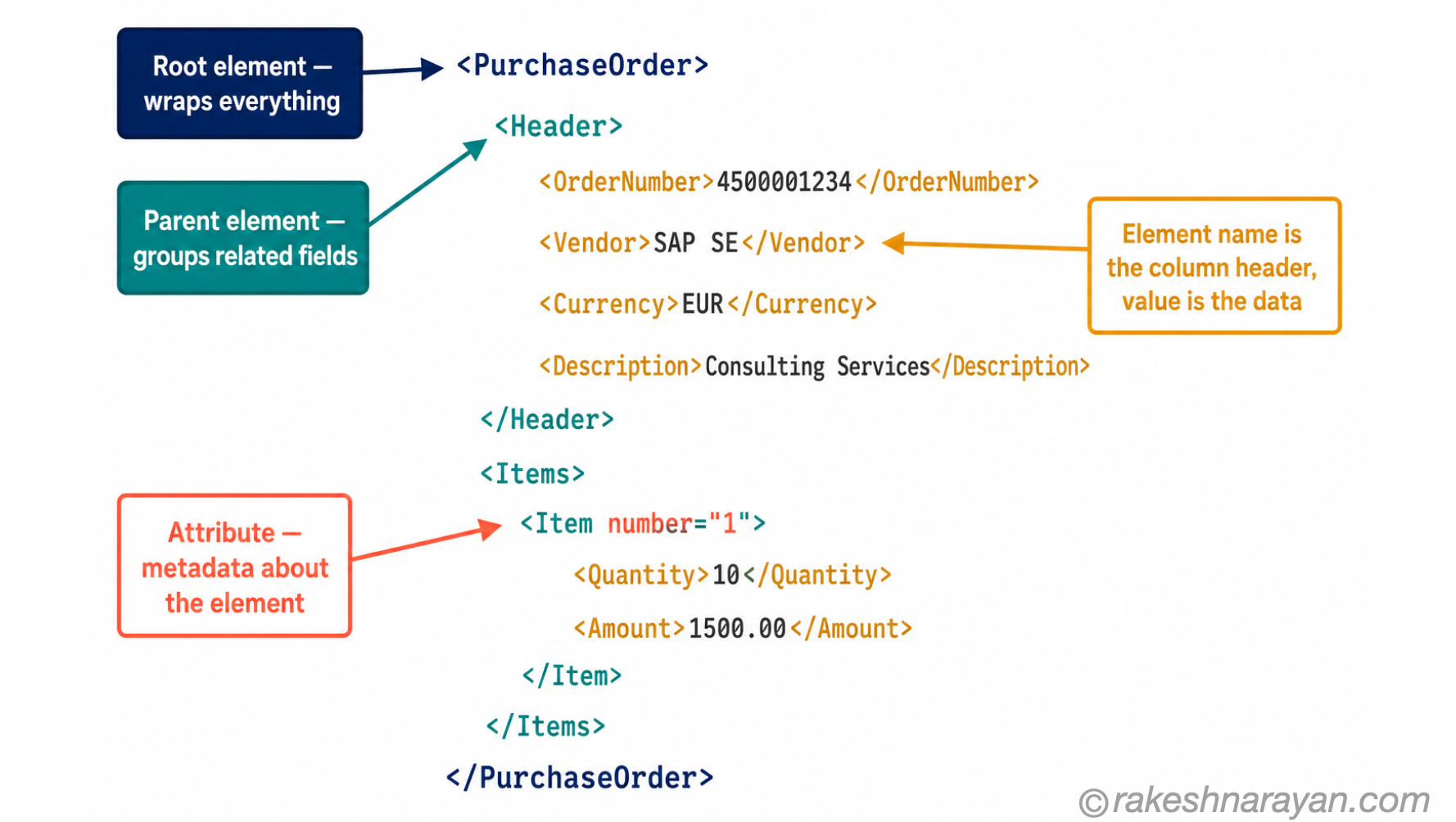
Here is what a simple, well-formed XML document looks like:
<?xml version="1.0" encoding="UTF-8"?>
<PurchaseOrder>
  <Header>
    <OrderNumber>4500012345</OrderNumber>
    <Vendor>SAP SE</Vendor>
    <Currency>EUR</Currency>
  </Header>
  <Items>
    <Item number="1">
      <Description>Software Licence</Description>
      <Quantity>1</Quantity>
      <Amount>25000.00</Amount>
    </Item>
  </Items>
</PurchaseOrder>
Read top to bottom: PurchaseOrder is the root element. Header and Items are its children. Each child has its own children. The structure is a tree. Once you see it as a tree, XML becomes readable — even without prior experience.
💡 Practical Tip
Attributes — like
number="1"in<Item number="1">— are another way to attach data to an element. They sit inside the opening tag. SAP’s XML formats use both elements and attributes, often in the same document. Elements hold the main data. Attributes hold metadata about that element.
XML vs JSON — when each wins
If you know JSON, you have probably noticed that XML and JSON solve the same problem: structured data that machines can read. They are not rivals.
Each one is better suited to different situations, and both exist in every SAP landscape:
| XML | JSON | SAP default (XML) | SAP default (JSON) | |
|---|---|---|---|---|
| Readability | Verbose but self-describing tags | Concise — lighter to scan | OData V2, SOAP, IDocs | OData V4, BTP APIs |
| Validation | Strong — XSD schemas | Weaker — JSON Schema less mature | ||
| Namespaces | Supported natively | Not supported | ||
| Legacy fit | Excellent — 25+ year standard | Better for modern REST |
📌 Key Takeaway
OData V4 defaults to JSON. OData V2 defaults to XML (Atom format). If you are calling a V2 service and want JSON, add $format=json to the request URL or set the Accept: application/json header explicitly. Without it, you get XML back — and that surprises developers who have only worked with modern REST APIs.
Where SAP uses XML — the actual list
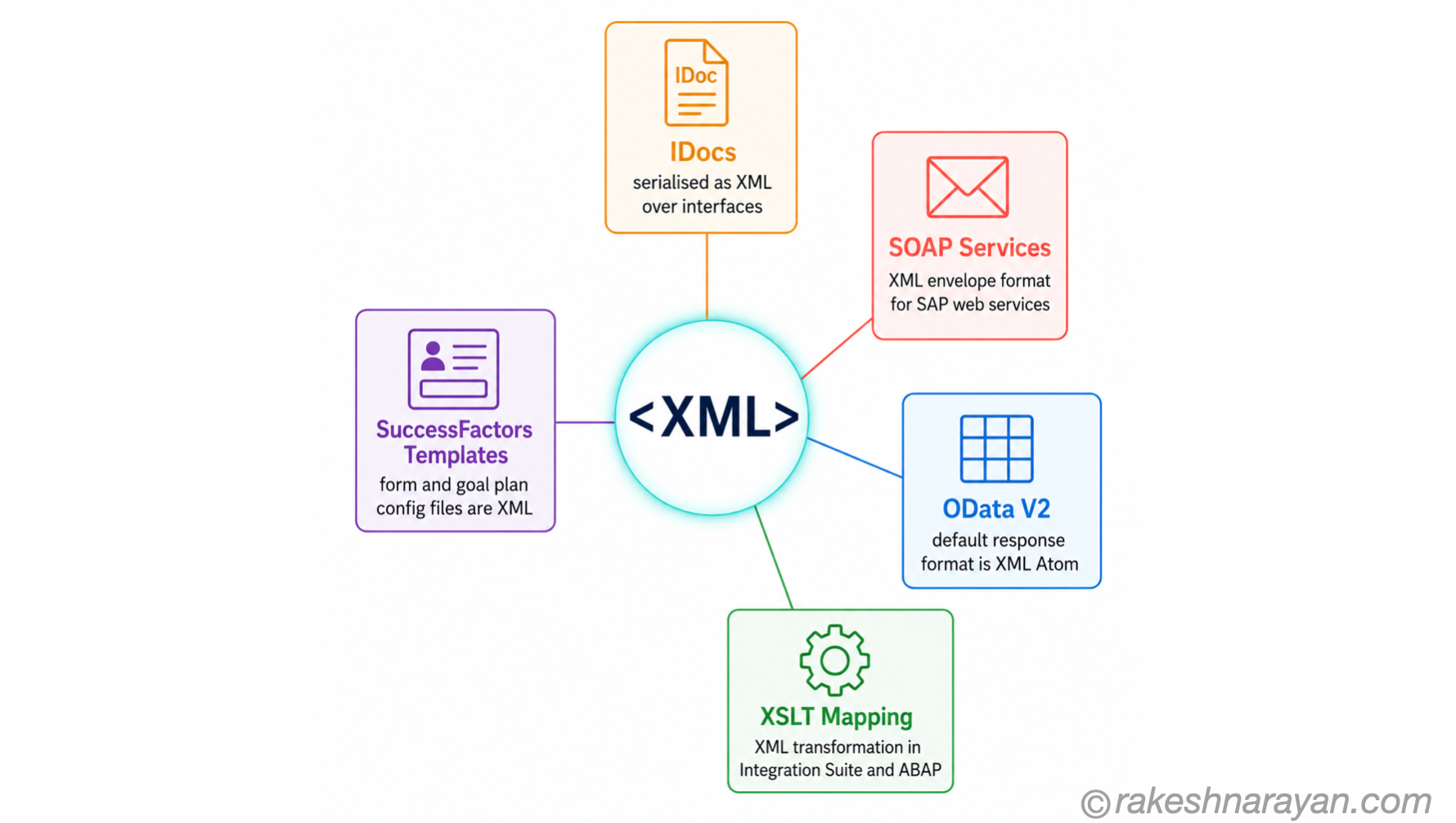
XML shows up in five distinct places in an SAP landscape. Each one has a different context, a different reason for using XML, and a different practical implication for the people working with it.
1. IDocs — SAP’s document exchange format
IDocs (Intermediate Documents) are SAP’s native format for structured data exchange with external systems and between SAP systems. When an IDoc is transmitted over an interface — via SOAP, via SAP Integration Suite, via EDI — it is serialised as XML.
The XML structure mirrors the IDoc segment hierarchy: control record, data segments, status segments. You will encounter IDoc XML when debugging a failed goods receipt, tracing a purchase order to a third-party logistics provider, or mapping an IDoc payload in Integration Suite using XSLT.
In ABAP, the function module IDOC_XML_TRANSFORM lets you export an IDoc as XML directly from SE37 — useful for testing mappings without triggering production processes.
2. SOAP web services — the older integration standard
SOAP (Simple Object Access Protocol) is a messaging protocol that wraps data in an XML envelope. SAP has been exposing business functions as SOAP services since the NetWeaver era, and many of those services are still running in ECC and S/4HANA landscapes today.
If you are integrating with an older SAP system, or working with a third-party system that calls SAP via SOAP, XML is the payload format. A SOAP envelope has a fixed structure: an outer Envelope element, a Header section for metadata, and a Body section containing the actual business data.
When a SOAP call fails, the error comes back as an XML fault document. The error sits inside a <faultstring> or <detail> element — which is the first thing you read to understand what went wrong.
3. OData V2 — the default is XML
OData V2 services expose data in Atom format by default — which is XML. In practice, most Fiori apps and modern integrations override this with a JSON request, but the default matters: any OData V2 service called without an explicit format preference will return XML.
The metadata document ($metadata) for any OData service — V2 or V4 — is always returned as XML regardless of format preference. If you are troubleshooting an OData service using browser-based tools or older clients, you will be reading XML.
4. XSLT transformations in Integration Suite and ABAP
XSLT (Extensible Stylesheet Language Transformations) is the language used to transform one XML structure into another.
In SAP Integration Suite, XSLT mapping is one of the core mapping options for converting IDoc XML to a target format, or reshaping a SOAP payload before it reaches its destination.
In ABAP, the XSLT_TOOL transaction and the iXML library allow developers to process and transform XML payloads directly.
XSLT is where XML becomes active — not just a data carrier but a transformation target.
If you are reviewing a mapping in an Integration Suite iFlow and see an XSLT step, you are looking at XML going in and a different XML (or sometimes JSON) structure coming out.
5. SuccessFactors configuration templates
SAP SuccessFactors uses XML for a category of configuration that cannot be done through the Admin Centre UI: performance form templates, goal plan templates, job requisition templates, and similar structures are defined and maintained as XML files.
Consultants download the template XML, edit it in an XML editor, and upload it back into the system. This is live as of 1H 2026 and applies across Performance & Goals, Recruiting Management and other modules.
⚠️ Warning / Caution
SAP will not validate or correct a SuccessFactors template XML before upload. A malformed file — a missing closing tag, a case mismatch, a broken attribute — can corrupt the template in the system and affect all users. Always validate XML in an editor before uploading. SAP Support will not fix the result of a bad upload.
Reading XML when you have to
You do not need to write XML to benefit from being able to read it. The skill that saves you time is not authoring — it is diagnosis.
A failed SOAP call, a rejected IDoc payload, a broken SuccessFactors template: in each case, you are reading XML to find what is wrong. Three steps cover most situations:
| Step | What to do |
|---|---|
| Find the root element | The outermost tag — the one that wraps everything — tells you what type of document this is. PurchaseOrder, SOAP:Envelope, MATMAS05 — the root immediately identifies the context. |
| Follow the nesting | Each child element is indented inside its parent — read top to bottom, inside out. The hierarchy shows you the data structure. |
| Read tags as column names | The element name describes the data it contains — OrderNumber, Vendor, Currency. XML is self-describing. The tag tells you what the value means without a data dictionary. |
When something is wrong, look for the error first. SAP and most middleware systems return error details as XML elements. In a SOAP fault response, the error is inside a <faultstring> or <detail> element. In an IDoc status record, the error message sits in the STATUS segment. Find that element and you have the diagnosis.
✅ Best Practice
Use a proper XML editor or format the XML before reading it. Raw XML with no indentation is almost unreadable. VS Code with an XML plugin, Notepad++, or any online XML formatter will pretty-print the document and let you collapse sections. This takes thirty seconds and makes the difference between understanding the structure and getting lost in angle brackets.
At a glance — XML essentials
| Concept | One-line summary |
|---|---|
| XML | A format for storing and transporting structured data using custom tags — not a programming language. |
| Well-formed XML | An XML document that follows all syntax rules — every tag closed, one root element, case-consistent. |
| Element | The basic unit of XML — an opening tag, content, and a closing tag: <Vendor>SAP SE</Vendor>. |
| Attribute | Additional data attached to an element inside its opening tag: <Item number="1">. |
| Root element | The single outermost element that wraps everything else in an XML document. |
| XSD (XML Schema) | A definition of exactly what elements and attributes are allowed in a specific XML format. |
| XSLT | A language for transforming one XML structure into another — used extensively in SAP Integration Suite. |
| OData V2 default | Atom (XML) — JSON requires explicit $format=json or an Accept: application/json header. |
| IDoc as XML | IDocs are serialised as XML when transmitted over interfaces — XSLT_TOOL or IDOC_XML_TRANSFORM in ABAP. |
| SOAP | A messaging protocol that wraps business data in an XML envelope — still active in many SAP landscapes. |
| SuccessFactors templates | Performance, goal plan and recruiting templates are configured and maintained as XML files. |
What to take away
XML is not going away. The conversations about JSON replacing XML have been happening for fifteen years, and what actually happened is that both are now standard.
Modern SAP APIs use JSON. SAP’s integration infrastructure — IDocs, SOAP services, OData V2, SuccessFactors configuration — still runs on XML, because it has been running on XML for twenty-five years and the cost of replacing it is not justified by the gain.
The practical consequence is that XML literacy is a consultant skill, not a developer skill. You do not need to write XSLT.
You do need to be able to open an XML payload, identify what it contains, and find where the error message is. Understanding why a tag mismatch breaks a parse takes an hour to learn. It saves time on every integration project you will ever work on.
The OData Protocol in SAP — V2, V4 and How It Works post covers V2 and V4 in detail — including the format negotiation that determines whether you get XML or JSON back from a service call. That is the next logical read if you are working with SAP APIs.
🔗 Related posts on this site
OData Protocol in SAP — V2, V4 and How It Works — covers OData V2 XML vs V4 JSON format negotiation in detail, including the $format query option.
JSON — From Zero to Confident — the format that has replaced XML in modern APIs, explained from scratch.
SAP Integration Patterns — The Decisions That Matter — where SOAP, IDocs and the formats that carry them fit in the broader SAP integration picture.
ABAP Fundamentals That Still Matter — iXML library, XSLT_TOOL and XML processing in ABAP are covered in the ABAP fundamentals post.
Published on rakeshnarayan.com — Articles
https://rakeshnarayan.com/articles/xml-what-it-is-and-where-sap-still-uses-it/

Did you enjoy this article?
Let me know — it takes one click.
0 Comments
Leave a Comment
Looks like this one held your attention — I'd really appreciate a quick comment below.
Your comment has been submitted and will appear after review.