ABAP Fundamentals That Still Matter
🔗 Related Reading — Read These First
SAP S/4HANA vs ECC — The Real Difference — understanding what changed in the move to S/4HANA and why ABAP’s role shifted with it.
OData Protocol in SAP — how CDS views and ABAP backend services are exposed as OData APIs consumed by Fiori apps.
Every few years, someone announces that ABAP is dying. It never does. There are more ABAP systems running in production today than at any point in SAP’s history — and with S/4HANA, ABAP has actually become more central, not less.
The language has changed, though. The ABAP that matters in 2026 is not the same as the ABAP that was written ten years ago. If you are new to SAP development, the fundamentals you need to learn are different from what older tutorials will tell you. If you are an experienced SAP professional who is not a developer, you need enough ABAP literacy to read code, understand what is happening, and have an informed conversation with your technical team.
This post covers both. The absolute fundamentals that have not changed, and the modern shift that changes how you apply them.
What ABAP Is — and Why It Is Still Everywhere
ABAP stands for Advanced Business Application Programming. SAP created it in the 1980s to give customers a way to customise SAP systems without touching the core product. That decision — to embed the programming language inside the application — is why ABAP is still here forty years later.
Every SAP system runs ABAP. Every standard transaction, every report, every workflow — it is all written in ABAP. When you configure a business rule, run a payroll, or trigger a purchase order, you are running ABAP code. This is not legacy infrastructure you can swap out. It is the foundation.
The question in 2026 is not whether ABAP matters. It is which parts of ABAP matter and which parts you should stop using.
The Core Language — What Has Not Changed
Before the modern frameworks, you need to understand the language itself. These fundamentals are the same whether you are writing classic ABAP or cloud ABAP.
Data Types and Variables
ABAP has a small set of elementary data types that you will see everywhere. The ones that actually matter:
| Type | What It Is | Example Use |
|---|---|---|
| C (Character) | Fixed-length text string | Company code, material number |
| N (Numeric text) | Numbers stored as text | Document number, purchase order |
| I (Integer) | Whole number | Quantity, count |
| P (Packed decimal) | Decimal number | Amount, price, percentage |
| D (Date) | Date in YYYYMMDD format | Posting date, delivery date |
| T (Time) | Time in HHMMSS format | Timestamp |
| STRING | Variable-length text | Description, free text fields |
| XSTRING | Binary data | File content, attachments |
The one that trips people up: ABAP dates are type D, stored as YYYYMMDD — an 8-character string that looks like a number. Arithmetic on dates works because of this, but it also means you cannot treat a date as a standard integer.
Internal Tables — the Heart of ABAP
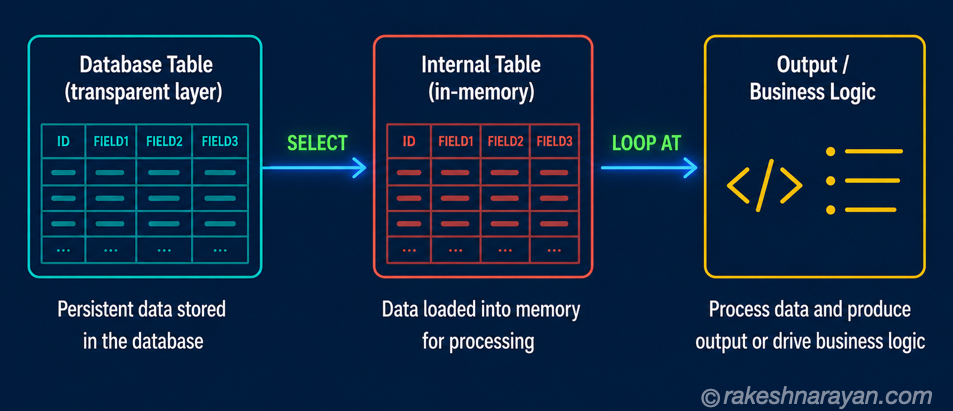
Internal tables are what makes ABAP different from most other languages. They are in-memory data structures that hold sets of records — think of them as a spreadsheet in memory.
Almost everything in ABAP passes data through internal tables. You select from the database into an internal table, process the records in the table, and either write them back or present them to the user. Understanding this pattern is non-negotiable.
| Table Type | When to Use It |
|---|---|
| STANDARD TABLE | Default. Access by index. Fast for sequential reads and appending. Allows duplicates. |
| SORTED TABLE | Always sorted by a key. Binary search available. Faster for key-based reads than standard. No duplicates on key. |
| HASHED TABLE | Access only by key using a hash algorithm. Fastest for single-record lookups. No duplicates on key. |
The practical rule: use STANDARD TABLE unless you are doing repeated key-based lookups, in which case SORTED or HASHED tables will be noticeably faster.
SELECT — Reading from the Database
ABAP’s SELECT statement reads from database tables directly into internal tables or work areas. The syntax is close enough to SQL to be readable, but different enough to cause confusion.
SELECT matnr maktx FROM makt
INTO TABLE @DATA(lt_materials)
WHERE spras = @sy-langu.
The @ symbol before variables is modern ABAP syntax — it was introduced to make the distinction between ABAP variables and database columns explicit. If you see older code without @, it still works but you are looking at pre-7.4 syntax.
The Modern Shift — What Changed with S/4HANA
Moving to S/4HANA changes two things about how ABAP code should be written. Understanding both is essential — not just for developers, but for anyone reviewing technical designs or approving development work.
Push Logic to the Database
Classic ABAP had a pattern that made sense when databases were dumb: read large amounts of data into an internal table, then process it in ABAP. With SAP HANA as the database, this is exactly backwards. HANA can process data orders of magnitude faster than ABAP loops.
The correct pattern in S/4HANA is to push as much filtering, sorting, and aggregation as possible into the SELECT — let the database do the heavy lifting. An internal table should contain only the records you actually need, not everything you might need.
| Old Pattern (avoid) | Modern Pattern (use) |
|---|---|
| SELECT * FROM vbak INTO TABLE lt_orders. | SELECT vbeln, kunnr, netwr FROM vbak INTO TABLE @lt_orders WHERE erdat = @lv_date. |
| LOOP AT lt_orders. Check condition. ENDLOOP. | WHERE clause filters in the database, not in ABAP. |
| Read all columns, use two or three. | Select only the columns you need. |
Clean Core — the Most Important Concept in Modern ABAP
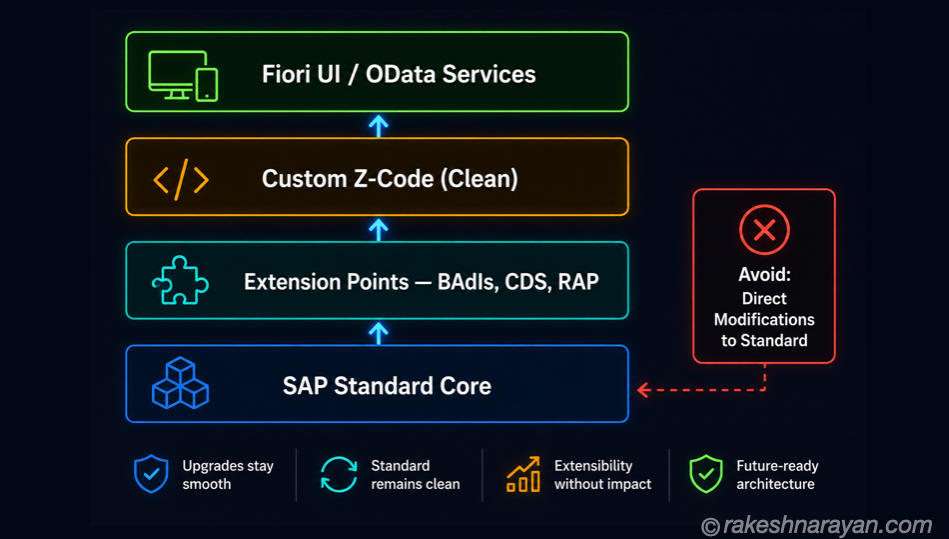
Clean Core is SAP’s principle for how S/4HANA systems should be extended. It is simple to state: do not modify SAP standard objects. No user exits that write directly into SAP tables. No modifications to standard function modules. No Z-programs that bypass the standard API layer.
The reason is practical, not ideological. Every time you modify standard SAP code, you create something that must be maintained, tested, and re-applied every time SAP ships an update. In a cloud world where SAP delivers continuous updates, modifications become a permanent tax on your system.
Clean Core replaces modifications with extension points — officially supported hooks that SAP guarantees will survive upgrades. The main ones are Business Add-Ins (BAdIs), Customer Exits, and the modern RAP framework.
💡 Practical Tip
Clean Core is not about doing less — it is about doing things in a way that SAP can still upgrade around. The goal is upgrade-stable customisation, not no customisation.
CDS Views — the New Data Layer
Core Data Services (CDS) views are the modern replacement for many classic ABAP data access patterns. A CDS view is defined close to the database — it pushes join and filter logic down to HANA — and it carries semantic annotations that other layers (OData services, Fiori apps, analytics) can consume directly.
If you are reading modern S/4HANA technical documentation, CDS views will be everywhere. The Virtual Data Model (VDM) that SAP ships in S/4HANA is built entirely on CDS views layered on top of the underlying tables. Understanding what a CDS view is and why it exists is non-negotiable literacy for any SAP professional working with S/4HANA.
CDS views are covered in depth in the next post in this series — CDS Views and the VDM Concept.
RAP — How Modern ABAP Extensions Are Built
The ABAP RESTful Application Programming Model — RAP — is the strategic framework for building S/4HANA-compliant applications and extensions. If you are a developer moving to S/4HANA, RAP is not optional. It is the framework SAP expects you to use.
RAP provides a structured, end-to-end approach: you define the data model with CDS views, describe the business logic in a Behaviour Definition, and expose the result as an OData service automatically. A Fiori Elements app can then consume that service with minimal additional work.
| RAP Layer | What It Does | Technology |
|---|---|---|
| Data Model | Defines the structure and relationships of your business object | CDS Views |
| Behaviour Definition | Declares what operations are allowed — create, update, delete, actions | BDEF (Behaviour Definition) |
| Service Definition | Exposes the model as an OData service | Service Definition + Binding |
| UI | Fiori Elements app auto-generated from annotations on the CDS view | Fiori Elements / SAP UI5 |
RAP replaces the older patterns — Web Dynpro, classic BAPI-based extensions, and direct table modifications — with a model that SAP guarantees will survive S/4HANA upgrades. If you are still building extensions with the old patterns in a cloud S/4HANA system, you are already accumulating technical debt.
The Tools You Work In
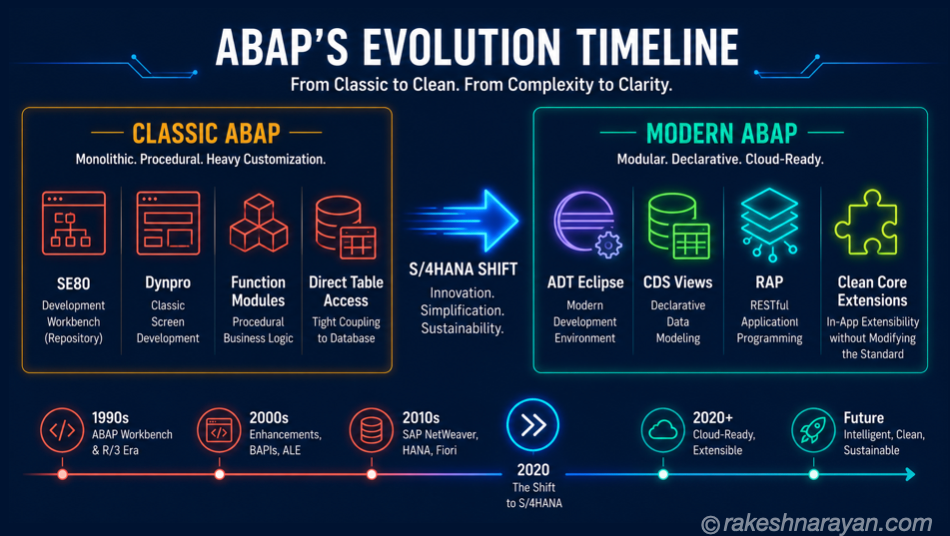
One change that catches people off guard: modern ABAP development does not happen in SAP GUI’s SE80 transaction. The tool is ABAP Development Tools (ADT) — a plugin for the Eclipse IDE.
| Tool | What It Is |
|---|---|
| SE80 (ABAP Workbench) | Classic GUI-based development. Still works. Not where modern ABAP is written. |
| ADT for Eclipse | The modern IDE. Required for CDS views, RAP, and ABAP Cloud development. |
| Joule for Developers | AI code assistant integrated into ADT. Explains code, suggests completions, generates unit tests. Free until September 2026. |
| SAP BTP ABAP Environment | Cloud-hosted ABAP runtime on BTP — also called Steampunk. No SAP GUI access. |
💡 Practical Tip
Joule for Developers, SAP’s AI assistant integrated into ADT, has been available free through September 2026. It is genuinely useful for explaining legacy code and generating unit tests. If you have not tried it, now is the time.
At a Glance — The Mental Model
| Concept | One-Line Summary |
|---|---|
| ABAP | SAP’s proprietary programming language, embedded in every SAP system, not going anywhere. |
| Internal Tables | In-memory data structures. The core pattern: SELECT into table, LOOP AT to process. |
| Data Types | C, N, I, P, D, T, STRING are the types you will see constantly. D for dates is YYYYMMDD. |
| S/4HANA shift | Push logic to HANA. Fewer loops, smarter SELECTs. Let the database do the work. |
| Clean Core | No direct modifications to SAP standard. Use extension points — BAdIs, CDS, RAP. |
| CDS Views | Modern data layer. Pushes join and filter logic to HANA. The VDM in S/4HANA is built on them. |
| RAP | The modern extension framework. CDS + Behaviour Definition + OData service. Upgrade-stable. |
| ADT for Eclipse | The IDE for modern ABAP. SE80 still works, but RAP and CDS require ADT. |
The Part Most People Get Wrong
ABAP is not two separate worlds — a legacy world and a modern world that are somehow different languages. It is one language that has been extended and refined over forty years. The fundamentals — internal tables, data types, SELECT — have not changed. The patterns around them have.
What has changed is where the work happens. Classic ABAP put the logic in ABAP. Modern ABAP puts as much of the logic as possible into the database layer — CDS views and HANA — and uses ABAP to orchestrate, not to process. RAP formalises this into a complete model.
If you understand that shift, you understand modern ABAP. The rest is syntax.
🔗 Related Reading
- SAP S/4HANA vs ECC — The Real Difference — the business and technical case for S/4HANA, and what it means for how ABAP is written today.
- SAP BTP — The Platform Explained — where the ABAP Environment (Steampunk) lives and how BTP fits into the SAP extension story.
- CDS Views and the VDM in SAP S/4HANA Explained — the next step after ABAP fundamentals; how CDS views work and how the VDM is structured.
- OData Protocol in SAP — how RAP exposes CDS views as OData services and how Fiori apps consume them.
- SAP Security Roles and Authorisation — how ABAP authority checks connect to roles and profiles in the authorisation concept.
- ABAP Object-Oriented Programming — Classes, Objects, Interfaces — the natural next step once these fundamentals are solid: the OO model behind BAdIs and RAP.
Published on rakeshnarayan.com — Articles | https://rakeshnarayan.com/articles/abap-fundamentals-that-still-matter/
Did you enjoy this article?
Let me know — it takes one click.
0 Comments
Leave a Comment
Looks like this one held your attention — I'd really appreciate a quick comment below.
Your comment has been submitted and will appear after review.