CDS Views and the VDM in SAP S/4HANA Explained
🔗 Read These First
ABAP Fundamentals That Still Matter — CDS views are written in ABAP ADT. Understanding the ABAP development environment first will help. Read post OData Protocol in SAP — V2, V4 and How It Works — CDS views are the source that OData services expose. Read this alongside or after. Read post
Every S/4HANA project reaches the same moment. Someone asks which table holds the sales order data. Someone else opens SE16, pulls up VBAK, and the conversation dies — because VBAK was never designed to be read directly. It holds the data. It does not describe it.
Core Data Services (CDS) views are the layer that sits between the raw tables and everything that consumes data. They define a semantic, business-oriented view of the data — with joins already resolved, calculated fields included, and annotations that tell downstream systems how to display and use the data.
Understanding CDS views is non-negotiable if you work with S/4HANA. Whether you are a developer building extensions, a consultant reading technical designs, or an architect planning an integration — the VDM is the data layer you will be working with.
What a CDS View Actually Is
A CDS view is a database view defined using ABAP’s Data Definition Language (DDL). Unlike a traditional database view, a CDS view can carry annotations — metadata that describes how the data should be used. An annotation might say this field is a currency amount, this view is meant for analytical consumption, or this association should be exposed as a navigation property in an OData service.
CDS views are created and maintained in ABAP Development Tools (ADT) in Eclipse — not in SE80. Each view is a text file with a .ddls extension, stored and transported like any other ABAP development object.
The key difference from a plain SQL view: a CDS view is not just a query. It is a semantic object that describes the data in a way that multiple consumers — OData services, Fiori apps, SAP Analytics Cloud, BW extraction — can each use appropriately without each one rebuilding the same logic.
The Virtual Data Model — Why Layers Exist
SAP ships S/4HANA with thousands of pre-built CDS views that collectively form the Virtual Data Model (VDM). The VDM is SAP’s structured, semantic representation of all the business data in the system.
The VDM is not a flat list of views. It is deliberately layered, with each layer serving a specific purpose. Understanding the layers is the key to navigating the VDM and knowing which views to use or extend.
| VDM Layer | Purpose | Annotation |
|---|---|---|
| Basic Interface Views | Map directly to database tables. One view per table, minimal transformation. The stable foundation. | @VDM.viewType: #BASIC |
| Composite Interface Views | Join multiple basic views. Add business logic, calculated fields, currency conversion. The reusable middle layer. | @VDM.viewType: #COMPOSITE |
| Consumption Views | Shaped for a specific consumer — a Fiori app, an API, an analytical query. Often 1:1 with a use case. | @VDM.viewType: #CONSUMPTION |
| Private Views | Internal SAP use only. Not released for customer consumption. No stability contract. | @VDM.viewType: #PRIVATE |
The stability principle matters here. Basic and composite interface views that SAP marks as released have a stability contract — SAP commits to not breaking them between releases.
Consumption views are more specific and may change. Private views carry no guarantee and should never be used in custom code.
Associations — the Join on Demand
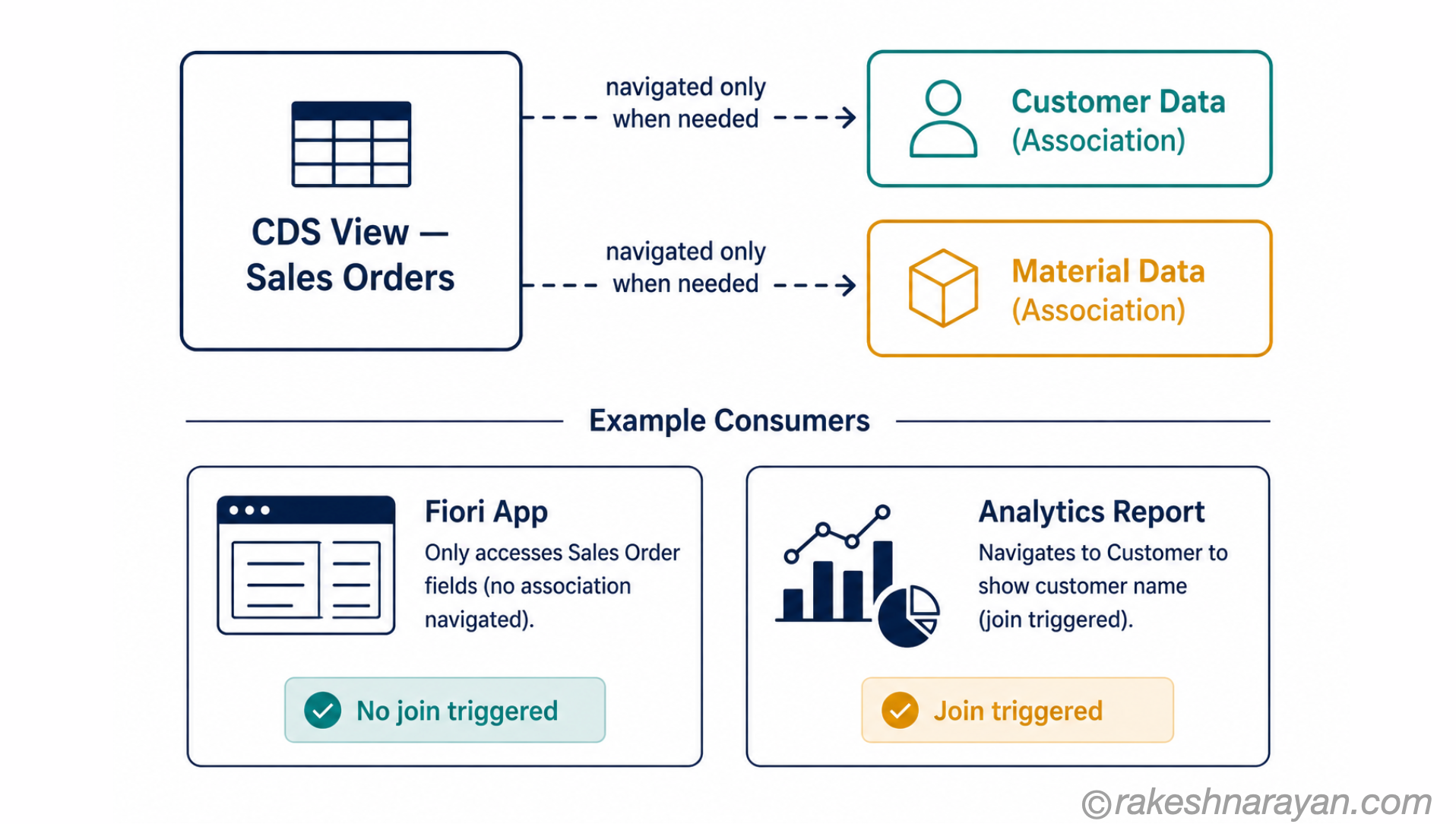
One of the most useful features of CDS views is associations. Where a traditional SQL join always executes, a CDS association defines a potential join that is only executed when a consumer actually navigates it.
This matters for performance. If you define a CDS view over sales orders with an association to customer data, a report that only needs the sales order fields pays no cost for the customer join. A Fiori app that navigates to customer details triggers the join only when needed.
| Join | Association |
|---|---|
| Always executed — even if consuming app does not need the joined fields | Lazy — only executed when consumer explicitly navigates |
| Result includes all joined columns in the result set | Association fields not included unless accessed |
| Classic SQL behaviour | CDS-specific feature — not in traditional SQL views |
| Use when data is always needed | Use when data is sometimes needed |
Annotations — the Metadata That Makes CDS Views Smart
Annotations are what elevate CDS views from SQL views to semantic objects. They are machine-readable metadata that downstream systems consume to decide how to handle the data.
Three categories of annotations matter in practice:
| Annotation Category | Examples | What They Control |
|---|---|---|
| Semantics | @Semantics.amount.currencyCode @Semantics.quantity.unitOfMeasure | Tells consumers which field holds the currency or unit for a value. Without this, currency amounts are just numbers. |
| OData / API | @OData.publish: true @ObjectModel.semanticKey | Controls how the CDS view is exposed as an OData service and which fields identify a record. |
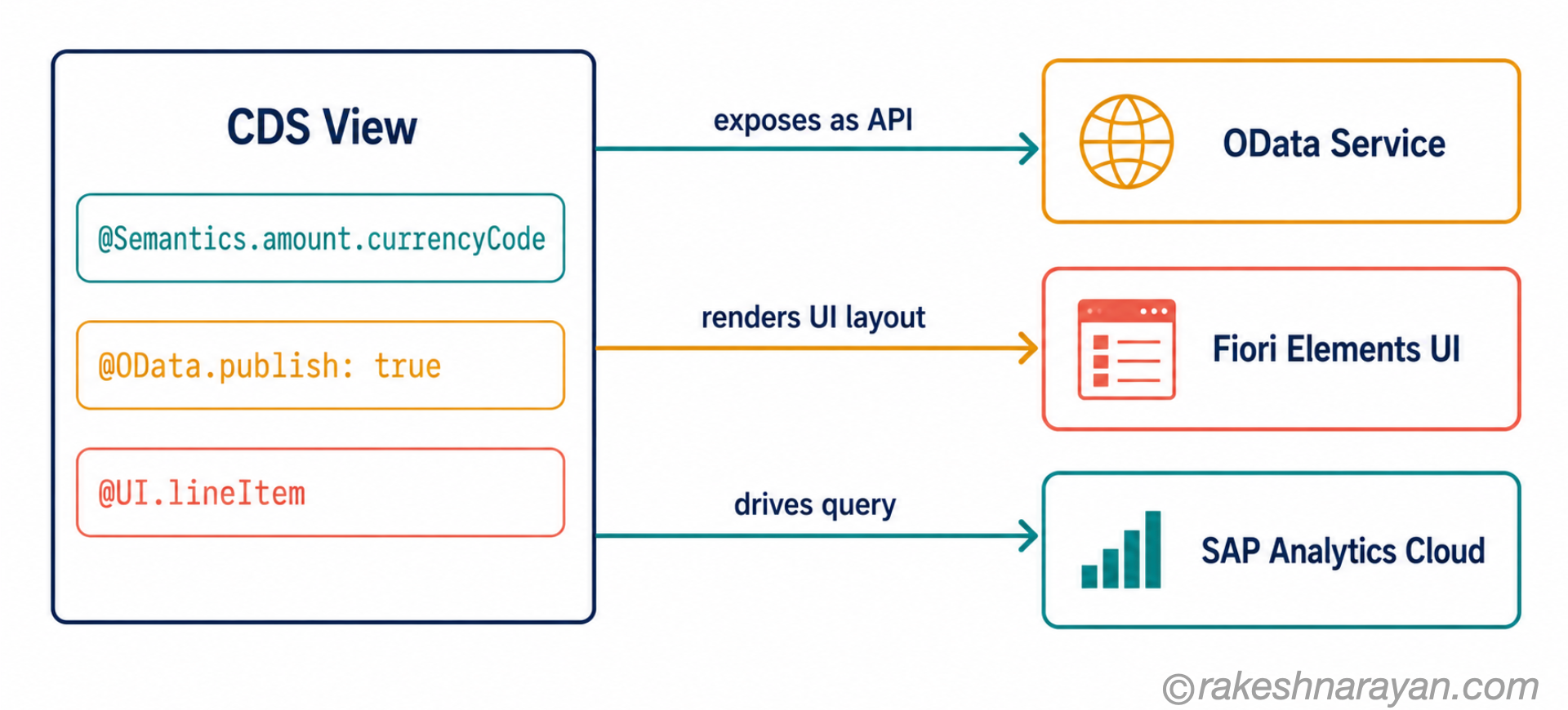
| Analytics / UI | @AnalyticsDetails.query.axis @UI.lineItem | Drives SAP Analytics Cloud queries and Fiori Elements UI layouts directly from the CDS view definition. |
The practical implication: a well-annotated CDS view can serve as the single source of truth for a business object. The OData service, the Fiori Elements UI, and the analytical report all derive their behaviour from the same set of annotations. Change the annotation once, all consumers benefit.
Released vs Unreleased CDS Views — a Critical Distinction
Not every CDS view in S/4HANA is available for customer use. SAP assigns a release contract to each view, and this determines whether you can safely build on it.
| Contract | What It Means |
|---|---|
| C0 — Extension Only | Can be extended but not consumed directly in custom code. |
| C1 — System-Internal Use | SAP internal only. Not for customer use. May change without notice. |
| C2 — Use in Key User Apps | Stable for key user extensibility scenarios. |
| Released (no C contract) | Fully released for customer consumption. Stability guaranteed across upgrades. |
💡 Practical Tip
Always check the release contract before building custom code on a CDS view. A C1 view used in custom code is a hidden dependency that will break on the next upgrade. In ADT, the release contract is visible in the object properties. The SAP API Business Hub also lists all released CDS views.
Custom CDS Views — Building on the VDM
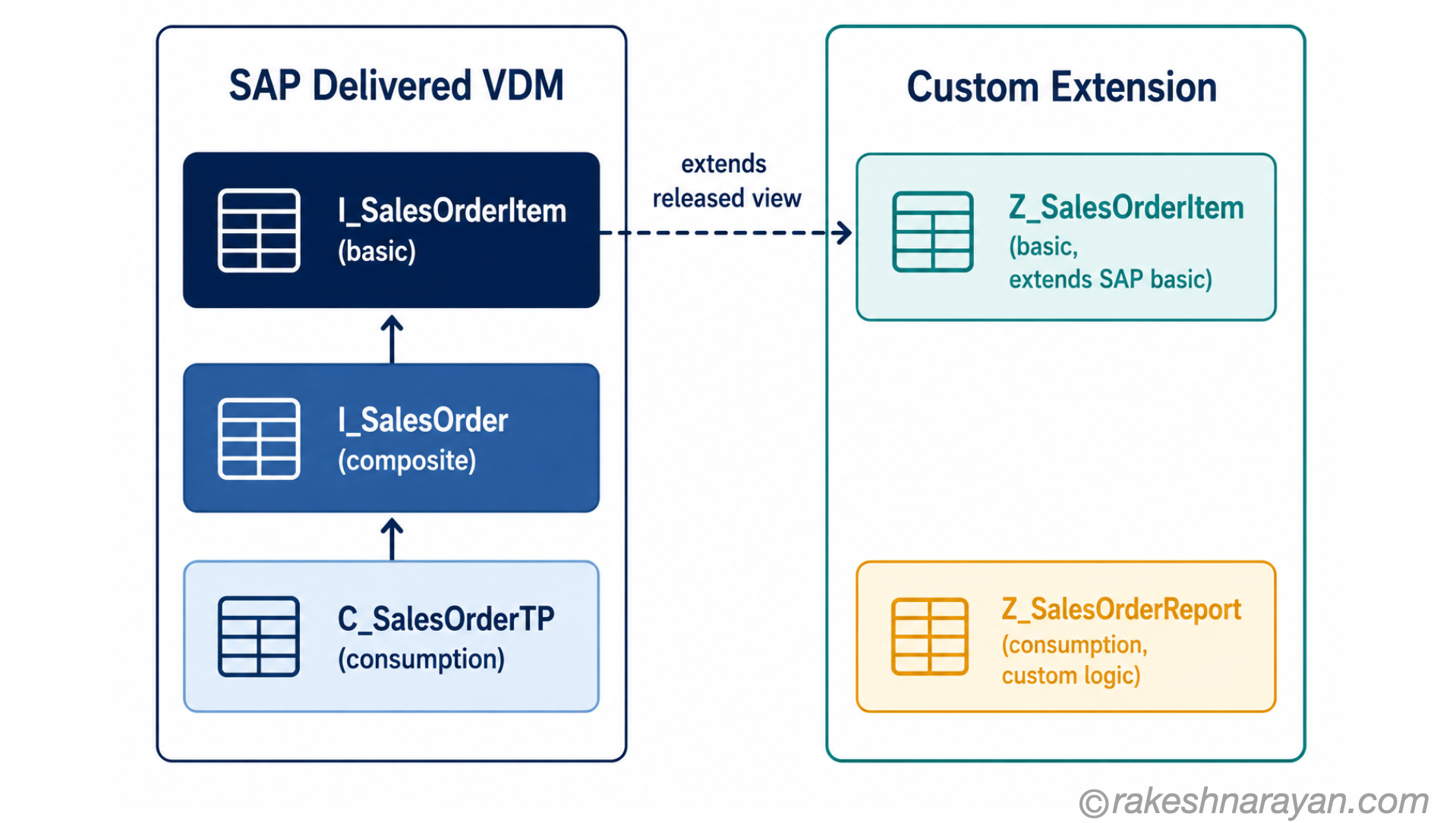
You can build your own CDS views on top of SAP’s released views. This is the correct extensibility pattern — you consume a released view, add your own fields or logic, and expose the result.
Custom CDS views follow the same layered pattern as the VDM. A basic custom view extends a released interface view. A consumption view above it shapes the data for a specific Fiori app or report. The pattern is the same whether SAP built it or you did.
The naming convention matters. SAP’s views use the I_ prefix (interface) and C_ prefix (consumption). Your custom views should use the Z prefix or a customer namespace — this makes it clear at a glance which objects are SAP-delivered and which are custom.
At a Glance — The Mental Model
| Concept | One-Line Summary |
|---|---|
| CDS View | A semantic database view with annotations. Not just a SQL view — it describes how the data should be used. |
| VDM | SAP’s structured library of CDS views. The official data layer of S/4HANA. |
| Basic View | Maps to one database table. The stable foundation of the VDM. |
| Composite View | Joins multiple basic views. Adds business logic. The reusable middle layer. |
| Consumption View | Shaped for a specific consumer — a Fiori app, an API, a report. |
| Association | A lazy join — defined in the view, only executed when a consumer navigates it. |
| Annotation | Metadata on a CDS view that controls how consumers use the data. |
| Release Contract | SAP’s commitment (or lack of) to stability. Always check before building on a view. |
The Part Most People Miss
Most explanations of CDS views focus on the syntax. The syntax is learnable in a day. What takes longer to internalise is the VDM’s design intent: every layer exists to serve a specific consumer, and mixing layers creates problems.
A consumption view used as a foundation for another view creates a tight coupling to a specific use case. A basic view consumed directly by a Fiori app bypasses the business logic in the composite layer. These are not just architectural preferences — they are the patterns that determine whether your custom code survives the next upgrade.
Build on released interface views. Consume them through your own composite and consumption views. Keep the layers intact. That is the discipline that makes S/4HANA extensible over the long term.
🔗 Related Reading
ABAP Fundamentals That Still Matter — the development environment and language features you need to write CDS views.
OData Protocol in SAP — V2, V4 and How It Works — how CDS views are exposed as OData services for Fiori apps and APIs.
SAP BTP — The Platform Explained — where custom CDS views and extensions live in the BTP ABAP Environment.
SAP Integration Patterns — The Decisions That Matter — how CDS views feed integration and extraction scenarios.
Published on rakeshnarayan.com — Articles URL: https://rakeshnarayan.com/articles/cds-views-and-the-vdm-concept/
Did you enjoy this article?
Let me know — it takes one click.
0 Comments
Leave a Comment
Your comment has been submitted and will appear after review.