SAP Analytics Cloud — What It Is and How It Fits
🔗 Related reading
New to SAP’s cloud landscape? Start here first: SAP BTP — The Platform Explained - SAC runs on BTP infrastructure. That post explains the platform behind it.
SAP S/4HANA vs ECC — The Real Difference - Understanding the S/4HANA data model explains why SAC’s live connection works the way it does.
Ask an SAP consultant what tool to use for reporting on S/4HANA data and you will get different answers depending on who you ask. Some will say SAP Analytics Cloud. Some will say keep using BW. Some will say they have not moved away from BusinessObjects yet. All of them are working in the same landscape — and the confusion is understandable.
SAP Analytics Cloud (SAC) gets described differently depending on who is pitching it. A planning tool. A BI platform. A dashboarding solution. An Excel replacement for finance. All of those descriptions are partially correct. None of them on their own captures what SAC actually is.
This post gives you the complete picture: what SAC is, what its three pillars do, how it connects to S/4HANA, and — the question nobody answers clearly — where it fits relative to BW, BusinessObjects and Datasphere.
The three things SAC actually does
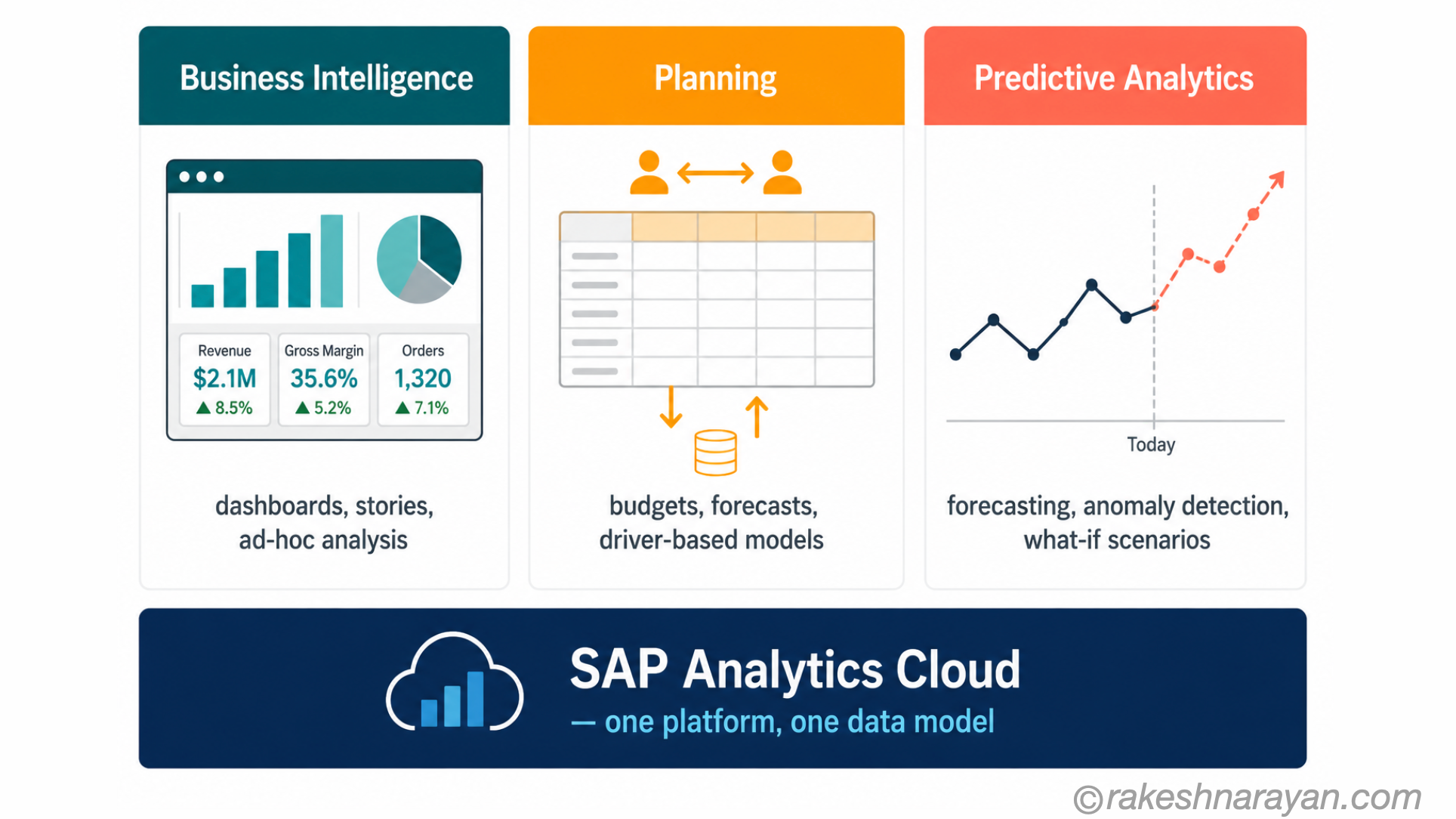
SAP Analytics Cloud is a SaaS platform — no on-premise installation, no separate server to maintain. It runs in SAP’s data centres and you access it through a browser. That is the starting point. What it does falls into three distinct pillars.
| Pillar | What it means in practice | Replaces or extends |
|---|---|---|
| Business Intelligence (BI) | Dashboards, stories and reports built on live or imported data. Self-service analytics for business users without needing IT for every report. | SAP BusinessObjects for new cloud reporting scenarios |
| Planning | Collaborative, driver-based planning directly in SAC — budgets, forecasts, scenarios. Plan data can be written back to S/4HANA. Connected to actuals in real time. | SAP BPC (Business Planning and Consolidation) and scattered Excel-based planning |
| Predictive Analytics | Built-in machine learning for forecasting, anomaly detection and what-if scenario modelling. No separate data science tooling required for standard use cases. | External BI tools and manual statistical modelling for business forecasting |
The three pillars in one platform is the actual differentiator. Most BI tools do reporting. Most planning tools do planning. SAC does both — plus predictive — and they share the same data model and the same user interface.
In practice, organisations often start with one pillar and expand. Many start with BI reporting on S/4HANA data, then bring planning in once the data foundation is stable.
How SAC connects to S/4HANA — and why it matters
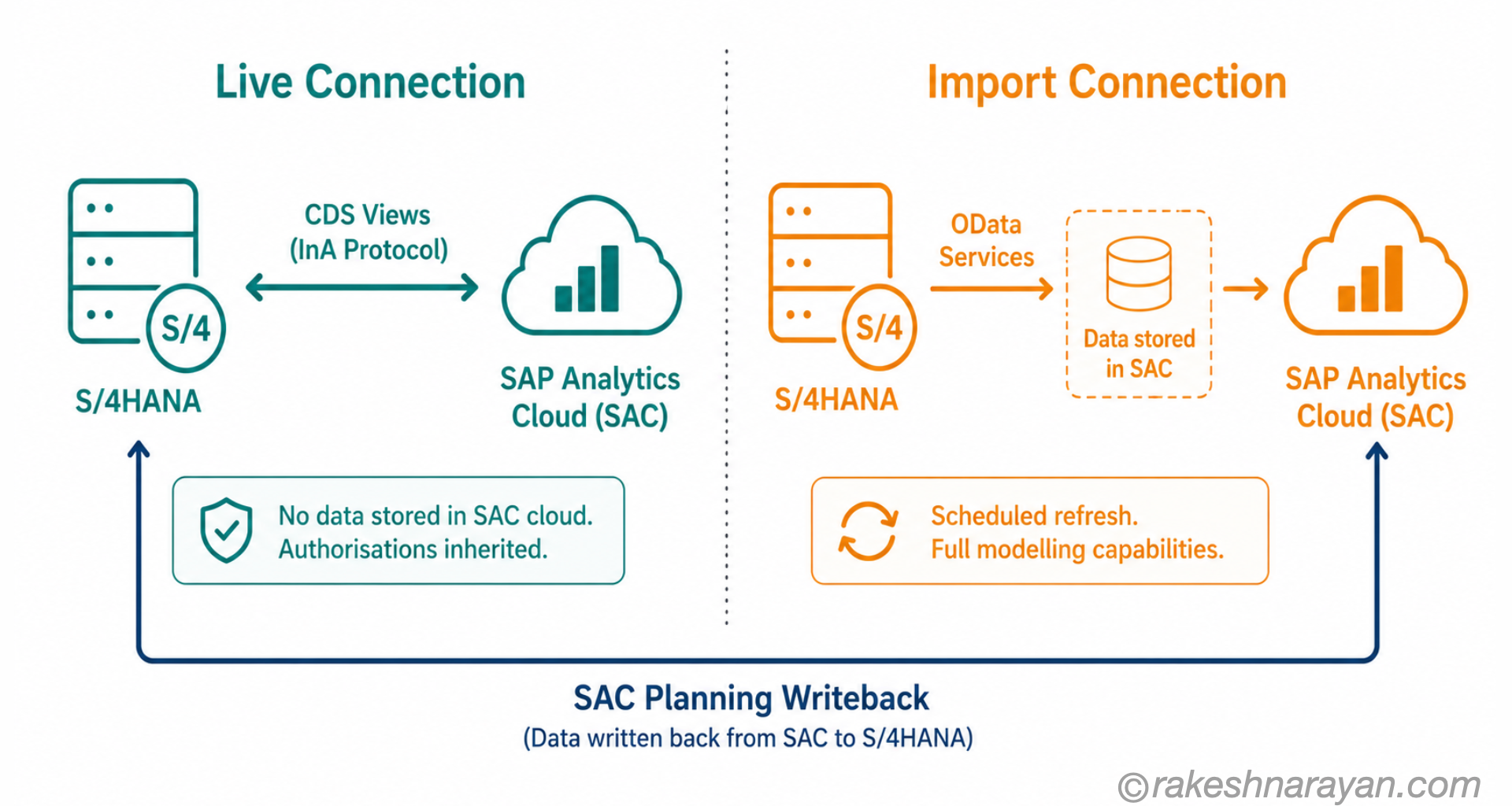
The connection between SAC and S/4HANA is the reason SAP positioned SAC as the preferred analytics layer for S/4HANA customers. Understanding the two connection modes is essential — they have very different implications for architecture and data governance.
| Connection mode | How it works | What is stored in SAC | Best for |
|---|---|---|---|
| Live Connection | SAC queries the source system directly at runtime. No data is copied to the cloud. For S/4HANA: SAC consumes CDS views with the annotation @analytics.query:true. | Only metadata — dimension names, filter values. No business data. | Real-time reporting on S/4HANA where data must not leave on-premise. Authorisations from S/4HANA apply automatically. |
| Import Connection | Data is replicated from the source into SAC. For S/4HANA: SAC consumes OData services (not CDS views directly). | Full dataset stored in SAC cloud. Scheduled refresh cycles. | Scenarios requiring extensive transformation, blending with non-SAP data, or planning models needing full SAC modelling capabilities. |
💡 Practical tip
Most organisations use live connection for real-time S/4HANA reporting and import connection for planning models that blend S/4HANA actuals with non-SAP data. Live connection is simpler to maintain — no replication process, existing S/4HANA authorisations are reused, and no business data is stored in the cloud.
The live connection is built on SAP’s InA (Information Access) protocol. The query executes on your S/4HANA or BW system and only the result set comes back to the browser — the underlying data never passes through SAC’s cloud infrastructure.
For planning, the import model is more common because planning requires full data persistence and writeback. SAC planning models store data and can write plan values back to S/4HANA through a dedicated integration — closing the loop between plan and actuals.
Where SAC fits in the SAP analytics landscape
This is the question that causes the most confusion on projects. SAP has multiple analytics and reporting tools — and each one has a role. They are not all the same thing, and they are not all being replaced by SAC.
Here is the honest picture as of mid-2026:
| Tool | What it actually is | Direction in 2026 | Use it when… |
|---|---|---|---|
| SAP Analytics Cloud (SAC) | SaaS front end for BI, planning and predictive. The strategic analytics layer for cloud and hybrid SAP landscapes. | SAP’s primary investment for analytics and planning. Quarterly releases. Joule AI integration active. | Building new reporting or planning on S/4HANA, S/4HANA Cloud or BW/4HANA. All new planning projects. |
| SAP BW / BW/4HANA | On-premise data warehouse — loads, transforms and stores data modelled for analysis. Mainstream maintenance ends December 2027; extended maintenance available to 2030. | Still widely deployed. Increasingly used as a data layer feeding SAC rather than as a reporting front end. | You have existing BW investments. SAC can connect live or via import. BW is not being replaced — it is evolving into a data layer. |
| SAP BusinessObjects (BOBJ) | On-premise enterprise reporting suite — Web Intelligence, Crystal Reports, Lumira Designer. BI 4.3 mainstream maintenance ends December 2026. SAP released BI 2025 in March 2025; BI 2027 planned for Q4 2026. | SAP is maintaining BOBJ with new releases — it is not sunset. Two paths exist: upgrade to BI 2025/2027 to stay on-premise, or migrate to SAC. | Complex pixel-perfect enterprise reporting (Crystal Reports), large-scale scheduled distribution, or organisations not ready to move to cloud. |
| SAP Datasphere | Cloud data fabric — integrates, harmonises and governs data from SAP and non-SAP sources. Not a reporting tool. The data preparation layer beneath SAC. | SAP’s strategic data foundation. Since Q1 2025, SAC Seamless Planning uses Datasphere as the storage layer for planning data. | You need a governed, harmonised data layer across multiple systems before consuming in SAC. Part of SAP Business Data Cloud. |
⚠️ Warning
The narrative that BusinessObjects is being sunset and replaced by SAC is too simple. SAP released BusinessObjects BI 2025 in March 2025 and has confirmed BI 2027 for Q4 2026. On-premise customers have a genuine choice. If you are advising on an analytics strategy, present both paths — on-premise upgrade or SAC migration — and let the organisation’s cloud readiness and reporting complexity guide the decision.
📌 Key takeaway
The simplest way to think about the SAP analytics stack: Datasphere prepares the data. SAC activates it. BW is a data layer option alongside Datasphere. BusinessObjects covers complex on-premise reporting where SAC is not yet the right fit.
Planning in SAC — what it actually means
Planning is the pillar that gets the most questions — and the most misconceptions. When SAP says SAC is a planning tool, they mean something specific. Being precise about it matters.
What SAC planning is
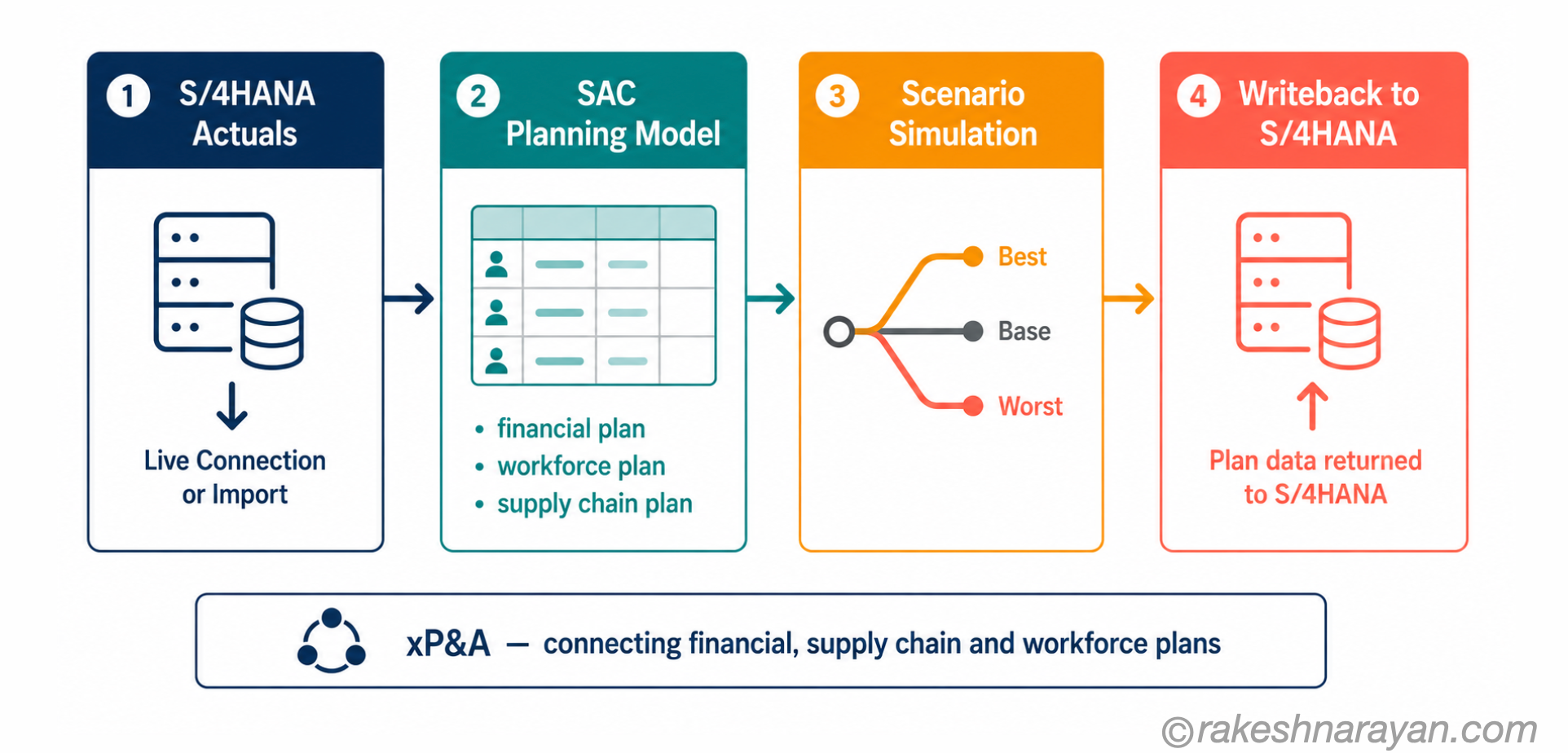
SAC planning is collaborative, driver-based planning connected to actuals. Finance teams build planning models in SAC, enter assumptions and plan figures, run calculations and scenarios, and see the impact against real S/4HANA actuals — in the same tool, on the same data model.
Plan data is stored in SAC and can be written back to S/4HANA. That writeback loop — actuals come in from S/4HANA, plans go back to S/4HANA — is what makes SAC a genuine planning platform rather than a standalone budgeting tool.
xP&A — connected planning across lines of business
SAP uses the term xP&A (Extended Planning and Analysis) to describe the approach of connecting financial, supply chain and workforce planning in a single SAC environment. Instead of finance planning in one tool, HR in another and supply chain in a third, xP&A brings them into one connected plan with a shared data model.
In practice, most organisations start with financial planning and expand. The architecture supports it — the models can be connected progressively.
What SAC planning is not — yet
SAC planning is not a drop-in replacement for every capability in SAP BPC (Business Planning and Consolidation). Complex group consolidation scenarios, intercompany elimination and certain statutory reporting requirements still require evaluation against your specific needs. SAP is investing in this area — but scope that honestly before committing.
✅ Best practice
For new planning implementations in 2026: SAC is the right starting point. For migrations from BPC: assess which BPC capabilities you actively use, map them against SAC’s current feature set, and plan the migration in phases. Do not try to replicate BPC feature-for-feature in SAC — the planning paradigm is different, and the redesign is usually the opportunity.
At a glance — SAP Analytics Cloud
| Concept | One-line summary |
|---|---|
| SAP Analytics Cloud (SAC) | SaaS platform combining BI reporting, planning and predictive analytics — SAP’s strategic analytics front end |
| Business Intelligence pillar | Dashboards and stories built on live or imported data — self-service analytics for business users |
| Planning pillar | Collaborative, driver-based planning connected to S/4HANA actuals with writeback capability |
| Predictive Analytics pillar | Built-in machine learning for forecasting and scenario modelling — no separate data science tooling required |
| Live Connection | SAC queries the source system at runtime — no data stored in SAC cloud, S/4HANA authorisations reused |
| Import Connection | Data replicated into SAC — full modelling capabilities, scheduled refresh, required for most planning models |
| xP&A | Extended Planning and Analysis — SAP’s approach to connecting financial, supply chain and workforce plans in SAC |
| SAP Datasphere | The data foundation layer beneath SAC — integrates and governs data. SAC is the consumption and planning front end on top. |
| SAP BusinessObjects | On-premise enterprise reporting suite — not sunset. BI 2025 released March 2025; BI 2027 planned Q4 2026. Two paths: upgrade or migrate to SAC. |
| SAP BW / BW/4HANA | On-premise data warehouse — increasingly used as a data layer feeding SAC rather than as a standalone reporting front end |
What to take away
SAC is not just another BI tool SAP built to replace BusinessObjects. That framing misses what it is. SAP spent decades with analytics and planning in separate products — BusinessObjects for reporting, BPC for planning, BW as the data layer underneath — and no clean integration between them. SAC is the attempt to fix that: one platform where the data model, the reports and the plans coexist.
Whether that is the right fit for your organisation depends on your current landscape. If you are on S/4HANA and building new reporting or planning capability, SAC is the clear starting point. If you have significant BPC investments or complex on-premise reporting in BusinessObjects, the migration path requires proper scoping — not just a product decision.
The most useful thing to know going into any SAC conversation: understand which pillar the project is actually about, understand the connection architecture, and understand where the tool fits in the broader stack. The rest follows from that foundation.
🔗 Related posts on this site
SAP BTP — The Platform Explained - SAC runs on BTP infrastructure. That post explains the platform behind it.
SAP S/4HANA vs ECC — The Real Difference - Understanding the S/4HANA data model explains why live connection to SAC works the way it does.
AI in SAP: How Joule and Business AI Actually Work - Joule is now integrated into SAC for natural language queries and scenario modelling. That post covers the AI layer.
CDS Views and the VDM in SAP S/4HANA Explained - Live connection from SAC to S/4HANA depends on CDS views. That post explains the data model underneath.
SAP Business Data Cloud — The Architecture Behind SAP’s AI Push - the governed semantic layer that BDC provides is what makes SAC’s cross-system analytics and AI features reliable at scale.
Published on rakeshnarayan.com — Articles
https://rakeshnarayan.com/articles/sap-analytics-cloud-what-it-is-and-how-it-fits/
Did you enjoy this article?
Let me know — it takes one click.
0 Comments
Leave a Comment
Looks like this one held your attention — I'd really appreciate a quick comment below.
Your comment has been submitted and will appear after review.