What Is an API? — How Software Systems Talk to Each Other
Every time you check the weather on your phone, the app does not store that forecast itself. It asks somewhere else for it. Every time you pay on a website, your bank is asked, in real time, whether the money is there. Every time a new SaaS tool connects to your existing system, something is enabling that handshake quietly in the background.
That something is an API. The term gets thrown around constantly — in job descriptions, in architecture meetings, in vendor pitches. Most people nod along. Fewer people can explain what one actually is.
This post fixes that. Not with analogies about waiters and restaurants — you have heard that one. With a clear explanation of what an API is, what travels when one is called, and why they are designed the way they are.
🔗 Related Reading
Once you understand what an API is, the natural next step is REST API Design Principles — which covers how well-designed APIs are structured. For the security side, API Security Essentials picks up from here.
What an API actually is
API stands for Application Programming Interface. The acronym is not particularly helpful. The concept behind it is.
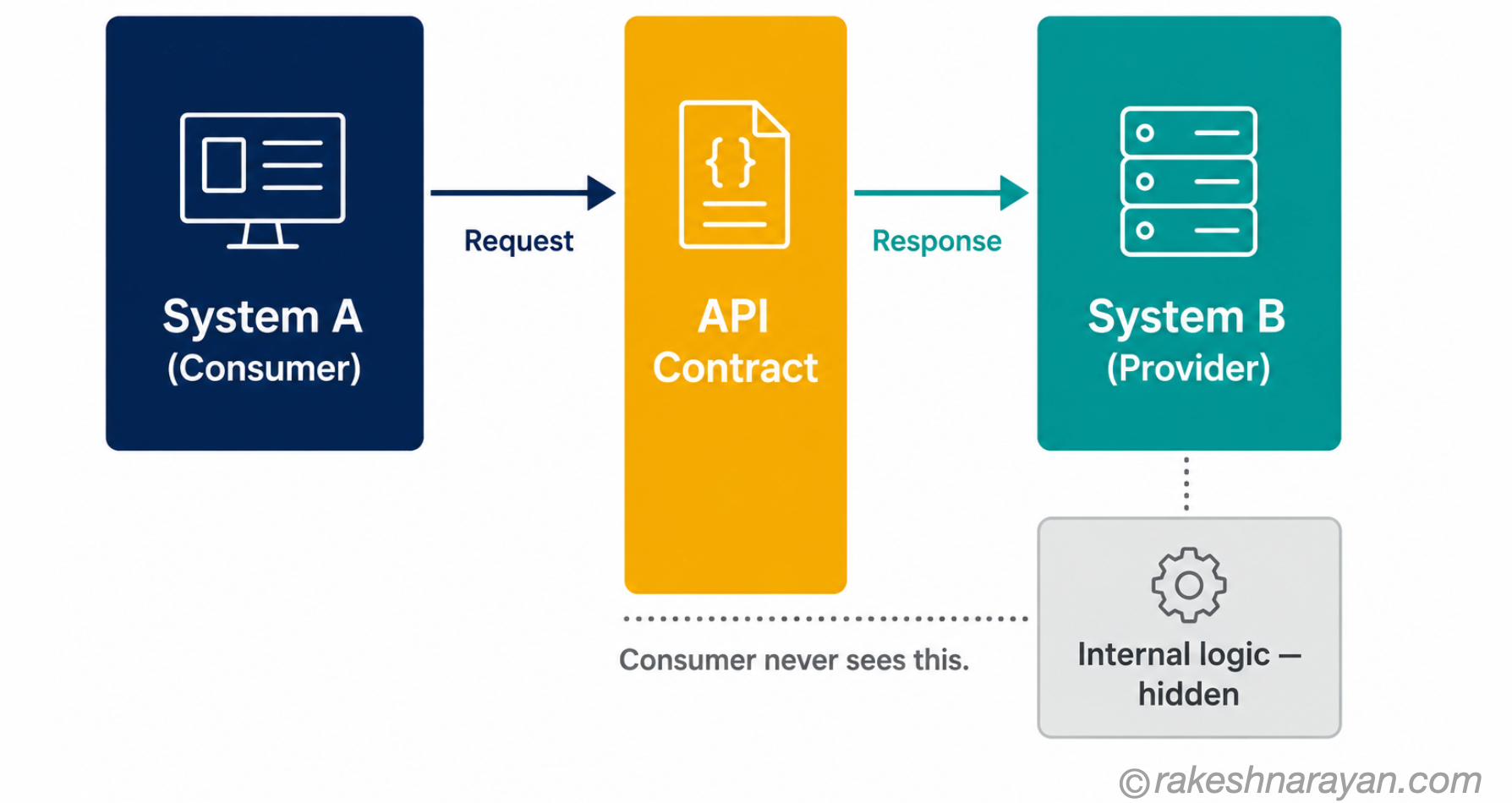
An API is a defined interface between two pieces of software. One side makes a request. The other side responds. The interface specifies exactly what requests are allowed, what format they must be in, and what the response will look like.
The important word is defined. An API is not just two systems talking — it is two systems talking through a published contract. System A does not need to know how System B works internally. It just needs to know the API: what to ask for, and what it will get back.
📌 Key Takeaway
An API hides complexity on purpose. Spotify does not give you access to its music database directly. It gives you an API — a controlled set of things you are allowed to ask for. The internal implementation can change entirely; the API contract stays stable. That is the whole point.
This is why APIs are sometimes described as a contract between systems. The provider commits to accepting certain requests and returning certain responses. The consumer commits to asking in the format specified. As long as both sides honour the contract, neither needs to know anything about the other’s internals.
The request and the response — what actually travels
Most explanations of APIs stop at the concept. This is the part they skip: what is actually sent when a system calls an API.
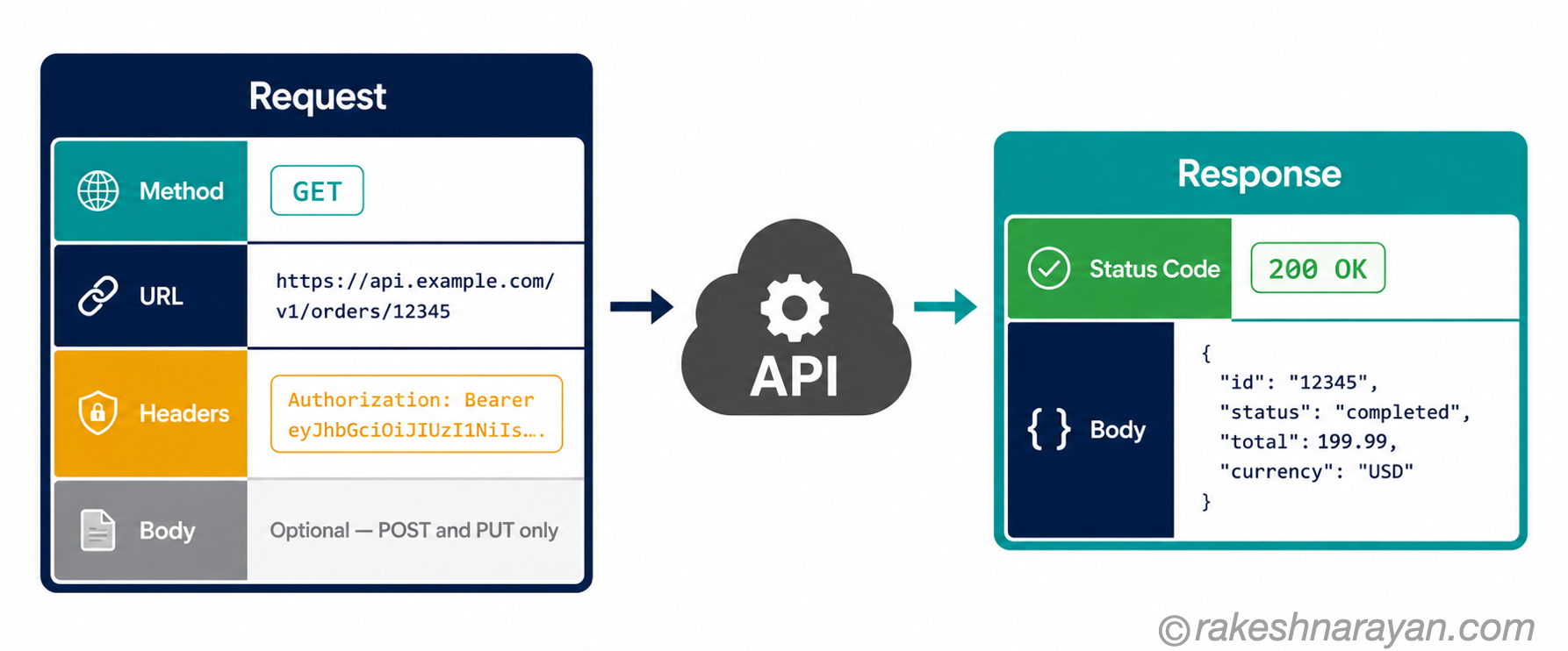
A web API call is an HTTP request. It has four components that matter:
| Component | What it is | Example |
|---|---|---|
| Method | What the caller wants to do — retrieve, create, update or delete | GET (retrieve), POST (create), PUT (update), DELETE (remove) |
| URL (endpoint) | The address of the specific resource being requested | |
| Headers | Metadata about the request — who is asking, what format is expected | |
| Body | Data sent with the request — only relevant for POST and PUT | A JSON object containing the data to be created or updated |
URL example:
https://api.spotify.com/v1/tracks/3n3Ppam7vgaVa1iaRUIOKEHeaders example:
Authorization: Bearer {token}
Content-Type: application/json
The response comes back from the server with two things that matter most: a status code and a body.
The status code is a three-digit number that tells you immediately whether the request worked. 200 means success. 201 means something was created. 401 means you are not authenticated. 404 means the resource does not exist. 500 means something went wrong on the server side.
The body is the actual data — almost always in JSON format for modern web APIs. It contains whatever the API is designed to return: a list of records, a single object, a confirmation, or an error message.
💡 Practical Tip
If you are ever looking at an API response and it is unclear what went wrong, the status code is your first signal. A 4xx code means the problem is with the request — wrong format, missing authentication, resource not found. A 5xx code means the problem is on the provider’s side. This distinction saves time when debugging integrations.
Why APIs are designed the way they are
APIs exist because of a problem that arises the moment more than one system needs to share data or functionality. Without a defined interface, every integration is custom — and every change on one side breaks the other.
Three principles drive how APIs are designed:
| Principle | What it means in practice |
|---|---|
| Encapsulation | The provider exposes only what it wants to expose. Internal databases, business logic and infrastructure stay hidden. Consumers get a clean, stable surface to work with. |
| The contract | Both sides commit to a specification. The provider commits to accepting defined requests and returning defined responses. The consumer commits to asking correctly. Neither depends on the other’s internals. |
| Versioning | APIs change over time. A well-designed API uses versioning — typically in the URL (/v1/, /v2/) — so existing consumers keep working when the provider evolves. Breaking changes are released as a new version, not silently applied to the existing one. |
The consequence of this design is that one API can be consumed by thousands of different systems simultaneously — a mobile app, a web app, a third-party integration, an internal tool — all asking the same questions in the same format, all getting consistent answers.
✅ Best Practice
When evaluating a vendor’s API, check for versioning. If there is no version in the URL — no /v1/ or /v2/ — and no versioning strategy in the documentation, that API will break your integration without warning when the provider updates it. Versioning is a sign of a mature, production-ready API.
The types of API you will actually encounter
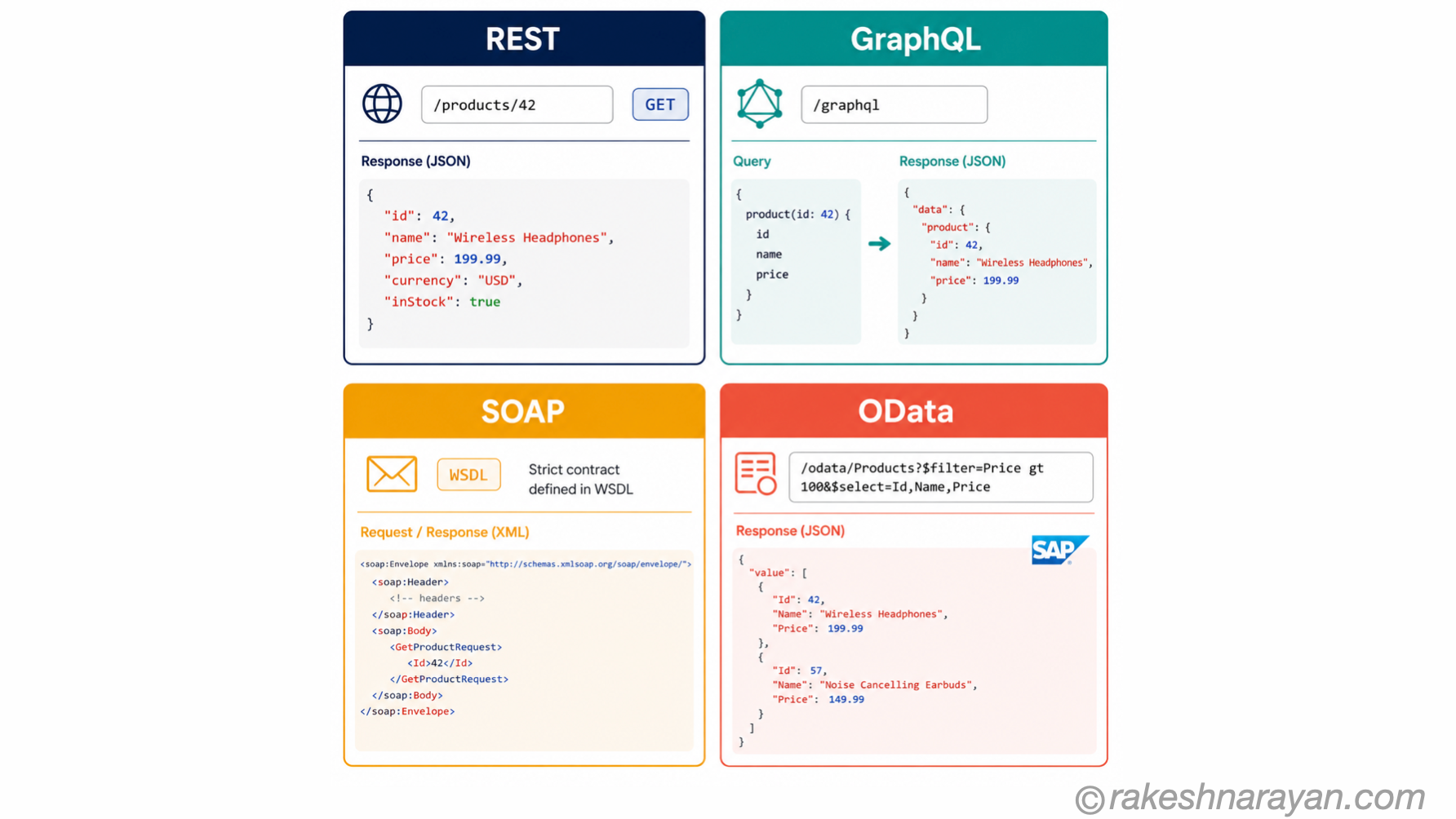
REST is the default. It is what almost every modern web API uses. When someone says “we have an API”, they almost certainly mean a REST API.
REST uses HTTP methods and URLs to represent resources and actions. It is stateless, widely supported, and straightforward to integrate with. Every tool you use to build software understands it.
| API type | How it works | When you encounter it | Examples |
|---|---|---|---|
| REST | Resources at URLs, operated on with HTTP methods (GET, POST, PUT, DELETE). Stateless. Returns JSON. | The vast majority of modern web and mobile APIs | Stripe, Slack, Salesforce, most SaaS platforms |
| GraphQL | Client specifies exactly what data it needs in a query. One endpoint, flexible response shape. Returns JSON. | APIs where mobile clients need to minimise data transfer | Facebook, GitHub, Shopify Storefront API |
| SOAP | XML-based, strict schema, uses a single endpoint with structured envelope. Heavier and more formal. | Legacy enterprise and financial systems | Banking, insurance, older ERP integrations |
| OData | A REST-based protocol with a standardised query language. Built on HTTP. Returns JSON or XML. | SAP systems — the current standard for SAP Fiori and S/4HANA APIs | SAP Fiori, S/4HANA, BTP integrations |
📝 Note
OData deserves a special mention for anyone working in the SAP ecosystem. SAP exposes almost all of its business data through OData services — purchase orders, sales orders, master data, financial documents. If you are building a Fiori app, integrating with S/4HANA, or connecting an external system to SAP, you are working with OData. The full story is in OData Protocol in SAP — V2, V4 and How It Works.
⚠️ Warning / Caution
SOAP is not dead. It is functionally obsolete for new builds, but it is very much alive in banking, insurance and older enterprise systems. If you are integrating with a financial institution or a legacy ERP, expect to encounter it. The learning curve is real — the XML schemas are verbose and the tooling is nothing like REST.
Where APIs show up in everyday work
APIs are not an abstract concept. They are the mechanism behind almost every integration you work with — consumer or enterprise.
| Scenario | What is happening at the API level |
|---|---|
| Sign in with Google on a third-party site | The site calls Google’s OAuth API to verify your identity. Google responds with a token. The site never handles your Google password. |
| Live flight prices on a travel booking site | The site calls an airline or aggregator API in real time. The response comes back with current availability and pricing. No data is stored locally. |
| A SaaS tool syncing with your CRM | The SaaS tool calls the CRM’s API to read and write records. Both sides follow the contract — the CRM does not need to know anything about the SaaS tool’s internals. |
| SAP Fiori app loading purchase order data | The Fiori app calls an OData API on the SAP backend. The backend responds with the PO data in a defined format. The app renders it. The business logic stays entirely in SAP. |
| A payment at checkout | Your browser calls the payment provider’s API (Stripe, PayPal, Adyen). The provider’s API calls your bank’s API. Each layer communicates through defined contracts, not direct database access. |
The pattern is always the same. One system makes a structured request. Another system responds with defined data. The contract between them makes the integration stable, scalable and independent of each side’s internal implementation.
At a glance — what is an API
| Concept | One-line summary |
|---|---|
| API | A defined interface between two software systems — one makes a request, the other responds |
| API contract | The published specification both sides commit to — what requests are valid and what responses look like |
| HTTP method | The action the caller wants to take — GET (read), POST (create), PUT (update), DELETE (remove) |
| Status code | The three-digit number in every response indicating success or failure — 200 OK, 404 not found, 500 server error |
| REST | The dominant API style — resources at URLs, HTTP methods, JSON responses, stateless |
| GraphQL | A query language for APIs — clients specify exactly what data they need, one endpoint |
| SOAP | An older XML-based protocol — still active in legacy enterprise and financial systems |
| OData | A REST-based protocol with standardised query syntax — the API layer that SAP runs on |
| Encapsulation | The API exposes only what the provider chooses — internal logic stays hidden from the consumer |
| Versioning | A mature API uses version numbers (/v1/, /v2/) so existing integrations do not break when the API evolves |
What to take away
An API is not a technology. It is a decision — a deliberate choice about what to expose, what to hide, and what contract to honour.
When Stripe built its API in the early 2010s, it was not building a feature. It was making a commitment: here is exactly how you talk to us, here is exactly what you get back, and we will honour that contract as we grow. That decision is why Stripe became the infrastructure layer for a huge share of the internet. The API was the product.
Once you see APIs as contracts rather than just connections, a lot of things in software architecture start making sense — why systems can be updated independently, why third-party integrations scale, why REST API Design Principles exist as a discipline, and why API Security Essentials matter as much as they do. The contract is everything.
🔗 Related posts on this site
REST API Design Principles — how well-designed REST APIs are structured: endpoints, methods, status codes and versioning.
API Security Essentials — authentication, authorisation and the OWASP API Security Top 10: what goes wrong and how to prevent it.
JSON — From Zero to Confident — JSON is what almost every API returns; this post covers it from the ground up.
OData Protocol in SAP — V2, V4 and How It Works — the API layer the SAP world runs on: what OData is, how V2 and V4 differ, and how to query it.
HTTP Requests and Responses — The Mental Model — every API call in this post is an HTTP request under the hood; this covers the protocol itself in full.
GraphQL vs REST — The Honest Decision Framework — once you understand what an API is, this is the decision framework for choosing between the two dominant styles.
Published on rakeshnarayan.com — Articles
URL: https://rakeshnarayan.com/articles/what-is-an-api-how-software-systems-talk-to-each-other/
Did you enjoy this article?
Let me know — it takes one click.
0 Comments
Leave a Comment
Looks like this one held your attention — I'd really appreciate a quick comment below.
Your comment has been submitted and will appear after review.