How HTTPS Works: Certificate Chains and TLS Handshake
🔗 Related Reading
OAuth 2.0 and OpenID Connect — How Modern Login Actually Works — authentication sits on top of the secure channel HTTPS provides.
Most explanations of HTTPS stop at the padlock. You know it means the connection is encrypted. You know there is something called a certificate involved. What you probably do not know is what the browser actually checks before it trusts that certificate, or what happens in the 50 milliseconds before the first byte of your page data arrives.
That gap matters more than it used to. If you build or deploy anything on the web, you will eventually encounter certificate errors, TLS configuration decisions, and debugging scenarios where understanding what actually happens during connection setup is the difference between solving the problem in ten minutes and spending a day on it.
This post goes deeper. Certificate chains, certificate authorities, the TLS handshake step by step, TLS 1.2 vs 1.3, and the concepts that sit underneath all of it.
The Trust Problem — Why Certificates Exist
Encryption alone does not solve the security problem on the internet. If you connect to your bank and the connection is encrypted, but you are actually connected to an attacker who is relaying your traffic — a man-in-the-middle — the encryption is worthless. You need a way to verify that the server you are talking to is actually who it claims to be.
Certificates solve the identity problem. An HTTPS certificate is a document that says: this server is genuinely operated by this organisation, and a trusted third party has verified that claim. The trusted third party is a Certificate Authority (CA).
Your browser ships with a pre-loaded list of root CAs it trusts — typically around 100–150 trusted root CAs, including Comodo, DigiCert, Let’s Encrypt, and others. If a certificate chains back to one of those trusted roots, the browser accepts it. If it does not, you see the warning screen.
Certificate Chains — the Trust Hierarchy
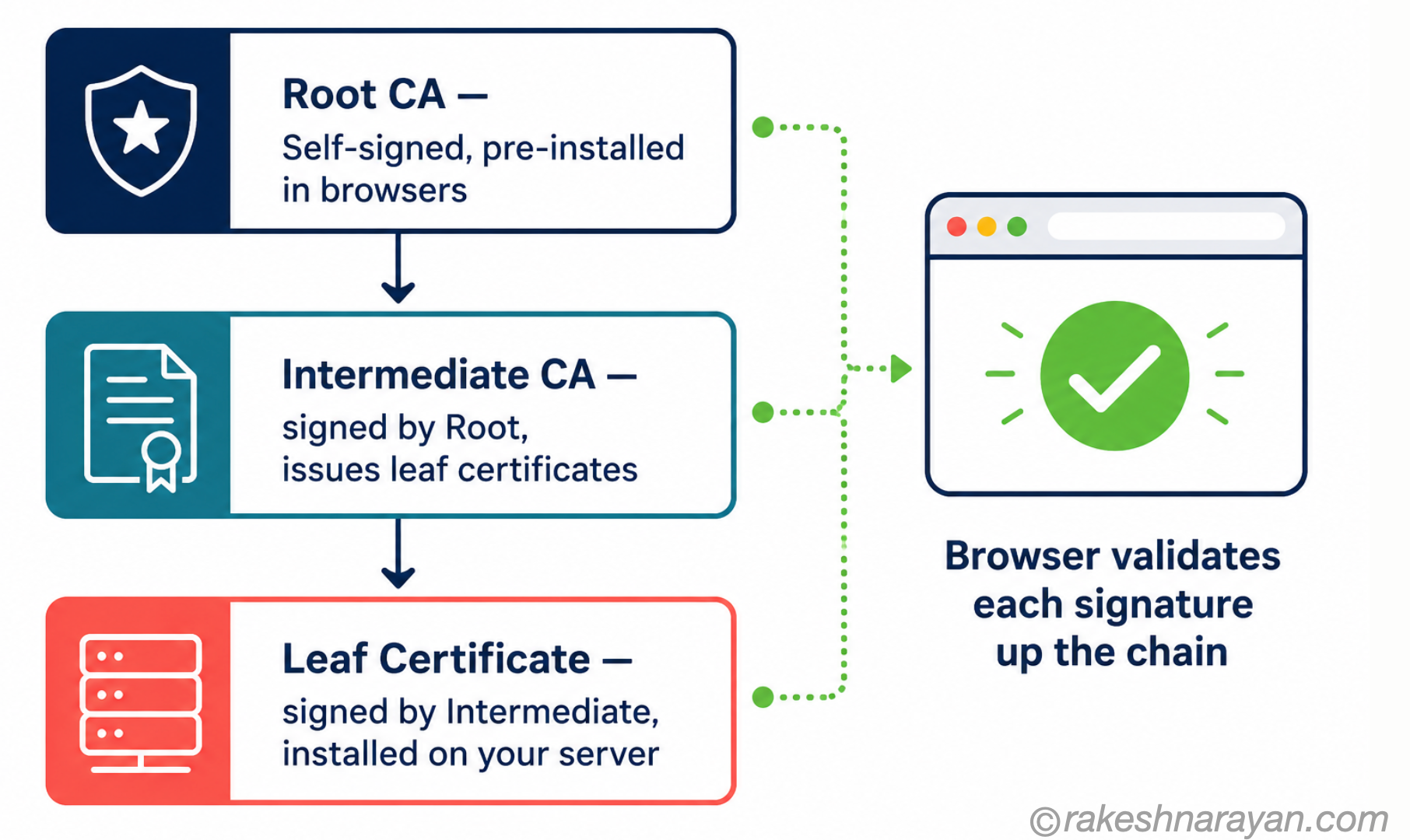
Certificates do not work as a flat list. They form chains. Understanding the chain is the key to understanding most certificate errors.
| Level | Certificate Type | Role |
|---|---|---|
| Top | Root CA Certificate | Self-signed. Pre-installed in browsers and operating systems. Rarely used directly — kept offline for security. |
| Middle | Intermediate CA Certificate | Signed by the root. Issues end-entity certificates. The operational layer of the PKI. |
| Bottom | End-Entity (Leaf) Certificate | The certificate on the server you are connecting to. Signed by an intermediate CA. |
When your browser connects to a server, it receives the server’s leaf certificate and usually one or more intermediate certificates. It then builds a chain from the leaf up through the intermediates to a root CA it trusts. Every signature in the chain is verified. If any link is missing, expired, or invalid, the connection fails.
The most common certificate error in practice — ‘certificate not trusted’ — usually means the server is not sending the complete intermediate certificate chain. The leaf certificate is valid, but the browser cannot build the chain to a trusted root because a middle certificate is missing.
💡 Practical Tip
If you are configuring a web server, always include the full certificate chain in your server configuration — not just the end-entity certificate. Nginx, Apache, and most other servers support a combined PEM file with the leaf certificate followed by the intermediates. Forgetting this is the most common cause of certificate trust errors.
What a Certificate Actually Contains
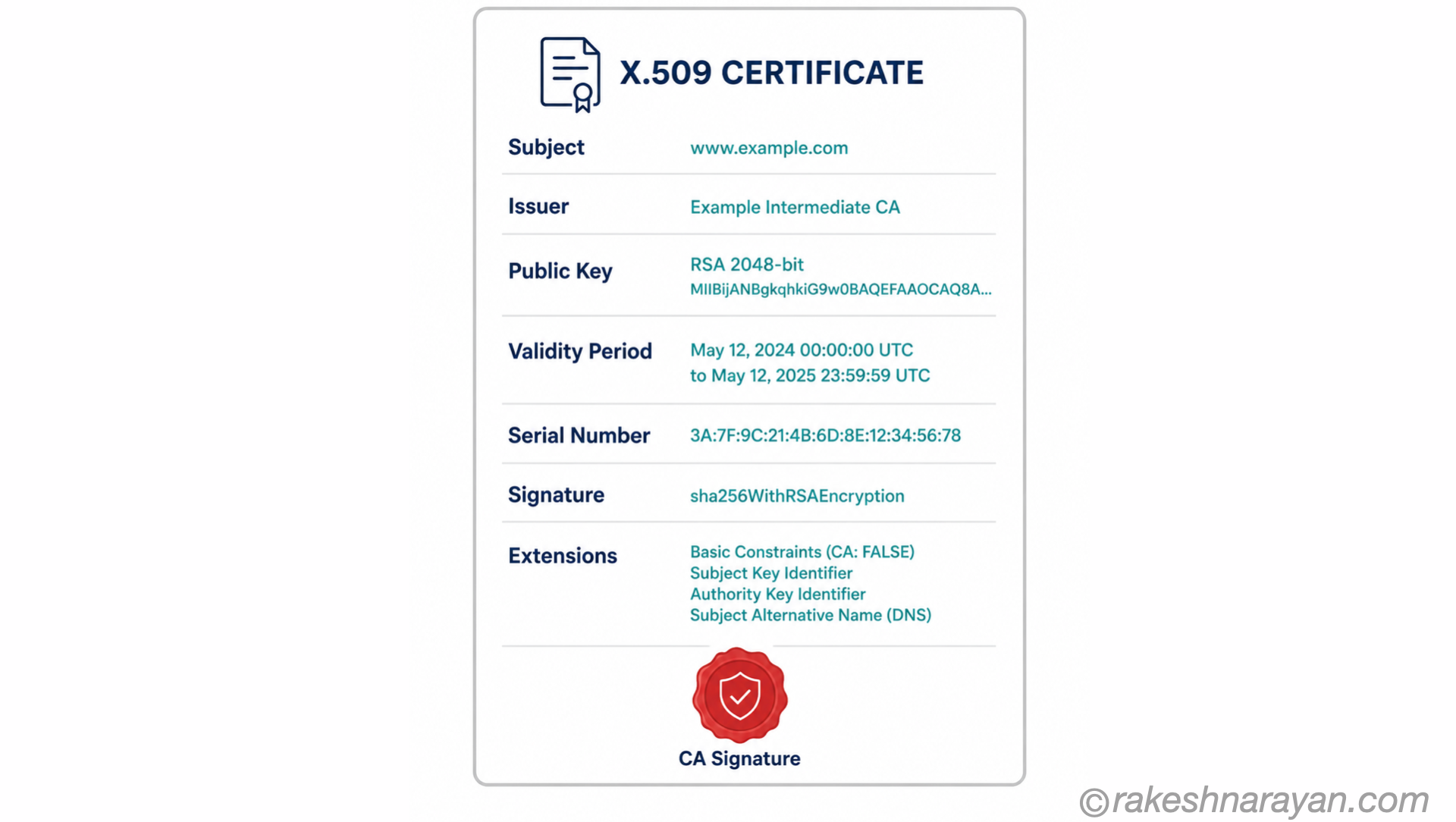
A certificate is a structured document following the X.509 standard. The fields that matter:
| Field | What It Contains |
|---|---|
| Subject | Who the certificate belongs to. For a domain certificate: the domain name (Common Name) or multiple domains (Subject Alternative Names). |
| Issuer | Who signed the certificate. For a leaf cert: the intermediate CA. For a root: itself (self-signed). |
| Public Key | The server’s public key. Used by the client during the handshake to establish the shared secret. |
| Validity Period | notBefore and notAfter dates. The browser rejects certificates outside this window. |
| Serial Number | Unique identifier for this certificate. Used in revocation checking. |
| Signature | The issuing CA’s digital signature over all the above fields. This is what makes the certificate tamper-proof. |
| Extensions | SAN (Subject Alternative Names), Key Usage, Extended Key Usage, OCSP URL, CRL Distribution Points. |
The TLS Handshake — Step by Step
The handshake is the negotiation that happens before any application data flows. It establishes which version of TLS to use, which cipher suite to use, verifies the server’s identity, and derives the shared encryption keys. In TLS 1.2, this takes two round trips. In TLS 1.3, it takes one.
TLS 1.2 Handshake (2-RTT)
| Step | What Happens |
|---|---|
| 1. Client Hello | Client sends: supported TLS versions, supported cipher suites, a random 32-byte nonce (client random), and extensions including SNI (Server Name Indication — which hostname the client wants). |
| 2. Server Hello + Certificate | Server responds with: chosen TLS version, chosen cipher suite, server random, and the server’s certificate chain. |
| 3. Key Exchange | Client verifies the certificate chain. Both sides use the client random, server random, and a key exchange algorithm (typically ECDHE) to independently derive the same session keys. No key is ever transmitted. |
| 4. Finished | Both sides confirm they have the same keys by sending a Finished message encrypted with those keys. If either side cannot decrypt the other’s Finished, the handshake fails. |
TLS 1.3 Handshake (1-RTT)
TLS 1.3, standardised in 2018, redesigns the handshake to reduce it to one round trip. The client sends its key exchange data immediately in the Client Hello — before knowing which cipher suite the server will choose — because TLS 1.3 reduced the supported cipher suites to a small set of strong ones. The server can respond with the certificate and Finished in a single message.
| TLS 1.2 | TLS 1.3 |
|---|---|
| 2 round trips before data flows | 1 round trip before data flows |
| Supports legacy cipher suites (including weak ones) | Only strong cipher suites — negotiation simplified |
| RSA key exchange option (does not provide forward secrecy) | ECDHE mandatory — Perfect Forward Secrecy always enabled |
| Certificate sent in plaintext | Certificate encrypted (server identity hidden from observers) |
| Resumed sessions via Session ID | 0-RTT resumption for returning clients (with replay risk caveats) |
Perfect Forward Secrecy — Why It Matters
Traditional RSA key exchange had a critical weakness: the session keys were encrypted with the server’s long-term private key. If an attacker recorded encrypted traffic today and later obtained the server’s private key, they could decrypt all past sessions retroactively.
Perfect Forward Secrecy (PFS) removes this risk. With ECDHE (Elliptic Curve Diffie-Hellman Ephemeral), both sides generate fresh temporary key pairs for each session. The session keys are derived from these temporary keys, which are discarded after the session. Even if the server’s long-term private key is later compromised, past sessions cannot be decrypted because the ephemeral keys no longer exist.
TLS 1.3 makes PFS mandatory. TLS 1.2 supports it but allows RSA key exchange without PFS. If you are configuring TLS 1.2, explicitly disable RSA key exchange cipher suites.
Certificate Revocation — the Weak Link
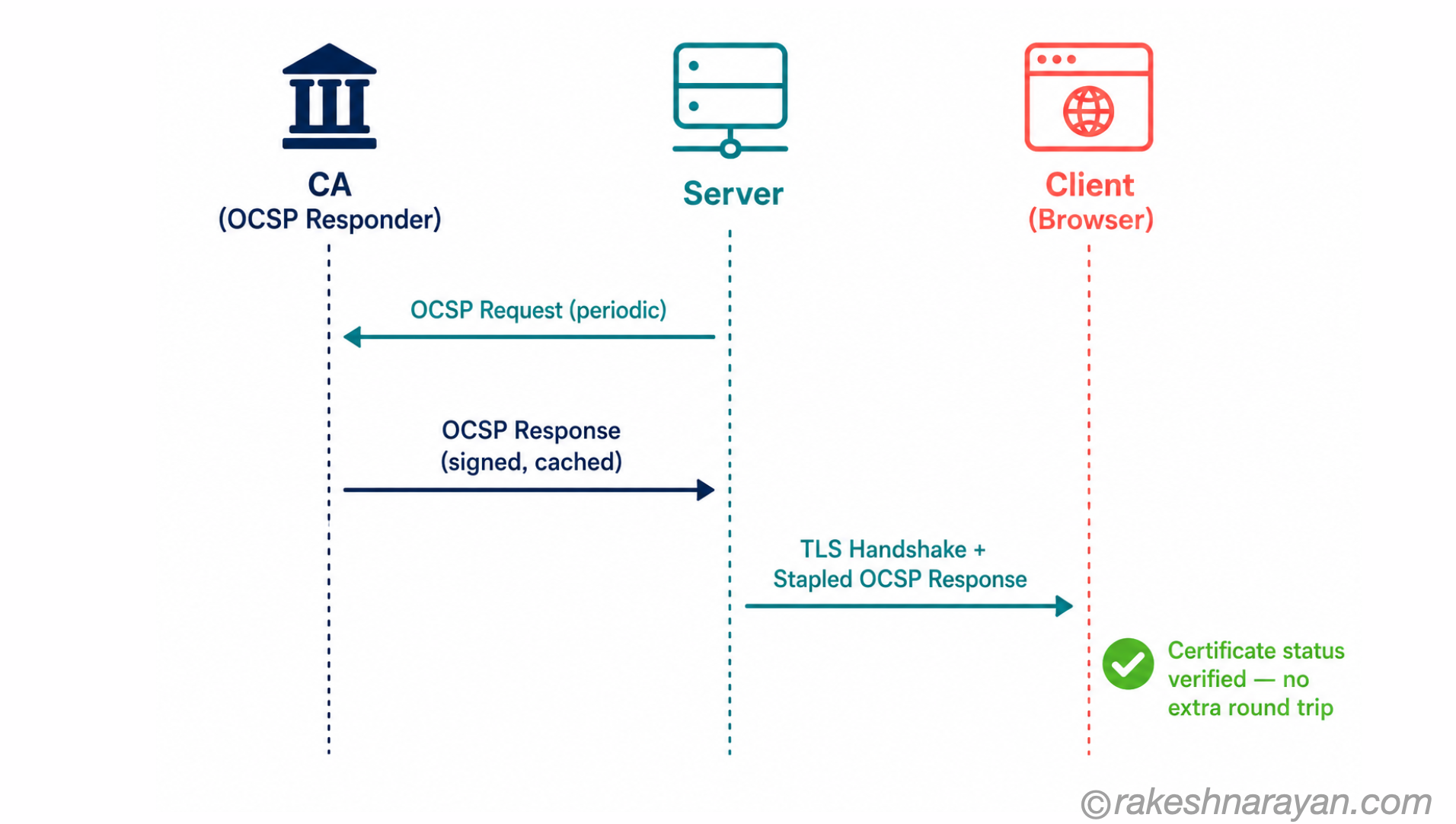
Certificates have validity periods, but sometimes a certificate needs to be invalidated before it expires — the private key was compromised, the domain changed hands, or the certificate was issued incorrectly. The mechanisms for this are Certificate Revocation Lists (CRLs) and OCSP (Online Certificate Status Protocol).
| Mechanism | How It Works and Its Limits |
|---|---|
| CRL (Certificate Revocation List) | A list published by the CA of revoked certificates. Browsers can download and check it. Problem: CRLs can be large and become stale between updates. |
| OCSP (Online Certificate Status Protocol) | Browser queries the CA’s OCSP responder in real time to check if a specific certificate is revoked. Problem: adds latency to the handshake and creates a privacy issue (CA knows which sites you visit). |
| OCSP Stapling | Server fetches the OCSP response from the CA and includes it in the TLS handshake. Solves the latency and privacy problem. The correct approach — but requires server-side configuration. |
| Short-lived certificates | Let’s Encrypt’s approach: certificates valid for 90 days, renewed automatically. Let’s Encrypt is moving toward even shorter 6-day certificates. Revocation matters less if certificates expire quickly. Increasingly the preferred model. |
At a Glance — The Mental Model
| Concept | One-Line Summary |
|---|---|
| Certificate Authority (CA) | A trusted third party that verifies identity and signs certificates. |
| Certificate Chain | Root CA → Intermediate CA → Leaf Certificate. Each signed by the one above. |
| TLS Handshake | The negotiation before data flows. Establishes version, cipher suite, identity, and session keys. |
| TLS 1.3 | Faster (1-RTT), stronger (PFS mandatory), more private (encrypted certificates) than TLS 1.2. |
| Perfect Forward Secrecy | Ephemeral key exchange — past sessions cannot be decrypted even if the private key is later compromised. |
| OCSP Stapling | Server includes certificate revocation status in the handshake. Faster than client-side OCSP lookup. |
| SNI | Server Name Indication — tells the server which hostname the client wants, enabling multiple TLS sites on one IP. |
The Part That Connects Everything
The TLS handshake is an elegant solution to a genuinely hard problem: how do two parties who have never met agree on a shared secret, over a channel that anyone can observe, and do it in a way that cannot be faked?
The certificate chain answers the identity question — not by the server proving itself directly, but by a chain of trusted signatures leading back to an authority your browser already trusts. The key exchange answers the secrecy question — using mathematics that allows both sides to arrive at the same secret without ever transmitting it.
Understanding these two mechanisms is understanding why HTTPS works at a level that actually helps when something goes wrong. Most debugging scenarios — certificate errors, handshake failures, TLS version mismatches — trace back to one of these two mechanisms not completing as expected.
🔗 Related Reading
API Security Essentials — how HTTPS and TLS underpin API security, alongside authentication and authorisation.
OAuth 2.0 and OpenID Connect — How Modern Login Actually Works — authentication protocols that rely on the secure channel HTTPS provides.
REST API Design Principles — how API design decisions interact with transport-layer security.
HTTP Requests and Responses — The Mental Model — HTTPS is HTTP plus the TLS handshake this post covers; start here if requests and responses themselves still feel unclear.
How DNS Works — Lookups, Records and Why It Matters — DNS resolution happens before any of the certificate checks in this post — the first step in the connection, not the last.
Published on rakeshnarayan.com — Articles
URL: https://rakeshnarayan.com/articles/how-https-works-certificate-chains-and-tls-handshake/
Did you enjoy this article?
Let me know — it takes one click.
0 Comments
Leave a Comment
Looks like this one held your attention — I'd really appreciate a quick comment below.
Your comment has been submitted and will appear after review.