JSON — From Zero to Confident
If you work anywhere near software, APIs or data, you have already seen JSON. It might have looked like this in an API response. It might have been a config file for a tool. It might have been the payload in a SAP BTP integration flow.
JSON is the universal language that systems use to talk to each other. Once you understand it properly — not just recognise it, but actually understand the structure — you can read any API response, write any payload and debug any integration without guessing.
This post builds that understanding from scratch, and gives you enough to be genuinely confident with JSON in the real world.
What JSON is
JSON stands for JavaScript Object Notation. Despite the name, it has nothing to do with JavaScript in practice — it is a plain text format for representing structured data, supported by every programming language and every modern system.
It was designed to be human-readable and easy for machines to parse. Both goals are achieved. A well-structured JSON file is readable by someone with no programming background. A machine can parse it in microseconds.
| Property | Detail |
|---|---|
| Full name | JavaScript Object Notation |
| File extension | .json |
| MIME type | application/json |
| Encoding | UTF-8 (always) |
| Defined by | RFC 8259 (the official specification) |
| Used for | API requests and responses, configuration files, data storage, message payloads |
The six data types
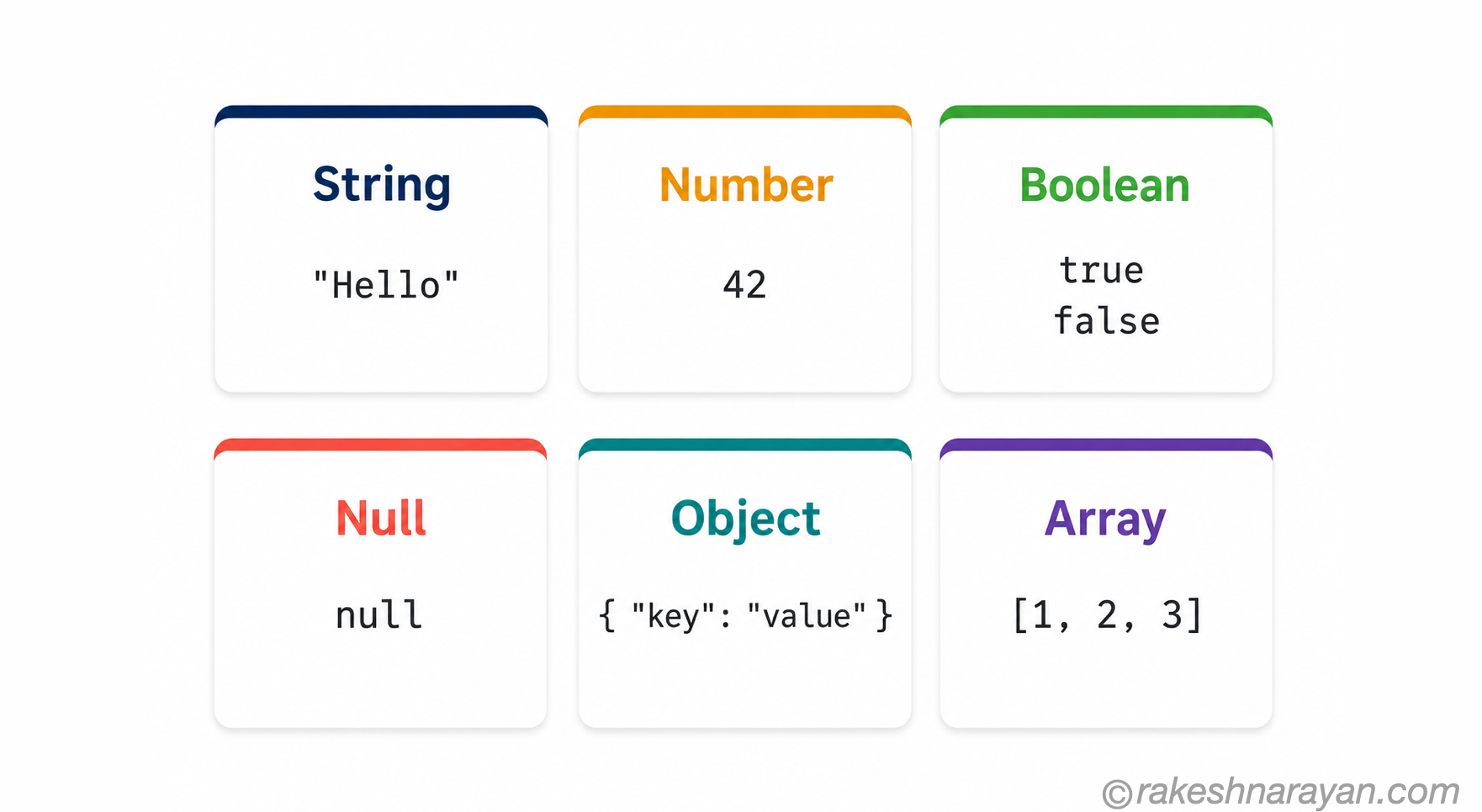
JSON supports exactly six data types. Every value in a JSON document is one of these — nothing more, nothing less.
| Type | What it is | Example | Notes |
|---|---|---|---|
| String | Text in double quotes | ”Rakesh Narayan” | Always double quotes — single quotes are not valid JSON |
| Number | Integer or decimal | 42 / 3.14 / -7 | No quotes around numbers — quoted numbers are strings |
| Boolean | True or false | true / false | Always lowercase — True and False are not valid |
| Null | Absence of a value | null | Always lowercase — means the value exists but is empty |
| Object | A collection of key-value pairs | { “name”: “Rakesh” } | Wrapped in curly braces { } |
| Array | An ordered list of values | [ “SAP”, “BTP”, 15 ] | Wrapped in square brackets [ ] |
A complete JSON example — annotated
Here is a realistic JSON response — the kind you would see from a REST API. Read it top to bottom — every element is explained below.
{
“id”: 1042,
“name”: “Rakesh Narayan”,
“active”: true,
“score”: 98.5,
“nickname”: null,
“roles”: [
“SAP Consultant”,
“BTP Architect”
],
“address”: {
“city”: “Helsinki”,
“country”: “Finland”
}
}
| Key | Value type | What to notice |
|---|---|---|
| id | Number | No quotes — it is a number, not the string “1042” |
| name | String | Double quotes around both the key and the value — always |
| active | Boolean | true with no quotes — quoted “true” would be a string, which is different |
| score | Number | Decimals are fine — no special type needed |
| nickname | Null | null means the field exists but has no value — different from the field being absent |
| roles | Array | Square brackets [ ] — contains two strings. Arrays can hold any type, including objects. |
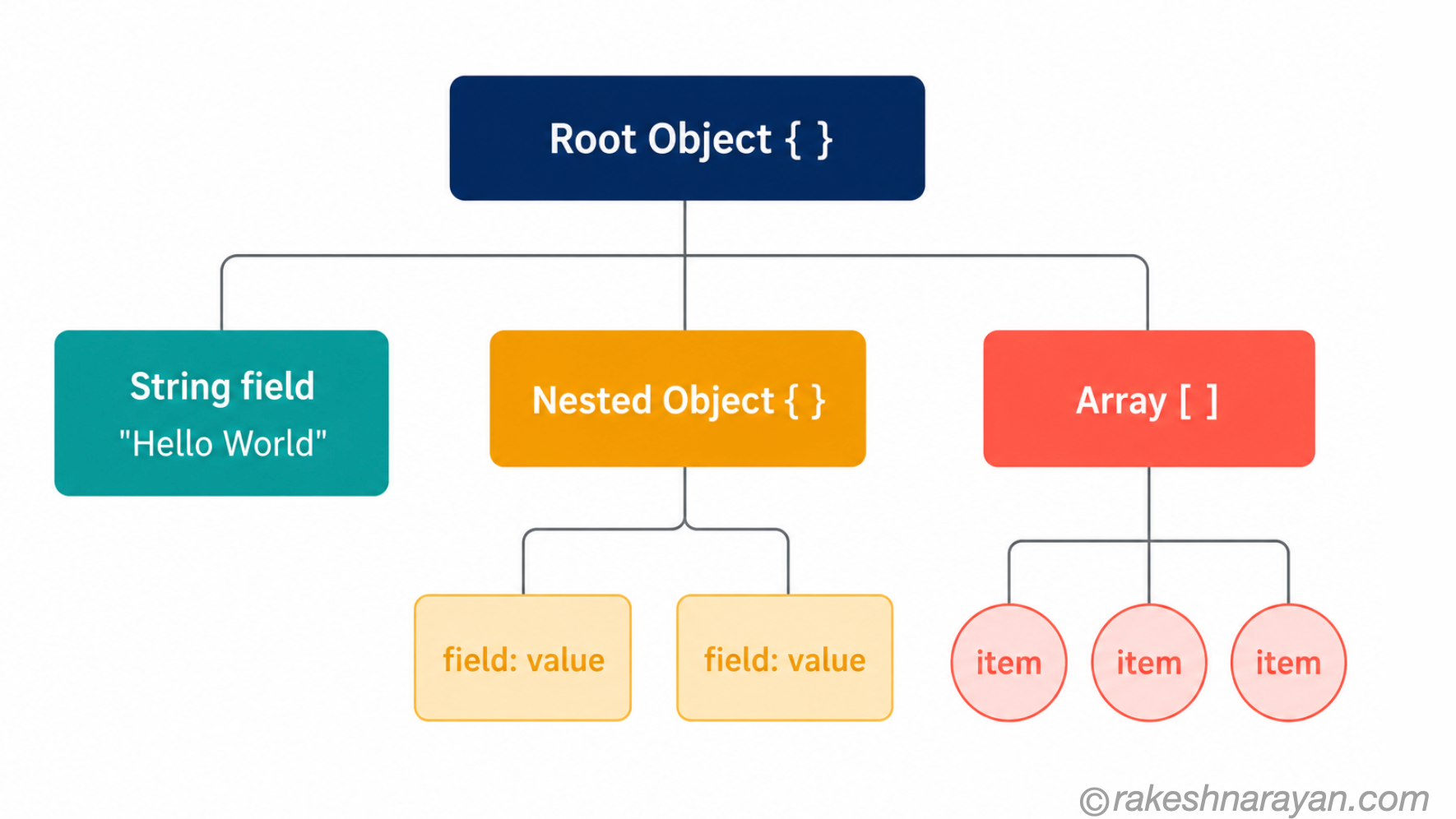
| address | Object | Curly braces { } — a nested object. JSON can nest as deeply as needed. |
Objects — key-value pairs
A JSON object is a collection of key-value pairs wrapped in curly braces. This is the most commonly used structure in JSON.
{
“firstName”: “Rakesh”,
“lastName”: “Narayan”,
“yearsExperience”: 15
}
- Keys are always strings — they must be in double quotes
- Keys and values are separated by a colon :
- Key-value pairs are separated by commas — except the last one
- Order does not matter — an object is not a sequence, it is a collection
- Keys within one object must be unique
Arrays — ordered lists
A JSON array is an ordered list of values wrapped in square brackets. The values can be any type — strings, numbers, booleans, objects, or even other arrays.
[ “SAP”, “BTP”, “Fiori” ]
Arrays of objects — by far the most common pattern in API responses:
{
“users”: [
{
“id”: 1, “name”: “Alice”
},
{
“id”: 2, “name”: “Bob”
}
]
}
This pattern — a top-level object containing an array of objects — is what most API list endpoints return. When you call GET /users, this is typically the shape of the response.
Nesting — objects inside objects
JSON can nest objects and arrays inside other objects and arrays. There is no strict limit to the depth — but in practice, deeply nested JSON (more than 3-4 levels) becomes hard to work with and is often a sign of a poorly designed API.
JSON vs XML — a quick comparison
Before JSON became dominant, XML was the standard format for data exchange. You will still encounter XML in some older systems and in SAP (IDoc, SOAP, some OData formats). Knowing the difference matters.
| JSON | XML | |
|---|---|---|
| Syntax | Curly braces, square brackets, colons | Opening and closing tags like HTML |
| Readability | Generally easier to read | More verbose — tags repeated for every element |
| Size | More compact | Larger — closing tags add significant overhead |
| Data types | Six native types including boolean, null | Everything is text — types must be inferred or defined externally |
| Array support | Native — [ ] | No native arrays — repeated elements used instead |
| Use today | Standard for REST APIs and modern systems | Still used in SOAP, legacy integrations, SAP IDoc |
💡 SAP and both formats
SAP OData APIs support both JSON and XML response formats. You choose via the Accept header in your request: Accept: application/json gives JSON, Accept: application/xml gives XML. In Fiori and BTP development, JSON is the default and preferred format.
Common mistakes in JSON
JSON is strict. A single wrong character makes the entire document invalid. These are the mistakes that come up most often.
| Mistake | Invalid JSON | Correct JSON |
|---|---|---|
| Single quotes | { ‘name’: ‘Rakesh’ } | { “name”: “Rakesh” } |
| Trailing comma | { “name”: “Rakesh”, } | { “name”: “Rakesh” } |
| Unquoted key | { name: “Rakesh” } | { “name”: “Rakesh” } |
| Comments | { // this is a user \n\n “id”: 1 } | JSON does not support comments at all |
| Capitalised booleans | { “active”: True } | { “active”: true } |
| Number in quotes | { “id”: “42” } | { “id”: 42 } — unless you genuinely want a string |
💡 Always validate your JSON
If you are ever unsure whether your JSON is valid, paste it into jsonlint.com — a free, fast JSON validator. It will show you the exact line and character where a problem exists. Most code editors (VS Code, for example) also highlight invalid JSON automatically.
JSON in the real world — where you will see it
| Where | How JSON is used |
|---|---|
| REST API responses | The standard format for all data returned by modern REST APIs — GET /orders returns a JSON body |
| REST API request bodies | POST and PATCH requests send data to the server as a JSON body with Content-Type: application/json |
| OAuth tokens (JWT) | JWTs are Base64-encoded JSON — the payload section is a JSON object containing user claims |
| SAP BTP / CPI | Integration flows exchange data as JSON payloads — mappings read and write JSON fields |
| SAP OData APIs | OData V4 returns JSON by default — V2 supports both JSON and XML |
| Config files | Tools like VS Code, Docker, and npm use JSON config files (.vscode, package.json) |
| Logging and monitoring | Structured logs are usually JSON — makes them searchable and parseable by log aggregation tools |
Reading a real API response
Let us put it together with a realistic example — a REST API response for a single order. This is the kind of JSON you would actually encounter in a SAP BTP integration or any e-commerce API.
{
“orderId”: “ORD-2026-9981”,
“status”: “confirmed”,
“totalAmount”: 1249.99,
“currency”: “EUR”,
“isPriority”: true,
“deliveryDate”: null,
“items”: [
{
“sku”: “SKU-001”,
“description”: “SAP BTP License”,
“quantity”: 1,
“unitPrice”: 1249.99
}
],
“customer”: {
“id”: 8821,
“email”: “rakesh@example.com”
}
}
Reading this, you can immediately identify:
- orderId is a string — even though it looks like an ID, it contains letters and hyphens so a string is correct
- totalAmount and unitPrice are numbers — no quotes, supports decimals
- isPriority is a boolean — true without quotes
- deliveryDate is null — confirmed but not yet scheduled
- items is an array of objects — in this case just one item, but the array allows for multiple
- customer is a nested object — its own key-value pairs inside the parent
Quick reference — JSON rules
| Rule | Detail |
|---|---|
| Always double quotes | Strings and keys use double quotes — never single quotes |
| No trailing commas | The last item in an object or array has no comma after it |
| No comments | JSON has no comment syntax — use a separate README if you need to explain a config |
| Lowercase booleans | true, false, null — always lowercase |
| Numbers without quotes | 42 is a number, “42” is a string — they are different |
| UTF-8 encoding | JSON is always UTF-8 — special characters can be escaped as \uXXXX |
| Root can be any type | A JSON file can start with { for an object or [ for an array — both are valid |
What to take away
JSON is genuinely simple once the six data types click. After that, everything else — objects, arrays, nesting — is just combinations of those six types.
The reason it matters is that JSON is everywhere. Every REST API response, every OAuth token payload, every BTP integration message, every modern config file — it is all JSON. Getting comfortable with it is one of those foundational skills that pays off every single day.
🔗 Related posts on this site
REST API Design Principles — REST APIs use JSON as their standard response format. Understanding JSON makes reading API docs straightforward.
OAuth 2.0 and OpenID Connect — JWT tokens are JSON objects — the payload section of every JWT is a JSON structure.
API Security Essentials — API request and response bodies, including security payloads, are all JSON.
Published on rakeshnarayan.com — Articles
URL: https://rakeshnarayan.com/articles/json-from-zero-to-confident/