OpenAPI — The Contract Behind APIs, Documentation and AI Agents
Every API with documentation nobody trusts has the same root cause. Someone wrote it by hand, in a wiki page or a Word doc, and it went stale the first time an endpoint changed. Nobody updated it, because updating documentation manually is the first thing everyone deprioritises under deadline pressure.
OpenAPI removes that choice. You describe your API once, in a single machine-readable file, and everything downstream — the docs your developers read, the SDK your partner generates, the tests your pipeline runs, increasingly the tools an AI agent calls — gets built from that same file.
This post covers what OpenAPI actually is, why it is not the same thing as Swagger, what changed in the current version, and why it has quietly become the thing AI agents depend on to use your API at all.
🔗 Related Reading
This post builds on What Is an API? — How Software Systems Talk to Each Other and REST API Design Principles. If terms like endpoint, resource or HTTP method are new to you, start there first.
What OpenAPI actually is — and why “Swagger” confuses everyone
An OpenAPI document is a YAML or JSON file that describes an HTTP API — every endpoint, every request and response shape, every authentication method — in one place. It is written so both a human and a piece of software can read it and understand exactly what the API does, without ever looking at the source code.
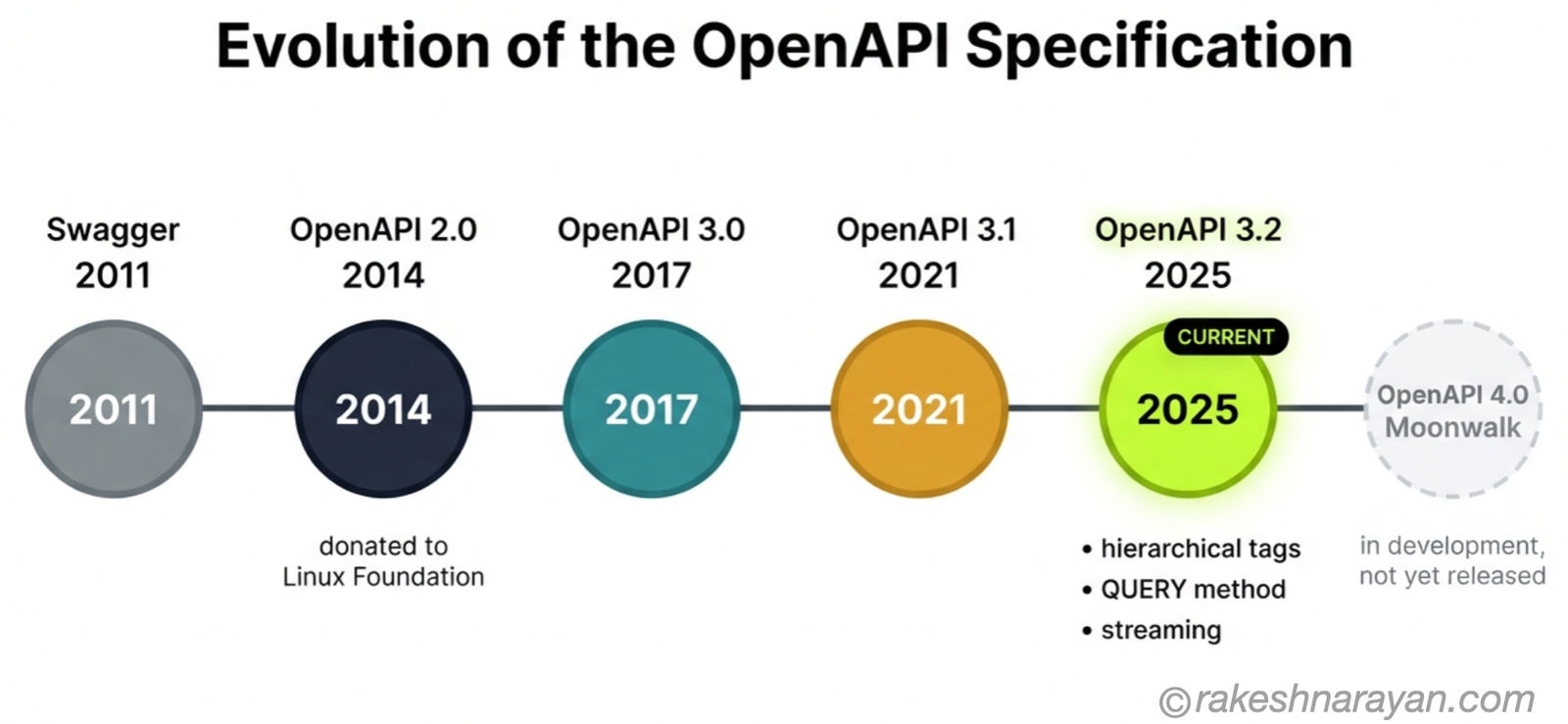
The naming confusion has a real history. Swagger started in 2011 as an open-source tool from a company called Wordnik, later acquired by SmartBear.
In 2014, the specification itself was donated to a new vendor-neutral home — the OpenAPI Initiative, now part of the Linux Foundation — and was renamed OpenAPI. Swagger did not disappear. It became SmartBear’s brand for the tools that implement the spec: Swagger UI, Swagger Editor, Swagger Codegen.
So when someone says “we use Swagger,” they usually mean they write an OpenAPI document and render it with SmartBear’s tools. The spec is OpenAPI.
Swagger is one vendor’s toolset for using it — a very popular one, but not the only one. Redocly, Stoplight and Postman all read the same OpenAPI file.
📌 Key Takeaway
OpenAPI is the specification. Swagger is a toolset brand built on top of it. The two get used interchangeably in job specs and client conversations, and it causes more confusion than it should.
One honest limitation worth stating up front: OpenAPI describes REST-style, HTTP-based APIs. It is not universal across every API style.
GraphQL has its own schema language, and gRPC uses Protocol Buffers. If your API is REST, OpenAPI is close to the industry default. If it is not, you need a different tool entirely.
The anatomy of an OpenAPI document
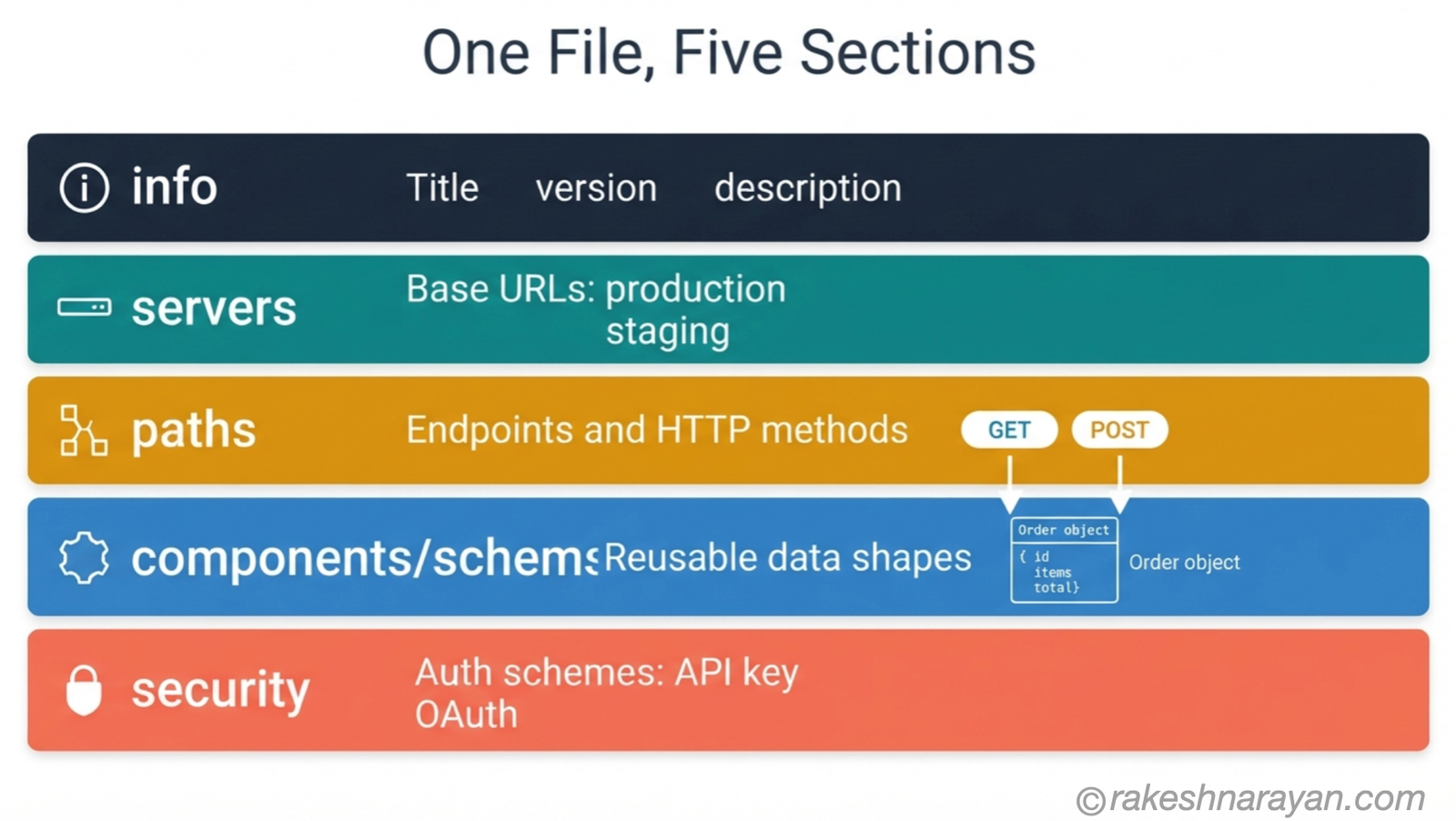
Strip away the tooling and an OpenAPI document is built from a small number of sections, each doing one job.
| Section | What it defines |
|---|---|
| info | The API’s name, version and description — the metadata a consumer sees first |
| servers | The base URLs where the API actually runs — production, staging, sandbox |
| paths | Every endpoint and the HTTP methods it supports — GET /orders, POST /orders and so on |
| components/schemas | Reusable data shapes — an Order object defined once, referenced everywhere it appears |
| security | The authentication schemes the API accepts — API key, OAuth 2.0, bearer token |
openapi: 3.2.0
info:
  title: Orders API
  version: 1.0.0
paths:
  /orders/{orderId}:
    get:
      summary: Retrieve an order
      parameters:
      - name: orderId
        in: path
        required: true
        schema:
          type: string
      responses:
        '200':
          description: Order found
          content:
            application/json:
              schema:
                $ref: '#/components/schemas/Order'
That one file is enough for a tool to generate an interactive documentation page, a typed client SDK and a set of contract tests, without a developer writing any of those three things by hand.
From spec to documentation — the tooling that reads it
This is the part that makes OpenAPI worth the upfront effort. Once the document exists, tools generate everything else from it automatically, and they stay correct because they are regenerated every time the spec changes.
| Output | Tool examples | What it replaces |
|---|---|---|
| Interactive documentation | Swagger UI, Redoc, Stoplight | A hand-maintained docs page that always lags behind the real API |
| Client SDKs | OpenAPI Generator, Swagger Codegen | Developers hand-writing HTTP calls and guessing at field names |
| Mock servers | Prism, Postman | Waiting for the real backend to be ready before frontend work can start |
| Contract tests | Dredd, Schemathesis | Manually checking that responses match what the docs promised |
💡 Practical Tip
Validate your OpenAPI document in CI, on every pull request. A spec with a typo in a field name is worse than no spec at all, because everything downstream — docs, SDKs, tests — inherits the mistake silently.
What’s new in OpenAPI 3.2
The current version is OpenAPI 3.2.0, released in September 2025. It is a fully backward-compatible update to 3.1 — every valid 3.1 document is still valid, you just change the version number and adopt new features at your own pace.
Three additions are worth knowing about. Hierarchical tags let you group large APIs into nested categories for navigation, replacing vendor extensions like Redocly’s x-tagGroups that people were already bolting on informally.
The new QUERY method gives you an idempotent, cacheable way to send complex search criteria in a request body, instead of stuffing it into a GET URL or misusing POST. Streaming responses — Server-Sent Events, JSON Lines — finally get first-class support instead of being described as a vague application/octet-stream and a paragraph of prose.
OAuth 2.0’s Device Authorization Flow is now part of the spec too, along with a way to mark old security schemes as deprecated rather than silently deleting them.
⚠️ Warning
If you have seen mentions of “OpenAPI 4.0,” that version does not exist yet. A future major version, known during development as “Moonwalk,” is still being worked on. 3.2.0 is the current, production-ready spec.
Design-first vs code-first
Every team building an OpenAPI-described API eventually picks a side, whether they realise it or not.
| Approach | How it works | Best for |
|---|---|---|
| Design-first | Write the OpenAPI document before writing any code, then generate server stubs from it | External-facing APIs, partner integrations — anywhere the contract must be agreed before backend work starts |
| Code-first | Write the code first, annotate it, and generate the OpenAPI document from those annotations | Internal APIs, fast-moving teams — situations where the spec must never drift from what the code actually does |
I lean design-first for anything a partner or another team depends on. Agreeing the contract before anyone writes a line of backend code catches shape disagreements early, when they cost a conversation instead of a rewrite.
Code-first has one advantage design-first can’t fully match: the spec is generated from the real code, so it cannot drift. The trade-off is that your API’s shape ends up following whatever your framework naturally produces, rather than what you deliberately designed.
✅ Best Practice
Whichever approach you pick, put spec validation in your CI pipeline. Design-first specs drift if nobody checks the implementation against them. Code-first specs are only as good as the annotations developers remember to write.
OpenAPI and AI agents — why this matters more in 2026
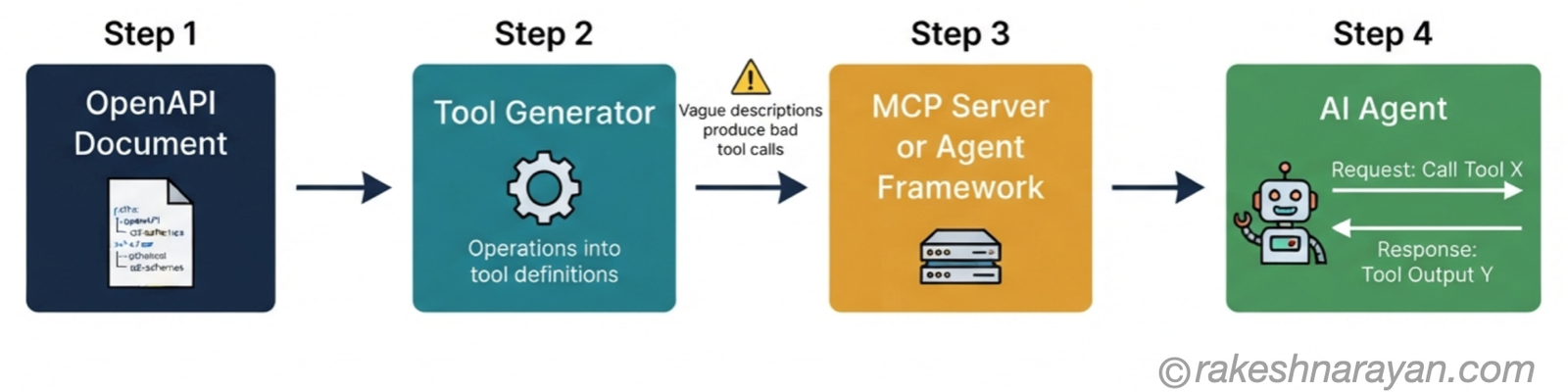
This is the part that has changed the stakes on writing a good OpenAPI document. AI agents that call APIs on your behalf — through frameworks built on tool-calling, and increasingly through MCP servers — need a structured description of what an API can do before they can use it at all.
OpenAPI already provides exactly that shape: named operations, typed parameters, described responses. It turns out the same file that generates your documentation and your SDK also generates a usable tool definition for an AI agent, with very little extra work.
I covered the mechanics of this in the MCP post and the AI Agents post — the short version here is that your OpenAPI document has quietly become more than internal tooling. It is becoming the interface other software, including AI software, uses to decide whether and how to call your API.
📝 Note
A description field that was “good enough” for a human skimming your docs is often not good enough for an agent. A human infers intent from context. An agent mostly has the words in your spec. Vague parameter descriptions that never caused a problem before can now produce genuinely wrong tool calls.
Common documentation mistakes
| Mistake | What happens | Fix |
|---|---|---|
| Spec drifts from the real API | Docs describe a field that no longer exists, or miss one that does | Generate the spec from code, or validate it against real responses in CI |
| No examples on schemas | Developers guess at date formats, enum values and required fields | Add a concrete example value to every schema, not just a type |
| Only the 200 response is documented | Integrations break the first time a real error occurs | Document 4xx and 5xx responses with the same care as success responses |
| Security schemes described vaguely | Partners cannot work out how to get a valid token | Use full security scheme objects — specify the OAuth flow, scopes and token URL |
| Docs treated as a one-time deliverable | Same complaints resurface every few months | Put the spec in version control and review it in the same pull request as the code change |
At a glance — OpenAPI essentials
| Concept | One-line summary |
|---|---|
| OpenAPI (OAS) | The machine-readable format that describes an HTTP API’s endpoints, schemas and security in one file |
| Swagger | SmartBear’s toolset brand — Swagger UI, Editor, Codegen — built on top of the OpenAPI spec, not the spec itself |
| OpenAPI document | The single YAML or JSON file that is the source of truth an API is described from |
| Design-first | Writing the spec before the code — best when an external team depends on the contract |
| Code-first | Generating the spec from annotated code — cannot drift from what the code does |
| OpenAPI 3.2 | The current version, released September 2025 — hierarchical tags, the QUERY method, streaming support, fully backward-compatible |
| OpenAPI 4.0 | Does not exist yet — a future major version (“Moonwalk”) is still in development |
| Contract testing | Automatically checking that real API responses match what the spec promises |
| Scope limit | OpenAPI describes REST/HTTP APIs — GraphQL and gRPC use their own separate schema systems |
| AI agent tool generation | Frameworks and MCP servers turning OpenAPI operations directly into callable tools for AI agents |
What to take away
OpenAPI is not documentation about your API. It is the contract your API makes, and documentation is just one of several things generated from that contract.
Once that clicks, a lot of decisions get easier. If your team maintains a docs page and a spec as two separate artifacts, you already have the bug that causes stale documentation — there is only supposed to be one source of truth, and everything else is downstream of it.
The AI agent piece is not a separate trend to bolt on later. It is the same discipline — write an accurate, well-described contract once — paying off in a place nobody was optimising for a few years ago.
Write the spec properly and you are not just documenting an API. You are making it usable by whatever reads it next, human or otherwise.
🔗 Related posts on this site
REST API Design Principles — the design decisions an OpenAPI document ends up describing.
GraphQL vs REST — the honest comparison for when OpenAPI’s REST assumption does not fit your API.
API Security Essentials — the authentication and authorisation detail that belongs in your security schemes.
MCP — Model Context Protocol Explained — how AI agents actually consume tool definitions like the ones generated from an OpenAPI spec.
Published on rakeshnarayan.com — Articles
URL: https://rakeshnarayan.com/articles/openapi-the-contract-behind-apis-documentation-and-ai-agents/
Did you enjoy this article?
Let me know — it takes one click.
0 Comments
Leave a Comment
Looks like this one held your attention — I'd really appreciate a quick comment below.
Your comment has been submitted and will appear after review.