SAP Activate — The Methodology Behind Every S/4HANA Project
Ask a project team which methodology they used and most will say “Activate” without being able to tell you why it replaced what came before it, or where their own project actually struggled inside it. That is not really their fault. Most explanations of Activate stop at the phase names.
Every SAP Activate article online gives you the same six words — Discover, Prepare, Explore, Realize, Deploy, Run — and a sentence each. Almost none of them tell you what happens inside those words, or which one is quietly deciding whether your project succeeds.
I have sat through more than one of these projects, and the phase list was never the hard part. The hard part was always one specific workshop, one specific handoff, and one specific week before go-live. This post covers all six phases — but it spends most of its time on those three moments, because that is where projects are actually won or lost.
🔗 Related Reading
This post builds on SAP S/4HANA Migration: Greenfield, Brownfield, Bluefield and RISE with SAP — What’s Actually in the Bundle . If you are still deciding how to move to S/4HANA, start there — Activate is the methodology you use once that decision is already made.
Why ASAP Had to Die
SAP’s original methodology, ASAP, assumed you were building a system from a blank page. Gather requirements, write a blueprint, then spend months building against that blueprint before anyone in the business saw a working screen. That was fine when SAP systems were mostly custom-built from scratch.
SAP Activate replaced it in 2015, announced at SAPPHIRE alongside S/4HANA itself. It did not just retire ASAP — it also absorbed a separate cloud-only methodology called SAP Launch, folding both into one framework that covers on-premise, cloud and hybrid landscapes.
The real change is not agile versus waterfall. It is the starting position.
ASAP started from nothing. Activate starts from a preconfigured system built on SAP’s own best-practice processes, and your job is to adapt it rather than build it.
That single change is why Activate projects move faster — and why the standard-versus-customize argument becomes the whole project.
💡 Practical Tip
The fastest way to blow an Activate timeline is to run it like ASAP with new phase names. Full requirements-gathering before anyone touches the system defeats the entire point — the system should be doing the talking from Explore onward, not a requirements document.
The Three Pillars Behind Activate
Activate is not only six phases. SAP built it on three components working together, and most people only ever mean one of them when they say “Activate.”
| Pillar | What it actually is | Why it matters |
|---|---|---|
| SAP Best Practices | Pre-built, ready-to-run business processes for finance, procurement, sales and more, drawn from thousands of prior implementations | You start with a working system, not a blank one |
| Guided Configuration | Tools inside the system, such as SAP Central Business Configuration, that walk the team through setting scope | Cuts manual configuration and keeps the build close to standard |
| Methodology | The six phases, workstreams, deliverables and roadmaps most people picture when they hear “Activate” | Structures how the project team actually runs the work |
📌 Key Takeaway
When someone says a project “used Activate,” they usually mean the phases. The content and the tooling are doing at least as much work — and are the reason the phases can move as fast as they do.
The Six Phases — And What Actually Happens Inside Each
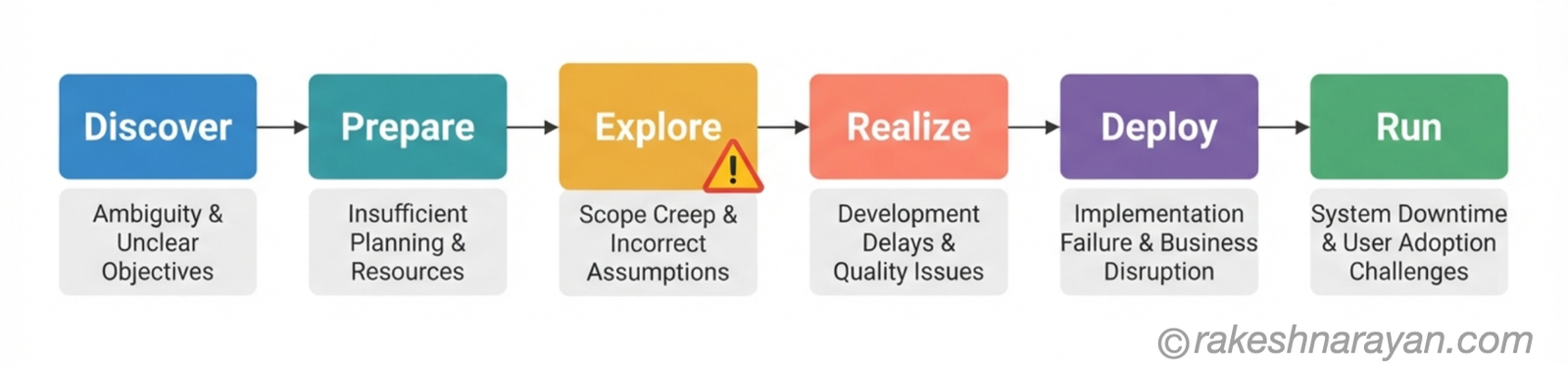
Here are the six phases with their official purpose next to the risk that actually shows up in practice. The official description is the part every other article gives you. The risk column is the part that matters.
| Phase | Official purpose | The real risk |
|---|---|---|
| Discover | Assess solution fit, define scope at a high level, choose the deployment model | The deployment choice made here is rarely revisited — getting it wrong is expensive to unwind later |
| Prepare | Kick off the project, set up the environment, agree governance, provision the starter system | The governance model set here decides whether later standard-versus-customize fights have a referee |
| Explore | Run fit-to-standard workshops, validate business processes against SAP’s pre-delivered ones, log gaps | This is where the project is actually decided — covered in the next section |
| Realize | Configure, build and test in sprints, integrate the end-to-end solution | Unresolved gaps from Explore resurface here as backlog nobody prioritised |
| Deploy | Final data migration, cutover, go-live readiness checks | Ambiguous data migration ownership is the single most common cause of go-live weekend failures |
| Run | Stabilise the new system, provide hypercare, transition to continuous improvement | ”Done” is often left undefined, with no clear exit criteria for handing the system to the internal team |
⚠️ Warning
The most common go-live weekend failure is not a bug. It is two teams discovering, during cutover, that they each assumed the other owned a piece of legacy data that turns out to be wrong. Put a written RACI for data migration in place before Realize starts — not during Deploy, when it is too late to renegotiate.
Fit-to-Standard — The Workshop That Decides the Whole Project
Every generic Activate article mentions fit-to-standard in a single line and moves on. It deserves its own section, because it is where an implementation is actually won or lost.
The idea itself is sound. Instead of asking the business to describe requirements in the abstract, you show them their own processes running inside a pre-configured system and ask what does not fit. It is faster and more concrete than any requirements document.
Here is the part that never makes it into the marketing deck. Partway through these workshops, business users realise that staying on standard means real change to how they work day to day.
Teams can hit genuine resistance at this point — SAP’s own community has described it plainly as a “business uprising.”
Handling that is not a facilitation trick. It needs governance that was set up back in Prepare, and change management that started before the workshops, not after them.
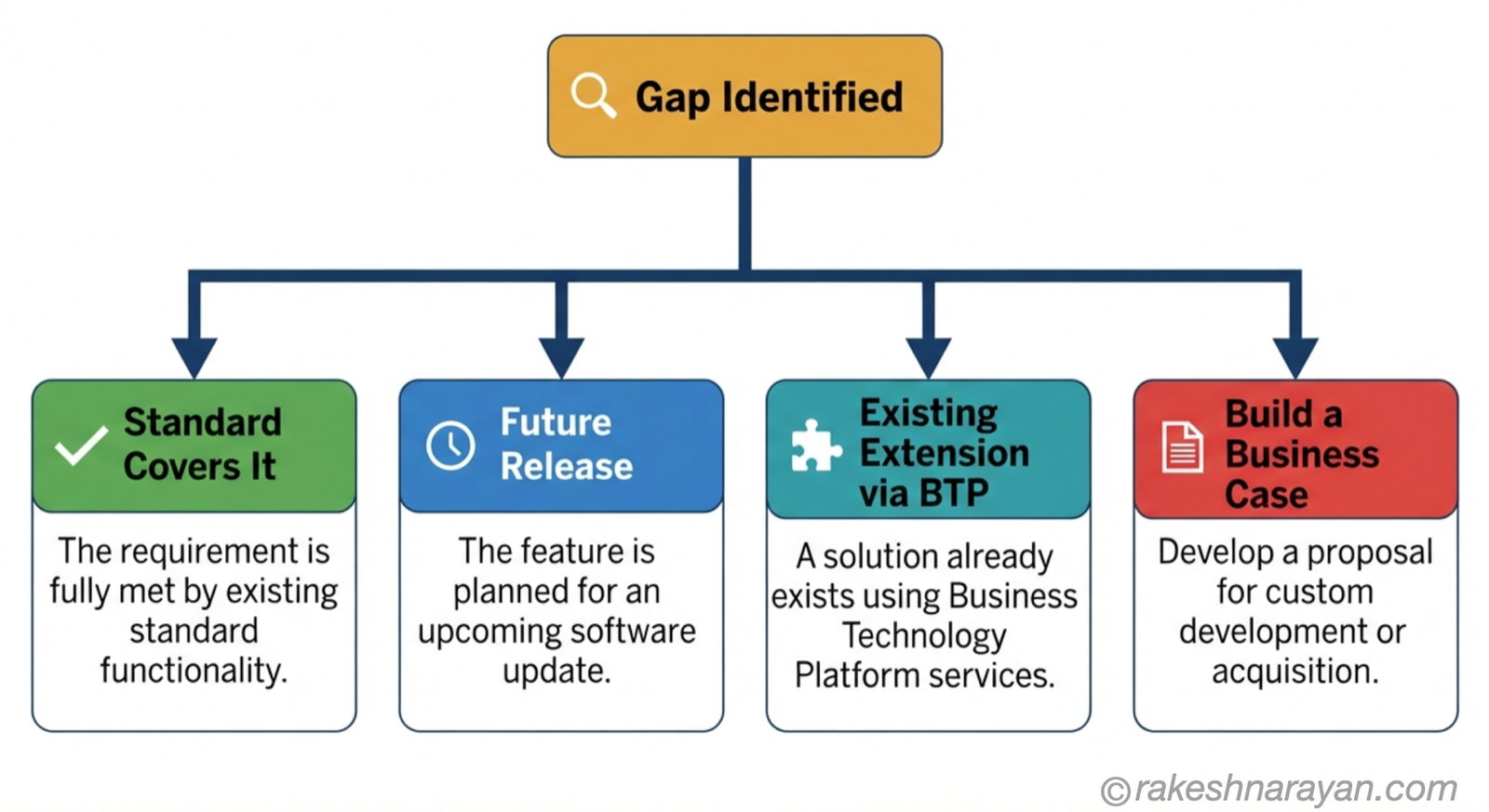
| When a gap is identified | What the team should do |
|---|---|
| Standard functionality already covers it | Configure it and move on — no further discussion needed |
| A future SAP release will cover it | Document it and defer — do not build a temporary version now |
| An existing extension covers it | Use SAP BTP extensibility rather than modifying the core system |
| None of the above apply | Build a business case first — cost, upgrade impact, and whether it is a genuine differentiator |
✅ Best Practice
Before approving any deviation from standard, ask three questions: does it affect the customer directly, is it a genuine competitive differentiator, and what does it cost every future upgrade. If the answer to the first two is no, do not build it.
Agile Inside a Waterfall Shell
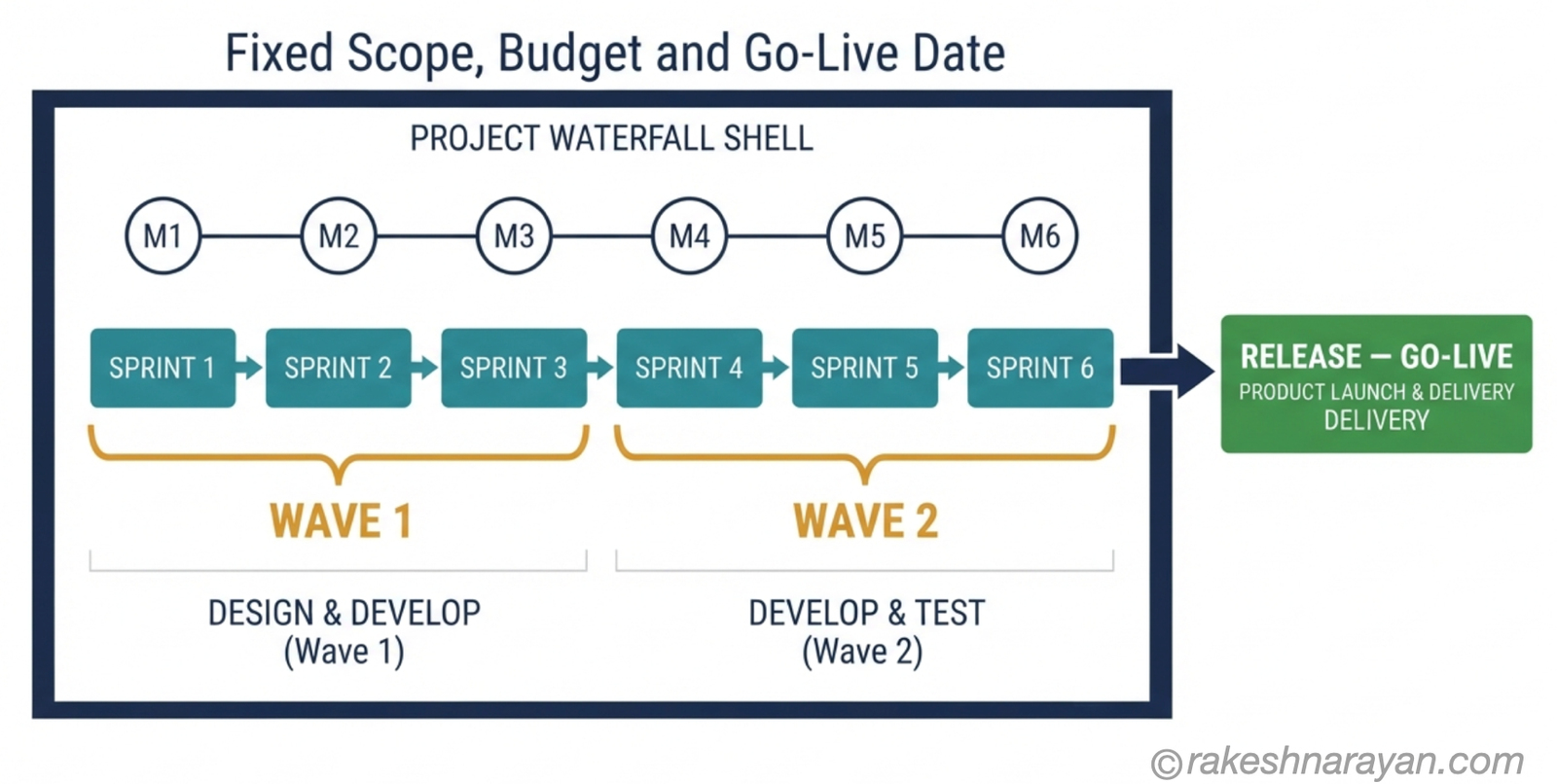
People call Activate “agile” and that is only half true. The overall project still has a fixed scope, a fixed budget and a planned go-live date — that is a waterfall shell. What changes is how the Realize phase gets delivered inside it.
Inside Realize, work is organised into sprints, typically two to four weeks long, each ending with a show-and-tell back to the business users who raised the original requirement. Sprints are grouped into waves, usually one to three months long, and a release is the complete set of functionality built across one or more waves, ending in a go-live.
Scrum teams are typically five to nine people, organised by workstream or process area, with a scrum master and product owner attached to each. Where a project runs several scrum teams in parallel, they coordinate through a “scrum of scrums” — one representative from each team, meeting regularly to resolve cross-team dependencies.
📝 Note
You do not have to run full Scrum to use Activate. SAP’s own training material treats how far to lean into agile ceremonies as a decision made during Prepare, based on team maturity — not a mandatory requirement bolted onto every project regardless of size.
Cloud vs Private Cloud vs On-Premise — What Actually Changes
The six phases stay the same across every deployment model. What changes is how much room Explore actually gives you to deviate from standard.
| Deployment model | What Explore looks like | What changes practically |
|---|---|---|
| Public cloud (S/4HANA Cloud, Public Edition) | Fit-to-standard against a fixed starter system with minimal extensibility | Fastest timeline, least ability to deviate — decide this trade-off honestly before Discover ends |
| Private cloud (RISE with SAP, Private Edition) | Fit-to-standard approach with deeper extensibility and more configuration flexibility | Still standard-first, but with real room for genuine differentiators |
| On-premise | System conversion or new implementation, still using fit-to-standard where relevant | Most flexible, and the most exposed to technical debt if governance is weak |
At a Glance — SAP Activate
| Concept | One-line summary |
|---|---|
| SAP Activate | The methodology launched in 2015 alongside S/4HANA, replacing both ASAP and SAP Launch |
| Three pillars | SAP Best Practices content, guided configuration tooling, and the methodology itself |
| Six phases | Discover, Prepare, Explore, Realize, Deploy, Run |
| Fit-to-standard | Explore-phase workshops testing business processes against SAP’s pre-built ones — where projects are actually won or lost |
| Sprint / Wave / Release | Build unit (2–4 weeks) / group of sprints (1–3 months) / full functionality set ending in go-live |
| Data migration RACI | Written ownership of legacy data and cleansing decisions, agreed before Realize starts |
| CoE readiness | The internal team’s ability to run and govern the system without the consultancy — the real definition of “done” |
| SAP Cloud ALM | Where Activate’s task content, quality gates and requirements tracking now live |
What to Take Away
The six phases are the part of Activate you will find on every training slide, and they are the least useful thing to memorise. What actually determines whether your project succeeds is whether you protect the fit-to-standard workshops, write down who owns data migration before anyone touches it, and define what “done” means before the team walks away.
Activate did fix a real problem. Projects that took years and delivered systems nobody wanted were common under ASAP, and starting from a working system instead of a blank page genuinely changed that.
But the methodology does not fix governance for you. It only tells you exactly where governance needs to show up.
If you take one thing from this post, take this: Activate is a framework for the fights you were going to have anyway — standard versus custom, speed versus control. It does not make those fights disappear. It tells you which phase they will happen in, so you can actually be ready for them.
🔗 Related Reading
SAP Clean Core — Strategy Behind Every S/4HANA Build Decision — the standard-versus-custom decision made in Explore is the same decision Clean Core governs long after go-live.
SAP Cloud ALM — Implementation, Operations and the SolMan Question — where Activate’s task content and quality gates actually live today.
RISE with SAP — What’s Actually in the Bundle — the private cloud deployment model referenced in this post.
SAP Signavio — Process Mining, Intelligence and Where It Fits — process mining is what tells you what your processes actually do before the Explore phase’s fit-to-standard workshops even start.
GROW with SAP vs RISE with SAP — Which Is Right for You — the decision that determines which Activate roadmap you will actually follow.
Running SAP Discovery Workshops That Produce Decisions — the facilitation discipline behind the Explore phase workshops this post assumes.
SAP Blueprinting — Fit-Gap to Design Freeze — turning Explore’s fit-to-standard output into a design freeze that actually holds through Realize.
SAP Fit-Gap Analysis — When Business, IT and Finance Disagree — facilitating the cross-functional disagreement that Explore’s fit-to-standard workshops surface.
Published on rakeshnarayan.com — Articles
URL: https://rakeshnarayan.com/articles/sap-activate-the-methodology-behind-every-s4hana-project/

Did you enjoy this article?
Let me know — it takes one click.
0 Comments
Leave a Comment
Looks like this one held your attention — I'd really appreciate a quick comment below.
Your comment has been submitted and will appear after review.