SAP Blueprinting — Fit-Gap to Design Freeze
Three weeks into Realize, someone reopens a decision everyone thought was settled. The design says one thing. A senior stakeholder who was not in the fit-to-standard workshop says another. Now the build team is stuck, the architect is refereeing a fight that should have happened months ago, and the schedule slips.
This happens on almost every greenfield program, and it is rarely bad luck. It happens because the blueprint was treated as a document to produce, not a decision set to protect. Fit-gap workshops generate a lot of output — process flows, workshop notes, marked-up slides. Very little of that output survives contact with Realize unless something specific holds it in place.
That something is a proper design freeze — not a date on the plan, but a state the design reaches and stays in. This post covers how to get from fit-gap output to a freeze that actually holds, and what to do when someone tries to reopen it anyway.
🔗 Before this post — This builds on Running SAP Discovery Workshops That Produce Decisions, where the decision-log discipline this post relies on is covered in full, and connects to SAP S/4HANA Migration: Greenfield, Brownfield, Bluefield for where blueprinting sits in the wider migration decision.
What a blueprint actually is, and isn’t
A blueprint is not a status report on what was discussed. It is not a deck summarising workshop outcomes for a steering committee. It is the translation layer between business decisions and what the build team actually configures — and if it cannot be read by someone who was not in the room, it has not done its job.
📌 Key takeaway
A usable blueprint answers three questions for every in-scope process: what does SAP standard do, where does it not match the requirement, and what was decided about that gap. Anything that only answers the first question is a demo recording, not a blueprint.
I have seen blueprints that ran to two hundred pages of screenshots and process narration with barely a page of actual decisions in them — impressive to flip through, useless to build against.
From fit-gap output to a draft design
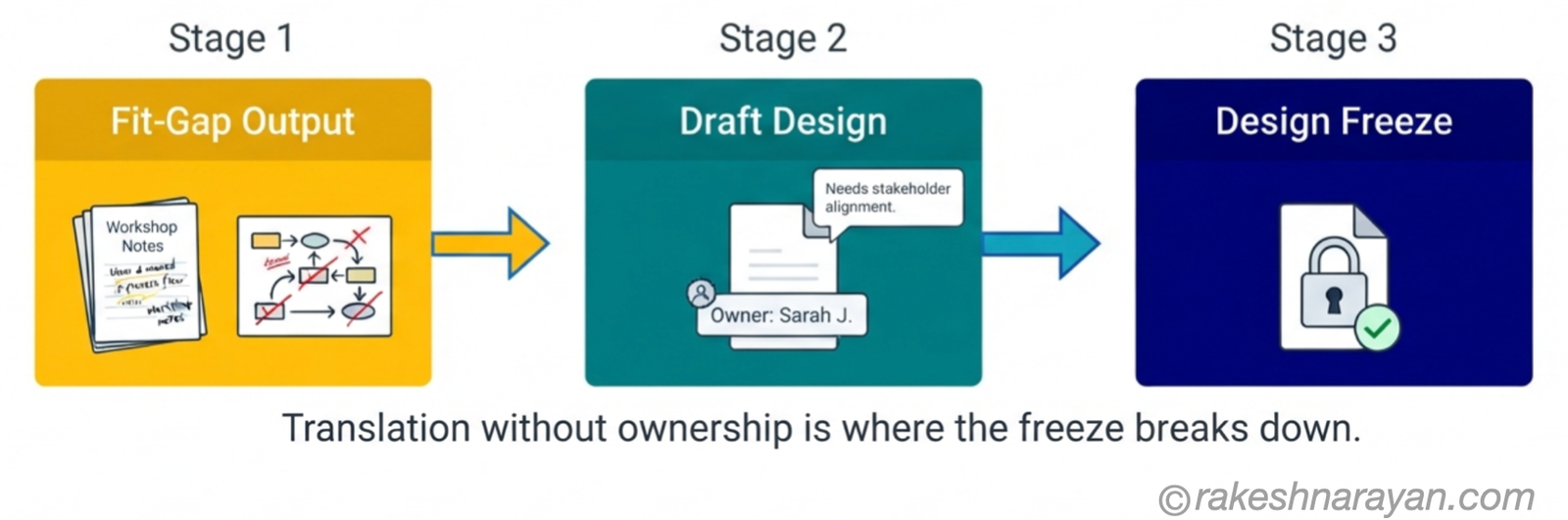
Fit-to-standard workshops produce raw material — notes, marked-up process flows, a list of things that did not match standard. Someone has to turn that into a design document the build team can actually configure against, and this translation step is where most of the damage happens.
The most common failure is translation without ownership. A business analyst writes up what they heard in the workshop, the design document circulates for comment, and nobody with real authority actually reviews it before it moves forward. Six weeks later, the process owner sees the finished design for the first time and disagrees with a decision they never actually made — because what they signed off on in the room and what got written down afterward drifted apart somewhere in the translation.
💡 Practical tip — Name the owner before the workshop
Assign a named owner to every process area before fit-to-standard even starts, not after the workshop finishes. That owner reviews the draft design before it goes anywhere near a freeze, and their sign-off is what makes the design theirs, not just something written about them by someone else in the room.
What freeze actually means
A design freeze is not a date on the project plan. It is a state: every identified gap has a documented decision, every decision has a named owner and a sign-off date, and every open item is tracked somewhere visible rather than silently dropped because the workshop ran out of time.
⚠️ Warning — A false freeze is worse than an honest delay
Calling a design frozen because the calendar says so, while gaps are still marked “to be confirmed,” does not produce a freeze. It produces a design that looks finished and is not — which is worse than an honestly incomplete one, because nobody is actively chasing the open items anymore. An honest amber status gets attention. A false green status does not.
The gap register — the document that prevents reopening
The single most useful artefact in a greenfield blueprint is the gap register, and most programs either do not keep one properly or let it decay into an unreadable spreadsheet nobody trusts by the time Realize starts.
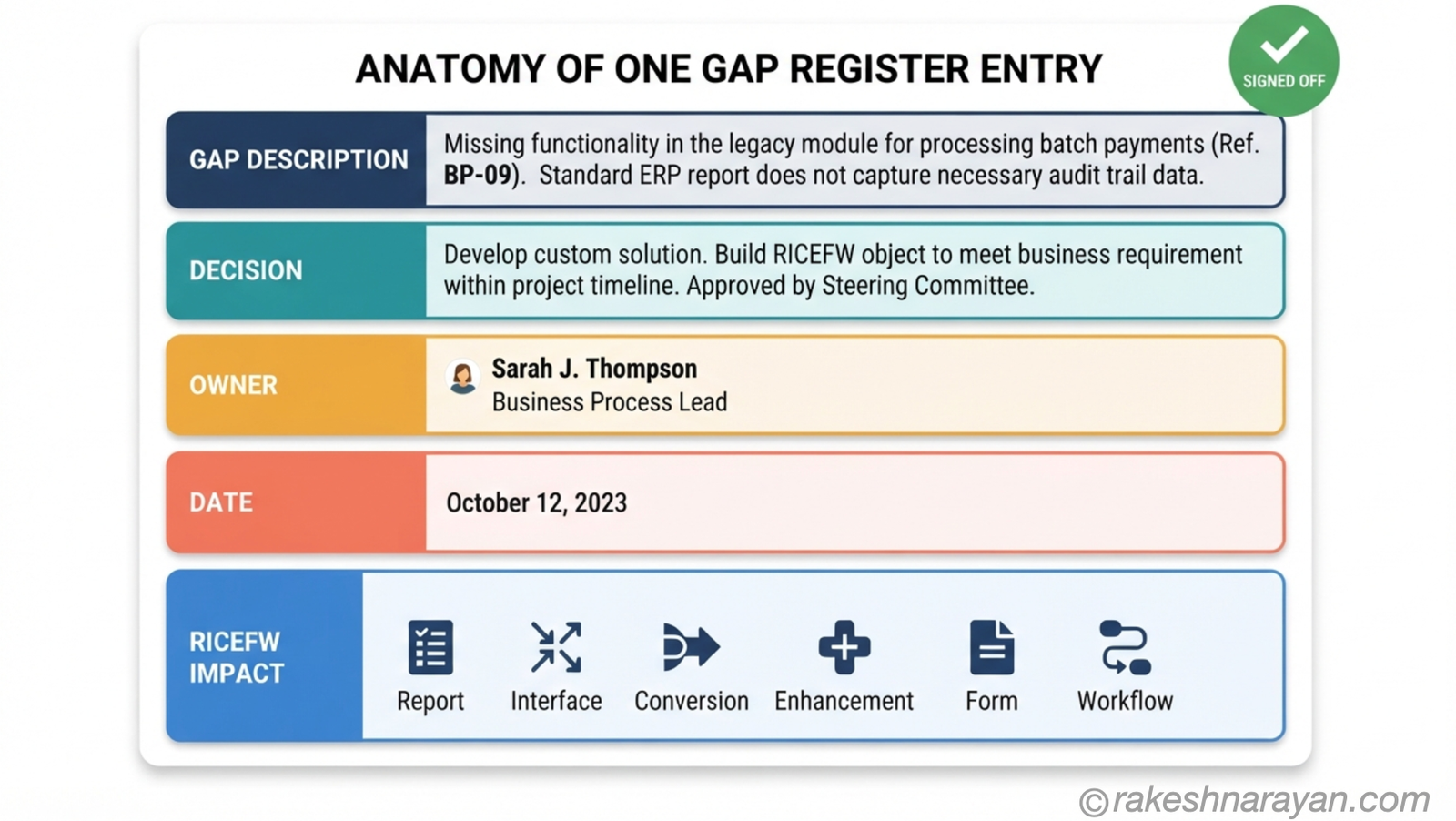
| Gap register field | What it captures |
|---|---|
| Gap description | What SAP standard does not cover, in plain business language |
| Decision | What was agreed — SAP standard, workaround, or a custom build |
| Owner | The named person accountable for the decision, not a team |
| Date | When it was signed off, not when it was first raised |
| RICEFW impact | Whether it creates a report, interface, conversion, enhancement, form or workflow |
✅ Best practice — Read it back before you freeze it
Read the gap register back to the named owner before the freeze is declared, the same way a decision log gets read back at the end of a discovery workshop. If someone will not sign a specific line when asked directly, that gap is not resolved yet — no matter what the project plan says.
Why signed-off designs get reopened anyway
Even with a gap register, designs get reopened. The pattern is almost always the same: someone who should have been in the fit-to-standard workshop was not, and their objection surfaces after the fact instead of during the session where it belonged and would have been cheap to resolve.
The senior stakeholder who delegated attendance to someone junior is the most common version of this. The junior attendee nodded along through the workshop, the design moved forward on that basis, and the senior stakeholder disagrees with half of it once they actually sit down and read the finished document. This is the same failure that derails discovery workshops — a decision made by someone without the real authority to make it, discovered too late to be cheap to fix.
📝 Note — Contradictions hide across workshops, not within them
The second common pattern: a decision made in one workshop quietly contradicts a decision made in another. Two process areas touch the same master data object, two different workshops make incompatible calls about it, and nobody notices until integration testing forces the contradiction into the open. A shared gap register across process areas — one register, not one spreadsheet per module — is what catches this before Realize does it for you, at much greater cost.
Holding the freeze during Realize
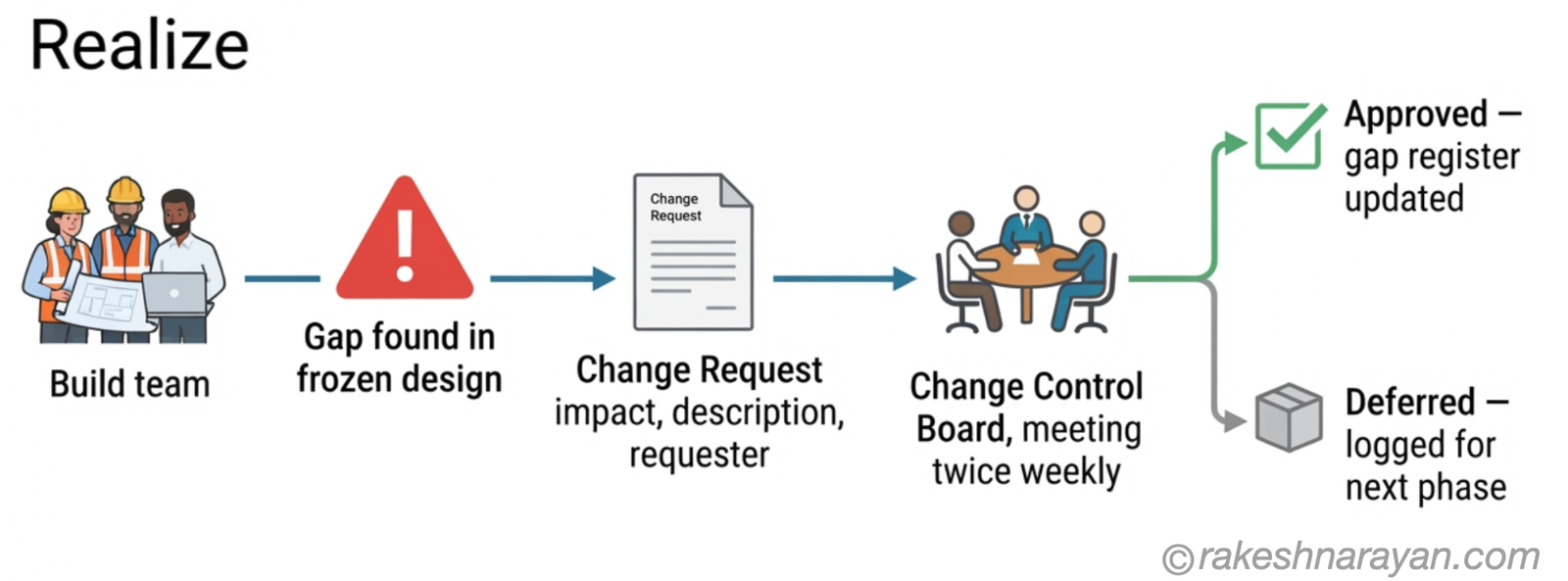
A frozen design will still hit genuine gaps once the build team starts configuring against it in earnest. That is normal, not a failure of the freeze — but it needs a controlled path through change, not an open door that anyone can walk through informally.
Every change request against a frozen design needs the same rigour as the original gap register entry: a clear description of what was missed, an honest assessment of impact on schedule and on other process areas that touch the same data or process, and a named decision maker who is not the same person requesting the change.
| Change request field | Purpose |
|---|---|
| What was missed | The specific gap in the frozen design, described plainly |
| Impact assessment | Effect on schedule and on other process areas sharing data |
| Requester | Who raised it — never the same person who decides it |
| Decision and date | Approved or deferred, logged back into the gap register |
⚠️ Warning — Informal changes are how freezes actually die
Route every change through a change control board, even a lightweight one that meets twice a week for thirty minutes, rather than letting individual conversations quietly amend the design one message at a time. Most designs are not reopened in a formal meeting. They are reopened quietly, in a side conversation, without anyone updating the document everyone else is still building against.
At a glance — from fit-gap to a freeze that holds
| Concept | One-line summary |
|---|---|
| Blueprint | The translation layer between business decisions and what gets configured — not a status report |
| Named owner | One accountable person per process area, assigned before fit-to-standard starts |
| Design freeze | A state, not a date — every gap resolved, every decision owned and signed |
| Gap register | Five fields only — description, decision, owner, date, RICEFW impact |
| Sign-off | Read back and confirmed in person, not assumed from an email reaction |
| Reopened design | Usually caused by a missing decision owner or a cross-workshop contradiction |
| Change control board | A lightweight, regular forum that makes every change during Realize visible and owned |
What to take away
A design freeze is not a milestone you hit once and move past. It is a governance commitment you keep making, decision by decision, for the rest of the program.
The blueprint holds if the gap register is real, if every decision has a named owner who actually signed it in person, and if changes during Realize go through a visible process instead of a private conversation. Skip any one of those three, and the freeze is just a date on a plan, not a state the design is actually in.
The programs that avoid reopened designs are not the ones with the most detailed blueprints. They are the ones that treated every decision as something worth protecting, not just something worth writing down once and hoping it holds.
🔗 Related posts on this site
Running SAP Discovery Workshops That Produce Decisions — the decision-log discipline that the gap register in this post builds on directly.
SAP S/4HANA Migration: Greenfield, Brownfield, Bluefield — where blueprinting sits inside the wider migration path decision.
SAP Activate — The Methodology Behind Every S/4HANA Project — the Explore phase and Fit-to-Standard workshops this post assumes as context.
What Does an SAP Solution Architect Actually Do? — the role that usually owns the blueprint and defends the freeze.
SAP Fit-Gap Analysis — When Business, IT and Finance Disagree — the next post in this series, for when the fit-gap workshop behind this design hits competing stakeholder positions.
SAP Architecture Decisions — Stakeholder Sign-Off — where the frozen design this post produces gets presented for sponsor sign-off.
Published on rakeshnarayan.com — Articles
URL: https://rakeshnarayan.com/articles/sap-blueprinting-fit-gap-to-design-freeze/
Did you enjoy this article?
Let me know — it takes one click.
0 Comments
Leave a Comment
Looks like this one held your attention — I'd really appreciate a quick comment below.
Your comment has been submitted and will appear after review.