SAP Build — Apps, Automation and Work Zone
Every SAP project has the same conversation at some point. The business has ten ideas. IT has a backlog. The answer is always the same: it will take six months, minimum.
SAP Build is SAP’s answer to that problem. It is a suite of low-code and pro-code tools that lets business analysts, functional consultants and professional developers build apps, automate processes and create digital workplaces — on the same platform, with shared governance, without writing extensive custom ABAP in the core.
The name SAP Build covers four distinct tools. Most people have heard of at least one. Very few know how they fit together or which one to reach for in a given situation. That is what this post covers.
🔗 Foundation reading
SAP BTP — The Platform Explained covers the platform that SAP Build runs on. If BTP is new to you, read that first — it gives the landscape that makes SAP Build’s positioning make sense. If you are reading this in the context of an S/4HANA project, SAP S/4HANA vs ECC — The Real Difference covers the clean core principle that explains why SAP Build extensions are now the preferred approach.
What SAP Build actually is
SAP Build is a development suite on SAP BTP. It brings together four tools under a single lobby, shared governance and a common integration with Joule, SAP’s AI copilot.
The four tools cover a spectrum from no-code to pro-code. A business analyst with no technical background can use one end of that spectrum. A professional developer can use the other. Fusion teams — where both work together — can use all of it on the same project.
For S/4HANA Cloud customers, SAP Build entitlements are bundled with the cloud subscription. Licensing was simplified in 2025, removing the previous per-tool complexity — but always verify current entitlements in your contract, as they vary by edition.
| Tool | Who uses it | What it does |
|---|---|---|
| SAP Build Apps | Business analysts, citizen developers | Visual drag-and-drop app builder — web and mobile apps without writing code |
| SAP Build Process Automation | Business process owners, automation teams | Workflow automation and RPA bots — approvals, process flows, repetitive task automation |
| SAP Build Work Zone | IT, HR, line-of-business teams | Digital workplace and business sites — unified launchpad, role-based access to apps and content |
| SAP Build Code | Professional developers | Pro-code IDE — full-stack development with CAP, ABAP Cloud and Joule AI code assistance |
SAP Build Apps — visual app building for everyone
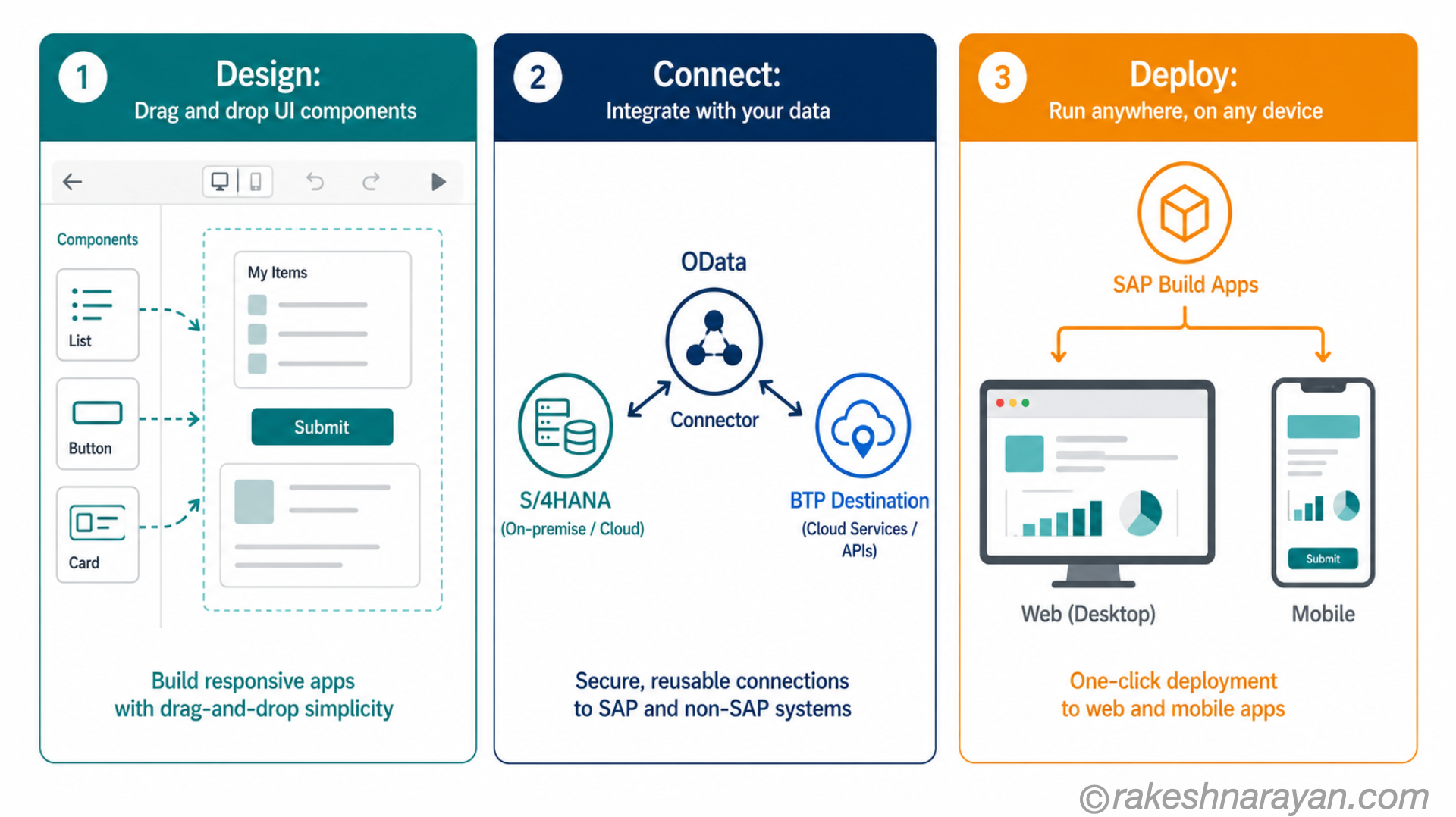
SAP Build Apps is the no-code/low-code app builder in the suite. You build user interfaces using a drag-and-drop canvas, connect to SAP and non-SAP data sources, define logic visually, and deploy to web or mobile — without writing a traditional programming language.
The platform evolved from SAP AppGyver, a specialist no-code platform SAP acquired in 2021. Enterprise features — authentication, data integration, lifecycle management — were added on top of the AppGyver foundation to make it viable for business applications connected to S/4HANA and BTP services.
💡 Practical tip
SAP Build Apps connects to SAP systems through OData APIs and BTP destinations. If you are building an app that surfaces purchase order data or vendor information, you are calling S/4HANA OData services through a BTP destination — not directly accessing the database. The clean core stays intact.
What it replaces — and what it does not
For simple extension scenarios — a mobile approval app, a custom data entry form, a role-specific dashboard — SAP Build Apps replaces what teams previously built in SAP Web IDE using SAPUI5, or sometimes avoided building altogether because the effort was too high.
It does not replace complex custom Fiori apps that require deep SAPUI5 control, custom OData extensions or significant backend logic. Those still belong in SAP Build Code or the ABAP environment.
The honest answer is: if a business analyst can describe exactly what the app needs to do in a single conversation, Build Apps can probably build it. If it takes a functional spec to explain the logic, you are likely looking at Build Code.
SAP Build Process Automation — workflows and RPA
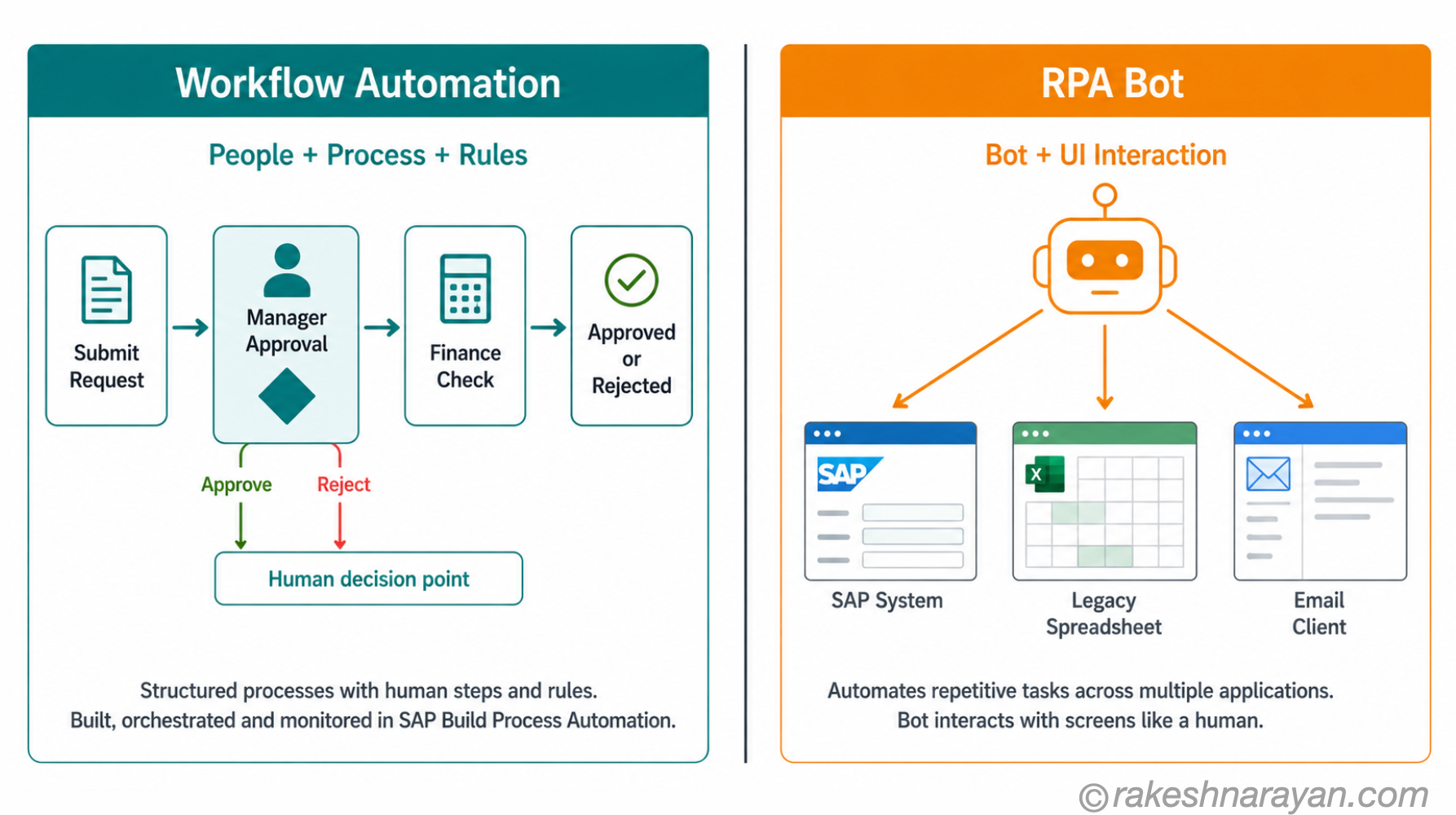
SAP Build Process Automation covers two distinct capabilities that often get conflated: workflow automation and robotic process automation (RPA). They are not the same thing, and understanding the difference matters when you are deciding which one to use.
| Capability | What it does | When to use it |
|---|---|---|
| Workflow automation | Defines structured business processes — approvals, decision steps, parallel flows — with human tasks and automated steps | Approval chains, purchase order releases, leave requests, exception handling that involves human decisions |
| RPA (robotic process automation) | Automates repetitive tasks at the UI or API level — bots that mimic what a user does on screen or interact with APIs | Data entry into legacy systems with no API, screen scraping, repetitive copy-paste tasks across applications |
Both are built visually using drag-and-drop. Workflows use a process designer. RPA bots use a recorder and bot builder. Both connect to SAP and non-SAP systems through prebuilt connectors and the SAP Integration Suite.
The automation library matters here. SAP ships a content library of prebuilt process templates, approval flows and RPA bots for common SAP scenarios — purchase order processing, travel requests, goods receipt — that you configure rather than build from scratch. In a project context, always check the library before building custom.
⚠️ Common mistake
Teams sometimes reach for RPA when a workflow is the right answer. If the process involves human decisions at defined points, use workflow. RPA is for automating tasks a human would do mechanically — not for replacing structured approval processes. Using bots where workflows belong creates fragile automation that breaks when screens change.
Joule and agentic automation
As of Q4 2025, Joule Studio — the agent builder in SAP Build — became generally available. This extends Process Automation beyond fixed workflows into agentic territory: custom AI agents that can plan, reason and adapt across multi-step business scenarios.
The agent builder uses natural language to define agent behaviour and supports MCP-based integrations and multi-agent orchestration. For most projects in 2026, standard workflow automation covers the immediate need. Agentic automation is where the platform is heading.
SAP Build Work Zone — the digital workplace layer
SAP Build Work Zone is the tool most people already use without necessarily knowing the product name. If your organisation has an SAP Fiori Launchpad, or a central site where employees access SAP apps — that is often Work Zone underneath.
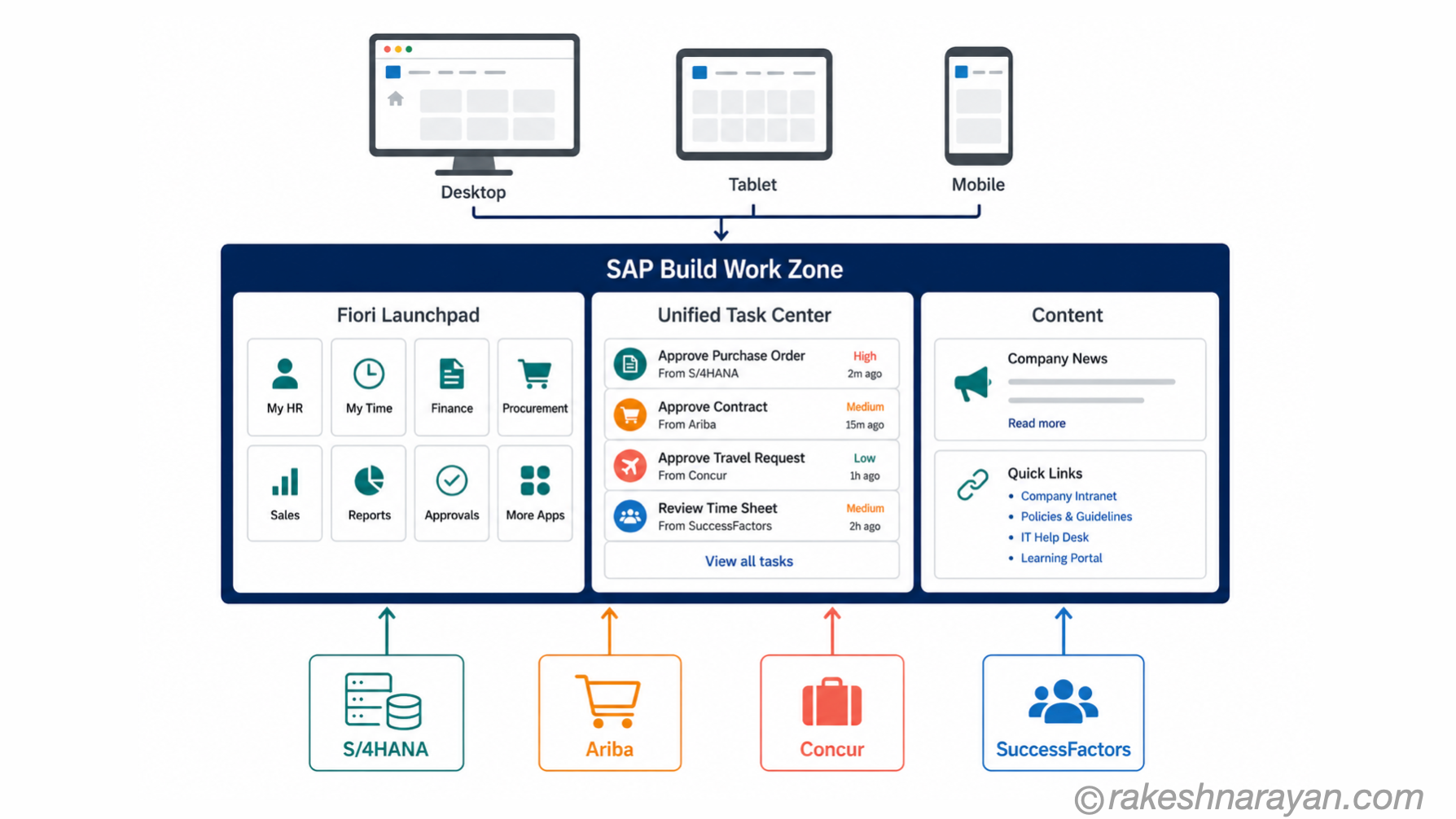
Work Zone creates business sites: personalised, role-based portals that give employees a single place to access SAP applications, external tools, workflows, content and collaboration features. It replaces the previous SAP Launchpad service and, for larger deployments, what used to be called SAP Enterprise Portal.
📝 Note
Work Zone comes in two editions: standard and advanced. The standard edition covers the Fiori Launchpad replacement scenario — app tiles, user personalisation, basic content. The advanced edition adds business sites with custom pages, UI integration cards, SAP Task Center (unified task inbox across SAP systems) and deeper content management. Most enterprise deployments moving from SAP Portal should look at the advanced edition.
What Work Zone brings together
The value of Work Zone is not one feature — it is the aggregation. Instead of employees navigating to separate systems for their Fiori apps, their workflow inbox, their HR portal and their company news, Work Zone pulls all of that into one authenticated experience on any device.
SAP Task Center is embedded in Work Zone advanced edition, giving a unified task inbox across S/4HANA, Concur, Ariba and other SAP systems — something that used to require significant custom integration work.
✅ Best practice
If your organisation runs multiple SAP cloud applications — S/4HANA Cloud, Ariba, Concur, SuccessFactors — Work Zone’s Task Center integration alone justifies the conversation. Unified task management across systems reduces context-switching and gives managers visibility across processes they previously had to check in separate inboxes.
SAP Build Code — pro-code development with AI
SAP Build Code is the professional developer’s tool in the suite. It is a cloud-based IDE that bundles SAP Business Application Studio, the SAP Cloud Application Programming Model (CAP), SAPUI5, SAP Fiori Elements and SAP Mobile Services into one environment — accessed from the same SAP Build Lobby as the other three tools.
What makes Build Code distinct from just opening Business Application Studio directly is the integration of Joule as a code-generation copilot, prebuilt templates aligned with clean core extensibility patterns, and unified governance with the low-code tools. A professional developer building a CAP service and a business analyst building a Build Apps interface can share components and work in the same project.
📌 Key takeaway
SAP Build Code supports two programming models: ABAP Cloud (for on-stack and side-by-side extensions using ABAP) and CAP (for full-stack Java or JavaScript/TypeScript applications on BTP Cloud Foundry). If you are building S/4HANA extensions using the clean core approach, these two models cover the professional developer scenarios that Build Apps cannot handle.
How the four tools work together — a real scenario
The tools are designed to be composed. In practice, a single business requirement often touches more than one.
Consider a purchase order exception process. A supplier sends a goods receipt that does not match the purchase order. The exception needs to be reviewed, a decision made, and the outcome recorded.
| Step | Tool | What it does |
|---|---|---|
| Exception flagged in S/4HANA | SAP Build Process Automation | A workflow is triggered automatically when the system detects the discrepancy. The process routes the exception to the relevant buyer. |
| Buyer reviews on mobile | SAP Build Apps | A custom mobile app surfaces the exception details — PO, goods receipt, variance — in a clean interface built without ABAP. |
| Task appears in the inbox | SAP Build Work Zone | The buyer’s Work Zone Task Center shows the pending decision alongside other open tasks from across SAP systems. |
| Complex extension logic | SAP Build Code | If the exception requires custom backend logic — a CAP service checking tolerance thresholds — a professional developer builds that service in Build Code and exposes it as an API the Build Apps app calls. |
No single tool does everything here. But because they share the same platform, governance and identity layer, they compose cleanly. This is the fusion team model SAP describes — and it works in practice when the scope of each tool is understood clearly.
SAP Build and the clean core
This is the strategic reason SAP Build matters beyond convenience. If you are running S/4HANA Cloud — or planning to move there — the clean core principle means you cannot modify the SAP standard. Custom ABAP in the core delays upgrades and increases risk.
SAP Build is the primary mechanism for extending S/4HANA Cloud without touching the core. All four tools run side-by-side on BTP, connecting to S/4HANA through released APIs in the SAP Business Accelerator Hub. The core stays clean. Extensions live outside it.
SAP has formalised a Clean Core maturity model. SAP Build extensions — using Build Apps, Process Automation, Work Zone and Build Code with CAP or ABAP Cloud — align with the highest-integrity extension levels in that model. SAP designed Build to be the clean core extension platform.
At a glance — SAP Build
| Concept | One-line summary |
|---|---|
| SAP Build | SAP’s unified development suite on BTP — four tools covering no-code to pro-code across apps, automation, workplaces and full-stack development |
| SAP Build Apps | Drag-and-drop visual app builder for web and mobile — no ABAP required, connects to S/4HANA via OData |
| SAP Build Process Automation | Workflow automation and RPA bots — structured approvals and repetitive task automation, with a prebuilt content library |
| Workflow vs RPA | Workflow = structured human decisions in a process; RPA = bot automating repetitive UI or API tasks — they are not interchangeable |
| SAP Build Work Zone | Digital workplace and business sites — unified Fiori Launchpad, role-based app access and Task Center in the advanced edition |
| SAP Task Center | Unified task inbox across SAP systems — available in Work Zone advanced edition for cross-system task aggregation |
| SAP Build Code | Pro-code cloud IDE — bundles Business Application Studio, CAP, SAPUI5 and Joule AI copilot for professional developer scenarios |
| Joule Studio | Agent builder in SAP Build — generally available since Q4 2025, enables custom AI agents with MCP integrations and multi-agent orchestration |
| Fusion team | Business analysts using Build Apps and Process Automation alongside professional developers using Build Code — all on the same platform |
| Clean core | SAP Build is the preferred extension path for S/4HANA Cloud — all four tools run side-by-side on BTP without modifying the SAP standard |
What to take away
SAP Build is not a single product with a misleading name. It is four tools with different purposes, different user audiences and different positions in a project. Treating it as one thing is why teams end up using the wrong tool for the job — reaching for Build Apps when the logic requires Build Code, or building custom workflow code when Process Automation has a template for it.
The shift that matters is strategic, not technical. For two decades, extending SAP meant writing ABAP in the core. That approach no longer scales in a cloud ERP world where upgrade frequency is measured in weeks. SAP Build represents a genuine architectural change — extensions that live outside the core, composed from platform services, governed centrally. The tools are the visible part. The clean core principle is the reason it exists.
Start with the tool that matches the person doing the work. If it is a business analyst describing a process, that is Build Apps or Process Automation. If it is a developer building a CAP service, that is Build Code. If the question is how employees access all of it, that is Work Zone. Once you make that mapping consistently, the platform starts to pay off.
🔗 Related posts
SAP BTP — The Platform Explained — SAP Build runs on BTP. Covers the platform architecture, services and the BTP Cockpit where you activate and manage Build entitlements.
AI in SAP: How Joule and Business AI Actually Work — Joule is embedded across all four SAP Build tools. Covers how SAP’s AI copilot works and where it surfaces in the product landscape.
SAP S/4HANA vs ECC — The Real Difference — The clean core principle that makes SAP Build the strategic extension platform for S/4HANA Cloud projects.
SAP Fiori Design Principles — Apps built in SAP Build Apps follow Fiori design principles. Work Zone is built on the same Fiori Launchpad foundation.
Published on rakeshnarayan.com — Articles
URL: https://rakeshnarayan.com/articles/sap-build-apps-automation-and-work-zone/

Did you enjoy this article?
Let me know — it takes one click.
0 Comments
Leave a Comment
Looks like this one held your attention — I'd really appreciate a quick comment below.
Your comment has been submitted and will appear after review.