SAP CAP — The Framework Behind Modern BTP Development
Every BTP project conversation eventually arrives at the same question: are we using CAP? For most teams, the answer is yes — but when you ask what CAP actually is, the explanations get vague fast. A framework. Something to do with CDS. Node.js, maybe Java.
That vagueness is understandable. CAP sits at the intersection of several SAP concepts — CDS, OData, BTP services, clean core — and it is easy to describe the parts without ever explaining what holds them together.
This post explains CAP clearly: what problem it was built to solve, how its three layers work, what it gives you without writing a line of boilerplate, and when to use it instead of RAP.
🔗 Foundation posts
SAP BTP — The Platform Explained covers what BTP is and how its services fit together — read that first if BTP is new to you.
CDS Views and the VDM in SAP S/4HANA Explained introduces CDS in the S/4HANA context — useful background before this post.
The problem CAP was built to solve
Before CAP, building a custom application on SAP BTP meant assembling the pieces yourself. You defined your data model, manually created an OData service, wired up authentication, configured the database connection, and wrote boilerplate for every recurring task — security checks, error handling, pagination, multitenancy hooks.
Every project started from scratch. Every team made different decisions. There was no standard. That produced inconsistent applications, slow delivery, and maintenance problems that accumulated over time.
CAP was SAP’s answer to that problem. It is a framework that standardises the development path — providing the languages, libraries, and tools so that teams spend their time on business logic, not infrastructure plumbing.
📌 Key Takeaway
CAP is SAP’s primary framework for building side-by-side extensions on BTP. In SAP’s clean core maturity model — formalised in August 2025 — CAP-based extensions on BTP are classified as Level A: the cleanest, most upgrade-safe way to extend S/4HANA without touching the core.
That clean core connection is why CAP has become unavoidable. If your organisation is on S/4HANA and needs custom logic that goes beyond standard configuration, the question is no longer whether to move that logic to BTP — it is which framework to use when you get there. For anything cloud-native and language-agnostic, the answer is CAP.
What CAP actually is
CAP stands for Cloud Application Programming Model. It is not a product. It is not a platform. It is a framework — a set of languages, libraries, and tools that SAP calls the golden path for building enterprise-grade services and applications on BTP.
The golden path concept is deliberate. CAP does not force you into a single way of doing everything. But it provides a well-lit, well-maintained path with proven practices built in — so that you are not solving the same problems every project team has already solved before you.
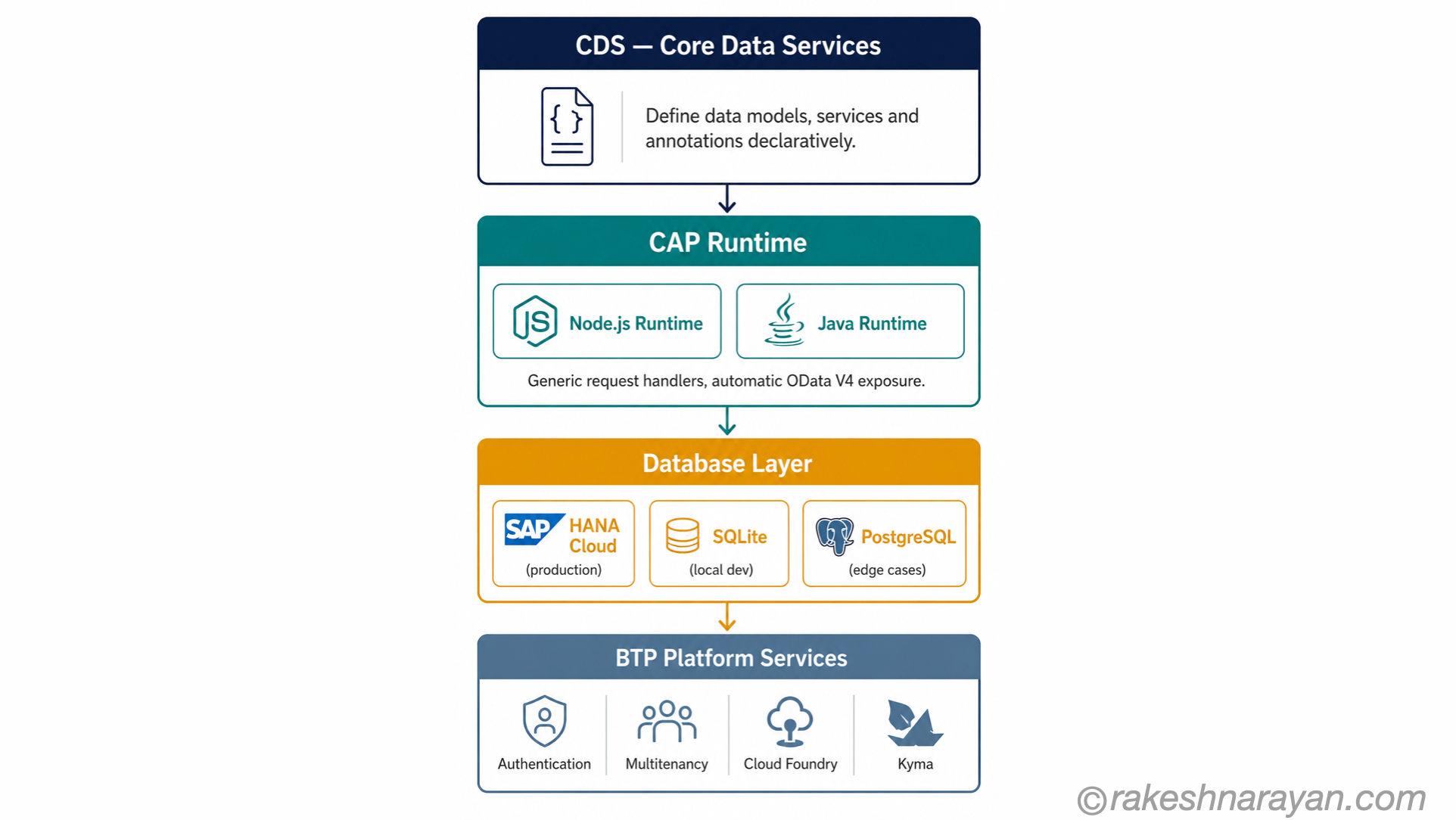
CAP has four components:
| Component | What it is | What it does |
|---|---|---|
| CDS | Core Data Services — CAP’s modelling language | You define your data models, service interfaces and UI annotations declaratively. CDS is the backbone of everything. |
| Service Runtimes | Node.js or Java | The runtime that serves your application. Generic handlers automatically respond to requests — you add custom logic only where needed. |
| Platform Integrations | Calesi — CAP-level platform connectors | Pre-built integrations to BTP services: authentication, multitenancy, messaging, audit logging. You configure, not code. |
| CLI and Tooling | cds command-line interface | Scaffolding, local development server, build and deploy commands. Integrated with SAP Build Code, VS Code, IntelliJ and Eclipse. |
📝 Note
Node.js or Java — Both runtimes are fully supported and production-ready. Node.js tends to be the default for new projects because of its faster local development cycle. Java is common in enterprise environments where Java skills are established or where performance and ecosystem integration requirements align better with the JVM.
The three layers of a CAP application
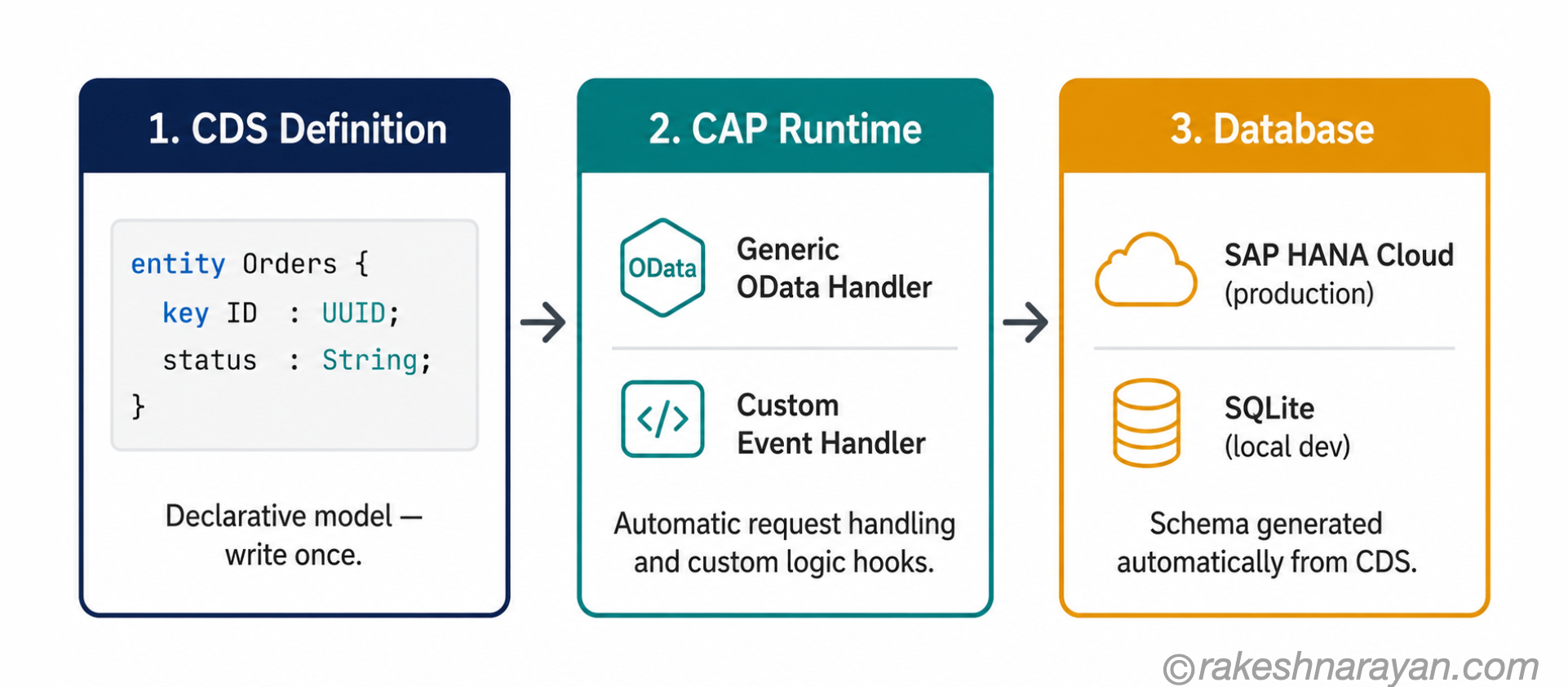
Once you understand what happens inside a CAP project — how a CDS definition becomes a live OData service backed by a real database — everything else follows naturally.
Layer 1 — CDS: define once, generate everything
CDS is where you do the modelling. You define your entities (the data structures), your services (the APIs that expose them) and your annotations (the UI and behaviour hints). You write this in a declarative language that is close to plain English.
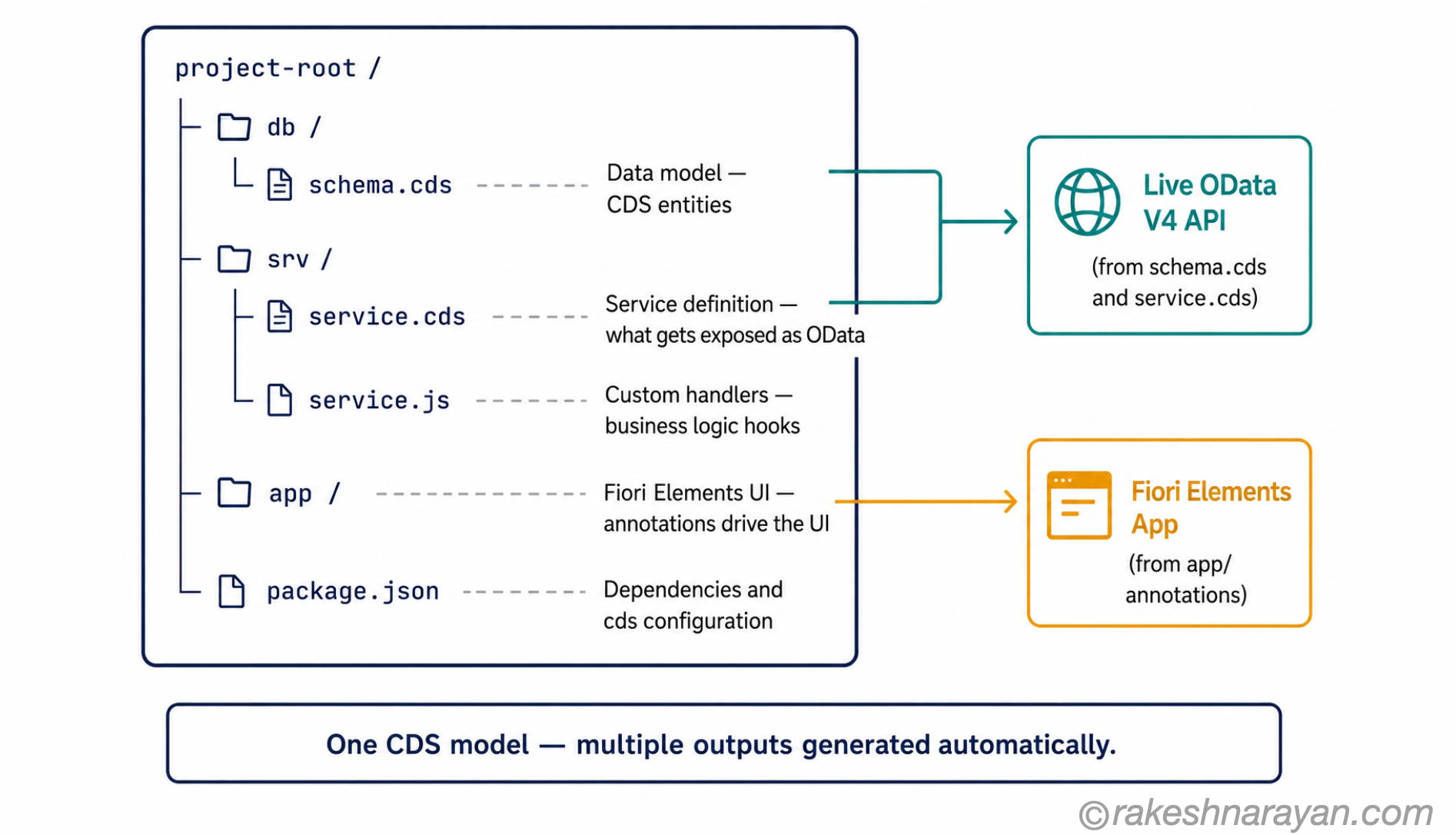
From a single CDS definition, CAP generates the database schema, the OData service metadata, the UI annotations for Fiori Elements, and the input for the runtime. You are not writing SQL. You are not writing WSDL. You define the intent once, and CAP produces the artefacts.
💡 Practical Tip
CDS annotations are what connect your data model to Fiori Elements UI. A @UI.LineItem annotation on an entity tells CAP to expose that entity as a list in a Fiori List Report — no UI code required. Get the annotations right, and you get a working Fiori app as a side effect of your model.
Layer 2 — The CAP runtime: generic handlers do the heavy lifting
The CAP runtime reads your CDS service definitions and bootstraps generic service providers automatically. When a request arrives — say, a GET request for a list of purchase orders — the runtime handles it. It translates the OData query into SQL, runs it against the database, and returns the result. No code written by you.
You add custom logic only when the generic behaviour is not enough. You write event handlers — before, on, or after standard CRUD operations — that run your business logic at the right point. The rest is handled.
This is the core value of CAP: the plumbing is solved. You focus on the logic that is specific to your application.
Layer 3 — Database: SQLite locally, HANA Cloud in production
During local development, CAP uses SQLite automatically. You get a working database the moment you start the local server — no HANA instance needed, no BTP connection, no setup overhead. The development loop is fast.
What CAP gives you out of the box
The list of things CAP handles automatically is where the productivity argument becomes concrete. These are not minor conveniences — they are the things that consume weeks on projects that build without a framework.
| What you get | What it means in practice | Without CAP |
|---|---|---|
| Automatic OData V4 exposure | Every CDS service definition is immediately available as a standards-compliant OData V4 API — no manual service creation | Write and maintain OData annotations and service definitions by hand |
| Generic CRUD handling | List, read, create, update, delete are all handled automatically for every entity you define | Implement each operation per entity, per service |
| Authentication integration | XSUAA and SAP IAS hook in via configuration — user claims flow into your handlers automatically | Wire up OAuth flows and token validation manually for every service |
| Multitenancy support | CAP’s MTX sidecar handles tenant onboarding, database isolation and schema upgrades for SaaS scenarios | Build tenant isolation and lifecycle management from scratch |
| Local development without HANA | SQLite runs in-memory locally — start coding immediately without a BTP subaccount or HANA entitlement | Provision a HANA instance for every developer |
| Cloud Foundry and Kyma deployment | cds add mta for Cloud Foundry, cds add helm for Kyma — deployment configuration generated, not hand-written | Write and maintain MTA descriptors or Helm charts manually |
✅ Best Practice
Start every new BTP application project with cds init and run cds watch immediately. You will have a local server with a working SQLite database and a live OData endpoint within minutes. Validate the data model and service design locally before you involve any BTP services — it is dramatically faster to iterate at this stage than after deployment.
CAP or RAP — how to choose
RAP — the ABAP RESTful Application Programming Model — is SAP’s other strategic framework. Both are supported. Both are actively developed. They are not competing for the same use cases.
The decision comes down to three things: where your application lives, what skills your team has, and what you are extending.
| Decision factor | Choose CAP | Choose RAP |
|---|---|---|
| Where the app runs | BTP Cloud Foundry or Kyma — cloud-native, outside the ABAP stack | ABAP environment on BTP or S/4HANA on-premise — inside the ABAP stack |
| Team skills | Node.js or Java developers — web and cloud backgrounds | ABAP developers — existing S/4HANA and SAP basis expertise |
| What you are extending | Side-by-side extensions — custom apps that consume S/4HANA via published APIs | On-stack extensions — enhancing or exposing existing ABAP business logic via OData |
| Clean core level | Level A — BTP side-by-side, fully upgrade-safe | Level A — ABAP Cloud on-stack, also upgrade-safe when using released APIs only |
| Multitenancy / SaaS | Strong — built-in MTX support designed for cloud SaaS scenarios | Not the primary use case — single-tenant on-stack is the typical RAP scenario |
| Open-source integration | Strong — integrates naturally with npm ecosystem, Docker, Kubernetes tooling | Limited — ABAP environment is largely SAP-contained |
⚠️ Warning
The most expensive mistake in SAP BTP projects is defaulting to RAP because the team knows ABAP, when the actual requirement is a cloud-native, externally-facing application. RAP is excellent for on-stack ABAP extensions. It runs into real scalability and architectural limits when forced into a cloud-native, multi-tenant, side-by-side role. Choose based on the use case, not the team’s comfort zone.
In practice, many projects use both. RAP exposes the S/4HANA business logic through clean OData APIs. CAP consumes those APIs and builds the cloud-native application layer on top. The two models complement each other when the architecture is designed correctly.
At a glance — SAP CAP
| Concept | One-line summary |
|---|---|
| SAP CAP | The Cloud Application Programming Model — SAP’s standard framework for building cloud-native applications on BTP |
| Golden path | SAP’s term for CAP’s opinionated, proven development path — reduces decisions, builds in best practices |
| CDS | Core Data Services — CAP’s declarative modelling language for data, services and UI annotations |
| CAP runtime | The Node.js or Java layer that reads CDS models and serves requests automatically via generic handlers |
| Generic handlers | Built-in request handling for CRUD operations — no custom code needed for standard behaviour |
| SQLite / HANA Cloud | SQLite for fast local development, SAP HANA Cloud for production — same CDS model drives both |
| OData V4 | Every CDS service is automatically exposed as a standards-compliant OData V4 API |
| Clean core Level A | CAP-based side-by-side extensions on BTP are SAP’s cleanest extension pattern — fully upgrade-safe |
| CAP vs RAP | CAP = cloud-native, Node.js/Java, side-by-side. RAP = ABAP, on-stack S/4HANA extensions. Both are strategic. |
| Deployment targets | Cloud Foundry (MTA-based) and Kyma/Kubernetes (Helm-based) — both fully supported |
What to take away
CAP is the answer to a question SAP spent years getting wrong: how do you give a developer team a consistent, productive starting point for building on BTP without making them assemble everything from scratch?
The golden path framing is not marketing language. It describes something real. Every CAP project starts with a working OData service, a local database, and authentication hooks in place — before you write a single line of business logic. That is the productivity argument. The clean core argument follows from the architecture: code that lives on BTP instead of in the ABAP stack survives upgrades, scales independently, and integrates cleanly with cloud services.
If you are on an S/4HANA programme that involves custom development, the question is not whether to use CAP — it is whether your use case is side-by-side (CAP) or on-stack ABAP (RAP). Get that decision right early. The projects that got it wrong spent significant time and budget finding out why.
🔗 Related posts on this site
SAP BTP — The Platform Explained — the platform CAP runs on: services, runtimes, and how it all fits together.
OData Protocol in SAP — V2, V4 and How It Works — CAP exposes OData V4 automatically; this post explains what that means and why V4 matters.
CDS Views and the VDM in SAP S/4HANA Explained — CDS in the S/4HANA context: how the same modelling language powers both the core and CAP extensions.
SAP S/4HANA vs ECC — The Real Difference — the clean core strategy and why extending S/4HANA the right way matters for your upgrade path.
ABAP Fundamentals That Still Matter — if you are evaluating RAP alongside CAP, this post covers the ABAP foundation RAP builds on.
SAP BTP Runtimes — Cloud Foundry, ABAP and Kyma Compared — CAP is built to run on Cloud Foundry specifically; this post compares that runtime against the other two.
SAP Clean Core — Strategy Behind Every S/4HANA Build Decision — CAP is the practical implementation of the clean core principle this post’s architecture argument rests on.
Published on rakeshnarayan.com — Articles
URL: https://rakeshnarayan.com/articles/sap-cap-the-framework-behind-modern-btp-development/
Did you enjoy this article?
Let me know — it takes one click.
0 Comments
Leave a Comment
Looks like this one held your attention — I'd really appreciate a quick comment below.
Your comment has been submitted and will appear after review.