SAP Fiori Launchpad Configuration — Spaces, Pages and Catalogs
Follow a five-year-old Fiori blog post today and you will hit a wall fast. It tells you to open the Groups tab. There is no Groups tab.
The screen just sits there, empty, and you start wondering if something is broken.
Nothing is broken. SAP quietly retired the model most guides still teach. Groups is deprecated, Spaces and Pages are the standard, and a lot of the content still ranking on Google has not caught up.
This post covers what actually governs a Fiori launchpad today — catalogs, spaces, pages and the PFCG wiring that ties them to a role — plus every transaction and app you need to configure one.
🔗 Foundation posts
This post builds on SAP Security Roles and Authorisation — the PFCG, SU24 and SU53 fundamentals here assume you already know what an authorization object and a role are doing. If catalogs, roles and profiles are still fuzzy, start there. SAP Fiori Design Principles covers the role-based principle that this post makes technically real.
The launchpad isn’t one thing — it’s four layers
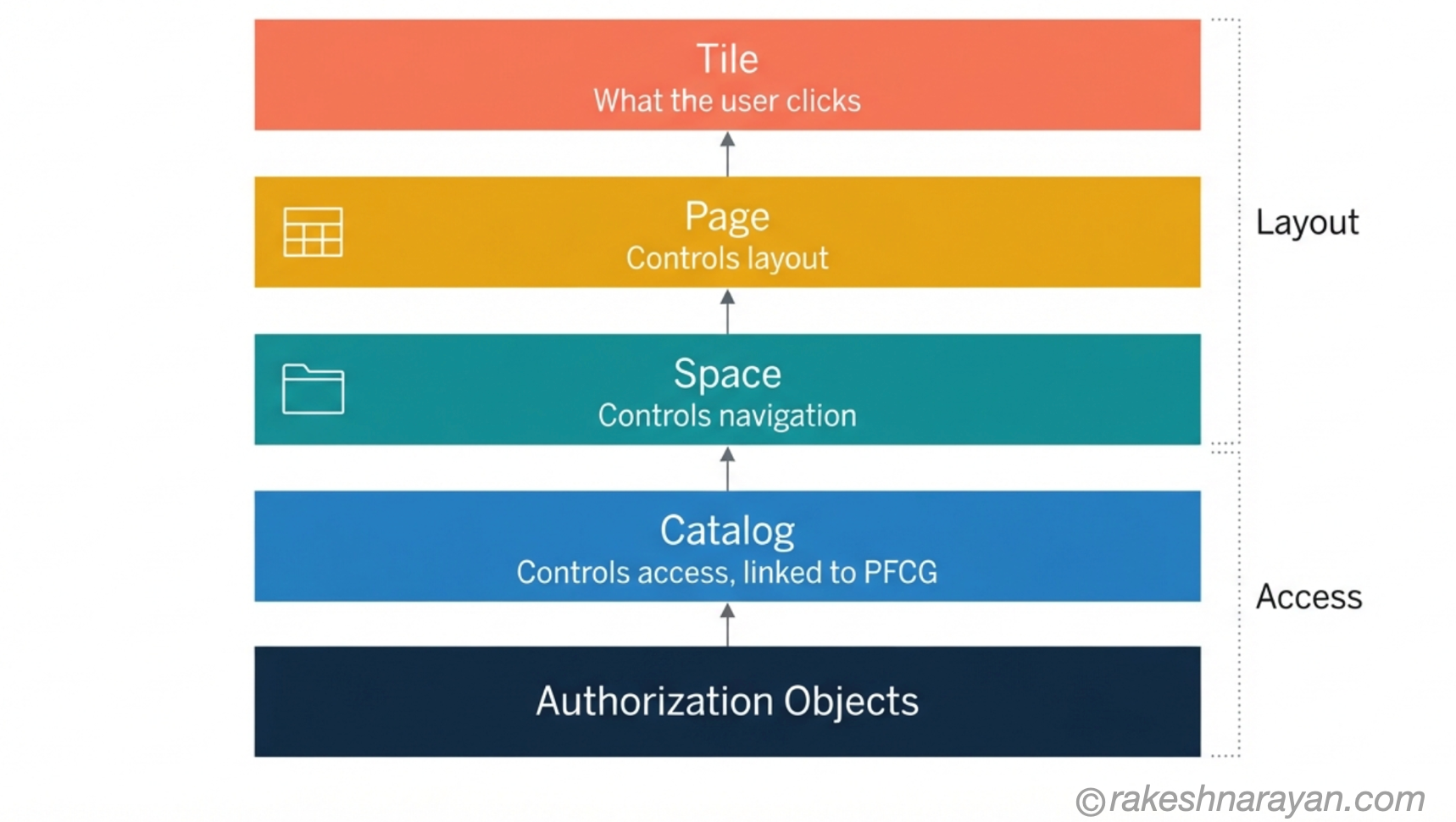
Most confusion about the launchpad comes from treating it as one object. It is not. It is four layers stacked on top of each other, and each layer answers a different question.
A catalog answers – Is this user allowed to use this app at all?
A space, page and section answer – Does this user see it, and where?
Those are not the same question, and mixing them up is the single most common setup mistake I see on projects.
Spaces and pages do not touch authorization. If a tile sits on a page but the user has no authorization for the underlying app, SAP hides that tile automatically. The page can be configured perfectly and the user still will not see the app — the catalog decides that, not the page.
📌 Key Takeaway
Catalog = access. Space, Page and Section = layout. Diagnosing a launchpad problem starts with working out which of the two you are actually dealing with.
Catalogs — still doing the same job they always did
A catalog is a container of apps — tiles and their target mappings, bundled together. SAP ships technical catalogs organised by module, and you build business catalogs from them for specific job functions.
Nothing about Spaces and Pages changed this. A catalog is still what gets added to a role’s menu in PFCG, and it is still what determines which apps a user is authorized to launch.
Keep a catalog under 100 apps. Anything larger slows down design-time operations like copying the catalog, and it makes the catalog harder for anyone to reason about later.
💡 Practical Tip
Add the catalog to the role menu through Menu tab → Transaction → SAP Fiori Launchpad → Catalog. This one step is what actually grants app access — everything else in this post is about how the app looks once it’s granted.
Why Groups is being retired (and what that means for you)
Groups was the original launchpad home page model — apps organised into named groups, shown as tiles on one scrolling page. It worked. It also does not scale, and SAP has been moving away from it since SAP S/4HANA 2020, when Spaces and Pages first became available on-premise.
As of release 2402, SAP officially classifies the Groups-based home page as outdated for SAP S/4HANA Cloud. Any system provisioned after 25 January 2023 ships in Spaces mode by default — Groups mode is not even available to turn on.
⚠️ Warning
SAP is not removing Groups quietly. If migration is not finished in time, SAP will change the launchpad settings for you through Hotfix Collections — non-production systems first, then production — and business users can end up looking at an empty launchpad mid-migration. Plan this. Do not let it happen to you.
If you are still on Groups, SAP delivers a migration tool for exactly this: /UI2/FDM_GTP, Create Launchpad Pages from Groups. It converts existing groups into pages automatically. It does not support mass processing, so budget real time for larger landscapes.
Spaces and Pages — the current model
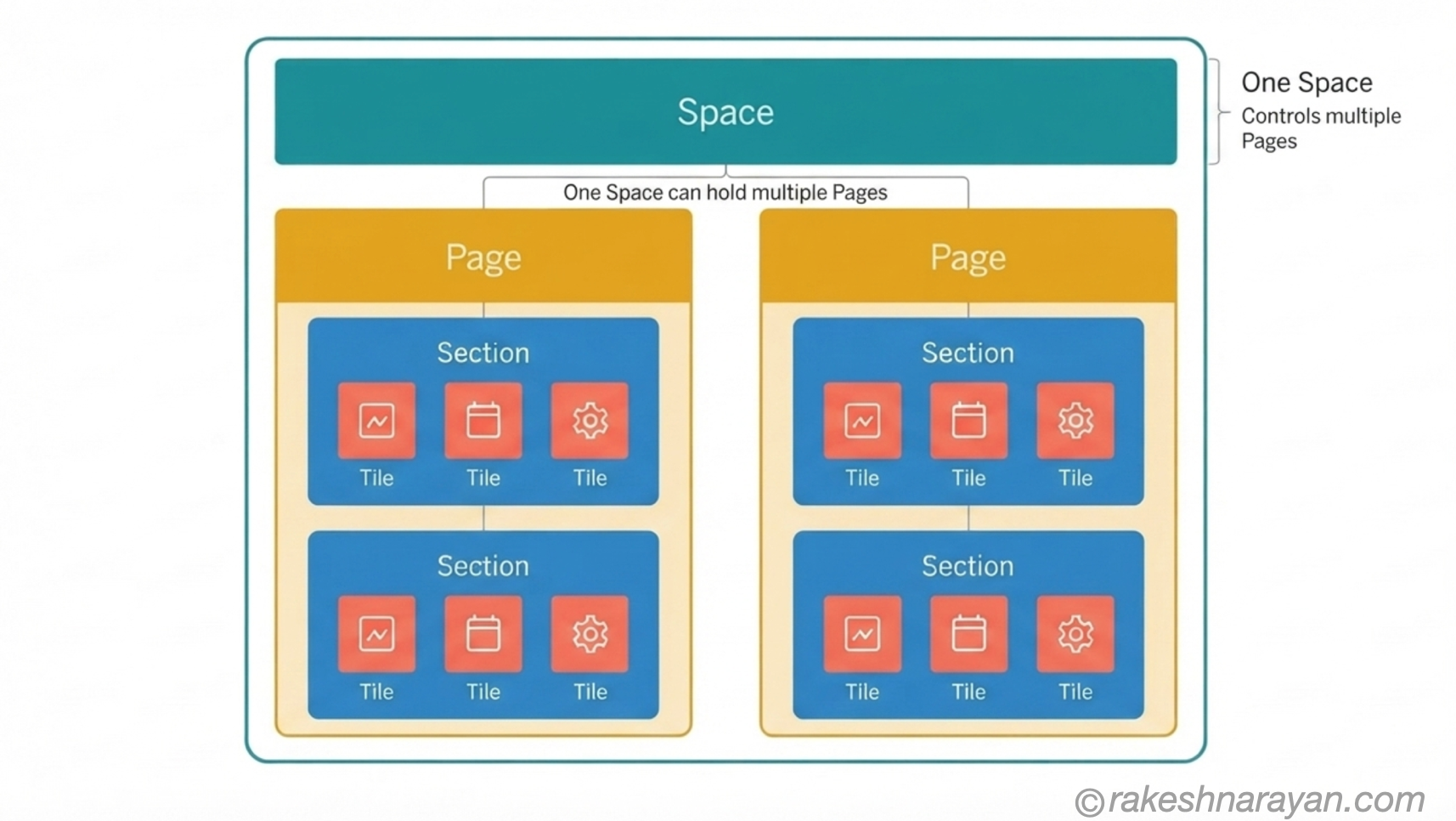
A space is the coarsest level of the new structure. It shows up as a tab across the top of the launchpad, and it maps to a business role — Procurement, Finance Operations, Sales Order Management, whatever job function you are building for.
The detail people miss most often: a space does not contain apps. It is a shell. All it does is group pages together and get itself linked to a role.
A page is where apps actually live, organised into sections. The relationship between pages and spaces is many-to-many — one page can be reused across several spaces, and a space can hold more than one page. That reuse is one of the real advantages over Groups, where duplication was constant.
Configuring a space and page — the basic flow
This is the core sequence, not a full click-through tutorial. Six steps, in order:
1. Build or confirm the business catalog. The apps a page can offer come from the catalogs already linked to the role — no catalog, no apps to choose from.
2. Open Manage Launchpad Spaces (app F4834) and create the space. Give it an ID (custom IDs must start with Z or Y), a description for admins and a title users will see. Tick “Also create a page” to generate the first page at the same time.
3. Assign a transport request. Spaces and pages are customizing objects and move through the landscape the same way any other configuration change does.
4. Link the space to the role in PFCG. Menu tab → Transaction → SAP Fiori → Launchpad → Launchpad Space, then enter the space ID.
5. Open Manage Launchpad Pages (app F4512), or continue from inside the Spaces app, and build sections. Add tiles pulled from the catalogs already granted through the role — this is where the access layer and the layout layer meet.
6. Activate Spaces mode for your users with the SPACES and SPACES_ENABLE_USER parameters, if it is not already the system default.
💡 Practical Tip
You need the SAP_FLP_ADMIN role to open Manage Launchpad Spaces and Manage Launchpad Pages in the first place. This trips people up constantly — the apps exist, the tiles are just not visible without that role.
Wiring it together in PFCG
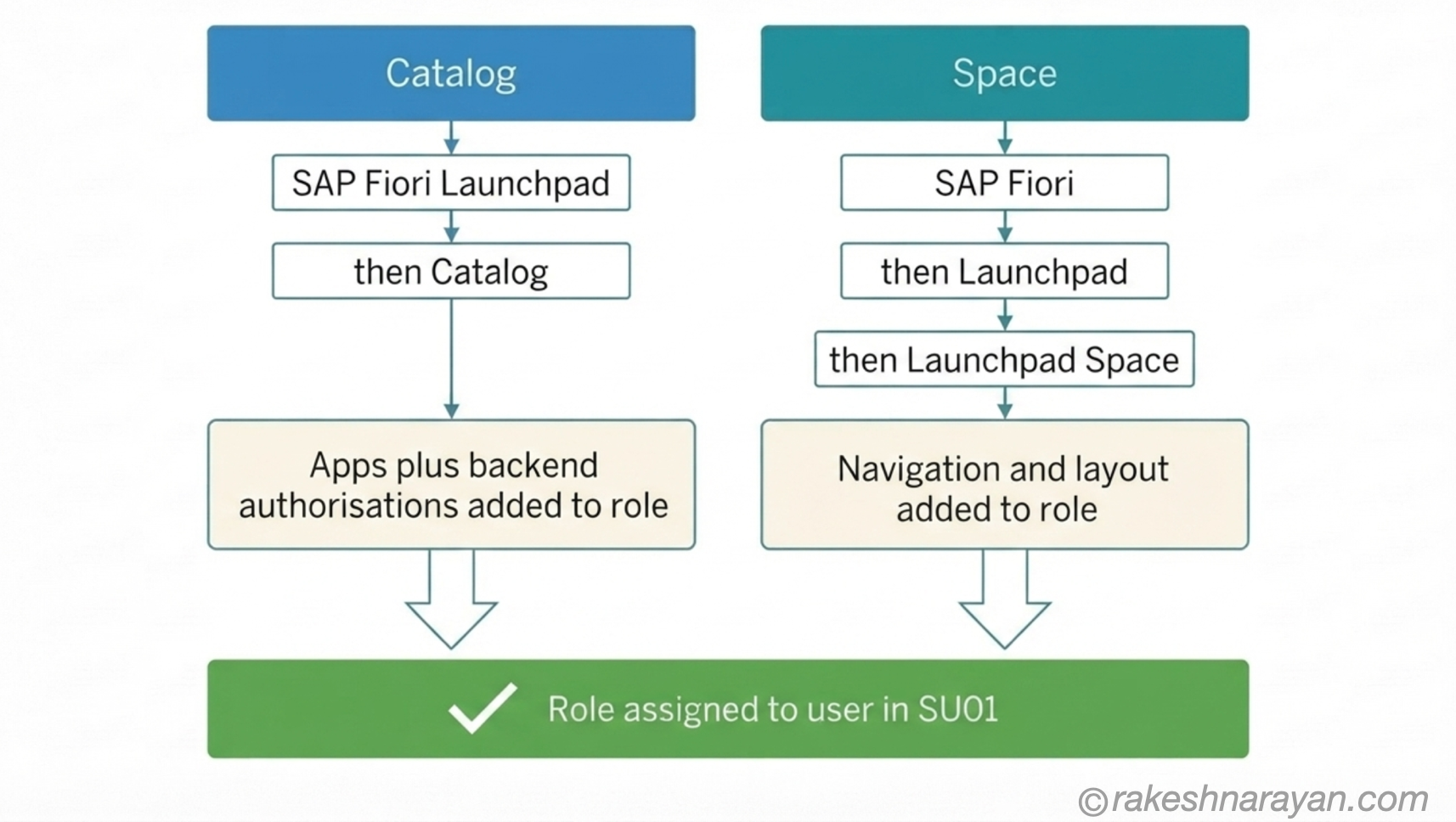
Catalog and space are two separate links inside the same role menu, and it is worth being deliberate about both because they do different jobs.
| Link type | Path in PFCG | What it actually grants |
|---|---|---|
| Catalog | Menu → Transaction → SAP Fiori Launchpad → Catalog | App access and the backend authorization objects behind each app |
| Space | Menu → Transaction → SAP Fiori → Launchpad → Launchpad Space | Navigation, layout, and which tab the user sees |
✅ Best Practice
Add the catalog and the space to a role in the same transport. A role with a space but no matching catalog shows a tab with nothing authorized behind it. A role with a catalog but no space grants access to apps a user can only reach through search or the App Finder — never through a clean, deliberate layout.
Key transactions and apps — quick reference
| Transaction / App | What it does |
|---|---|
| PFCG | Role maintenance — links catalogs, spaces and pages to a role |
| SU01 | User maintenance — assigns the role to a user |
| /UI2/FLPD_CUST | Launchpad Designer (client-specific) — classic catalog and group maintenance |
| /UI2/FLPD_CONF | Launchpad Designer (client-independent) — configuration layer |
| Manage Launchpad Spaces (F4834) | Create and maintain spaces, and see which roles a space is linked to |
| Manage Launchpad Pages (F4512) | Create and maintain pages, sections and tile placement |
| /UI2/FDM_GTP | Create Launchpad Pages from Groups — SAP’s migration tool from the old model |
| /UI2/FLP_CUS_CONF + SM34 | Central configuration parameters, such as default search scope and home navigation behaviour |
| SU24 | Authorization proposals — links transactions and services to their expected authorization objects |
| SU53 | Show last failed authorization check — your first stop when a tile is missing for authorization reasons |
Common setup issues
A blank launchpad almost always means one of two things: the SPACES parameter is not activated for that user, or the role assigned in SU01 has no space linked at all. Check activation before you start rebuilding pages.
A tile that exists in the catalog but never appears usually means it was never added to a section on a page. Being authorized and being placed are two separate steps, and Spaces and Pages makes you do both deliberately — Groups let people blur this together more easily, which was part of the problem.
📌 Key Takeaway
If a tile is missing, work out which layer is broken before touching anything. Missing from the page is a layout fix. Missing from the catalog is an authorization fix, and SU53 is where you check it.
At a glance — the mental model
| Concept | One-line summary |
|---|---|
| Catalog | Container of apps linked to a role — controls access, not layout |
| Business catalog | A catalog scoped to a job function, built from technical catalogs |
| Space | The coarsest navigation level — a shell, mapped to a business role, shown as a tab |
| Page | Where apps actually live, organised into sections — reusable across multiple spaces |
| Section | A grouping of tiles within a page |
| Groups (legacy) | The pre-2020 home page model — outdated as of release 2402, being phased out |
| Manage Launchpad Spaces (F4834) | The Fiori app used to create and maintain spaces |
| Manage Launchpad Pages (F4512) | The Fiori app used to create and maintain pages and sections |
| SAP_FLP_ADMIN | The role required to access the launchpad administration apps |
| SPACES / SPACES_ENABLE_USER | The parameters that activate Spaces mode for users |
What to take away
Every launchpad problem is really one of two questions: can this user reach this app, or does this user see this app the way they should? The first is a catalog and authorization question. The second is a space, page and section question.
Keep those two questions separate in your head and launchpad debugging stops being guesswork. You stop rebuilding pages to fix authorization issues, and you stop chasing SU53 traces for a tile that was simply never added to a section.
Groups will not disappear overnight, but it is not where you should be building anything new. Spaces and Pages is where SAP is investing, and the sooner your role structure reflects that, the less migration pain you carry later.
🔗 Related posts on this site
SAP Security Roles and Authorisation — the PFCG, SU24 and SU53 fundamentals behind every catalog and space link in this post.
SAP Fiori Design Principles — The Five Ideas Behind Every SAP App — the role-based principle that spaces and catalogs make technically real.
SAP Fiori Authentication — Every Scenario Explained — what happens before a user even reaches the launchpad.
SAPUI5 vs Fiori vs Fiori Elements — What’s the Difference? — for understanding what’s actually running inside each tile.
SAP Fiori Deployment Using CTMS with CI/CD on SAP BTP — once spaces, pages and catalogs are configured, this covers shipping that configuration safely through a CI/CD pipeline.
SAP Fiori Deployment — Embedded, Hub FES, and Work Zone — the deployment model this launchpad configuration actually runs on.
Fiori Authorization and Role Design for a Multi-System Landscape — how the catalog-to-role mechanics in this post scale once a second or third system joins the landscape.
Published on rakeshnarayan.com — Articles
URL: https://rakeshnarayan.com/articles/sap-fiori-launchpad-configuration-spaces-pages-and-catalogs/

Did you enjoy this article?
Let me know — it takes one click.
0 Comments
Leave a Comment
Looks like this one held your attention — I'd really appreciate a quick comment below.
Your comment has been submitted and will appear after review.