SAP Fiori Authentication — Every Scenario Explained
The demo worked perfectly. SAML was configured, the Identity Provider was set up, the trust was established. Then the client went live and half the users could not log in — because nobody had noticed the production system was a standalone Front-End Server, not embedded, and the authentication flow was completely different.
This is the pattern SAP Fiori authentication problems follow. The protocol choice gets all the attention. The deployment topology gets almost none. And those two things are inseparable — the topology determines which mechanisms are available and how the authentication flow actually works.
This post covers every authentication scenario you will encounter across on-premise, RISE with SAP, and BTP-hosted Fiori deployments — with architecture diagrams for each. By the end, you will have the decision logic, not just a list of protocols.
🔗 Related reading — foundation posts
This post builds on SAP Security Roles and Authorisation — authentication gets you into the system; authorisation controls what you can do once you are in. Read that post first if you are new to SAP access control.
OAuth 2.0 and OpenID Connect covers the OAuth and OIDC protocols from first principles — useful background for the BTP and IAS sections of this post.
The foundation — how Fiori authentication actually works
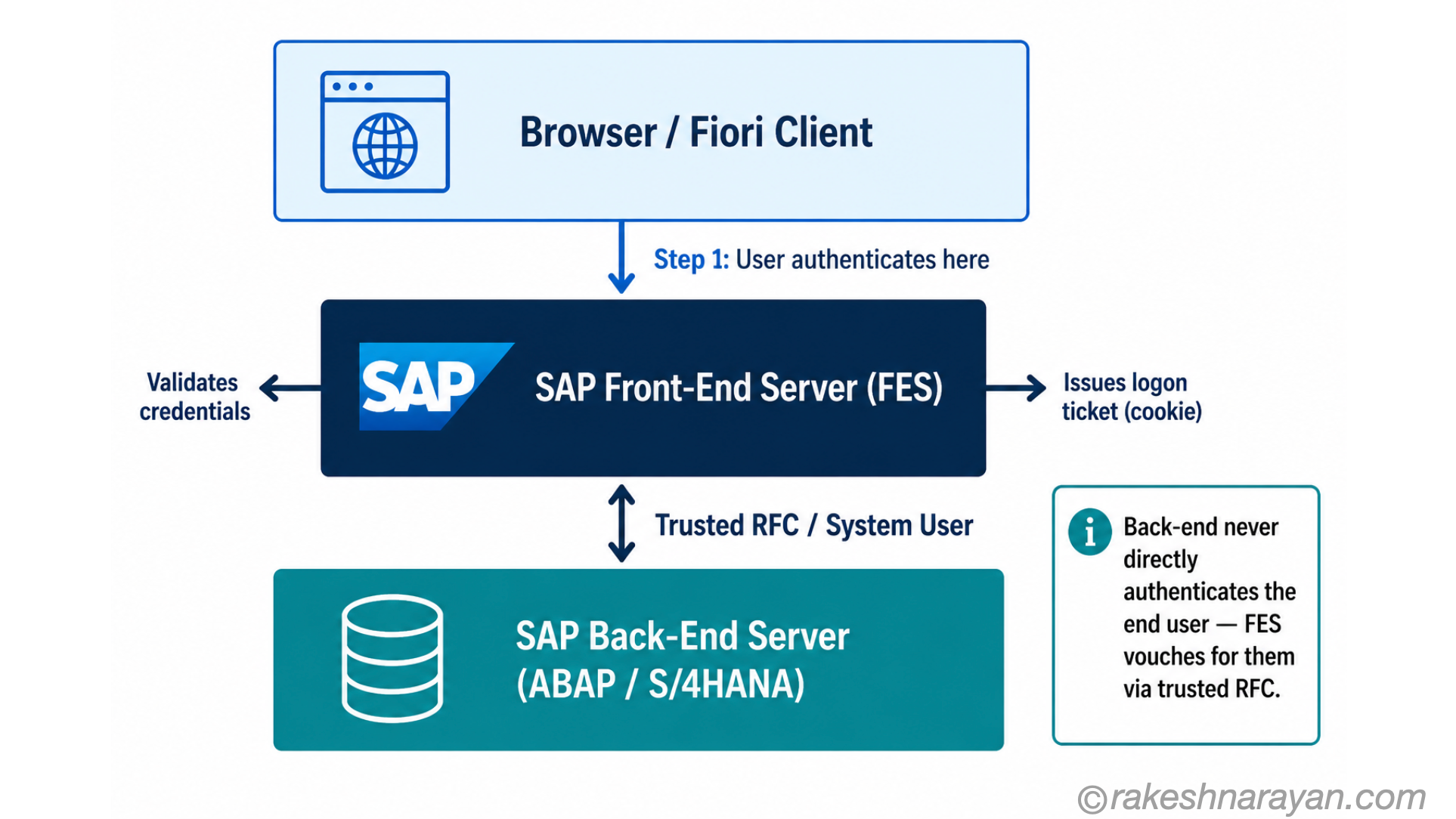
SAP Fiori is not a monolithic application. It is a browser-based UI layer sitting on top of an ABAP back-end system. Authentication happens at the Front-End Server (FES) — not the back-end. The browser talks to the FES, the FES authenticates the user, and then the FES communicates with the back-end using a trusted RFC connection under a technical system user.
This three-layer model is fundamental. It means the back-end never directly authenticates the end user in a standard Fiori setup. The back-end trusts the FES, and the FES vouches for the user. The OData service calls that Fiori apps make to the back-end ride on that established trust.
Once initial authentication is established at the FES, SAP issues a logon ticket (an HTTP cookie). Subsequent OData requests from the browser carry that ticket — the user does not re-authenticate for each call. The security session persists until it expires or the user logs out.
📌 Key Takeaway
Authentication in SAP Fiori is always a conversation between the browser and the Front-End Server. The back-end is protected by the RFC trust — not by direct user authentication. This shapes every scenario that follows.
The deployment topologies — this is what changes everything
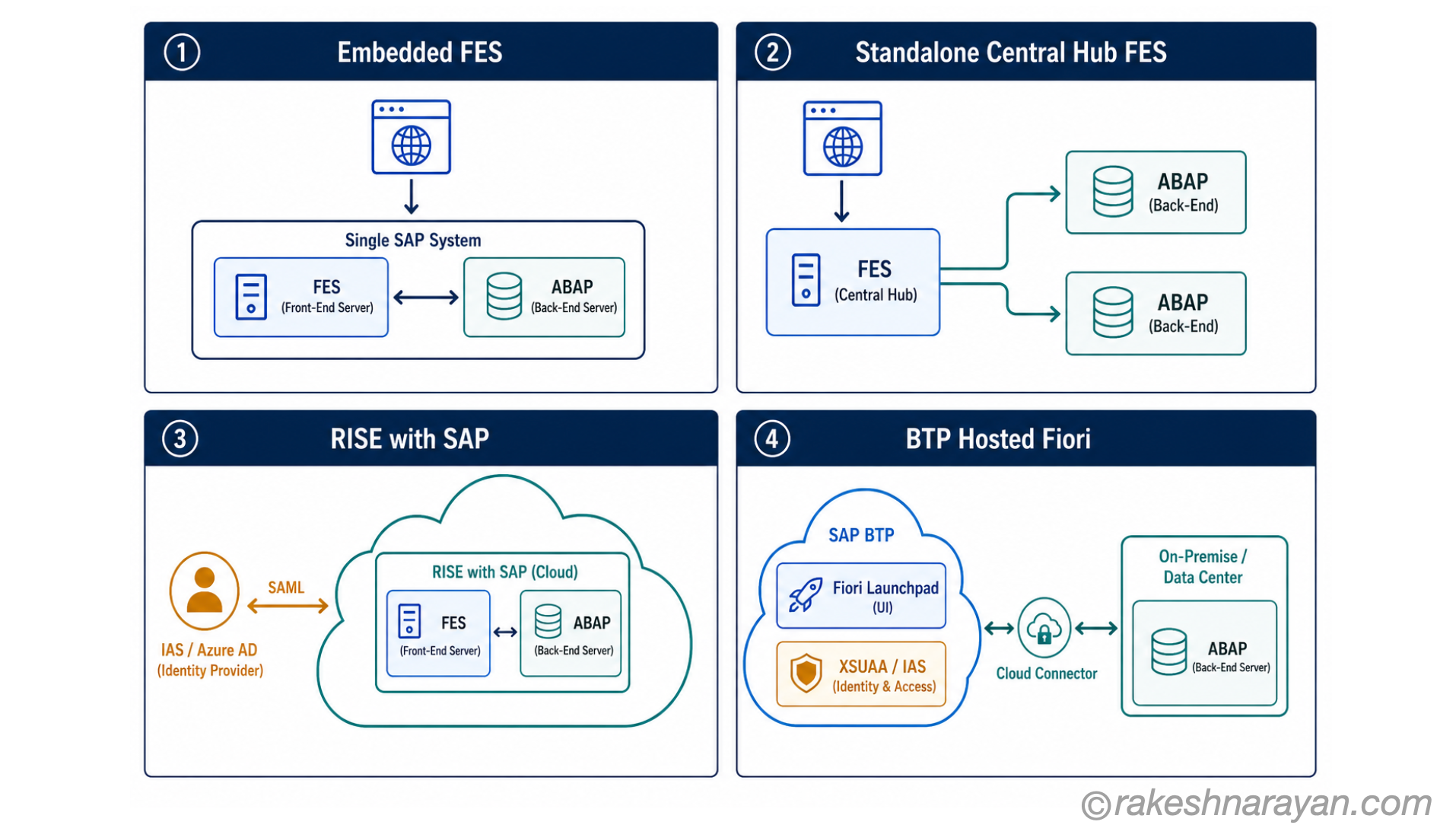
Before choosing an authentication mechanism, you must know your deployment topology. SAP Fiori runs in four distinct shapes in 2026, and they are not equivalent. Each one changes what is technically possible and what SAP recommends.
| Topology | What it means | Auth implications |
|---|---|---|
| Embedded FES (on-premise) | FES and back-end are the same S/4HANA system. Recommended by SAP since S/4HANA 2020. | All standard mechanisms apply. Simplest setup. Trusted RFC is internal. |
| Standalone / Central Hub FES (on-premise) | Separate FES system serves multiple back-end systems. Still common in large landscapes. | All mechanisms apply but RFC trust must be explicitly configured between FES and each back-end. |
| RISE with SAP / S/4HANA Cloud Private Edition | SAP-managed cloud infrastructure. Embedded FES is standard. OS-level access is restricted. | Kerberos possible but requires SAP involvement. SAML 2.0 and IAS are the primary options. |
| BTP-hosted Fiori (HTML5 apps on BTP) | Fiori Launchpad and apps run on BTP. Back-end may be on-premise or cloud, reached via Cloud Connector. | XSUAA or IAS handles authentication. OAuth SAML Bearer propagates identity to back-end. |
| S/4HANA Cloud Public Edition | Fully SAP-managed multi-tenant cloud. Fiori is embedded. Customer has no OS or infrastructure access. Upgrades are automatic and quarterly. | IAS is mandatory — SAP provisions an IAS tenant automatically. No access to transaction SAML2. Authentication is fully managed by SAP via IAS. Customer configures corporate IdP trust inside IAS only. |
Authentication mechanism 1 — Username and password
The ABAP system accepts a user ID and password directly. The user enters credentials in the Fiori Launchpad login screen, the FES validates them against the SAP user store, and a logon session is created.
This is the default. No additional configuration required. It also has no SSO — the user must enter credentials every session, and every system independently validates its own passwords.
| Aspect | Detail |
|---|---|
| Where it applies | All topologies — on-premise, RISE, BTP (with basic auth for technical users) |
| Best for | System users, batch processes, API testing, emergency access when SSO is unavailable |
| Not suitable for | End-user production access — no SSO, no federation, no MFA by default |
| SAP position | Supported but not recommended for human users — SSO is the expected standard |
⚠️ Warning
Basic username/password for end users is a security risk in 2026. It means passwords stored in each system independently, no central lockout policy, and no MFA. If you are still relying on it for production user access, the migration to SAML or IAS should be on your roadmap.
Authentication mechanism 2 — Kerberos / SPNego
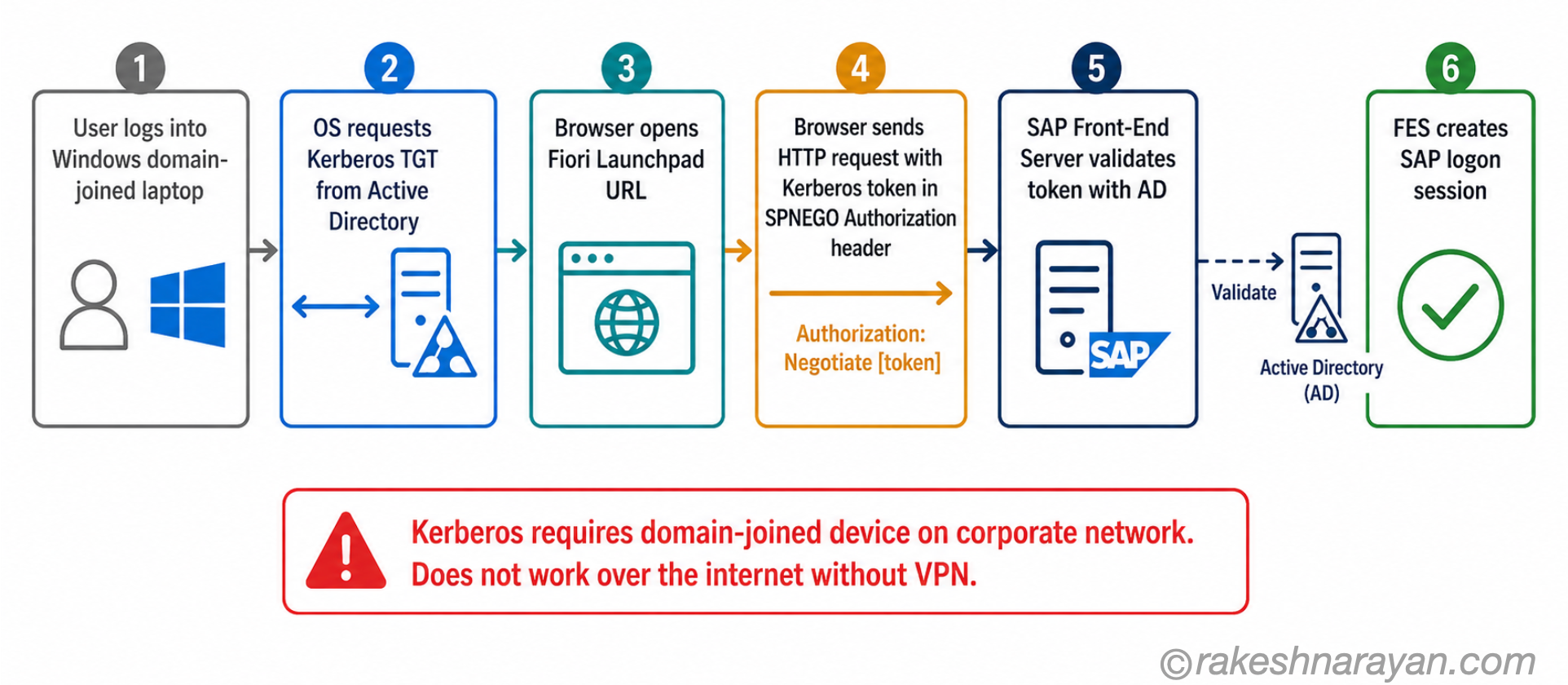
Kerberos is the SSO mechanism built into Microsoft Active Directory. When a Windows user logs into their domain-joined laptop, the OS acquires a Kerberos ticket from Active Directory. SPNego (Simple and Protected GSSAPI Negotiation Mechanism) is the HTTP wrapper that lets a browser pass that Kerberos ticket to a web server — in this case, the SAP Front-End Server.
The result: the user opens the Fiori Launchpad in a browser, the browser silently presents the Kerberos ticket, the FES validates it with Active Directory, and the user is logged in. No login screen appears. This is the gold standard for corporate network SSO experience.
| Aspect | Detail |
|---|---|
| Where it applies | On-premise embedded and standalone FES; RISE with SAP (with SAP involvement required) |
| Best for | Domain-joined Windows users inside the corporate network — delivers true zero-prompt SSO |
| Hard limits | Does not work over the internet; mobile devices and non-Windows machines cannot use it; RISE requires coordination with SAP to configure |
| Required infrastructure | Microsoft Active Directory; SAP Web Dispatcher configured for SPNego; SAP SSO Secure Login Client optional but recommended |
💡 Practical Tip
Kerberos SSO failures in Fiori are almost always one of three things: the Service Principal Name (SPN) registered in AD does not match the FES hostname exactly, the Kerberos token is not being forwarded by the browser (check browser trusted sites configuration), or the user’s device is not on the domain network. Check all three before digging deeper.
Authentication mechanism 3 — SAML 2.0
SAML 2.0 is the dominant SSO mechanism for browser-based SAP Fiori in 2026. It works inside and outside the corporate network, supports federated identity across domains, and is the mechanism most major Identity Providers — Azure AD / Microsoft Entra ID, Okta, Ping, and SAP IAS — support natively.
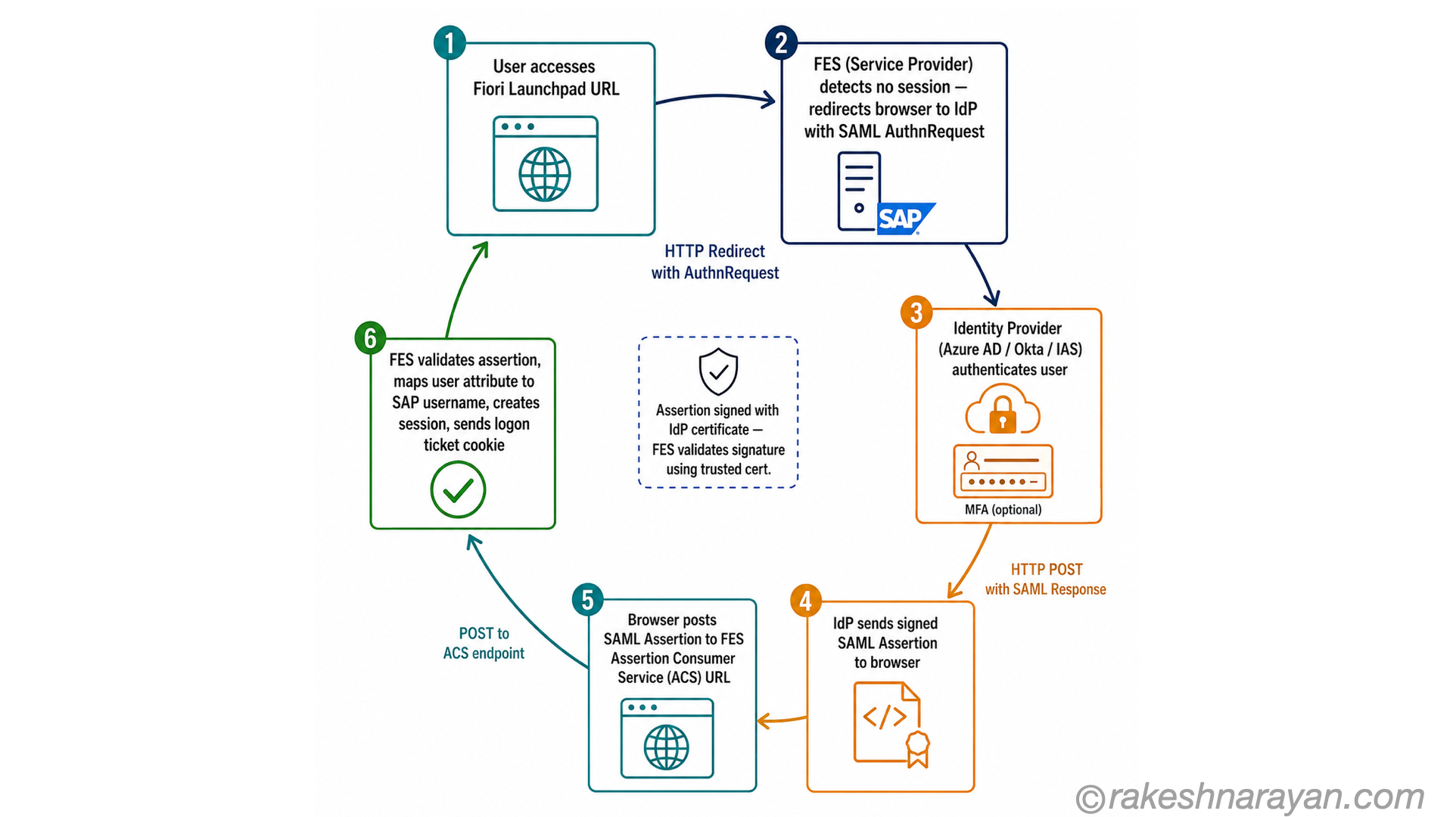
In SAML, the SAP Front-End Server is the Service Provider (SP) and the Identity Provider (IdP) is your corporate identity service. The SP and IdP exchange metadata and signing certificates to establish trust. Authentication happens at the IdP — the ABAP system never sees the user’s password.
SP-initiated flow — the standard pattern
Most enterprise deployments use SP-initiated SSO. The user hits the Fiori Launchpad URL, the FES detects no active session and redirects to the IdP, the IdP authenticates the user (using whatever method it supports — password, MFA, Kerberos), and sends a signed SAML assertion back to the FES. The FES validates the assertion, maps the SAML attribute (usually email or user principal name) to an SAP user, and creates a logon session.
| Aspect | Detail |
|---|---|
| Where it applies | All topologies — on-premise, RISE, BTP (between application and back-end trust). The dominant choice for most enterprise Fiori deployments. |
| Identity Providers supported | Azure AD / Microsoft Entra ID, Okta, Ping Identity, SAP IAS, ADFS — any SAML 2.0 compliant IdP |
| User mapping | SAML attribute (email, UPN, or custom) must map to an SAP user. Configured in transaction SAML2 on the FES. |
| Key transactions | SAML2 — configure SP metadata and IdP trust. STRUSTSSO2 — manage logon ticket certificates. |
| Works over internet | Yes — IdP must be reachable from outside the network. SAP system does not need to be publicly exposed. |
⚠️ Warning — the most common SAML failure in production
SAML signing certificates expire. When the IdP certificate rolls over and the SAP FES is not updated with the new certificate metadata, every user gets an authentication error simultaneously. Set a calendar reminder 60 days before your IdP certificate expiry. Rotating the certificate in the IdP without updating the SAP trust configuration is the single most common cause of mass Fiori outages.
Authentication mechanism 4 — OAuth 2.0 and the SAML Bearer flow
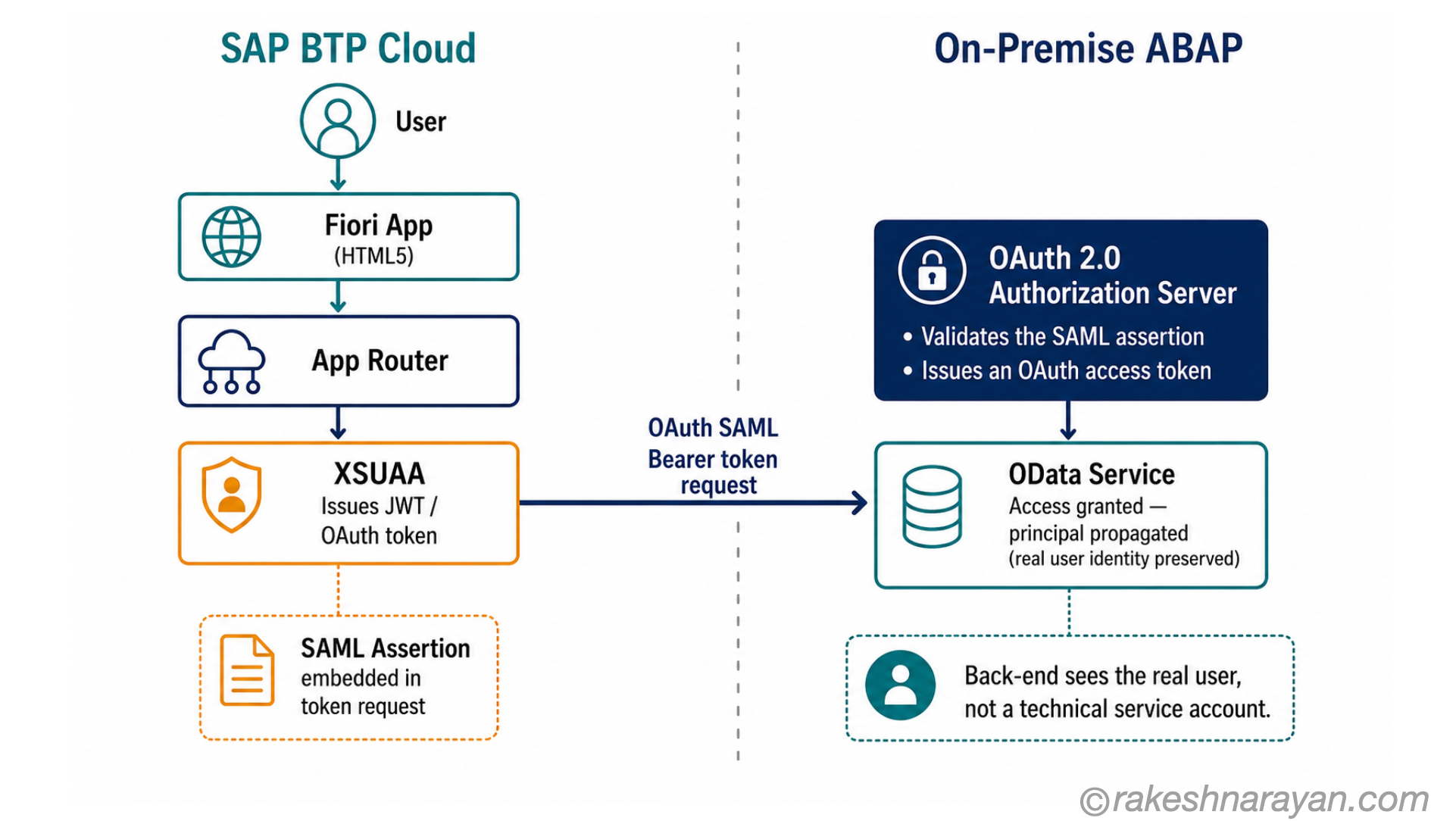
OAuth 2.0 in the SAP context appears in two distinct situations: when Fiori apps run on BTP and call back-end OData services, and when system-to-system integrations need to carry user identity. The mechanism that connects SAML authentication to OAuth token issuance is the OAuth 2.0 SAML Bearer Assertion grant type.
The problem it solves: a Fiori app on BTP has authenticated its user via SAML (handled by XSUAA). But the back-end ABAP system uses a different identity model — without principal propagation, the back-end sees a generic technical user, not the actual logged-in person.
SAML Bearer solves this by exchanging the SAML assertion for an OAuth access token that the back-end accepts as proof of the real user’s identity.
| Aspect | Detail |
|---|---|
| Where it applies | BTP-hosted Fiori apps calling on-premise or cloud ABAP back-ends. Required whenever user identity must propagate through BTP to the back-end. |
| What XSUAA does | Handles user authentication (via SAML trust with IdP), issues JWT tokens to BTP apps, exchanges SAML assertions for OAuth tokens on behalf of the app. |
| What the ABAP back-end needs | An OAuth 2.0 Authorization Server configured in the ABAP system (transaction OA2C_CONFIG). The back-end must trust the XSUAA tenant as an OAuth client. |
| Principal propagation outcome | The OData service and all downstream ABAP authorisation checks run under the real user identity — not a service account. Audit logs show the real user. |
| Destination configuration | SAP BTP Destination Service stores the OAuth configuration. Destination type: OAuth2SAMLBearerAssertion. |
💡 Practical Tip
The most common OAuth SAML Bearer setup failure is a mismatch between the SAML audience configured in the BTP Destination and the OAuth client registered in the ABAP back-end. Check transaction OA2C_CONFIG on the back-end and ensure the client ID and trusted SAML issuer match exactly what the BTP Destination is sending.
Authentication mechanism 5 — SAP IAS and the modern identity stack
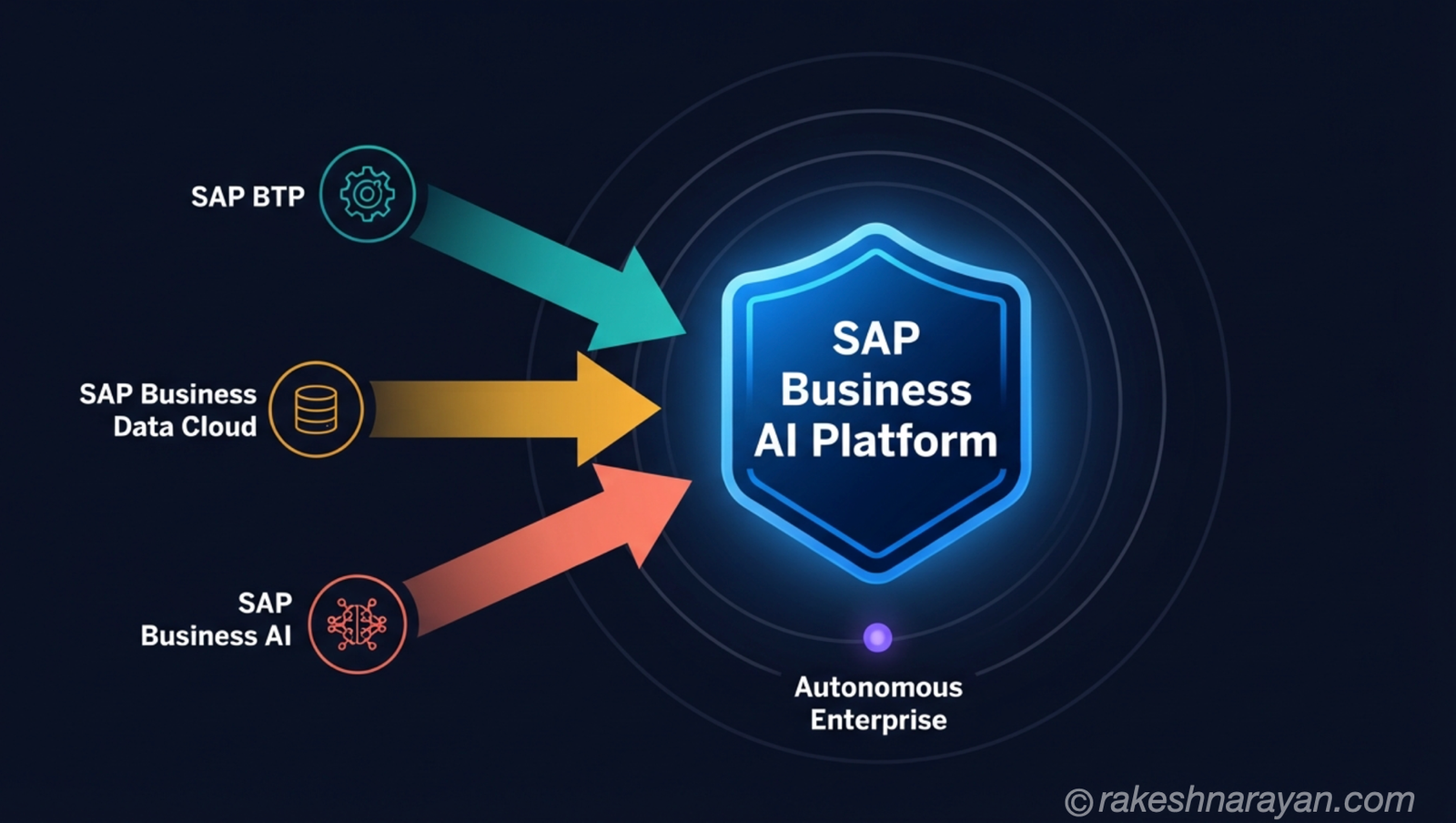
SAP Identity Authentication Service (IAS) is SAP’s cloud-native identity provider, part of SAP Cloud Identity Services alongside Identity Provisioning (IPS) and Identity Directory (IDS). As of 2026, IAS is SAP’s strategic direction for authentication across all SAP cloud products — and increasingly for on-premise integration scenarios too.
The shift happening now: SAP is moving away from XSUAA as the primary authentication service for BTP applications and towards IAS + AMS (Authorization Management Service). New CAP projects should start with IAS directly. XSUAA remains supported but is no longer the recommended starting point for new development.
IAS as a proxy Identity Provider
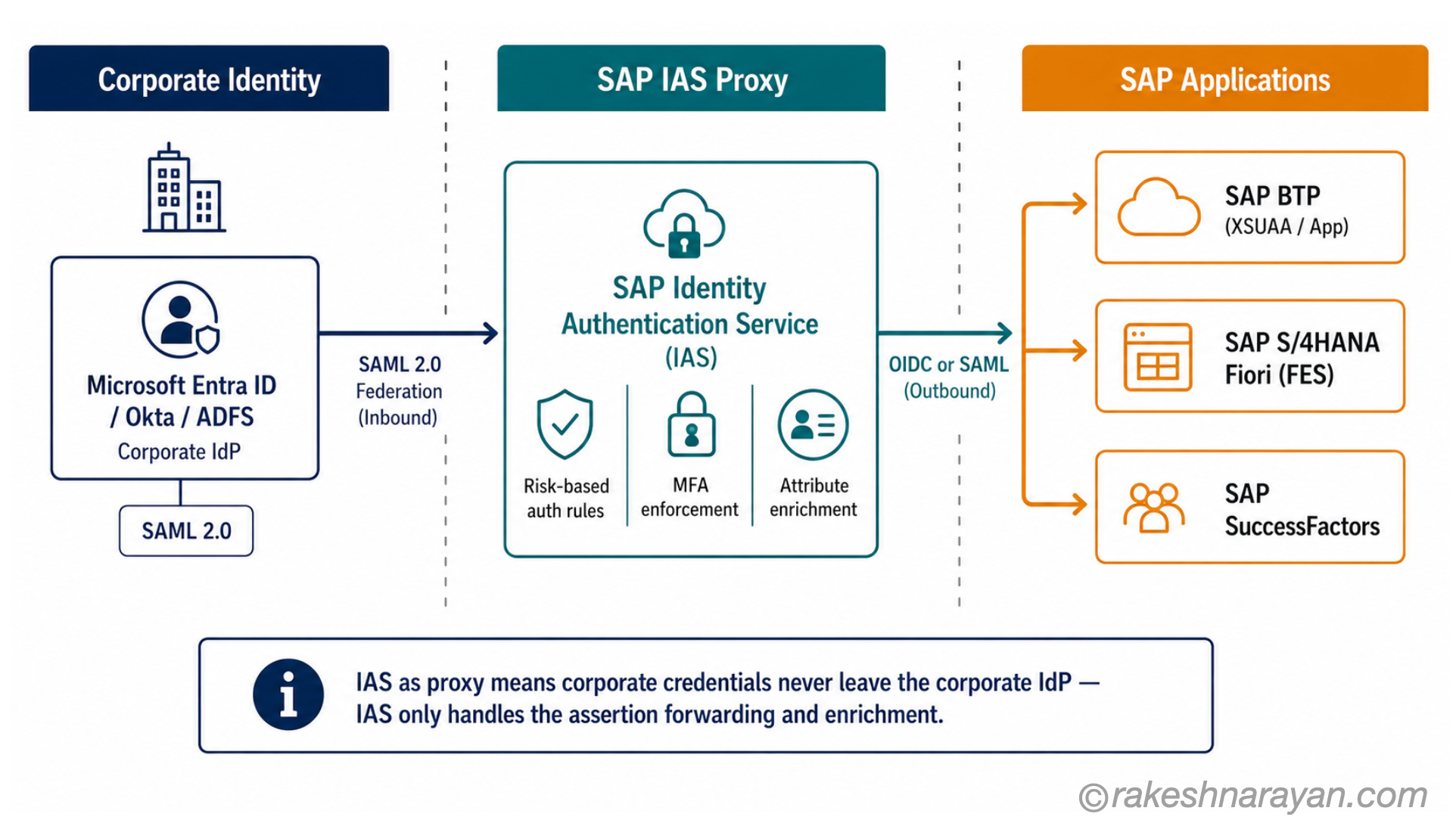
Most enterprise deployments do not make IAS the authoritative user directory. Instead, IAS acts as a proxy IdP — sitting between the SAP application and the corporate IdP (Microsoft Entra ID, Okta, or ADFS). The corporate IdP authenticates the user. IAS enriches the assertion with SAP-specific attributes and forwards it to the application.
This architecture is called SAML proxying or identity federation. It means corporate credentials never leave the corporate IdP — IAS only handles the assertion forwarding and enrichment.
📝 Note — this applies to standard on-premise Fiori too
IAS as a proxy IdP is not limited to RISE or BTP deployments. You can configure a standard on-premise Front-End Server to trust IAS as its SAML Identity Provider. The Fiori app and ABAP system stay entirely on-premise — only the authentication request passes through IAS.
This is increasingly the recommended pattern even for on-premise landscapes, because it centralises identity management in one place across all SAP systems regardless of deployment type. In the IAS admin console, create the on-premise system as an application with Application Type set to “SAP on-premise Solution”. Upload the SAML metadata from transaction SAML2 on the FES. From that point, the on-premise FES trusts IAS exactly as it would trust any other SAML IdP.
SAP reference: SAP Cloud Identity Services Administration Guide
| Aspect | Detail |
|---|---|
| Protocol between IAS and BTP | OpenID Connect (OIDC) — IAS acts as OIDC provider, BTP trusts it. This is the modern setup recommended by SAP. |
| Protocol between IAS and corporate IdP | SAML 2.0 — most corporate directories speak SAML. IAS federates inbound via SAML and proxies outbound via OIDC. |
| IAS + AMS vs XSUAA | IAS + AMS is SAP’s strategic direction. XSUAA remains supported. For new BTP projects, start with IAS. For existing XSUAA setups, migration is gradual — hybrid mode is supported. |
| What IAS adds over direct IdP trust | Risk-based authentication rules, MFA enforcement, user self-service (password reset, profile), user provisioning via IPS, and a centralised identity hub for all SAP cloud products. |
| Microsoft Entra ID with IAS | Recommended pattern: Entra ID as corporate IdP → SAML federation into IAS → IAS as OIDC provider for BTP. Avoids managing trust directly between Entra ID and every BTP subaccount. |
📌 Key Takeaway — the direction of travel
If you are building a new SAP Fiori application on BTP today, start with IAS as your identity provider — not XSUAA alone. SAP is consolidating authentication onto IAS across all cloud products. Starting with IAS now avoids a migration later.
Authentication mechanism 6 — X.509 client certificates
X.509 client certificate authentication is certificate-based mutual TLS. Instead of a password or a SAML assertion, the client presents a digital certificate to the server. The server validates the certificate against a trusted Certificate Authority (CA) and maps the certificate identity to an SAP user.
This approach works for both HTTP/browser access (Fiori) and SAP GUI (via SAP SSO Secure Login Client). It does not require an issuing system at runtime — unlike Kerberos, it works fine over the internet.
The certificate is distributed to the device, and authentication is certificate-based from that point forward.
| Aspect | Detail |
|---|---|
| Where it applies | Internet-facing Fiori deployments where Kerberos cannot reach; high-security environments; mobile devices managed via MDM; machine-to-machine service calls with mutual TLS |
| Certificate distribution | Enterprise PKI or SAP SSO Secure Login Service issues certificates. MDM tools (e.g. Microsoft Intune) can distribute to mobile devices centrally. |
| SAP SSO Secure Login Service | Cloud service from SAP that issues short-lived X.509 certificates. Users authenticate once (via SAML or Kerberos) and receive a certificate — subsequent access is certificate-based. |
| BTP context | OAuth with X.509 client certificates is supported for BTP Destination configurations. Used as a more secure alternative to client secrets for system-to-system OAuth flows. |
| Key advantage | No password, no SAML redirect loop — certificate is presented silently. Suitable for non-interactive (machine) scenarios and high-assurance human access. |
✅ Best Practice
For service-to-service OAuth flows on BTP — such as a Fiori app calling a back-end API via a BTP Destination — use X.509 certificates instead of client secrets wherever possible. Certificates have a defined expiry and are harder to leak than static secrets. SAP BTP Destination Service supports X.509 for OAuth 2.0 client authentication.
Multi-factor authentication (MFA) — where it fits
MFA is not a separate authentication mechanism for SAP Fiori. It is a layer enforced at the Identity Provider, not at the ABAP system. The ABAP FES does not know or care whether the user authenticated with MFA — it only cares that a valid SAML assertion or session arrived.
This means MFA capability depends entirely on your IdP. If your IdP is Azure AD, MFA is Entra ID Conditional Access. If your IdP is SAP IAS, MFA is configured in the IAS risk-based authentication rules.
Either way, the SAP system is downstream — the MFA challenge happens before the SAML assertion is issued.
| MFA method | How it works in SAP Fiori context |
|---|---|
| TOTP (Time-based OTP) | User enters a 6-digit code from an authenticator app (Microsoft Authenticator, Google Authenticator) — enforced by the IdP (IAS or Entra ID) during the authentication step |
| FIDO2 / Passkeys | Hardware security key or device biometric. Supported by IAS and Entra ID. Increasingly the enterprise standard for phishing-resistant MFA. |
| Push notification | App-based approval (Entra ID Authenticator, Okta Verify). IdP sends push; user approves on mobile. |
| Risk-based authentication (IAS) | IAS evaluates login risk signals (device, location, IP, time) and challenges with MFA only when risk is elevated. Reduces friction for low-risk logins. |
| SMS OTP | Still supported by most IdPs but being deprecated in high-security environments — SIM-swap attacks make it less reliable than app-based methods. |
📝 Note
If your Fiori users are on SAP IAS as the IdP, you can enforce MFA for specific applications or user groups in the IAS admin console under Authentication Rules. You can also set up conditional MFA — for example, challenge users accessing Fiori from outside the corporate network but not from within it. This is the recommended approach for RISE and BTP-hosted Fiori deployments.
Choosing the right mechanism — the decision map
The decision is not “which protocol do I prefer?” — it is “what is my deployment topology, who are my users, and where are they accessing from?” Work through these three filters and the mechanism becomes obvious.
| Deployment | User type / location | Recommended mechanism | Why |
|---|---|---|---|
| On-premise (embedded or standalone FES) | Domain-joined Windows users, inside corporate network | Kerberos / SPNego | Zero-prompt SSO, no extra infrastructure if AD exists, best UX for office workers |
| On-premise (embedded or standalone FES) | Browser users inside or outside corporate network | SAML 2.0 with corporate IdP (Entra ID / Okta) | Works everywhere, IdP handles MFA, standard enterprise pattern |
| On-premise | Internet-facing, mobile or non-Windows | SAML 2.0 or X.509 certificates | Kerberos not available; SAML via IAS or corporate IdP covers all device types |
| RISE with SAP | All end users | SAML 2.0 via SAP IAS (proxying corporate IdP) | SAP manages the OS; IAS is the recommended IdP for RISE. Kerberos possible but requires SAP coordination. |
| BTP-hosted Fiori apps | All end users | IAS (OIDC) for authentication + OAuth SAML Bearer for back-end principal propagation | IAS is SAP’s strategic choice for BTP. SAML Bearer propagates real user identity to back-end OData services. |
| BTP-hosted Fiori apps | System / machine-to-machine | OAuth 2.0 Client Credentials with X.509 certificate | No user involved; certificate-based client auth is more secure than client secrets |
| Any topology | High-security, phishing-resistant MFA required | FIDO2 / Passkeys enforced via IdP (IAS or Entra ID) | FIDO2 is hardware-bound and phishing-resistant — the most secure MFA option available |
| S/4HANA Cloud Public Edition | All end users | IAS — mandatory, SAP-provisioned. Configure corporate IdP trust inside IAS only. | SAP manages the full authentication stack. No access to SAML2 transaction. IAS is the only configuration point available to the customer. |
Quick Reference — SAP Official Documentation
These are the SAP starting points for each topic covered in this post. Use these to move from concept to configuration.
| Topic | SAP Resource |
|---|---|
| SAML 2.0 configuration on SAP NetWeaver (transaction SAML2) | help.sap.com/docs/SAP_NETWEAVER |
| SAP Identity Authentication Service — full administration guide | help.sap.com/docs/identity-authentication |
| SAP Cloud Identity Services — structured landing page (IAS, IPS, IDS, AMS) | help.sap.com/docs/cloud-identity-services |
| SAP BTP — Trust and Federation with Identity Providers | help.sap.com/docs/btp/…/trust-and-federation |
| Kerberos / SPNego on SAP NetWeaver | help.sap.com/docs/SAP_NETWEAVER |
| IAS + Authorization Management — BTP applications | help.sap.com/docs/btp/…/authorization-management |
| SAP BTP Connectivity — Destination authentication types (incl. OAuth SAML Bearer) | help.sap.com/docs/connectivity/sap-btp-connectivity |
At a glance — SAP Fiori authentication
| Concept | One-line summary |
|---|---|
| Front-End Server (FES) | The authentication boundary in Fiori — the browser authenticates here, not at the back-end |
| Trusted RFC | How the FES communicates with the back-end after authentication — under a system user, not the end user |
| Logon ticket | The session cookie the FES issues after successful authentication — used for subsequent OData requests |
| Username / password | Default mechanism — suitable for technical users and testing, not recommended for end-user production access |
| Kerberos / SPNego | Windows domain SSO — zero prompt for domain-joined devices on the corporate network; not suitable for internet or mobile |
| SAML 2.0 | The dominant browser SSO mechanism — works inside and outside the network; relies on a trusted Identity Provider |
| SAML 2.0 (RISE) | SAML via SAP IAS is the recommended path — SAP manages the infrastructure, OS-level Kerberos setup requires SAP involvement |
| OAuth 2.0 SAML Bearer | The mechanism that propagates real user identity from BTP through to ABAP back-end OData services |
| SAP IAS | SAP’s cloud identity provider — acts as a proxy IdP, enforces MFA, and is the strategic direction for all new SAP cloud authentication |
| IAS + AMS vs XSUAA | The new model — IAS handles authentication, AMS handles authorisation. SAP’s recommended approach for new BTP projects in 2026. |
| X.509 certificates | Certificate-based auth — works for browser, SAP GUI, and machine-to-machine; recommended for service accounts over client secrets |
| MFA | Enforced at the IdP level (IAS or Entra ID), not by ABAP — the SAP system is downstream of the MFA challenge |
| Deployment topology | The most important decision variable — the topology determines which mechanisms are available and which to use |
| S/4HANA Public Cloud | IAS is mandatory and SAP-provisioned — the only configuration point is the corporate IdP trust inside IAS |
What to take away
SAP Fiori authentication is solved at the wrong level in most projects. Teams debate SAML versus Kerberos, or XSUAA versus IAS, before they have locked down which deployment topology they are working with. Get the topology clear first. The mechanism follows from it — not the other way around.
The other thing to hold onto: authentication and authorisation are genuinely separate problems in SAP. Authentication — the mechanisms in this post — gets the user into the system. It does nothing about what they can do once they are in. That is controlled by roles, authorization objects and the positive authorisation model covered in the SAP Security Roles and Authorisation post. Projects that conflate the two spend twice as long debugging access issues.
For anything new in 2026 — new BTP application, new RISE landscape, new cloud integration — start with SAP IAS. The migration from XSUAA is underway across SAP’s product portfolio, and IAS as a proxy IdP covers every scenario in this post: corporate SSO, MFA, principal propagation, and certificate-based service accounts. Building on it now avoids rebuilding later.
🔗 Related posts on this site
SAP Security Roles and Authorisation — authentication gets you in. This post covers what happens next: authorization objects, PFCG roles and the positive authorisation model.
OAuth 2.0 and OpenID Connect — How Modern Login Actually Works — the OAuth and OIDC protocols explained from first principles, essential background for the IAS and XSUAA sections.
SAP BTP — The Platform Explained — understanding BTP’s architecture makes the XSUAA, IAS and Cloud Connector authentication flows much easier to follow.
OData Protocol in SAP — V2, V4 and How It Works — the OData services that Fiori apps call are protected by the authorisation model and OAuth flows described in this post.
API Security Essentials — OAuth 2.0 client credentials, token validation and mutual TLS map directly to the BTP authentication patterns described here.
SAP Cloud Identity Services — IAS vs IPS — the identity provider and provisioning service behind the IAS scenarios in this post, covered in full, including the 2026 migration deadline.
Published on rakeshnarayan.com — Articles
URL: https://rakeshnarayan.com/articles/sap-fiori-authentication-every-scenario-explained/
Did you enjoy this article?
Let me know — it takes one click.
0 Comments
Leave a Comment
Looks like this one held your attention — I'd really appreciate a quick comment below.
Your comment has been submitted and will appear after review.