SAP Security Roles and Authorisation
SAP security is one of those areas that most people work around rather than through. You know enough to do your job — but if someone asks you to explain how authorization objects, profiles and roles actually fit together, the answer is often vague.
That vagueness costs time. It costs time when you are trying to debug an access issue. It costs time when you are reviewing a role during a project. It costs real money when an audit finds that roles were not designed correctly.
This post builds the mental model — clearly and from the ground up. Whether you are a functional consultant, a Basis expert or a developer, this is the foundation.
🔗 Related context
SAP’s authorisation model is a specific application of access control concepts. API Security Essentials covers the same concepts (authentication vs authorisation, least privilege) in the API world. SAP Fiori Design Principles covers the role-based design that Fiori security makes real.
The fundamental principle — positive authorisation
Before anything else, understand this: SAP uses a positive authorisation concept.
Everything that is not explicitly allowed is forbidden. There are no SAP authorisations that block access to something. There are only authorisations that grant it. If a user has no relevant authorisation, the access is denied by default.
This sounds simple. It has real implications: when a user cannot do something, the starting assumption is always that they are missing an authorisation — not that something is blocked.
💡 The practical consequence
When debugging an access issue, the question is always: what authorisation is missing? Use transaction SU53 immediately after the failed action — it shows the last failed authorisation check, including the exact authorization object, the field and the value that was checked. This is your first diagnostic tool.
The building blocks — bottom to top
Authorization Fields and Authorization Objects
An authorization object is a group of related authorization fields that together define an access check. SAP delivers thousands of authorization objects — one for each type of access it wants to control.
For example, the authorization object S_TCODE controls transaction code access. It has one field: TCD (transaction code). To allow a user to run ME21N, the authorization object S_TCODE must be in their role with TCD value ME21N.
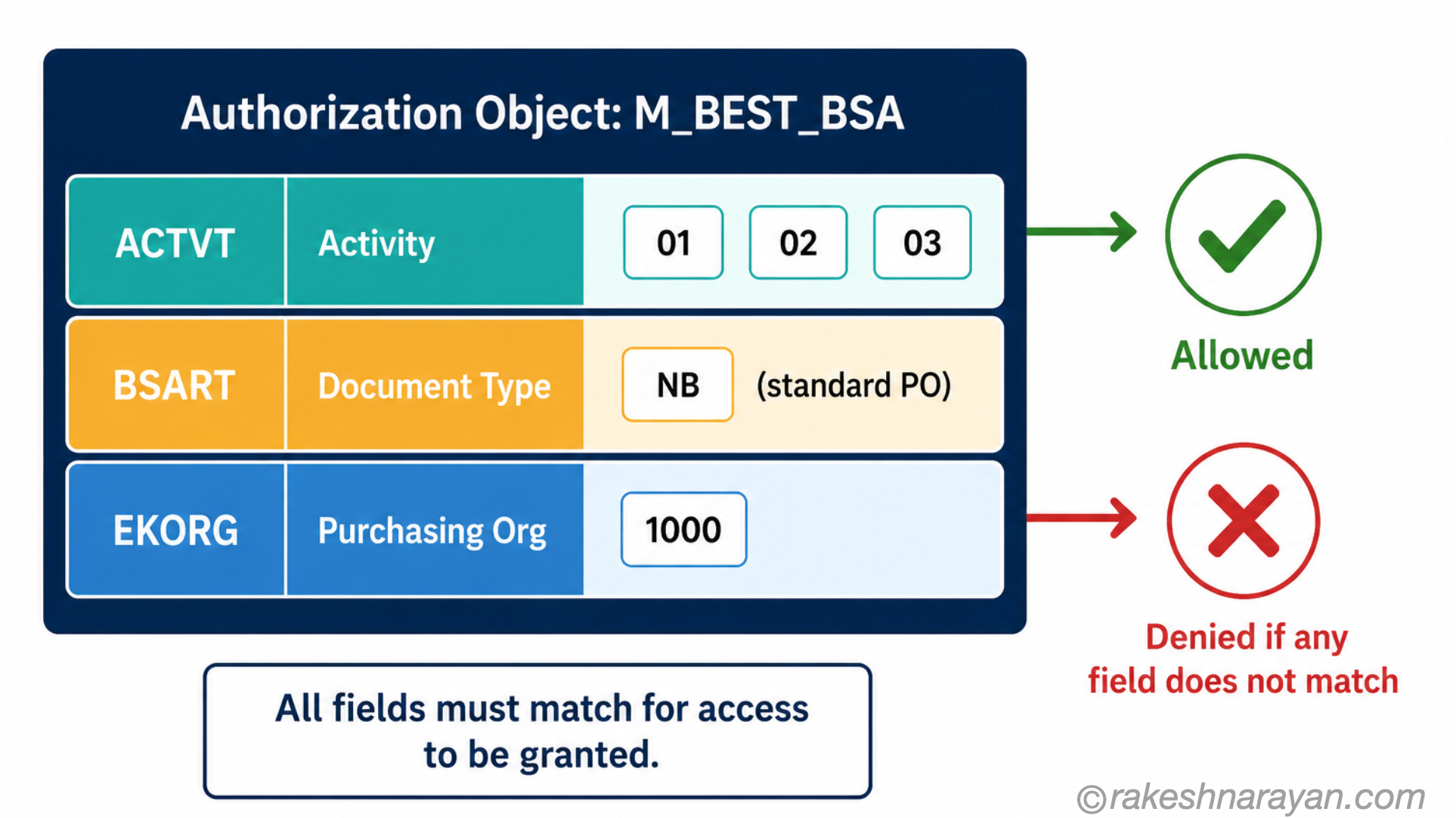
A more complex example: M_BEST_BSA controls purchase order access. Its fields include: ACTVT (activity — display, change, create), BSART (document type) and EKORG (purchasing organisation). All fields must match for access to be granted.
| Authorization object | Purpose | Key fields (examples) |
|---|---|---|
| S_TCODE | Controls which transaction codes a user can start | TCD (transaction code value) |
| M_BEST_BSA | Controls purchase order access | ACTVT (01=create, 02=change, 03=display), BSART (doc type), EKORG (purch org) |
| F_BKPF_BUK | Controls financial document access by company code | ACTVT, BUKRS (company code) |
| S_SERVICE | Controls which OData services a user can call (Fiori) | SRV_NAME (OData service name), SRV_TYPE (service type) |
| P_ORGIN | Controls HR data access by personnel area | INFTY (infotype), SUBTY, PERSA, VDSK1, AUTHC |
Profiles — generated, not designed
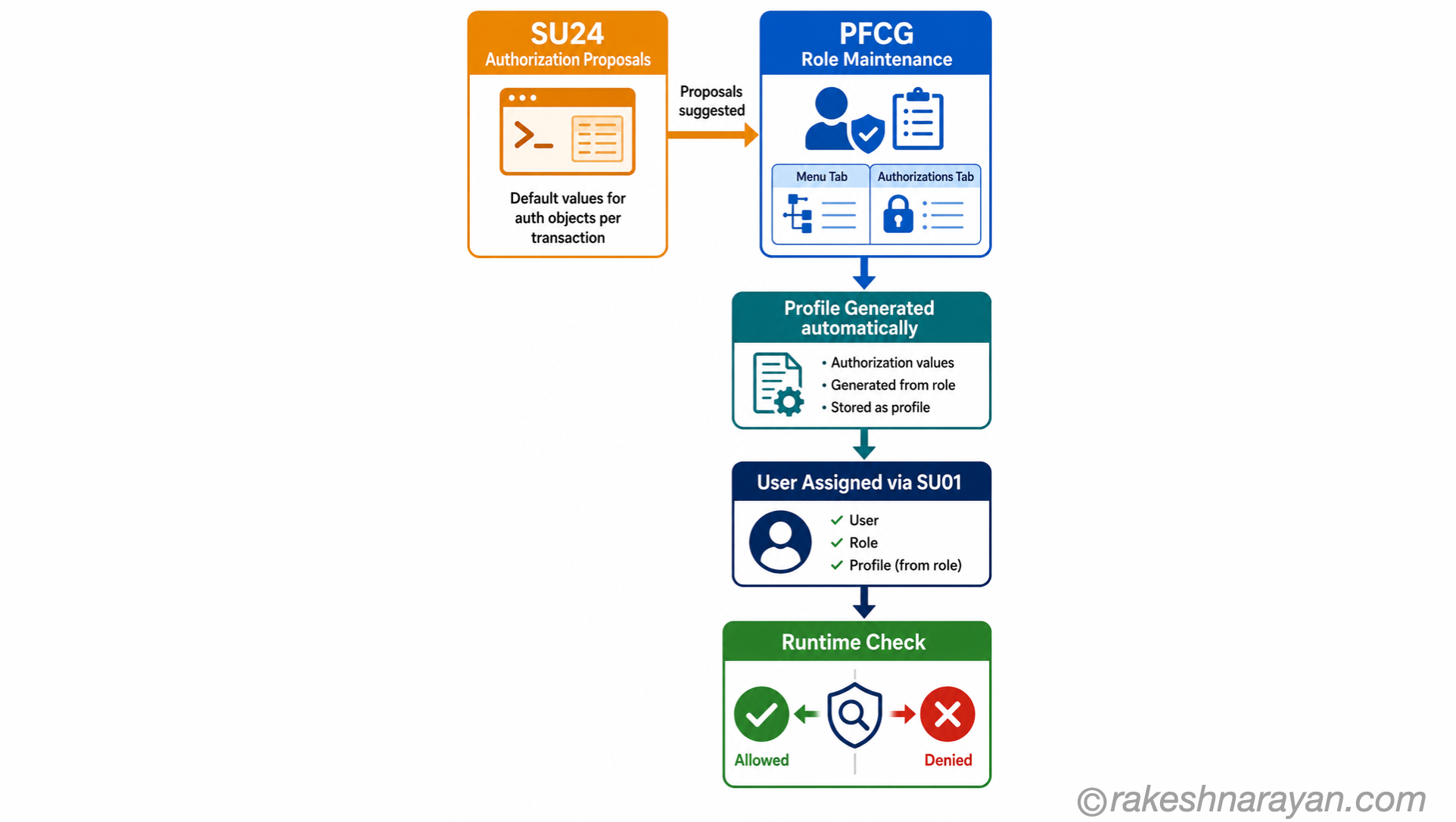
A profile is the technical container that holds the actual authorization field values. When you maintain a role in PFCG, SAP generates a profile automatically. You do not create or edit profiles directly in standard practice — PFCG generates them.
The profile is what gets assigned to a user, technically. But in practice, you think in terms of roles. The profile is an implementation detail that PFCG manages for you.
Roles — where the work happens
A role in SAP is maintained using transaction PFCG (Profile Generator). A role has two main sections:
- Menu tab — the transactions, reports and Fiori apps the role grants access to start
- Authorizations tab — the authorization objects and their field values that define what the user can do within those transactions
When you add a transaction to the role menu, PFCG uses the authorization proposals from SU24 to suggest which authorization objects and default values should be included. This is the connection between SU24 and PFCG.
| Role type | What it is | When to use |
|---|---|---|
| Single role | One role covering a specific set of tasks | Standard approach — build roles around job functions |
| Composite role | A container that groups multiple single roles — assigned to users as one unit | When a user needs several single roles — simplifies user assignment |
| Reference role | A template role — copied to create similar roles for different organisational values | Large landscapes with the same role structure across multiple company codes or plants |
| Derived role | A child role inherited from a parent — inherits menu, adds specific org values | Multi-org landscapes — parent defines the structure, derived roles specify the org unit |
💡 SU24 — the link between applications and roles
Transaction SU24 defines authorization proposals — which authorization objects and default values should be proposed when a transaction is added to a role in PFCG. SAP delivers proposals for all standard transactions. For custom transactions and Z-programs, your developers should maintain SU24 so that when the transaction is added to a role, the correct authorization objects are proposed automatically. Skipping this step leads to manual, unmaintainable role maintenance.
Users — where roles are assigned
Transaction SU01 is used to create and maintain users. A user is assigned one or more roles (and through them, profiles). At runtime, SAP collects all the authorization values from all assigned roles and checks whether the combined set grants the requested access.
Users can also be assigned directly to a profile — but this is not recommended. Always assign roles, not profiles directly. Profiles should be managed through PFCG, not assigned manually.
The key transactions — quick reference
| Transaction | What it does | Used by |
|---|---|---|
| PFCG | Role maintenance — create, maintain and generate roles and profiles | Basis / Security team |
| SU01 | User maintenance — create users, assign roles, lock/unlock | Basis / Security team |
| SU24 | Authorization proposals — maintain default auth objects for transactions and services | Developers + Security team |
| SU25 | Mass update of authorization proposals after upgrade — transport SU24 changes | Security team during upgrades |
| SU53 | Show last failed authorisation check — essential for debugging access issues | Anyone debugging access problems |
| AUTH | Authorization trace — record all authorisation checks for a user or transaction | Security team for analysis |
| SUIM | User Information System — reports on users, roles, profiles and authorisations | Auditors + Security team |
| SU10 | Mass user maintenance — assign roles to many users at once | Basis / Security team |
Fiori adds a layer — what changes
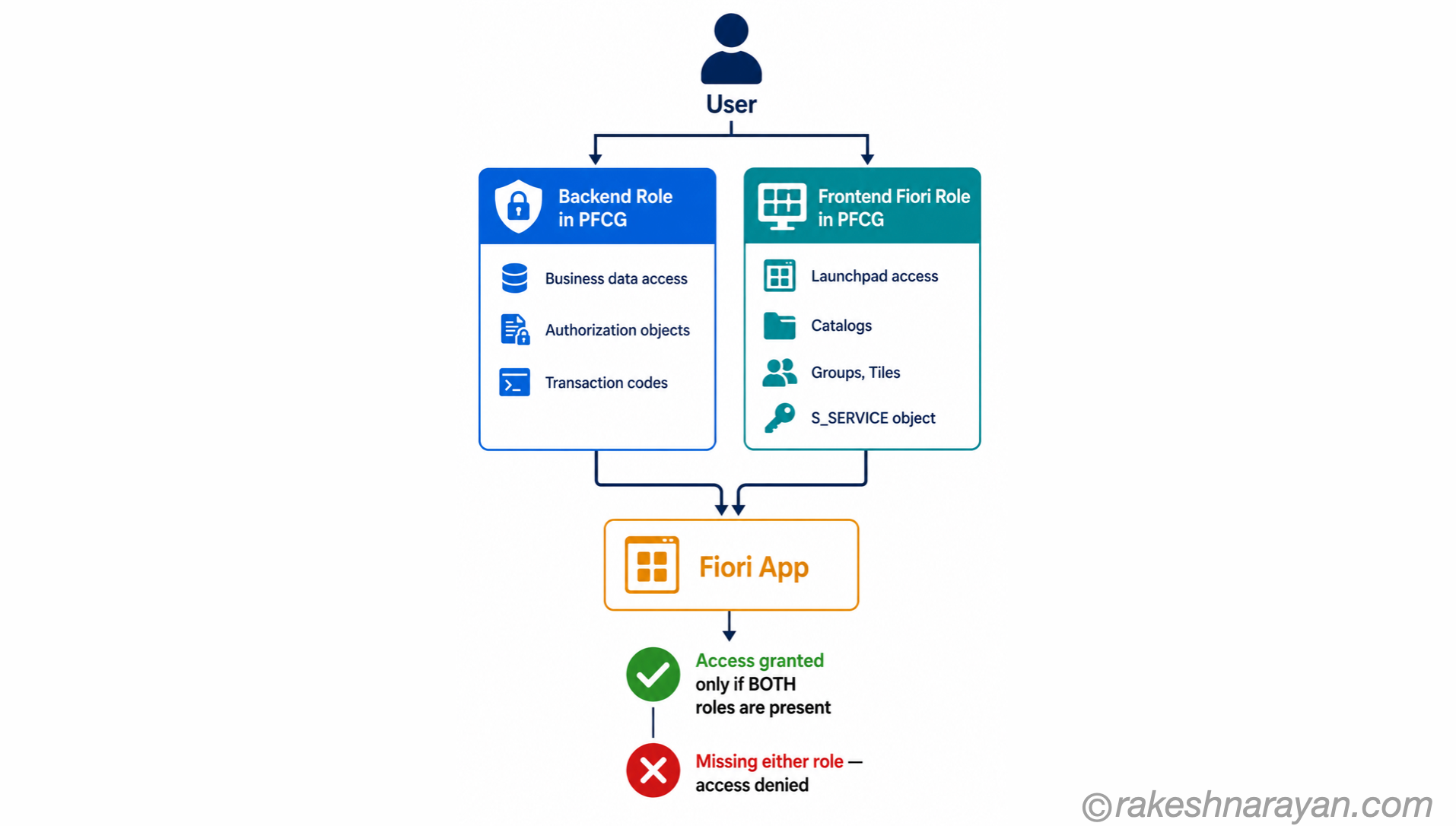
For SAP Fiori apps, the classic authorisation model still applies — but there is an additional layer. Users need both the backend authorisations (to perform the business operation) and the Fiori-specific authorisations (to launch the app and see it in the launchpad).
| Layer | What it controls | How it is maintained |
|---|---|---|
| Backend role | The business data access — same as before: authorization objects, field values, transaction codes | PFCG on the backend system |
| Frontend / Fiori role | The Fiori launchpad access — which catalogs, groups and tiles the user sees | PFCG on the frontend server (or embedded Fiori in S/4HANA) |
| S_SERVICE object | Controls which OData services the user can call — the API layer behind each Fiori app | Part of the Fiori role in PFCG |
📌 Common Fiori access issue
A user can log into the launchpad but gets an authorisation error when they open an app. This usually means one of two things: the backend role is missing an authorization object, or the S_SERVICE authorisation for the OData service is missing. Use SU53 immediately after the error — it will tell you exactly which check failed.
BTP security — how it differs
SAP BTP uses a different security model from the ABAP-based systems. On BTP, access is controlled through the SAP Authorization and Trust Management Service — commonly referred to as XSUAA (Extended Services for UAA).
| Concept | ABAP (ECC / S4HANA on-premise) | SAP BTP (Cloud Foundry) |
|---|---|---|
| Authentication | SAP logon / SAML via Identity Provider | OAuth 2.0 / OpenID Connect via SAP IAS or Azure AD |
| Authorisation mechanism | Authorization objects in PFCG roles | Scopes and role templates in XSUAA |
| User management | SU01 | SAP BTP Cockpit or SAP Identity Authentication Service |
| Role assignment | Role assigned in SU01 | Role collection assigned in BTP Cockpit |
| Audit and trace | SUIM, AUTH trace | SAP BTP audit log service |
💡 The connection
The OAuth 2.0 scopes in BTP are the equivalent of authorization object field values in ABAP — they define what a user or application is allowed to do. OAuth 2.0 and OpenID Connect covers this in full from the non-SAP perspective.
Segregation of Duties — the audit dimension
Technically correct roles can still create a compliance problem. Segregation of Duties (SoD) is the principle that no single user should have the ability to perform two or more steps in a sensitive process end-to-end — because combining them creates fraud risk.
A classic example: a user who can both create a vendor (FK01) and release a payment to that vendor (F110) has the capability to create a fictitious vendor and pay themselves. Neither authorisation is wrong in isolation — the problem is having both.
| Process | SoD conflict | Risk |
|---|---|---|
| Purchase-to-Pay | Create vendor + Approve payment | Fictitious vendor fraud |
| Order-to-Cash | Create customer + Post cash receipt | Revenue manipulation |
| Financial Reporting | Post journal entry + Approve journal entry | Fraudulent posting |
| User Administration | Create user + Assign roles | Privilege escalation |
SAP GRC Access Control (AC) is the tool for managing SoD at scale. It maintains a ruleset of conflicting permission pairs, evaluates roles and user assignments against that ruleset, and produces risk reports for auditors. In projects where GRC AC is not in place, SoD conflicts must be reviewed manually against a risk matrix during the security design phase — not after go-live, when unwinding conflicts means changing live user assignments.
The mental model — all together
| Concept | One-line summary |
|---|---|
| Positive authorisation | Everything not explicitly allowed is denied — there are no blocking authorisations |
| Authorization object | A group of fields defining one type of access check — all fields must match |
| Profile | The technical container of authorisation values — generated by PFCG, not manually designed |
| Role (PFCG) | The unit of access design — contains a menu and authorisations. This is what you build and assign. |
| Single role | One role for one job function — the standard building block |
| Composite role | A group of single roles — simplifies user assignment |
| Derived role | Inherits menu from a parent, adds org-specific values — used in multi-org landscapes |
| SU24 | Authorization proposals — links transactions to their expected authorization objects |
| SU53 | Show last failed check — your first tool when debugging an access issue |
| S_SERVICE | The authorization object for OData service access — required for Fiori apps |
| XSUAA (BTP) | The BTP equivalent of roles — OAuth scopes and role collections replace PFCG roles |
What to take away
SAP security is not complicated once the model is clear. Authorization objects define what can be checked. Roles collect those checks into a manageable unit. Users receive roles. The system checks every access at runtime against the combined set.
The mistakes that cost projects time — and cost organisations audit findings — are almost always design mistakes: over-permissive wildcard values, roles built without SU24 proposals, Fiori access added without the backend role, and composite roles that nobody reviews because they are assumed to be maintained correctly.
The mental model in this post is the foundation. The rest is application — and every project that involves SAP security will require it.
🔗 Related posts on this site
SAP Fiori Design Principles — the role-based principle in Fiori is made real by the SAP security model described here.
API Security Essentials — the same access control concepts apply to APIs — SAP OData services are protected by the S_SERVICE object.
OAuth 2.0 and OpenID Connect — BTP uses OAuth and XSUAA instead of PFCG roles — the concepts connect directly.
SAP BTP — The Platform Explained — BTP’s security model with XSUAA and IAS is the cloud extension of the SAP security concepts in this post.
GitHub for SAP Developers — Actions, Issues and Pages Explained — GitHub’s security layer (secret scanning, Dependabot, CodeQL) works on the opposite default from the positive-authorisation model described here.
SAP Cloud Identity Services — IAS vs IPS — authentication (IAS) and provisioning (IPS) are the cloud-side counterpart to the PFCG roles this post covers.
Fiori Authorization and Role Design for a Multi-System Landscape — how these PFCG fundamentals scale into composite roles and a business-role mapping once a landscape has more than one system.
Published on rakeshnarayan.com — Articles
URL: https://rakeshnarayan.com/articles/sap-security-roles-and-authorisation/
Did you enjoy this article?
Let me know — it takes one click.
0 Comments
Leave a Comment
Looks like this one held your attention — I'd really appreciate a quick comment below.
Your comment has been submitted and will appear after review.