Fiori Authorization and Role Design for a Multi-System Landscape
Wiring one catalog to one PFCG role is not hard. Every SAP consultant learns it in the first month on a Fiori project, and there is plenty written about exactly how to do it.
What almost nobody writes about is what happens when that same pattern gets repeated across three systems, a Work Zone aggregation layer, and a security team that now has to answer “what can this user actually do” without a single place to look. That is not a configuration problem. It is an architecture problem, and it is the one I get asked about most on any project past the first system.
This post is not about how to add a catalog to a role menu — that ground is already covered elsewhere on this site. It is about designing the role structure so it still makes sense once a fourth system joins the landscape.
🔗 Related reading
This post builds directly on SAP Security Roles and Authorisation and SAP Fiori Launchpad Configuration — Spaces, Pages and Catalogs . Both cover the mechanics this post assumes you already know — what a catalog does, and how PFCG wires it to a role. This post picks up where the landscape stops being one system.
Why single-system role design breaks at scale
The standard pattern is simple: a business catalog bundles the tiles for one job to be done, that catalog gets added to a PFCG role’s menu, and the role gets assigned to users who do that job. One system, one role structure, one team maintaining it. It works well, and there is no reason to overengineer it at this scale.
The problem is not the pattern. It is what happens when you repeat it, unplanned, per system. Three systems means three independent catalog structures, three naming conventions nobody agreed on up front, and three teams who each think they own the authorization model.
None of that shows up as a defect on day one. It shows up eighteen months later as an audit finding, or as a security team that cannot answer a straightforward access question without opening three separate systems.
What SAP Build Work Zone does not solve for you
It is tempting to assume that adding an aggregation layer like SAP Build Work Zone on top of multiple systems also solves the authorization sprawl underneath it. It does not, and SAP’s own documentation is direct about this.
Work Zone Standard edition does not require — or provide — a harmonized role or authorization concept across the systems it connects. Each backend keeps its own role and catalog structure exactly as it had it before Work Zone arrived.
What Work Zone does need is what SAP’s own documentation calls an overarching concept — a way of connecting each user, through their existing roles, to the right content in every system behind the aggregation layer. Building that concept is not something Work Zone does automatically. It is the architecture decision this post is actually about.
There is a second, easy-to-miss consequence of this. A user does not get access to an S/4HANA Fiori app just by appearing inside Work Zone. They still need an account and the correct authorization inside that specific backend system, exactly as if Work Zone did not exist.
Work Zone changes where the user clicks. It does not change who checks whether they are allowed to.
⚠️ Warning
Do not treat SAP Build Work Zone as a security boundary. It is a presentation and aggregation layer. Every backend system behind it still enforces its own authorization independently, and assuming otherwise is how landscapes end up with tiles that are visible but non-functional for users who were never actually authorized in the source system.
Role design patterns that scale
SAP gives you three structural building blocks for roles — single, composite and derived — and the choice between them matters more once a second or third system is in play.
| Role type | What it is | Where it fits a multi-system landscape |
|---|---|---|
| Single role | One role covering one Fiori catalog or one job function, built per system | The base unit — always built per system, never spans systems directly |
| Composite role | A container grouping multiple single roles, assigned to a user as one unit | Groups a user’s single roles across systems into one assignable bundle — the most direct fix for assignment sprawl |
| Derived role | A child role that inherits a parent’s menu and adds organisation-specific values | Useful within one system across org units — less useful across systems, since the menu content itself differs per backend |
The practical pattern that actually scales: keep single roles tight and per-system, exactly as the mechanics posts describe. Use composite roles as the layer that represents a real job — “AP Specialist,” not “S/4HANA AP Catalog Role” — bundling the single roles from every system that job touches into one assignment. This is the one decision that determines whether a fourth system is a minor addition or a redesign.
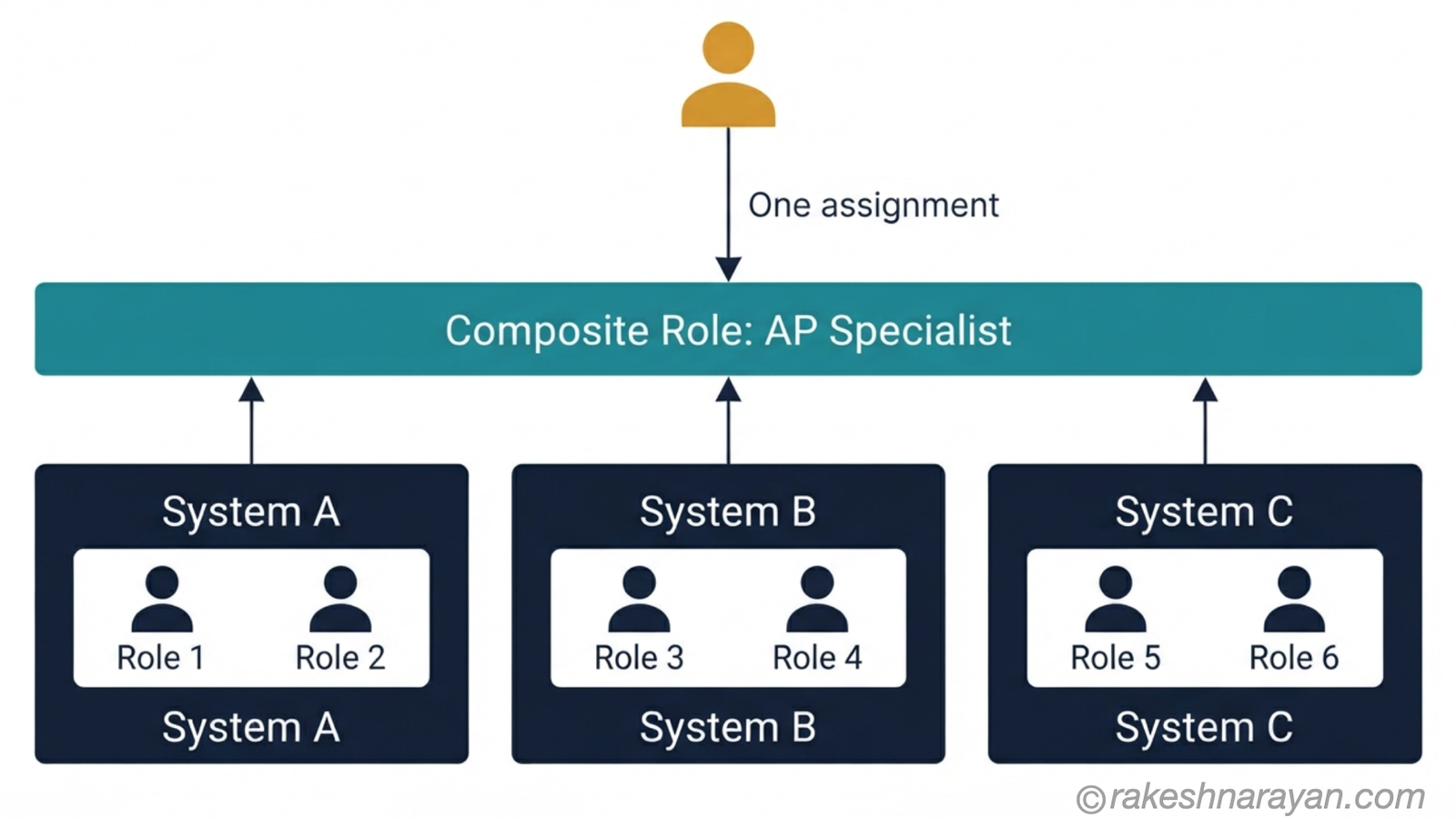
The overarching concept — linking roles across systems
This is the governance layer Work Zone assumes already exists. In practice, it comes down to three decisions made once, at the start, and then enforced consistently.
| Decision | What good looks like |
|---|---|
| Naming convention | A single, documented convention for catalogs, single roles and composite roles that reads the same whether you are looking at system one or system four |
| Provisioning model | User and role assignment flows through SAP Cloud Identity Services — Provisioning (IPS) consistently, rather than each system maintaining its own separate provisioning process |
| Business-role mapping | A maintained mapping from each real job function to the composite role and single roles it requires — the document that answers “what does an AP Specialist actually have access to” in one place |
None of this is exotic. It is closer to bookkeeping than architecture. But it is the exact bookkeeping that Work Zone’s own documentation says is required and does not provide — which is why it is so often skipped, and why it is so expensive to retrofit once three systems already have three different conventions.
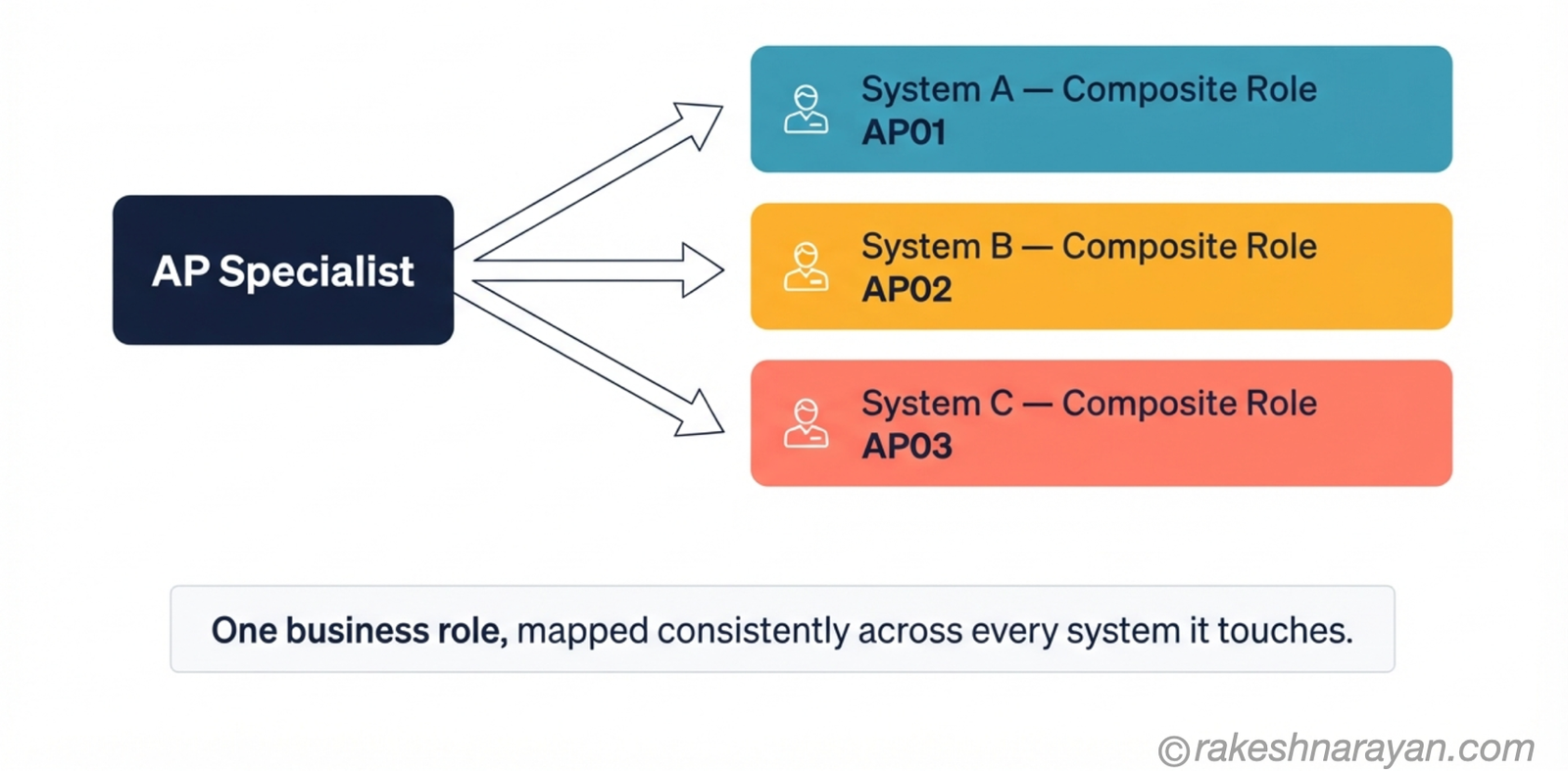
Segregation of duties gets harder, not easier
A common assumption is that spreading responsibilities across more systems naturally spreads risk too. It does the opposite. Segregation of duties conflicts do not average out across systems — they multiply, because a user can now hold conflicting access split across two systems that neither system’s own authorization check can see.
A user with create-vendor access in one system and approve-payment access in another has exactly the SoD conflict a single-system landscape would have flagged immediately — except now it is invisible to both systems individually, and only visible to whoever is looking at the combined picture. This is precisely the scenario SAP GRC Access Control’s risk analysis exists to catch, and it becomes non-optional, not just good practice, the moment a landscape crosses from one system to several.
📌 Key takeaway
If your landscape has more than one system feeding into a shared entry point, run SoD risk analysis across the combined access picture, not per system. A clean result in each system individually tells you nothing about the conflicts that only exist when you look at both together.
The decision framework
Put the landscape shape against the role design approach and the path gets clearer.
| Landscape characteristic | Approach | Why |
|---|---|---|
| Single system, no Work Zone aggregation | Standard single-role-per-catalog pattern | No cross-system complexity exists yet — do not build for a problem you do not have |
| Multiple systems, Work Zone aggregating access | Composite roles per business function, single roles per system underneath | Gives users one assignment while keeping each system’s own authorization intact |
| Landscape actively growing (new systems planned) | Agree naming convention and business-role mapping before the second system goes live | Retrofitting a convention across live systems costs far more than defining it up front |
| Users with access spanning two or more systems | Run SoD analysis across the combined access picture via SAP GRC | Per-system analysis cannot see conflicts that only exist across systems |
The diagram below maps that same decision visually — trace your own landscape through it.
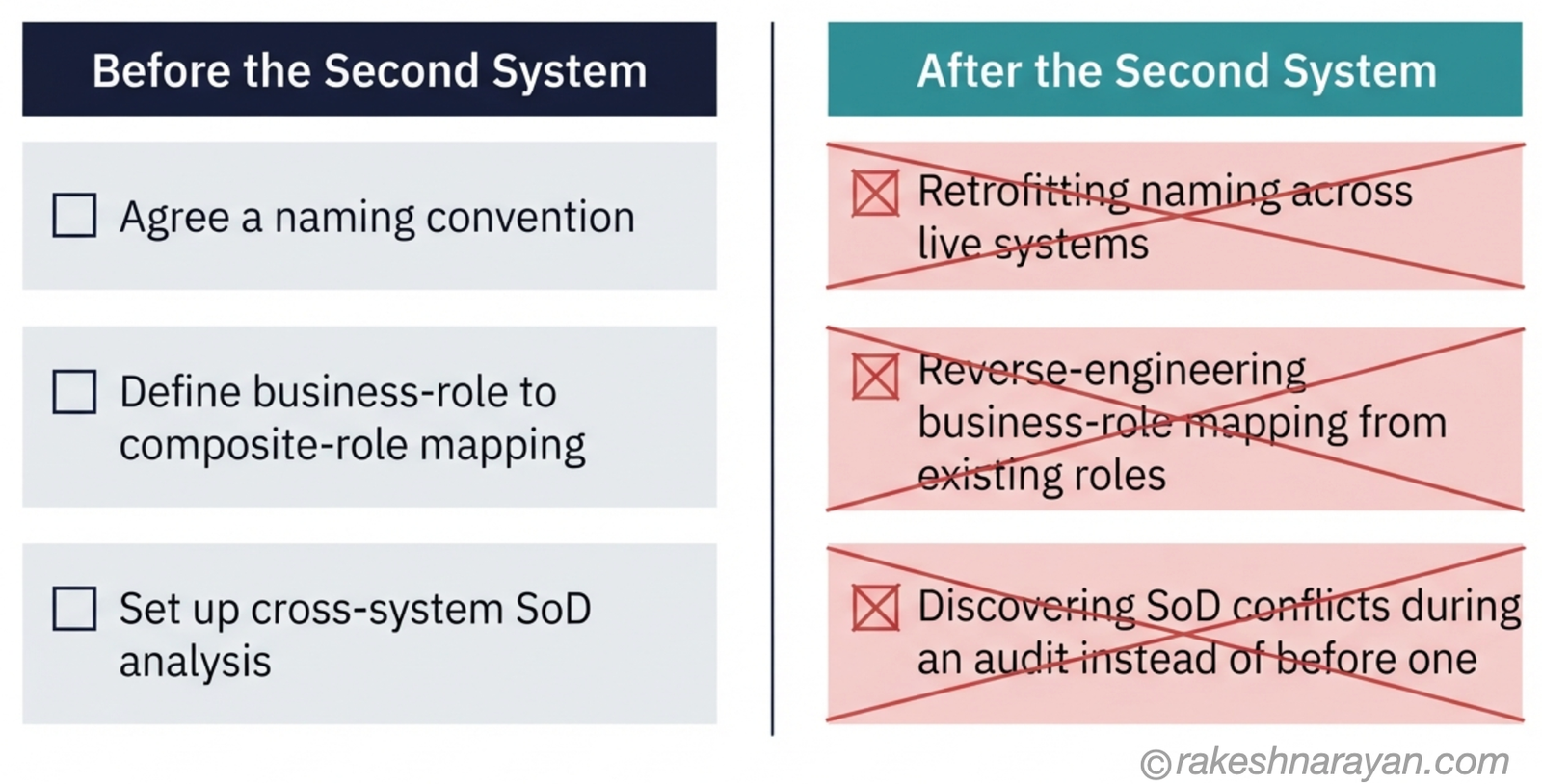
What this looks like in a real landscape
Take the landscape pattern from the previous post in this series — several S/4HANA systems, each running embedded Fiori, with SAP Build Work Zone aggregating access on top. The role design that fits it looks like this: each system keeps its own tight single roles, built exactly the way the standard mechanics describe.
Above that, composite roles represent real jobs — one composite role per business function, bundling the relevant single roles from every system that function touches. Work Zone displays content according to what each backend authorizes; it does not grant anything on its own. And the naming convention, provisioning model and business-role mapping are agreed once, before the landscape grows past two systems, not reconstructed afterward.
Get this layering right and adding a fourth system is a mechanical exercise — new single roles, one more branch on each relevant composite role. Get it wrong, and a fourth system means renegotiating a role structure that was never designed to hold more than one.
At a glance — Fiori authorization at scale
| Concept | One-line summary |
|---|---|
| Single role | One role per catalog, built per system — the base unit, never spans systems directly |
| Composite role | Bundles single roles from multiple systems into one assignment representing a real job function |
| Work Zone and authorization | Work Zone aggregates access, but does not harmonize or grant it — each backend still enforces its own authorization |
| The overarching concept | Naming convention, provisioning model and business-role mapping, agreed once and enforced consistently |
| Segregation of duties | Conflicts multiply across systems rather than averaging out — analyze the combined access picture, not each system alone |
| When to formalize governance | Before the second system joins the landscape, not after |
| The real risk | Not the mechanics of one catalog and one role — the absence of a shared structure once there is more than one system |
What to take away
Nobody’s Fiori authorization model fails because a consultant forgot how to add a catalog to a PFCG role menu. It fails because that correct, well-executed pattern was repeated three times with no shared structure holding it together.
Work Zone will not build that structure for you. Its own documentation says as much — it needs an overarching concept to link users to their roles across systems, and building that concept is an architecture decision, not a configuration step. The teams that get this right make the decision once, early, and let every new system slot into a structure that already exists.
A role structure that assumes one system will always find one system’s worth of problems eventually. Build it to assume more than one, even while you only have one, and the landscape stops dictating the redesign schedule.
🔗 Related reading
SAP Security Roles and Authorisation — the authorization object, profile and PFCG fundamentals this post builds on.
SAP Fiori Launchpad Configuration — Spaces, Pages and Catalogs — the catalog-to-role mechanics this post assumes as a starting point.
This post is Chapter 4 of the SAP Fiori & UX Architecture series, closing it out — see “When Fiori Isn’t the Answer — Choosing the Right SAP Frontend” for the frontend decision that starts the series, and “SAP Fiori Deployment — Embedded, Hub FES, and Work Zone” for the landscape pattern this post’s role structure is designed to sit on top of.
Published on rakeshnarayan.com — Articles
URL: https://rakeshnarayan.com/articles/fiori-authorization-and-role-design-for-a-multi-system-landscape/

Did you enjoy this article?
Let me know — it takes one click.
0 Comments
Leave a Comment
Looks like this one held your attention — I'd really appreciate a quick comment below.
Your comment has been submitted and will appear after review.