SAP Integration Patterns — The Decisions That Matter
No SAP system is an island. Every SAP landscape connects to something — other SAP systems, third-party applications, cloud services, legacy platforms, external partners. How you design those connections shapes how maintainable, scalable and reliable your landscape will be for years.
Integration architecture is not about picking a tool. It is about choosing the right pattern for each scenario — and then choosing the tool that implements that pattern well. Get the pattern wrong and even the best tool cannot save you.
This post covers the core integration decisions: topologies, communication styles and SAP’s own integration technologies — with honest guidance on when to use each.
🔗 Related context
This post builds on SAP BTP — The Platform Explained , which covers Integration Suite and Event Mesh. It also connects to REST API Design Principles and API Security Essentials — REST is one of the integration technologies covered here.
The first decision — topology
Point-to-Point
Point-to-point is the most natural way to start integrating systems. System A talks directly to System B. No middleware. No hub. Direct connection.
It works perfectly for one or two integrations. The problem appears when you have ten systems, each needing to talk to several others. The number of connections grows exponentially. Each has its own error handling, its own transformation logic, its own monitoring. When a change is needed in one system, you must update every connection from that system.
Hub-and-Spoke
Hub-and-spoke places a central integration platform between all systems. No system connects directly to another — every message flows through the hub. The hub handles routing, transformation, error handling and monitoring in one place.
| Point-to-Point | Hub-and-Spoke | |
|---|---|---|
| Complexity at scale | Exponential — n systems = n(n-1) connections | Linear — each system connects once to the hub |
| Change management | Change one system, update all its connections | Change the mapping in the hub — one place |
| Monitoring | Distributed — visibility is hard | Centralised — all traffic visible in one platform |
| Cost of first connection | Low — no middleware to set up | Higher — hub infrastructure needed upfront |
| SAP recommendation | Acceptable for 1 to 2 simple connections | Standard for enterprise landscapes |
| SAP tool | Direct RFC, BAPI or REST calls | SAP Integration Suite (CPI) |
💡 Most SAP landscapes have both
In practice, large SAP landscapes have a mix. The strategic direction is hub-and-spoke via Integration Suite. But legacy point-to-point connections — built before middleware existed — coexist. The question is often: which new connections go through the hub, and which existing ones do we migrate?
The second decision — synchronous vs asynchronous
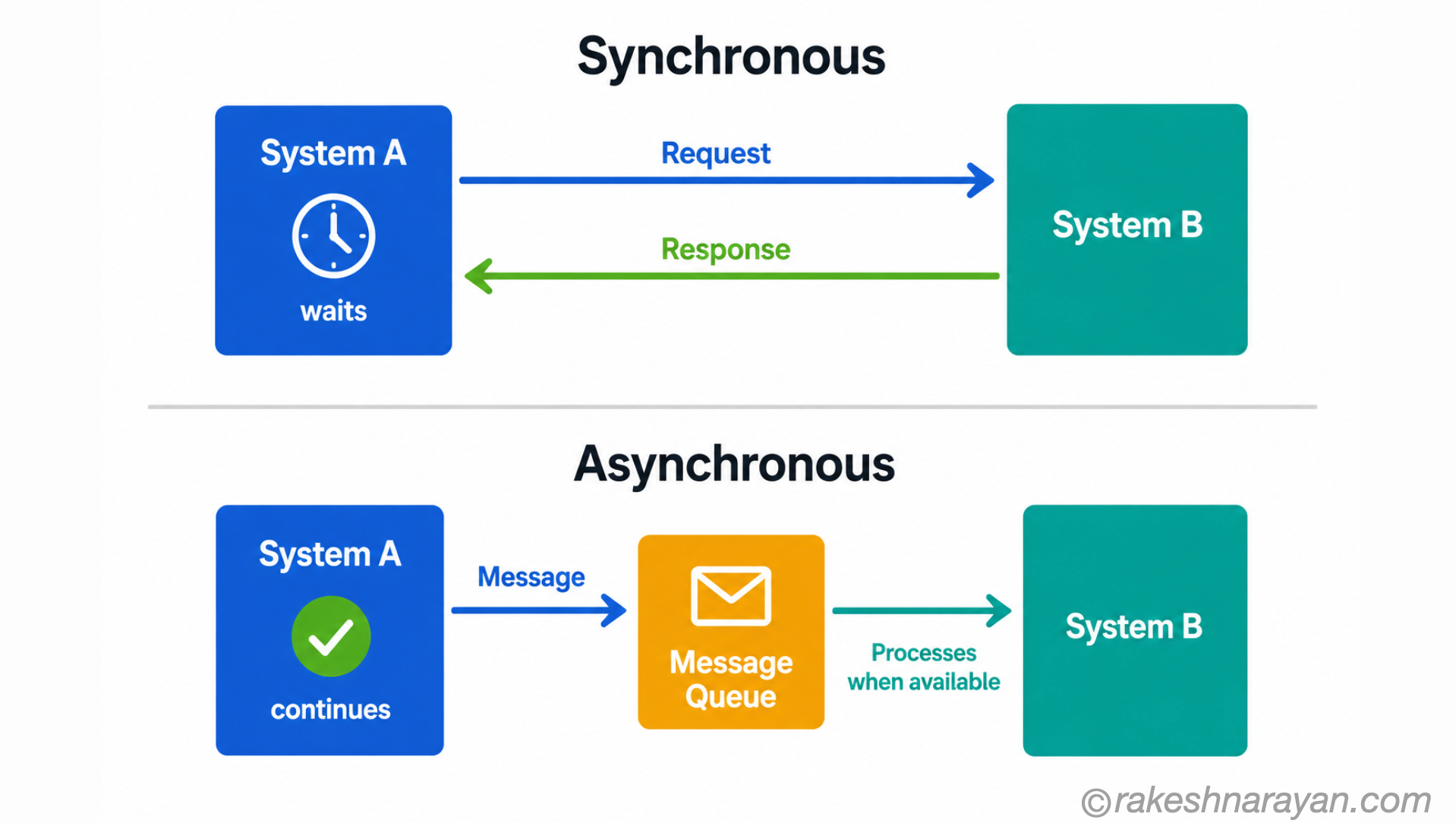
This is one of the most consequential architectural decisions in integration. It determines how systems behave when things go wrong — and they always eventually go wrong.
| Synchronous | Asynchronous | |
|---|---|---|
| How it works | System A calls System B and waits for the response before continuing | System A sends a message and continues immediately — System B processes it independently |
| Coupling | Tight — both systems must be available at the same time | Loose — System B can be down; messages queue and process when it recovers |
| Response | Immediate — the caller gets the result in the same transaction | Eventual — the result comes later, if at all |
| Error handling | Simpler — error returned directly to the caller | More complex — need to handle failed messages, retries, dead-letter queues |
| Best for | Real-time queries, creating a record and needing the ID back | Batch updates, notifications, events, high-volume data feeds |
| SAP examples | RFC, BAPI, OData from Fiori, REST API calls | IDoc, SAP Event Mesh, message queues in CPI |
SAP integration technologies — what to use when
SAP has accumulated integration technologies over decades. Each one exists for a reason and is still in use today in some context. Knowing which to use — and why — is what separates architectural thinking from just knowing the tools.
| Technology | Type | Best used for | Status in 2026 |
|---|---|---|---|
| RFC (Remote Function Call) | Synchronous | Real-time system-to-system calls between SAP systems — function module level | Active — common in older landscapes, still supported |
| BAPI (Business API) | Synchronous | Standard SAP business transactions — more stable than custom RFC | Active — standard for many SAP object operations |
| IDoc (Intermediate Document) | Asynchronous | High-volume batch data exchange — orders, invoices, delivery notes. EDI and B2B. | Active — dominant in supply chain and B2B integration |
| OData (V2 / V4) | Synchronous REST | Fiori apps, third-party apps consuming SAP data — the API layer of S/4HANA | Active — V4 is current standard, V2 still widely deployed |
| REST / HTTP | Synchronous | Modern API integrations — BTP services, cloud apps, third-party APIs | Active — standard for new integrations |
| SOAP / Web Services | Synchronous | Older enterprise integrations, some SAP standard services still use SOAP | Declining — maintained for legacy, REST preferred for new work |
| SAP Event Mesh | Asynchronous / Event-driven | Event-driven architecture — decoupled notifications between systems | Active and growing — SAP’s strategic async technology |
Event-driven integration — the growing pattern
Traditional integration is request-driven — System A asks System B for something when it needs it. Event-driven integration inverts this. System A publishes an event when something happens. Any system interested in that event consumes it independently.
| Request-driven | Event-driven |
|---|---|
| System A polls System B for updates | System B publishes an event when something changes |
| Systems are coupled — A must know B’s API | Systems are decoupled — publisher does not know who consumes |
| High polling load if checking frequently | No polling — consumers react only when events occur |
| Adding a new consumer requires changes to the source | New consumers subscribe independently — source unchanged |
| SAP example: scheduled RFC to check for new orders | SAP example: S/4HANA publishes SalesOrder.Created to Event Mesh |
💡 SAP’s standard event catalogue
SAP has published a standard business event catalogue for S/4HANA — predefined events like SalesOrder.Created, BusinessPartner.Changed and GoodsMovement.Posted. These publish to SAP Event Mesh on BTP. Any connected system can subscribe. This is the foundation of SAP’s composable enterprise architecture direction.
Integration Suite — where patterns become reality
SAP Integration Suite on BTP is the platform where most of these patterns are implemented in modern SAP landscapes.
- Cloud Integration (CPI) — integration flow engine for message-based integrations with transformation, routing and error handling
- API Management — publish, secure and monitor APIs following REST design principles
- Event Mesh — async messaging backbone for event-driven integration
- Open Connectors — pre-built adapters to 170+ third-party services
- Integration Advisor — AI-assisted B2B message mapping for EDI and IDoc scenarios
| Integration scenario | Recommended pattern | SAP tool |
|---|---|---|
| S/4HANA to Salesforce real-time account sync | Hub-and-spoke, synchronous REST | CPI integration flow |
| S/4HANA to 3PL partner order updates via EDI | Hub-and-spoke, async IDoc | CPI with IDoc adapter and Integration Advisor |
| ERP event to multiple downstream consumers | Event-driven, async | Event Mesh — S/4HANA publishes, consumers subscribe |
| Fiori app to S/4HANA data | Point-to-point, sync OData | OData V4 service directly — no middleware needed |
| Third-party app to SAP BTP service | Hub-and-spoke, sync REST with OAuth | API Management plus CPI |
Common mistakes in SAP integration
| Mistake | What happens | Better approach |
|---|---|---|
| Point-to-point at scale | Hundreds of direct connections — unmaintainable, brittle | Move to hub-and-spoke via Integration Suite |
| Synchronous when async fits better | Tight coupling — one system down takes others with it | Use IDoc or Event Mesh for batch and notifications |
| Custom RFC instead of standard BAPI | Breaks on upgrades, no documentation, no stability guarantee | Always check if a BAPI exists before writing custom RFC |
| No error handling in CPI flows | Silent failures — messages lost, no visibility | Implement exception handling and alerting in every flow |
| Skipping API versioning | Breaking changes affect all consumers simultaneously | Version APIs from the start — /v1/ in the URL |
The core decisions at a glance
| Decision | Options | The key question to ask |
|---|---|---|
| Topology | Point-to-point vs hub-and-spoke | How many connections will this landscape eventually have? |
| Communication | Synchronous vs asynchronous | Does the caller need an immediate response, or can it fire and forget? |
| Technology | RFC / BAPI / IDoc / OData / REST / Events | Is this SAP-to-SAP, real-time or batch, standard or custom? |
| Error handling | Retry / dead-letter / alerting | What happens when this integration fails at 2am on a weekend? |
| Versioning | URL versioning / header versioning | How will consumers handle a breaking change in 18 months? |
What to take away
Integration architecture is where decisions made in a project live longest. A wrong topology choice, made early, creates technical debt that survives for a decade. A right one makes the landscape extensible for just as long.
The patterns are not complicated to state. Hub-and-spoke over point-to-point at scale. Asynchronous where coupling is a risk. Standard technologies before custom ones. These require experience to apply consistently under delivery pressure — but knowing the principles is where that experience starts.
SAP Integration Suite gives you the tools. The patterns give you the architectural thinking to use those tools well.
🔗 Related posts on this site
SAP BTP — The Platform Explained — Integration Suite is one of the four core BTP pillars.
REST API Design Principles — REST is the standard for new SAP integrations.
API Security Essentials — OAuth, HTTPS and rate limiting apply to all API-based SAP integrations.
SAP S/4HANA vs ECC — The Real Difference — the integration landscape changes significantly in an S/4HANA migration.
Published on rakeshnarayan.com — Articles
URL: https://rakeshnarayan.com/articles/sap-integration-patterns/