SAP Screen Personas — The UX Layer for Classic SAP Transactions
🔗 Read These First
SAP Fiori Design Principles — The Five Ideas Behind Every SAP App — understanding Fiori design first gives context for why Screen Personas exists.
ABAP Fundamentals That Still Matter — Screen Personas builds on top of classic ABAP transactions. Understanding what those are helps.
SAP Fiori gets most of the attention when people talk about SAP user experience. And for good reason — Fiori apps are cleaner, role-based, and designed for how people actually work. But there is a practical reality that every SAP customer faces: thousands of classic SAP GUI transactions that either do not have a Fiori equivalent, or where the Fiori equivalent does not quite match what the business needs.
SAP Screen Personas is the answer to that reality. It lets you take an existing SAP GUI transaction and simplify it — hide fields that are not relevant, pre-fill values that never change, add buttons that automate multi-step actions, rearrange the layout — all without writing a line of ABAP code and without modifying the underlying transaction.
The result is a Fiori-like experience on top of a classic transaction. It is not a replacement for Fiori. It is a pragmatic bridge.
What Screen Personas Actually Does
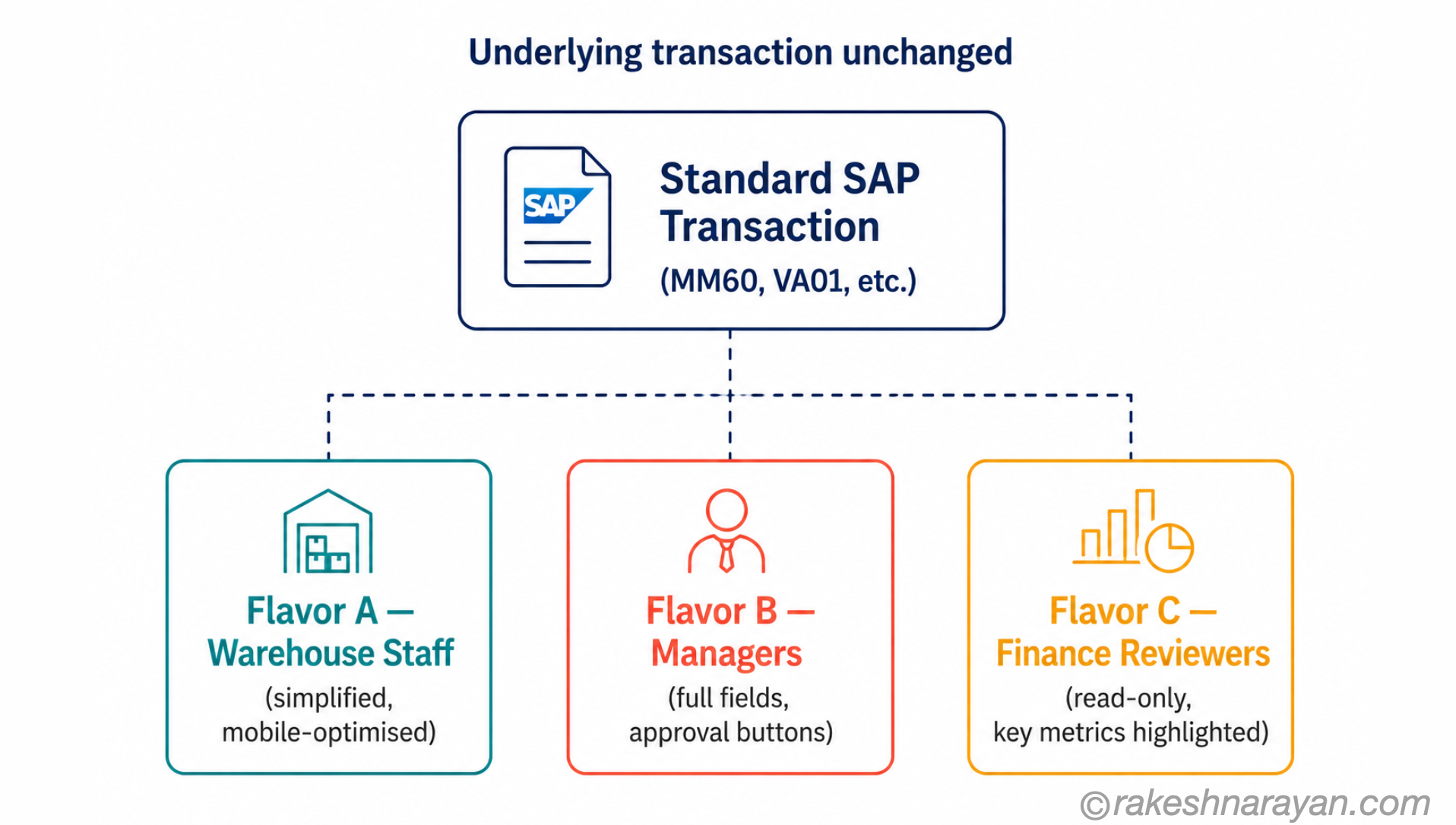
Screen Personas works by creating a layer on top of an existing SAP GUI transaction. This layer — called a flavor — defines how the transaction looks and behaves for a specific user or group. The underlying transaction code is completely untouched. The data still flows through the same program. Screen Personas only changes the presentation.
You build flavors using a drag-and-drop editor, directly in the browser. No developer tools required. No transport needed for the editing process itself (though deploying a flavor to production follows the standard SAP transport process).
| What You Can Do with Screen Personas | What You Cannot Do |
|---|---|
| Hide fields, tabs, and sections that users never need | Add new fields that do not exist in the underlying transaction |
| Pre-fill fields with default values | Change business logic in the underlying program |
| Rename labels to match business terminology | Replace a transaction with a completely different data model |
| Add scripted buttons that automate sequences of steps | Access data from systems outside the current SAP system (without API calls) |
| Apply conditional formatting to table rows | Create a standalone app independent of an existing transaction |
| Adapt the layout for different screen sizes and roles |
Flavors — the Core Concept
A flavor is the Screen Personas term for a customised version of a transaction. One transaction can have many flavors — one for warehouse staff that shows only the fields they need, another for managers that includes additional data and approval buttons, another simplified for mobile devices.
Flavors are assigned to users or roles. When a user with an assigned flavor opens the transaction, they see the flavored version. A user without a flavor assignment sees the original transaction. The two can coexist in the same system without conflict.
This makes Screen Personas genuinely non-invasive. You are not changing the transaction for everyone — you are overlaying a personalised experience for specific users, leaving the standard transaction intact.
The Scripting Engine — Where the Real Power Is
Screen Personas includes a scripting engine that lets you automate sequences of steps. This is where it goes beyond simple field hiding and becomes a genuine productivity tool.
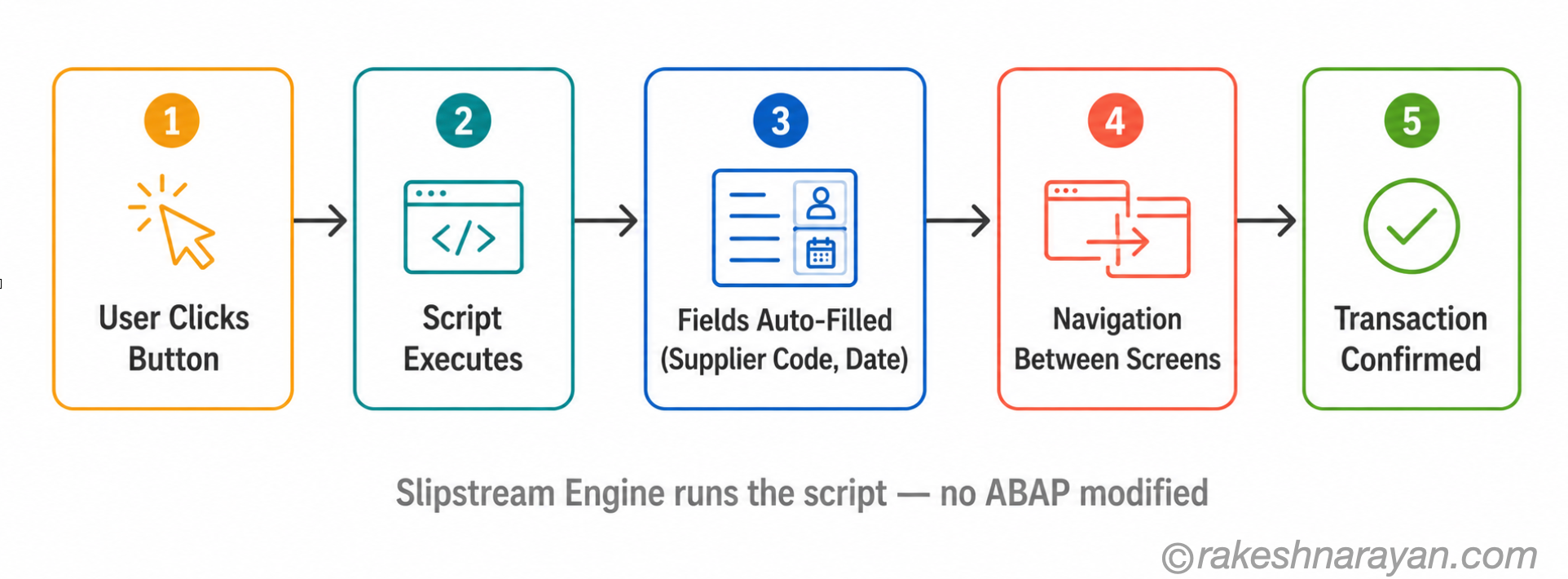
A common example: a goods receipt transaction that normally requires a user to navigate three screens, enter the same supplier code every time, and click confirm twice. With Screen Personas scripting, you can create a single button that executes the entire sequence — pre-filling the supplier, navigating between screens, and confirming — leaving the user to only enter the quantity.
The scripting language is JavaScript-like and runs in the Slipstream Engine — the modern rendering engine in Screen Personas. Scripts can read and write field values, trigger navigation, and apply conditional logic.
💡 Practical Tip
Screen Personas scripts are Clean Core compliant — they do not modify underlying ABAP code and survive system upgrades. This makes them a safe way to automate repetitive workflows without creating technical debt.
Screen Personas vs Fiori — When to Use Which
The honest answer: use Fiori wherever a Fiori app exists and meets the business need. The Fiori app reference library lists all available apps for your S/4HANA version. If a Fiori app covers your use case, that is the right tool.
Screen Personas fills the gap — the transactions that do not have a Fiori equivalent, or where the Fiori app exists but the business process requires a workflow that the Fiori app does not support. This is not a small gap. Thousands of transactions in a typical S/4HANA system still run as classic GUI, and they will continue to do so for years.
| Use SAP Fiori When… | Use Screen Personas When… |
|---|---|
| A Fiori app exists for the transaction | No Fiori app exists for the transaction |
| The Fiori app fully covers the business process | The Fiori app exists but does not match the specific workflow |
| You are on S/4HANA Cloud Public Edition (default path) | You need quick UX improvement without a development project |
| You want a fully modern, mobile-first UI | You need to automate a multi-step classic transaction |
Availability and Support
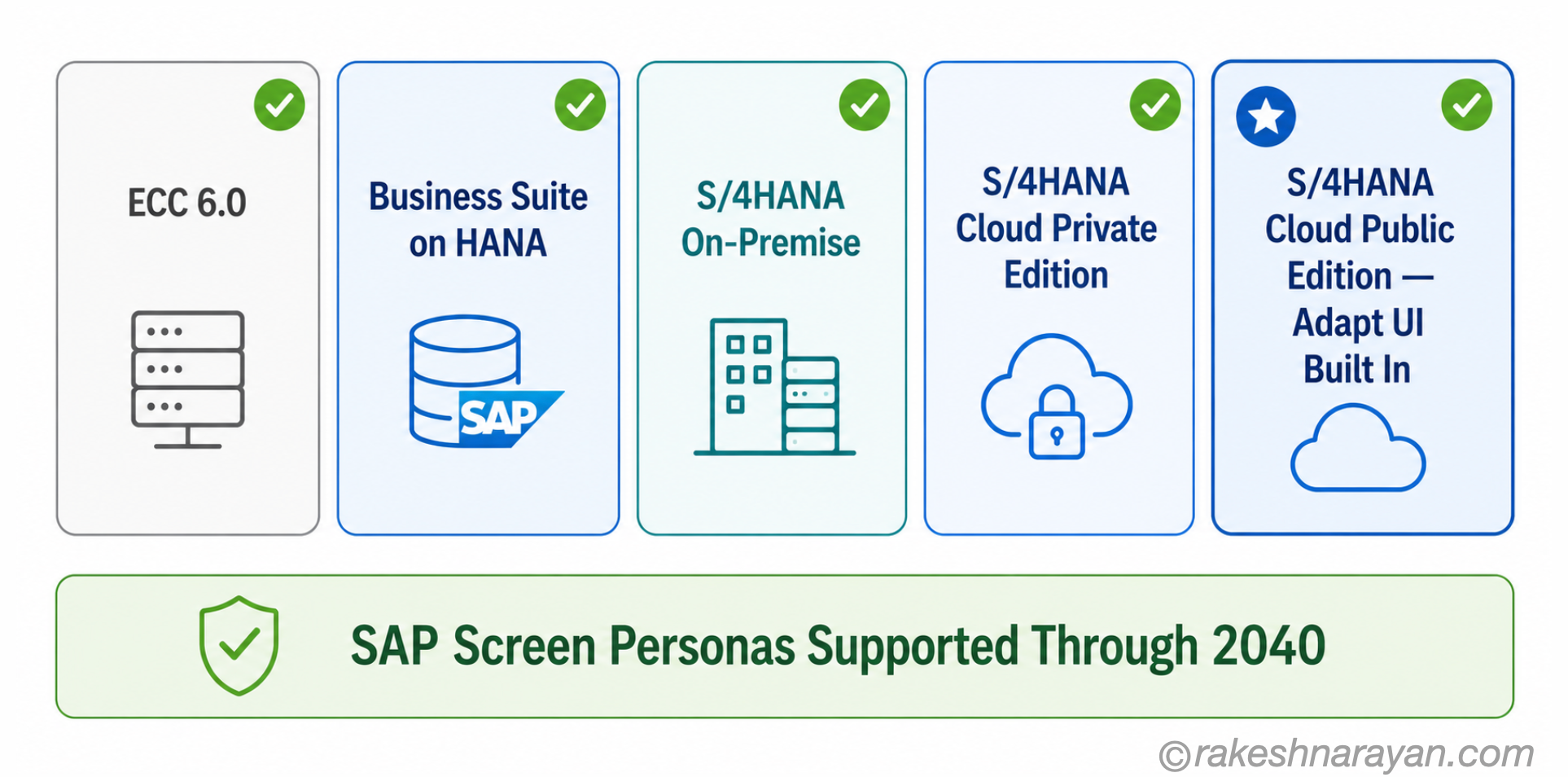
Screen Personas is available across the SAP ERP landscape — ECC 6.0, SAP Business Suite on HANA, S/4HANA on-premise, S/4HANA Cloud Private Edition, and S/4HANA Cloud Public Edition. On Public Cloud, it is built in as Adapt UI for Classic Apps — no separate installation needed.
SAP has committed to supporting Screen Personas functionality through at least 2040. SAP releases service packs on a regular cadence with a two-year support window per release. This is a long-term supported tool, not a temporary workaround.
At a Glance — The Mental Model
| Concept | One-Line Summary |
|---|---|
| Screen Personas | A tool that creates a customised presentation layer on top of classic SAP GUI transactions. |
| Flavor | A customised version of a transaction. One transaction, many possible flavors. |
| Slipstream Engine | The modern rendering engine in Screen Personas. Required for scripting and advanced features. |
| Scripting | JavaScript-like automation that runs in Screen Personas. Automates multi-step sequences. |
| Adapt UI | Screen Personas built into S/4HANA Cloud Public Edition. Same concept, different name. |
| Clean Core | Screen Personas flavors are Clean Core compliant — no ABAP modifications required. |
What Screen Personas Tells You About SAP’s UX Strategy
Screen Personas exists because SAP’s user experience transformation is not a single migration event — it is a long journey. Fiori is the destination. But thousands of complex, deeply used classic transactions cannot be replaced overnight, and for many of them, the business case for full redevelopment is hard to make when Screen Personas can deliver 80% of the UX improvement for 10% of the effort.
SAP’s strategy is pragmatic: Fiori where possible, Screen Personas where Fiori does not yet reach. The commitment to 2040 support signals that SAP does not expect the classic transaction estate to disappear quickly.
Understanding Screen Personas is understanding how real SAP landscapes actually run — not just the ideal state in the brochure.
🔗 Related Reading
SAP Fiori Design Principles — The Five Ideas Behind Every SAP App — the design philosophy that Screen Personas brings to classic transactions.
SAP S/4HANA vs ECC — The Real Difference — the transition context that explains why classic transactions still dominate many landscapes.
ABAP Fundamentals That Still Matter — understanding the classic transactions that Screen Personas simplifies.
SAP BTP — The Platform Explained — where SAP’s broader UX and extensibility strategy sits.
Published on rakeshnarayan.com — Articles
URL: https://rakeshnarayan.com/articles/sap-screen-personas-the-ux-layer-for-classic-sap-transactions/
Did you enjoy this article?
Let me know — it takes one click.
0 Comments
Leave a Comment
Looks like this one held your attention — I'd really appreciate a quick comment below.
Your comment has been submitted and will appear after review.