SAPUI5 vs Fiori vs Fiori Elements — What's the Difference?
Ask three people in a SAP project meeting what SAPUI5 is and you will get three different answers. One will say it is Fiori. Another will say it is the frontend framework. A third will mention Fiori Elements as if that settles it. Nobody is completely wrong — but nobody has the full picture either.
The confusion is understandable. SAP uses all three terms constantly, often in the same sentence, and rarely stops to explain how they fit together. The result is a mental model that is permanently half-built — fine for everyday use, but a real problem when something breaks or when you have to make a build decision.
This post draws the lines clearly. Three terms. Three distinct roles. One mental model that makes the rest of Fiori development significantly easier to navigate.
🔗 Related Reading
If you are new to Fiori, start here: SAP Fiori Design Principles — The Five Ideas Behind Every SAP App. For the data layer that powers SAPUI5 apps: OData Protocol in SAP — V2, V4 and How It Works
The one-sentence version of each
Before going deeper, here is the essential distinction:
| Term | What it actually is |
|---|---|
| SAP Fiori | A design system — the principles, guidelines and standards that define how SAP enterprise apps should look and behave. |
| SAPUI5 | A JavaScript framework — the technology that developers use to build apps that follow the Fiori design system. |
| Fiori Elements | A development accelerator built on top of SAPUI5 — it generates the UI automatically from OData metadata, so you write less code. |
📌 Key Takeaway
Fiori is the what. SAPUI5 is the how. Fiori Elements is the shortcut. Every Fiori app uses SAPUI5 under the hood. Not every SAPUI5 app uses Fiori Elements.
SAP Fiori — the design system, not the technology
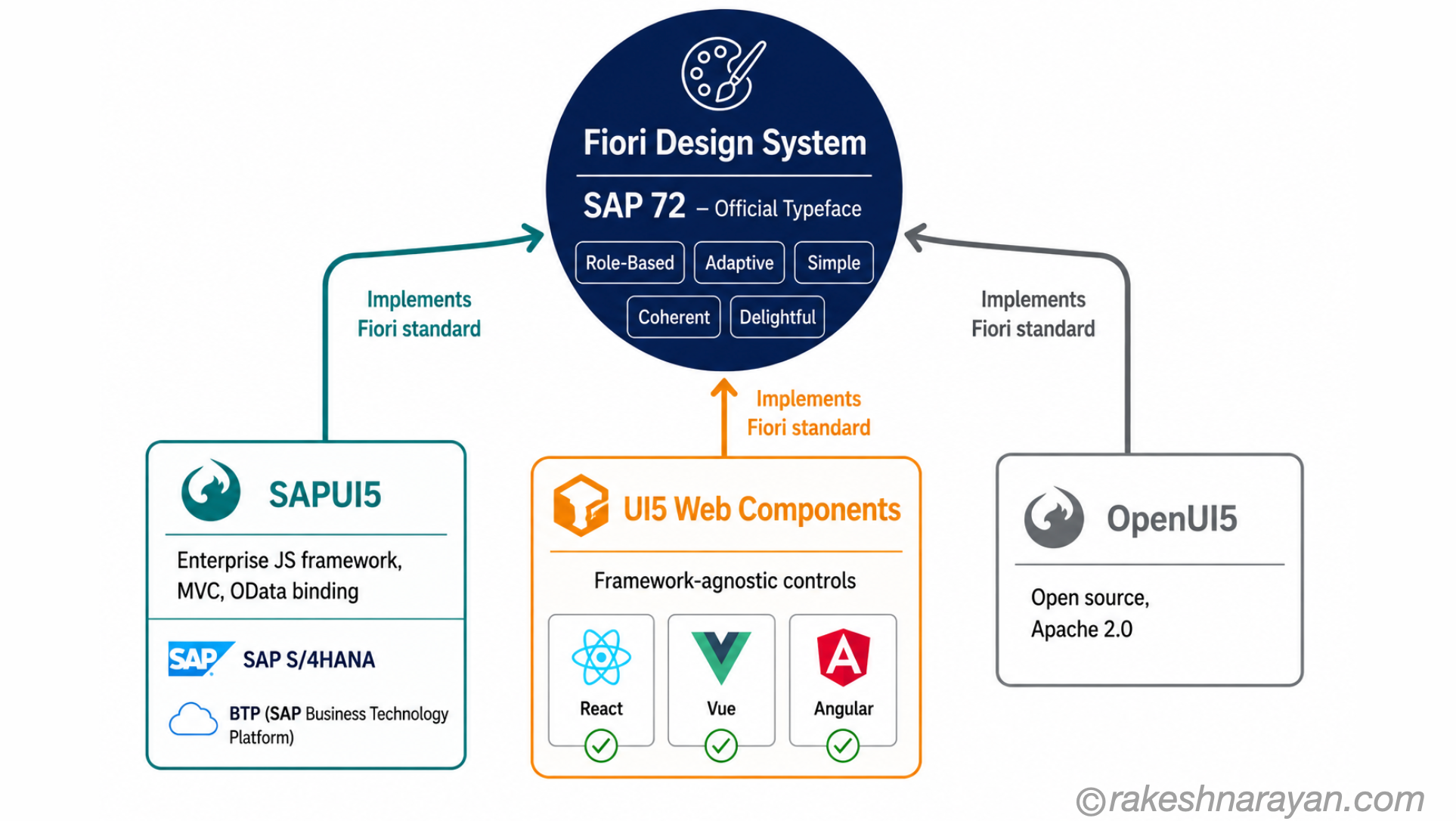
Fiori is not a framework. It is not a product you install. It is a design philosophy — a set of five principles that define what a good SAP user experience looks and feels like: role-based, adaptive, simple, coherent, and delightful.
SAP introduced Fiori in 2013 as a direct response to the notoriously complex SAP GUI. The idea was simple: enterprise software should be as easy to use as a consumer app. Every visual decision in a Fiori app — the layout, the navigation, the typography, the way data is presented — is meant to reflect those five principles.
Fiori also includes the Fiori Launchpad: the browser-based home screen where users access their apps as tiles. The Launchpad is what most people mean when they say “the Fiori interface”. It is the delivery mechanism, not the framework.
📝 Note
SAP uses the SAP 72 typeface — a proprietary font designed specifically for Fiori — across all apps. It is optimised for readability on screens of any size and is part of what gives Fiori its consistent visual identity.
SAPUI5 — the framework that builds Fiori apps
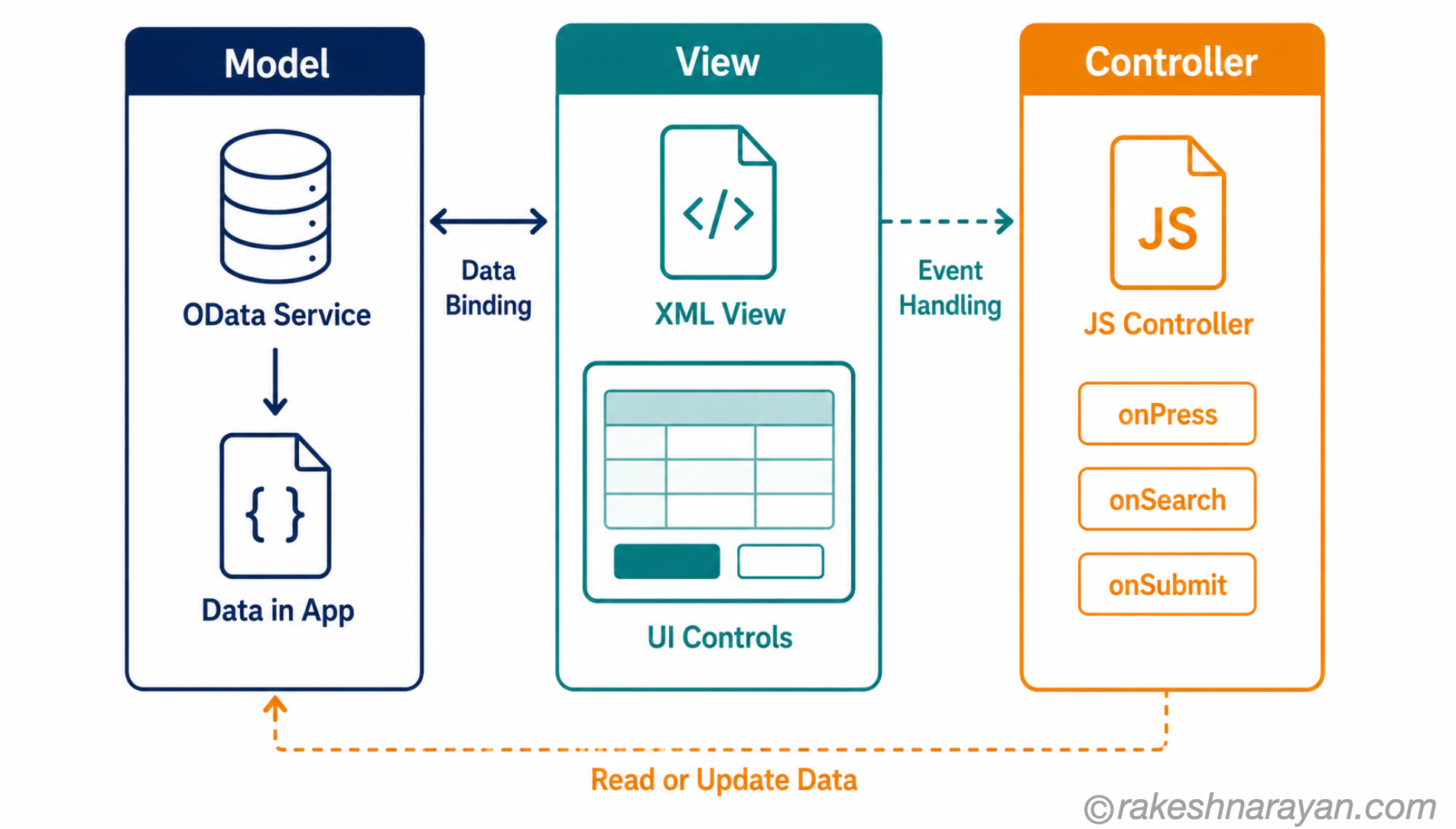
SAPUI5 is a JavaScript framework — SAP’s equivalent of React or Angular, built specifically for enterprise applications. It gives developers a control library (buttons, tables, charts, forms), a data binding layer, and an application structure based on Model-View-Controller (MVC) architecture.
MVC is the core of how any SAPUI5 app is organised:
| MVC Layer | What it does in SAPUI5 |
|---|---|
| Model | Holds the data — usually fetched from an OData service. Can be a JSON model, OData model or resource model for translations. |
| View | Defines what the user sees — written in XML (most common), HTML or JavaScript. Contains the UI controls. |
| Controller | Contains the logic — what happens when a user clicks a button, navigates, or submits a form. Written in JavaScript. |
The data binding layer is what makes SAPUI5 feel different from standard JavaScript frameworks. You bind a UI control directly to a model property — the table fills automatically when the OData response arrives. No manual DOM manipulation. No custom fetch-and-render loops.
💡 Practical Tip
SAPUI5 connects to OData services natively. The sap.ui.model.odata.v4.ODataModel class reads your OData V4 service and binds directly to your controls. This is why understanding OData is not optional for Fiori developers — the two are inseparable.
SAPUI5 vs OpenUI5 — the open-source version
OpenUI5 is the open-source version of SAPUI5 — the same core framework, freely available under the Apache 2.0 licence. The difference is the control library. SAPUI5 includes additional SAP-proprietary controls (charts, analytical tools, smart controls) that are not in OpenUI5.
For most enterprise S/4HANA and BTP development, you use SAPUI5. OpenUI5 is used when you want to build Fiori-styled apps outside the SAP ecosystem or contribute to the open-source community.
Fiori Elements — when SAPUI5 generates itself
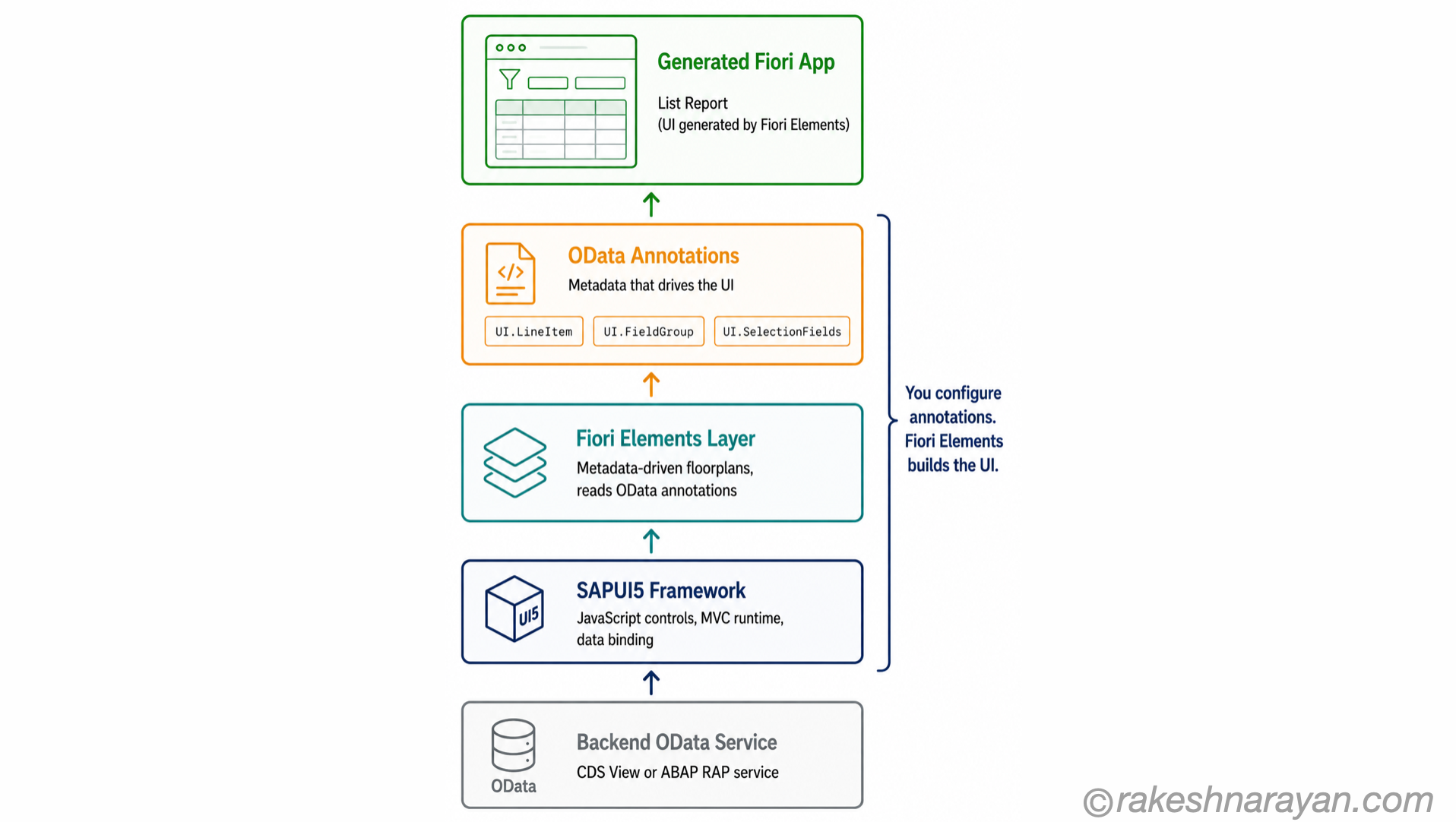
Fiori Elements is a development framework that sits on top of SAPUI5. Instead of writing XML views and JavaScript controllers manually, Fiori Elements generates the UI automatically — driven entirely by annotations in your OData service.
The idea: SAP noticed that most business apps follow one of a handful of standard patterns. A list of items with filters. A detail page for one object. A worklist of tasks. Rather than have every team build these patterns from scratch, Fiori Elements gives you pre-built floorplans that read your OData metadata and render accordingly.
| Fiori Elements Floorplan | What it generates |
|---|---|
| List Report | A searchable, filterable list of business objects — the most common pattern. Think: list of purchase orders. |
| Object Page | A full detail view of one business object with sections and subsections. Think: a single purchase order. |
| Worklist | A simplified list without the smart filter bar — for shorter, focused task lists. |
| Analytical List Page | Combines charts and a data table — for reporting and KPI pages. |
✅ Best Practice
Fiori Elements and CDS Views are designed to work together. When you build a RAP-based OData V4 service with the right CDS annotations, Fiori Elements reads those annotations and renders the UI — no XML view required. This is the standard approach for new S/4HANA development in 2026.
Freestyle vs Fiori Elements — the decision that actually matters
Every Fiori development project faces this choice. It is the practical question the other resources never answer cleanly — so here it is.
| Freestyle SAPUI5 | Fiori Elements | |
|---|---|---|
| Code written | Full XML views, controllers, routing — everything manually | Annotations in OData/CDS — minimal UI code |
| Flexibility | Complete — any layout, any behaviour, any custom control | Limited to floorplan structure — you configure, not design |
| Development speed | Slower — every pattern built from scratch | Faster — standard patterns generated automatically |
| Maintenance | You own every line — your team upgrades it | SAP owns the floorplan — upgrades are automatic |
| Best for | Complex custom UX, non-standard layouts, apps that do not fit a floorplan | Standard CRUD apps, list-detail patterns, analytical views |
| SAP recommendation | When no standard floorplan fits | Default choice for new S/4HANA and BTP apps |
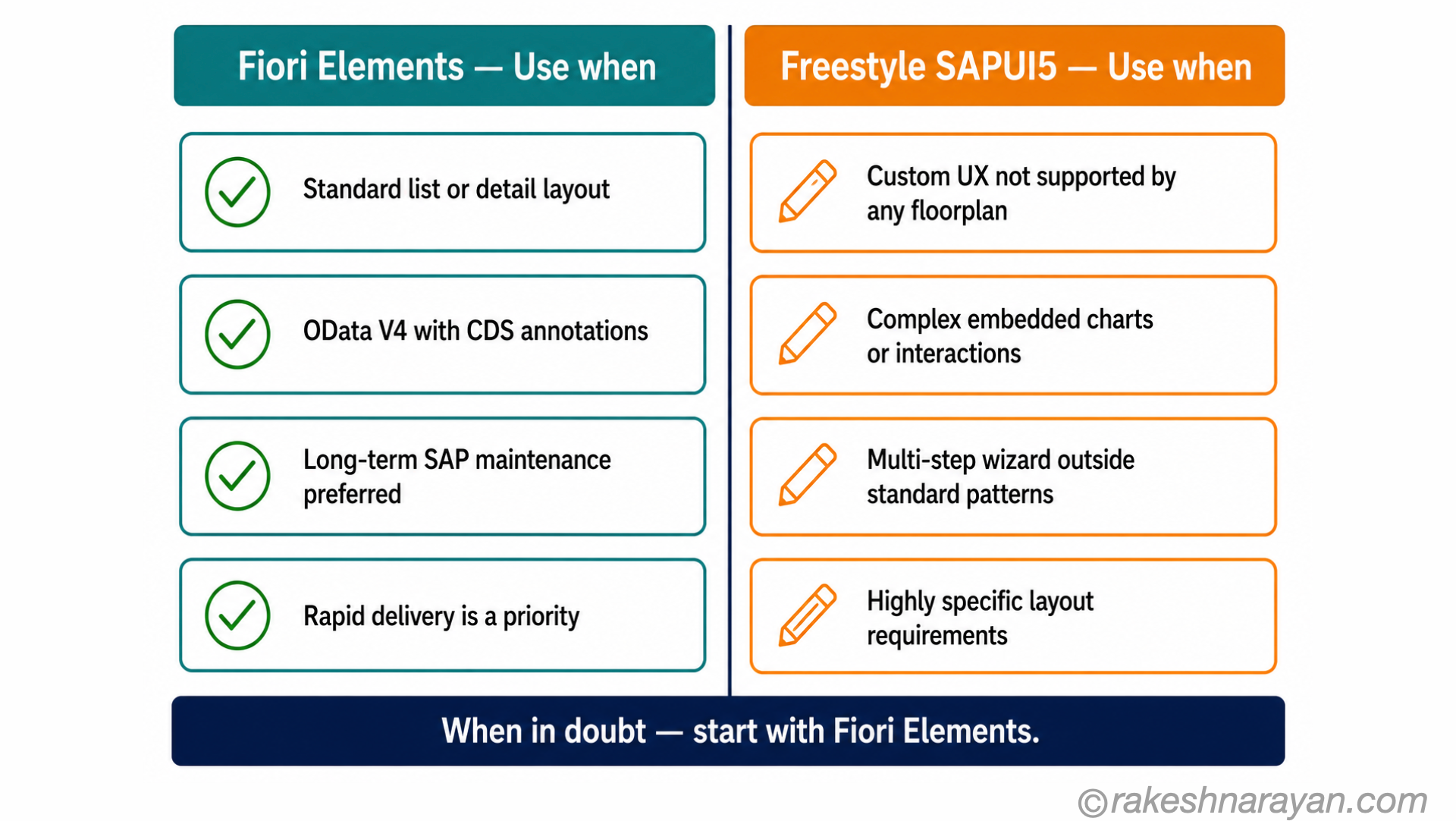
The honest answer: if your app fits a standard floorplan, use Fiori Elements. The maintenance advantage alone justifies it — when SAP updates the framework, your app updates automatically. Building the same list report in freestyle means you own every pixel of it, forever.
Freestyle earns its place when the UX requirement genuinely does not fit a floorplan — a custom dashboard, an embedded chart with bespoke interactions, a multi-step wizard that does not map to any standard pattern. That is where the extra code is justified.
⚠️ Warning
The most common mistake: choosing Freestyle because the team knows JavaScript and finds annotations unfamiliar. Fiori Elements has a learning curve — but so does building and maintaining a Freestyle app long-term. Evaluate on fit, not on comfort.
Where UI5 Web Components fit in
UI5 Web Components is a separate project — a collection of Fiori-styled UI controls packaged as standard web components. The key difference: they work in any JavaScript framework. React, Vue, Angular — you get the same Fiori look and feel without requiring the full SAPUI5 runtime.
This matters on BTP. If your team is building a custom BTP application and prefers React, UI5 Web Components lets you stay in React while still delivering the Fiori visual standard. You get consistent Fiori styling without writing a full SAPUI5 app.
📝 Note
UI5 Web Components does not replace SAPUI5 for standard Fiori development. It is an extension of the Fiori ecosystem — not a migration path. Standard S/4HANA Fiori apps still use SAPUI5.
At a glance — the differences
| Concept | One-line summary |
|---|---|
| SAP Fiori | The design system — five principles defining how SAP enterprise apps should look and behave |
| SAPUI5 | The JavaScript framework — used to build apps that follow the Fiori design system |
| OpenUI5 | The open-source version of SAPUI5 — same core, fewer proprietary controls |
| MVC (Model-View-Controller) | The architecture SAPUI5 apps follow — Model holds data, View defines UI, Controller handles logic |
| OData binding | How SAPUI5 connects to backend data — binds UI controls directly to OData service responses |
| Fiori Elements | A SAPUI5-based accelerator — generates UI automatically from OData annotations, no manual XML views |
| Floorplan | A standard UI pattern in Fiori Elements — List Report, Object Page, Worklist or Analytical List Page |
| Freestyle SAPUI5 | Building a Fiori app entirely with manual SAPUI5 code — full flexibility, full ownership |
| UI5 Web Components | Fiori-styled controls usable in any JavaScript framework — React, Vue, Angular — without the SAPUI5 runtime |
| SAP Fiori Launchpad | The browser-based home screen where users access Fiori apps as tiles — not part of the framework itself |
What to take away
The most useful reframe: when something breaks in a Fiori app, the layer model tells you exactly where to look. Display issue? View layer — XML or Fiori Elements floorplan. Data problem? Model layer — OData binding or service. Behaviour problem? Controller layer — JavaScript logic or annotations.
Fiori Elements is not a shortcut. It is a deliberate handover of two layers to SAP. That is a good trade — until your requirements push past what those layers can express. Know where that boundary is before you start building, not after.
🔗 Related posts on this site
SAP Fiori Design Principles — The Five Ideas Behind Every SAP App — the five Fiori principles that SAPUI5 apps are built to express.
OData Protocol in SAP — V2, V4 and How It Works — the data protocol that powers SAPUI5’s binding layer.
CDS Views and the VDM in SAP S/4HANA Explained — the backend layer that supplies annotations for Fiori Elements.
SAP Security Roles and Authorisation — including S_SERVICE, the authorisation object that controls OData service access for Fiori apps.
SAP Fiori Launchpad Configuration — Spaces, Pages and Catalogs — once an app is built, this is how it actually gets surfaced to end users: spaces, pages, catalogs and PFCG wiring. SAP Screen Personas — The UX Layer for Classic SAP Transactions — the alternative UX layer for teams simplifying classic SAP GUI transactions without a Fiori rebuild.
Published on rakeshnarayan.com — Articles
URL: https://rakeshnarayan.com/articles/sapui5-vs-fiori-vs-fiori-elements-what-s-the-difference/
Did you enjoy this article?
Let me know — it takes one click.
0 Comments
Leave a Comment
Your comment has been submitted and will appear after review.