When Fiori Isn't the Answer — Choosing the Right SAP Frontend
Ask an SAP architect when to use Fiori and most will say always. That answer is comfortable. It is also wrong often enough that I have watched it turn a six-week UI build into a six-month one.
Fiori is the default because SAP made it the default — role-based apps, one launchpad, one design language across every module. For most requirements, that default is the right call. But “most” is not “all”, and the requirements where it is not correct rarely get flagged until the build is already underway.
This post is the decision I actually walk through with a client before committing to a frontend. It is not Fiori Elements vs Freestyle SAPUI5 — that is an internal Fiori choice, and it deserves its own post. This is the bigger question: does the requirement belong in Fiori at all, or does it belong somewhere else.
🔗 Related reading
This post builds on SAP Fiori Design Principles and SAPUI5 vs Fiori vs Fiori Elements — What’s the Difference?. If you are new to Fiori’s building blocks, start there — this post assumes you already know what Fiori is and asks a different question: should this specific requirement use it.
The three real options
Most people frame this as a two-way choice: Fiori, or “we build something custom.” That framing is where projects go wrong. There are three real options, not two, and the second one is still Fiori — just not the flavour most people mean when they say it.
| Option | What it is | Where it lives |
|---|---|---|
| Standard Fiori Elements app | Template-driven UI generated from OData and CDS annotations — List Report, Object Page, Analytical List Page and similar floorplans | SAP Fiori Launchpad, SAP-hosted |
| Custom SAPUI5 (Freestyle) | Hand-built SAPUI5 application, still following Fiori design guidelines and still deployed to the launchpad | SAP Fiori Launchpad, SAP-hosted |
| Non-SAP frontend | React, a native mobile app, a customer portal, or any other technology consuming SAP data over an API — entirely outside the Fiori ecosystem | Wherever the business decides — often outside SAP entirely |
💡 Practical tip
Ask the requirement before you ask the technology. Who is the user, and do they already live in the Fiori Launchpad for their other daily tasks? That single question rules out one of the three options faster than any feature comparison.
When standard Fiori is right
Standard Fiori — meaning Fiori Elements, generated from annotated CDS views — is the right call for the large majority of internal, transactional SAP work. This is the 80% case, and it is worth naming why.
The user is already inside the Fiori Launchpad doing five other tasks. The data is native S/4HANA data with a released, extensibility-safe CDS view behind it.
The interaction is fundamentally CRUD — create, display, change, approve, list. In that shape of requirement, building anything custom is effort spent re-solving a problem SAP already solved.
There is also an architecture reason, not just a convenience one. SAP’s Clean Core strategy pushes custom logic off the core system and onto BTP or standard extensibility options — covered in more depth in SAP Clean Core — Strategy Behind Every S/4HANA Build Decision.
A Fiori Elements app generated purely from a released CDS view fits that model natively. Used exactly as generated, it carries close to no custom UI code and close to no upgrade risk.
That is a default, not a permanent guarantee. The same app can still pick up extensions, custom fields, or controller overrides later — deployed embedded on the system itself or side-by-side on BTP — and each one chips away at that upgrade-safety margin.
| Signal | Why it points to standard Fiori |
|---|---|
| Data comes from a released, extensibility-safe CDS view | The floorplan can be generated directly from existing annotations — no custom OData layer to build or maintain |
| The task is CRUD-heavy | List Report and Object Page floorplans are built precisely for create, display, change and approve workflows |
| Users are already in the Fiori Launchpad | No context-switch cost, no second login, no separate design language to learn |
| Delivery speed matters more than bespoke interaction design | Generated UIs ship in days; every deviation from the template adds development and testing time |
When custom SAPUI5 still makes sense
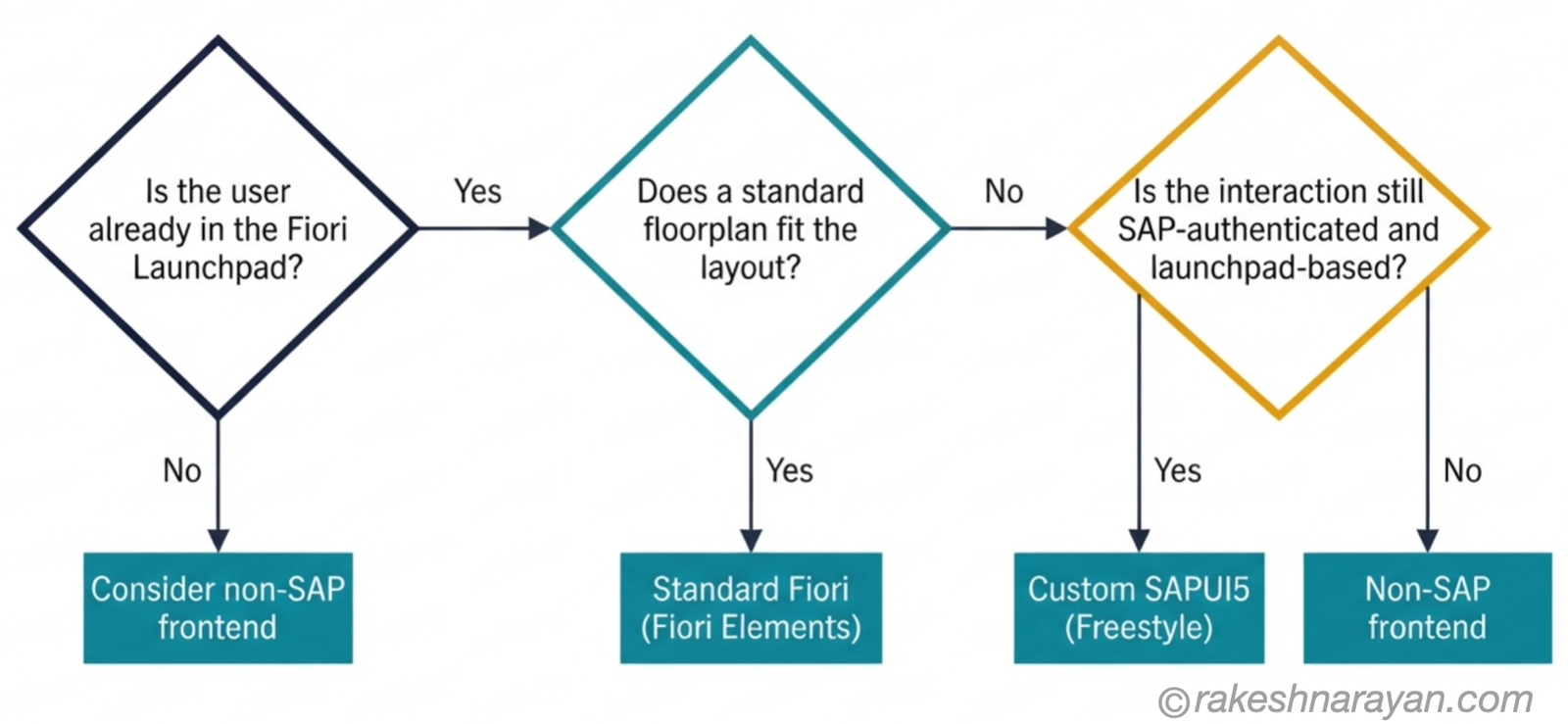
Sometimes the user is still SAP-native and the data is still S/4HANA, but the interaction does not fit any of the standard floorplans. A wizard-style multi-step process.
A shopping-cart-style selection flow. A dashboard with a layout no annotation can describe.
This is where custom SAPUI5 — freestyle development — earns its place. You are still building inside the Fiori design system, still deploying to the same launchpad, still using the same authentication. You are just not letting the metadata generate the screen for you.
The mistake I see most often here is treating this as a fallback rather than a deliberate choice. If you can achieve 90% of a requirement with a standard floorplan and a small extension, that is almost always the better outcome than a fully freestyle build — even if freestyle feels like more control. Reach for freestyle when the layout itself is the problem, not when the requirement is merely inconvenient to template.
When a non-SAP frontend is the honest answer
This is the section most SAP consultants avoid saying out loud, because it sounds like talking yourself out of a job. It should not. Getting this call right is exactly the job.
A consumer-facing application, built for people who have never heard of SAP and never will, does not belong in the Fiori design language. A native mobile app with offline-first requirements, camera access, or push notifications is usually better served by a purpose-built mobile stack. A brand-critical customer experience — where design consistency with your company’s public website matters more than consistency with SAP’s design system — is a legitimate reason to walk away from Fiori entirely.
The same applies when the team building it has React or Angular skills and no SAPUI5 depth. Forcing a Fiori build onto a team without Fiori experience does not save time. It creates a slower, worse version of both outcomes.
⚠️ Warning
The most expensive version of this mistake is forcing Fiori onto a consumer-facing product because “we’re an SAP shop.” It produces a UI that neither looks like the company’s brand nor performs like a purpose-built consumer app — and the rework, when it happens, costs more than building it correctly the first time.
None of this means the SAP data disappears from the picture. It means the frontend stops being Fiori while the backend — OData services, CDS views, APIs — stays exactly where it was.
The decision framework
Put the three sections above into one table and this is the framework I actually use on a project. It will not cover every edge case, but it covers the decision correctly in the large majority of them.
| Requirement characteristic | Best fit | Why |
|---|---|---|
| Internal SAP user, standard CRUD, released CDS view exists | Standard Fiori Elements | Fastest path, lowest maintenance, Clean Core aligned |
| Internal SAP user, non-standard layout or multi-step flow | Custom SAPUI5 (Freestyle) | Stays in the Fiori ecosystem while solving a layout the templates cannot |
| External or consumer-facing, non-SAP branding required | Non-SAP frontend | Design system and audience expectations do not match Fiori’s purpose |
| Native mobile-first requirement — offline, camera, push | Non-SAP frontend | Purpose-built mobile stacks are usually needed for full device capabilities Fiori was not designed for |
| Team has strong React/Angular skills, no SAPUI5 depth | Non-SAP frontend | Building in an unfamiliar framework slows delivery more than it saves |
| Frontend will be reused across several non-SAP channels | Non-SAP frontend, API-first | A shared API layer supports multiple channel-specific frontends without duplicating backend logic |
The two diagnostic questions below make the same table easier to apply in the moment.
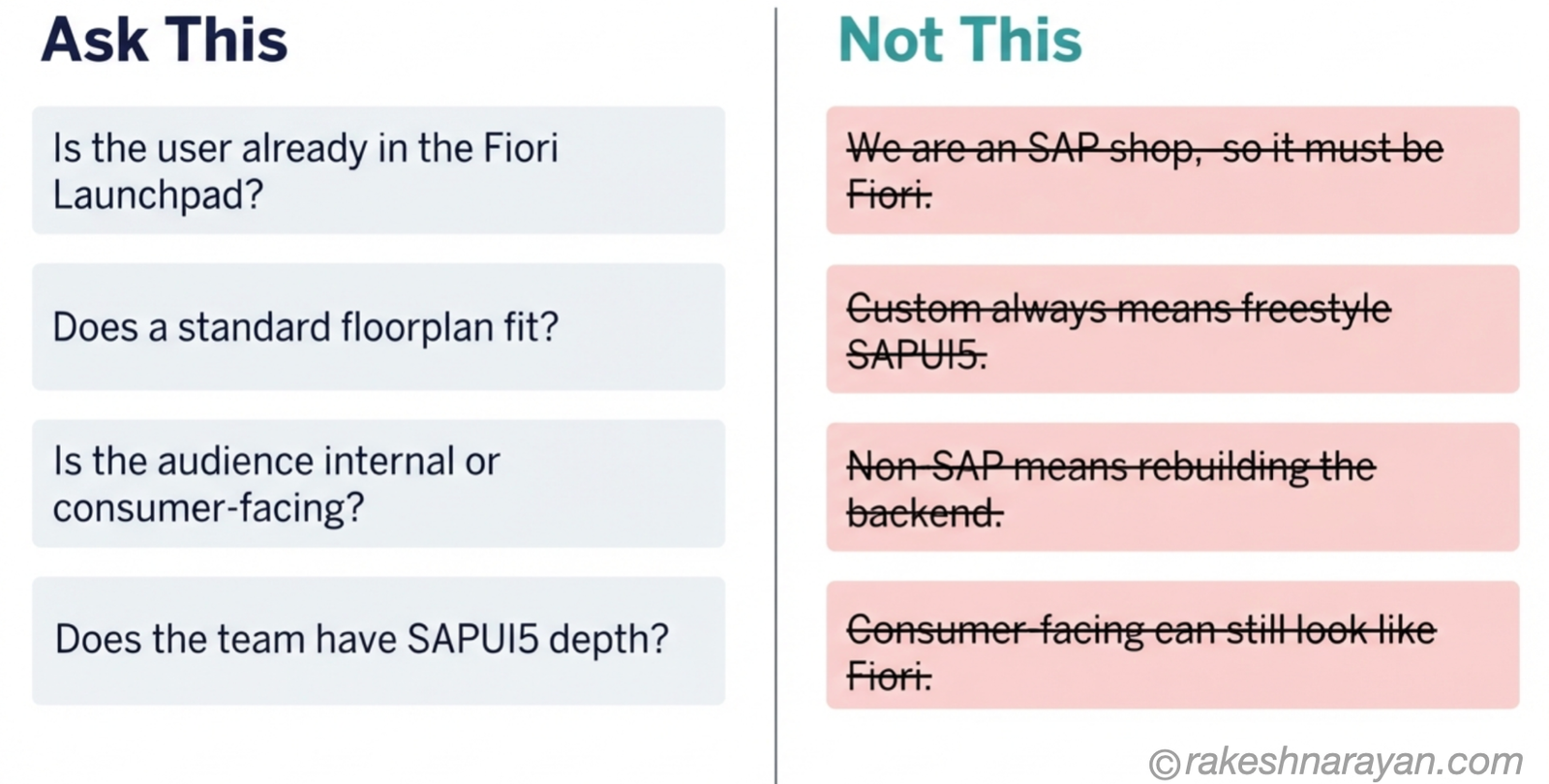
Keep both columns in front of you the next time a requirement lands on your desk.
📌 Key takeaway
If you cannot say “this user already lives in the Fiori Launchpad,” that is your signal to question the default before you build anything.
What this looks like in a real landscape
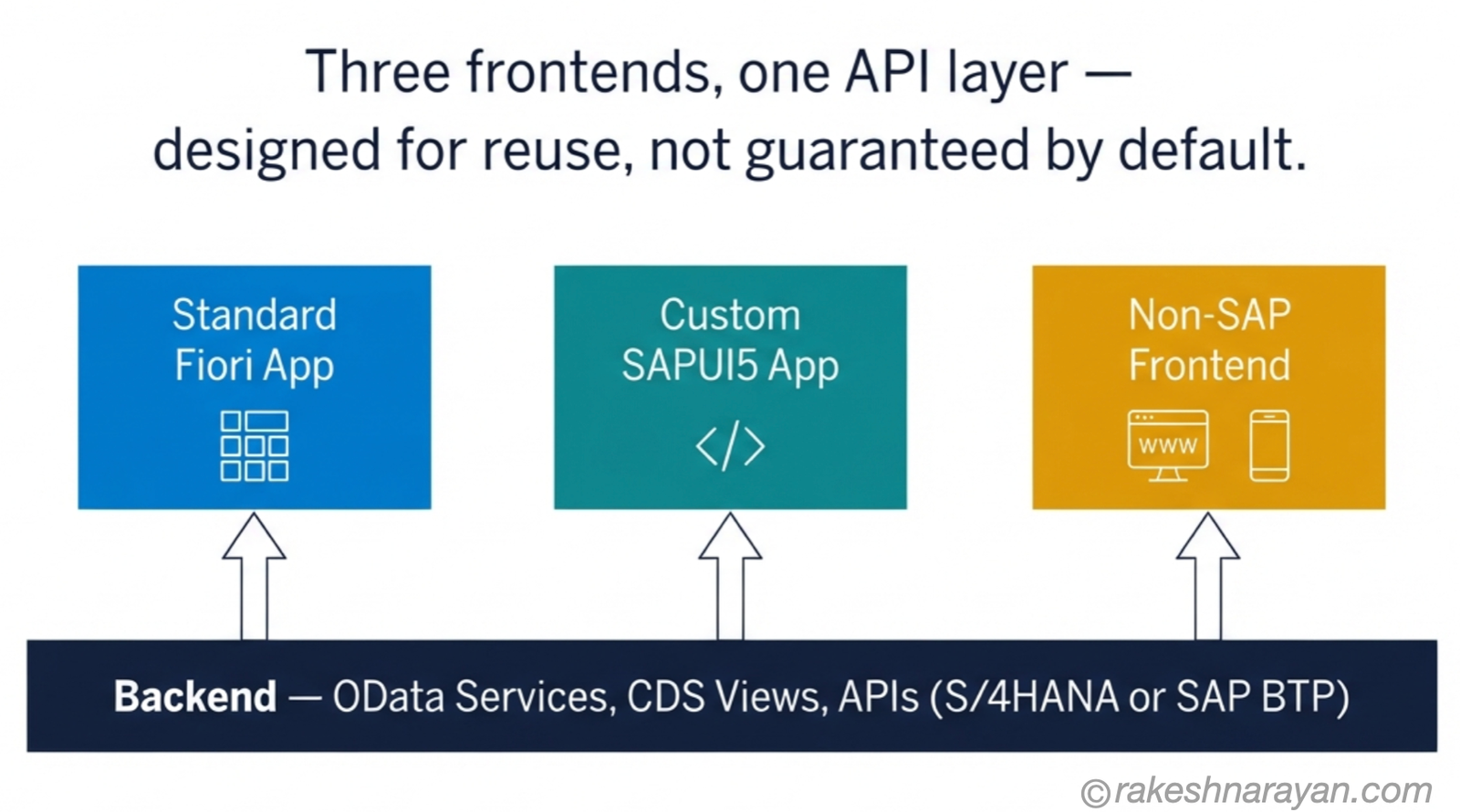
Here is the part that makes this decision less risky than it sounds: whichever frontend you choose, the backend does not have to change shape — as long as the API layer was designed to be shared, not bolted together for one consumer at a time.
A standard Fiori app, a custom SAPUI5 app, and a React application built for a customer portal can all consume the same OData service or API exposed from S/4HANA or SAP BTP. The frontend decision is real and it matters, but it is not a decision that locks you into rebuilding your data layer three times over.
This is also why the decision is safer to get right early than to leave ambiguous. A team that agrees on the API contract up front — including the access management, authorization and payload shaping an external channel will need — can build a standard Fiori app for internal users and a completely separate non-SAP portal for external customers, off the same backend, without either team blocking the other.
At a glance — the frontend decision
| Concept | One-line summary |
|---|---|
| Standard Fiori Elements | Template-driven UI from CDS/OData annotations — the right default for internal, CRUD-heavy, S/4HANA-native work |
| Custom SAPUI5 (Freestyle) | Hand-built but still SAP-hosted — for non-standard layouts that floorplans genuinely cannot template |
| Non-SAP frontend | React, native mobile, or a portal outside Fiori entirely — for consumer-facing or brand-driven requirements |
| Clean Core alignment | Fiori Elements apps built on released CDS views keep custom logic off the core system |
| OData/API layer | Can stay shared across frontends when APIs are deliberately designed and governed for reuse — external channels still need auth, throttling and payload shaping on top |
| The real decision driver | Who the user is and where they already work matters more than which technology is trendiest |
| Fiori Launchpad | The natural home for standard and custom Fiori apps — not the natural home for every requirement |
| The default risk | Defaulting to Fiori for everything creates slower delivery and a worse experience for non-SAP-native users |
What to take away
Fiori is not a religion. It is a design system and a launchpad, built to solve a specific problem — role-based, task-centric SAP work for people who are already inside SAP every day. It solves that problem better than almost any alternative.
The mistake is not choosing Fiori too often. It is choosing it automatically, without asking whether the requirement in front of you is actually the problem Fiori was built to solve.
Most of the time it is. When it is not, saying so early is the architectural decision — not a failure to commit to the platform.
Get the frontend decision right once, at the start, and design the backend to be shared from day one — do that, and it never has to know or care which frontend you picked.
🔗 Related reading
SAP Fiori Design Principles — the five ideas this post assumes you already know before questioning when to apply them.
SAPUI5 vs Fiori vs Fiori Elements — What’s the Difference? — the internal Fiori choice this post deliberately left aside.
SAP Clean Core — Strategy Behind Every S/4HANA Build Decision — why standard Fiori Elements apps fit SAP’s extensibility strategy natively.
SAP BTP — The Platform Explained — where non-SAP frontends and extension logic usually end up living.
This post is Chapter 1 of the SAP Fiori & UX Architecture series — see “Fiori Elements vs Freestyle SAPUI5 — The Clean Core Trade-off” for the build decision inside Fiori once you have decided Fiori is the right frontend, and “SAP Fiori Deployment — Embedded, Hub FES, and Work Zone” and “Fiori Authorization and Role Design for a Multi-System Landscape” for how this decision plays out across a multi-system landscape.
Published on rakeshnarayan.com — Articles
URL: https://rakeshnarayan.com/articles/when-fiori-is-not-the-answer-choosing-the-right-sap-frontend/

Did you enjoy this article?
Let me know — it takes one click.
0 Comments
Leave a Comment
Looks like this one held your attention — I'd really appreciate a quick comment below.
Your comment has been submitted and will appear after review.