SAP Fiori Deployment — Embedded, Hub FES, and Work Zone
Ask three SAP architects whether hub deployment is dead, and you will get three different answers — and at least one of them will be confidently wrong. I have seen landscape plans built on a single blog post’s summary of SAP’s Fiori roadmap, then quietly unravel when someone actually opens the SAP Notes behind it.
The confusion is understandable. SAP’s own Fiori front-end server documentation covers six-plus versions, three deployment models, and maintenance windows that do not move in lockstep with each other. Getting this decision right means reading past the summary, not repeating it.
One thing worth pinning down before anything else: “central” gets used loosely. It can mean a central ABAP Fiori Front-End Server (FES) hub, a shared launchpad URL, SAP Enterprise Portal, or SAP Build Work Zone. This post uses “hub” specifically for the ABAP FES hub deployment model, and “Work Zone” for SAP’s BTP-based aggregation layer — they solve different problems, and mixing them up is where landscape plans go wrong.
🔗 Related reading
This post builds on SAP Fiori Design Principles and SAP Fiori Launchpad Configuration — Spaces, Pages and Catalogs . If you are new to Fiori’s building blocks, start there — this post assumes you already know what a launchpad is and asks a different question: which deployment model should host it.
The three deployment options today
Most people frame this as embedded versus hub, with Work Zone treated as an afterthought. That framing misses the point — Work Zone is not a competing deployment model for the FES, it is a separate layer that sits above whichever deployment model you choose.
| Option | What it is | Where it fits |
|---|---|---|
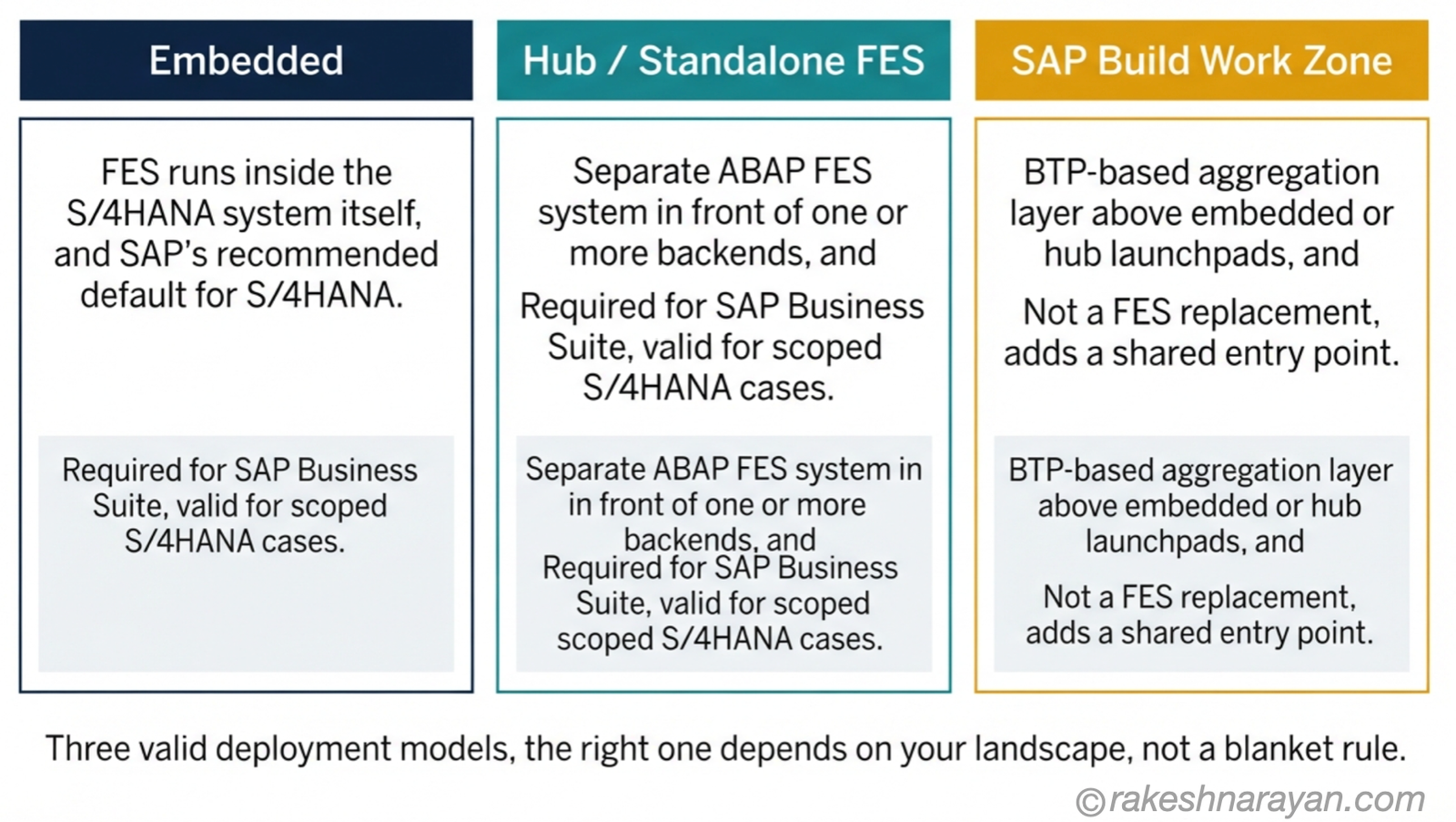
| Embedded | Fiori Front-End Server (FES) runs inside the same system as the backend — no separate hub system | SAP’s recommended default for SAP S/4HANA |
| Hub / standalone FES | A separate ABAP FES system sits in front of one or more backends | The required model for SAP Business Suite; still valid for specific S/4HANA scenarios |
| SAP Build Work Zone | A BTP-hosted aggregation layer that sits above embedded or hub launchpads | Adds a shared entry point across systems — it is not a FES replacement |
💡 Practical tip
Before you touch any deployment decision, check the maintenance date of the exact FES version in play — not the general “hub is legacy” narrative. SAP publishes version-specific end-of-maintenance dates, and they vary by several years across FES releases.
Embedded deployment — SAP’s default, not the only option
For SAP S/4HANA, embedded is SAP’s strategic recommendation. The FES runs inside the same system as the backend, which means one set of patches, one upgrade cycle, and no separate hub system to size, secure, or keep in step.
That default exists for good reasons: less landscape complexity, no cross-system version compatibility matrix to maintain, and a simpler authorization model since front-end and backend roles live in the same place.
None of that makes embedded mandatory. It is SAP’s recommended starting point for new S/4HANA builds — the right question for an existing landscape is whether a good reason exists to deviate from it, not whether deviation is allowed.
Hub / standalone FES — still valid, still maintained, still worth checking
This is where a lot of blog content — including an earlier version of this one — overstates the case. Hub deployment is not being retired. It is SAP’s recommended default for a narrower set of scenarios than it used to cover, and its maintenance timeline depends entirely on which FES version you are running.
SAP Business Suite systems still require hub deployment — there is no embedded option for them. If any part of your landscape is still on Business Suite rather than S/4HANA, hub is not a legacy choice you are being pushed off; it is the only supported model.
For S/4HANA landscapes, SAP’s own front-end server strategy documentation shows a spread of maintenance end-dates by version: FES 6.0 and FES 2022 maintenance was extended to 31 December 2030, aligned with SAP Business Suite and SAP S/4HANA 2022’s own maintenance windows respectively. Other FES versions carry different end-dates tied to the S/4HANA release they support.
| Signal | What it means |
|---|---|
| You are running SAP Business Suite anywhere in the landscape | Hub deployment is required, not optional — there is no embedded model for Business Suite |
| You are on S/4HANA and need one launchpad across several backends | Hub or Work Zone are both worth evaluating — check which one matches your identity and content needs |
| Your FES version’s maintenance end-date is more than 18 months out | No urgency — plan the embedded conversation around your next major upgrade, not a deadline |
| You cannot find your FES version’s specific maintenance date | Stop and check SAP’s current Fiori deployment options documentation before assuming anything |
⚠️ Warning
Do not let “embedded is the default” turn into “hub is being retired, migrate now.” Those are different claims. The first is SAP’s stated direction for new S/4HANA builds. The second is only true for a specific FES version once its own maintenance end-date is confirmed — check that date directly rather than repeating a paraphrase of it.
SAP Build Work Zone — the aggregation layer, not a hub replacement
There are two editions worth knowing apart. Work Zone Standard is a launchpad aggregator — it pulls apps and content from multiple SAP systems into one entry point. Work Zone Advanced adds pages, collaboration, document management and connectivity to non-SAP sources like Microsoft 365, positioning itself closer to a SAP Enterprise Portal replacement than a launchpad.
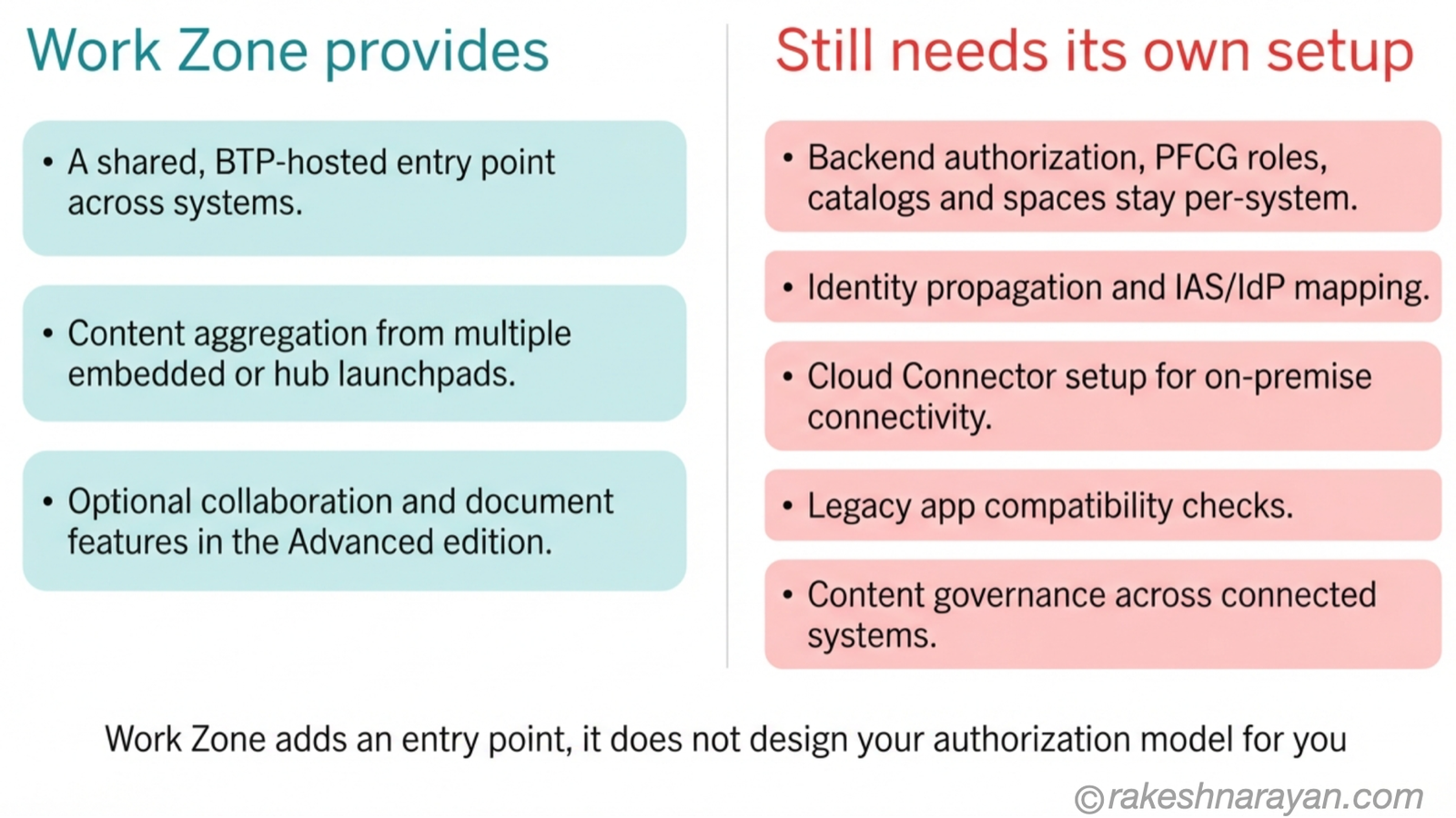
Both editions run as a BTP service, not as an ABAP FES deployment model. That distinction matters operationally: Work Zone brings its own identity setup, connectivity requirements, content federation model, and entitlement rules — it does not inherit these from whatever hub or embedded launchpads it aggregates.
What Work Zone does not replace: it does not resolve backend authorization on its own, does not configure Cloud Connector for you, does not guarantee legacy app compatibility, and does not govern content across the systems it connects. Those remain per-system responsibilities that Work Zone sits on top of, not tasks it absorbs.
📌 Key takeaway
Work Zone answers “where do users click” across a multi-system landscape. It does not answer “what are they allowed to do once they get there” — that is still a per-backend authorization design question, covered in more depth in the authorization post linked below.
The decision framework
Put the sections above into one table and this is the framework worth working through before committing to a landscape plan.
| Landscape characteristic | Approach | Why |
|---|---|---|
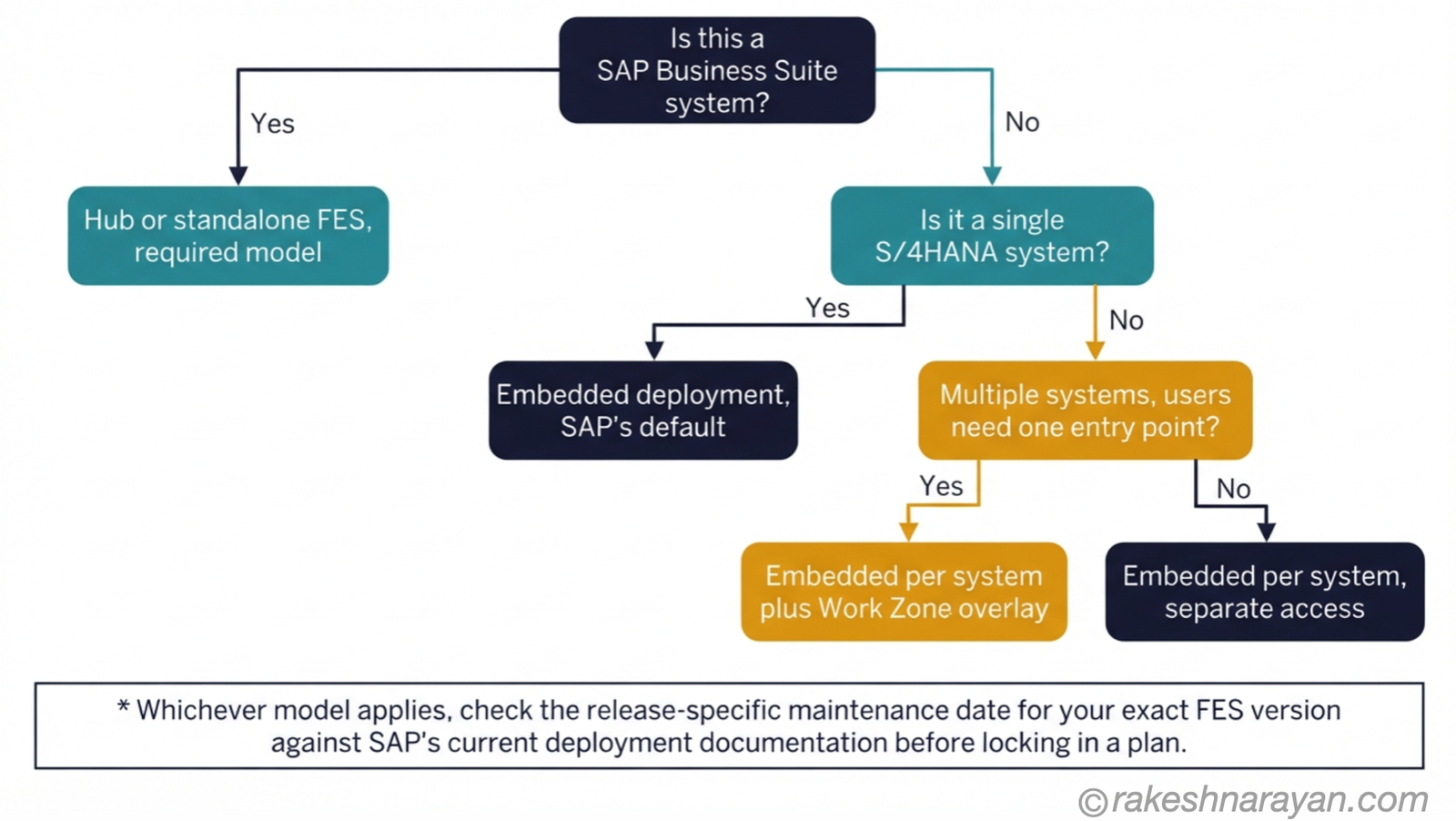
| Any part of the landscape is on SAP Business Suite | Hub / standalone FES for those systems | No embedded option exists for Business Suite — this is not a choice |
| Single S/4HANA system, no cross-system access needed | Embedded | SAP’s default; no reason to add hub or Work Zone complexity |
| Multiple S/4HANA systems, users work in one at a time | Embedded per system | No shared entry point needed — hub or Work Zone would add unused complexity |
| Multiple S/4HANA systems, users need one shared entry point | Embedded per system + SAP Build Work Zone | Work Zone adds the aggregation layer without disturbing each system’s own FES model |
| Still running standalone FES on S/4HANA with no Business Suite dependency | Check that FES version’s specific maintenance end-date | Some versions run to 2030; others align to an earlier S/4HANA release — the date decides urgency, not the deployment model itself |
What this looks like in a real landscape
Take a mid-size SAP estate: one legacy Business Suite system still in its maintenance window, two S/4HANA systems from different implementation waves, and a business requirement for a single entry point across all three.
The Business Suite system runs hub deployment because it has to — that is not a decision point. Each S/4HANA system runs embedded, per SAP’s default, with its own FES version and its own maintenance timeline to track independently.
SAP Build Work Zone sits above all three, giving users one URL and one aggregated view. It does not touch how authorization works inside any of the three backends — that design work happens per system, exactly as it would without Work Zone in the picture.
At a glance — the deployment decision
| Concept | One-line summary |
|---|---|
| Embedded | SAP’s recommended default for S/4HANA — FES and backend run in the same system |
| Hub / standalone FES | Required for SAP Business Suite; still valid for scoped S/4HANA cases — check the version-specific maintenance date |
| SAP Build Work Zone | A BTP aggregation layer above embedded or hub launchpads — not a FES replacement |
| FES maintenance dates | Vary by version — some run to 2030 — verify the exact date rather than relying on a general “being retired” narrative |
| Authorization | Embedded simplifies the front-end/backend split but does not remove the need for coherent identity, PFCG/business-role and — where Work Zone is used — BTP role design |
| The real decision driver | Which systems are Business Suite versus S/4HANA, and whether users need a shared entry point — not a blanket embedded-versus-hub rule |
What to take away
The embedded-versus-hub question is not a single decision made once for a landscape. It is a per-system question — Business Suite systems answer it for you, S/4HANA systems default to embedded unless there is a specific reason not to, and Work Zone answers a different question entirely.
The mistake is not picking embedded too often — SAP’s own guidance points there for good reasons. The mistake is treating “hub is legacy” as a fact rather than a version-specific maintenance date you have not looked up yet.
Get the per-system model right, add Work Zone only where a shared entry point is an actual requirement, and the landscape plan stops depending on which blog post you read last.
Frequently asked questions
Is embedded deployment mandatory for SAP S/4HANA?
No. It is SAP’s recommended default and the right choice for most new builds, but standalone or hub deployment remains a supported, documented option for specific S/4HANA scenarios — particularly mixed landscapes that also include SAP Business Suite.
Does SAP Build Work Zone replace the Fiori Front-End Server?
No. Work Zone is a BTP-hosted aggregation layer that sits above an embedded or hub FES deployment — it does not run instead of one. Every backend it connects to still needs its own FES setup underneath.
Can a central Fiori hub still be used with SAP Business Suite?
Yes — it is the required model. SAP Business Suite has no embedded deployment option, so hub or standalone FES remains the only supported path for those systems regardless of what S/4HANA guidance says.
When should I use Work Zone Standard versus Advanced?
Standard covers launchpad aggregation across SAP systems — the direct answer to “one entry point, multiple backends.” Advanced adds pages, collaboration and non-SAP content sources like Microsoft 365, and fits better where the requirement looks closer to a portal replacement than a launchpad.
🔗 Related reading
SAP Fiori Design Principles — the five ideas behind every Fiori app, regardless of deployment model.
SAP Fiori Launchpad Configuration — Spaces, Pages and Catalogs — the configuration layer this post’s deployment decisions sit underneath.
SAP BTP — The Platform Explained — where SAP Build Work Zone and most modern SAP extensions actually run.
This post is Chapter 3 of the SAP Fiori & UX Architecture series — see “When Fiori Isn’t the Answer — Choosing the Right SAP Frontend” for the frontend decision this post assumes is already made, and “Fiori Authorization and Role Design for a Multi-System Landscape” for how role design plays out across the landscape shapes described here.
Published on rakeshnarayan.com — Articles
URL: https://rakeshnarayan.com/articles/sap-fiori-deployment-embedded-hub-fes-and-work-zone/
Did you enjoy this article?
Let me know — it takes one click.
0 Comments
Leave a Comment
Looks like this one held your attention — I'd really appreciate a quick comment below.
Your comment has been submitted and will appear after review.