AI Agents — What They Are and How They Work
In 2026, almost every AI product pitch includes the word agent. Chatbots became copilots. Copilots became agents. The terminology moved faster than the understanding.
This post cuts through that. An AI agent is a specific thing — with a specific architecture and specific capabilities. Understanding what it actually is helps you evaluate AI tools honestly, design better systems, and have more grounded conversations about where AI automation makes sense.
🔗 Foundation for this post
This post builds on What is a Large Language Model? (what LLMs can do), AI Hallucinations — Why They Happen (where they fail), and RAG — Retrieval Augmented Generation (how agents access knowledge). Those three posts are the context this one builds on.
Chatbot vs copilot vs agent — the actual differences
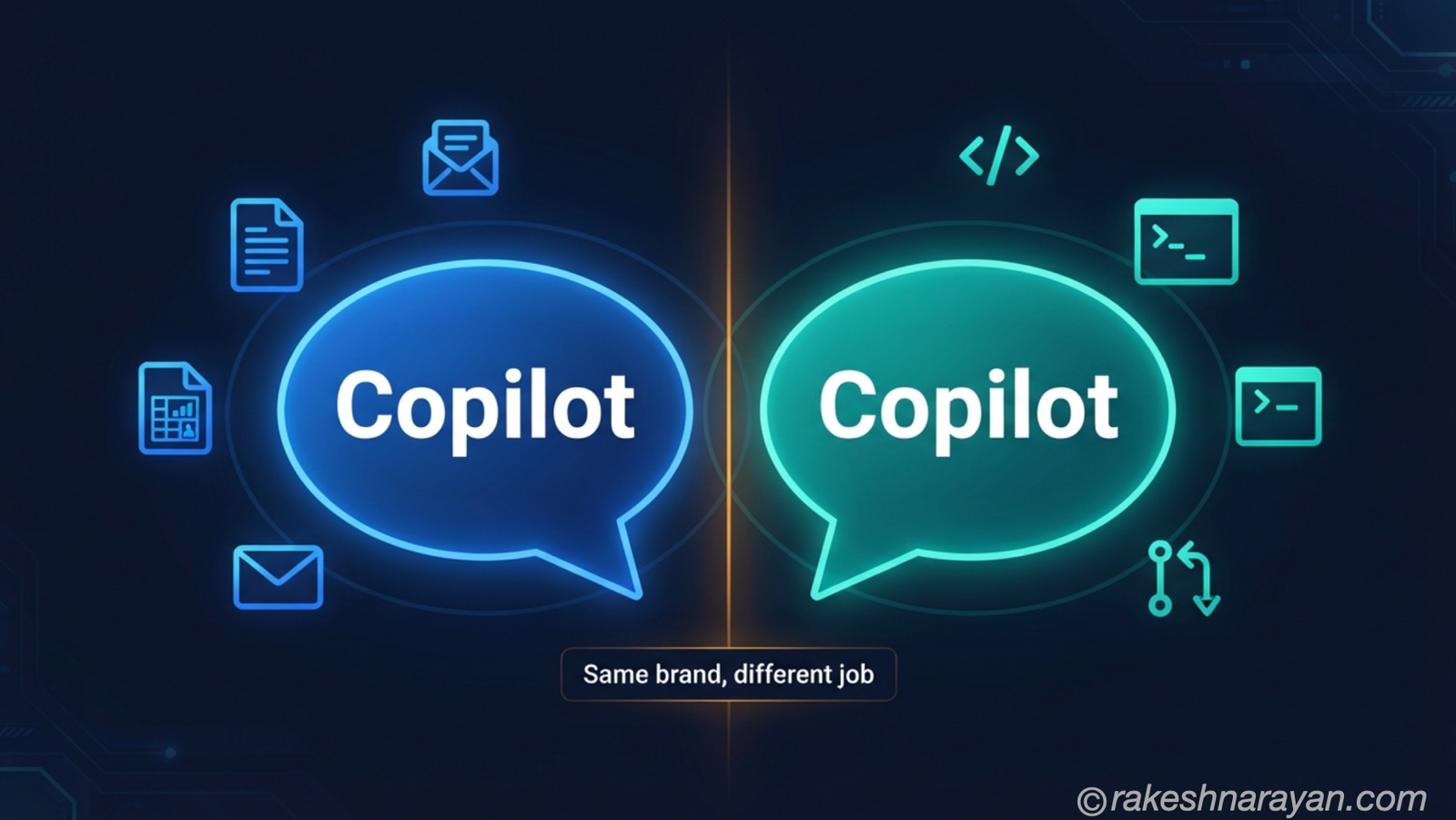
These three terms describe genuinely different things. The distinction is not about marketing; it is about what the system can do autonomously.
| Chatbot | Copilot | Agent | |
|---|---|---|---|
| What it does | Responds to a single message | Assists a human doing a task | Plans and executes a multi-step task autonomously |
| Autonomy | None — responds only | Low — suggests, human decides | High — acts independently across steps |
| Tool use | No — text only | Limited — may invoke one tool | Yes — calls multiple tools across a workflow |
| Memory | None — each message is fresh | Usually session-only | Can have persistent memory across sessions |
| Example | Customer service FAQ bot | GitHub Copilot suggesting code | An agent that reads your calendar, drafts emails and books meetings without prompting |
| SAP example | Simple FAQ bot on an SAP Help page | SAP Joule suggesting a field value | A Joule agent that analyses an exception, creates a task, assigns it and follows up |
What makes something an agent
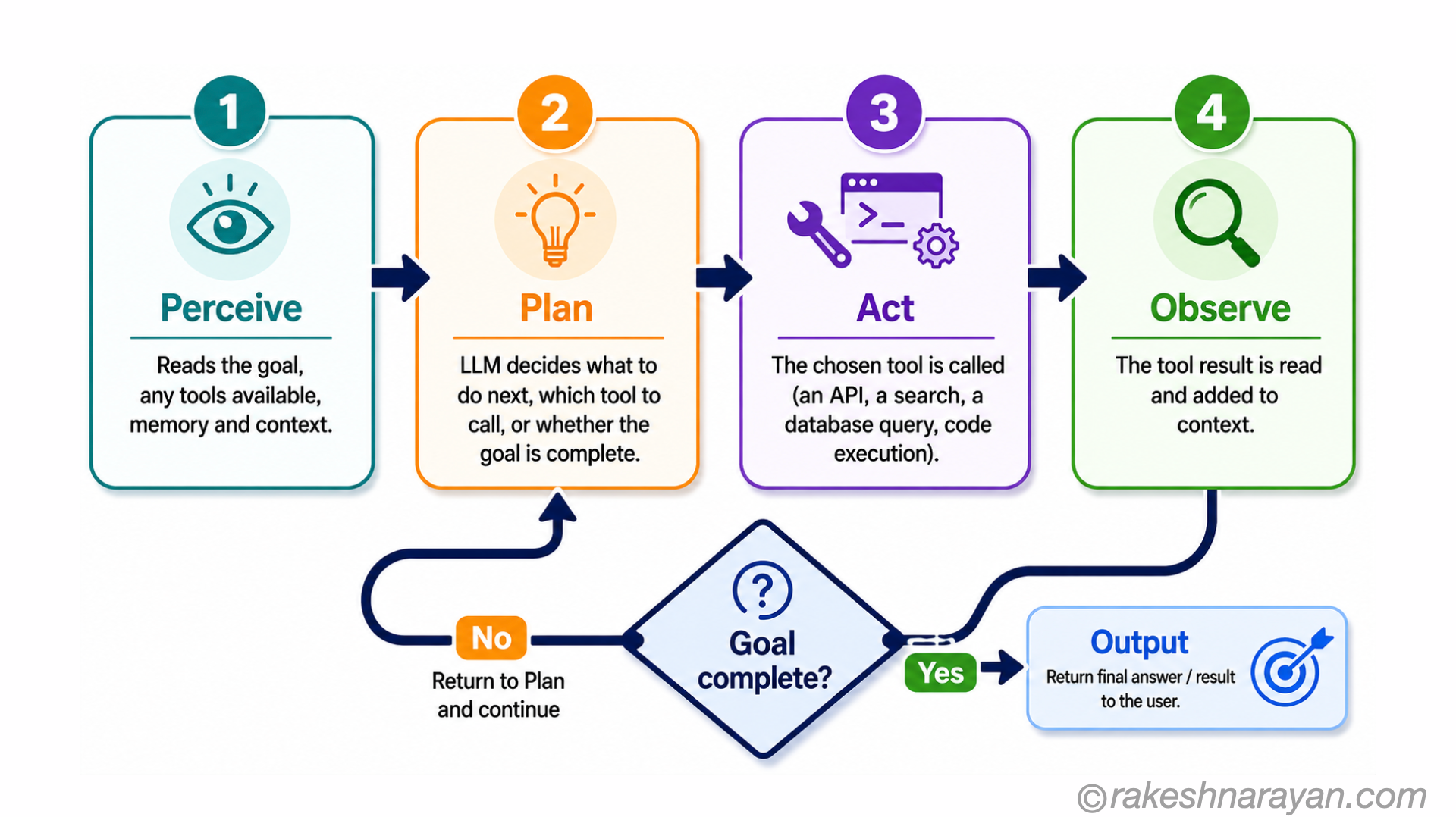
The defining characteristic of an agent is the planning loop — the ability to take a goal, break it into steps, take actions, observe the results, and adjust the plan based on what happened.
A chatbot takes an input and produces an output. An agent takes a goal and pursues it across multiple steps, making decisions along the way.
The four components of an agent
| Component | What it does | Why it matters |
|---|---|---|
| LLM (the brain) | The language model that plans, reasons and generates text | The intelligence layer — decides what to do and how to respond |
| Tools | External capabilities the agent can use — APIs, search, code execution, databases | Without tools, the agent can only produce text. Tools let it act in the world. |
| Memory | Storage of past interactions, retrieved context, intermediate results | Allows the agent to maintain state across steps and across sessions |
| Planning loop | The cycle of perceive → plan → act → observe → repeat | What turns a single LLM call into a multi-step autonomous workflow |
Tools — what agents actually use to act
A tool is any external capability the agent can invoke. The LLM decides which tool to call, what inputs to pass, and how to interpret the result. The tool itself is just a function — it does not need to be AI.
| Tool type | What it does | Example |
|---|---|---|
| Web search | Retrieves current information from the internet | Look up today’s stock price, find recent news |
| Code execution | Runs Python, JavaScript or other code | Calculate a formula, process a spreadsheet, generate a chart |
| Database query | Reads from or writes to a database | Fetch customer data, create a record, update a status |
| API call | Calls any REST API | Create a Jira ticket, send a Slack message, book a calendar slot |
| File operations | Read, write or process files | Summarise a PDF, extract data from a CSV, update a document |
| RAG / search | Retrieves from a knowledge base | Find the relevant policy, look up a product specification |
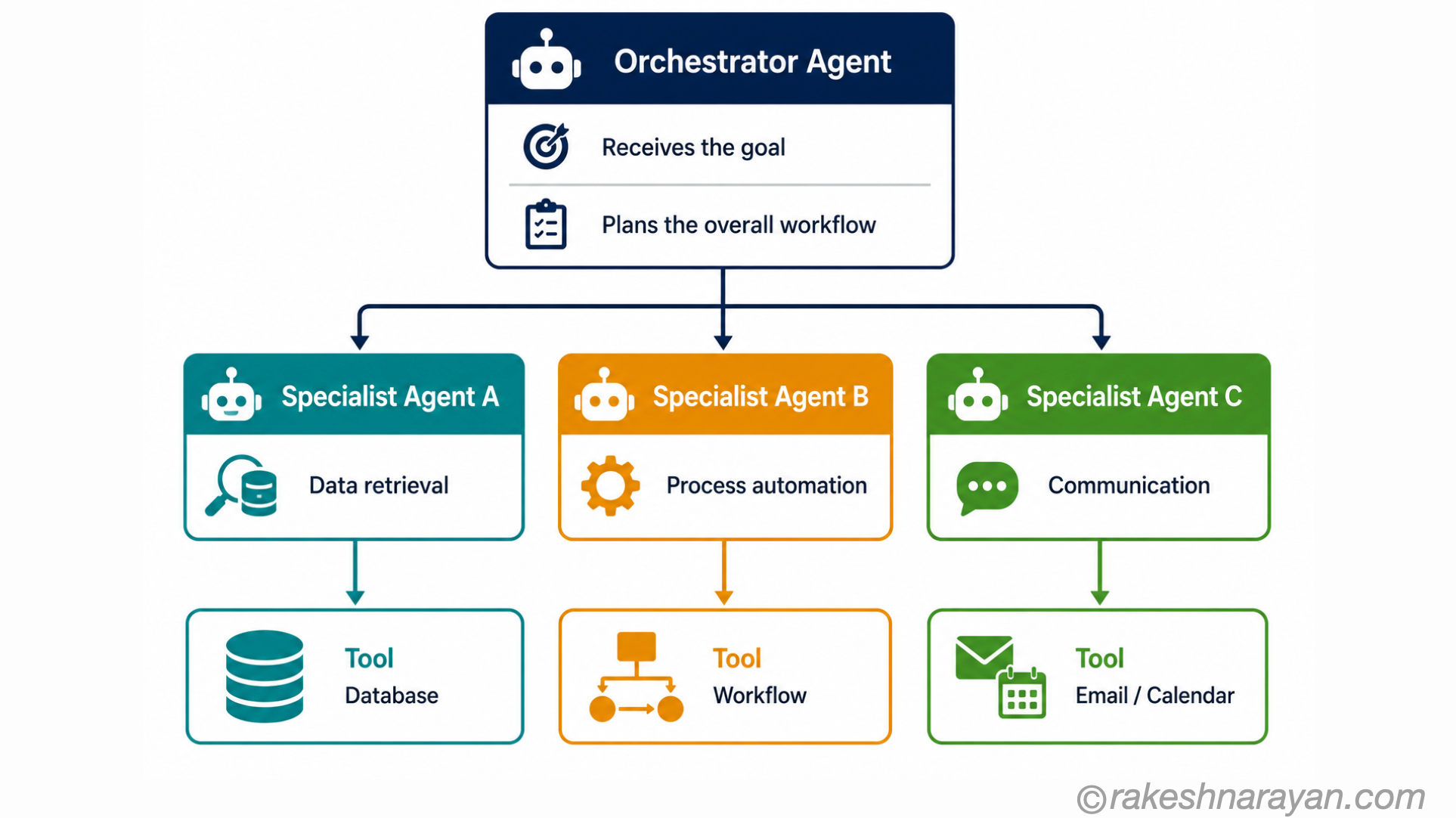
| Another agent | Delegates to a specialised sub-agent | An orchestrator agent calling a specialist coding agent |
How does the LLM actually decide to call a tool? Through a mechanism called function calling (also called tool use). When an agent is set up, each available tool is described to the LLM as a function — its name, what it does, and what parameters it takes. When the LLM determines that a tool is needed, instead of generating a text response it generates a structured tool call — a JSON object naming the function and the parameters to pass. The agent framework intercepts this, executes the actual tool (the real API call or database query), and feeds the result back to the LLM as context. The LLM then decides whether the goal is complete or whether another tool call is needed. This loop is how a single LLM becomes an agent that acts in the world. Every major LLM provider — including those powering SAP Joule — supports function calling natively.
💡 MCP is how tools connect
Model Context Protocol (MCP) is the open standard that defines how agents discover and call tools. Instead of each tool requiring custom integration code, MCP provides a standardised interface. The next post in this series covers MCP in full — it is the infrastructure layer that makes the tool ecosystem in the table above practical at scale.
Where agents work well
| Scenario | Why agents suit it |
|---|---|
| Multi-step research tasks | Agents can search, read, synthesise and summarise across multiple sources in one workflow |
| Process automation with decisions | Where a workflow has conditional steps — if X then do Y else do Z — an agent handles this naturally |
| Exception handling | Review an exception, look up related data, propose a resolution and create a task — all in one agent run |
| Data aggregation | Pull data from multiple systems, combine and format — agents can call multiple APIs in one session |
| Document-heavy workflows | Read a contract, extract key terms, cross-check against a database and flag discrepancies |
Where agents fail — and why
This is the part most agent articles skip. Agents are powerful but they have well-documented failure modes. Knowing them is essential before deploying agents in production.
| Failure mode | What happens | Mitigation |
|---|---|---|
| Hallucination in tool use | The agent calls a non-existent API endpoint or fabricates a tool parameter | Constrain tool schemas strictly — validate inputs before execution |
| Infinite loops | The agent gets stuck in a planning loop, repeatedly trying variations that all fail | Set maximum iteration limits — exit if goal not achieved within N steps |
| Prompt injection | Malicious content in a tool result hijacks the agent’s next action | Treat all tool results as untrusted input — sanitise before feeding back to the LLM |
| Compounding errors | An early wrong decision causes every subsequent step to be wrong | Human checkpoints at critical decision points — especially for irreversible actions |
| Scope creep | The agent takes actions beyond what was intended | Define clear tool scope — only expose the tools needed for the specific task |
| Slow and expensive | Multi-step planning with multiple LLM calls is slower and more costly than a single call | Agents suit complex multi-step tasks — not simple Q&A where a direct LLM call is enough |
⚠️ Never give agents irreversible actions without a human checkpoint
An agent that can send emails, delete records, or make financial transactions without human approval can cause serious damage if it goes wrong. The rule: reversible actions can be automated. Irreversible ones need a human in the loop — at least until you have built and verified confidence in the agent’s reliability for that specific task.
Agents in the SAP context — 2026
| SAP scenario | Agent approach |
|---|---|
| SAP Joule with agentic capabilities | Joule in S/4HANA and SuccessFactors can now initiate multi-step actions — not just answer questions but create records, trigger workflows and follow up |
| SAP Build Process Automation | The low-code automation platform supports AI-assisted decision steps within workflows — human approval before irreversible actions |
| SAP AI Core agents on BTP | Custom agents built on BTP using SAP AI Core — define tools, memory and the planning loop using SAP’s orchestration framework |
| Integration exception handling | An agent monitors CPI integration exceptions, looks up related master data, classifies the error and creates an incident with context — reducing manual triage |
| Purchase order exception agent | Reads blocked purchase orders, checks reason codes, looks up supplier history and proposes resolution — a human approves before unblocking |
The mental model — in one view
| Concept | One-line summary |
|---|---|
| AI Agent | A system that uses an LLM to plan and execute multi-step tasks autonomously using tools |
| Planning loop | The cycle of perceive, plan, act, observe — repeated until the goal is complete or the attempt limit is reached |
| Tools | External capabilities the agent can call — APIs, search, code, databases |
| Memory | Context that persists across steps — working memory in the session, long-term memory across sessions |
| Copilot | Assists a human — suggests actions, human decides. Joule is largely a copilot. |
| Agent | Acts independently — plans and executes without human prompting each step |
| MCP | The open standard for connecting agents to tools — covered in the next post |
| Key risk | Irreversible actions without human checkpoints. Always build approval gates. |
What to take away
An AI agent is not a chatbot with a bigger brain. It is a fundamentally different architecture — one that plans, acts, observes and adjusts. That architecture makes agents genuinely powerful for complex multi-step tasks and genuinely risky without proper guardrails.
In the SAP and enterprise world, agents are moving from pilots to production in 2026. Understanding what they actually are — and where they fail — is what separates the people who deploy them well from the people who deploy them and then deal with the consequences.
🔗 Related posts on this site
What is a Large Language Model? — the brain inside every agent.
RAG — Retrieval Augmented Generation — how agents access knowledge from documents and databases.
AI Hallucinations — Why They Happen — hallucination compounds in multi-step agent workflows — essential reading.
MCP — Model Context Protocol — the open standard that defines how agents discover and connect to tools.
Multi-Agent Systems — How Orchestration and Coordination Work — the natural next step: when one agent is not enough and you need to coordinate many.
Published on rakeshnarayan.com — Articles

Did you enjoy this article?
Let me know — it takes one click.
0 Comments
Leave a Comment
Looks like this one held your attention — I'd really appreciate a quick comment below.
Your comment has been submitted and will appear after review.