CF CLI Commands for SAP BTP — Cheat Sheet with Examples
Your deploy has just failed in the VS Code terminal. The BTP cockpit shows the app as crashed and nothing else. So you open a browser and start searching for the CF CLI commands that will tell you why.
Most SAP developers know three commands by heart: cf login, cf push and cf deploy. Everything else gets looked up mid-crisis. That is backwards — the commands that save you hours are the ones that explain what is going on, not the ones that deploy.
This is the cheat sheet I would have wanted on my first BTP project. Every command a developer or consultant needs in real project work, grouped by what you are trying to do, with an example for each — and a clear warning on every command that deletes something you cannot get back.
🔗 Related Reading
This post builds on two earlier articles — start there if Cloud Foundry on BTP is new to you. SAP BTP Runtimes — Cloud Foundry, ABAP and Kyma Compared Getting Started with SAP BTP — A Hands-On Guide
Before You Start — CF CLI vs btp CLI and Where You Type
Get one thing straight first: CF commands do not belong to VS Code. They come from one tool, cf, and they behave the same in the VS Code terminal, SAP Business Application Studio (BAS), PowerShell or a Mac terminal.
The difference is setup. BAS ships with the CF CLI and the MultiApps plugin already installed. On your own machine with VS Code, you install both yourself. Check what you have:
cf version     # CLI version — you want 8.x
cf plugins     # installed plugins — look for 'multiapps'
Everything in this post targets CF CLI v8, the current major version as of 2026. Version 7 is no longer supported, so if cf version shows 7 or lower, upgrade before you do anything else.
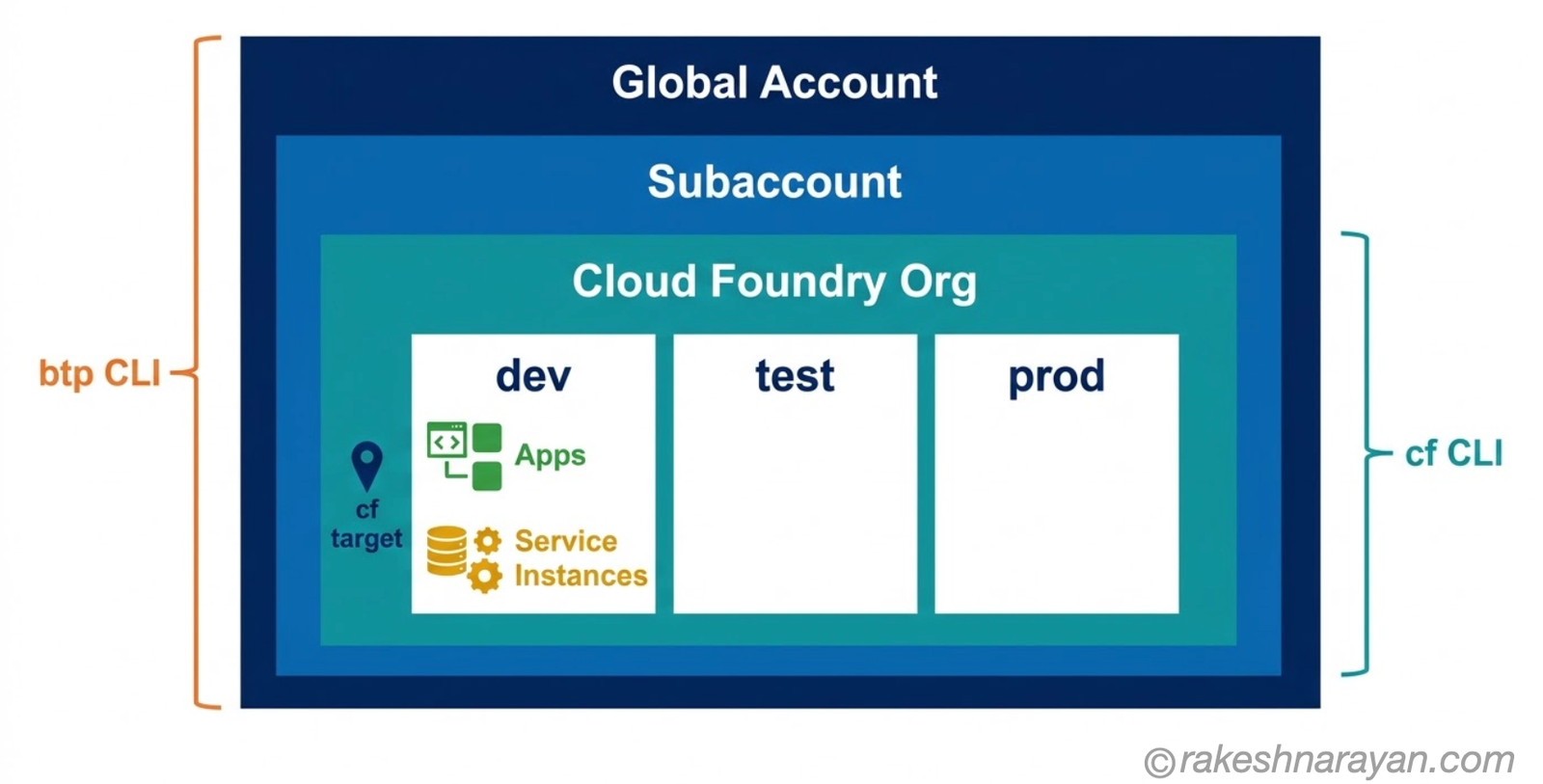
Which CLI manages what
The most common beginner mix-up on BTP is cf versus btp. They are separate tools that manage different layers of the same account.
| CLI | What it manages | Example |
|---|---|---|
| btp CLI | Global account, directories, subaccounts, entitlements | btp login |
| cf CLI | Orgs, spaces, apps, services and routes inside the Cloud Foundry environment | cf push, cf deploy, cf logs |
| kubectl | The Kyma runtime (Kubernetes) | kubectl get pods |
Inside Cloud Foundry, everything sits in a simple hierarchy. Your org belongs to your subaccount, and spaces inside it separate environments like dev, test and prod. Your apps and service instances live in a space.
📌 Key Takeaway
Every
cfcommand runs against your current target — one org, one space. Know your target and you know exactly what you are about to change.
Logging In and Targeting the Right Space
Logging in needs one value most people have to look up: the API endpoint for your region. It follows a fixed pattern, and the overview page of your subaccount in the BTP cockpit shows the exact URL.
# Pattern: https://api.cf.<region>.hana.ondemand.com
cf login -a https://api.cf.eu10.hana.ondemand.com

# Corporate identity provider? Use a one-time passcode instead
cf login -a https://api.cf.eu10.hana.ondemand.com --sso
With --sso, the CLI gives you a link. You open it in the browser, copy the one-time passcode, and paste it back into the terminal.
| Command | What it does | Example |
|---|---|---|
cf login | Interactive login, then prompts for org and space | cf login -a <api-url> |
cf login --sso | Login with a one-time passcode from the browser | cf login --sso |
cf login --origin | Login through a specific identity provider | cf login --origin <idp-origin-key> |
cf auth | Non-interactive login for scripts and CI/CD pipelines | cf auth ci-user@company.com (password from CF_PASSWORD) |
cf target | Show the current org and space, or switch | cf target -o my-org -s dev |
cf orgs / cf spaces | List the orgs and spaces you can access | cf spaces |
cf logout | End the session | cf logout |
⚠️ Warning
Never put your password on the command line with
-p. The CLI itself warns that it may be visible to others and recorded in your shell history. In pipelines, store it as a secret in theCF_PASSWORDenvironment variable.
The second habit matters even more than the first.
💡 Practical Tip
Before any deploy, run
cf targetwith no arguments. It prints the org and space you are about to change. Deploying a test build into production because you forgot to switch spaces is the oldest mistake on this platform — and the cheapest one to prevent.
Deploying Apps — cf push vs cf deploy (MTA)
This is where most of the confusion lives. Cloud Foundry gives you two ways to deploy, and they are not interchangeable.
| cf push | cf deploy | |
|---|---|---|
| Deploys | One app | A multi-target application (MTA) — apps and services together |
| Descriptor | manifest.yml | mta.yaml, built into an .mtar archive |
| Built into the CLI? | Yes | No — needs the MultiApps plugin |
| Creates services? | No — you create and bind them yourself | Yes — from the descriptor’s resources |
| Typical BTP use | Quick single-app tests | CAP apps, Fiori apps, anything heading to production |
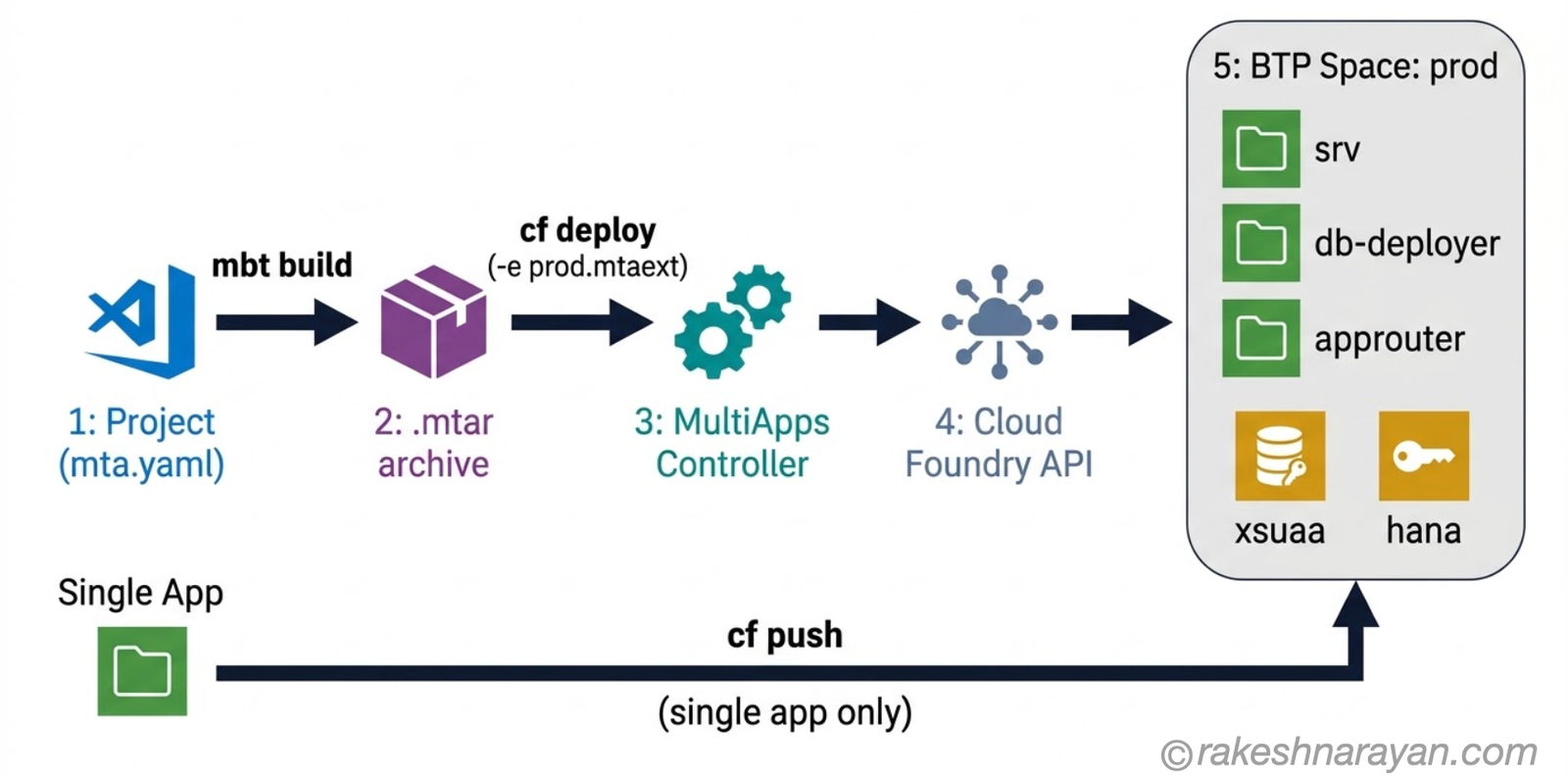
My position: on SAP BTP, use cf deploy for anything that will reach production. A CAP project is never just one app — it is a service, a database deployer, an app router and several service instances. An MTA keeps them together as one versioned unit.
cf push — single apps
cf push my-app                            # uses manifest.yml in the current folder
cf push my-app -f ./manifest-dev.yml      # use a specific manifest
cf push my-app -m 512M -i 2               # override memory and instance count
cf push my-app --no-start                 # upload without starting
cf push my-app --strategy rolling         # update without downtime
cf push my-app --vars-file vars-dev.yml   # fill ((variables)) in the manifest
🔗 Related Reading
Both
manifest.ymlandmta.yamlare YAML, and indentation errors in them are the most common deploy failure I see.
YAML — How It Works and When to Use It Over JSON covers the rules in ten minutes.
cf deploy — multi-target applications
First, install the MultiApps plugin. Skip this step in BAS, where it is already installed.
cf install-plugin multiapps
cf plugins          # confirm 'multiapps' is listed
Then build and deploy. mbt build is the Cloud MTA Build Tool, not a CF command — but you run it right before every deploy, so it belongs here.
mbt build                                           # creates mta_archives/<id>_<version>.mtar
cf deploy mta_archives/my-app_1.0.0.mtar
cf deploy my-app_1.0.0.mtar -e prod.mtaext          # apply an extension descriptor
cf deploy my-app_1.0.0.mtar --strategy blue-green   # zero-downtime MTA deploy
Extension descriptors (.mtaext) let you deploy the same .mtar to dev, test and prod with different settings. Build once, deploy many — that habit is what makes transports through CI/CD predictable.
Watching and controlling MTA operations
| Command | What it does |
|---|---|
cf mtas | List the MTAs deployed in the current space |
cf mta <mta-id> | Show the apps, services and status of one MTA |
cf mta-ops | List active MTA operations |
cf dmol -i <operation-id> | Download the logs of an operation (short for download-mta-op-logs) |
cf deploy -i <operation-id> -a abort | Abort a running or stuck operation |
cf deploy -i <operation-id> -a retry | Retry a failed operation |
cf deploy -i <operation-id> -a resume | Continue a blue-green deploy after the testing phase |
A blue-green deploy pauses in a testing phase and prints the exact resume and abort commands, operation ID included. Copy them somewhere safe — or add --skip-testing-phase if you do not need the pause.
⚠️ Warning
cf deploy -fdoes more than skip a prompt. It forces the deployment without asking about aborting any conflicting process — and that process can be a colleague’s deployment running in the same space. Use it in pipelines you control, never casually.
Inspecting What’s Running
These commands are read-only. Run them as often as you like — they change nothing.
| Command | What it shows |
|---|---|
cf apps | Every app in the space with its state, instances, memory and routes |
cf app <app> | One app in detail — each instance’s state, CPU, memory and disk |
cf env <app> | All environment variables, including service credentials in VCAP_SERVICES |
cf events <app> | Recent events — starts, stops, crashes, scaling |
cf routes | Every route in the space and the app it points to |
cf services | Service instances in the space and what they are bound to |
cf domains | Domains available to your org |
💡 Practical Tip
cf envprints live credentials — client secrets, database passwords, everything. Never paste its full output into a ticket, chat or email. Copy only the part you need.
Org, space and quota checks
When a deploy fails on memory, the question is always the same: have we hit the quota? These commands answer it in seconds.
cf org my-org                 # spaces, domains and quota of the org
cf org-quotas                 # list org quota plans
cf org-quota <quota-name>     # limits in one org quota (alias: cf quota)
cf space dev                  # apps, services and quota of the space
cf space-quota <quota-name>   # limits in a space quota
cf org-users my-org           # who holds which org role
cf space-users my-org dev     # who holds which space role
📝 Note
cf quotastill works in v8 — it is an alias forcf org-quota. If you learned the CLI on an older version, both names do the same thing.
Troubleshooting — Logs, SSH and Crashed Apps
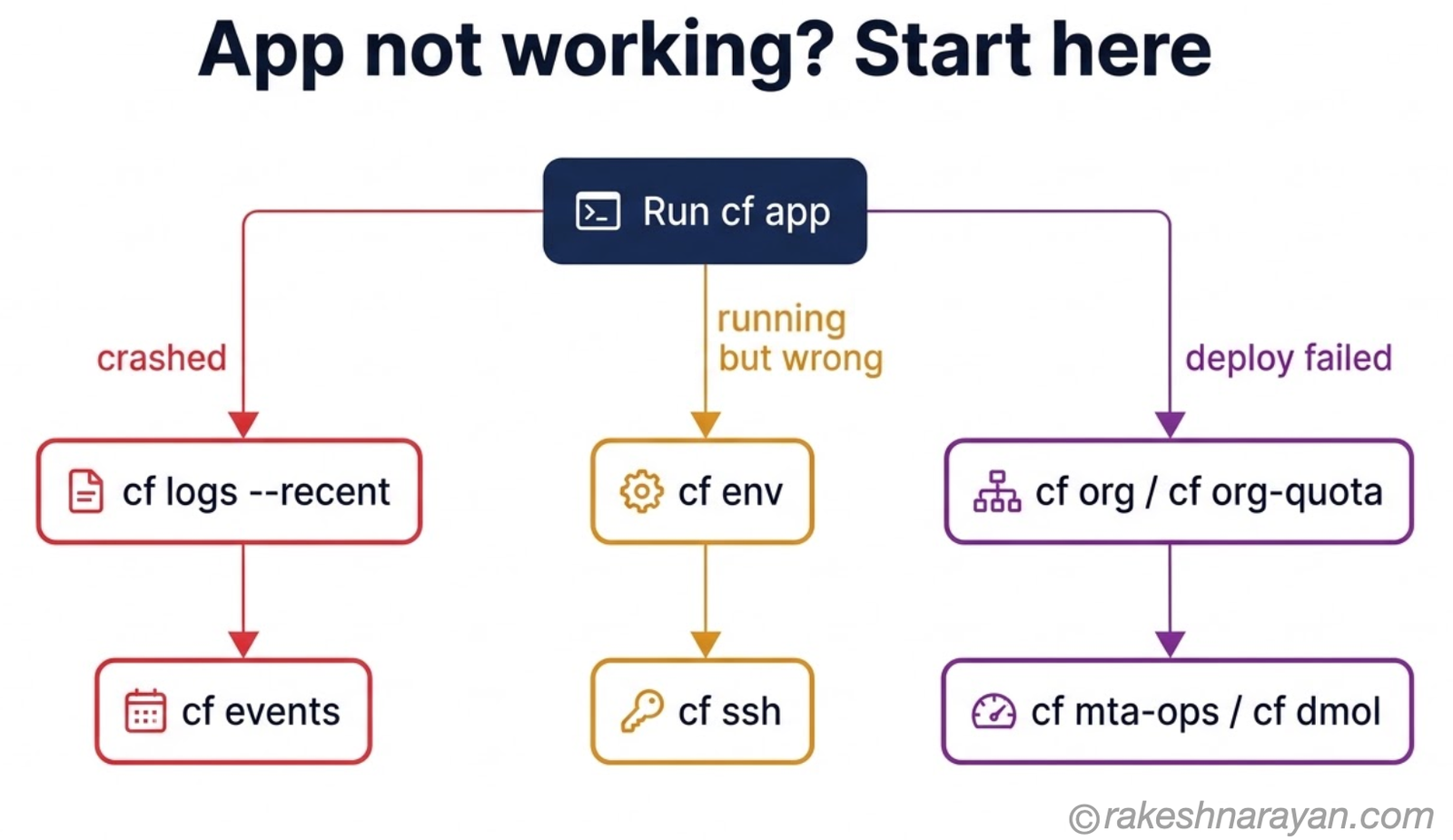
When an app breaks, run these in order. In my experience, most problems are solved by the second command.
| Step | Command | What it tells you |
|---|---|---|
| 1 | cf app <app> | Is it running, crashed or starting? How many instances are healthy? |
| 2 | cf logs <app> --recent | The last log lines before it failed — usually the actual error |
| 3 | cf events <app> | Why it stopped — crash, out of memory, failed health check |
| 4 | cf env <app> | Whether the bindings and variables you expect are really there |
| 5 | cf ssh <app> | What is happening inside the running container |
cf logs --recent dumps what has already happened. Without --recent, cf logs streams live — open it in a second VS Code terminal, then reproduce the problem in the first.
cf logs my-app --recent
cf logs my-app            # live stream — Ctrl+C to stop
Getting inside the container with cf ssh
SSH has to be allowed for both the space and the app, and the app needs a restart after you enable it. Once inside, you are in a plain Linux shell — the Linux Command Line post covers what to do there.
cf space-ssh-allowed dev        # is SSH allowed in the space?
cf ssh-enabled my-app           # is SSH enabled for the app?
cf enable-ssh my-app
cf restart my-app               # required before SSH works
cf ssh my-app                   # connect to instance 0
cf ssh my-app -i 1              # connect to a specific instance
cf ssh my-app -c "ls -la"       # run one command and exit
If only one instance is misbehaving, do not restart the whole app. Restart just that one with cf restart-app-instance my-app 1.
Common symptoms and where to look
| Symptom | Likely cause | Start with |
|---|---|---|
| Deploy or scale fails on memory | Org or space quota reached | cf org, cf org-quota |
| App crashes right after starting | Startup error or missing binding | cf logs --recent, cf env |
| App keeps restarting | Out of memory or failing health check | cf events, cf app |
| 401 or 403 from a bound service | Wrong or missing credentials | cf env, cf service-key |
| MTA deploy blocked by another operation | An earlier operation is still active | cf mta-ops, then -a abort |
| ”Not authorized” on a command | Missing space role | cf space-users |
Services, Bindings and Service Keys
On BTP, nearly every app depends on services — XSUAA for security, Destination for connectivity, HANA Cloud for data. Here is the full lifecycle in one block.
cf marketplace                       # everything you can create
cf marketplace -e xsuaa              # plans for one offering
cf create-service xsuaa application my-xsuaa -c xs-security.json
cf services                          # what exists in the space
cf service my-xsuaa                  # details and last operation status
cf bind-service my-app my-xsuaa
cf restage my-app                    # app picks up the new credentials
Service keys are credentials for something outside Cloud Foundry — Postman, a local test run, an external system.
cf create-service-key my-xsuaa my-key
cf service-keys my-xsuaa             # list keys
cf service-key my-xsuaa my-key       # print the credentials
For a system that is not in the marketplace — an on-premise API, a third-party SaaS — a user-provided service wraps its credentials so apps can bind to it like any other service.
cf cups my-external-api -p credentials.json   # short for create-user-provided-service
cf update-service my-db -p <new-plan>         # change a service plan
cf rename-service old-name new-name
Passing JSON inline works on Mac and Linux, but Windows quoting is different and easy to get wrong. Put the JSON in a file and pass the file path instead — it works the same in every terminal.
✅ Best Practice
After you bind a service, unbind one or change an environment variable, restage the app. It only reads its environment when it starts, and the CLI even prints a tip telling you to restage.
Restart, Restage, Scale and Environment Variables
Restart, restage and push sound alike. They are not, and picking the wrong one is why “I changed it but nothing happened” is such a common complaint.
| Command | What it does | Use it when | Downtime? |
|---|---|---|---|
cf restart | Stops all instances, then starts them with the existing build | The app is stuck and you changed nothing | Yes, unless --strategy rolling |
cf restage | Rebuilds the app from its last upload, then restarts it | You changed env variables, bindings, buildpack or stack | Yes, unless --strategy rolling |
cf push / cf deploy | Uploads new code, builds it and starts it | You changed the code | Avoid with rolling (push) or blue-green (deploy) |
cf restart my-app --strategy rolling
cf restage my-app --strategy rolling
cf scale my-app -i 3              # more instances — no restart
cf scale my-app -m 1G             # more memory — restarts the app
cf set-env my-app LOG_LEVEL debug
cf unset-env my-app LOG_LEVEL
cf stop my-app
cf start my-app
cf rename old-app-name new-app-name
Routes are just as easy to change. Run cf domains to see your region’s shared domain, then map or unmap a hostname.
cf map-route my-app cfapps.eu10.hana.ondemand.com --hostname my-app-v2
cf unmap-route my-app cfapps.eu10.hana.ondemand.com --hostname my-app-v2
⚠️ Warning
cf set-envis a quick fix, not a configuration strategy. If the app belongs to an MTA, the nextcf deployapplies the environment from your descriptors — and a value you set by hand can be overwritten. Put anything permanent inmta.yamlor an extension descriptor.
Deleting and Cleaning Up — Know the Risks First
Every command in this section asks for confirmation — unless you add -f. That flag exists for scripts. In a terminal at the end of a long day, it is how people delete the wrong thing.
Here is what each delete command really removes, rated by how hard it is to undo:
- 🟢 Recoverable — redeploy and you lose nothing
- 🟠 Disruptive — something breaks or configuration is lost, but you can rebuild it
- 🔴 Permanent — data or credentials are gone for good
| Command | Risk | What you actually lose |
|---|---|---|
cf delete my-app | 🟢 | The app. Its routes stay unless you add -r. Any values you set by hand with cf set-env go with it. |
cf delete my-app -r | 🟢 | The app and its mapped routes |
cf undeploy <mta-id> | 🟢 | The MTA’s apps. Its services stay unless you add the delete flags. |
cf unbind-service my-app my-svc | 🟠 | The app’s access to that service — it fails as soon as it needs those credentials again |
cf delete-service-key my-svc my-key | 🟠 | The key’s credentials. Postman, pipelines or external systems using them stop working. |
cf delete-orphaned-routes | 🟠 | Every route in the space not mapped to an app or service — including any you kept on purpose |
cf delete-service my-svc | 🔴 | The instance plus all its bindings and service keys. For an HDI container, the data. Recreating XSUAA means new credentials everywhere. |
cf undeploy <mta-id> --delete-services --delete-service-keys | 🔴 | Every service in the MTA, databases included, and their keys |
cf delete-space dev | 🔴 | The space and every app, service and route in it |
cf delete-org my-org | 🔴 | The org and every space inside it |
⚠️ Warning
The v8 change that catches people out:
cf delete-serviceno longer stops at bindings. Older CLI versions refused to delete an instance that still had bindings. In v8 the delete goes through and takes the bindings and service keys with it — the confirmation prompt says so, so read it to the end.
The safest habit costs ten seconds.
✅ Best Practice
Before any 🔴 command, run its read-only partner first:
cf servicesbeforecf delete-service,cf mta <mta-id>beforecf undeploy,cf routesbeforecf delete-orphaned-routes, andcf targetbefore all of them.
One last cleanup command for MTA users: cf purge-mta-config. If someone removed MTA apps with cf delete instead of cf undeploy, stale configuration entries stay behind, and this command removes them.
Power-User Extras
| Command | What it does |
|---|---|
cf help -a | Lists every command in your installed version |
cf <command> --help | Full syntax and options for one command |
CF_TRACE=true cf <command> | Shows the raw API requests and responses — invaluable for strange errors (PowerShell: $env:CF_TRACE="true") |
cf curl /v3/apps | Calls the Cloud Foundry API directly and returns raw JSON |
cf oauth-token | Prints your current access token for Postman or scripts — treat it like a password |
cf install-plugin <name> | Installs a CLI plugin, such as multiapps |
📝 Note
What is deliberately missing: commands for platform operators — creating quotas, service brokers, security groups, buildpacks, feature flags. On BTP, SAP runs that layer and customer users usually cannot run them. If you ever need one,
cf help -alists it.
At a Glance — CF CLI Commands Cheat Sheet
| Command | One-line summary |
|---|---|
| Log in and target | |
cf login -a <api> --sso | Log in to your BTP region with a one-time passcode |
cf target -o <org> -s <space> | Check or switch where your CF CLI commands will act |
| Deploy | |
cf push <app> | Deploy one app from manifest.yml |
mbt build + cf deploy <file>.mtar | Build and deploy a multi-target app — the BTP default |
cf deploy -i <id> -a abort | Abort a stuck MTA operation |
| Inspect | |
cf apps / cf app <app> | State, instances and memory of your apps |
cf org / cf org-quota | Org details and quota limits (cf quota is an alias) |
| Troubleshoot | |
cf logs <app> --recent | The last log lines — usually the real error |
cf events <app> | Why the app stopped or restarted |
cf env <app> | Variables and service credentials — never share the output |
cf ssh <app> | Shell into a container (enable SSH and restart first) |
| Services | |
cf create-service / cf bind-service | Create a service instance and connect an app to it |
cf create-service-key | Credentials for use outside Cloud Foundry |
cf cups | Wrap an external system as a bindable service |
| Lifecycle | |
cf restart vs cf restage | Restart reuses the build; restage rebuilds it with new config |
--strategy rolling | Restart, restage or push without downtime |
cf scale -i / -m | Instances need no restart; memory does |
| Delete (read the prompt) | |
cf delete <app> -r | 🟢 App and routes — redeployable |
cf delete-service | 🔴 Instance, bindings and keys — data can be lost |
cf undeploy --delete-services | 🔴 The whole MTA including databases |
What to take away
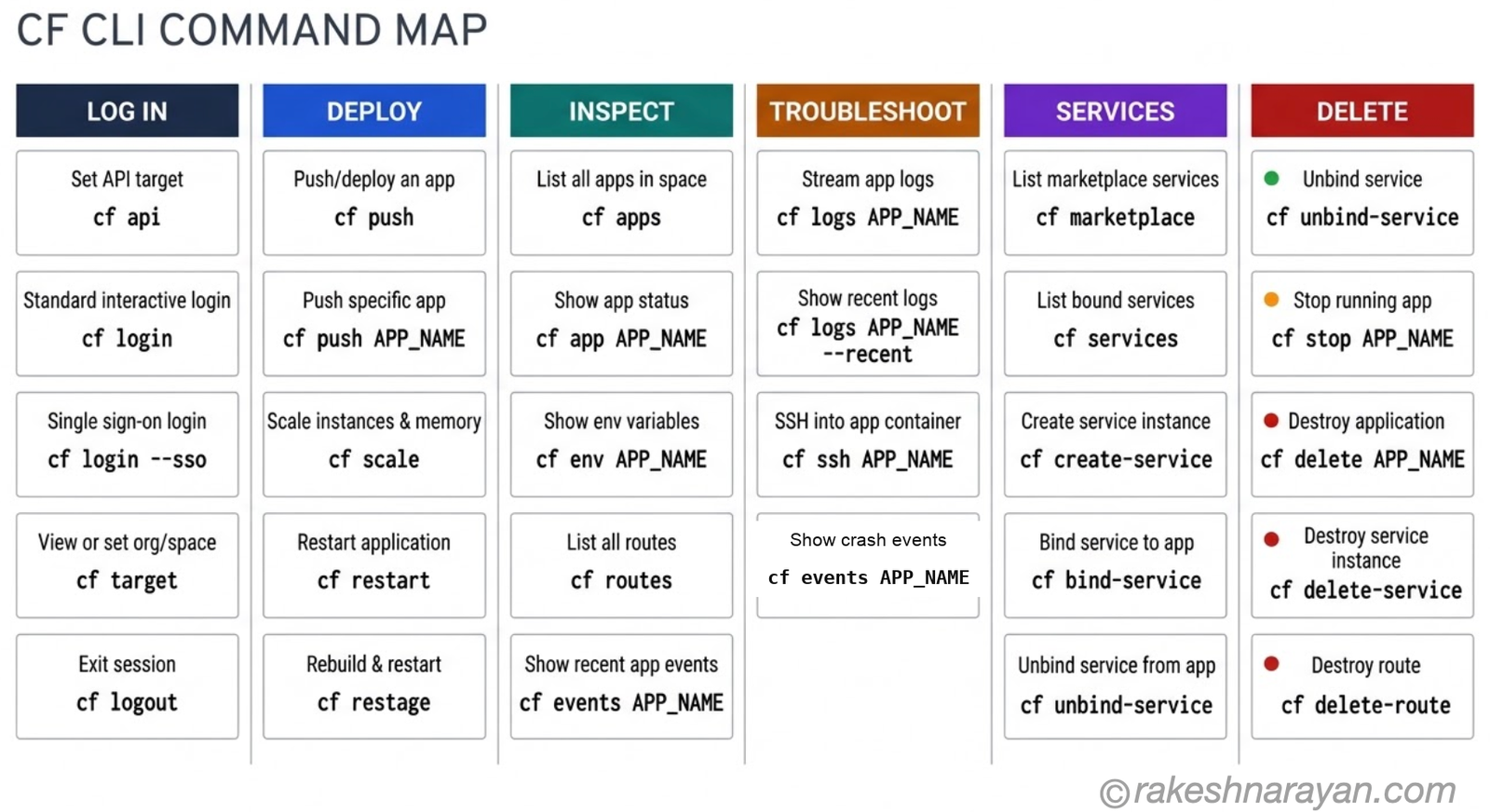
Look back at the list and count the commands that actually deploy something. A handful, at most. Everything else inspects, explains or diagnoses.
That is the real shape of working on Cloud Foundry. Deploying is one command; understanding why it did not do what you expected is the job. The people who seem fast on BTP are not faster at typing cf deploy — they run cf logs --recent, cf events and cf env before they start guessing.
And the commands that can really hurt you are few. Learn those, respect -f, and read every confirmation prompt to the end. A cheat sheet makes you quick — knowing which commands cannot be undone is what keeps you trusted with production.
🔗 Continue Reading
SAP CAP — The Framework Behind Modern BTP Development — the app type you will most often deploy with cf deploy. SAP Fiori Deployment Using CTMS with CI/CD on SAP BTP — take these commands into a pipeline with proper transports. YAML — How It Works and When to Use It Over JSON — read and fix manifest.yml and mta.yaml with confidence. Linux Command Line — The Mental Model for Developers — the terminal habits that make every CLI, including cf, easier.
Did you enjoy this article?
Let me know — it takes one click.
0 Comments
Leave a Comment
Looks like this one held your attention — I'd really appreciate a quick comment below.
Your comment has been submitted and will appear after review.