Getting Started with SAP BTP — A Hands-On Guide
🔗 Read These First
SAP BTP — The Platform Explained — the conceptual overview of what BTP is and why it exists. Read that first if you haven’t.
SAP Integration Patterns — The Decisions That Matter — covers how Integration Suite on BTP fits into the broader integration picture.
Reading about SAP BTP is one thing. Knowing where to actually start — what to click, what to enable, what to ignore — is something different. Most introductions to BTP describe the platform at a level of abstraction that leaves you no closer to doing anything useful.
This post is the bridge. It assumes you know what BTP is conceptually and takes you into the account structure, the cockpit, the key services, and the decisions you actually need to make when you first get access. It is a starter, not a complete reference — BTP is too large for that. But by the end, you will have a working mental model of how the platform is organised and what to do first.
How BTP Accounts Work
The first thing that confuses new BTP users is the account structure. BTP does not have a flat list of services you switch on. It has a hierarchy: Global Account → Directory → Subaccount → Space (for Cloud Foundry environments).
| Level | What It Is |
|---|---|
| Global Account | Your organisation’s top-level BTP contract. Holds your entitlements — the services and quotas SAP has licensed to you. |
| Directory | Optional grouping layer. Useful for large organisations that want to separate by region, department, or project. |
| Subaccount | The working unit. Services are enabled at subaccount level. You will have at least one — usually several (dev, test, prod). |
| Space (CF) | Within a Cloud Foundry subaccount, spaces provide further isolation. Each space has its own apps and service instances. |
The practical implication: before you can use any BTP service, you need to assign an entitlement (the licence) to a subaccount, then enable the service in that subaccount. New BTP users often find that a service is visible in the catalogue but not usable — usually because the entitlement has not been assigned.
💡 Practical Tip
The BTP Cockpit is your starting point. Log in with your SAP Universal ID: https://cockpit.btp.cloud.sap If you do not have a paid BTP account, the free tier gives access to a meaningful set of services with no time limit — enough to learn and build proof-of-concept projects.
The Five Service Areas You Need to Know
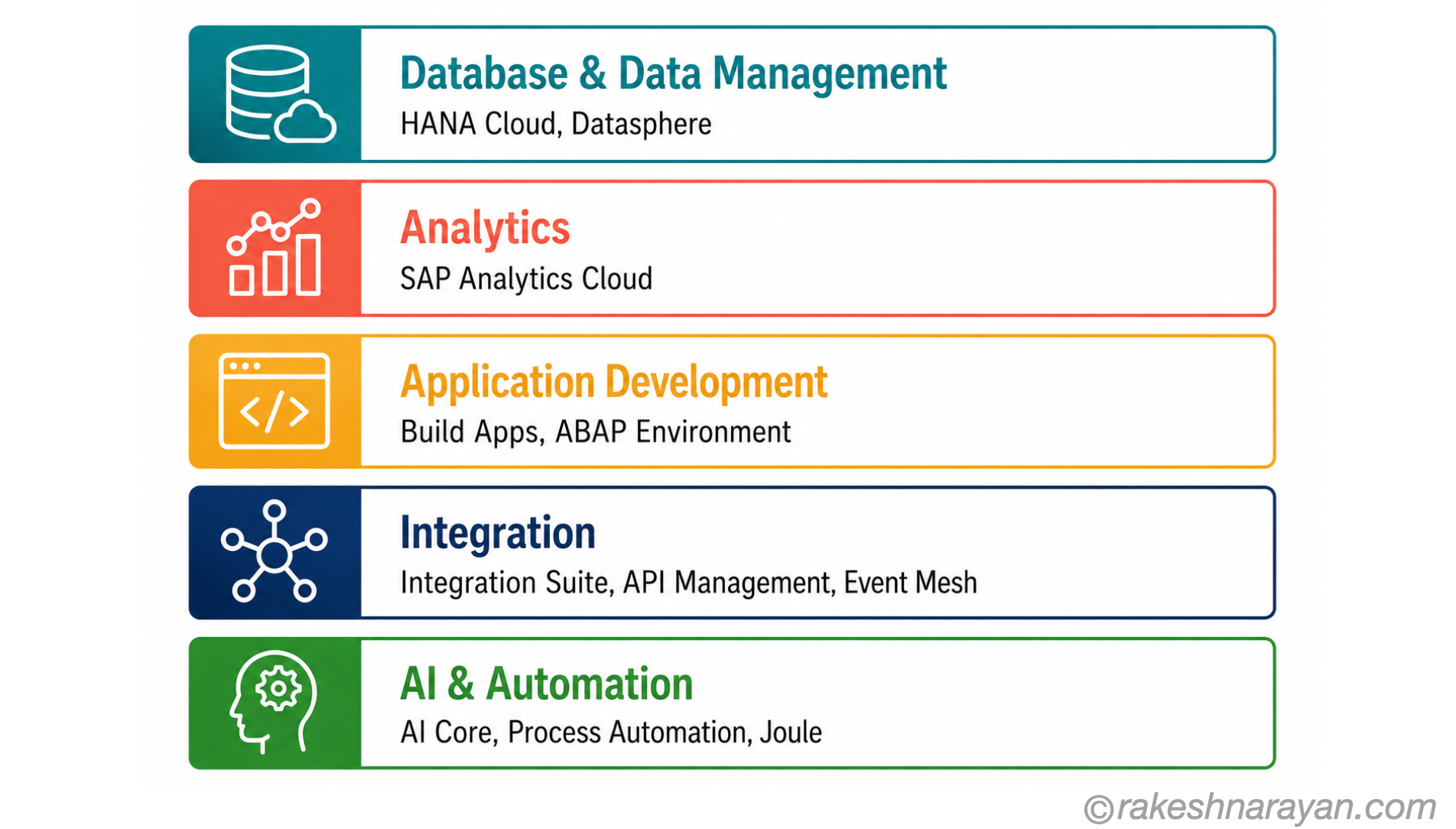
BTP groups its services into five main areas. You do not need to use all of them — most projects use two or three. But knowing what each area is for helps you navigate the catalogue and understand which service belongs to which problem.
| Service Area | What It Is For |
|---|---|
| Database & Data Management | SAP HANA Cloud (fully managed HANA), SAP Datasphere (data warehousing and federation), Data Intelligence. Use when you need a managed database or a data layer. |
| Analytics | SAP Analytics Cloud (BI and planning), Embedded Analytics in S/4HANA. Use when you need dashboards, reports, or planning scenarios. |
| Application Development | SAP Build Apps (low-code), SAP Build Work Zone (portals and launchpads), ABAP Environment (Steampunk — full ABAP runtime in the cloud). |
| Integration | SAP Integration Suite (API Management, Cloud Integration, Event Mesh, Open Connectors). Use when you need to connect systems. |
| AI & Automation | SAP AI Core (model deployment and inference), SAP AI Launchpad (model management), SAP Build Process Automation (workflow and RPA), Joule (AI assistant). |
Integration Suite — the Most Used BTP Service
For most SAP customers, SAP Integration Suite is the primary reason they are on BTP. It is the successor to SAP Process Integration (PI) and SAP Process Orchestration (PO) and the standard platform for connecting SAP systems to each other and to third-party applications.
Integration Suite has several components. The two that matter most in practice:
| Component | What It Does |
|---|---|
| Cloud Integration (CPI) | Design, deploy, and monitor integration flows. Replaces PI/PO iFlows. Connects SAP and non-SAP systems via pre-built adapters and custom mappings. |
| API Management | Create, publish, secure, and monitor APIs. Add rate limiting, authentication, and analytics on top of existing backend services. |
| Event Mesh | Asynchronous messaging between systems using event-driven patterns. Decouples sender and receiver. |
| Open Connectors | Pre-built connectors to 170+ third-party SaaS applications. Normalises APIs so you can integrate Salesforce, ServiceNow, Slack, and others with a consistent interface. |
ABAP Environment — Cloud ABAP Without an S/4HANA System
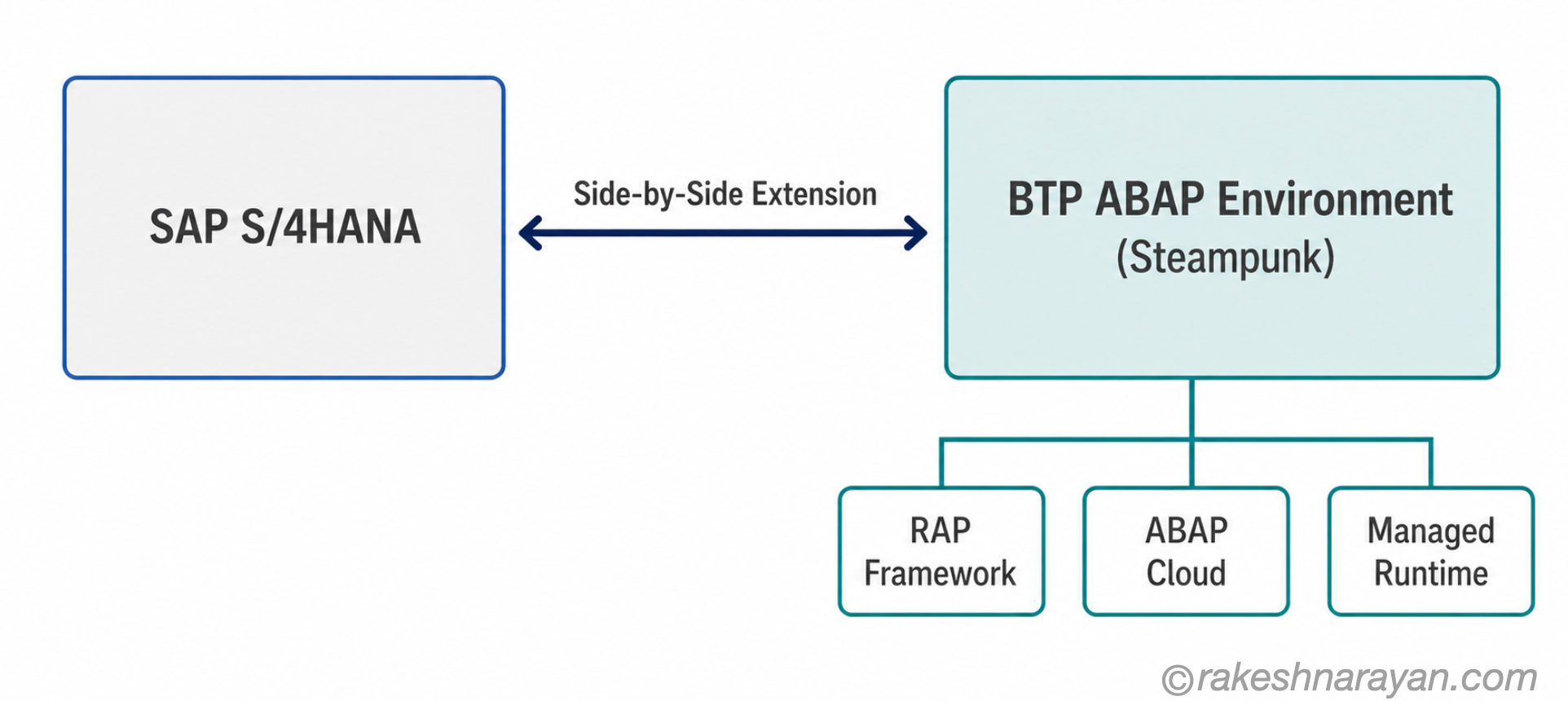
The ABAP Environment on BTP — also called Steampunk — is a fully managed ABAP runtime in the cloud. It lets you develop ABAP-based applications and extensions without owning or managing an SAP S/4HANA system.
This matters for partners and ISVs who want to build cloud-native ABAP products. It also matters for customers who want to move custom developments off the S/4HANA core and into a side-by-side extension model — which is the Clean Core approach SAP recommends.
Steampunk uses the same ABAP language and RAP framework as S/4HANA but restricts access to classic features that are not compatible with the cloud model. You write ABAP Cloud — a defined subset of ABAP that is upgrade-stable and cloud-compatible.
SAP Build — Low-Code on BTP
SAP Build is SAP’s low-code/no-code suite on BTP. It has three main tools:
| Tool | Who It Is For | What It Builds |
|---|---|---|
| SAP Build Apps | Business users, citizen developers | Web and mobile apps without writing code. Drag-and-drop UI builder with a visual logic editor. |
| SAP Build Process Automation | Business analysts | Workflows, approval processes, and robotic process automation (RPA) — automating repetitive tasks across systems. |
| SAP Build Work Zone | IT and line of business | Central launchpad and portal experience. Brings together Fiori apps, third-party apps, and content in one place. |
💡 Practical Tip
SAP Build Apps includes AI-assisted app generation — describe what you want in natural language and the tool generates a starting UI. As of 2026, this is genuinely useful for rapid prototyping, though the output typically needs refinement before production use.
What to Do First — A Practical Starting Point
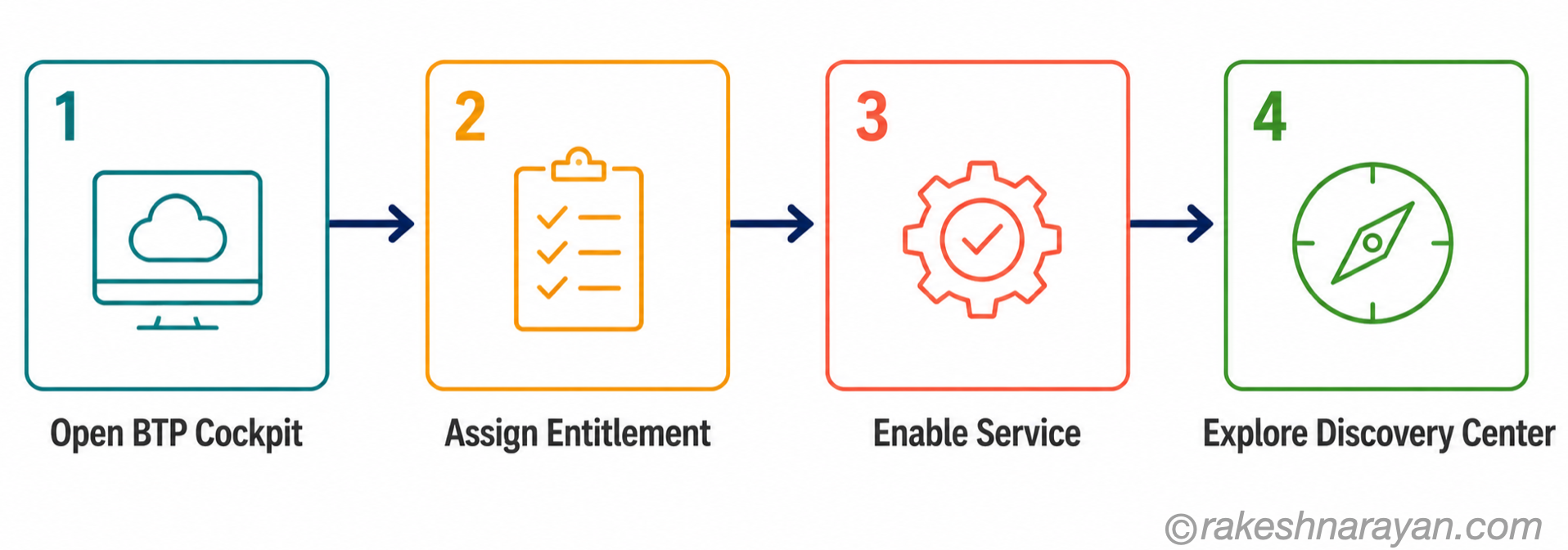
If you have just gained access to a BTP trial or free tier account and are not sure where to begin, here is a practical sequence:
| Step | What to Do |
|---|---|
| 1. Navigate the cockpit | Open the BTP Cockpit, explore your global account, and create a subaccount if one does not exist. Understand the entitlement and service assignment flow. |
| 2. Enable a service | Pick one service — HANA Cloud free tier or Integration Suite trial. Assign the entitlement to your subaccount and enable the service. Doing this once teaches you the pattern for everything else. |
| 3. Explore the Discovery Center | SAP’s guided mission centre. Each mission walks you through a real scenario end-to-end. More useful than documentation for getting started. |
| 4. Try a mission | The ‘Get Started with SAP BTP’ mission in the Discovery Center is the best first step. It covers account setup, service enabling, and a simple Hello World deployment. |
The Discovery Center URL:
📌 At a Glance — The Mental Model
| Concept | One-Line Summary |
|---|---|
| Global Account | Your org’s top-level BTP container. Holds entitlements. |
| Subaccount | The working unit. Services are enabled here. Have at least dev/test/prod. |
| Entitlement | The licence for a service. Must be assigned to a subaccount before the service can be used. |
| Integration Suite | The BTP integration platform. Replaces PI/PO. Cloud Integration, API Management, Event Mesh. |
| ABAP Environment | Cloud ABAP runtime — Steampunk. Clean Core extensions without an S/4HANA system. |
| SAP Build | Low-code suite. Build Apps (UI), Process Automation (workflows/RPA), Work Zone (launchpad). |
| Discovery Center | SAP’s guided mission platform. The best starting point for hands-on learning. |
The Thing That Takes Longest to Learn
BTP is genuinely broad. The instinct when you first open the cockpit is to try to understand everything at once. That leads nowhere.
The better approach: pick the problem you are actually trying to solve, find the BTP service that addresses it, and learn that service properly. Integration Suite if you are connecting systems. ABAP Environment if you are building clean core extensions. Build if you are automating a business process. The platform makes more sense when you approach it through a specific use case rather than as an abstract catalogue.
The account hierarchy, the entitlement model, and the cockpit will feel natural after your first real deployment. Before that, they feel like bureaucracy. That is normal.
🔗 Related Reading
SAP BTP — The Platform Explained — the conceptual overview of what BTP is and how its pillars fit together.
SAP Integration Patterns — The Decisions That Matter — how Integration Suite fits into broader integration architecture decisions.
ABAP Fundamentals That Still Matter — the ABAP skills you need to work in the BTP ABAP Environment.
CDS Views and the VDM Concept — how CDS views built on BTP ABAP Environment consume the S/4HANA data model.
SAP Build — Apps, Automation and Work Zone — the low-code toolset available the moment you have a BTP account set up: apps, process automation and a launchpad.
Published on rakeshnarayan.com — Articles
URL: https://rakeshnarayan.com/articles/getting-started-with-sap-btp-a-hands-on-guide/
Did you enjoy this article?
Let me know — it takes one click.
0 Comments
Leave a Comment
Looks like this one held your attention — I'd really appreciate a quick comment below.
Your comment has been submitted and will appear after review.