How to Cut LLM Cost and Latency in Production
Every team that ships an LLM feature hits the same wall eventually. The pilot works, everyone loves it, usage triples — and three months later finance is asking why the AI bill tripled too, while users complain it feels slower than it did in the demo.
Cost and latency are not two separate problems. They come from the same root cause — every extra token you send in or generate back costs money and takes time. Fix the token problem properly and both numbers move together.
This is not a pitch for one caching product. It is the honest list of levers — prompt caching, semantic caching, batching, model routing and context discipline — that actually cut LLM cost and latency in production, what each one costs you in return, and where each one quietly falls apart.
🔗 Related Reading
This post assumes you already have something running. If you are still figuring out where AI fits in your organisation, start with AI in the Enterprise — A Practical Map .
If your feature is live and you are managing it day to day, LLMOps — The Operating Model for AI in Production is the operational layer this post sits on top of.
Why cost and latency are the same problem
An LLM does not see your prompt as a paragraph. It sees a stream of tokens — and it bills you for every one, and makes you wait for every one too, as covered in How Generative AI Works.
Generation is autoregressive. The model produces one token at a time, and each new token depends on every token generated before it.
Double the output length and you roughly double the latency — there is no fixed overhead that stays flat as responses grow. The cost is linear with the work.
📌 Key Takeaway
Cost and latency both scale with the number of tokens processed and generated. Any lever that genuinely reduces tokens processed reduces both at once. That is why this post treats them as one problem, not two.
Know where your tokens are actually going before you fix anything
Before touching any of the levers below, find out what is actually driving your bill. Every major provider returns token counts in the response — input tokens, output tokens, and for prompt caching specifically, a separate count of tokens served from cache versus tokens that missed and were processed in full.
Track that split by feature, not just in aggregate. I have seen teams spend weeks optimising the wrong prompt because their dashboard showed one blended average across a chatbot and a batch job that behaved completely differently under the hood.
💡 Practical Tip
If you cannot see your cache hit rate broken down by feature or endpoint, you are optimising blind. Start there before you touch anything else in this post.
Prompt caching — stop paying for the same context twice
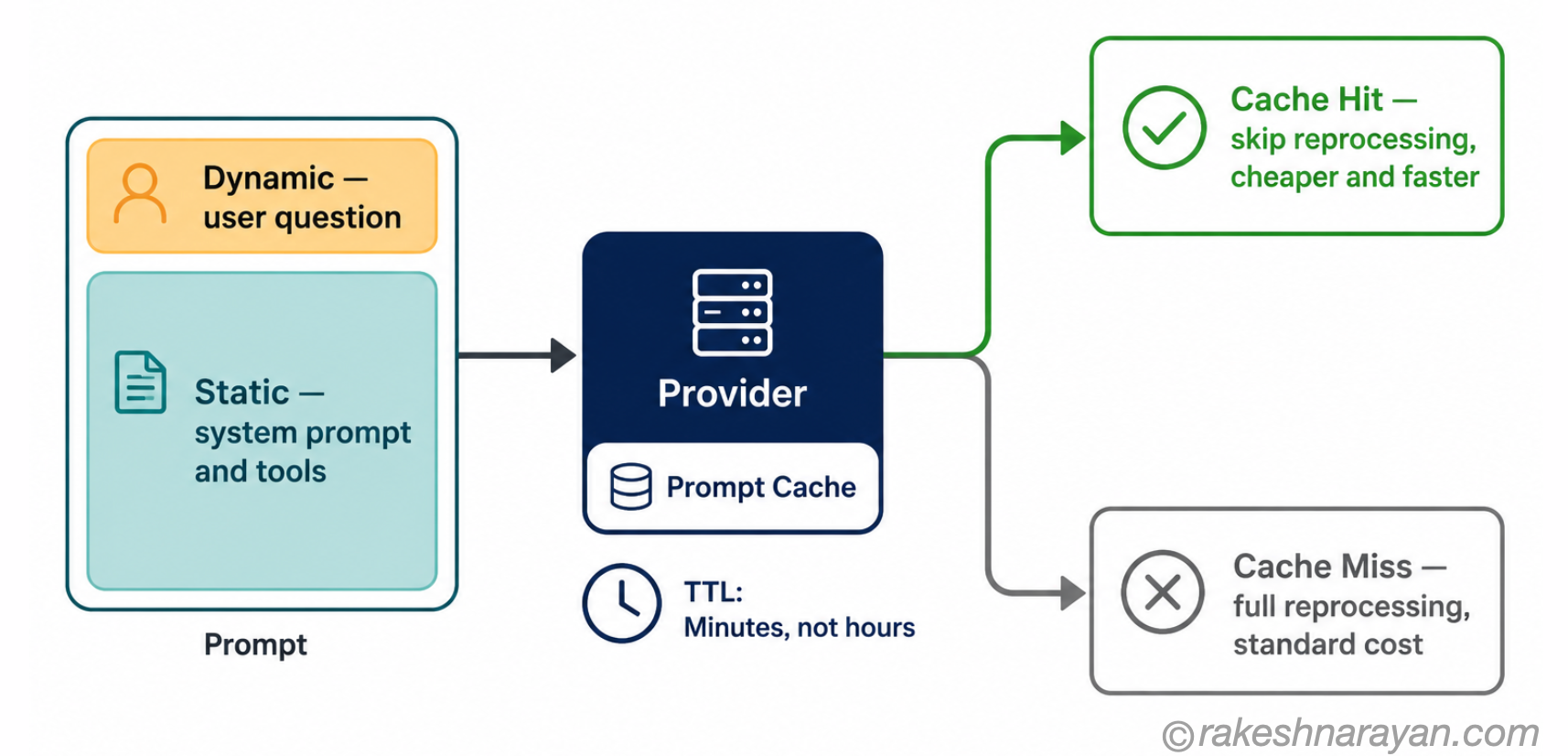
Most production prompts repeat the same large block on every single call — a system prompt, a set of tool definitions, a house style guide. Your users see a fresh question each time. The model reprocesses the entire prefix from scratch every time, unless you tell it not to.
Prompt caching stores the processed state of that repeated prefix so the provider can skip recomputing it on the next matching request. The three major providers took different approaches.
OpenAI does it automatically once a prompt passes a size threshold — no code changes needed. Anthropic now offers both automatic caching and explicit control, where you mark exactly which blocks to cache and set the lifetime yourself. Google offers both an automatic version and an explicit one where you set the cache lifetime yourself.
| Provider | How caching activates | Developer control |
|---|---|---|
| OpenAI | Automatic once a prompt passes a minimum token threshold | None — happens entirely on the provider side |
| Anthropic | Automatic by default, with explicit breakpoints available | Full when needed — mark exactly what gets cached and for how long |
| Both automatic (implicit) and explicit caching available | Explicit mode lets you set the cache lifetime directly |
💡 Practical Tip
Put static content — the system prompt, tool schemas, house rules — at the very top of the prompt, and dynamic content at the bottom. Caching works on an exact prefix match. Reorder one sentence above the cache boundary and every request after it misses.
⚠️ Warning
Cache windows are short by default — minutes, not hours, unless you explicitly extend them. A support bot that gets a burst of traffic and then goes quiet for twenty minutes will miss the cache on almost every request after the gap, and pay the extra cost of writing the cache for nothing in return.
Semantic caching — catching meaning, not just exact text
Prompt caching only helps when the prefix matches exactly, character for character. Semantic caching works differently. It stores the embedding of a past query alongside its response, and when a new query arrives, it checks whether anything semantically close already has a cached answer — the same embedding-and-nearest-neighbour mechanism covered in Vector Databases Explained, just pointed at your own traffic instead of your documents.
Two users asking, “how do I reset my password” and “I forgot my login, help me” are different strings but the same intent underneath. Semantic caching can serve the second one from cache without a fresh call to the model at all.
✅ Best Practice
Reserve semantic caching for genuinely repetitive workloads — support triage, FAQ bots, anything where large numbers of users ask a version of the same handful of questions. For unique, one-off queries, running a vector search on every request can cost you more in infrastructure than it saves on the LLM call.
Batching — trading a little latency for a lot of throughput
Batching combines multiple inference requests into a single pass on the same GPU. Continuous batching, the approach used by production inference engines like vLLM and TensorRT-LLM, does not wait for a batch to fill before it starts — it adds new requests into a batch that is already running.
The GPU stays busier per second of work, which lowers the effective cost of every request that passes through it. The trade-off is real and it does not go away: large batches raise throughput but stretch the tail latency for any individual request sitting inside them.
📌 Key Takeaway
Batching helps your infrastructure bill, not any one user’s wait time. If your product is a real-time chat interface or a voice agent, aggressive batching against a busy queue will visibly slow every response down — this is where the lever falls apart.
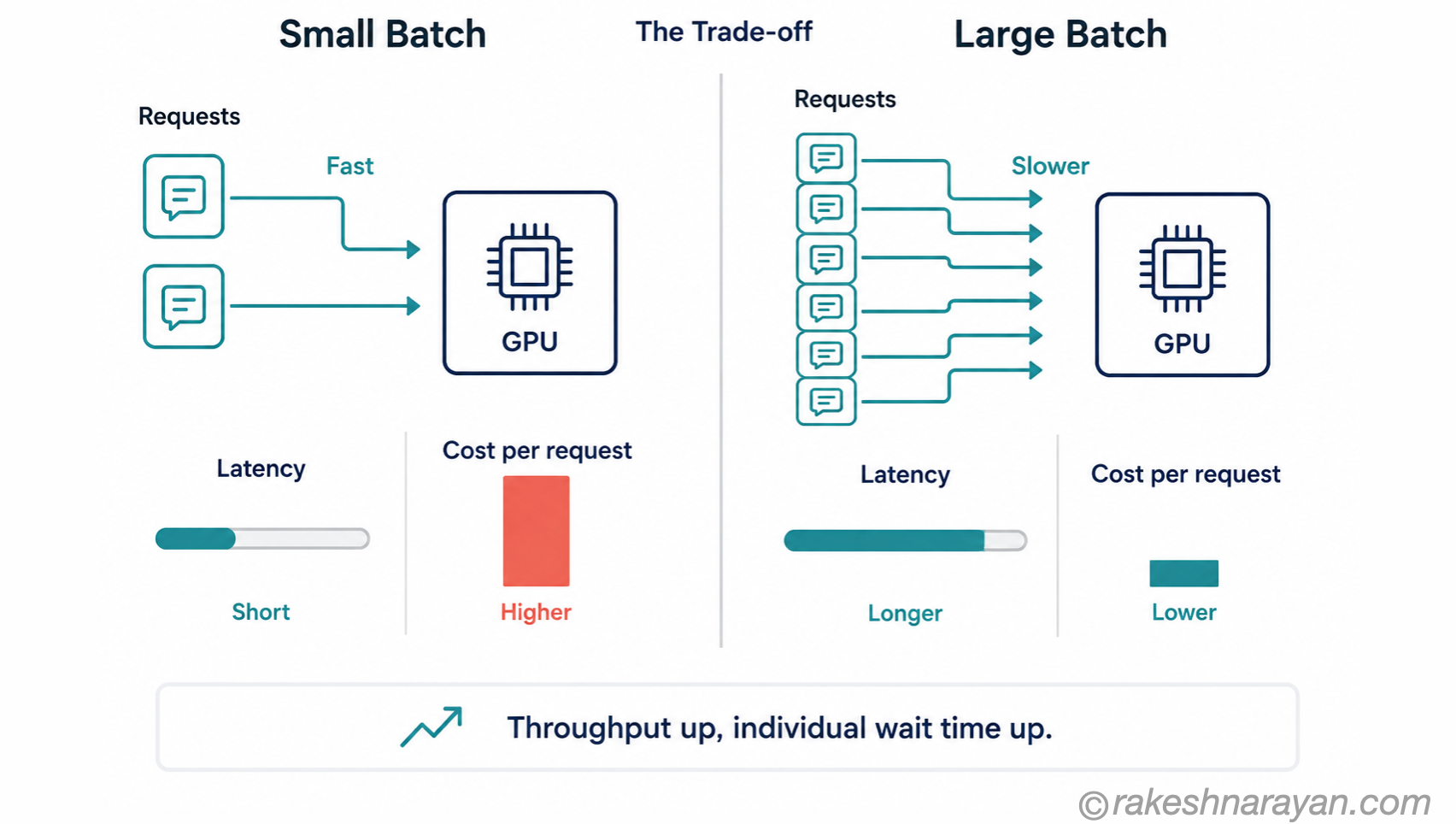
Batching earns its keep in the workloads nobody is staring at a spinner for — nightly document processing, bulk classification, background summarisation jobs. Push it into a live conversation and you have traded a genuine cost win for a user complaint you will hear about within a week.
Model routing — stop sending everything to your flagship model
Not every request needs your most capable model. A support ticket classifier does not need the same model as a contract risk analysis. Routing by task complexity means sending simple, well-defined tasks to a smaller or cheaper model and reserving the flagship model for the work that genuinely needs its reasoning depth — the full case for this is covered in Small Language Models — What They Are and When to Use Them.
| Task type | Model tier | Why |
|---|---|---|
| Classification, extraction, simple formatting | Small or budget model | Task complexity is low — a larger model adds cost without adding accuracy |
| Summarisation, drafting, everyday Q&A | Mid-tier model | Balances quality and cost for routine work |
| Multi-step reasoning, complex analysis, mission-critical output | Flagship model | Accuracy matters more than cost — this is where the flagship model earns its price |
⚠️ Warning
Routing only works if you have evaluated the cheaper model against the task first. Route blindly and you are trading a visible cost problem for an invisible quality problem — the exact failure mode covered in AI Evaluation — Why Benchmarks Lie and What to Measure Instead .
Context discipline — the tax you pay twice
Every token you include that the model does not actually need costs you twice. You pay for it once in the API bill, and again in latency, because the model has to process it before it reaches the part of the prompt that actually matters to the task.
Stale conversation history, an entire file pasted in when only one function matters, a system prompt that has grown by accretion over a year of small additions — all of it adds up quietly. Trimming context to what the task genuinely needs is the discipline covered properly in Context Engineering — Beyond Prompts to Production.
📝 Note
This is not about writing shorter prompts for their own sake. A well-structured 2,000-token prompt with the right context will outperform a padded 500-token one every time. The goal is relevance, not brevity.
Stacking the levers — what it looks like in production
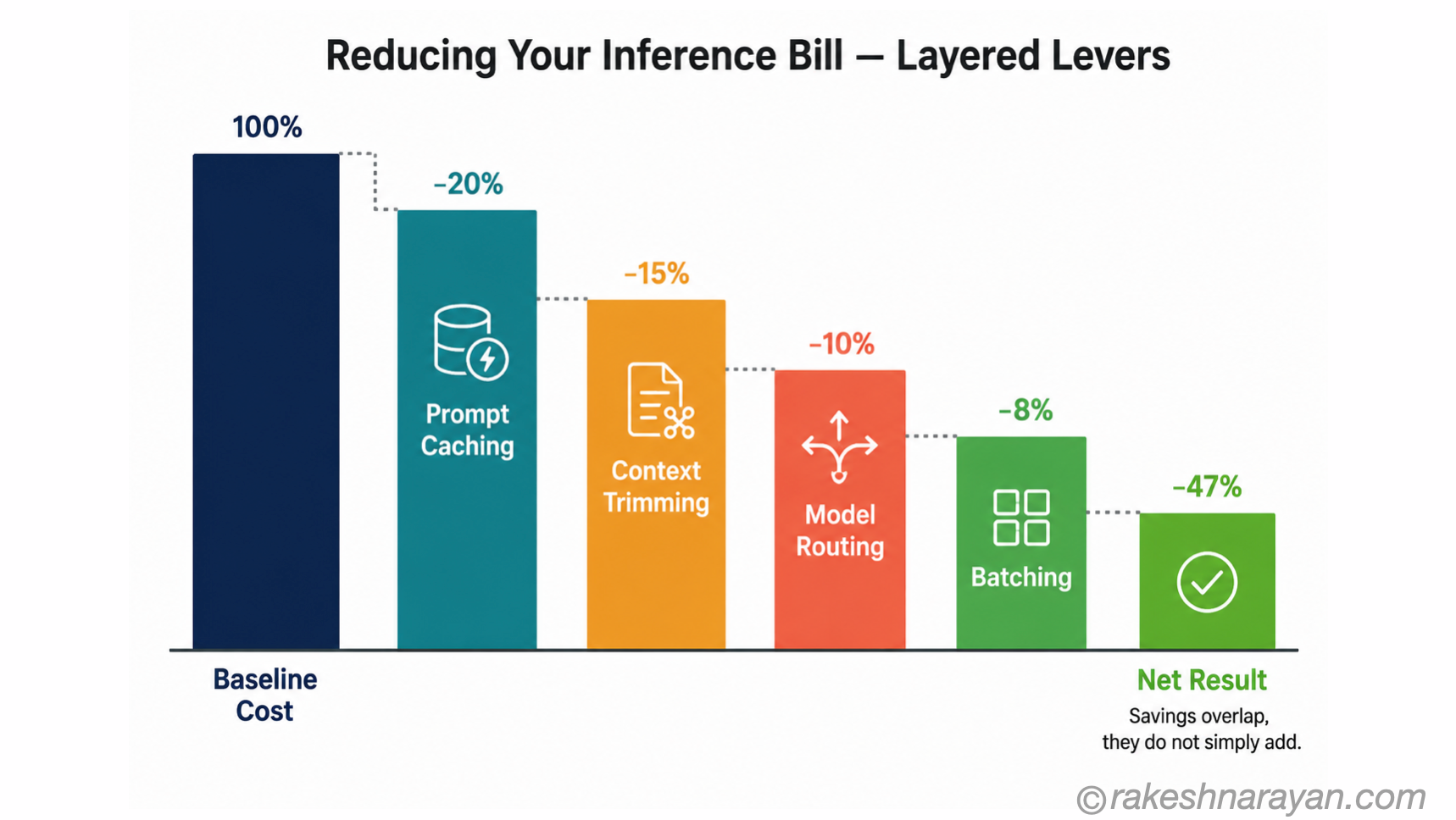
None of these levers work in isolation the way a single vendor blog post makes it sound. Prompt caching reduces the cost of your repeated prefix.
Batching raises GPU utilisation on the requests that can tolerate the delay. Routing sends traffic to the cheapest model that still passes your evaluation. Context discipline shrinks the token count every other lever is working against.
Teams that combine several of these see the largest reduction in their inference bill — but the savings do not simply add up. Caching a smaller prompt caches less in absolute terms once you have already trimmed the context.
Routing a request to a cheaper model changes what batching is worth on that same request. Measure each lever separately before you claim credit for the combination.
At a Glance
| Concept | One-line summary |
|---|---|
| Cost and latency | Both scale with token count — reducing tokens processed cuts both at once |
| Prompt caching | Reuses the processed state of a repeated prefix — needs an exact match |
| Semantic caching | Serves a cached answer to a semantically similar query, not just an identical one |
| Batching | Combines requests into one GPU pass — raises throughput, stretches individual latency |
| Model routing | Sends each task to the cheapest model tier that still passes evaluation |
| Context discipline | Cuts tokens that cost money on the way in and latency on the way out |
| Stacking | Combining levers compounds savings, but not additively — measure each one separately |
What to take away
Cost and latency are not an infrastructure problem you solve once and move on from. They are a discipline you maintain, the same way you maintain evaluation or monitoring once a feature goes live.
The teams that get blindsided by their AI bill are rarely the ones using the wrong model. They are the ones who never measured which lever was actually driving the number in the first place, and reached for the first fix a blog post recommended instead.
Pick one lever, measure its effect on your actual traffic, and only then reach for the next one. That is slower than installing a caching product and hoping for the best. It is also the only approach that tells you what is genuinely happening to your bill.
🔗 Related posts on this site
LLMOps — The Operating Model for AI in Production — the operational discipline this post’s levers plug into day to day.
AI Evaluation — Why Benchmarks Lie and What to Measure Instead — the evaluation work that has to happen before you trust a routing decision.
Vector Databases Explained — How Semantic Search Works — the embedding mechanics behind semantic caching, explained in full.
Context Engineering — Beyond Prompts to Production — a deeper dive into trimming and structuring context for production use.
Small Language Models — What They Are and When to Use Them — the full case for routing to a smaller model, referenced above.
Reasoning Models — How Test-Time Compute Works — thinking budgets are one of the clearest cost/latency levers there is; this post explains what you are actually paying for.
Published on rakeshnarayan.com — Articles
_URL: https://rakeshnarayan.com/articles/how-to-cut-llm-cost-and-latency-in-production/

Did you enjoy this article?
Let me know — it takes one click.
0 Comments
Leave a Comment
Looks like this one held your attention — I'd really appreciate a quick comment below.
Your comment has been submitted and will appear after review.