Prompt Engineering — How to Get Reliable Output from Any LLM
Most people who are disappointed with AI are disappointed with their prompts. The model is not the problem; the instruction is.
Prompt engineering is the practice of designing your inputs to get consistent, reliable and useful outputs. Structured prompts reduce AI errors by up to 76% compared to unstructured inputs. The gap between ‘I tried ChatGPT and it was useless’ and ‘AI saves me hours every week’ is almost always prompt quality — not model capability.
This post covers every technique that actually matters — with real before-and-after examples, not abstract theory. It applies to every frontier model: GPT-4o, Claude, Gemini, Llama and SAP Joule.
🔗 Foundation for this post
Understanding why prompt engineering works requires knowing what an LLM is doing. What is a Large Language Model? covers that. How Generative AI Works explains why token-by-token prediction means the quality of what you put in directly determines what comes out.
The anatomy of a prompt — four components
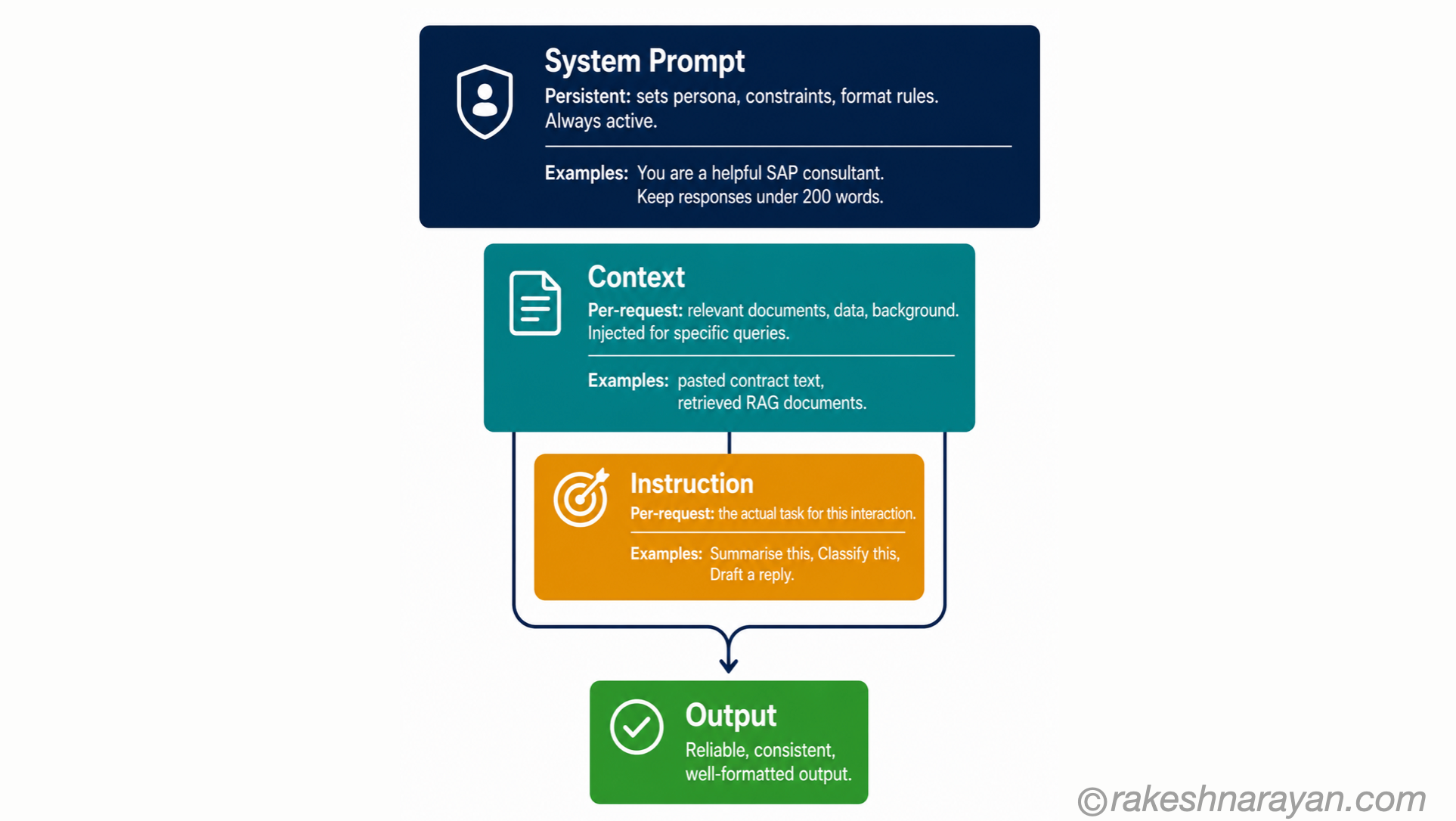
Every prompt, whether you think of it this way or not, has up to four components. The more deliberately you use each, the more reliable your output.
| Component | What it does | Required? |
|---|---|---|
| System prompt | Sets the model’s persona, constraints, output format and rules for the entire conversation — the instruction layer | Not always exposed to users, but the most powerful component when available |
| Context | The relevant background the model needs for this specific task — documents, data, previous output | No, but usually the biggest driver of output quality |
| Instruction | What you are asking the model to do — the task itself | Yes — the core of every prompt |
| Output specification | Defines the format, length, structure or style of the response | No, but dramatically improves consistency when included |
💡 Context is the most underused component
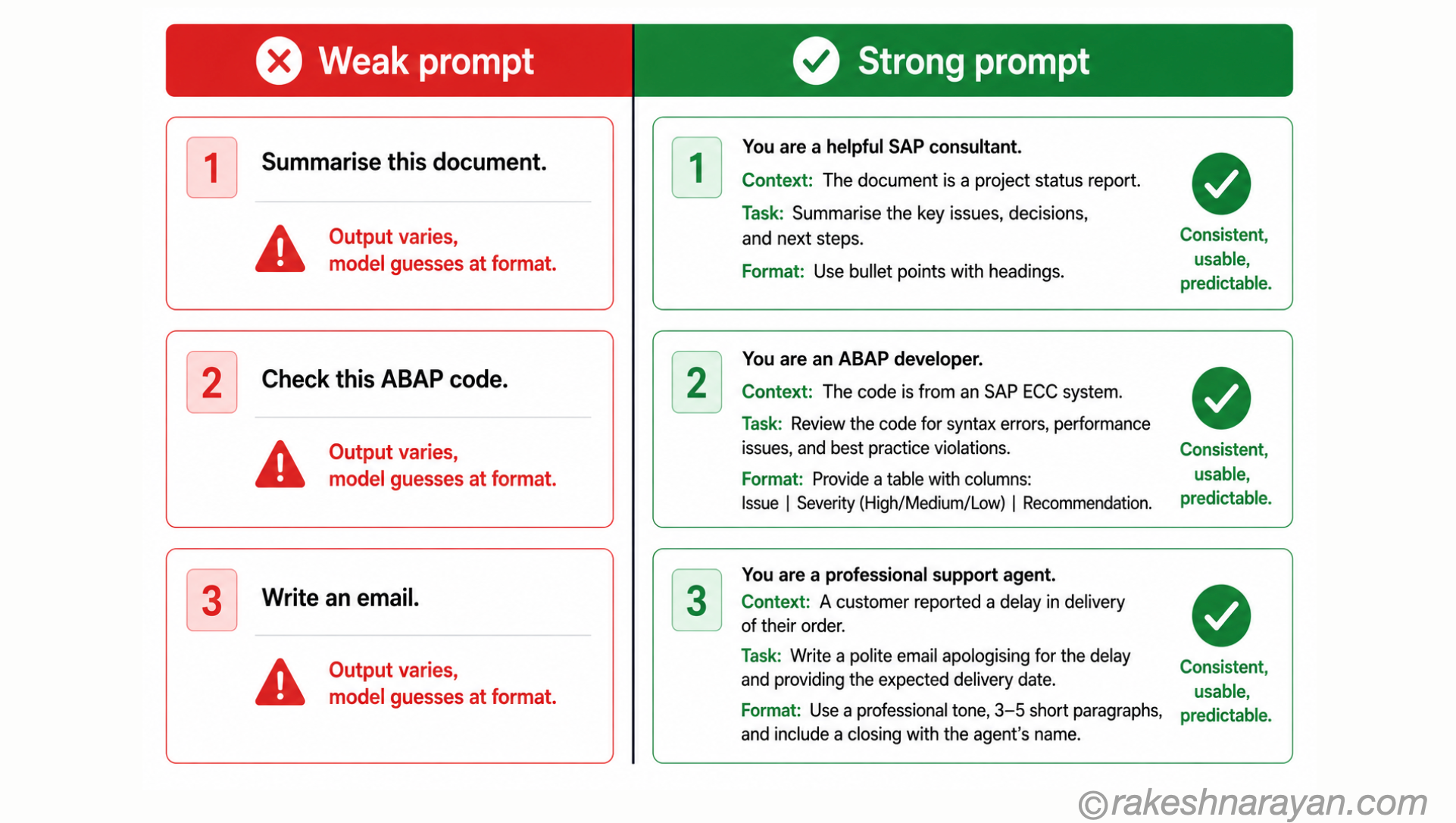
Most people write a one-line instruction and wonder why the output is generic. The model does not know your document, your audience, your constraints or your definition of quality unless you tell it.
Pasting the relevant source material, defining your audience and specifying what good looks like will improve output quality more than any technique in this post.
The core techniques — from simplest to most powerful
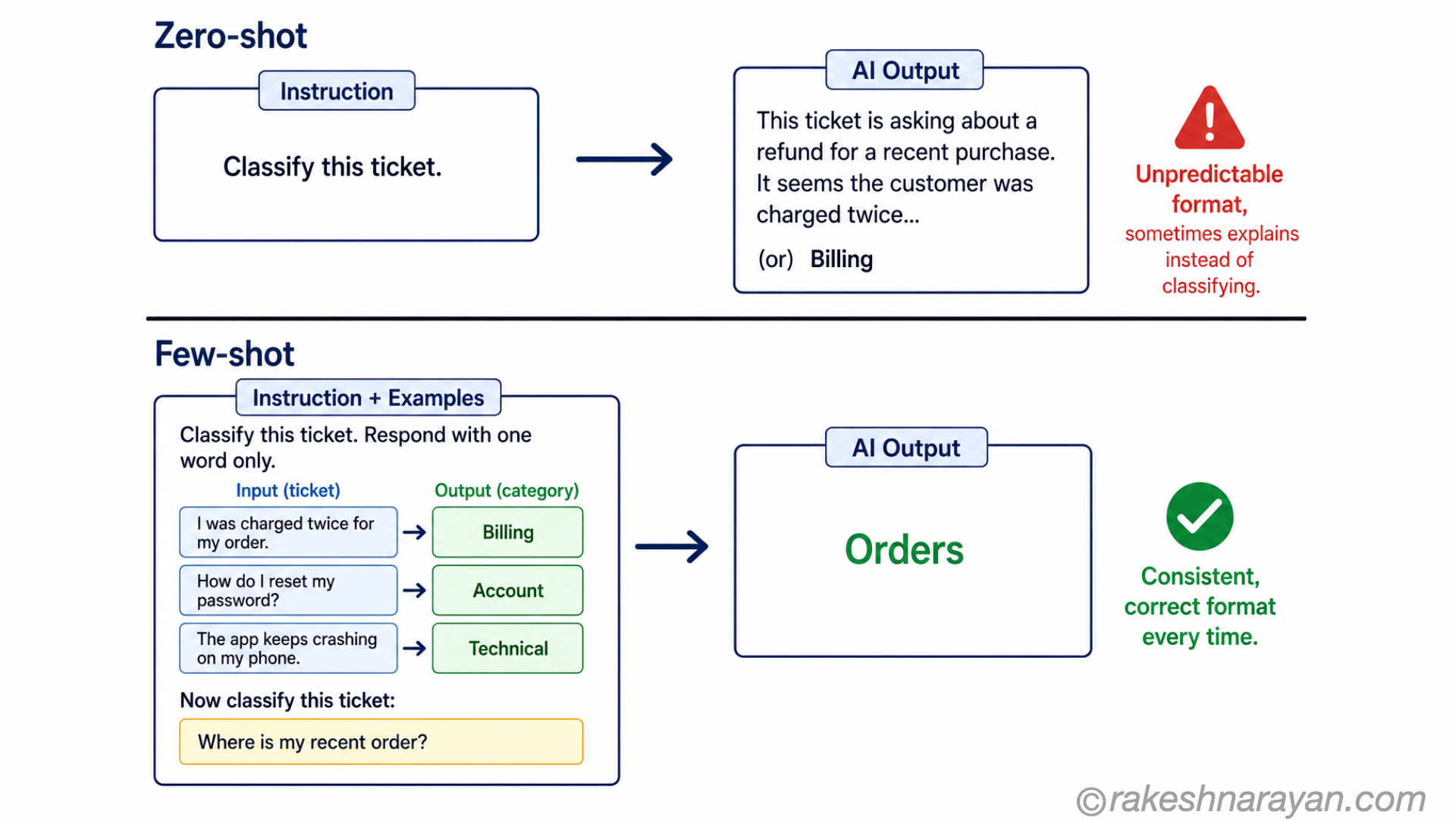
Zero-shot prompting — just ask
Zero-shot means giving the model a task without any examples. The model uses its training to complete it. This works for straightforward, well-defined tasks where the output format is obvious.
Zero-shot example:
Summarise the following contract clause in plain English for a non-lawyer:
[paste contract clause here]
Zero-shot fails when the output format is ambiguous, the task is complex, or the model makes assumptions about style or structure that do not match what you need. Move to few-shot when this happens.
Few-shot prompting — show, do not just tell
Few-shot prompting gives the model 2-5 examples of the exact input-output pattern you want before presenting the actual task. The model learns the pattern from the examples and applies it.
This is the single most reliable technique for controlling output format and tone. It works better than lengthy instructions because you are demonstrating rather than describing.
Few-shot example (classifying support tickets):
Classify each support ticket as: Billing, Technical, or General.
Ticket: My invoice shows the wrong amount.
Category: BillingTicket: The app crashes when I open it on iOS 17.
Category: TechnicalTicket: What are your opening hours?
Category: GeneralTicket: I was charged twice for the same order.
Category: Billing
💡 3-5 examples is the sweet spot
Research consistently shows that 3-5 few-shot examples produce near-optimal results for most tasks. More than 5 examples adds tokens without proportional improvement. For complex classification tasks with many categories, aim for 1-2 examples per category.
Chain-of-thought — make the model reason before answering
Chain-of-thought (CoT) prompting asks the model to work through its reasoning step by step before giving a final answer. It dramatically improves accuracy for tasks involving logic, calculation, analysis or multi-step decisions.
Chain-of-thought alone improves accuracy on reasoning tasks by 15-40% in research benchmarks. The mechanism is simple: the intermediate reasoning steps become part of the model’s context, and each step provides better input for the next.
Without chain-of-thought:
A project has 3 phases. Phase 1 is 40% done and takes 10 weeks total.
Phase 2 is not started and takes 6 weeks. Phase 3 takes 8 weeks.How many weeks until completion?
-> Model often gives wrong answer
With chain-of-thought:
A project has 3 phases. Phase 1 is 40% done and takes 10 weeks total.
Phase 2 is not started and takes 6 weeks. Phase 3 takes 8 weeks.How many weeks until completion? Think step by step.
-> Model works out: Phase 1 remaining = 60% of 10 = 6 weeks.Phase 2 = 6 weeks. Phase 3 = 8 weeks. Total = 20 weeks.
The phrase ‘think step by step’ is the simplest CoT trigger. For more complex tasks, explicitly structure the reasoning: ‘First analyse X. Then consider Y. Then conclude based on both.‘
System prompts — the most powerful lever
The system prompt is the persistent instruction layer that shapes every response in a conversation. It sets the persona, defines constraints, specifies output format and establishes what the model should and should not do.
When you have access to a system prompt — through the API, or in tools like SAP Joule configuration, Custom GPTs or Claude Projects — it is the most impactful place to invest your prompting effort.
Example system prompt for an internal HR assistant:
You are an HR policy assistant for Acme Corporation.
You answer employee questions about company policies only.
Always cite the specific policy document and section number.
If a question falls outside HR policy, say so and direct to HR.
Keep answers under 150 words. Use plain English, not HR jargon.
Never share information about other employees.
If uncertain, say you are uncertain and recommend contacting HR directly.
💡 System prompts persist — user messages do not
Every user message in a conversation starts fresh from the model’s perspective, constrained only by the system prompt and conversation history. If you want behaviour to be consistent across all interactions — tone, format, constraints — it must be in the system prompt, not repeated in each user message.
Output specification — ask for exactly what you need
One of the easiest improvements to any prompt: tell the model exactly what format you want. Without this, the model picks a format based on what it has seen most often — which may not match your use case.
| Output specification | Example | When to use |
|---|---|---|
| Format | ’Respond in a JSON object with keys: summary, risk_level, recommendation’ | API integrations, structured data extraction, automated pipelines |
| Length | ’Answer in exactly 3 bullet points, each under 25 words’ | Summaries, UI copy, constrained content slots |
| Structure | ’Use this structure: Problem / Root cause / Recommended fix’ | Troubleshooting, analysis, reports |
| Tone and voice | ’Write as a senior consultant explaining to a client, not as a textbook’ | Client-facing content, communications |
| Negative constraints | ’Do not include examples. Do not use bullet points. Do not repeat the question.‘ | When you know exactly what to exclude |
Common prompting mistakes — and how to fix them
| Mistake | What happens | Fix |
|---|---|---|
| Vague instruction | Model interprets the task differently each time | Be specific: not ‘analyse this’ but ‘identify the top 3 risks and rate each as High, Medium or Low’ |
| No output format | Output structure varies — hard to process downstream | Always specify format when the response feeds into another system or template |
| Too much in one prompt | Model loses track of constraints mid-response | Split complex tasks into sequential prompts — chain them rather than stacking |
| Assuming shared knowledge | Model does not know your context, your audience or your definition of quality | Paste relevant context, define your audience and include a quality example |
| Not using examples | Model defaults to its most common training pattern | Add 2-3 few-shot examples when format and consistency matter |
| Long conversations without a system prompt | Model drifts from early instructions over time | Put persistent constraints in the system prompt, not just the first user message |
| Asking for opinions without constraints | Model gives balanced but uncommitted answers | Specify the perspective: ‘From the point of view of a risk manager…’ |
Prompt engineering in the SAP context
The same techniques apply to every SAP AI tool. SAP Joule responds to structured prompts exactly as any other LLM does — persona, context, instruction, output format.
| SAP scenario | Prompt engineering approach |
|---|---|
| SAP Joule for process guidance | Be specific about the system, transaction and user role: ‘I am an accounts payable clerk in SAP S/4HANA. Explain how to reverse a posted vendor invoice step by step.‘ |
| Joule for exception analysis | Provide full context: ‘This purchase order block has reason code ZB01. The vendor is new. The amount is EUR 45,000 above the approval threshold. What are the most likely causes?‘ |
| Custom AI assistants on BTP | Use the system prompt to constrain scope tightly: ‘You answer questions about SAP Integration Suite only. For all other questions, say this is outside your scope.‘ |
| AI-generated ABAP code | Specify exactly what you need: ‘Write an ABAP report that reads table MARA, filters by MTART = FERT, and outputs MATNR and MAKTX. Use SAP-standard SELECT with INTO TABLE. No OOP.‘ |
| Document summarisation | Specify the audience and format: ‘Summarise this change request for a non-technical business sponsor in 5 bullet points. Focus on business impact, not technical details.’ |
The prompt engineering toolkit — when to use what
| Technique | When to use it | Impact |
|---|---|---|
| Zero-shot | Simple, well-defined tasks with an obvious output format | Low — baseline; good for quick queries |
| Few-shot (2-5 examples) | When format consistency, tone or pattern matching matters | High — most impactful single technique for format control |
| Chain-of-thought | Multi-step reasoning, logic, analysis, calculations, comparisons | High — 15-40% accuracy improvement on reasoning tasks |
| System prompt | Any AI tool you configure or any API integration | Very high — sets constraints for every interaction |
| Output specification | When the response feeds into a template, system or downstream process | High — eliminates format variation almost entirely |
| Negative constraints | When you know what to exclude and the model keeps including it | Medium — effective for stubborn model defaults |
| Prompt chaining | Complex tasks that require sequential steps or conditional logic | High — breaks context overload, improves each step |
At a glance — prompt engineering essentials
| Concept | One-line summary |
|---|---|
| System prompt | The persistent instruction layer — sets persona, constraints and format for all interactions |
| Zero-shot | Give the task with no examples — works for simple, well-defined requests |
| Few-shot | Show 2-5 examples of the exact input-output pattern you want — best for format control |
| Chain-of-thought | Ask the model to reason step by step — 15-40% improvement on logic and analysis tasks |
| Context | The background the model needs for this specific task — the most underused component |
| Output specification | Tell the model exactly what format, length and structure you want |
| Negative constraints | Tell the model what not to do — effective for stubborn defaults |
| Prompt chaining | Break complex tasks into sequential prompts — each step feeds the next |
| 76% error reduction | What structured prompts achieve compared to unstructured inputs |
What to take away
Prompt engineering is not a trick. It is a discipline — the practice of communicating precisely with a system that responds to precision. Every technique in this post is a way of removing ambiguity: about the task, the context, the audience, the format or the constraints.
The teams producing reliable AI output in 2026 are not using more powerful models than everyone else. They are writing better prompts — more specific instructions, relevant context, clear output formats and a few examples showing exactly what good looks like.
Start with the system prompt if you have access to it. Add context before instructions. Use few-shot examples for anything format-sensitive. Use chain-of-thought for anything requiring reasoning. That covers 90% of practical prompt engineering needs.
🔗 Related posts on this site
What is a Large Language Model (LLM)? — understanding how LLMs work explains why prompt precision matters.
How Generative AI Works — token-by-token generation means every word in your prompt shapes every word in the output.
Fine-Tuning vs Prompt Engineering vs RAG — prompt engineering is always the starting point before considering RAG or fine-tuning.
AI Hallucinations — Why They Happen — good prompts with context and constraints reduce hallucination significantly without any additional infrastructure.
Temperature and Top-p — Controlling LLM Output — once your prompts are structured, these are the API parameters that control how creative or conservative the output is. The final 10%.
Published on rakeshnarayan.com — Articles
URL: https://rakeshnarayan.com/articles/prompt-engineering-how-to-get-reliable-output-from-any-llm/

Did you enjoy this article?
Let me know — it takes one click.
0 Comments
Leave a Comment
Looks like this one held your attention — I'd really appreciate a quick comment below.
Your comment has been submitted and will appear after review.