AI Memory — How LLMs Remember and Why They Forget
You have a long conversation with an AI assistant. You explain your project, your constraints, your preferences. The model responds well. Then, three exchanges later, it contradicts something you already settled. Or you come back the next day and start from zero — the model has no idea who you are or what you discussed.
This is not a bug. It is not a failure of the model. It is a direct consequence of how LLMs are designed — and understanding it changes how you build with them, how you evaluate AI products, and how you diagnose the problems that come up in practice.
Memory in AI is not one thing. There are four distinct types, and most AI products use a combination. Getting them confused leads to bad design decisions and a lot of frustrated users.
🔗 Foundation for this post
This post builds on two earlier posts. How Generative AI Works introduces the context window and how the transformer processes tokens — essential context for understanding memory limits. What is a Large Language Model? covers what these models are and how they are trained.
The context window — the only memory an LLM actually has
At its core, an LLM has no persistent memory. Every time it processes a request, it works with a fixed amount of text — called the context window.
Everything the model can see is in that window. Everything outside it does not exist, as far as the model is concerned.
The simplest mental model: imagine a desk. When you sit down, you spread everything you need across it — your notes, background documents, the conversation so far. The model reads across the desk and responds. When the session ends, the desk is cleared. Next session, it is blank.
Context window sizes have grown significantly. As of 2026, most frontier models offer 1 million tokens or more at standard pricing. That is enough to hold several novels, an entire codebase, or many hours of conversation history in a single request.
But larger context windows do not solve the memory problem. They just make the desk bigger. The moment a session ends, the desk still clears.
📌 Key point
The context window is working memory — temporary, active, and gone when the session ends. It is not storage. Whatever you need the model to know, you must either put it in the window or retrieve it from somewhere else.
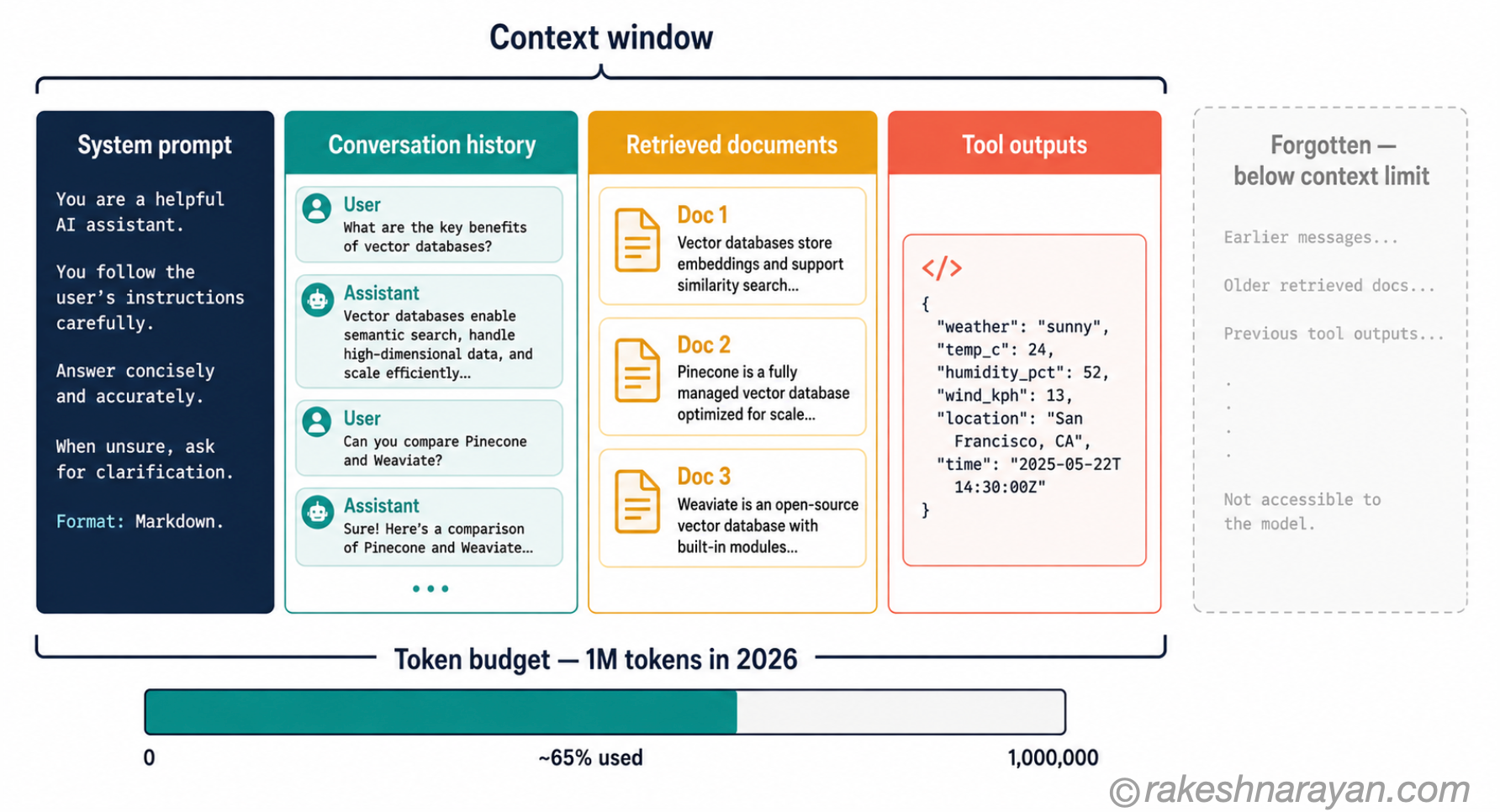
What fills the context — and what gets dropped
The context window is not just the conversation you have with the model. In any real AI system, it competes for space with several things at once:
| What fills the context | Typical token cost | Notes |
|---|---|---|
| System prompt | 500 – 5,000 tokens | Instructions, persona, rules — present in every request |
| Conversation history | Grows with every turn | Each exchange adds tokens; long chats fill the window fast |
| Retrieved documents (RAG) | 5,000 – 50,000+ tokens | Documents fetched to ground the model’s answer |
| Tool outputs | Varies widely | Results from function calls, code execution, search |
| User message + response | Typically 500 – 2,000 tokens | The actual content of the exchange |
When the window fills up, something has to give. Most implementations drop the oldest conversation turns first — the start of the conversation disappears, leaving only the most recent exchanges. The model has no way to tell you this is happening.
There is a second problem that most people do not expect: models do not treat all positions in the context equally. Research consistently shows that LLMs perform significantly better on information at the start or end of the context than on information buried in the middle. This is called the lost in the middle problem.
Put your most important facts first. The middle is where attention weakens — regardless of which model you are using.
💡 Practical tip
Structure long prompts so that critical context appears near the start and your specific question or instruction appears at the end. This applies to RAG documents, pasted source material, and conversation history alike.
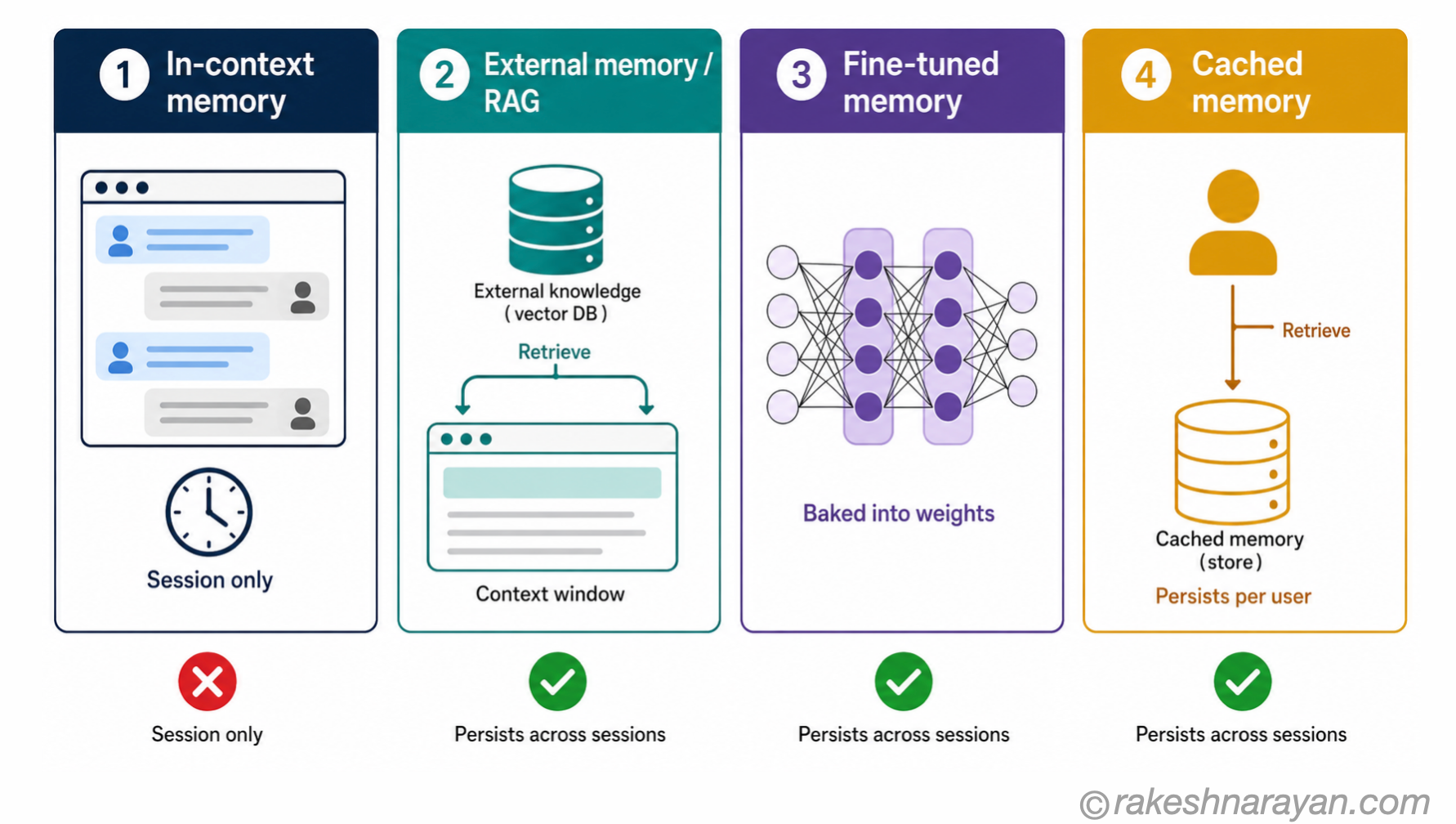
The four types of memory in AI systems
Solving the context window limitation requires going beyond the window itself. In 2026, most serious AI applications use a combination of four memory types, each suited to a different problem.
| Memory type | Where it lives | Persists across sessions? | Best for |
|---|---|---|---|
| In-context memory | The context window | No — cleared when session ends | Ongoing conversation, multi-step reasoning within one session |
| External memory (RAG) | A vector database or document store | Yes — retrieved on demand | Large document libraries, company knowledge, real-time data |
| Fine-tuned memory | The model weights themselves | Yes — baked into the model | Domain-specific style, terminology, consistent behaviour at scale |
| Cached / persistent memory | Saved conversation summaries or fact stores | Yes — retrieved per user or session | Personal preferences, user history, long-running agents |
In-context memory
This is the default. Everything currently in the context window is memory the model can use. It is immediate and accurate — the model sees exactly what you put in.
The limitation is that it is bounded and ephemeral. Use it for active reasoning, document analysis and multi-turn conversation within a single session.
External memory — RAG
Retrieval-Augmented Generation solves the persistence problem by storing documents in a vector database and retrieving relevant chunks when needed. Instead of putting a 200-page policy manual in the context window, you retrieve only the relevant sections and inject them for each query.
RAG does not give the model memory. It gives the model access to a document store. The model still does not learn from what it retrieves. It reads it in the moment, answers based on it, and forgets it when the session ends. The documents persist — the model’s experience of them does not.
For a full breakdown of how RAG works, see RAG — Retrieval Augmented Generation Explained.
Fine-tuned memory
Fine-tuning changes the model weights themselves — training the model on additional data so that specific knowledge, style, or behaviour becomes part of the model. This is the most durable form of memory: it persists across every session, needs no retrieval, and adds no tokens to the context window.
The trade-off is cost and rigidity. Fine-tuning is expensive, takes time, and once the knowledge is baked in, it cannot be updated without retraining. Use it for stable, high-value behaviours — consistent tone, domain-specific terminology, specialised task formats — not for information that changes.
Cached and persistent memory
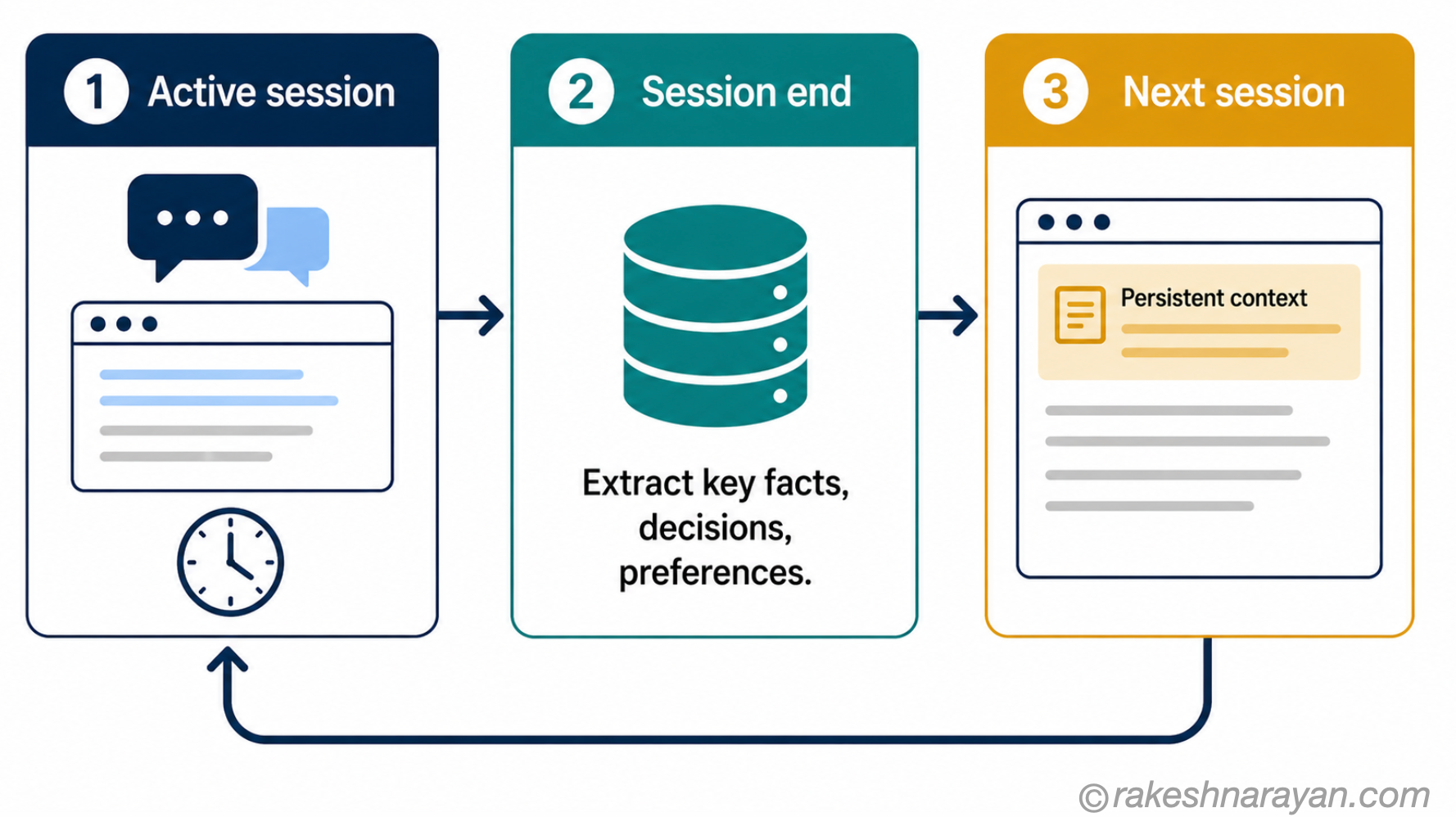
This is the memory layer that AI agents and personal assistants use to maintain continuity across sessions. After each session, key facts are extracted and stored — user preferences, decisions made, issues resolved. At the start of the next session, relevant facts are retrieved and injected into the context.
It is not true memory in the way a human experiences it. It is structured retrieval of past context. The model still processes each session fresh — but it begins with a richer context than a blank window. This is what Claude’s memory feature, and similar capabilities in other AI products, does under the hood.
Why forgetting is a feature, not a bug
The stateless design of LLMs is not an oversight. There are good reasons to start each session fresh.
Privacy. If models retained everything from every conversation, every user’s data would need to be stored, secured and potentially retrievable. Stateless sessions make privacy simpler by default — when the session ends, the data is gone.
Predictability. A stateless model gives consistent, reproducible responses to the same input. A model that accumulates context across millions of conversations would be unpredictable — its behaviour would shift based on everything it had previously absorbed. Statelessness is what makes LLMs testable and deployable at scale.
Cost. Every token in the context window costs money to process. A model that carried all prior context indefinitely would become prohibitively expensive to run.
The limitation only becomes a problem when the design pretends it does not exist — when an AI product acts as though it remembers, or when a system is built without thinking about what happens when the window fills.
⚠️ Warning
AI hallucinations get worse in very long conversations, not better. As conversation history fills the window and earlier instructions get pushed out, the model loses grounding in what was agreed at the start. Long-running sessions without memory management are one of the most common causes of quality degradation. See AI Hallucinations — Why They Happen for the full explanation.
What this means for how you use AI
Understanding the memory model changes how you approach AI in practice. Three things are worth internalising.
Treat each long session as a resource that depletes. The context window fills up. If your task requires sustained context — reviewing a large document, running a multi-step analysis — front-load the most important information and structure the conversation so the model does not need to refer back to something it may have already lost.
For anything that needs to persist, build the memory layer deliberately. If you are building an AI product and you need it to remember users, their preferences, or prior decisions, you need to explicitly design that. It will not happen by default. The choice is between RAG for knowledge retrieval, cached summaries for user continuity, and fine-tuning for permanent behaviour changes.
Know which problem you are actually solving. RAG is for knowledge retrieval — getting the right documents in front of the model. Fine-tuning is for behaviour — making the model consistently act a certain way.
Cached memory is for continuity — making sessions feel connected. Using the wrong tool for the wrong problem is the most common mistake in applied AI work.
For a deeper look at how these choices play out — and when to reach for each one — see AI Agents — What They Are and How They Work, which covers how agents manage multi-session context at scale.
✅ Best practice
For any AI product that needs continuity across sessions: extract a structured summary at the end of each session and store it. At the start of the next session, inject the relevant summary as part of the system prompt. This is the simplest effective implementation of persistent memory — no vector database required for lightweight use cases.
At a glance — AI memory essentials
| Concept | One-line summary |
|---|---|
| Context window | The model’s working memory — everything it can see in one session; gone when the session ends |
| Token limit | The maximum size of the context window; frontier models offer up to 1M+ tokens as of 2026 |
| Lost in the middle | Models perform worse on information buried in the middle of long contexts; put key content first |
| In-context memory | Whatever is currently in the context window; bounded, ephemeral, and immediately available |
| External memory (RAG) | Documents stored in a vector database and retrieved on demand; the model reads but does not learn from them |
| Fine-tuned memory | Knowledge baked into the model weights through additional training; permanent but costly to update |
| Cached / persistent memory | Per-user or per-session facts stored externally and injected at session start; gives the illusion of continuity |
| Stateless design | LLMs start fresh each session by design — for privacy, cost and predictability; memory is always an engineering addition |
What to take away
The question people usually ask is: does AI remember? The more useful question is: what should it remember, when, and how?
The context window is not a memory system. It is a processing surface — temporary and bounded. Real memory in AI is always an engineering decision: something you design, build and maintain on top of the model. The model itself does not accumulate experience. It processes what you give it, responds, and resets.
That framing changes how you evaluate AI products. When a product claims to remember your preferences or your history, ask what it is actually doing: retrieving from a document store, injecting a saved summary, or using fine-tuned weights? The claim is marketing. The mechanism determines whether it will actually work — at scale, over time, and under the edge cases your users will inevitably hit.
🔗 Related posts on this site
RAG — Retrieval Augmented Generation Explained The full external memory architecture: how documents are stored, retrieved and injected into context.
How Generative AI Works — Tokens, Embeddings and the Transformer The mechanics behind token-by-token generation and why the context window is the model’s only view of the world.
AI Agents — What They Are and How They Work How agents manage memory across long-running tasks and multiple sessions.
AI Hallucinations — Why They Happen and What You Can Do About Them Why context loss in long conversations is one of the direct causes of hallucination.
Published on rakeshnarayan.com — Articles
URL: https://rakeshnarayan.com/articles/ai-memory-how-llms-remember-and-why-they-forget/
Did you enjoy this article?
Let me know — it takes one click.
0 Comments
Leave a Comment
Looks like this one held your attention — I'd really appreciate a quick comment below.
Your comment has been submitted and will appear after review.