Temperature and Top-p — Controlling LLM Output
You have copied temperature=0.7 from a tutorial. You have set it, shipped it, and never thought about it again. That works — until the model starts writing nonsense, or repeating itself, or giving a different answer every time someone asks the same question. Then you are left guessing which knob to turn.
Temperature, top-p and top-k are not mysterious. They are three levers that control how an LLM picks each token as it generates a response. Understanding them takes about ten minutes. Knowing when to change them will save you hours of debugging and make your AI outputs noticeably more reliable.
This post explains what each one does, how they interact, and what to set for any real task — from code generation to creative writing to customer-facing chat.
🔗 Foundation posts
This post goes one level deeper than the generation mechanism covered in How Generative AI Works — Tokens, Embeddings and the Transformer . That post introduces token-by-token generation and mentions temperature briefly. This post explains the full set of sampling controls.
If you are new to LLMs entirely, start with What is a Large Language Model (LLM)? first.
What the model is doing before any setting kicks in
Every time an LLM generates a word, it does not just pick one. It calculates a probability score for every token in its vocabulary — which can be 50,000 tokens or more. The result is a ranked list: some tokens are very likely, most are extremely unlikely.
Before sampling parameters do anything, the model has already done the hard work. It has processed your prompt, run it through the transformer, and produced that ranked list. Temperature, top-p and top-k only operate on what happens next — how the model selects one token from that distribution.
Without any controls, the model would always pick the highest-probability token. That is called greedy decoding. The output is consistent — and usually repetitive and flat. Sampling parameters exist to make that selection smarter.
Temperature — the creativity dial
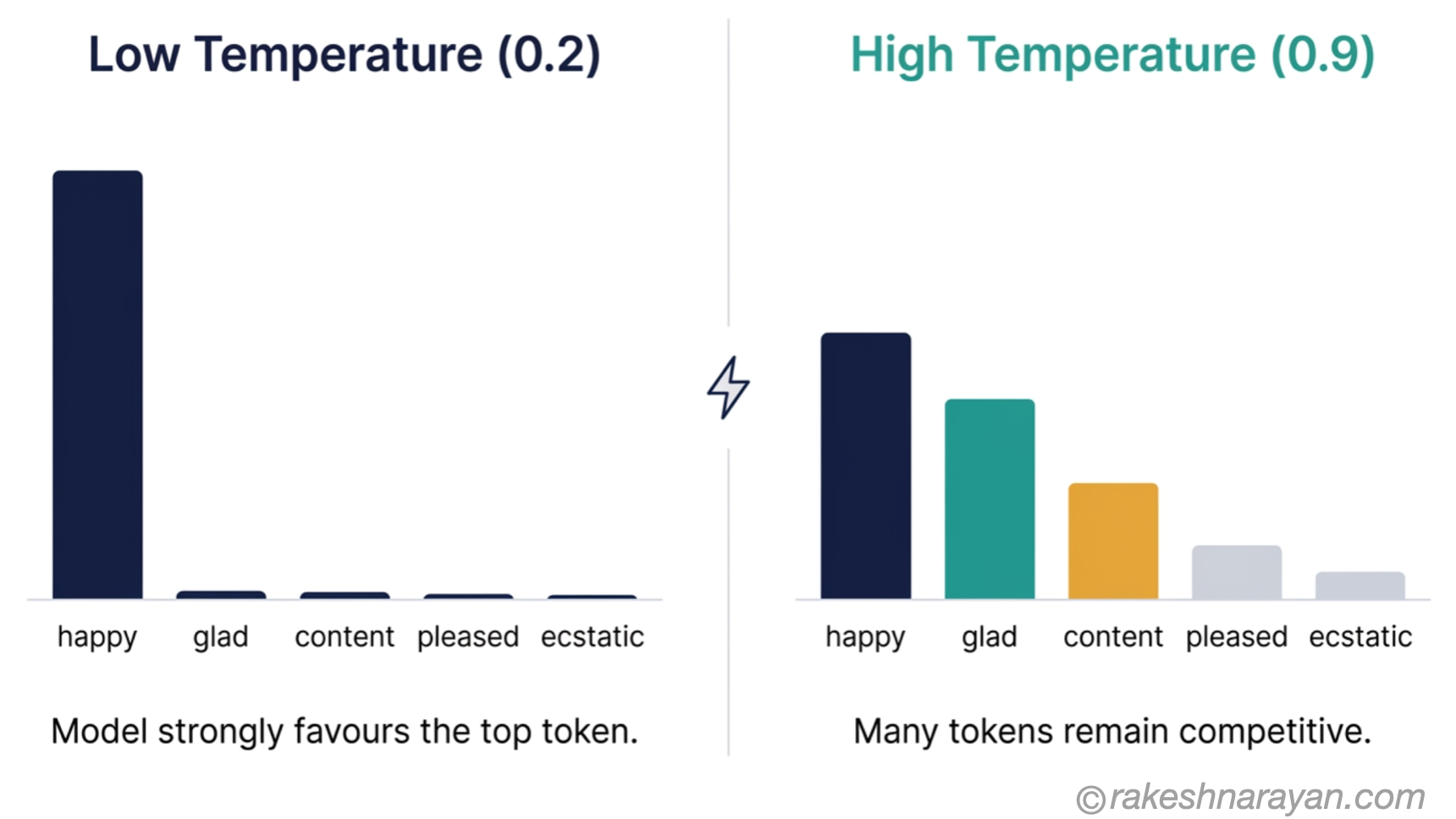
Temperature is the most important sampling parameter. It reshapes the probability distribution before the model picks a token. The range is typically 0.0 to 1.0, though some providers allow up to 2.0.
Low temperature makes the distribution sharper — the highest-probability tokens get even more weight, the rest get squeezed out. High temperature flattens it — more tokens become viable candidates, including some that would normally be long shots.
Think of it this way: low temperature is the model playing it safe, sticking to its most confident answers. High temperature is the model taking risks, reaching for less obvious choices.
| Temperature | What it does | Best for |
|---|---|---|
| 0.0 | Greedy decoding — model always picks the single most probable token | Data extraction, JSON output, classification, SQL queries |
| 0.1 – 0.3 | Very focused — minimal variation, highly predictable | Code generation, factual Q&A, structured reports |
| 0.4 – 0.7 | Balanced — consistent but not robotic | General chat, summarisation, customer support, SAP Joule responses |
| 0.8 – 1.0 | Creative — model explores less likely tokens | Copywriting, brainstorming, creative writing, varied output |
| Above 1.0 | High risk — output becomes diverse but increasingly incoherent | Experimental use only — not recommended for production |
⚠️ Temperature = 0 is not truly deterministic.
It sets greedy decoding, but hosted APIs still introduce small variation due to floating-point rounding and GPU batching. In practice, outputs at temperature 0 are highly consistent — but not byte-for-byte identical on every run.
If your pipeline requires strict reproducibility, OpenAI exposes a seed parameter for best-effort control. Anthropic does not expose a stable seed parameter as of 2026. For true determinism, you need a self-hosted model on fixed hardware.
Top-p — the smarter filter
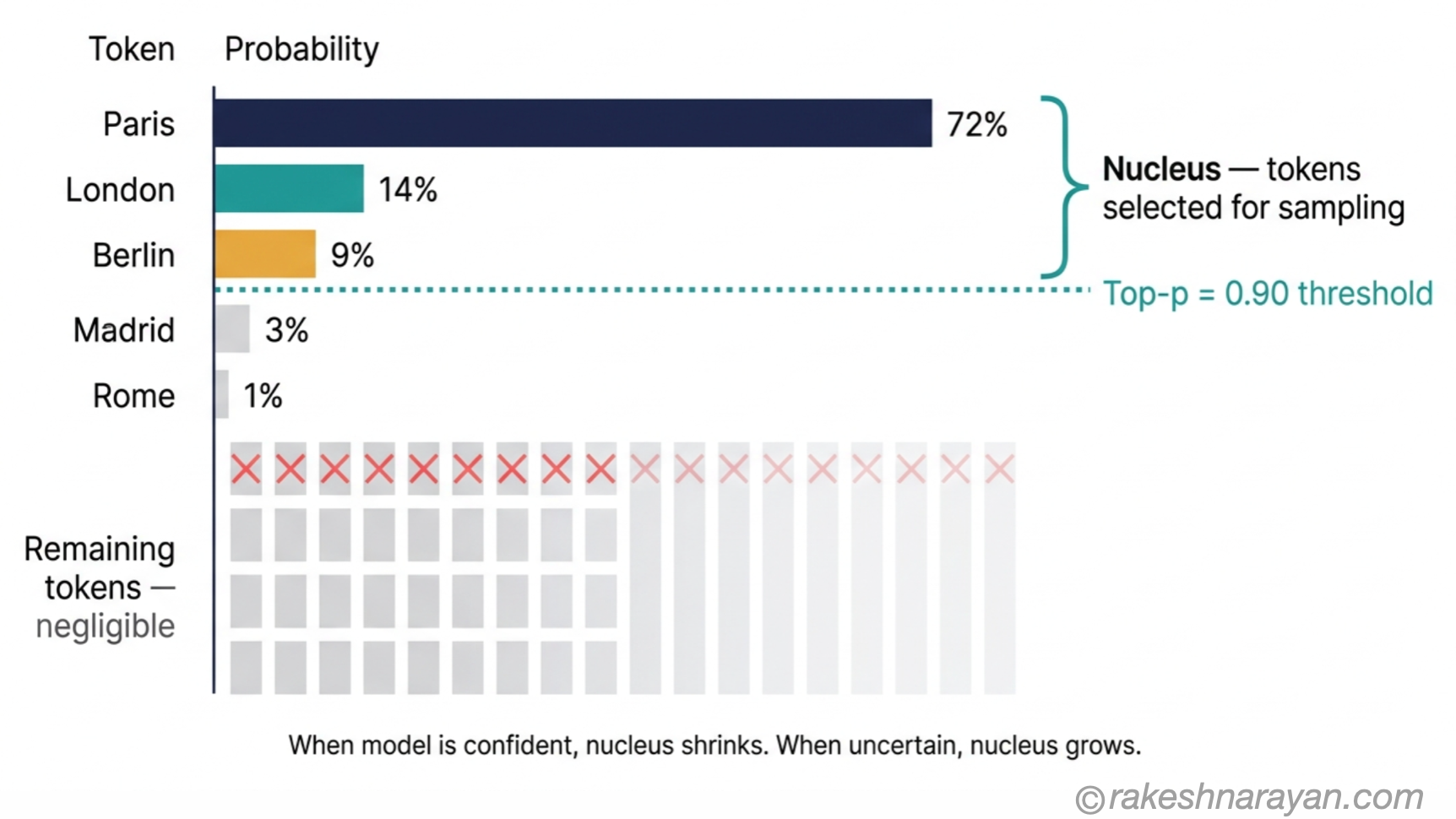
Top-p (also called nucleus sampling) works differently from temperature. Instead of reshaping the whole distribution, it cuts it. The model sums token probabilities from highest to lowest until the cumulative total reaches p. Everything below that threshold is discarded. The model then picks from what is left.
At top-p = 0.9, the model builds a pool of tokens that together account for 90% of the probability mass. When the model is confident — say the answer is clearly ‘Paris’ — that pool might contain just one or two tokens. When the model is uncertain, the pool expands to include many candidates. It adapts automatically.
This is the key advantage over top-k. Top-p responds to the model’s confidence. Top-k does not.
| Top-p value | What it does | When to use |
|---|---|---|
| 1.0 (default) | No filtering — all tokens remain in pool | When you want temperature to do all the work |
| 0.95 | Removes the very long tail of near-zero tokens | General-purpose safety net — works well alongside any temperature |
| 0.9 | Tighter pool — standard production setting | Most API integrations, customer-facing chat, structured output |
| 0.7 – 0.8 | Focused pool — fewer candidates | Factual tasks where you want extra control over output quality |
💡 Use temperature or top-p — not both aggressively.
Provider documentation consistently recommends tuning one, leaving the other at a neutral value. If you are adjusting temperature, set top-p to 1.0 and leave it. If you are adjusting top-p, set temperature to 1.0.
Tuning both simultaneously creates interactions that are hard to reason about and even harder to debug.
Top-k — the simpler cousin
Top-k is the predecessor to top-p. It keeps exactly k tokens — the k highest-probability ones — and discards everything else. Simple, fast, predictable.
The weakness is that k is a fixed number regardless of context. If the model is 95% confident about the next token, top-k = 40 still drags in 39 near-zero-probability alternatives. If the model is genuinely uncertain across hundreds of candidates, top-k = 40 cuts it off too aggressively.
This is why top-p has largely replaced top-k for hosted API use. OpenAI does not expose top-k at all. Anthropic and Google expose it, but their documentation recommends top-p for most production work. In 2026, top-k is mostly used in open-source and self-hosted deployments where you want fine-grained control over inference.
📌 The practical rule in 2026:
For hosted APIs (OpenAI, Claude, Gemini, SAP Joule), use temperature and top-p. Leave top-k alone or at its default.
For self-hosted open-weights models (Llama, Mistral via llama.cpp or vLLM), top-k gives you useful additional control over the inference loop.
How to set them — the practical cheat sheet
The settings below are verified starting points, not magic numbers. Test against your actual output, adjust in small increments, and always evaluate against real examples from your use case — not just a single prompt.
| Task | Temperature | Top-p | Reasoning |
|---|---|---|---|
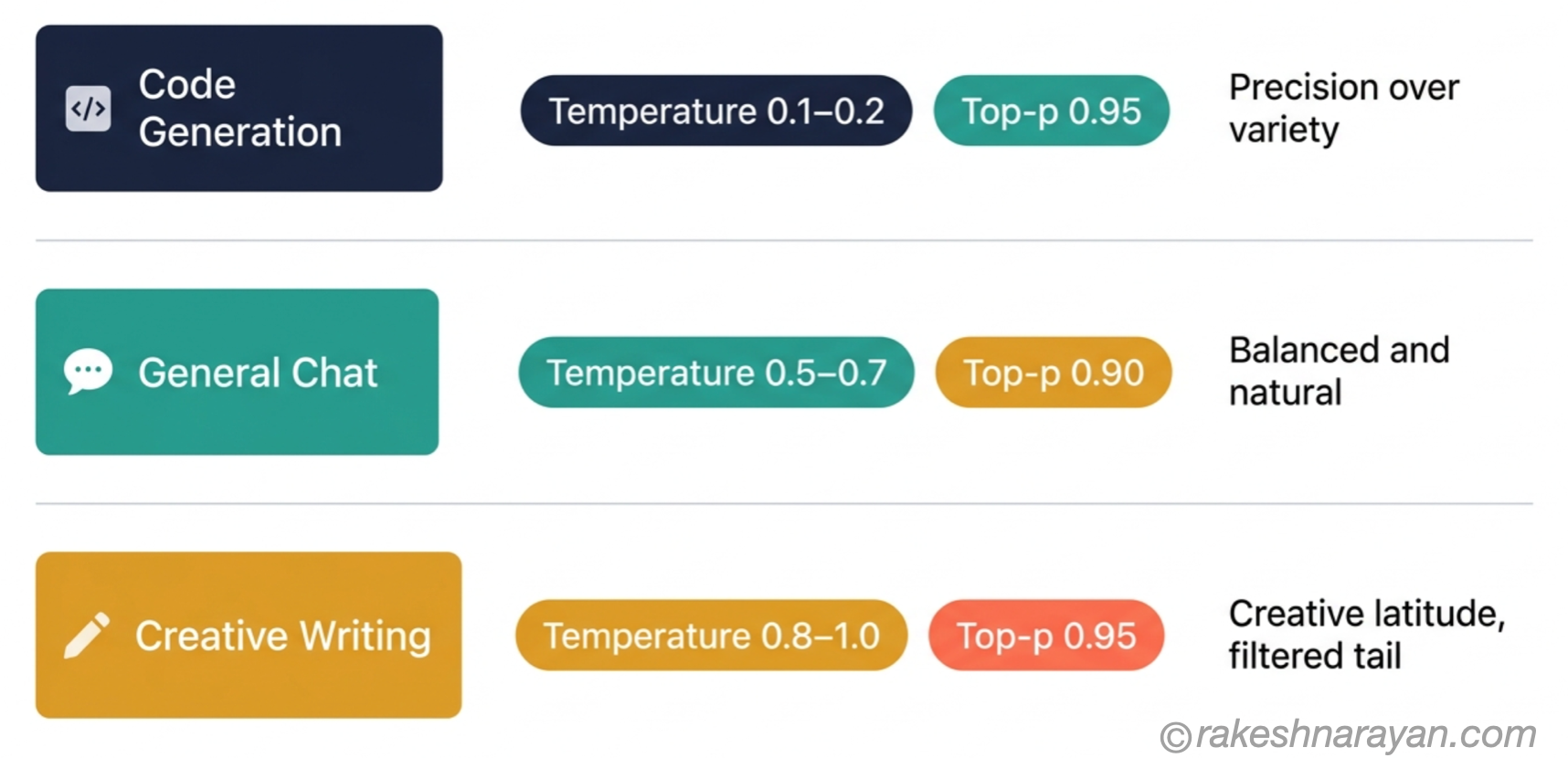
| Code generation | 0.1 – 0.2 | 0.95 | Code has right and wrong answers. Low temperature keeps the model on the safe path. Top-p as a safety net. |
| Data extraction / classification | 0.0 | 1.0 | One correct answer. Greedy decoding. No filtering needed. |
| Factual Q&A | 0.1 – 0.3 | 0.9 | Accurate and consistent. Small variance acceptable for natural phrasing. |
| General chat / customer support | 0.5 – 0.7 | 0.9 | Balanced. Natural-sounding without going off-script. |
| Document summarisation | 0.3 – 0.5 | 0.9 | Faithful to source. Some variance for readability is fine. |
| Creative writing / copywriting | 0.8 – 1.0 | 0.95 | Creative latitude. Top-p at 0.95 filters the very long tail without constraining creativity. |
| RAG / grounded responses | 0.2 – 0.4 | 0.9 | Model should stay close to the retrieved context. Low temperature reduces hallucination risk. |
| Reasoning models (o-series, extended thinking) | Default / 1.0 | Default | Internal deliberation determines accuracy. Temperature mostly affects surface phrasing. Leave at defaults. |
✅ Best practice: set temperature first, then top-p.
Decide how creative or conservative you need the output to be — that sets your temperature. Then decide whether you need a safety net on the token pool — that sets top-p.
A good default for most production work: temperature=0.3, top-p=0.9 for factual tasks and temperature=0.7, top-p=0.95 for anything conversational.
At a glance — temperature and top-p
| Concept | One-line summary |
|---|---|
| Temperature | Reshapes the probability distribution — low for precision, high for creativity |
| Temperature = 0 | Greedy decoding — most consistent output, but not truly deterministic on hosted APIs |
| Top-p (nucleus sampling) | Keeps only the tokens that together make up p% of the probability mass — adapts to model confidence |
| Top-k | Keeps exactly k tokens — simpler than top-p but static; mostly used for self-hosted models in 2026 |
| Temperature vs top-p | Tune one, leave the other at its neutral value — tuning both simultaneously is hard to reason about |
| Code and extraction | Temperature 0.0–0.2, top-p 0.9–0.95 — precision tasks need a tight distribution |
| General chat | Temperature 0.5–0.7, top-p 0.9 — balanced and natural |
| Creative writing | Temperature 0.8–1.0, top-p 0.95 — latitude with a filtered long tail |
| Reasoning models | Leave sampling parameters at provider defaults — internal deliberation drives quality, not surface temperature |
| Controlling LLM output | Temperature + top-p are the two primary levers — everything else is secondary |
What to take away
Temperature and top-p are not configuration noise. They are the mechanism by which an LLM decides whether to play it safe or take a risk on every single token it generates. Get them wrong for your task and you will spend hours debugging outputs that are actually a settings problem.
The teams producing consistent, reliable AI output in 2026 are not using better models. They are treating these parameters deliberately — choosing temperature for the task, using top-p as a controlled filter, and not touching both at once. It takes five minutes to set correctly and saves hours of confused iteration.
The model’s job is to be plausible, not correct. Temperature and top-p control how adventurous plausible gets. For tasks with a right answer, keep plausible close to certain. For tasks that need originality, give it room to explore. That is the whole framework.
🔗 Related posts on this site
How Generative AI Works — Tokens, Embeddings and the Transformer — the generation mechanism that sampling parameters operate on. Read this to understand why these settings exist.
Prompt Engineering — How to Get Reliable Output from Any LLM — sampling is the last 10% of reliable output. Prompt structure is the first 90%. Both matter.
AI Hallucinations — Why They Happen and What You Can Do About Them — high temperature increases hallucination risk. That post explains why and what to do about it.
Context Engineering — Beyond Prompts to Production — how to structure everything the model receives, not just the prompt. Sampling parameters and context engineering together cover most of what controls output quality.
Published on rakeshnarayan.com — Articles
URL: https://rakeshnarayan.com/articles/temperature-and-top-p-controlling-llm-output/

Did you enjoy this article?
Let me know — it takes one click.
0 Comments
Leave a Comment
Looks like this one held your attention — I'd really appreciate a quick comment below.
Your comment has been submitted and will appear after review.