SAP Cloud Identity Services — IAS vs IPS
Ask someone to explain the difference between SAP IAS and SAP IPS and watch them stall. Both live under the same SAP Cloud Identity Services banner.
Both show up in the same BTP subaccount. Most consultants use them for years without ever needing a clean one-line answer.
That gap catches people out during landscape design, and it catches them out worse during an audit. IAS and IPS solve two completely different problems.
One proves who you are. The other makes sure the right identity exists in the right system in the first place.
This post gives you the model. Once you see the split — authentication versus provisioning — every configuration screen you have stared at blankly starts making sense.
🔗 Foundation posts
This post builds on SAP Security Roles and Authorisation and SAP BTP — The Platform Explained. The authorization-object model and the BTP concepts covered there are the foundation for everything here.
What SAP Cloud Identity Services actually is
SAP Cloud Identity Services is the umbrella. IAS and IPS are the two services inside it, both running on SAP BTP, both built on the same technology stack, both administered from the same Cloud Identity Services administration console.
For SAP SuccessFactors tenants created after 9 December 2022, IAS comes bundled and deployed automatically — SAP announced the change that month, and it applies before you configure anything. A plain SAP BTP subaccount is different: it still defaults to the SAP ID service, and you have to entitle IAS yourself before it appears in the service marketplace.
Every customer gets one test tenant and one production tenant per service, regardless of how many contracts you have signed with SAP. If that is not enough for your landscape, additional tenants are available through the BTP cockpit for consumption-based licences, or a service ticket for subscription licences.
💡 Practical tip
I have seen teams treat IAS and IPS as one thing during project scoping, only to realise mid-implementation that they need two separate configuration efforts with two separate owners. Plan for that split early. It saves a painful conversation later.
SAP IAS — authentication, not authorization
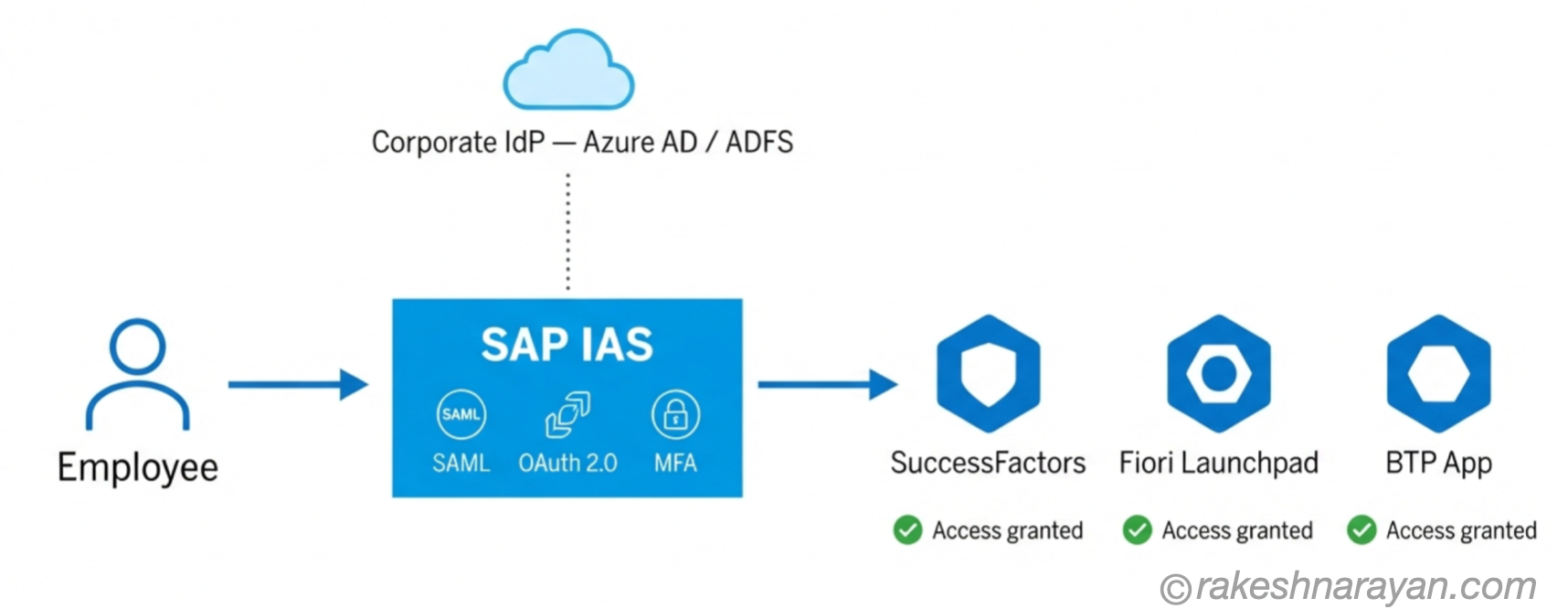
SAP IAS is the authentication layer. It answers exactly one question: is this person who they claim to be.
It supports SAML 2.0 and OAuth 2.0 or OpenID Connect, and it can act as your central identity provider or sit in front of a corporate one you already have, such as Microsoft Entra ID or ADFS. Single sign-on is the point. Log in once through IAS, get into every connected cloud application without logging in again.
IAS also handles multi-factor authentication and risk based access. Risk based access is worth understanding on its own. It lets you demand stronger proof of identity depending on where a login is coming from, what device is being used, or whether the pattern looks unusual — rather than applying the same MFA challenge to every login regardless of context.
⚠️ Where consultants trip up
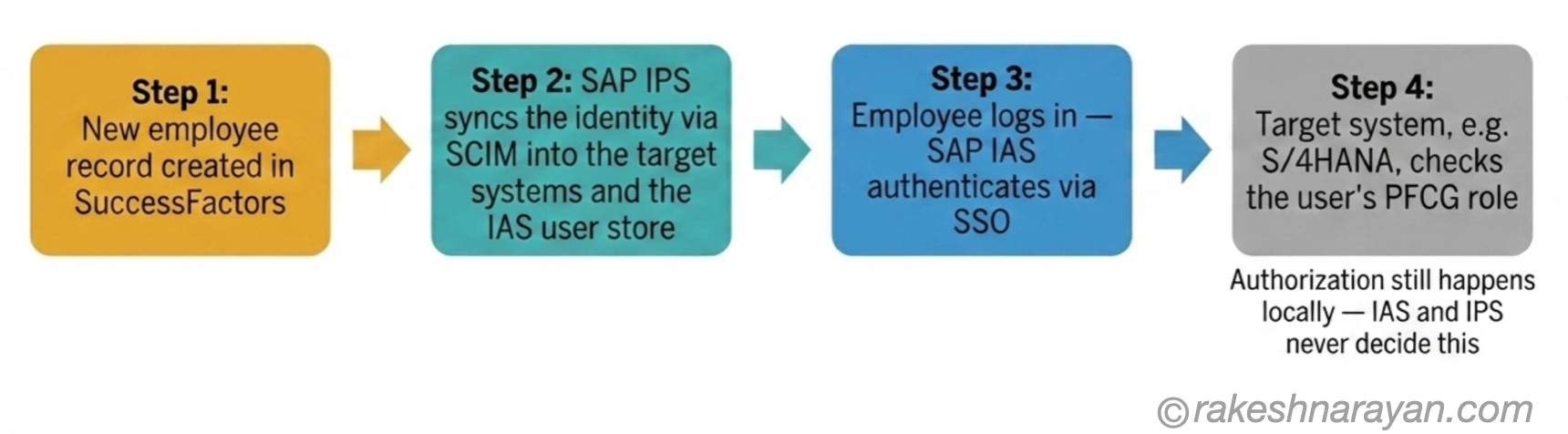
IAS confirms who someone is. It has no opinion on what they are allowed to do once inside. That decision still belongs to the target system — the same PFCG roles and authorization objects covered in the SAP Security Roles and Authorisation post. Authentication and authorization are not the same job, and IAS only does the first one.
SAP IPS — the provisioning layer
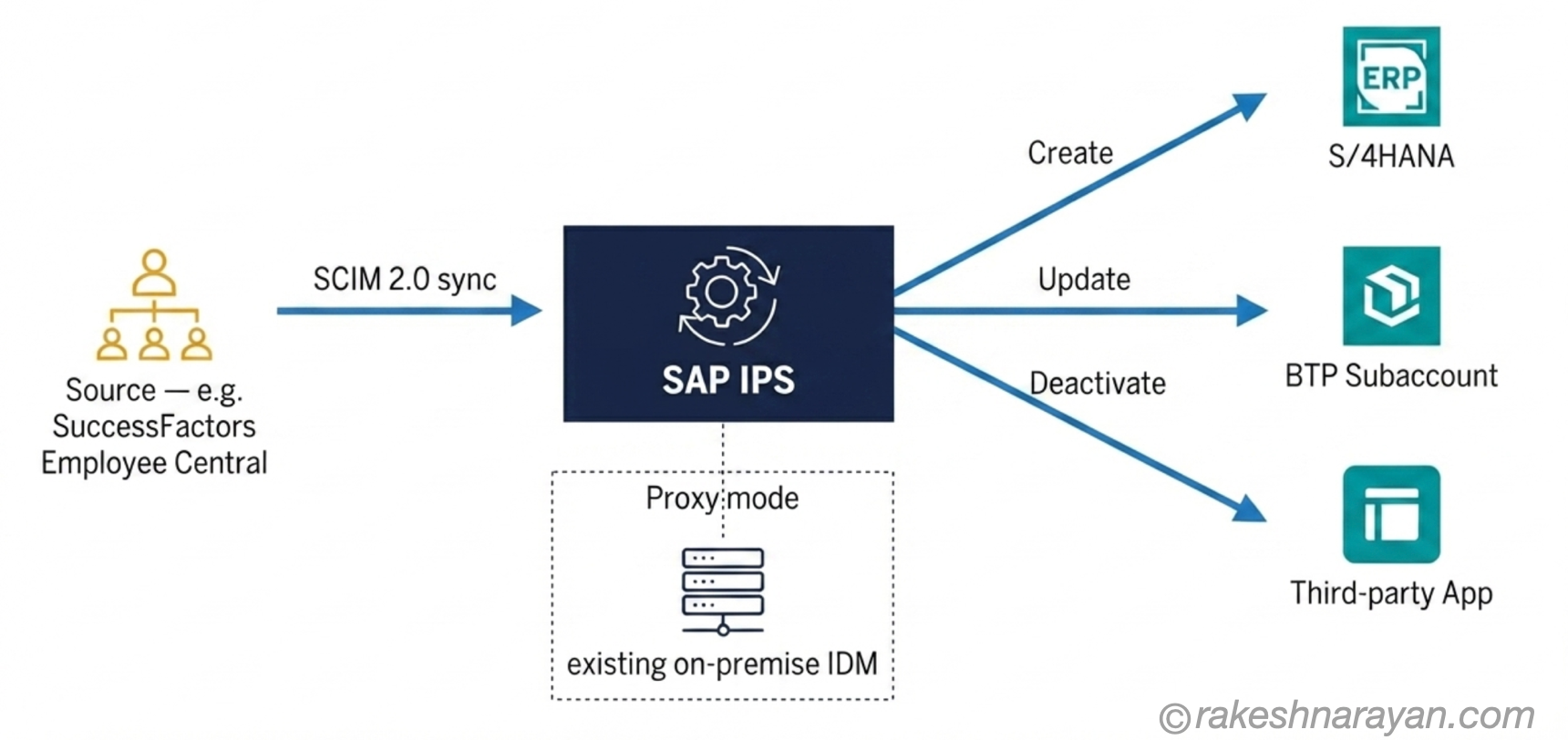
SAP IPS automates the other half of the identity problem, keeping user records in sync across every connected system. It creates accounts when someone joins, updates them when something changes such as a department move, and deactivates them the moment someone leaves.
Under the hood, IPS uses SCIM 2.0, a standard protocol for moving identity data between systems. You configure a source, where the identity originates, and one or more targets, where it needs to exist. A common setup uses SuccessFactors Employee Central as the source and S/4HANA, BTP subaccounts and third-party SaaS tools as targets.
IPS can also run in proxy mode, sitting in front of an existing on-premise SAP Identity Management installation rather than replacing it outright. This matters for organisations that already invested heavily in SAP IDM and are not ready to rip it out. Proxy mode lets IPS extend that existing investment into the cloud rather than forcing a full replacement.
⚠️ Warning
Get the source-to-target mapping wrong in IPS and you do not get an error message that screams at you. You get orphaned accounts nobody remembers creating, or duplicate identities across systems that quietly drift out of sync. This is the kind of mistake that surfaces during an audit, not during testing — and by then it is expensive to unwind.
IAS vs IPS — side by side
| Aspect | SAP IAS | SAP IPS |
|---|---|---|
| Purpose | Authenticates users — confirms identity at login | Provisions and deprovisions user accounts across systems |
| Core protocol | SAML 2.0, OAuth 2.0, OpenID Connect | SCIM 2.0 |
| What it manages | Login, SSO, MFA, risk based access | User lifecycle — create, update, deactivate |
| Typical use case | Federating login across BTP apps, Fiori, SuccessFactors | Syncing HR master data into S/4HANA, BTP and third-party apps |
| Closest ABAP-world equivalent | Confirms identity, like a login screen | Keeps SU01 user records current across systems |
How they work together in a real landscape
Take a new employee joining a company that runs SuccessFactors as the system of record. Their record is created in Employee Central. IPS picks that up through SCIM and provisions the identity into every connected target, including the IAS user store itself, usually within minutes rather than the batch overnight cycles older IDM setups relied on.
When the employee logs in for the first time, IAS handles the authentication, checking credentials and applying whatever SSO or MFA policy is configured for their group. Once they are through the door, the target system — say S/4HANA — checks its own PFCG roles to decide exactly what they can see and do.
Group assignment sits at the intersection of both services, and it is worth calling out separately. IPS can assign a user to an IAS group based on an attribute coming from the source system, such as department or hire date, and IAS can then apply different authentication policies to different groups.
A finance user might need MFA on every login. A contractor might need it plus a tighter risk based policy. That distinction is configured once, at the group level, rather than user by user.
📌 Key takeaway
IPS decided the identity should exist. IAS confirmed it was really them. Neither one made a single decision about business authorization. That boundary is worth holding onto, because it is where most confusion about these services actually comes from.
The 2026 mandatory migration deadline
If you run SAP SuccessFactors, this is not optional reading. IAS adoption becomes mandatory for all SuccessFactors customers by November 2026, and the corporate IdP and basic authentication method used before IAS is being deprecated alongside it.
Customers who have not migrated yet should not wait for the final quarter of 2026 to start. The migration touches SSO configuration, group assignments and how existing integrations authenticate, and none of that is a same-day change on a live production system.
✅ Best practice
Identify every integration that currently authenticates the old way, test each one against IAS in a non-production tenant first, and cut over deliberately rather than in one big-bang change close to the deadline.
At a glance — SAP Cloud Identity Services
| Concept | One-line summary |
|---|---|
| SAP Cloud Identity Services | The umbrella product covering IAS and IPS, both running on SAP BTP |
| SAP IAS | Authentication service — confirms identity via SAML, OAuth 2.0 or OpenID Connect, powers SSO and MFA |
| SAP IPS | Provisioning service — syncs user lifecycle across systems using SCIM 2.0 |
| Proxy mode | IPS sitting in front of an existing on-premise SAP Identity Management system rather than replacing it |
| Tenant model | One test and one production tenant per service per customer, regardless of contract count |
| Authorization boundary | Neither IAS nor IPS decides what a user can do — that stays with the target system’s own roles |
| 2026 deadline | IAS becomes mandatory for all SuccessFactors customers by November 2026 |
What to take away
IAS answers who you are. IPS answers whether you should exist in this system at all. Neither one touches what you are allowed to do once you are in — that decision still lives exactly where it always has, in the target system’s own roles.
Once that boundary is clear, the rest of the SAP Cloud Identity Services configuration stops feeling like guesswork. You stop asking which service handles authorization, because the honest answer is neither, and you start asking the more useful question: which system’s roles actually govern this access.
🔗 Related posts on this site
SAP Security Roles and Authorisation — the PFCG and authorization object model that governs everything IAS and IPS hand off to.
SAP BTP — The Platform Explained — where IAS and IPS actually run, and how BTP subaccounts fit together.
OAuth 2.0 and OpenID Connect — How Modern Login Actually Works — the protocols IAS is built on, explained outside the SAP context.
SAP GRC Access Control — Segregation of Duties Explained — how authorization risk is managed once IAS and IPS have done their job.
Published on rakeshnarayan.com — Articles
URL: https://rakeshnarayan.com/articles/sap-cloud-identity-services-ias-vs-ips/
Did you enjoy this article?
Let me know — it takes one click.
0 Comments
Leave a Comment
Looks like this one held your attention — I'd really appreciate a quick comment below.
Your comment has been submitted and will appear after review.