SAP GRC Access Control — Segregation of Duties Explained
Every SAP audit eventually produces the same finding. A user has too much access. They can create a vendor and approve a payment. They can post a goods receipt and also settle the invoice. One person controlling an entire financial transaction from start to finish — with no second set of eyes anywhere in the process. That is what segregation of duties is designed to prevent.
The concept sounds simple. The implementation is not. In SAP, SoD conflicts rarely come from a single role. They come from combinations — two or three roles that each look clean on their own but create a violation when assigned to the same user. That is the part most people miss, and it is why SoD problems survive role redesigns and survive audits and keep coming back every year.
This post builds the mental model. What SoD actually is, how conflicts happen at the role combination level, how SAP GRC Access Control manages them, and what you do when you do not have GRC at all.
🔗 Foundation reading
This post assumes you understand SAP roles and authorisation objects. If that model is not clear yet, start with SAP Security Roles and Authorisation first — SoD only makes sense once you know how roles and profiles work. For broader SAP context, SAP S/4HANA vs ECC — The Real Difference covers where GRC fits across both platforms.
Why SoD exists — the problem it solves
Segregation of duties is an internal control principle. Its purpose is to ensure that no single person has end-to-end control over a critical business process — particularly in finance, procurement and HR, where unchecked access creates a direct path to fraud or undetected error.
The classic example: a user who can both create a vendor master record and approve outgoing payments to that vendor. They can add a fictitious supplier, then authorise a payment to it. No second approval required. No system check will catch it. This is not a theoretical risk — it is one of the most common fraud patterns in SAP environments.
SoD is also a compliance requirement. SOX (Sarbanes-Oxley) mandates it for US-listed companies. ISO 27001:2022 Annex A.5.3 references it. Internal audit frameworks include it as a baseline control. External auditors specifically look for SoD violations in SAP — finding them repeatedly is a material weakness.
📌 Key Takeaway
SoD is not a checkbox for auditors. It is a design principle. The goal is to make fraud or error require the involvement of more than one person — so that collusion is required to bypass the control, not just opportunity.
How SoD conflicts happen — the role combination problem
This is the mental model most people do not have clearly enough, and it explains why SoD problems persist even after security teams think they have cleaned up their roles.
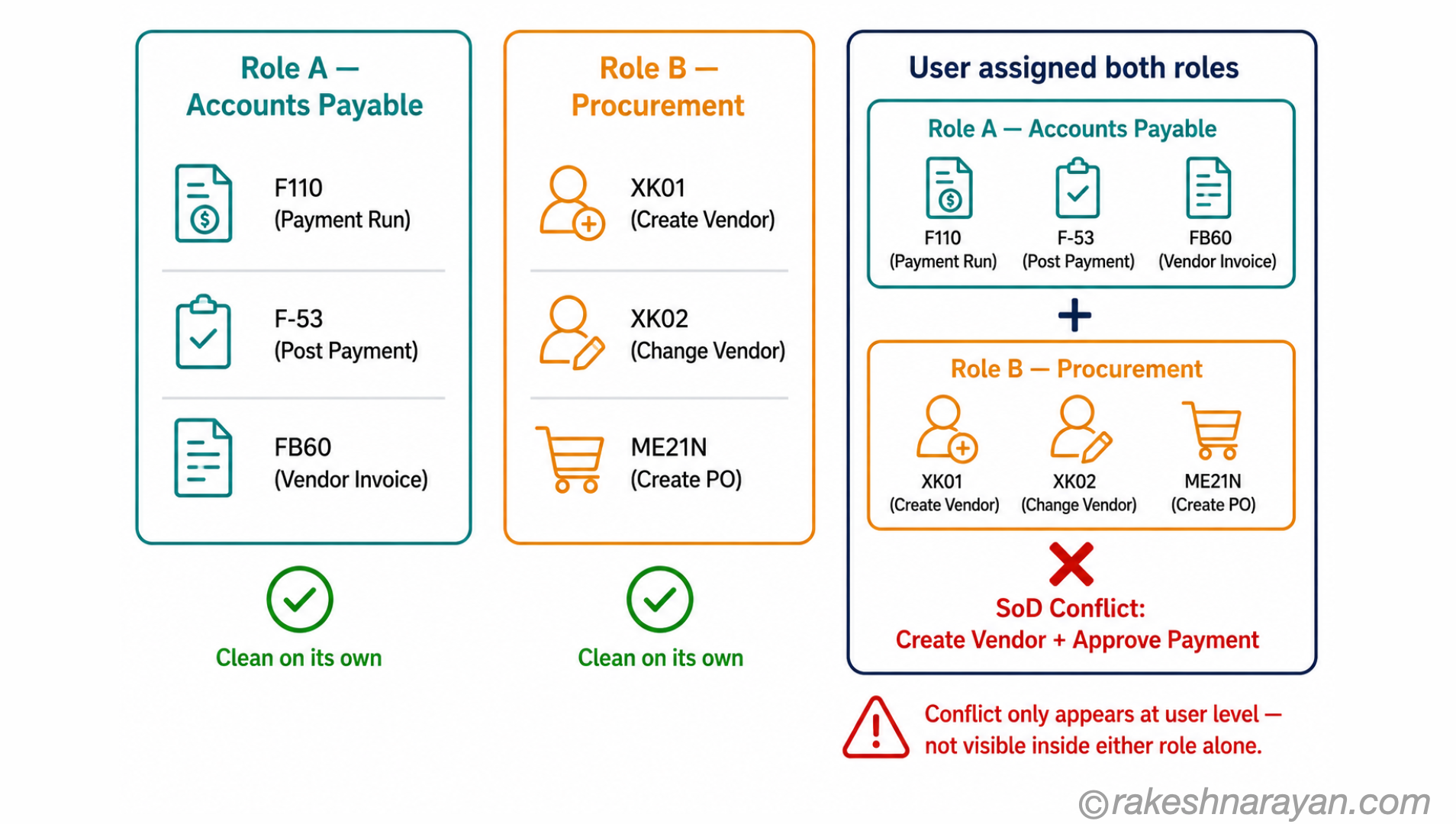
A single role rarely causes a conflict on its own. An Accounts Payable role gives access to vendor payment transactions. A Procurement role gives access to vendor master maintenance. Either role, individually, may be perfectly acceptable. The conflict appears when a single user holds both at the same time.
GRC Access Control analyses this at two levels. Role-level analysis checks whether a single role contains conflicting access within itself — a custom role that somehow includes both vendor creation and payment approval transactions. User-level analysis checks the full set of roles assigned to a user and identifies conflicts that only exist at the combination level. In practice, user-level is where most real violations live.
⚠️ Common mistake
Role-level analysis alone will not catch most real SoD violations. A user may hold six clean roles that create four conflicts in combination. Always run user-level analysis before any access review or audit. Role-level is useful for fixing role design — not for certifying a user’s access is clean.
The SoD matrix — how conflicts are defined
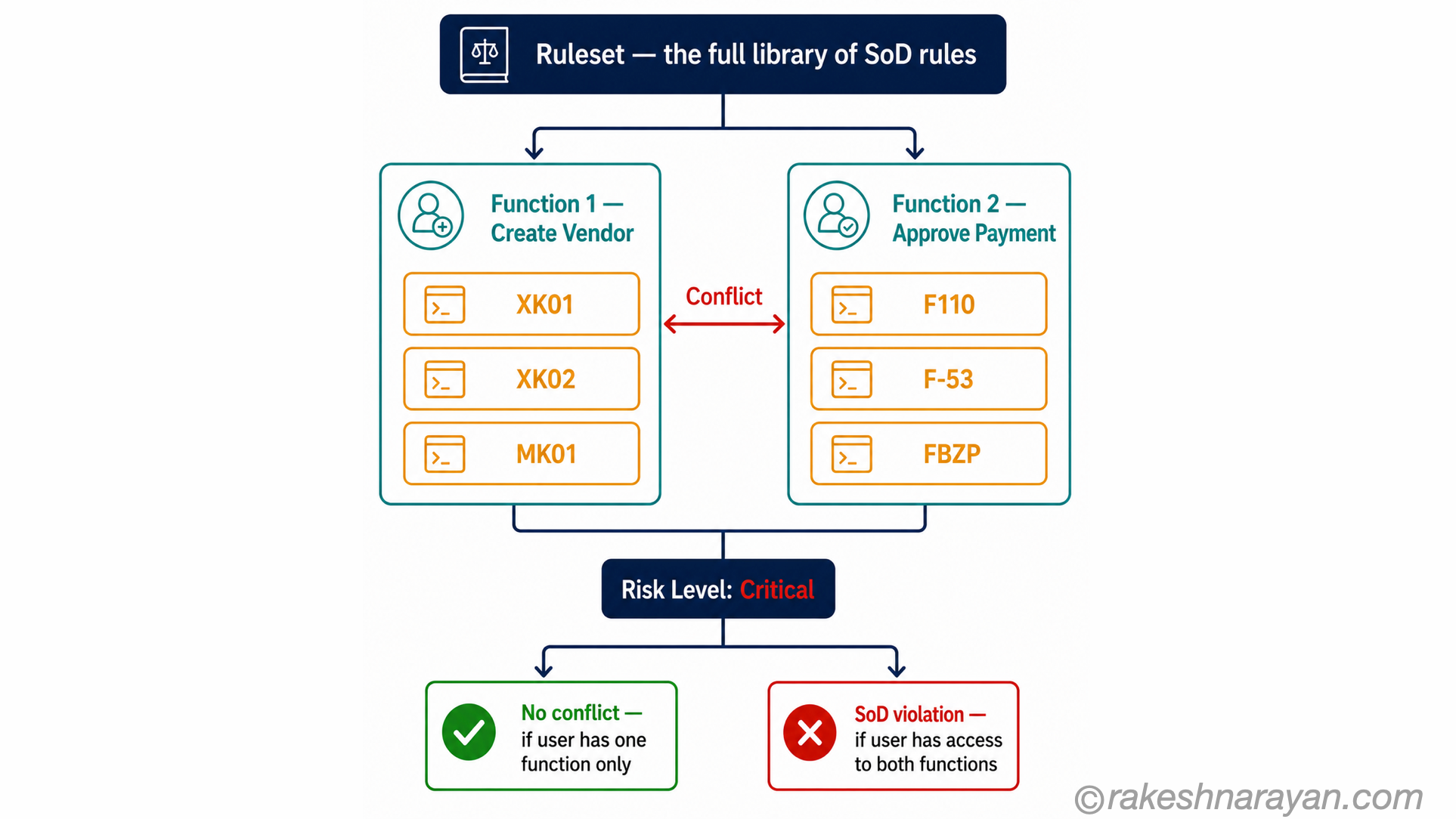
Before GRC can identify a conflict, someone has to define what a conflict is. That definition lives in the ruleset — a structured library of SoD rules that the system checks user access against.
Each rule defines two conflicting functions. A function is a group of SAP transactions or authorisation objects that together represent a business capability — “Create Vendor” or “Approve Payment”, for example. A conflict exists when a user has access to perform both functions. Each conflict is assigned a risk level: critical, high, medium or low.
SAP delivers a standard ruleset covering the most common SoD conflicts across FI, MM, HR, Basis and other modules. Most organisations start with the SAP ruleset and customise it — adding company-specific rules, adjusting risk levels, removing rules that do not apply. The ruleset is the governance layer. Without it, ARA has nothing to check against.
| Risk level | What it means | Example conflict |
|---|---|---|
| Critical | Fraud or major financial loss possible — zero tolerance in most organisations | Create vendor AND approve outgoing payment |
| High | Significant risk — remediation required, or strong compensating control | Create purchase order AND goods receipt posting |
| Medium | Risk exists but context-dependent — often mitigated | Maintain customer master AND post customer invoice |
| Low | Minor risk — typically handled through monitoring | Display-only access conflicts |
💡 Practical Tip
The SAP standard ruleset is a starting point, not a finished product. Every organisation has processes or controls that make certain standard conflicts acceptable — and risks the standard ruleset does not cover. Plan a ruleset review with the business and process owners before go-live, not after the first audit finding.
SAP GRC Access Control — the four components
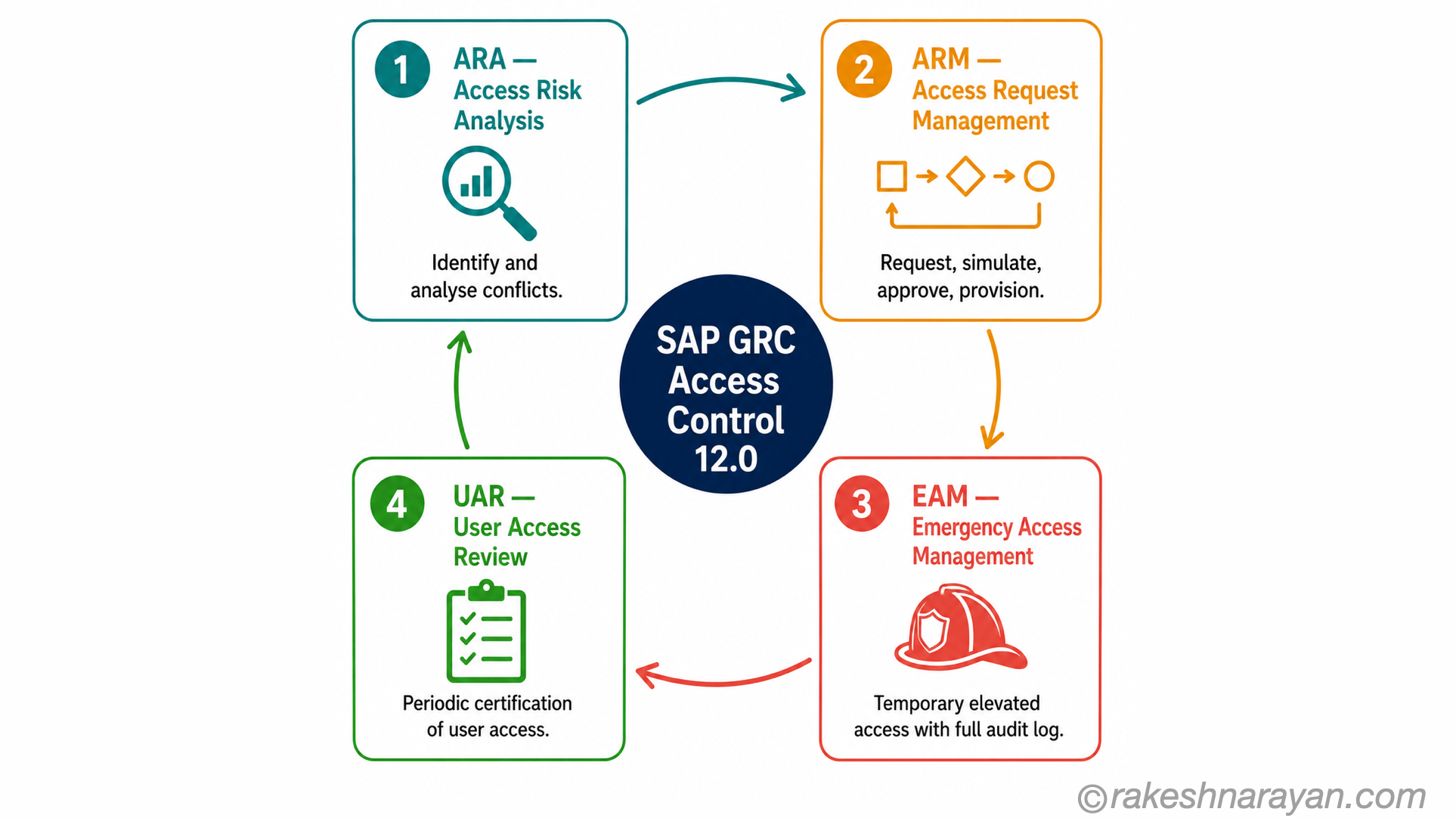
SAP GRC Access Control 12.0 is the on-premise platform most large SAP customers run for SoD management. It is not a single tool — it is four components that work together to cover the full access governance lifecycle.
| Component | Full name | What it does |
|---|---|---|
| ARA | Access Risk Analysis | The SoD engine. Scans user access against the ruleset and identifies conflicts. Runs at user level, role level, and in simulation mode before access is granted. |
| ARM | Access Request Management | The provisioning workflow. Access requests are submitted, routed for approval with built-in SoD simulation, and provisioned — or rejected — automatically. |
| EAM | Emergency Access Management | The Firefighter module. Manages elevated temporary access for emergency situations, with full logging, controller notification and post-use review. |
| UAR | User Access Review | The periodic recertification process. Role owners and managers review and certify (or revoke) user access on a scheduled basis — typically quarterly or annually. |
📝 Note — the landscape is shifting
SAP Access Control 12.0 mainstream support ends 31 December 2027, with extended support to 2030. SAP is actively developing two paths forward: SAP GRC Edition for SAP HANA for on-premise and private cloud, and SAP Cloud Identity Access Governance (IAG) on BTP for cloud-first organisations. If you are planning a new GRC implementation in 2026, the upgrade path is a conversation worth having early.
Firefighter — emergency access done right
Every SAP landscape eventually has a situation where someone needs access they do not normally have — a critical system failure at 2am, a month-end close crisis, a support engineer who needs to investigate a production issue. The temptation is to assign the access, deal with the SoD violation, and clean it up later. In practice, clean up later rarely happens.
EAM — Emergency Access Management — is the controlled alternative. A Firefighter ID (FFID) is a dedicated account with elevated access, pre-configured for specific emergency scenarios. Users do not get permanent access. They request Firefighter access, a controller approves it, they log in using the FFID, every action is recorded, and the controller reviews the log after use. The access is time-limited. The audit trail is complete.
ID-based vs role-based Firefighter
GRC Access Control supports two EAM approaches. ID-based Firefighter uses a shared account — users log into the FFID directly. It provides a strong audit trail but is harder to scale. Role-based Firefighter assigns a temporary role to the user’s own ID for the duration of the emergency, which is easier to manage in large landscapes but requires careful role design to avoid permanent access leakage.
✅ Best Practice
Every SAP landscape needs an emergency access process — with or without GRC. The worst answer is an undocumented workaround where a Basis admin assigns roles temporarily and removes them after the fact. That is the scenario that fails every audit. Even a manual Firefighter process with a shared log and a controller review is better than nothing.
When you do not have GRC — compensating controls
SAP GRC Access Control is a significant investment. Licence, implementation, ongoing maintenance — the total cost puts it out of reach for smaller organisations and many mid-market SAP customers. This is the honest part of the post: what do you do without it?
The answer is compensating controls — alternative measures that reduce the same risk GRC would automate. They require more manual effort and they do not scale as well, but they are auditor-acceptable when documented and consistently applied.
| Compensating control | How it works | Limitation |
|---|---|---|
| Manual SoD matrix review | A spreadsheet mapping high-risk function pairs to role assignments, reviewed quarterly by the security team | Labour-intensive, error-prone at scale, point-in-time only |
| SU53 analysis | Run SU53 after a failed access attempt to identify what authorisation object was missing — useful for debugging, not for proactive SoD review | Reactive, not preventive — shows failed checks, not active conflicts |
| Custom ABAP reports | A report that reads role and profile assignments and flags users who hold two or more roles from a defined high-risk list | Requires development, maintenance, and scheduling — not real-time |
| Periodic access certification | Managers review and sign off on their team’s access list on a scheduled basis — a manual UAR equivalent | Relies on managers understanding SAP roles, which is rarely the case |
| Process-level controls | Workflow-based approval for high-risk transactions — a second person must approve before a payment posts, regardless of authorisation | Requires process redesign and discipline; may miss access that is never used |
💡 Practical Tip
If you are running compensating controls instead of GRC, document them formally and get them signed off by internal audit before the external audit — not during it. An auditor who finds a compensating control that is already documented and consistently applied will accept it. An auditor who hears about it for the first time during the audit will not.
At a glance — SAP GRC Access Control and SoD
| Concept | One-line summary |
|---|---|
| Segregation of Duties (SoD) | The principle that no single user should have end-to-end control over a critical business process — fraud requires collusion, not just opportunity |
| SoD conflict | A violation where one user holds access to two or more functions that should be separated — most commonly caused by role combinations, not single roles |
| Role-level analysis | Checks whether a single role contains conflicting access within itself — useful for role design, not for certifying a user is clean |
| User-level analysis | Checks the combined effect of all roles assigned to a user — where most real violations live |
| Ruleset | The library of SoD rules — defines which function pairs conflict and at what risk level (critical, high, medium, low) |
| ARA — Access Risk Analysis | The GRC engine that scans access against the ruleset — runs on users, roles, or in simulation before access is granted |
| ARM — Access Request Management | The provisioning workflow — routes access requests through approval with built-in SoD simulation |
| EAM — Emergency Access Management | The Firefighter module — controlled temporary elevated access with full audit log and controller review |
| UAR — User Access Review | Periodic recertification — role owners and managers confirm or revoke user access on a scheduled basis |
| Mitigating control | A documented compensating measure accepted in place of remediation — formal, approved, and consistently applied |
| SAP Access Control 12.0 | The on-premise GRC platform — mainstream support to December 2027, extended support to 2030 |
| SAP Cloud IAG | The cloud path — SAP Identity Access Governance on BTP for cloud-first organisations |
What to take away
SoD is almost always framed as a compliance problem. Auditors find it, project teams scramble to fix it, roles get adjusted, and the same conflicts reappear within twelve months when new roles are assigned or existing ones are modified. That cycle exists because SoD was treated as a remediation task rather than a design constraint.
The organisations that actually control SoD do it at the point of access request — not after the audit. They simulate conflicts before roles are assigned, not after. They have a Firefighter process before they need it, not improvised when the crisis hits. GRC Access Control makes all of that automated and scalable. But the principle applies whether you have GRC or a spreadsheet — design the control in from the start, and the remediation cycle disappears.
If you take one thing from this post: a clean role does not mean a clean user. Run user-level analysis. That is where the real picture is.
🔗 Related posts on this site
SAP Security Roles and Authorisation — the authorisation model this post builds on: authorization objects, PFCG roles, SU01 and SU53.
SAP S/4HANA vs ECC — The Real Difference — how the GRC landscape differs across ECC, S/4HANA on-premise and S/4HANA Cloud.
OData Protocol in SAP — Fiori apps add an S_SERVICE authorisation layer that is also in scope for access control reviews.
AI in SAP: How Joule and Business AI Actually Work — SAP is embedding AI-assisted risk analysis into its GRC roadmap; the foundation is here.
Published on rakeshnarayan.com — Articles
URL: https://rakeshnarayan.com/articles/sap-grc-access-control-segregation-of-duties-explained/
Did you enjoy this article?
Let me know — it takes one click.
0 Comments
Leave a Comment
Looks like this one held your attention — I'd really appreciate a quick comment below.
Your comment has been submitted and will appear after review.