SAP Integration Suite MCP Gateway — AI Agents to SAP APIs
Ask an SAP architect what happens when an AI agent tries to call one of your OData services directly, and you get a slightly uncomfortable answer. It does not go well. Agents do not read Swagger files and guess at authentication headers the way a developer does.
Most enterprises running SAP have spent years building a genuinely good API landscape. Every one of those APIs is documented, secured and governed inside SAP Integration Suite. Almost none of that investment was reachable by an AI agent until very recently.
That is what MCP Gateway in SAP Integration Suite fixes. It takes the APIs and integration flows you already have and turns them into MCP tools — the format an AI agent actually understands — without giving up the governance you already built. This post is current as of August 2026. SAP is shipping changes to this capability every quarter, so treat the concepts here as stable and the specific dates as a snapshot.
🔗 Foundation posts
This post builds on SAP Integration Suite — What It Is and How It Works and MCP — Model Context Protocol Explained. If either concept is new to you, start there — this post assumes you already know what an iFlow is and what an MCP tool is.
Why your API landscape isn’t agent-ready yet
Here is the part that surprises people who are new to agentic AI. A well documented REST API is not automatically usable by an agent. A developer reads your API documentation, understands intent, and writes code that calls it correctly.
An agent does not do that. It needs a tool definition — a name, a description written for a model to read, and a schema it can call at runtime. Your OData service was never built with that in mind.
This is not a small gap. Multiply it across every API a large SAP landscape has built up over a decade, and you get a real blocker: an enormous, well governed API investment that no agent can touch natively.
📌 Key takeaway
The API being good is not the problem. The API not being agent-shaped is — and that is exactly the gap MCP Gateway closes.
What MCP Gateway actually is
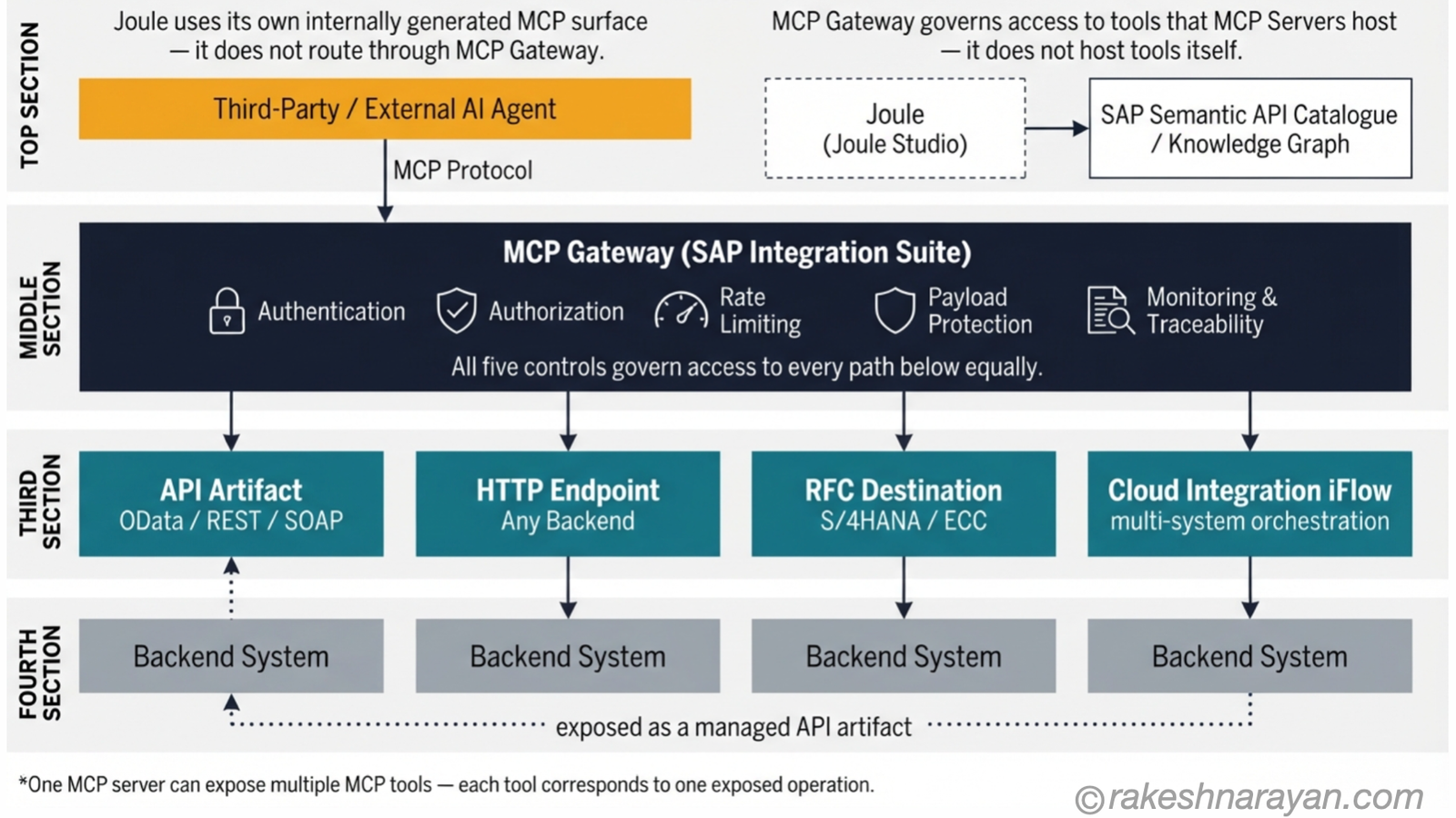
MCP Gateway is a capability inside SAP Integration Suite that turns an existing API, integration flow or RFC connection into an MCP server — a runtime endpoint an AI agent can discover and call. Think of it as API Management’s newest protocol, sitting next to REST, SOAP and OData.
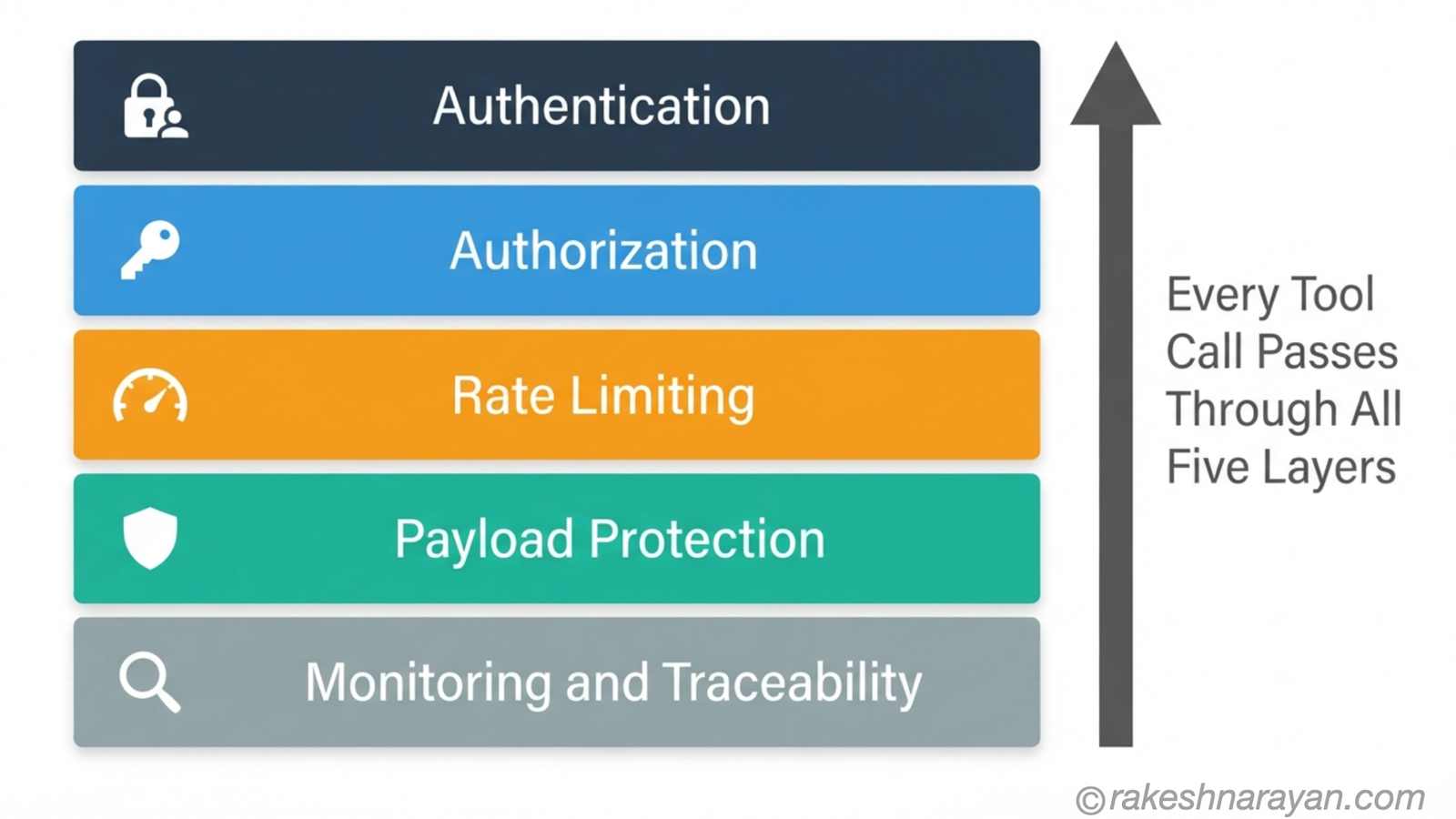
The word that matters most here is Gateway, not Server. An MCP Server hosts tools. MCP Gateway governs access to them — authentication, authorization, rate limiting, payload protection, monitoring and full traceability, the same enterprise controls you already expect from API Management.
In practice, MCP Gateway aggregates SAP APIs, non-SAP APIs, integration flows and even external MCP servers into one governed entry point. An agent connects once. Everything behind that connection is controlled centrally, not scattered across a dozen point-to-point integrations.
💡 Practical tip
If you already expose an API through API Management, you are most of the way there. MCP Gateway builds on that same artifact rather than asking you to build a second, parallel integration.
SAP’s two MCP paths — and why that confuses people
Here is where most explanations go wrong, and where I want to slow down. SAP actually has two separate uses of MCP, and conflating them will cost you a design mistake.
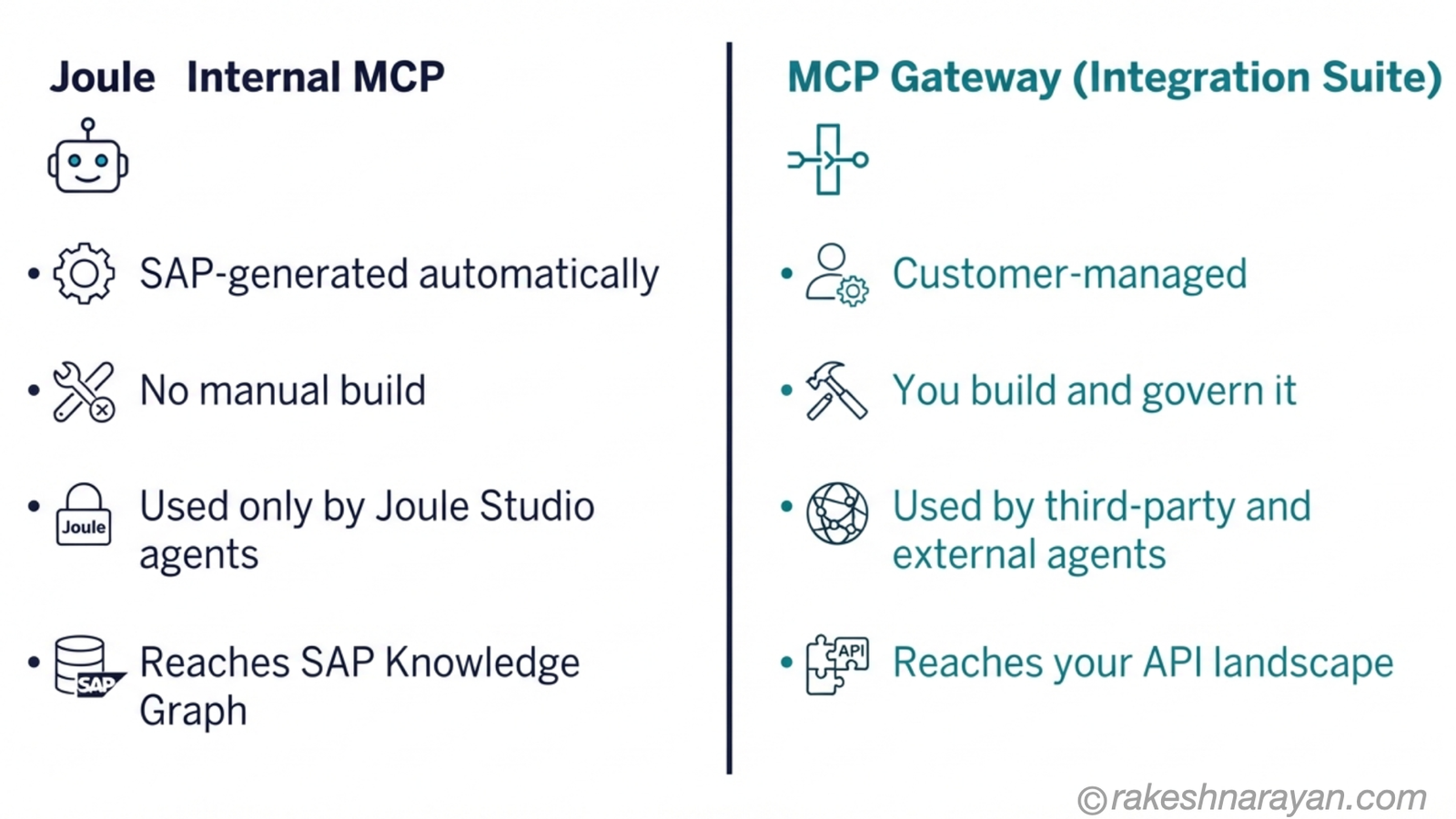
Joule, SAP’s own AI assistant, uses MCP internally to reach SAP business capabilities and Knowledge Graph content through Joule Studio. That MCP surface is generated automatically from SAP’s semantic API catalogue. You do not build it. You do not manage it. It exists specifically for Joule agents.
MCP Gateway in Integration Suite is a different thing entirely. It is customer-managed, built for external and third-party agents — Copilot Studio, Claude, custom agents on BTP — that need governed access to your API landscape from outside Joule’s world.
⚠️ Warning
Do not try to recreate Joule’s internal MCP capability yourself inside Integration Suite. SAP’s own architecture guidance is explicit: external and third-party agents should use MCP Gateway, while agents built with Joule Studio consume SAP’s generated MCP surface directly. Mixing the two designs is the most common mistake I see in early adoption conversations.
The rule of thumb I give clients: if the agent lives inside Joule Studio, it already has what it needs. If the agent lives anywhere else — a third-party platform, a custom BTP app, a partner tool — MCP Gateway is your entry point.
How you actually build one — from API to governed tool
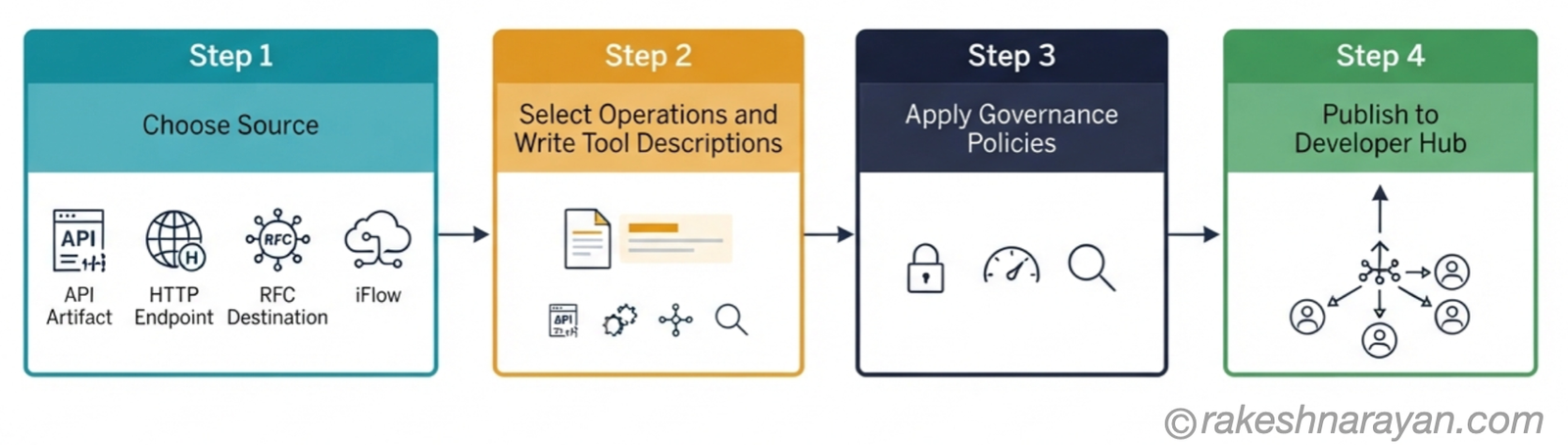
Building an MCP server in Integration Suite follows one of three source paths, and the right one depends on your backend.
| Source path | When to use it | What it connects to |
|---|---|---|
| API Artifact | You already expose the capability via API Management | OData, REST or SOAP service |
| HTTP Endpoint | Any external HTTP service, SAP or not | Any HTTP-reachable backend |
| RFC Destination | Direct calls into S/4HANA or ECC function modules | RFC-based SAP systems |
| Cloud Integration iFlow | Multi-system orchestration in one tool call | Any combination of the above |
Once the source is set, you choose which operations become tools, and you write a description for each one. This is the step people underestimate. Write the description for the agent, not for a human developer reading documentation years from now.
After that, you apply the same governance policies you already use in API Management — authentication, rate limiting, audit logging — and publish to Developer Hub, where agents can discover it.
💡 Practical tip
If an agent needs to call three or more tools in sequence just to complete one user request, treat that as a signal to consolidate. Ask whether your tools are intent-shaped — built around what the agent is trying to accomplish — rather than one tool per API operation.
📝 Note
For APIs that were never given a proper specification, Integration Suite includes AI-assisted OpenAPI generation, which saves you writing one by hand before exposing it as a tool.
Governance — what enterprise-grade actually means here
Governance is the entire reason MCP Gateway exists instead of every team standing up its own MCP server. Self-managed MCP servers put the full weight of security hardening, credential lifecycle and specification compatibility on whoever builds them.
| Control | What it does | Why it matters for agents |
|---|---|---|
| Authentication | Confirms who — or which agent, on whose behalf — is calling | Prevents anonymous or spoofed tool calls |
| Authorization | Confirms what that identity is allowed to do | Enforces least privilege per agent, not per API |
| Rate limiting | Caps call volume per agent or per tool | Stops a misbehaving agent loop from overwhelming a backend |
| Payload protection | Inspects and constrains request and response content | Reduces the blast radius of a bad or malicious tool call |
| Monitoring and traceability | Full audit trail of every tool invocation | Answers who did what, and when, during an incident |
Authentication deserves a specific mention. The architecture SAP recommends uses SAP Cloud Identity Services with user-context tokens — each tool call runs with the permissions of the actual signed-in user, not a shared service account with broad access.
✅ Best practice
Insist on user-context authentication over shared service accounts, even though shared accounts are faster to set up. A shared account makes every agent call look identical in your audit log — you lose the ability to answer who actually did what.
Where it fits today — status, and what is still moving
This is the section that will age the fastest, so treat every date here as a snapshot rather than a permanent fact.
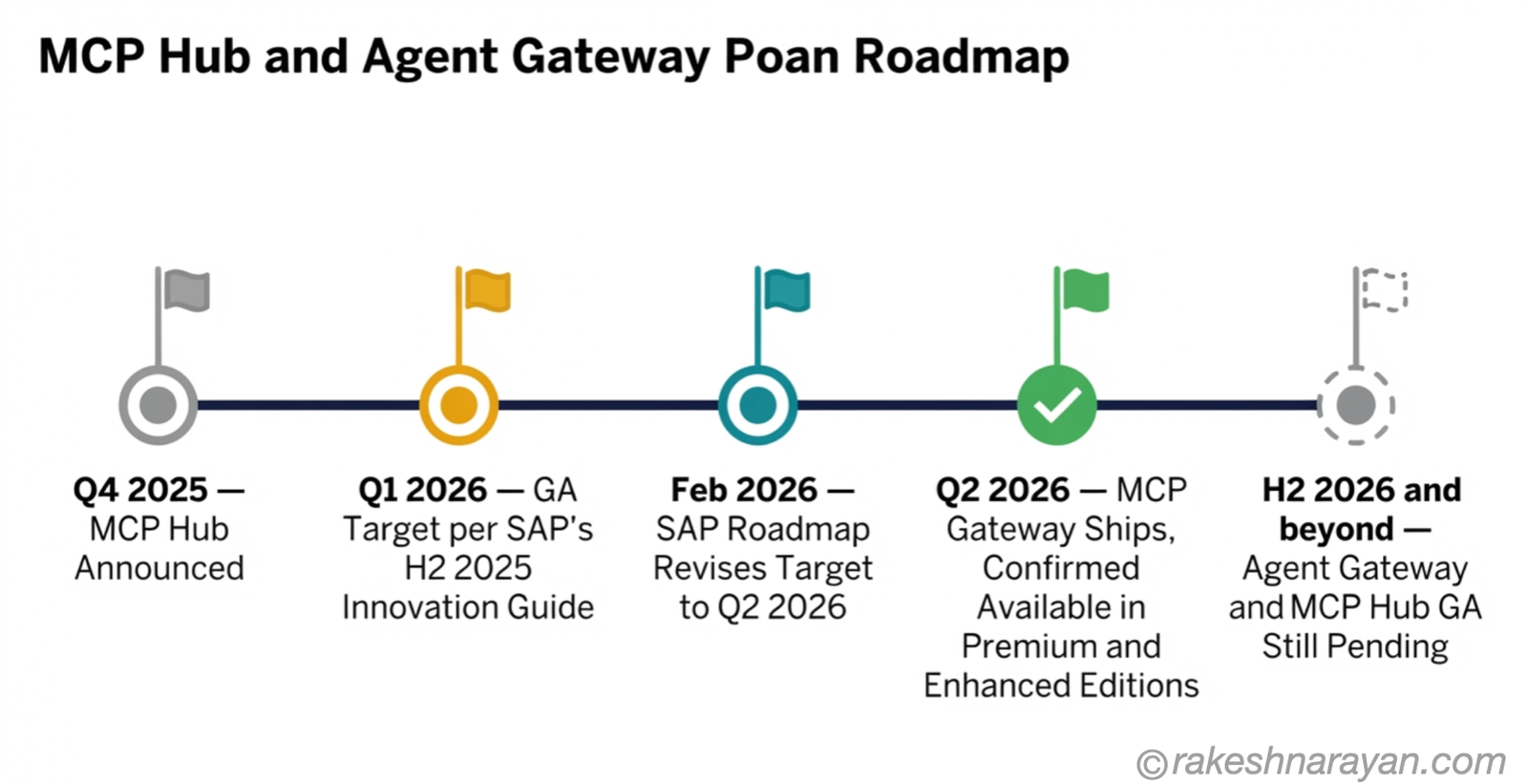
SAP’s H2 2025 Innovation Guide named Q1 2026 as the general availability target for MCP Gateway. By February 2026, SAP’s own roadmap had revised that to Q2 2026 — which is when it shipped, introduced as part of Integration Suite’s Q2 2026 release. SAP’s Community post confirms it is available now as part of the Premium and Enhanced Editions.
Two capabilities it is easy to confuse it with are not there yet. Agent Gateway, the A2A equivalent for multi-agent collaboration, was still not generally available as of June 2026. The MCP Hub — a separate, no-code layer SAP announced in Q4 2025 for centralising cross-cutting MCP concerns — was targeted for GA in the first half of 2026, but it is a different capability from MCP Gateway, not a replacement for it.
One protocol detail worth knowing if you are connecting an external client: major MCP clients, including Microsoft Copilot Studio, stopped supporting SSE transport for MCP connections after August 2025. If a client or gateway configuration still assumes SSE, it will not connect. Everything should be running on Streamable HTTP now.
⚠️ Warning
The MCP specification itself has already gone through significant architectural changes in 2026. If you choose to self-manage an MCP server instead of using the Gateway, that specification churn becomes your operational responsibility, not SAP’s.
At a glance — the mental model
| Concept | One-line summary |
|---|---|
| MCP Gateway | Customer-managed capability in SAP Integration Suite that turns existing APIs and iFlows into governed MCP tools |
| MCP Server | The runtime endpoint that hosts and advertises tools to an agent |
| Joule’s internal MCP | SAP-generated, used only by Joule Studio agents — not something you build |
| API Artifact / iFlow / RFC | The source types MCP Gateway can turn into agent-callable tools |
| Governance controls | Authentication, authorization, rate limiting, payload protection, monitoring and traceability |
| User-context authentication | Each tool call runs with the calling user’s actual permissions, not a shared service account |
| Agent Gateway (A2A) | Separate, multi-agent collaboration capability — not yet GA as of June 2026 |
| MCP Hub | Separate, no-code layer for centralising MCP concerns — distinct from MCP Gateway |
| Streamable HTTP | Required transport since SSE was deprecated for MCP in August 2025 |
What to take away
MCP Gateway is not a new integration pattern. It is your existing integration pattern, pointed at a new kind of consumer. The governance you already trust for REST and OData now extends to whatever agent shows up next — Copilot Studio today, something else in eighteen months.
The mistake to avoid is not technical, it is conceptual. People assume MCP Gateway and Joule’s internal MCP are the same door. They are not. Getting that distinction right on day one saves you from unwinding a design decision six months in.
SAP has opened a way for agents to reach a decade of API investment without asking you to rebuild any of it. That is worth taking seriously, even while the specification underneath keeps moving.
🔗 Related posts on this site
SAP Integration Suite — What It Is and How It Works — the foundation MCP Gateway builds on: API Management, iFlows and governance basics.
MCP — Model Context Protocol Explained — the protocol itself, explained without the SAP layer.
AI Agents — What They Are and How They Work — the consumer side of this equation: what an agent actually does with a tool.
AI in SAP: How Joule and Business AI Actually Work — where Joule’s own internal MCP usage fits into the bigger picture.
What Is an API? How Software Systems Talk to Each Other — the foundational concept underneath everything MCP Gateway exposes to an agent.
Published on rakeshnarayan.com — Articles
URL: https://rakeshnarayan.com/articles/sap-integration-suite-mcp-gateway-ai-agents-to-sap-apis/
Did you enjoy this article?
Let me know — it takes one click.
0 Comments
Leave a Comment
Looks like this one held your attention — I'd really appreciate a quick comment below.
Your comment has been submitted and will appear after review.