SAP Cloud ALM — Implementation, Operations and the SolMan Question
Every SAP project in the last few years has hit the same question at some point: what do we do about Solution Manager? The answer SAP gives is SAP Cloud ALM. What that actually means in practice — what it does, what it does not do, and whether it genuinely replaces what you have — is where most conversations stall.
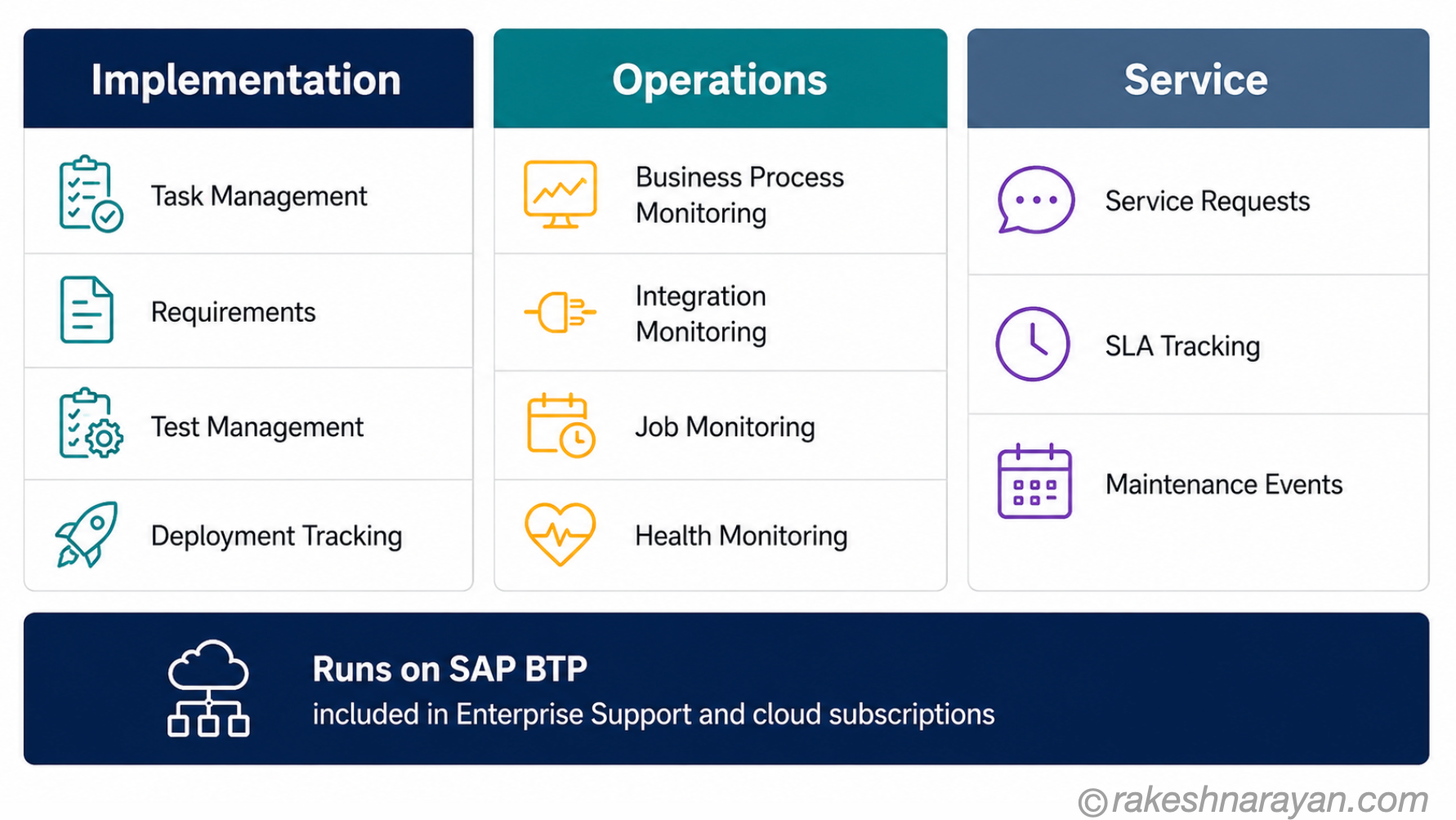
Cloud ALM is not one tool. It is a platform built around three distinct areas: Implementation, Operations and Service.
Most people only know one of them — usually whichever one they first needed — and assume the rest is being handled. That vagueness is where projects make decisions they later regret.
This post gives you the full picture. What each pillar does, what you actually get, and an honest answer to the SolMan question — including the parts SAP does not advertise on the product page.
🔗 Related Reading
SAP BTP — The Platform Explained — Cloud ALM runs on SAP BTP. If you are not clear on what BTP is and how it fits into the SAP landscape, start there first.
SAP S/4HANA vs ECC — The Real Difference — the ECC end-of-life context directly shapes why the SolMan question matters now.
What SAP Cloud ALM actually is
SAP Cloud ALM is SAP’s cloud-native Application Lifecycle Management platform. It sits on SAP BTP and covers the full lifecycle of your SAP applications — from the initial project setup through go-live and into day-to-day operations. SAP does not charge separately for it: if you have SAP Enterprise Support, RISE with SAP or GROW with SAP, you are entitled to one Cloud ALM tenant at no additional cost.
SAP announced Cloud ALM in 2018. It has been gaining capability ever since, and as of 2026 it is SAP’s stated go-to ALM platform for all customers. That matters because it is not just a recommendation — SAP has stopped investing in new functionality for Solution Manager. Whatever ALM tooling SAP builds next goes into Cloud ALM.
📌 Key Takeaway
Cloud ALM is included in your existing SAP support contract if you are on Enterprise Support or any cloud subscription (RISE, GROW). There is no separate licence to buy. The only question is whether you are using it yet.
The platform organises its capabilities into three areas. Understanding the split is the most important thing you can take from this post.
| Area | What it covers |
|---|---|
| Implementation | Project execution — task management, requirements, fit-to-standard workshops, test management, deployment tracking. Used during SAP projects and rollouts. |
| Operations | Landscape monitoring — business process monitoring, integration monitoring, job monitoring, health checks, alerting and automated remediation. Used after go-live, continuously. |
| Service | Collaboration between customer, partner and SAP support — service requests, maintenance events, SLA tracking. Bridges the operational and support layers. |
Implementation — managing your SAP project
Cloud ALM for Implementation is the project management layer for SAP rollouts. It is built around the SAP Activate methodology, which means the tool and the methodology are integrated rather than running in parallel — the task lists, phase gates and deliverables come pre-configured based on the solution you are implementing.
For a project manager or solution architect running a cloud implementation, this is where you spend most of your time in Cloud ALM. The key capabilities are:
| Capability | What it does | Why it matters |
|---|---|---|
| Project and task management | Creates structured task lists automatically from the SAP Activate roadmap, assigned by role and phase | No manual setup — the project structure is generated from SAP best practice content |
| Requirements and user stories | Tracks business requirements linked to SAP processes, with traceability from requirement to test | Connects business need to implementation outcome in one place |
| Fit-to-standard workshops | Provides structured content for running workshops with pre-loaded process flows from SAP Best Practices | Business and IT work from the same baseline — reduces scope creep |
| Test management | Manages manual test cases and integrates with automated testing tools; links tests to requirements | Traceability from requirement through test to go-live — auditable and structured |
| Deployment and transport management | Tracks deployment activities and manages transports across the landscape | Replaces parts of what SolMan ChaRM did — with caveats (see the SolMan section below) |
| Process documentation | Links documentation to processes, requirements and user stories in a structured library | Single source of truth for process content during and after implementation |
💡 Practical Tip
Cloud ALM for Implementation works best when you use it from the Prepare phase — not from Explore. Teams that start in Cloud ALM late miss the automated task lists and end up managing the project manually alongside the tool. Start it on day one of the project.
Cloud ALM for Implementation is available immediately — no server setup required. You request your tenant, onboard your team and the project structure is ready within hours. That is a meaningful shift from the SolMan world, where setting up the ALM environment was itself a project.
Operations — running your SAP landscape
Cloud ALM for Operations is the monitoring and alerting layer for your live SAP landscape. It gives your Basis team, operations team and business users a single place to see what is happening across all connected SAP systems — cloud, on-premise and hybrid — without switching between tools.
The scope is broader than most people expect. It covers six monitoring areas, each targeting a different failure mode in a live SAP environment.
| Monitoring area | What it watches |
|---|---|
| Business Process Monitoring | End-to-end process health across systems — detects anomalies in process execution, not just system availability. Business users can see process KPIs without needing technical access. |
| Integration and Exception Monitoring | Message flows across integration points — correlates single messages into end-to-end flows, tracks failures and helps pinpoint whether an issue is technical or business-process related. |
| Job and Automation Monitoring | Background job execution across the landscape — alerts on failures, delays and anomalies. Essential for finance closes and batch-heavy operations. |
| Health Monitoring | System and service health — availability, performance, infrastructure checks. Covers cloud services and on-premise systems in one view. |
| Real User Monitoring | Performance as experienced by end users — measures frontend and server-side response times and correlates them to identify root cause (network, server, or frontend). |
| Synthetic User Monitoring | Proactive availability testing — runs scripted scenarios 24/7 to detect issues before real users encounter them. |
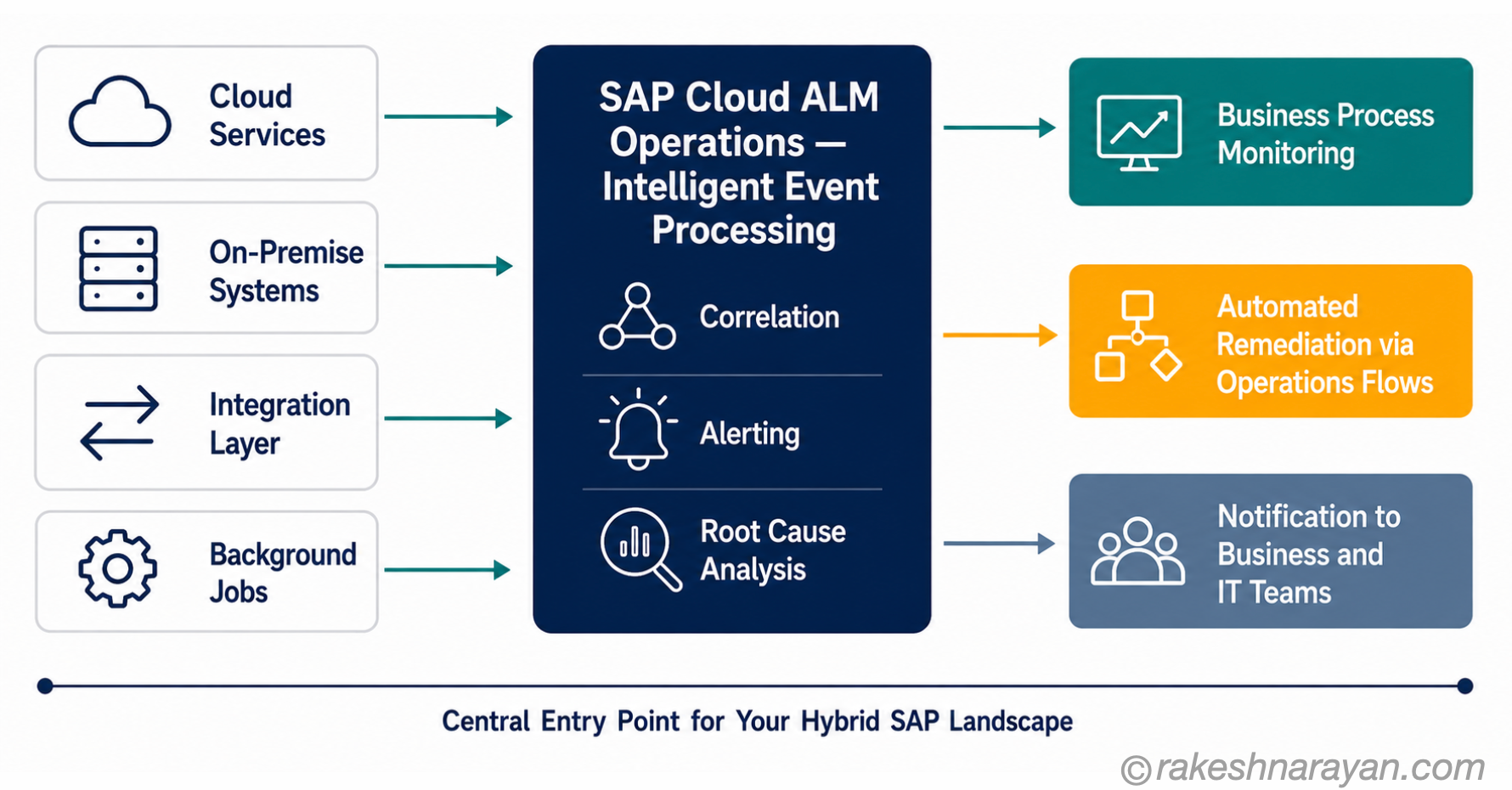
The part that separates Cloud ALM Operations from simple monitoring tools is Intelligent Event Processing. Events from all monitoring areas feed into a central engine that correlates them, applies rules and triggers actions — either automated remediation via Operations Flows, or alerts to the right team. The goal is to reduce the noise that drowns most Basis teams and surface only what needs a human decision.
✅ Best Practice
Set up Business Process Monitoring before go-live, not after the first incident. Cloud ALM provides pre-defined process content with auto-discovery of relevant metrics — activate this during UAT so the baseline is established before production traffic begins.
The SolMan question — what changes and what does not
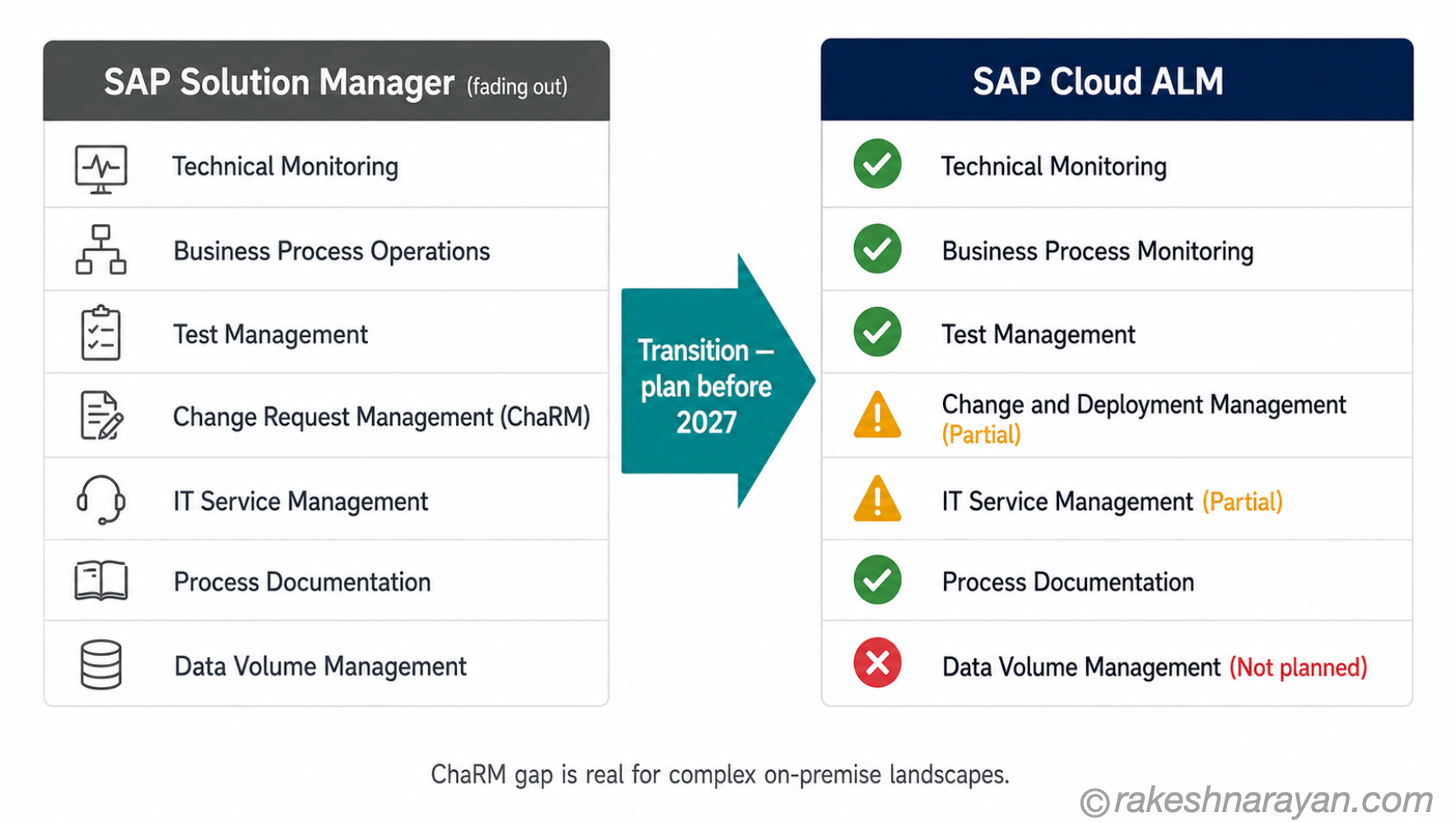
SAP Solution Manager 7.2 mainstream maintenance ends at the end of 2027. Extended maintenance runs until end of 2030 — but it covers a limited scope and carries additional cost. SAP’s recommendation is to complete the Cloud ALM transition before 2028.
Cloud ALM is the strategic successor. That is the honest answer. But it is not a complete, one-to-one replacement — and SAP does not claim it is. The important thing is to know exactly where the gaps are.
| SolMan capability | Cloud ALM coverage | Notes |
|---|---|---|
| Technical Monitoring | ✓ Covered | Health Monitoring, Real User Monitoring and Synthetic Monitoring replace and improve on SolMan’s technical monitoring |
| Business Process Operations | ✓ Covered | Business Process Monitoring in Cloud ALM covers this — with better cross-system end-to-end visibility |
| Test Management | ✓ Covered | Integrated test management with requirement traceability — supports manual and automated testing |
| Process Documentation | ✓ Covered | Process library is built into the Implementation pillar — structured and linked to requirements |
| Change Request Management (ChaRM) | ⚠ Partial | Cloud ALM has Change and Deployment Management, but it is not a like-for-like ChaRM replacement for complex on-premise landscapes. Automated retrofit, cross-system object locking and full end-to-end change traceability are still evolving. |
| IT Service Management (ITSM) | ⚠ Partial | The Service pillar covers SAP-related service requests and collaboration. Full ITSM integration typically still requires a third-party tool (ServiceNow, Jira Service Management). |
| Data Volume Management | ✗ Not planned | SAP has no current roadmap for Data Volume Management in Cloud ALM — customers needing this capability must find an alternative solution. |
| Business Process Change Analyzer (BPCA) | ✗ Not rebuilt | BPCA, which analyses the impact of changes on business processes, has not been rebuilt in Cloud ALM. Third-party tools fill this gap for complex landscapes. |
⚠️ Warning
Do not assume ChaRM is fully covered. If your organisation relies on ChaRM for regulated transport governance — particularly in complex landscapes with dual maintenance or cross-system object locking — Cloud ALM’s Change and Deployment Management is not yet a like-for-like replacement. Plan for this gap before 2027, not after.
For most cloud-centric customers on RISE with SAP or GROW with SAP, the coverage is strong enough to move now. The gaps matter most for large on-premise estates with complex change governance requirements — typically enterprises that have been heavy ChaRM users for years.
Who should be using it now
If you are on RISE with SAP or GROW with SAP — you should already be using Cloud ALM. It is the mandated ALM platform for cloud customers. SAP partners running cloud implementations use it by default. If your team is not, that is a gap to close immediately.
If you are on SAP Enterprise Support with a predominantly on-premise landscape — you also get Cloud ALM at no additional cost. Start with the Operations pillar. Business Process Monitoring and Health Monitoring add immediate value without requiring a full migration away from SolMan.
If you are still running Solution Manager for ChaRM and planning to stay there until 2027 — that is understandable, but the window to plan a transition is now. Waiting until mainstream maintenance actually ends is the highest-risk approach.
📝 Note
SAP Focused Run — a separate SAP product for large, complex on-premise operations monitoring — is not the same as Cloud ALM. If you are in a very large enterprise with a complex on-premise ABAP estate, Focused Run may still be relevant alongside Cloud ALM. The two can coexist.
At a glance — SAP Cloud ALM
| Concept | One-line summary |
|---|---|
| SAP Cloud ALM | SAP’s cloud-native ALM platform for implementation, operations and service — included in Enterprise Support and cloud subscriptions |
| Implementation pillar | Project execution layer — task management, requirements, test management, deployment tracking, built around SAP Activate |
| Operations pillar | Live landscape monitoring — business processes, integrations, jobs, health and user experience in one central view |
| Service pillar | Collaboration between customer, partner and SAP support — service requests, SLA tracking, maintenance events |
| Intelligent Event Processing | Central engine that correlates alerts from all monitoring areas and triggers automated or human responses |
| SolMan mainstream support | Ends 31 December 2027 — SAP recommends completing Cloud ALM transition before 2028 |
| ChaRM gap | Cloud ALM has Change and Deployment Management, but is not a full ChaRM replacement for complex on-premise landscapes — plan accordingly |
| Cost | Included at no extra cost for Enterprise Support, RISE with SAP and GROW with SAP customers — one tenant per customer number |
| Platform | Runs on SAP BTP — no on-premise installation required, maintained entirely by SAP |
What to take away
The SolMan question has a clear answer: Cloud ALM is the replacement. But the more useful framing is not about replacement at all — it is about what you are missing by not using Cloud ALM today. Business Process Monitoring alone, running across a live landscape and correlating events across systems, is something SolMan never did this well.
The gaps are real and worth knowing — especially around ChaRM for complex on-premise estates. But they do not change the direction of travel. SAP is building everything new into Cloud ALM. The gap will close faster if you are already on the platform, running it, and raising the limitations through customer feedback and SAP’s roadmap process.
Start with whatever pillar solves your most immediate problem — Implementation if you have a project running, Operations if you have a live landscape that needs better visibility. You do not have to migrate everything at once. But waiting for the perfect moment is how organisations arrive at 2027 without a plan.
🔗 Related Posts on This Site
SAP BTP — The Platform Explained — Cloud ALM runs on BTP. Understanding the platform underneath it clarifies the architecture and the integration possibilities.
SAP S/4HANA vs ECC — The Real Difference — the ECC maintenance timeline and the move to S/4HANA is the business context that makes the SolMan transition urgent.
SAP Integration Patterns — The Decisions That Matter — Cloud ALM Operations monitors your integrations in real time. This post explains the integration architecture it is watching.
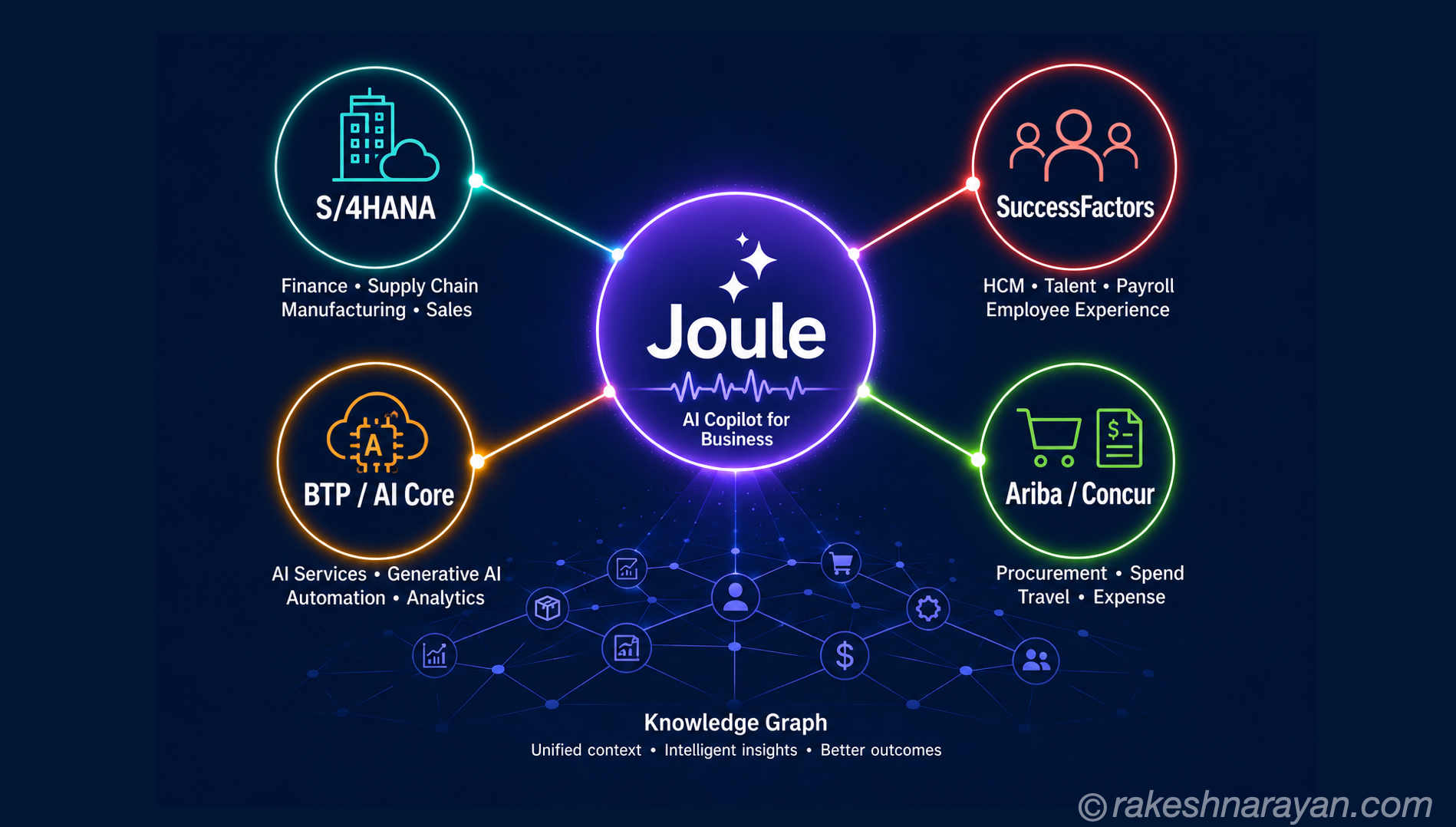
AI in SAP: How Joule and Business AI Actually Work — SAP is building AI-driven automation into Cloud ALM Operations. This post covers where AI fits in the broader SAP stack.
SAP LeanIX — Enterprise Architecture Management — LeanIX maps the application landscape Cloud ALM later implements and operates; the two tools cover adjacent stages of the same transformation.
Published on rakeshnarayan.com — Articles
URL: https://rakeshnarayan.com/articles/alm-implementation-operations-and-the-solman-question/
Did you enjoy this article?
Let me know — it takes one click.
0 Comments
Leave a Comment
Your comment has been submitted and will appear after review.