SAP Transport Requests — STMS, CTS and DEV to PRD
Ask most SAP people to explain the transport system and you get one of two answers. Either a vague wave of the hand — ‘it moves things from DEV to production’ — or a Basis-level deep dive that loses everyone in the room within thirty seconds. Neither is useful.
The transport system touches every role in an SAP project. Functional consultants release customising transports. Developers release workbench transports. Project managers track what has moved where. And yet the mental model behind it — why it works the way it does, what is actually happening when you click release — is something most people never get explained properly.
This post fixes that. Not a Basis configuration guide. Not a list of transactions. The model — clearly, from the ground up.
🔗 Related Reading
If you work with Fiori deployments, SAP Fiori Deployment Using CTMS with CI/CD on SAP BTP is the hands-on companion to this post — it shows the transport system in action inside a CI/CD pipeline. For the broader SAP development context, ABAP Fundamentals That Still Matter covers the workbench objects that go into transport requests.
Why the transport system exists
The problem is straightforward. In SAP, changes are not files you move manually. Every configuration setting, every piece of ABAP code, every role definition lives inside a database. Without a controlled mechanism for moving those changes between systems, every consultant and developer would make changes directly in production. That ends badly.
The answer is the three-system landscape: a Development system (DEV) where all changes are made, a Quality system (QAS) where changes are tested, and a Production system (PRD) where the business runs. Changes move in one direction only — DEV to QAS to PRD — and the transport system is what controls that movement.
This is not just a technical constraint. It is a discipline. Production is protected because nothing reaches it without going through DEV and QAS first. The transport system is what enforces that discipline automatically.
📌 Key Takeaway
The three-system landscape is the foundation. DEV is where you work. QAS is where you test. PRD is where the business runs. The transport system ensures changes move in one direction only — and that nothing skips the queue.
The building blocks — CTS, STMS and the Transport Organizer
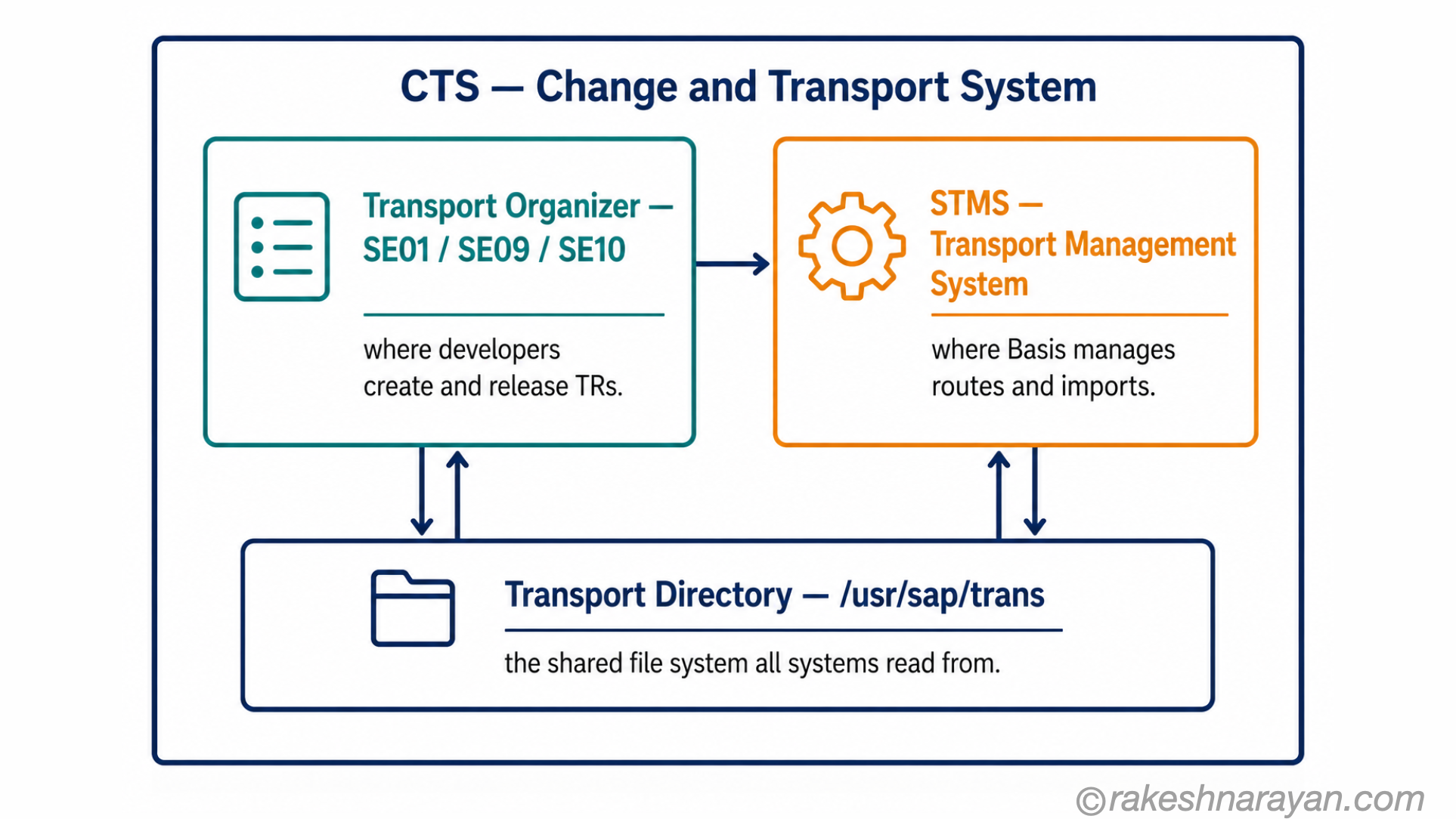
Three components make up the transport system. People use the names interchangeably, which is where most of the confusion starts.
| Component | What it is | Who uses it |
|---|---|---|
| CTS — Change and Transport System | The overall framework — the rules, tools and file structures that govern how changes are recorded and moved across the landscape | Everyone — it is the system, not a transaction |
| STMS — transaction | The central management tool for the transport domain. Used to configure transport routes, manage import queues and execute imports between systems | Basis administrators |
| Transport Organizer — SE01 / SE09 / SE10 | The day-to-day tool where developers and consultants create, manage and release transport requests | Developers and functional consultants |
Think of CTS as the framework, STMS as the control room and the Transport Organizer as the workbench where individual changes are packaged up and sent.
📝 Note
SE09, SE10 and SE01 all open the Transport Organizer. SE09 shows workbench requests. SE10 shows customising requests. SE01 is the extended view that shows both. Most people use SE01 and filter from there.
What a transport request actually is
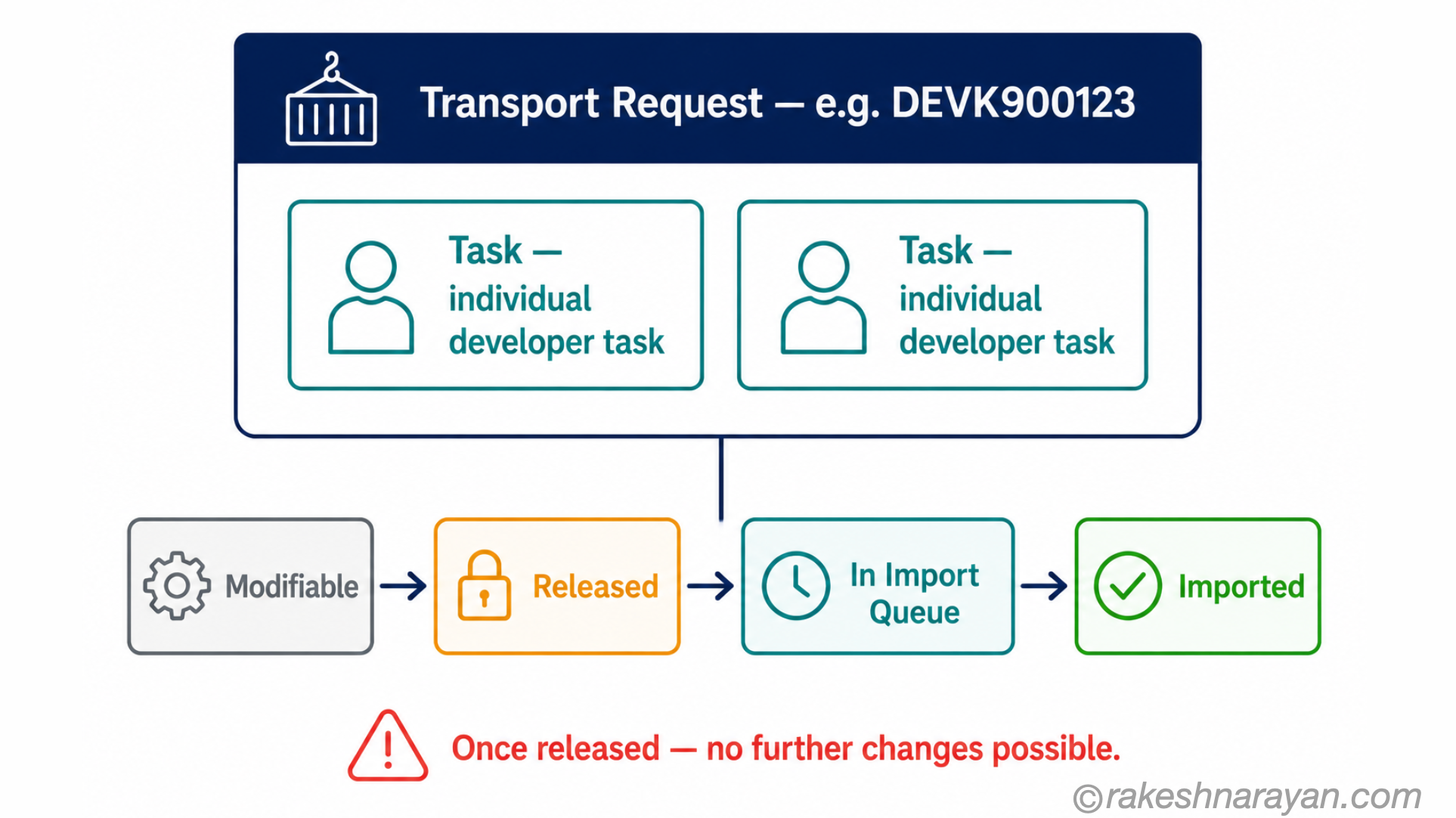
A transport request (TR) is a container. It collects all the changes you make in the system — configuration settings, code objects, role definitions — and packages them up for movement to the next system in the landscape.
Every TR has a system-generated ID in the format DEVK9XXXXX, where DEV is the source system SID. Inside a TR there are tasks — one per developer or consultant working on that change set. You add objects to your task. When you are done, you release your task first, then release the TR itself.
Releasing a TR is a one-way door. Once released, it is exported to the transport directory and is ready for import into the next system. You cannot add to it or change it after release. If you missed something, you create a new TR.
⚠️ Warning
Never release a TR to meet a deadline if it is not fully tested. A released TR cannot be recalled. If it contains an error and gets imported to PRD, the only way back is a correction transport or a manual rollback — both of which take longer than testing would have.
Workbench requests vs customising requests
Not all transport requests are the same. The two you will encounter every day are workbench requests and customising requests, and they behave differently.
| Request type | What it contains | Key characteristic |
|---|---|---|
| Workbench request | ABAP programs, function modules, CDS views, data dictionary objects, roles — repository objects | Client-independent. A change in DEV client 100 is visible in DEV client 200. Created in SE09 or SE01. |
| Customising request | IMG configuration settings — company codes, plant settings, document types, payment terms | Client-specific. A change in DEV client 100 stays in client 100. Created automatically when you save in SPRO. |
The practical consequence: workbench changes affect all clients in a system the moment you save them. Customising changes only affect the client you made them in — until you transport them.
Transport routes — how the path is defined
A transport request does not know where to go on its own. Transport routes, configured in STMS, define the allowed paths between systems. A TR can only travel along a defined route. You cannot import a DEV transport directly into PRD if a direct route does not exist — and in a correctly configured landscape, it should not.
There are two types of route. Consolidation routes move TRs from the development system to the quality system. Delivery routes move them onward from quality to production.
| Route type | What it does |
|---|---|
| Consolidation route | Moves TRs from DEV to QAS. When a developer releases a TR, it lands in the QAS import queue automatically. |
| Delivery route | Moves TRs from QAS to PRD. Once a TR is imported to QAS and testing is complete, Basis adds it to the PRD import queue. |
One system in the landscape acts as the Transport Domain Controller — typically the production system. It holds the master TMS configuration and distributes it to all other systems in the domain. You configure it once in STMS and everything else picks it up.
💡 Practical Tip
The transport domain controller being on the production system is a deliberate design choice. It means configuration is always available even if DEV or QAS is down for maintenance. Your Basis team manages this — but knowing it exists helps you understand why STMS sometimes needs to be accessed via a specific system.
What actually happens when you release and import
Most people treat the transport system as a black box. You click release, something happens, Basis imports it. Here is what is actually happening — demystified without going into Basis configuration detail.
| Step | What happens |
|---|---|
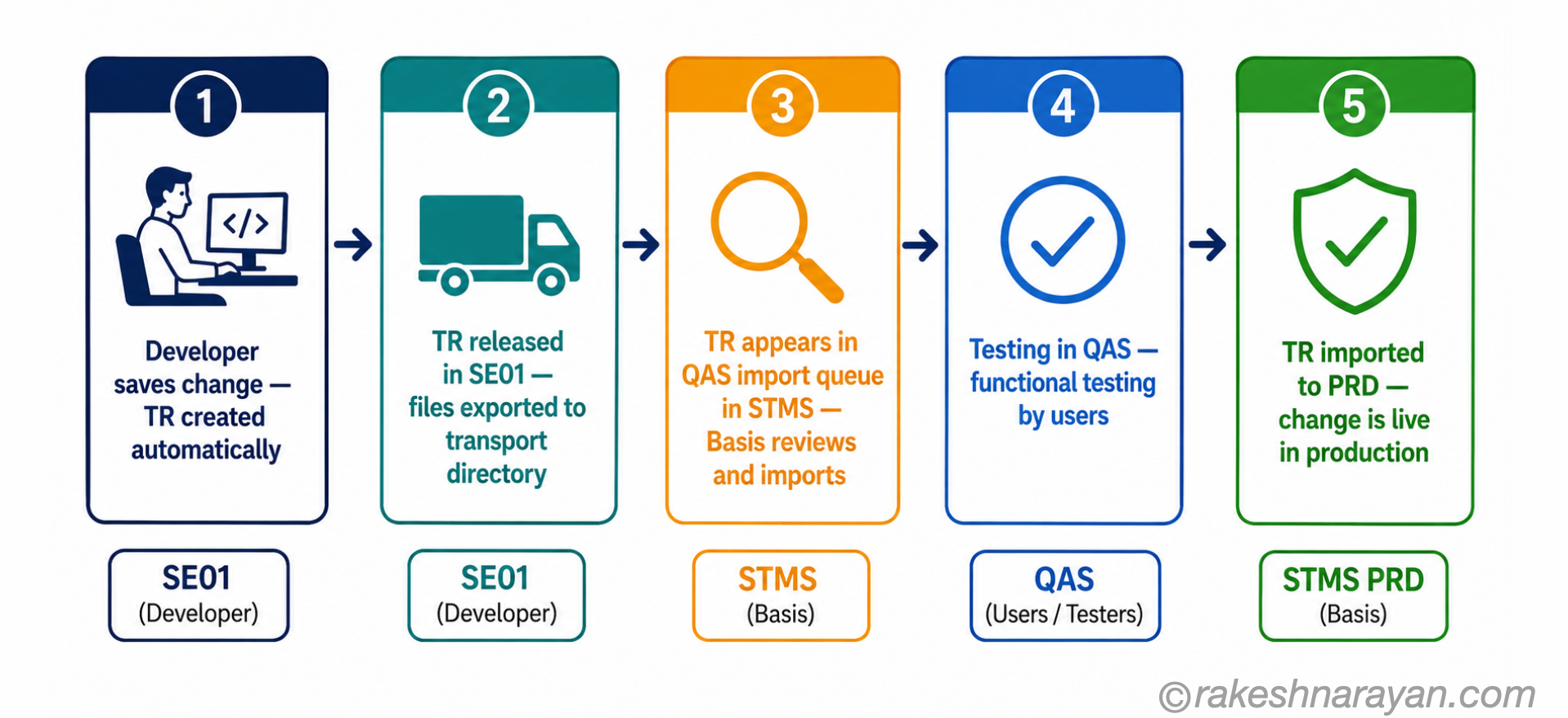
| 1 — Save change in DEV | SAP prompts you to assign your change to a TR. If no open TR exists, it creates one automatically. The object is locked to your TR — nobody else can change it simultaneously. |
| 2 — Release task (SE01) | You release your individual task within the TR. This signals your work is complete. Other tasks in the same TR can still be open. |
| 3 — Release TR (SE01) | All tasks must be released before you can release the TR. Releasing exports the TR to the transport directory — a shared file system at OS level (/usr/sap/trans on Unix/Linux — Windows installations differ). Two files are written: a data file and a cofile. |
| 4 — TR appears in QAS import queue (STMS) | Because the consolidation route is configured, the released TR automatically appears in the QAS import queue in STMS. Basis can see it and schedule the import. |
| 5 — Import to QAS (STMS) | Basis imports the TR. At OS level, SAP programs called tp and R3trans do the actual work — reading the export files and writing the data into the QAS database. Import logs are written in STMS. |
| 6 — Testing in QAS | Functional testing happens here. The TR stays in the QAS import queue log as a record of what was imported. |
| 7 — Import to PRD (STMS) | Once testing passes, Basis adds the TR to the PRD import queue and imports it. The change is live in production. |
📝 Note
tp and R3trans are the underlying OS-level transport programs. tp is the transport control program that manages the overall process. R3trans does the actual data movement between systems. You will rarely interact with them directly — STMS calls them behind the scenes — but they are what make the transport physically happen.
Where things go wrong — mistakes that cost projects time
Most transport failures are not technical. The system works. The problem is usually sequencing, missing dependencies or a misunderstanding of client-specificity. These are the ones I see on almost every project.
Wrong import order
TR A creates a data dictionary object. TR B uses that object. If TR B is imported before TR A, the import fails. Import order matters and it is not managed automatically. Your Basis team needs to import in the correct sequence — which means you need to document dependencies when you release.
Missing dependent TRs
A customising TR references a workbench object that is still sitting unreleased in DEV. The customising TR imports fine in QAS but fails in PRD because the workbench object never made it there. Always check that all dependent objects are in released TRs before importing to production.
Client confusion on customising requests
You made configuration changes in DEV client 100. The customising TR transports them. They land in QAS client 100. Your testers are using QAS client 200 and cannot see the changes. The TR did not fail — it imported correctly into client 100. Always confirm which client your TRs are targeting and which client your testers are using.
Releasing too early under pressure
Go-live pressure is real. A TR gets released before testing is complete because the deadline is tomorrow. It imports to PRD with an error. Now you are debugging in production instead of QAS, with real data and real users watching. The transport system cannot protect you from a bad release decision — only discipline can.
✅ Best Practice
Maintain a transport tracker — even a simple spreadsheet — listing each TR, its description, its dependencies and its test status. Import to PRD only when testing is confirmed in QAS. This takes ten minutes to maintain and saves hours when something goes wrong.
At a glance — the transport system
| Concept | One-line summary |
|---|---|
| Three-system landscape | DEV is where you work, QAS is where you test, PRD is where the business runs — changes move in one direction only |
| CTS | The Change and Transport System — the overall framework governing how changes are recorded and moved |
| STMS | Transaction for central transport management — configure routes, manage import queues, execute imports |
| Transport Organizer (SE01) | Where developers and consultants create, manage and release transport requests day to day |
| Transport request (TR) | A container that packages changes for movement — released when complete, imported into the next system |
| Workbench request | Holds repository objects (ABAP, CDS views, roles) — client-independent |
| Customising request | Holds IMG configuration settings — client-specific |
| Transport route | The defined path a TR can travel — consolidation (DEV to QAS) or delivery (QAS to PRD) |
| Transport domain controller | The system (usually PRD) that holds master TMS configuration for the landscape |
| tp and R3trans | OS-level programs that physically move transport data between systems — called by STMS automatically |
| Release = one-way door | Once a TR is released, it cannot be modified — missing objects require a new TR |
The part most people miss
The transport system is one of those things that works invisibly until it does not. When it fails — wrong order, missing dependency, wrong client — the pressure is immediate and the debugging happens in front of everyone. That is why understanding the model matters, not just knowing the transactions.
Here is the reframe that helps most: the transport system is not a Basis responsibility. It is a project discipline. Basis configures and operates it. But every functional consultant who saves a configuration change, every developer who releases a TR, every project manager who approves a move to PRD — all of them are participants in the system. The failures that cause real damage happen because someone did not understand their role in it.
Know what your TR contains. Know its dependencies. Know which client you are targeting. Release only when testing is complete. That covers the vast majority of transport problems before they happen.
🔗 Related Posts
SAP Fiori Deployment Using CTMS with CI/CD on SAP BTP — the transport system in a CI/CD context: automated pipelines and the CTMS approach for Fiori apps.
SAP Security Roles and Authorisation — roles are workbench objects transported via the same system covered in this post.
ABAP Fundamentals That Still Matter — the ABAP repository objects that go into workbench transport requests, explained.
SAP S/4HANA vs ECC — The Real Difference — the transport concept applies across both landscapes; the post explains what else changed between them.
GitHub for SAP Developers — Actions, Issues and Pages Explained — the non-ABAP counterpart: how GitHub Actions handles CI/CD for everything that doesn’t move through STMS and CTS.
SAP Basis Explained — The Technical Layer Under Every SAP System — Basis is who owns and operates the transport system this post covers end to end.
Published on rakeshnarayan.com — Articles
URL: https://rakeshnarayan.com/articles/sap-transport-requests-stms-cts-and-dev-to-prd/
Did you enjoy this article?
Let me know — it takes one click.
0 Comments
Leave a Comment
Looks like this one held your attention — I'd really appreciate a quick comment below.
Your comment has been submitted and will appear after review.