SAP Basis Explained — The Technical Layer Under Every SAP System
You raise a transport request. Something breaks in the target system. A Basis consultant fixes it in twenty minutes. You say thank you, and move on — with no real understanding of what just happened or why it needed a specialist to resolve it.
Most functional and technical SAP consultants work this way for years. Basis is the thing that runs in the background, managed by someone else, called upon when something goes wrong. That is fine — until you are in an architecture discussion, a project go-live, or a security audit, and the gaps in your understanding start to cost you.
This post explains what SAP Basis actually is, what it controls, and how the role has shifted as SAP’s landscape has moved into the cloud. Whether you are new to SAP or refreshing after years on functional tracks, this is the foundation worth having.
🔗 Related Reading
If you are new to SAP, start with What is SAP? before continuing here. For the S/4HANA context that shapes modern Basis work, SAP S/4HANA vs ECC — The Real Difference is the right companion post.
What SAP Basis Actually Is
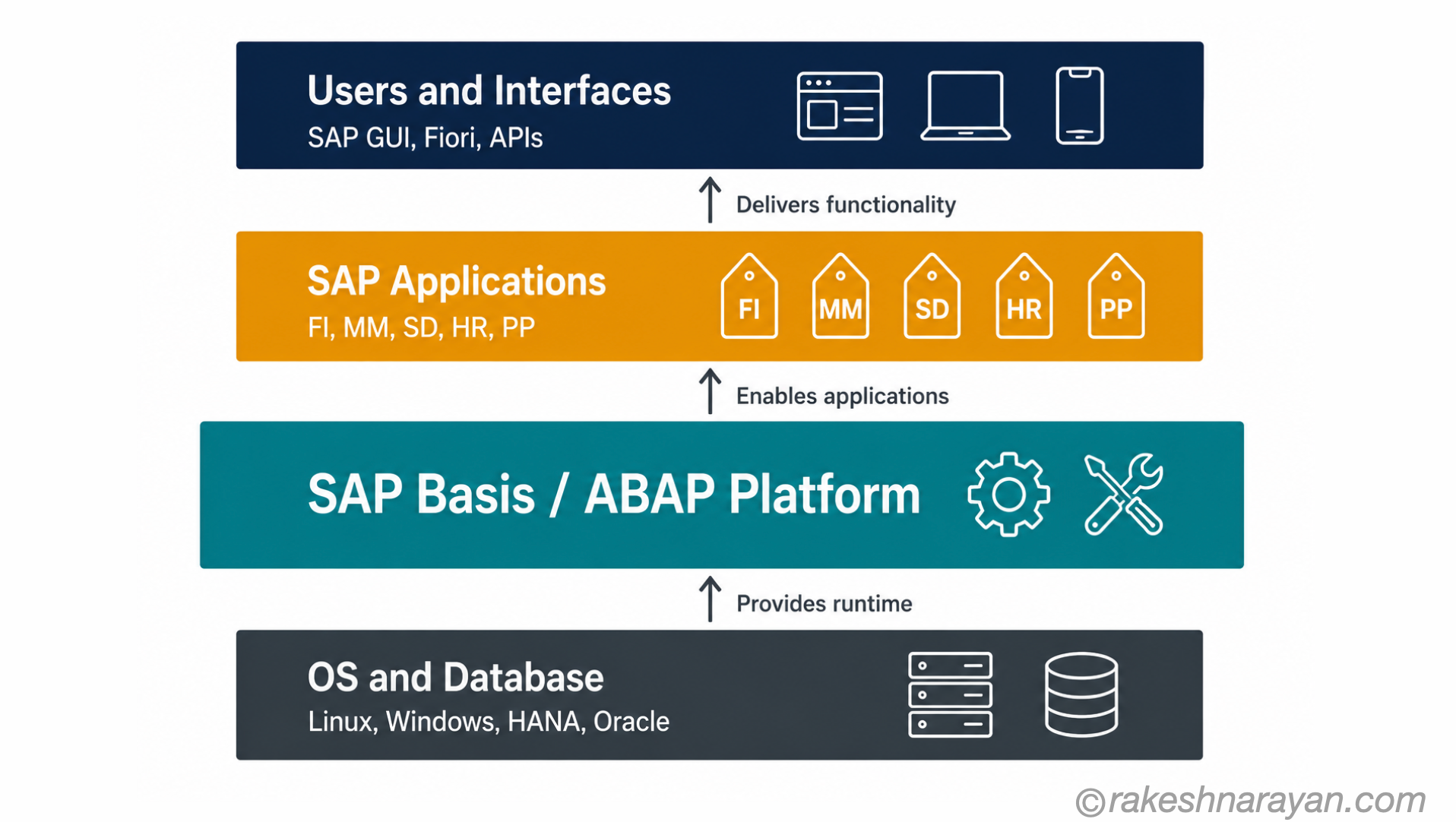
SAP Basis is the technical middleware layer that sits between your operating system and database on one side, and your SAP applications on the other. It is not a module in the way that FI or MM are modules. It is the platform that makes every SAP module work.
Think of it like the engine of a car. You interact with the steering wheel and the pedals — the applications. Basis is the engine underneath. You do not need to understand the combustion cycle to drive. But the moment something goes wrong, or you need to decide whether to upgrade, the engine is exactly what matters.
The official naming has evolved. In older SAP systems — ECC, R/3 — the layer was called SAP NetWeaver Application Server (NetWeaver AS). In S/4HANA, it is the ABAP Platform. The term “Basis” is the industry shorthand that has stuck regardless of the official product name. On every project you will join, the Basis team is the Basis team.
📝 Note
Basis consultants go by several names on project documents — SAP Basis Administrator, SAP Technical Consultant, SAP System Administrator. The scope is the same: ownership of the technical layer that everything else runs on.
The Three Things SAP Basis Controls
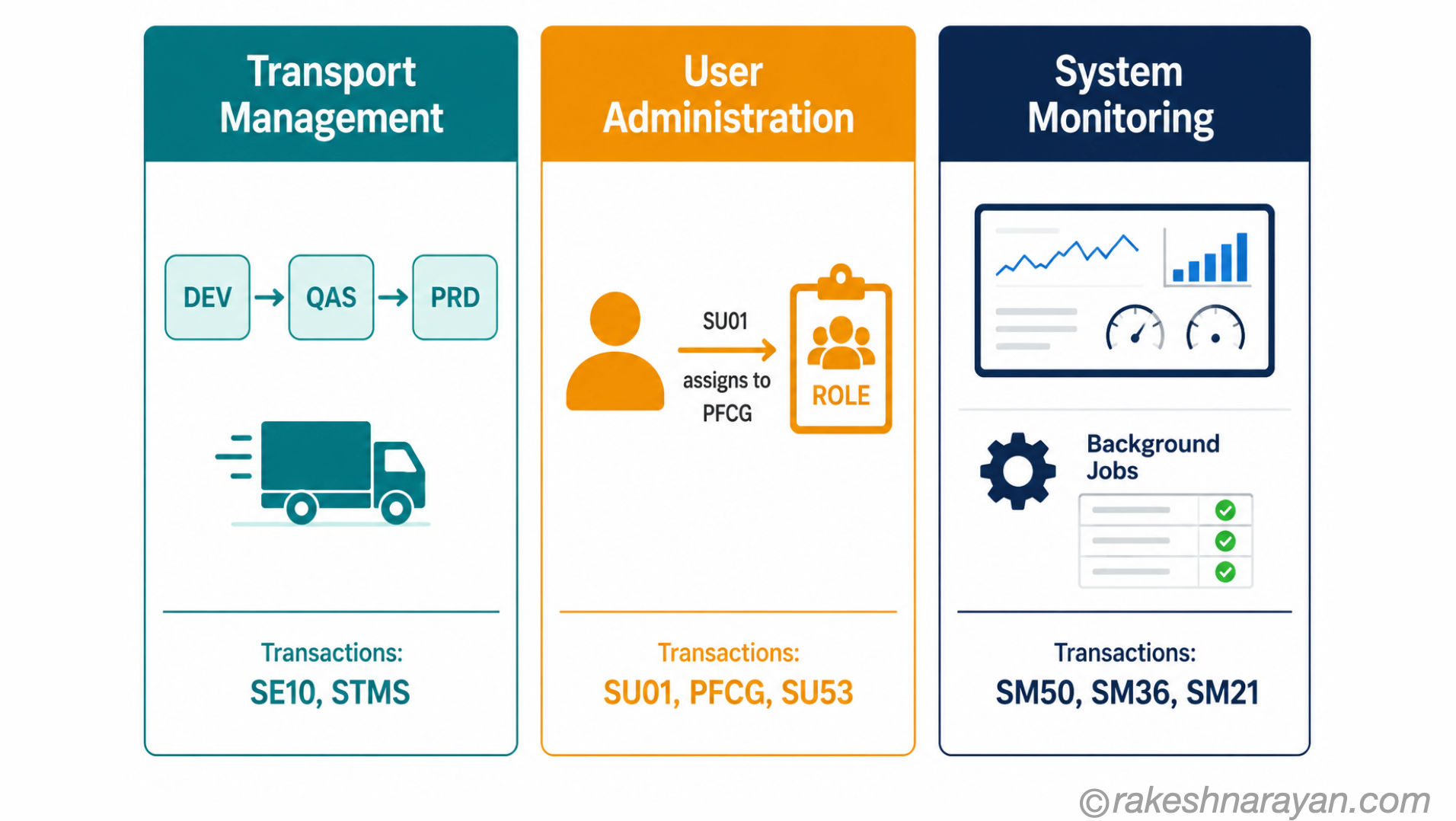
Basis is a broad discipline. But in practice it comes down to three domains — each of which touches the daily work of every other consultant on the project.
1. The System Landscape and Transport Management
Basis owns the SAP system landscape — the three-tier DEV / QAS / PRD structure that every SAP project runs on. Changes made in development move through quality assurance and into production via the Transport Management System (TMS). Basis configures, maintains and monitors this entire pipeline.
When a transport fails, when a system refresh is needed, when a landscape needs a new client — that is Basis. The transport system is the change control backbone of SAP. Every functional consultant interacts with it daily via transaction SE10 or STMS, but Basis is the team that defines how it behaves.
2. User Administration and Authorisation
Basis manages the technical side of user creation and system access. Creating users in SU01, assigning roles, locking and unlocking accounts, resetting passwords, managing system-level access — all Basis territory.
In practice, Basis and the security team often overlap here. The security team designs and maintains the roles in PFCG. Basis ensures the user master records are correct and the authorisation framework is functioning. SU53 — the transaction that shows the last failed authorisation check — is used by both teams when debugging access issues.
🔗 Related Reading
For a full breakdown of how SAP authorisation objects, profiles and roles fit together, see SAP Security Roles and Authorisation.
3. System Performance, Monitoring and Housekeeping
Basis keeps the lights on. That means monitoring application server performance with SM50 and SM51, reviewing system logs with SM21, managing background jobs with SM36 and SM37, and running periodic housekeeping — archiving, table growth management, spool cleanup.
When the system is slow, when a background job is stuck, when disk space is running low — the Basis team diagnoses and resolves it. For everyone else on the project, this is invisible until it stops working. That invisibility is actually the measure of a good Basis team.
The SAP System Landscape — DEV, QAS, PRD
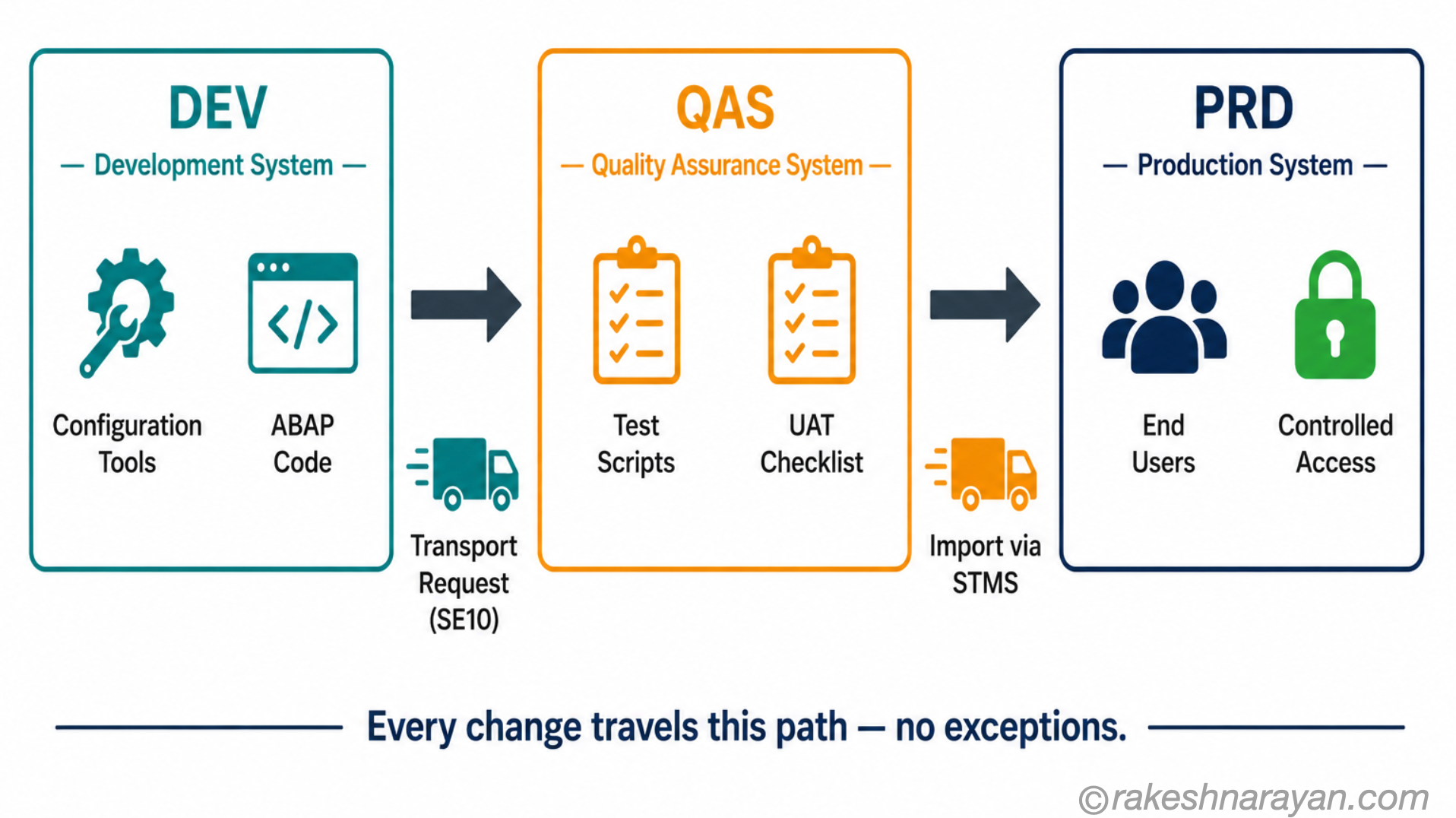
Every SAP implementation runs on a three-system landscape. Understanding this is not optional — it affects every transport you raise, every change request you open and every go-live you are part of.
| System | Purpose | Who works here |
|---|---|---|
| DEV — Development | Where all configuration and development happens. Changes are made here first. | Functional consultants, ABAP developers, configurators |
| QAS — Quality Assurance | Where testing happens. Changes transported from DEV. Nothing is configured directly here. | Testers, business users, project managers during UAT |
| PRD — Production | The live system. Only tested and approved transports reach here. No direct changes. | End users only — no development or configuration |
The Transport Management System (TMS) controls how changes move between these systems. Every change in DEV is packaged into a transport request. Basis releases and imports transports through STMS. Nothing reaches production without passing through this pipeline.
The reason this structure exists is stability and auditability. Changes that have not been tested in QAS do not reach production. Every change that reaches production is traceable to a transport request. In an audit, this history is everything.
⚠️ Warning
Bypassing the transport system — making direct changes in production — is one of the most serious violations in any SAP project. It breaks the audit trail, introduces untested changes and creates a system state that cannot be reproduced in DEV or QAS. Basis controls this access for good reason. If you are ever asked to make a change directly in PRD, escalate — do not proceed.
How Basis Has Shifted in the Cloud Era
The Basis role has not disappeared in the cloud era. It has split. Depending on where your client’s SAP landscape sits — on-premise, RISE with SAP Private Cloud, or RISE with SAP Public Cloud — what a Basis consultant does looks quite different.
| Deployment model | Who manages Basis | Consultant’s Basis responsibilities | Key tools still relevant |
|---|---|---|---|
| On-Premise (ECC / S/4HANA) | Customer’s Basis team owns everything | Full stack: landscape, transports, patching, performance, user admin | STMS, SM50, SM51, SM36, SU01, PFCG, SPAM, SAINT |
| RISE — Private Cloud Edition | SAP manages infrastructure; customer retains functional Basis | Transport management, user admin, monitoring — but no OS or DB access | STMS, SU01, SM36, SM21 — same transactions, narrower scope |
| RISE — Public Cloud Edition | SAP manages the full Basis layer | Consultants work through SAP’s tooling and support processes — minimal direct Basis access | SAP for Me, Cloud ALM, limited STMS access |
| SAP BTP | SAP manages all infrastructure | No traditional Basis — security and integration managed through BTP Cockpit and XSUAA | BTP Cockpit, Cloud Connector, SAP Identity Authentication |
The practical consequence: if your client is on-premise or RISE Private Cloud, you will work with a dedicated Basis team whose job looks much like it did a decade ago. If your client is on RISE Public Cloud or BTP, the Basis layer is largely invisible — managed by SAP — and your project team’s technical focus shifts to integration, security configuration and cloud operations.
This shift does not make Basis knowledge less valuable. Understanding what the layer does — even when you cannot touch it directly — still determines how well you can diagnose problems, design landscapes and make informed decisions about system architecture.
💡 Practical Tip
On RISE Public Cloud projects, the most common Basis-adjacent gap is transport management and change control. SAP provides tooling through Cloud ALM, but the concepts — DEV/QAS/PRD, change approvals, release management — are the same. Understand the concepts and the tooling change is straightforward.
What Every Non-Basis Consultant Needs to Know
You do not need to be a Basis expert. But there are five things that make you materially better at your own job when you understand them.
- Transport requests and release windows — know when the transport window opens and closes in your project. Raising a transport at 4pm on a Friday before a weekend cutover is not a Basis problem. It is a planning problem.
- Client concepts — a single SAP system can contain multiple clients (e.g. client 100 for production, client 200 for testing). Client-dependent vs. client-independent settings behave differently in transports. Misconfiguring this is a common source of project delays.
- Background job scheduling — SM36 and SM37 are not just Basis transactions. Functional consultants configure many background jobs. Understanding job classes, variants and dependencies prevents failed batch runs at month-end.
- SU53 for access issues — when a user gets an authorisation error, run SU53 immediately after. It shows the exact object, field and value that failed the check. This saves hours of back-and-forth with the security team.
- System downtime planning — major Basis activities (patches, upgrades, system copies) require planned downtime. Functional consultants who understand what triggers downtime can plan project timelines accordingly and avoid unpleasant surprises.
✅ Best Practice
Build a relationship with the Basis team early in every project. They know the landscape history, the transport pain points and the upcoming maintenance windows. That knowledge is not in any project document — it is in their heads. An hour’s conversation at the start of a project saves days of confusion later.
At a Glance — SAP Basis
| Concept | One-line summary |
|---|---|
| SAP Basis | The technical middleware layer between the OS/database and SAP applications — the platform everything runs on |
| ABAP Platform | The current official name for the Basis layer in S/4HANA — same function, updated branding |
| SAP NetWeaver | The previous name for the technical platform in ECC and older SAP systems |
| System landscape (DEV/QAS/PRD) | The three-system structure for development, testing and production — change control backbone of every SAP project |
| TMS / STMS | Transport Management System — the tooling that moves changes between systems in the landscape |
| Transport request | The package that carries a configuration or development change from one system to the next |
| SM50 / SM51 | Work process monitoring — the Basis tools for diagnosing application server performance |
| SM36 / SM37 | Background job management — scheduling, monitoring and troubleshooting batch jobs |
| SU53 | Shows the last failed authorisation check — the first diagnostic tool for access issues |
| RISE Public Cloud | SAP manages the Basis layer — customer retains change management responsibility but loses direct system access |
| SAP BTP | No traditional Basis — infrastructure abstracted; security managed through XSUAA and BTP Cockpit |
What to Take Away
The Basis team are not the people you call when things break. They are the people who decide whether things can break in the first place — through landscape design, transport controls and access management. Most consultants realise this too late in a project.
The consultants who work well with Basis are the ones who understand what the team actually owns. They plan around maintenance windows. They read a failed SU53 instead of raising a ticket. They understand that a transport to production is not just an admin step — it is a change control event with an audit trail that will be examined.
In 2026, with clients spread across on-premise, RISE Private Cloud, RISE Public Cloud and BTP, the Basis layer looks different depending on where you are. But the concepts — landscape, transports, authorisation, performance — do not change. Know the concepts, and the tooling is always learnable.
🔗 Related Posts
SAP Security Roles and Authorisation — the authorisation model that Basis and security teams maintain together: objects, profiles, roles and the positive authorisation principle.
SAP S/4HANA vs ECC — The Real Difference — how the move to S/4HANA changes the Basis landscape, HANA as the mandatory database, and what stays the same.
SAP BTP — The Platform Explained — the cloud platform where traditional Basis responsibilities are abstracted — and what takes their place.
ABAP Fundamentals That Still Matter — the development layer that sits directly above Basis — the two disciplines are closely related on every project.
Published on rakeshnarayan.com — Articles
URL: https://rakeshnarayan.com/articles/sap-basis-explained-the-technical-layer-under-every-sap-system/
Did you enjoy this article?
Let me know — it takes one click.
0 Comments
Leave a Comment
Looks like this one held your attention — I'd really appreciate a quick comment below.
Your comment has been submitted and will appear after review.