How DNS Works — Lookups, Records and Why It Matters
You have just finished a deployment. The app is live on the new server. The team is ready. And then — nothing. The domain is not resolving. Half the team can reach the site, half cannot. Nobody can agree on whether the change worked.
That is a DNS problem. And the reason it is so confusing is that most people have never had DNS properly explained. They know it converts domain names to IP addresses. They know changes are slow. Beyond that, it is a black box.
That vagueness costs real time. Understanding how DNS actually works — the lookup chain, the record types, the caching — takes about ten minutes. It will save you hours the next time something breaks.
🔗 Related Reading
This post sits alongside How HTTPS Works — once you understand DNS (getting to the right server) and HTTPS (securing the connection to it), you have the full picture of what happens before a page loads. If you work with APIs, API Security Essentials covers how DNS fits into the broader security picture.
What DNS actually is
DNS stands for Domain Name System. Its job: translate a human-readable domain name like rakeshnarayan.com into an IP address like 188.114.96.3 — the actual numerical location of the server.
Without DNS, you would need to memorise IP addresses to visit any website. That worked in the early days of the internet, when a text file called HOSTS.TXT listed every machine on the network. By the early 1980s, that approach broke down as the network grew. DNS replaced it in 1983.
The phone book analogy is fair as far as it goes. But DNS is not a single lookup in a single book. It is a distributed, hierarchical, heavily cached system involving multiple servers working together — usually in under 100 milliseconds.
The four players in every DNS lookup
Every time your browser resolves a domain name, up to four different servers are involved. Understanding who does what is the foundation of everything else.
| Server | Role | Real-world equivalent |
|---|---|---|
| Recursive Resolver | The intermediary that does the legwork — queries the other servers on your behalf. Usually run by your ISP, or a public provider like Cloudflare (1.1.1.1) or Google (8.8.8.8). | A librarian who does the research for you |
| Root Nameserver | The starting point. Does not know the IP address — but knows which TLD nameserver to ask. There are 13 root nameserver clusters globally. | The library’s main catalogue — tells you which section to go to |
| TLD Nameserver | Handles a top-level domain — .com, .org, .fi, .io. Knows which authoritative nameserver is responsible for a specific domain. | The section index — tells you which shelf |
| Authoritative Nameserver | The final authority. Holds the actual DNS records for the domain. Returns the IP address (or other record) and the lookup is done. | The book itself — the actual answer |
The lookup in order
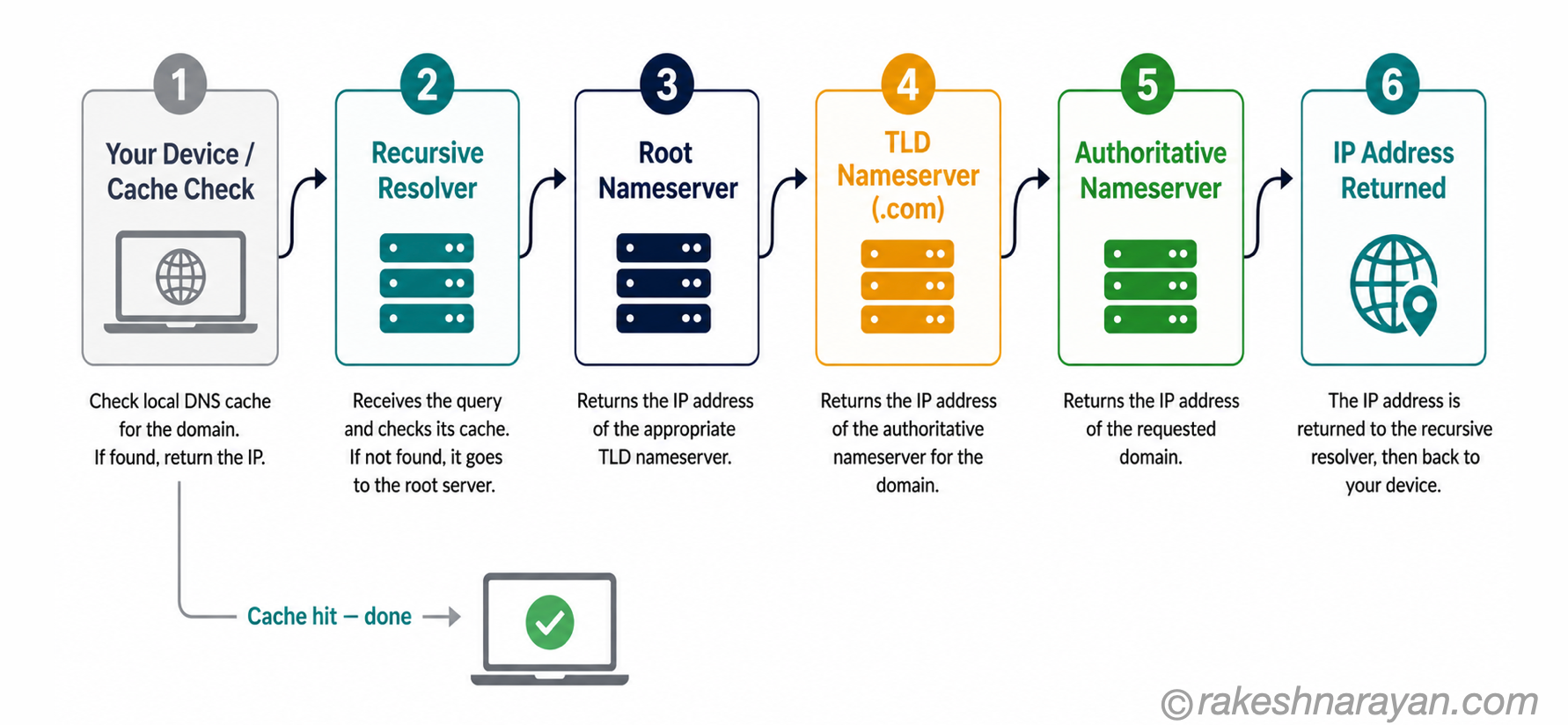
Here is what happens when you type rakeshnarayan.com into your browser:
| Step | What happens |
|---|---|
| 1. Check local cache | Your device checks if it already has a cached answer from a previous lookup. If yes, done — no network query needed. |
| 2. Ask the recursive resolver | If not cached, your device asks the recursive resolver (usually your ISP or Cloudflare/Google). The resolver checks its own cache. |
| 3. Resolver asks the root nameserver | Cache miss. The resolver queries a root nameserver: who handles .com? The root server points to the .com TLD nameserver. |
| 4. Resolver asks the TLD nameserver | The resolver asks the .com TLD nameserver: who handles rakeshnarayan.com? It returns the authoritative nameserver address. |
| 5. Resolver asks the authoritative nameserver | The resolver queries the authoritative nameserver directly. It returns the actual IP address for the domain. |
| 6. Answer returned and cached | The resolver returns the IP to your browser and caches it. Your browser connects to the server. The page loads. |
💡 Practical Tip
The full six-step chain only runs on a cache miss. For popular sites, your device or resolver almost certainly has the answer cached — the lookup feels instantaneous because it is. The full chain runs far less often than most people assume.
DNS records — the ones that actually matter
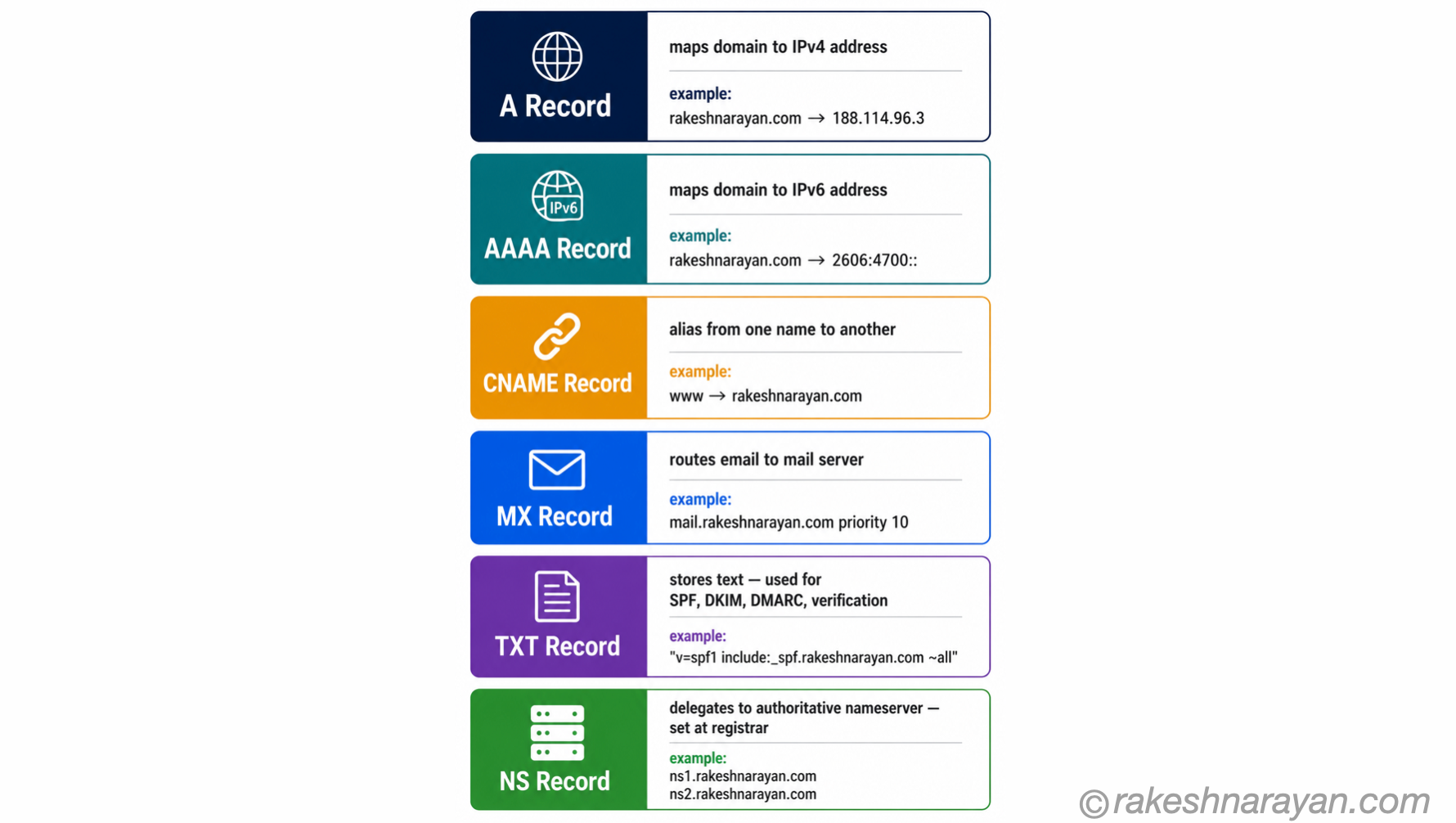
DNS records are the entries stored on the authoritative nameserver. They are what the lookup is actually retrieving. There are dozens of record types, but in practice you will touch a small handful of them.
| Record | What it does | When you need it |
|---|---|---|
| A | Maps a domain name to an IPv4 address. The most fundamental record. | Every website that runs on IPv4 — which is almost everything |
| AAAA | Maps a domain name to an IPv6 address. Clients that support IPv6 prefer this; older clients fall back to the A record. | When your server has an IPv6 address |
| CNAME | Creates an alias — points one name to another name (not an IP). The resolver then looks up the target name. | Subdomains pointing to a CDN or hosted service — e.g. www pointing to your root domain |
| MX | Specifies which mail server handles email for the domain. Has a priority value — lower number = higher priority. | Every domain that receives email |
| TXT | Stores arbitrary text. Used for domain verification, SPF, DKIM and DMARC email authentication — all stored as TXT records. | Email security, Google/GitHub domain verification, SSL certificate validation |
| NS | Specifies which nameservers are authoritative for the domain. Set at the registrar — this is what delegates control to your DNS provider. | When setting up or migrating DNS hosting |
⚠️ Warning
CNAME records cannot be used at the apex (root) of your domain — you cannot put a CNAME on example.com itself, only on subdomains like www.example.com. This trips up a surprising number of people when pointing a root domain at a CDN or load balancer. Some DNS providers offer a proprietary ALIAS or ANAME record as a workaround.
One more record worth knowing: SPF, DKIM and DMARC — the three email authentication standards — do not have their own dedicated record types. All three are stored as TXT records. If you are configuring email for a domain, you will be creating TXT records, not anything exotic.
TTL and caching — why DNS changes are slow
Every DNS record has a TTL — Time to Live — measured in seconds. It tells resolvers and devices how long to cache the answer before they need to ask again.
A TTL of 86,400 means the record is cached for 24 hours. A TTL of 300 means it is cached for 5 minutes. The practical consequence: if your A record has a 24-hour TTL and you update it to point to a new server, some users will keep hitting the old server for up to 24 hours while their cached answer is still valid.
This is called DNS propagation — though technically what is propagating is cache expiry, not the record itself. The authoritative nameserver has your new record immediately. The wait is for cached copies to expire worldwide.
📌 Key Takeaway
The single most common DNS migration mistake: forgetting to lower the TTL before a planned move. The right sequence is: lower your TTL to 300 seconds at least 24–48 hours before the migration. Make the change. Wait. Then raise the TTL back to 3,600 or 86,400. Skipping the first step means your old TTL controls how long the pain lasts.
| TTL value | Behaviour |
|---|---|
| 300 seconds (5 min) | Fast propagation — changes visible globally within minutes. More load on your nameserver. Use before migrations. |
| 3,600 seconds (1 hour) | Reasonable middle ground for most records — change propagates within an hour. |
| 86,400 seconds (24 hours) | Default at many registrars. Low nameserver load. Changes take up to 24 hours to propagate everywhere. |
Where DNS breaks — and how to diagnose it
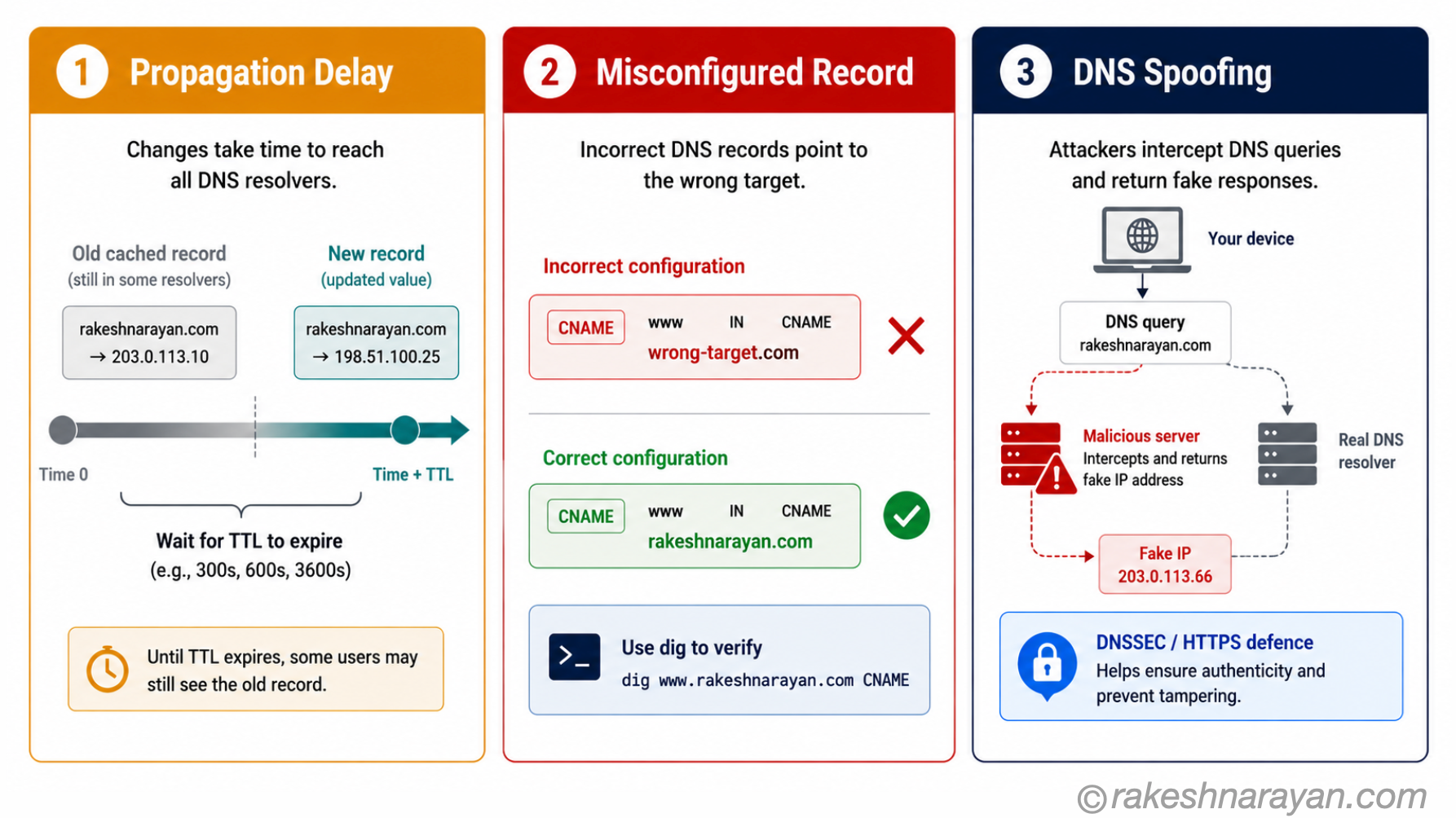
DNS failures have a pattern. The same three problems cause the vast majority of incidents.
1. Propagation delay
The change is correct, but not everyone sees it yet. The old record is cached somewhere — at their ISP, on their device, or both. This is not a bug. It is TTL doing its job.
The fix: wait for the old TTL to expire, or ask affected users to flush their local DNS cache. On most systems: ipconfig /flushdns on Windows, sudo dscacheutil -flushcache on macOS.
2. Misconfigured records
The most common real mistake. A CNAME pointing to the wrong target. An MX record with no A record for the mail server. An NS record left pointing at the old provider after a DNS migration.
The fix: verify the record directly using dig or nslookup. Do not rely on your DNS provider’s dashboard — query the authoritative nameserver directly to confirm what is actually live.
# Check what IP your domain resolves to
dig rakeshnarayan.com A

# Check MX records for a domain
dig rakeshnarayan.com MX

# Query a specific nameserver directly (bypass local cache)
dig @8.8.8.8 rakeshnarayan.com A

# Check with nslookup (works on Windows, macOS, Linux)
nslookup rakeshnarayan.com
3. DNS spoofing
A more serious failure mode. An attacker intercepts DNS queries and returns a false IP address — sending users to a malicious server instead of yours. The defence is DNSSEC, which adds cryptographic signatures to DNS records so resolvers can verify the answers are genuine.
DNSSEC adoption is growing but not universal. In the meantime, HTTPS (and the HSTS header) provides a layer of defence: even if DNS is spoofed, a certificate mismatch will alert the browser before the user submits anything sensitive.
💡 Practical Tip
Two tools worth bookmarking for DNS debugging: dnschecker.org and whatsmydns.net — both show you what different resolvers around the world are returning for your domain. If your site works for you but not for a colleague in another country, these tools will show exactly which resolvers still have the old record.
At a glance — DNS essentials
| Concept | One-line summary |
|---|---|
| DNS | Translates domain names into IP addresses — the lookup system that makes human-readable URLs work |
| Recursive Resolver | The intermediary server that queries root, TLD and authoritative nameservers on your behalf |
| Root Nameserver | The starting point for every lookup — points to the correct TLD nameserver |
| TLD Nameserver | Handles a top-level domain (.com, .org) — points to the authoritative nameserver for the specific domain |
| Authoritative Nameserver | The final authority — holds the actual DNS records and returns the answer |
| A Record | Maps a domain to an IPv4 address — the most fundamental DNS record |
| CNAME Record | Creates an alias from one name to another — cannot be used at the apex/root domain |
| MX Record | Routes email to the correct mail server — priority value determines order |
| TXT Record | Stores text — home of SPF, DKIM, DMARC and domain verification records |
| NS Record | Specifies the authoritative nameservers — set at the registrar |
| TTL | Time to Live — how long resolvers cache a record before re-querying. Controls propagation speed. |
| DNS Propagation | The time for cached old records to expire worldwide — governed by the previous TTL value |
| dig / nslookup | Command-line tools for querying DNS records directly — essential for debugging |
| DNSSEC | Adds cryptographic signatures to DNS records so resolvers can verify answers are genuine |
What to take away
DNS is invisible when it works and mysterious when it does not. The gap between those two states is usually a misconfigured record, an unexpired TTL, or a change made without lowering the TTL first.
The mental shift that makes DNS click: the authoritative nameserver always has your updated record immediately. Everything else is cache. Propagation delays are not DNS being slow — they are DNS being correct. The old TTL told every resolver in the world to trust the cached answer for X hours. Honour that, or lower the TTL before you make the change.
Once you understand the four-server chain and the six record types that actually matter, most DNS problems become diagnosable in under five minutes with dig or nslookup. The mystery disappears. What is left is a well-designed distributed system that has been quietly running the internet for over 40 years.
🔗 Related posts on this site
How HTTPS Works — Certificate Chains and TLS Handshake — DNS gets you to the right server. HTTPS secures what happens next — including how domain verification ties back to DNS TXT records. API Security Essentials — DNS spoofing and how it relates to API security — the same threat model applies to API endpoints. REST API Design Principles — understanding how DNS resolves API hostnames is useful context for anyone designing or calling REST APIs.
Published on rakeshnarayan.com — Articles
URL: https://rakeshnarayan.com/articles/how-dns-works-lookups-records-and-why-it-matters/


Did you enjoy this article?
Let me know — it takes one click.
0 Comments
Leave a Comment
Looks like this one held your attention — I'd really appreciate a quick comment below.
Your comment has been submitted and will appear after review.