HTTP Requests and Responses — The Mental Model
Every time you open a browser, call an API, or build a feature that talks to a backend — HTTP is what makes it work. It is the protocol behind every web page, every REST API, every SAP OData service, every authentication flow. You use it constantly.
Most people understand it just well enough to move forward. They know GET retrieves something and POST sends something. They recognise a 404 when they see one. But ask them to explain what actually travels across the network when a request is made — what the request is made of, what a response contains, why HTTP has no memory of previous requests — and the answer gets vague quickly.
That vagueness has a cost. It shows up when you misread an error response, when you design an API that leaks information in headers, or when you cannot tell whether a problem is in the request or in the server’s handling of it. This post fixes the gap. It builds the mental model — the one that makes everything else click.
🔗 Related Reading
This post sits naturally alongside two others on this site.
REST API Design Principles — builds directly on HTTP. REST is a set of conventions for using HTTP well.
How HTTPS Works — goes deeper on the security layer that sits on top of what is explained here.
What HTTP actually is
HTTP — Hypertext Transfer Protocol — is a set of rules that governs how two parties talk to each other over a network. One party asks for something. The other responds. That is the entire model.
The asking party is the client — usually a browser, a mobile app, or another service. The responding party is the server — a machine running software that knows how to handle the type of request it receives. Every web interaction you have ever had follows this pattern.
The most important thing to understand about HTTP is that it is stateless. Each request is completely independent. The server has no memory of any previous request from the same client. When you log in, load the next page, and then click a link — from HTTP’s perspective, those are three entirely separate conversations. Nothing carries over.
💡 Practical Tip
This sounds like a limitation. It is actually a design decision. Statelessness makes HTTP simple, scalable and easy to cache. The mechanisms that add memory — cookies, session tokens, JWTs — are built on top of HTTP, not inside it. Understanding this distinction explains why authentication works the way it does across every modern system.
The four parts of an HTTP request
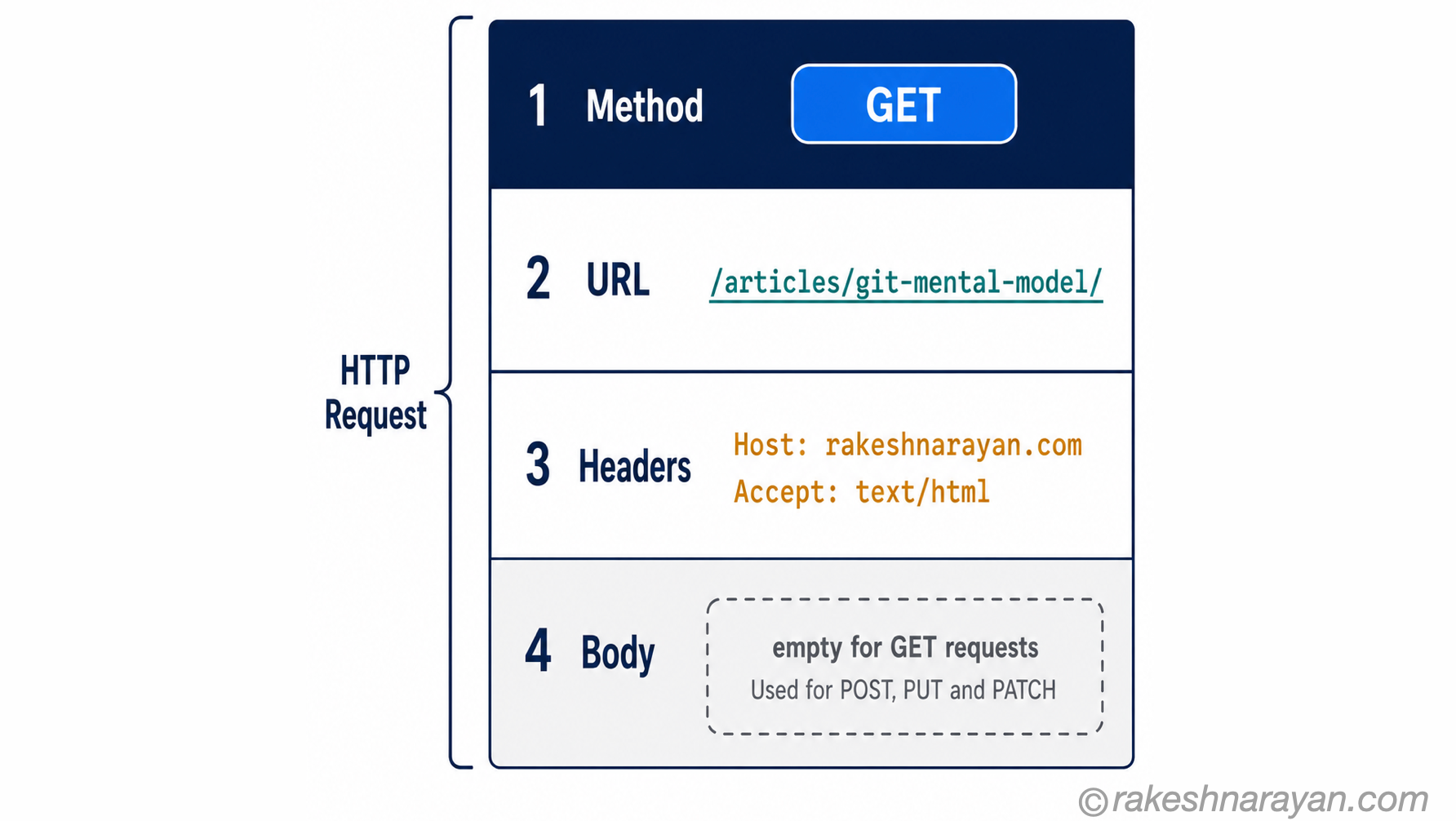
An HTTP request is a structured message. It has up to four parts, each doing a specific job. Understanding what each part does — and when each part is used — removes most of the confusion about how requests work in practice.
| Part | What it contains | Required? | |
|---|---|---|---|
| Method | The action — what the client wants to do (GET, POST, PUT, PATCH, DELETE) | Yes — always | |
| URL | The address — which resource the action applies to | Yes — always | |
| Headers | Metadata — content type, authentication tokens, accepted formats, caching rules | Technically optional, practically always present | |
| Body | The data payload — used when sending data to the server (POST, PUT, PATCH). GET requests have no body. | No — GET and DELETE requests never have a body |
A simple GET request — loading a web page — looks like this:
GET /articles/git-mental-model/ HTTP/1.1
Host: rakeshnarayan.com
Accept: text/html
Authorization: Bearer eyJhbGci...
A POST request — submitting a form or creating a resource — adds a body:
POST /api/articles HTTP/1.1
Host: rakeshnarayan.com
Content-Type: application/json
Authorization: Bearer eyJhbGci...
{
  "title": "HTTP Mental Model",
 "category": "Technology - Non SAP"
}
💡 Practical Tip
The Content-Type header tells the server what format the body is in. The Accept header tells the server what format the client wants back. These two headers are the source of more API debugging headaches than almost anything else. If the server returns a 415 Unsupported Media Type error, check Content-Type first.
HTTP methods — what you are actually asking for
The method tells the server what you want to do. Not just the action — it carries a contract about how the server should behave. Five methods cover almost everything you will encounter.
| Method | What it means | Has a body? | |
|---|---|---|---|
| GET | Retrieve a resource. Should never modify anything. Safe to call repeatedly. | No | |
| POST | Send data to create a new resource or trigger an action. Each call may produce a different result. | Yes | |
| PUT | Replace a resource entirely with what is in the body. Idempotent — calling it twice gives the same result. | Yes | |
| PATCH | Update part of a resource — only the fields provided. More targeted than PUT. | Yes | |
| DELETE | Remove a resource. Idempotent — deleting something that is already gone returns a success or 404, not an error. | No |
⚠️ Warning
The most common mistake: using POST when PUT or PATCH is correct. POST is not just ‘send data to server’ — it specifically means create something new or trigger an action where the result may vary. If you are updating an existing record, use PUT (full replacement) or PATCH (partial update). This distinction matters because it signals to clients whether it is safe to retry the request.
The response — what comes back
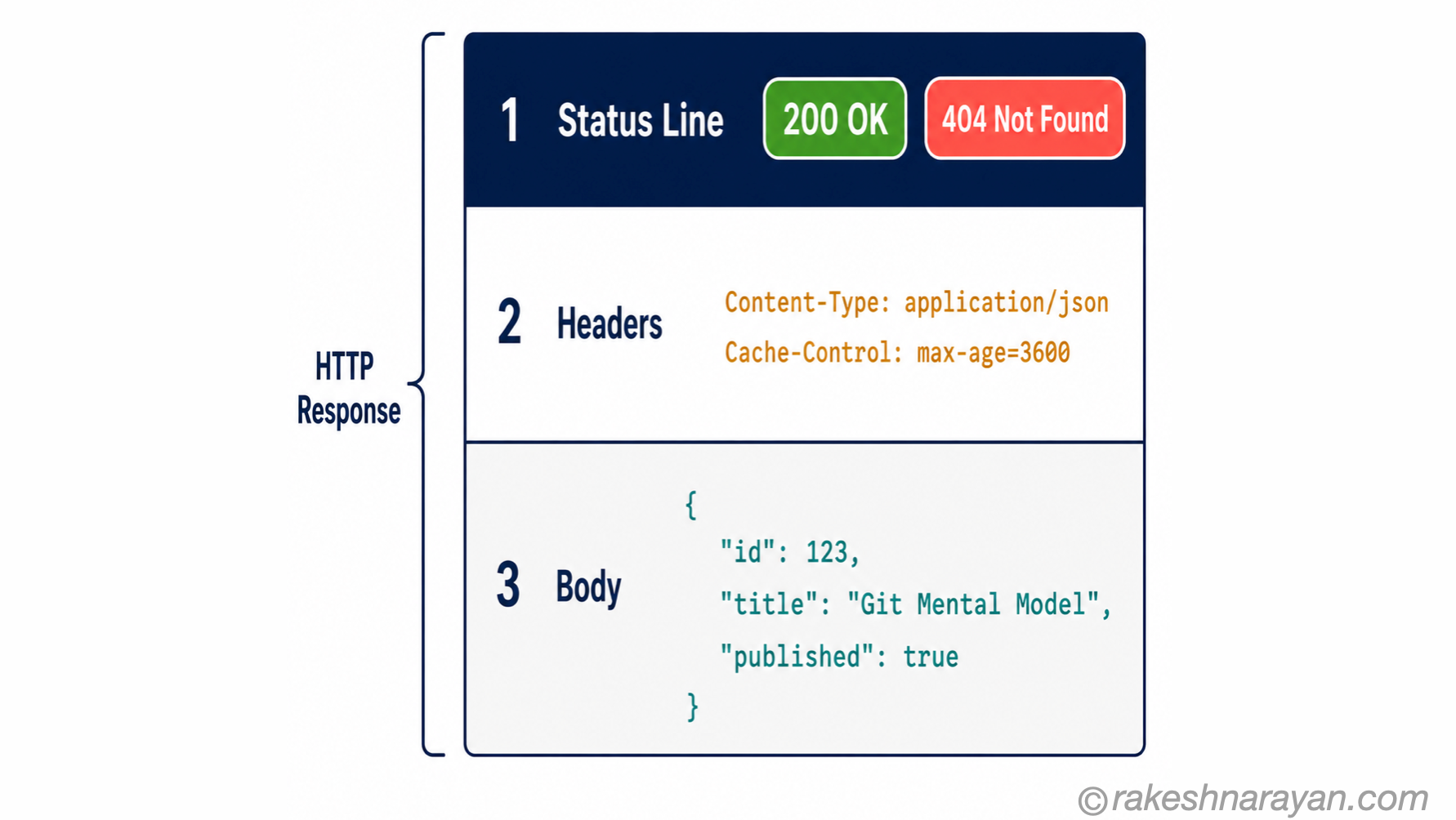
Every request gets a response. Even when things go wrong. The response has three parts: a status line, headers, and usually a body. The status line is the most important — it tells you immediately whether the request succeeded, and if it failed, what category of failure occurred.
| Status code range | What it means |
|---|---|
| 1xx — Informational | The server has received the request and is continuing to process it. Rare in everyday use. |
| 2xx — Success | The request worked. 200 OK is the standard success. 201 Created confirms a new resource was created. 204 No Content means success with no data returned. |
| 3xx — Redirection | The client must take further action. 301 Moved Permanently redirects to a new URL permanently. 302 Found is a temporary redirect. |
| 4xx — Client error | The request itself is wrong. 400 Bad Request (malformed data), 401 Unauthorized (not authenticated), 403 Forbidden (authenticated but not allowed), 404 Not Found, 429 Too Many Requests. |
| 5xx — Server error | The request was valid — the server failed. 500 Internal Server Error, 502 Bad Gateway, 503 Service Unavailable. |
📌 Key Takeaway
The 4xx/5xx distinction is the fastest way to triage any API problem. A 4xx means fix the request — something in what the client sent is wrong. A 5xx means the request was fine — something on the server broke. If you get a 5xx from an API you did not build, it is not your code that is wrong.
A typical success response looks like this:
HTTP/1.1 200 OK
Content-Type: application/json
Cache-Control: max-age=3600
{
  "id": 42,
  "title": "HTTP Mental Model",
  "published": true
}
The full cycle — one request, start to finish
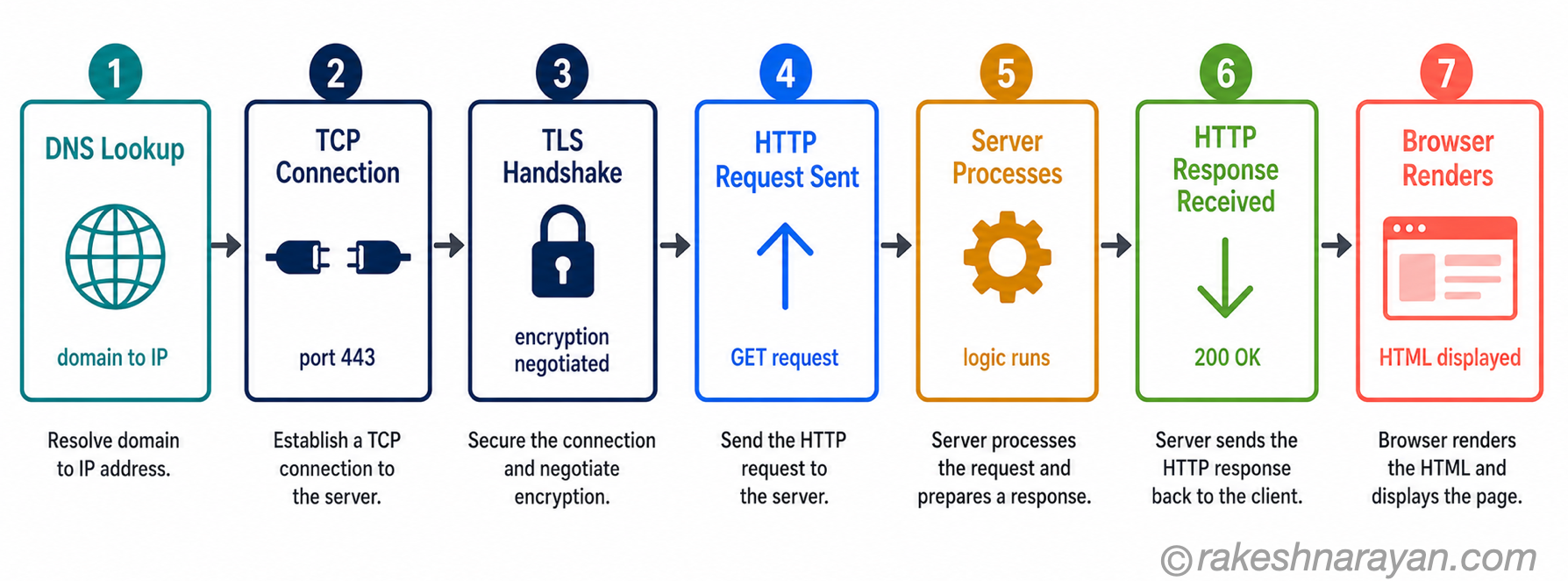
You type https://rakeshnarayan.com/articles/git-mental-model/ into your browser and press Enter. Here is exactly what happens.
| Step | What happens | Detail | Protocol involved |
|---|---|---|---|
| 1 | DNS lookup | The browser does not know where rakeshnarayan.com lives. It asks a DNS resolver to translate the domain name into an IP address. | DNS |
| 2 | TCP connection | The browser opens a TCP connection to the server’s IP address on port 443 (HTTPS). A three-way handshake establishes the connection. | TCP |
| 3 | TLS handshake | Because this is HTTPS, the client and server negotiate encryption — exchanging certificates and agreeing on a cipher. This is what the padlock icon confirms. | TLS |
| 4 | HTTP request sent | The browser sends the HTTP request — method (GET), URL, and headers — over the encrypted connection. | HTTP |
| 5 | Server processes | The server receives the request, finds the resource (or runs the application logic), and constructs a response. | Application layer |
| 6 | HTTP response received | The server sends back the status line, response headers, and the body (HTML in this case) over the same connection. | HTTP |
| 7 | Browser renders | The browser reads the HTML, discovers additional resources (CSS, JS, images), and fires new HTTP requests for each one. | HTTP |
📝 Note
Steps 2 and 3 only happen once per connection. HTTP/1.1 introduced persistent connections so the TCP and TLS overhead is not repeated for every single request on a page. HTTP/2 goes further — multiple requests travel over the same connection simultaneously.
Statelessness — the design decision that shapes everything
HTTP remembers nothing. Every request arrives at the server as if it were the first. The server does not know who you are, whether you logged in five seconds ago, or what page you were just on. That information has to travel with every request — or be stored somewhere and retrieved.
This is why authentication tokens exist. When you log in, the server gives you a token. Your browser stores it. Every subsequent request includes that token in an Authorization header. The server checks the token each time, confirms your identity, and responds accordingly. HTTP has not changed — the client is just including the proof of identity it was given.
| Mechanism | What it solves |
|---|---|
| Cookies | Small pieces of data the server asks the browser to store and send back automatically on every request to that domain |
| Session tokens | A server-side record of who is authenticated — the cookie holds a session ID, the server holds the data |
| JWTs (JSON Web Tokens) | Self-contained tokens that carry identity claims — the server can verify them without storing anything |
| OData context | SAP OData services are HTTP — authentication is handled the same way: OAuth tokens in the Authorization header |
🔗 Related Reading
OData Protocol in SAP — SAP Fiori apps talk to backend SAP systems via OData — which is HTTP with a structured query convention layered on top. Every GET, POST, PATCH and DELETE in an OData call is a plain HTTP request. Understanding HTTP is understanding how Fiori and OData actually work at the wire level.
HTTP/1.1, HTTP/2 and HTTP/3 — what actually changed
The request-response model has not changed across versions. GET still means retrieve. 200 still means success. What changed with each version is the efficiency of how requests travel across the network.
| Version | The one thing it fixed | Still in use? |
|---|---|---|
| HTTP/1.1 (RFC 2616, 1999) | Persistent connections — one TCP connection reused for multiple requests instead of opening a new one for every resource on a page. | Yes — still deployed widely, especially on older infrastructure |
| HTTP/2 (RFC 7540, 2015) | Multiplexing — multiple requests and responses travel simultaneously over a single connection. Header compression. No more waiting in line. | Yes — the current standard for most modern web traffic |
| HTTP/3 (RFC 9114, 2022) | Replaced TCP with QUIC (runs on UDP). Eliminates TCP’s head-of-line blocking. Faster on lossy connections (mobile networks). As of mid-2026, all major browsers support it and it accounts for around 21% of global web requests (Cloudflare Radar, May 2026), with HTTP/2 leading at over 50%. | Growing — supported by Chrome, Firefox, Safari and Edge natively |
📝 Note
For everyday development and debugging, the HTTP version does not change how you think about requests and responses. The semantics are identical — the same methods, the same status codes, the same headers. HTTP/2 and HTTP/3 are transport optimisations. The mental model in this post applies to all three.
At a glance — the HTTP mental model
| Concept | One-line summary |
|---|---|
| HTTP | The protocol that defines how clients and servers talk — the contract behind every web interaction |
| Client | The requester — a browser, mobile app, API tool or backend service |
| Server | The responder — returns the resource or confirms the action the client requested |
| Stateless | HTTP has no memory — every request is independent; cookies and tokens exist to add memory on top |
| Request method | The action — GET retrieves, POST creates, PUT replaces, PATCH updates, DELETE removes |
| Request headers | Metadata that travels with the request — content type, authentication, accepted formats |
| Request body | The data payload — only present for POST, PUT and PATCH; GET and DELETE have no body |
| Status code | The server’s verdict on the request — 2xx success, 3xx redirect, 4xx client error, 5xx server error |
| Response headers | Metadata that travels with the response — content type, caching rules, rate limit info |
| HTTP/1.1 | The 1999 standard — introduced persistent connections; still widely deployed |
| HTTP/2 | The 2015 standard — multiplexing over a single connection; the current default for modern web traffic |
| HTTP/3 | The 2022 standard — runs on QUIC (UDP); eliminates TCP head-of-line blocking; ~21% of global traffic as of mid-2026 |
| OData / REST | Both are conventions built on top of HTTP — same methods, same status codes, same headers |
What to take away
HTTP is not a transport detail. It is the contract every web system is built on — and knowing that contract changes how you read error messages, design APIs and debug problems. A 401 means authentication is missing or invalid. A 403 means you are authenticated but not allowed. A 503 means the server is overwhelmed. These are not opaque codes — they are the server telling you exactly what went wrong.
The stateless nature of HTTP is the insight that explains the most. Cookies, session tokens, JWTs, OAuth flows — they all exist because HTTP itself remembers nothing. Once that clicks, authentication stops feeling like magic and starts feeling like a logical solution to a specific problem.
Every tool you use — SAP OData, REST APIs, browser developer tools, curl — is making HTTP requests and reading HTTP responses. They look different on the surface. The protocol underneath is identical. Once that clicks, debugging stops being guesswork. You know exactly where to look.
🔗 Related posts on this site
REST API Design Principles — REST is a set of conventions for using HTTP correctly; this post is the natural next step.
How HTTPS Works — everything HTTP does, but with the TLS encryption layer explained in detail.
API Security Essentials — HTTP methods and headers are the attack surface; this post covers how to secure them.
JSON — From Zero to Confident — the HTTP response body is almost always JSON; that post explains exactly how to read it.
Published on rakeshnarayan.com — Articles
URL: https://rakeshnarayan.com/articles/http-requests-and-responses-the-mental-model/

Did you enjoy this article?
Let me know — it takes one click.
0 Comments
Leave a Comment
Looks like this one held your attention — I'd really appreciate a quick comment below.
Your comment has been submitted and will appear after review.