How Servers Actually Work — The Mental Model
Every day you work with servers. You deploy to them. You debug them. You pay for them by the hour. But ask most people to explain what a server actually is — not the definition, but what is physically happening when you make a request — and the answer gets vague fast.
That vagueness costs you. It makes cloud billing confusing. It makes performance problems harder to diagnose. And it makes conversations with infrastructure teams harder than they need to be.
This post fixes that. It starts with how a computer processes work — the CPU, RAM and storage relationship — and builds from there to servers, the client-server model, and how cloud infrastructure fits in. No assumed knowledge. No skipped steps.
🔗 Related Reading
The Cloud Service Model — IaaS, PaaS and SaaS Explained — covers what cloud providers sell on top of the infrastructure described here.
Docker and Containers — The Why — the natural next step after understanding what a server is.
What a computer actually is — the three-part model
Before you can understand a server, you need to understand what any computer does. Strip away the software and every computer is doing one thing: it takes instructions, processes them, and stores the results.
Three components handle this. Understanding what each one does — and why you cannot collapse them into one — is the foundation for everything that follows.
| Component | What it does | The analogy |
|---|---|---|
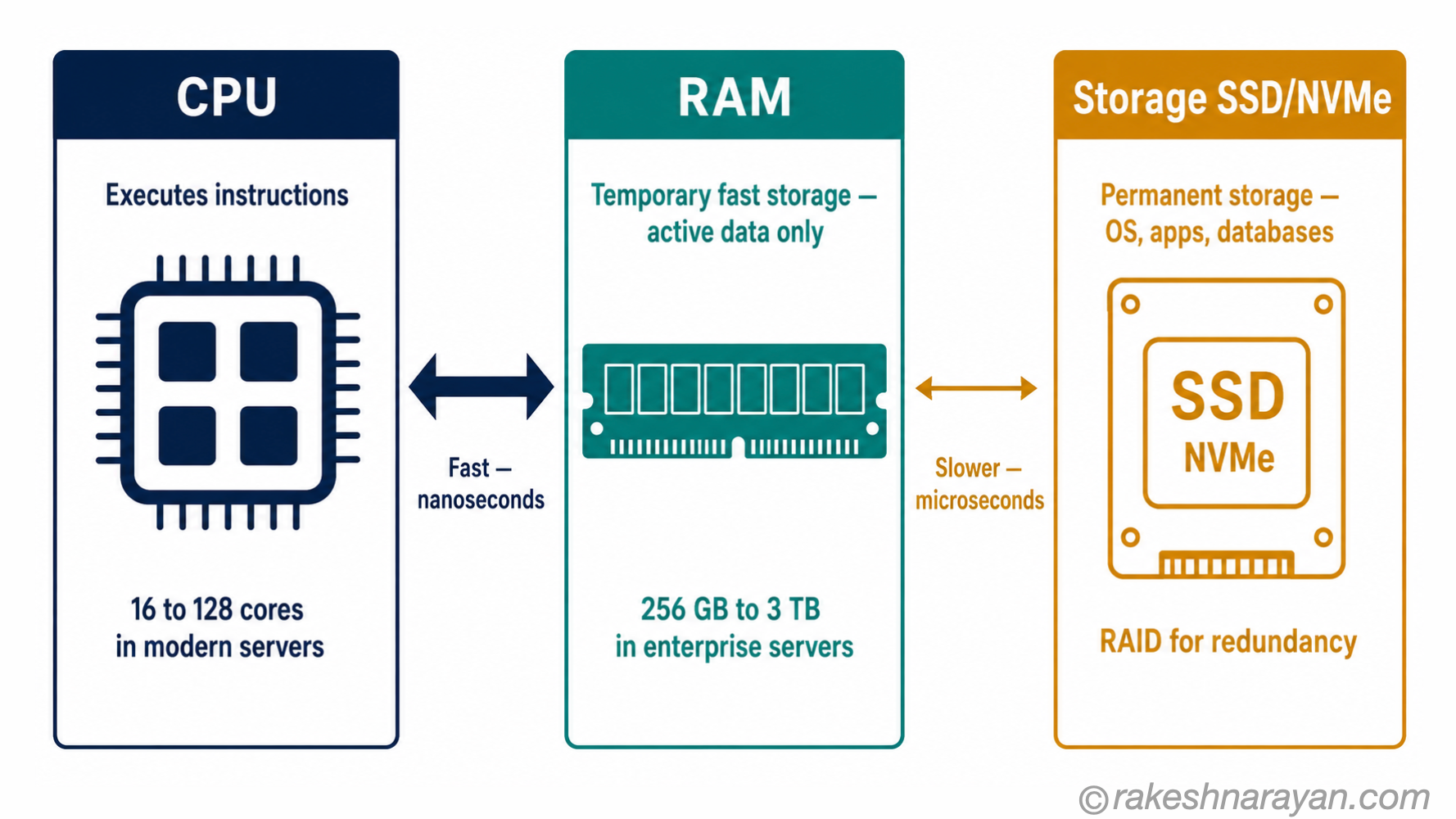
| CPU (Central Processing Unit) | Executes instructions. Addition, comparison, logic — it does the actual computation. Modern server CPUs have 16 to 128 cores, each capable of executing instructions independently. | The person doing the work |
| RAM (Random Access Memory) | Holds data the CPU is actively using. Fast to read and write — but temporary. When power goes off, RAM is cleared. A server might have 256 GB to 3 TB of RAM for large workloads. | The desk — the workspace in front of you |
| Storage (SSD / NVMe) | Holds data permanently — the operating system, application files, databases. Slower than RAM but persistent. Enterprise servers use NVMe SSDs for speed, with RAID configurations for redundancy. | The filing cabinet — permanent but slower to access |
Why all three? The CPU needs RAM because accessing storage for every calculation would be too slow — the speed difference between RAM and an SSD is roughly 10x. And you need storage because RAM is wiped when the machine restarts. The three tiers exist because speed costs money, and you cannot afford to have everything at CPU speed.
💡 Practical Tip
When a server runs slowly under load, the bottleneck is almost always one of these three things. CPU-bound means the processor is maxed out and cannot handle more work. Memory-bound means the server is running out of RAM and spilling to slower storage — called swapping. I/O-bound means too many reads and writes are queuing up on storage.
Each has a different fix. Knowing which one you have is half the diagnosis.
What a server is — and why it is not what you think
A server is a computer. That is not a simplification — it is the accurate answer that most explanations skip past.
The difference between the laptop on your desk and a server in a data centre is not fundamental. Both have a CPU, RAM and storage. Both run an operating system. Both execute code. What makes a server a server is two things: purpose and configuration.
A server runs software that listens for requests and responds to them. That is the core behaviour. Your laptop runs software you interact with directly. A server runs software that waits for other computers to talk to it and serves them when they do — hence the name.
📌 Key Takeaway
Any computer can be a server. If you run a web server process on your laptop, your laptop is a server. The hardware distinction exists for practical reasons — uptime, performance and reliability — not because servers are a fundamentally different category of machine.
Physical vs virtual servers
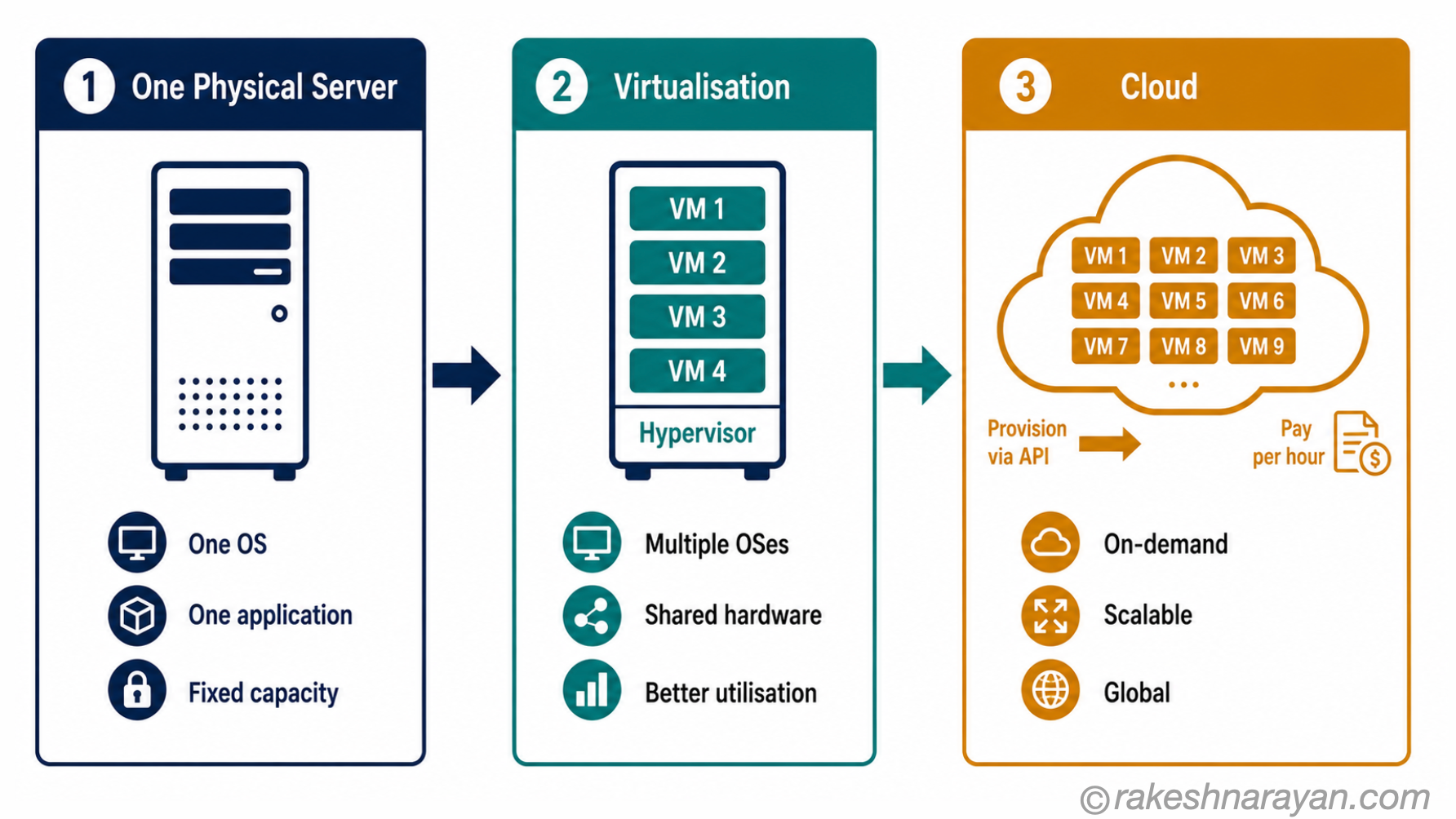
In a data centre, a physical server is a single machine — one set of hardware that runs one operating system. For years this was the only option, and it was wasteful. A physical server allocated to one application often ran at 10–20% CPU utilisation, leaving most of the hardware idle.
Virtualisation solved this. A hypervisor — software like VMware ESXi or Microsoft Hyper-V — sits between the hardware and the operating system. It divides one physical server into multiple virtual machines (VMs), each with its own allocated CPU cores, RAM and storage. Each VM behaves exactly like an independent physical server but shares the underlying hardware.
This is what cloud computing is built on. When AWS or Azure sells you a virtual machine, they are giving you a VM running on one of their physical servers in a data centre. You get a slice of the hardware — sized to your spec, billed by the hour.
The client-server model — how the conversation works
Every time you type a URL into a browser and a page loads, a specific sequence of events happens. Most people have a rough mental model of it but have never had it explained step by step.
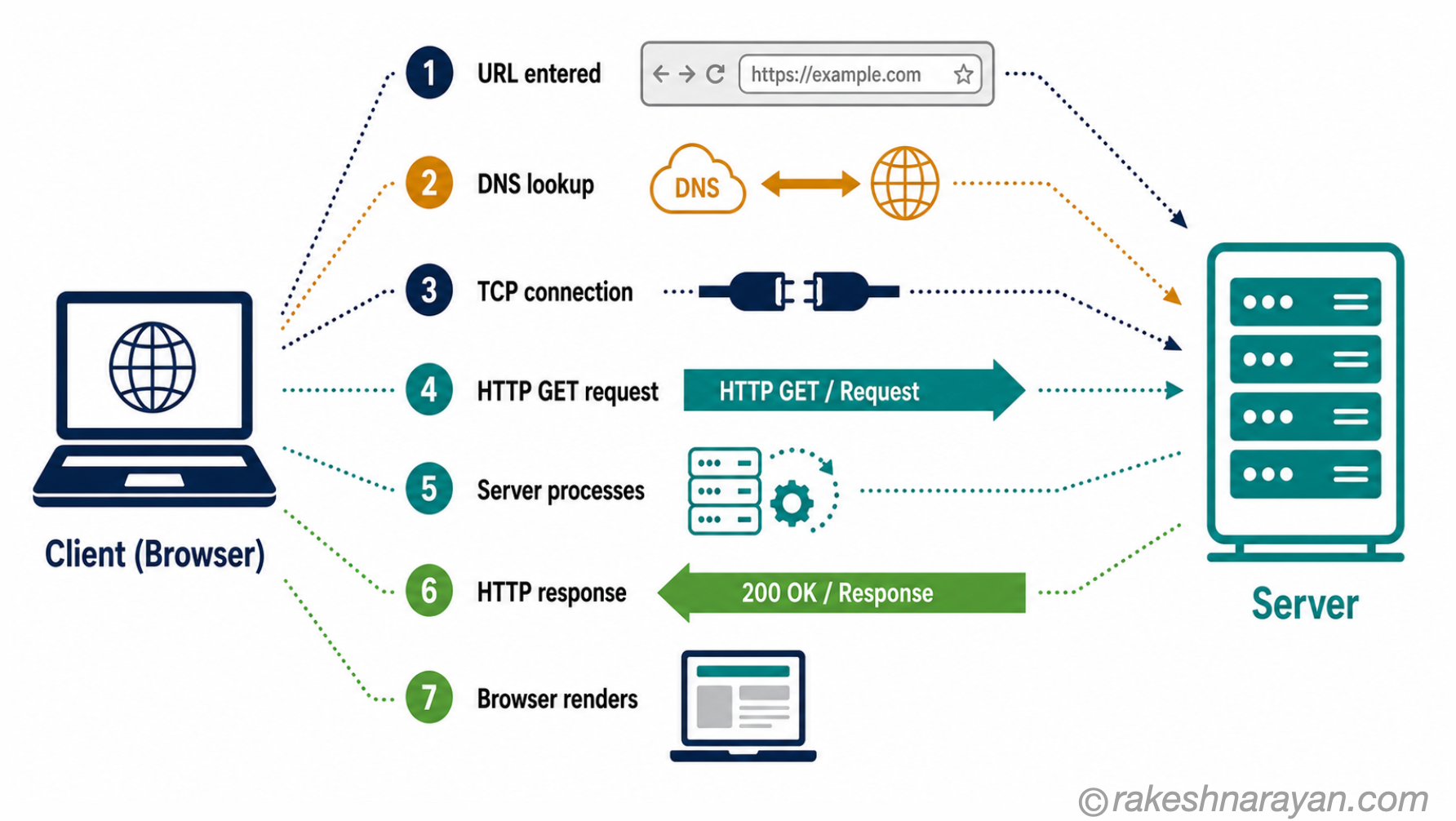
The client is the device making the request — your browser, your mobile app, an API client. The server is the machine that receives the request and sends back a response. Here is the full sequence:
| Step | What happens |
|---|---|
| 1. You type a URL | Your browser parses the address. It knows the domain name (e.g. rakeshnarayan.com) but not the IP address — the actual network location of the server. |
| 2. DNS lookup | Your device asks a DNS (Domain Name System) resolver to translate the domain name into an IP address. This typically happens in under 100 milliseconds and is often cached after the first visit. |
| 3. TCP connection | Your browser opens a connection to the server at that IP address. For HTTPS, a TLS handshake also happens here to encrypt the connection. |
| 4. HTTP request | Your browser sends an HTTP GET request to the server — essentially saying: ‘Please send me the contents of this page.‘ |
| 5. Server processes the request | The server receives the request. It might query a database, run application logic, fetch files from storage — whatever is needed to produce the response. |
| 6. HTTP response | The server sends back an HTTP response. This includes a status code (200 OK, 404 Not Found, 500 Server Error) and the response body — HTML, JSON, a file, or whatever was requested. |
| 7. Browser renders | Your browser receives the response and renders it. For a web page this means parsing HTML, loading CSS, executing JavaScript and displaying the result. |
📝 Note
DNS is a distributed system, not a single server. There are 13 root name server clusters globally, with thousands of individual instances. Your request typically hits a local resolver first — often run by your ISP or a provider like Cloudflare (1.1.1.1) or Google (8.8.8.8). For a deeper look at the connection security layer, see How HTTPS Works.
From one server to the cloud — how scale changes the picture
One physical server handles one thing at a time with a ceiling on how much work it can do. A laptop-grade server might handle a few hundred concurrent HTTP requests before it struggles. A busy e-commerce site on Black Friday gets millions.
Scale introduced three changes that led directly to what we call cloud computing today.
More hardware, then smarter hardware
The first answer to scale was simple: add more servers. Put twenty physical servers behind a load balancer — software that distributes incoming requests across them — and you multiply capacity by twenty. This still works. Every large web platform runs dozens to thousands of physical servers.
But managing physical servers is expensive. You buy hardware, rack it, cable it, power it, cool it — and then watch most of it sit idle during off-peak hours. Virtualisation made this smarter: one physical server running ten VMs can shift resources dynamically based on which workloads are busy.
Cloud infrastructure — rented slices of someone else’s data centre
AWS, Azure, and Google Cloud own millions of physical servers across data centres globally. They run hypervisors on every machine and sell slices of that hardware as virtual machines — billed by the hour, scaled on demand.
When you provision an EC2 instance or an Azure VM, you get a specific number of virtual CPU cores, a specific RAM allocation, and attached storage — running on physical hardware in one of their data centres. You do not own the hardware. You rent the compute.
🔗 Related Reading
The three cloud service models — IaaS, PaaS and SaaS — are what you get when cloud providers package this infrastructure at different levels of abstraction. The Cloud Service Model — IaaS, PaaS and SaaS Explained covers exactly this.
What makes servers different from laptops
If a server is just a computer, why does dedicated server hardware exist? The short answer is that a server needs to be reliable, accessible and efficient in ways that a consumer laptop was never designed for.
| Aspect | Laptop | Server |
|---|---|---|
| Form factor | Compact, portable, with screen and keyboard | Rack-mounted (1U/2U) or tower — no screen, no keyboard by default |
| CPU | 4–16 cores, optimised for burst performance | 16–128 cores, optimised for sustained parallel workloads |
| RAM | 8–64 GB, standard DDR5 | 256 GB to several TB, ECC (Error-Correcting Code) RAM to detect and fix memory errors |
| Storage | Single SSD, no redundancy | Multiple NVMe SSDs, often in RAID — losing one drive does not lose data |
| Power supply | Single power adapter | Dual redundant power supplies — one fails, the machine keeps running |
| Network | One wireless or wired interface | Multiple high-speed NICs — 10 Gbps, 25 Gbps or higher, bonded for redundancy |
| Uptime expectation | Rebooted regularly, tolerable downtime | 99.9%+ uptime SLA — designed to run continuously for years |
| Remote management | Physical access needed | IPMI/iDRAC: access BIOS and console remotely, even if the OS is down |
⚠️ Warning
ECC RAM is one of the most overlooked differences. Consumer hardware — including most developer laptops — uses non-ECC memory. A single bit-flip from cosmic radiation or electrical noise can corrupt data silently.
In a laptop this rarely matters. In a database server handling financial transactions, a single undetected memory error can corrupt data permanently. Enterprise servers use ECC RAM specifically to detect and correct these errors before they cause damage.
At a glance — the mental model
| Concept | One-line summary |
|---|---|
| CPU | The processor — executes instructions. More cores means more parallel work. |
| RAM | Fast temporary memory — holds data the CPU is actively using. Cleared on restart. |
| Storage (SSD/NVMe) | Permanent storage — holds the OS, applications and data. Slower than RAM, survives restarts. |
| Server | A computer running software that listens for requests and responds to them. |
| Client | Any device making a request — browser, app, API client. |
| Client-server model | The conversation pattern — client sends a request, server processes it and returns a response. |
| DNS | The directory that translates domain names (rakeshnarayan.com) into IP addresses servers can route to. |
| HTTP request/response | The message format for web communication — request specifies what to get, response returns it with a status code. |
| Virtualisation | Running multiple virtual machines on one physical server using a hypervisor. Each VM gets a slice of the hardware. |
| Hypervisor | The software layer (VMware ESXi, Hyper-V) that creates and manages virtual machines on physical hardware. |
| Cloud compute | Rented virtual machines running on a provider’s physical infrastructure — billed by the hour, scaled on demand. |
| ECC RAM | Error-Correcting Code memory — detects and fixes memory bit errors. Standard in enterprise servers, absent in consumer hardware. |
What to take away
Every cloud service you use — every EC2 instance, every Azure VM, every Kubernetes node — is a virtual machine running on physical hardware in a data centre somewhere. That hardware has a CPU, RAM and storage doing exactly what is described above. The abstraction layers change. The fundamentals do not.
This matters because the fundamentals are where performance problems live. A microservice that is slow under load is slow because it is CPU-bound, memory-bound or I/O-bound.
A cloud bill that is higher than expected is high because you provisioned more RAM or faster storage than the workload needs. You cannot diagnose or fix either without the mental model.
Knowing what a server is does not make you an infrastructure engineer. But it does make you a more effective developer, consultant or architect — because you stop treating the platform as magic and start seeing it as a set of machines with specific properties, limits and trade-offs. That shift changes how you design, how you debug, and how you talk to the people who run the infrastructure you depend on.
🔗 Related Posts on This Site
The Cloud Service Model — IaaS, PaaS and SaaS Explained — IaaS is virtualised servers for rent. Understanding what a server is makes the IaaS layer click immediately.
Docker and Containers — The Why — containers are the next layer above virtual machines. This post is the foundation for understanding why containers exist.
How Kubernetes Works — The Mental Model — Kubernetes orchestrates containers across clusters of servers. The server mental model from this post is assumed throughout.
How HTTPS Works — the TLS handshake that secures the client-server connection explained in full.
Published on rakeshnarayan.com — Articles
URL: https://rakeshnarayan.com/articles/how-servers-actually-work-the-mental-model/
Did you enjoy this article?
Let me know — it takes one click.
0 Comments
Leave a Comment
Looks like this one held your attention — I'd really appreciate a quick comment below.
Your comment has been submitted and will appear after review.