How to Choose the Right AI Model — A Decision Framework
Every client conversation about AI model choice starts the same way. Someone has seen a leaderboard where one model tops the coding benchmark, and they want me to confirm it is the model to use.
I never do. A model that wins this month’s SWE-bench score tells you almost nothing about whether it belongs in your support chatbot, your document extraction pipeline, or your internal SAP copilot.
This is the framework I actually use when a client asks that question. It has already outlived four separate “best model” leaderboards, and it will outlive the next one too.
🔗 Related Reading
Start with Open Source vs Closed Source AI Models and Small Language Models if you haven’t already — both feed directly into the decisions below. Multimodal AI covers a dimension this framework assumes you already understand.
Why the leaderboard is the wrong place to start
Benchmark posts are marketing, not decision tools. I stopped treating them as anything else once I noticed how quickly the “winner” changes and how rarely the benchmark task resembles the work my clients actually do.
SWE-bench measures how well a model resolves GitHub issues in open-source repositories. Most enterprise work looks nothing like that. Reconciling a purchase order exception, drafting a policy summary for a non-technical sponsor, or classifying a support ticket has a completely different shape.
There’s a second problem nobody mentions. A benchmark score is measured on the model in isolation, without your prompt, your context or your data. Two teams using the exact same model can get very different results, because the benchmark was never testing what they’re actually doing.
The third problem is timing. By the time you finish evaluating this quarter’s winner, a new one has shipped. You end up re-running the same comparison forever and never actually shipping anything.
None of this means benchmarks are useless. They are a reasonable first filter for narrowing a long list down to a shortlist. The mistake is treating the top of the leaderboard as the final answer instead of the starting point for your own testing.
📌 Key Takeaway
The leaderboard tells you what a model is good at in a lab. It does not tell you what your task needs. Those are two different questions, and only one of them is yours to answer.
The four questions that actually decide it
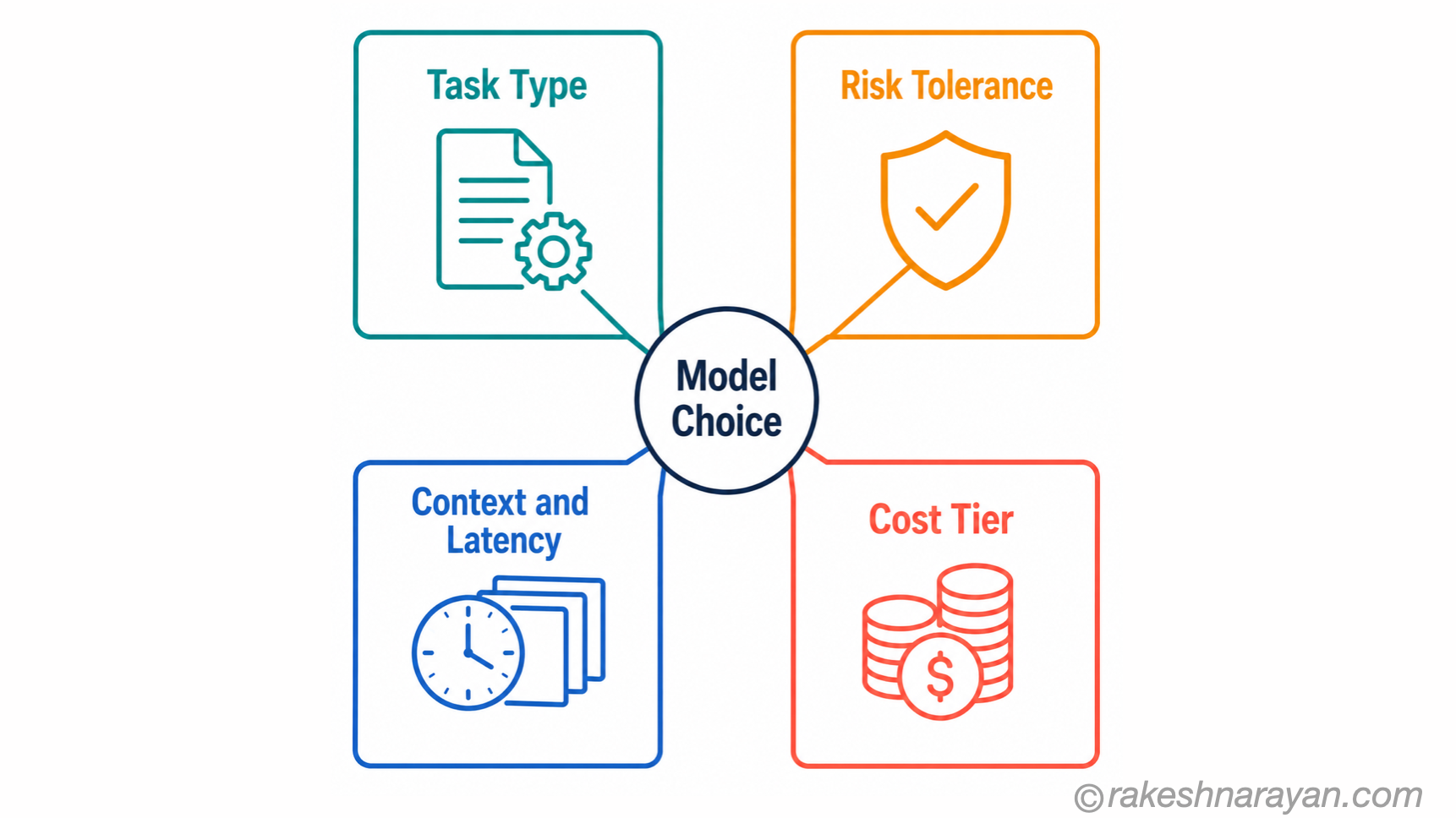
Every model decision I have made comes down to four questions. Answer these honestly before you open a single benchmark page, and the model choice mostly falls out on its own.
| Question | What it actually determines |
|---|---|
| Task type | Whether you need raw reasoning depth or just fast, consistent pattern-matching |
| Risk tolerance | How much a wrong answer costs you, and how much human review sits between the model and the outcome |
| Context and latency | How much information the model needs at once, and how fast the response has to come back |
| Cost tier | What a single request can reasonably cost at your expected volume |
Get these four answers on paper first. I have watched teams spend three weeks comparing benchmark scores for a task that turned out to need none of the capability they were comparing.
Here’s what that looks like in practice. A client wanted “the best AI” for classifying inbound service requests. Once we wrote the four answers down, the task turned out to be high-volume, low-risk, small-context and cost-sensitive — which pointed straight at the fast, lightweight tier, not the frontier model they had originally budgeted for.
Matching task type to model tier
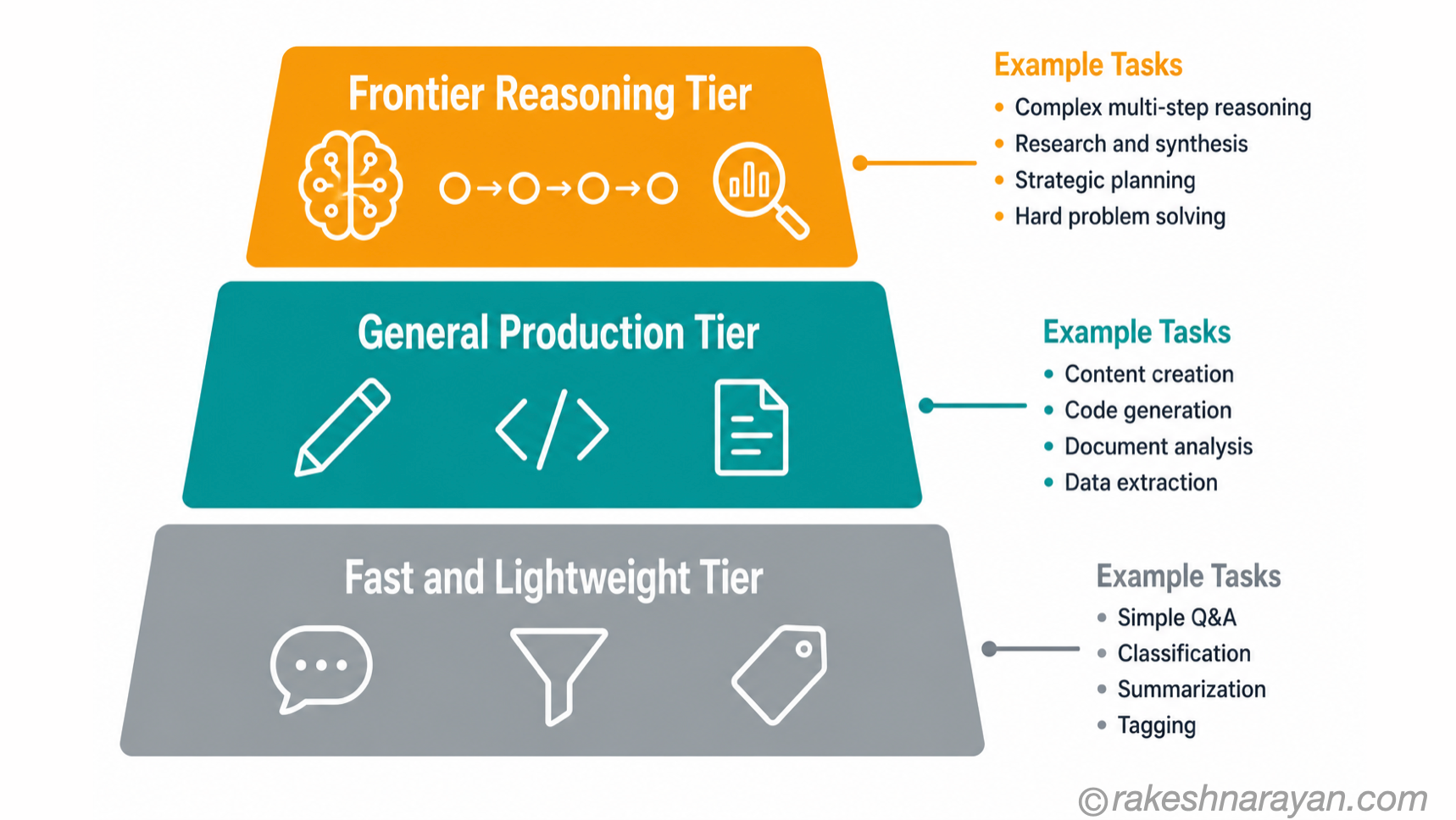
Once you know the task, the tier usually picks itself. I think about model tiers in three broad bands, and almost everything I work on falls cleanly into one of them.
| Tier | What it’s for | Typical examples |
|---|---|---|
| Fast and lightweight | High-volume, well-defined tasks where consistency matters more than depth | Ticket routing, spam filtering, simple classification, short chat replies |
| General production | The bulk of day-to-day knowledge work | Drafting, summarising, code review, structured analysis |
| Frontier reasoning | Long, multi-step problems where a wrong intermediate step derails the whole task | Complex agentic coding, multi-document research synthesis, architecture decisions |
Most tasks belong in the middle tier. That surprises people. The instinct is to reach for the most capable model available “to be safe”, and it is usually the most expensive mistake in the room.
I see this constantly in SAP-adjacent AI work. A Joule-style assistant answering “how do I reverse a posted vendor invoice” needs general production capability, not frontier reasoning. Save the top tier for the handful of tasks that genuinely involve long multi-step judgement — an exception analysis that needs to weigh several conflicting signals at once, for example.
✅ Best Practice
Default to the general production tier and only move up when a specific capability gap shows up in testing — not because the task sounds important.
Risk tolerance and where human review fits
Task type gets you most of the way there. Risk tolerance decides the rest, and it is the question people skip most often.
Think of it as a ladder. A low-risk draft — an internal summary, a first pass at a blog outline — can run on a fast, cheap model with light or no review. A high-risk output, like a customer-facing financial calculation or a compliance-adjacent answer, needs a stronger model and a human in the loop regardless of how good the model is.
I have seen this go wrong in both directions. One project used a frontier model with full human review for internal meeting notes nobody read twice. Another used a fast, cheap model with no review at all for a client-facing eligibility check, and got it wrong in a way that took two weeks to unwind.
The fix isn’t always a bigger model. Sometimes it’s the same model with a mandatory review step added before anything reaches the customer. Risk tolerance is a process question as much as a model question, and treating it as purely a capability problem misses half the solution.
⚠️ Warning
Model quality is not a substitute for review on high-stakes outputs, and heavy review is a waste of everyone’s time on low-stakes ones. Match the review effort to the risk, not to how impressive the task sounds.
Context, latency and cost — the operational trade-offs
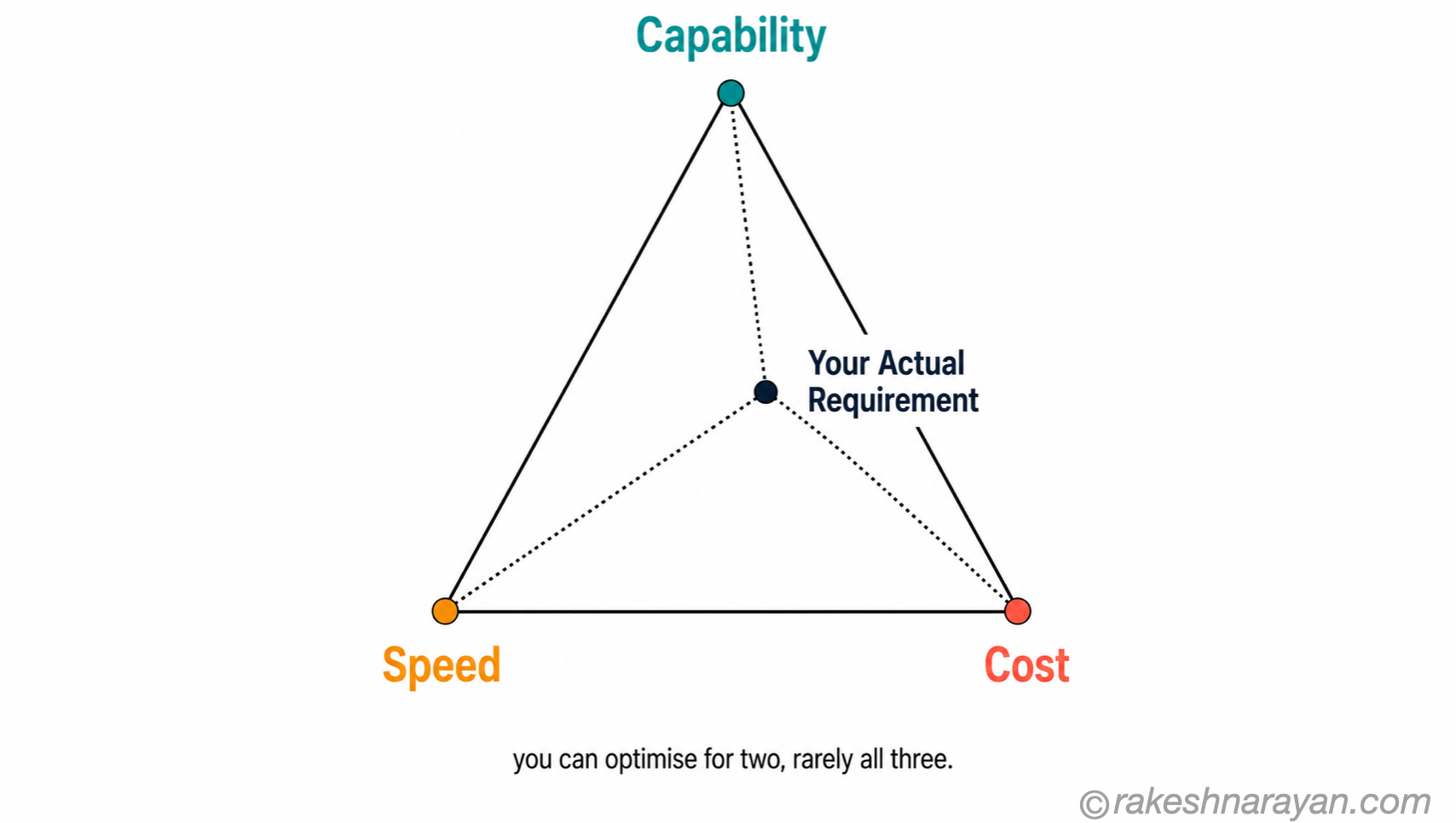
Capability, speed and cost pull against each other. You can usually optimise for two of the three. Trying to max out all three at once is how projects blow their budget without anyone noticing until the invoice arrives.
Context matters here too. A task that needs to reason over a handful of paragraphs has very different requirements from one that needs to hold an entire contract, codebase or support history in view at once. Bigger context windows generally cost more and respond slower, so match the window to what the task genuinely needs rather than defaulting to the largest one available.
Say you’re building an assistant that reads a full contract before answering a question. That needs a large context window regardless of how simple the eventual reasoning step is. A ticket router reading three sentences at a time never will, no matter how capable the model behind it is.
Latency has the same logic. A real-time chat assistant has a different tolerance than an overnight batch job summarising yesterday’s tickets. Building the batch job on a model tuned for instant response wastes money you didn’t need to spend.
I ask clients one blunt question here: would a five-second delay actually bother anyone using this? For a live chat widget, yes, every time.
For a nightly report that lands in an inbox before anyone’s awake, almost never. That single question resolves more latency arguments than any spec sheet does.
📝 Note
Many providers now let you dial intelligence up or down within the same model rather than switching models entirely — worth checking before you assume you need a bigger model.
Test before you commit — the small-eval habit
Everything above narrows your options. It does not replace testing. The habit that has saved me the most time: build a small evaluation set from real work before committing to any model.
Pull 10 to 20 examples from actual production data — real tickets, real documents, real questions people have asked. Run them through your two or three shortlisted models with the same prompt, and score the results the same way each time: accuracy, consistency across repeated runs, and how much human cleanup each output needs.
This takes an afternoon. Skipping it costs weeks, because the failure modes that show up in production never show up in a single polished demo prompt.
Keep the eval set around after you’ve made the decision. Every time a provider ships a new model, you re-run the same 10 to 20 examples in an hour instead of starting the whole evaluation from scratch. That’s the difference between dreading the next model release and treating it as a routine check.
💡 Practical Tip
Repeat the same prompt three to five times per model in your eval set. A model that gives a great answer once and a mediocre one the next time is not actually reliable, no matter how good its best output looked.
At a Glance
| Concept | One-line summary |
|---|---|
| Leaderboard chasing | Tells you what a model is good at in a lab, not what your task needs |
| The four questions | Task type, risk tolerance, context and latency, and cost tier decide the model — not the benchmark |
| Task-tier matching | Fast and lightweight, general production, or frontier reasoning — most tasks sit in the middle |
| The risk ladder | Low-risk work needs light review on a fast model; high-risk work needs a strong model plus a human, regardless |
| Capability, speed, cost | You can optimise two of the three — pick which one you can’t compromise on |
| Context and latency | Match the context window and response speed to what the task needs, not the largest option available |
| The small-eval habit | Test 10–20 real examples across your shortlist before committing, repeating each prompt to check consistency |
What to take away
The model landscape will keep changing. New releases will keep topping new leaderboards, and every one of them will feel urgent for about three weeks.
What doesn’t change is the shape of the decision. Task, risk, context, cost — that’s the whole framework, and it works exactly the same whether you’re picking between two models today or five new ones in eighteen months.
Build your systems so the model underneath is swappable, and you’ll never need to panic-migrate because a leaderboard moved. That’s the real skill here — not knowing which model is best this week, but knowing you’ll be fine when it isn’t the best next week.
🔗 Related Reading
AI Evaluation — Why Benchmarks Lie and What to Measure Instead — the deeper dive into why the small-eval habit beats benchmark chasing.
LLMOps — The Operating Model for AI in Production — what happens after you’ve picked a model and need to run it reliably at scale.
AI in the Enterprise — A Practical Map — where model selection fits into the bigger picture of enterprise AI adoption.
Open Source vs Closed Source AI Models — The Real Trade-offs — Chapter 1 of this series, for the build-vs-buy dimension this post doesn’t cover.
Published on rakeshnarayan.com — Articles
URL: https://rakeshnarayan.com/articles/how-to-choose-the-right-ai-model-a-decision-framework/
Did you enjoy this article?
Let me know — it takes one click.
0 Comments
Leave a Comment
Looks like this one held your attention — I'd really appreciate a quick comment below.
Your comment has been submitted and will appear after review.