Git vs GitHub vs GitHub Copilot — What Each One Actually Does
A new hire on one of my projects was told, on day one, to ‘clone the repo, commit your changes, and let Copilot help if you get stuck.’ She nodded, opened her laptop, and had no idea which of those three words meant what.
That is not unusual. Git, GitHub and GitHub Copilot get used in the same sentence constantly, and the names give almost no clue that they are three different categories of tool doing three different jobs.
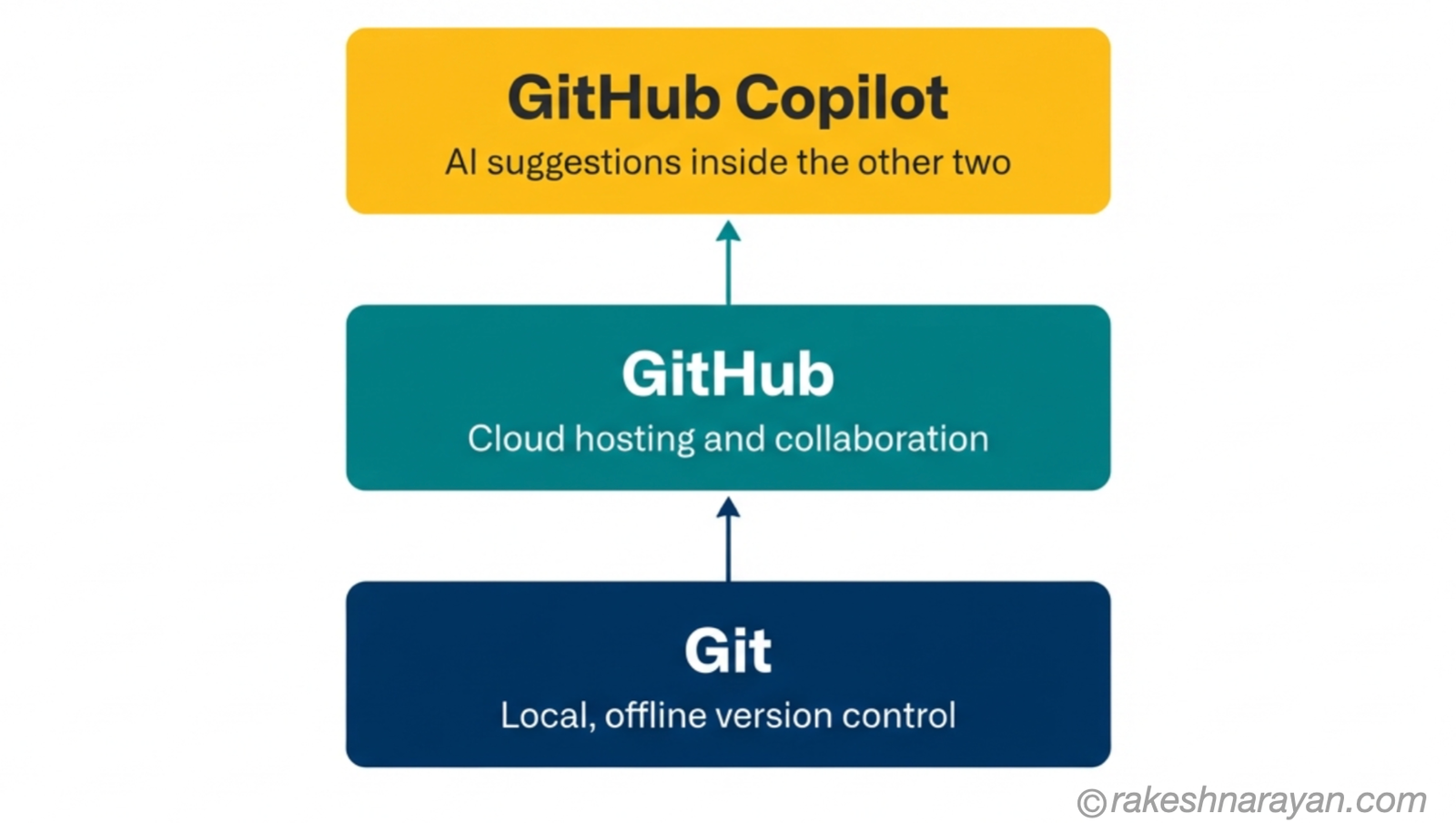
One runs on your machine. One runs in the cloud. One is an AI layer sitting across both. Knowing which is which is the difference between fixing a problem in thirty seconds and spending an hour looking in the wrong place.
🔗 Before you start
This post covers what each tool actually is, at a level that gets you unstuck in a meeting. For the deeper mechanics of commits, branches and the DAG, go to Git — The Mental Model once you have the shape of things here.
Git — the tool that lives on your machine
Git is a version control system. Linus Torvalds, the creator of Linux, wrote it in April 2005, in about ten days, after a licensing dispute cut the Linux kernel project off from the proprietary tool it had been using.
It runs entirely on your computer. It takes snapshots of your project every time you tell it to — called commits — and lets you move between those snapshots freely. No internet connection is required for any of this.
This is the detail that trips people up most: Git does not need GitHub to exist. You could use Git for the rest of your career and never touch GitHub. Git is the tool; GitHub is one place, among several, where you can choose to store a copy of what Git is tracking.
GitHub — the platform that lives in the cloud
GitHub is a hosting service for Git repositories, launched in 2008. It gives your local Git history a cloud copy that other people can reach, plus a set of collaboration features Git itself does not provide: pull requests, issues, code review and automation through GitHub Actions.
Microsoft bought GitHub in 2018, in a $7.5 billion all-stock deal. GitHub has continued to operate as its own product under Microsoft, and its core job has not changed — it is still, at heart, a place to push your Git history to and collaborate with other people around it.
The commands that connect the two are git push, which sends your local commits up to GitHub, and git pull, which brings changes back down. Everything else — the pull requests, the issue tracker, the project boards — is GitHub layered on top of what Git already does.
✅ Best practice
If someone tells you a Git command isn’t working and the error mentions ‘remote’ or ‘origin’, that is almost always about the connection to GitHub, not Git itself. Separating those two failure modes saves real debugging time.
GitHub Copilot — the AI layer on top of both
GitHub Copilot is not a version control tool and not a hosting platform. It is an AI assistant that suggests code as you write it. It launched built on OpenAI’s models — GitHub previewed it in June 2021 and made it generally available in June 2022 — and by 2026 it has grown to support multiple model providers, including Anthropic and Google, alongside OpenAI.
It lives inside the editor you are already using — Visual Studio Code, Visual Studio, JetBrains IDEs and others — plus GitHub.com itself and a command-line interface. As of 2026 it has grown well past autocomplete: Agent Mode can read across multiple files and apply changes on its own, and a cloud-based coding agent can pick up a GitHub issue and open a pull request against it without you writing a line.
None of this replaces Git or GitHub. Copilot still commits through Git and still opens pull requests through GitHub — it is generating the content that goes into those commits and pull requests, not the mechanism that moves them around.
Side by side — the core differences
Put next to each other, the split is straightforward:
| Aspect | Git | GitHub | GitHub Copilot |
|---|---|---|---|
| What it is | Version control software | Cloud hosting and collaboration platform | AI coding assistant |
| Where it runs | Your local machine | The cloud (github.com) | Inside your editor, GitHub.com and CLI |
| Needs internet | No | Yes | Yes, to reach its AI models |
| Created | 2005, Linus Torvalds | 2008, Tom Preston-Werner and co-founders | 2021, GitHub with OpenAI |
| Owned by | Open source, no single owner | Microsoft (since 2018) | Microsoft, via GitHub |
| What it does for you | Tracks every version of your project | Stores and reviews that history with others | Suggests and writes code for you |
How they work together — one change, start to finish
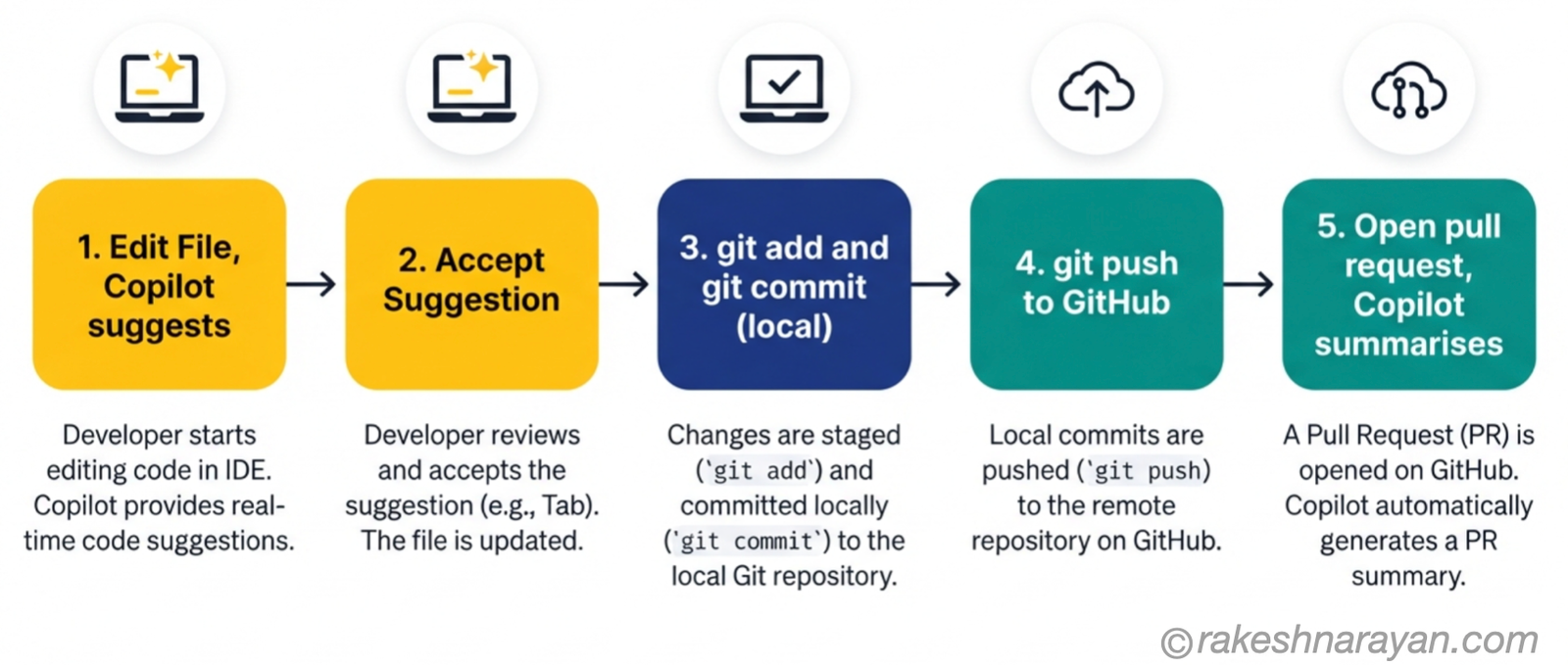
The clearest way to see the difference is to follow one small change through all three tools, start to finish.
You open a file in your editor. Copilot suggests a few lines as you type, based on the surrounding code. That suggestion exists only in your editor until you accept it.
You accept it, then run git add and git commit. Git takes a permanent local snapshot of that change on your machine. Nothing has left your laptop yet.
Only git push sends that commit to GitHub, where your team can see it. You open a pull request there to get it reviewed and merged. Copilot, now working through GitHub.com, can summarise that pull request or suggest review comments on it.
The mix-ups people actually make
Do I need GitHub to use Git? No. Git works completely on its own — GitHub is a hosting choice, not a requirement.
Does GitHub Copilot only work on GitHub? No. It works inside your editor whether or not you ever push code to GitHub, though a GitHub account is what licenses and activates it.
Is Copilot part of GitHub, or a separate product? It is a GitHub product, built originally with OpenAI, but it is a distinct thing from GitHub the hosting platform — you can use GitHub for years without ever turning Copilot on.
There is a second Copilot mix-up that has nothing to do with any of this: Microsoft has its own, unrelated Copilot for Word, Excel and Outlook. Microsoft Copilot vs GitHub Copilot — Same Name, Different Job untangles that one.
⚠️ Warning
Watch for this exact phrase in a standup: ‘Git is down.’ Git cannot be down — it runs on your machine. What is actually down is GitHub, or your internet connection, or Copilot’s servers, and naming the right one saves you from restarting your laptop to fix someone else’s outage.
At a glance — Git vs GitHub vs GitHub Copilot
| Concept | One-line summary |
|---|---|
| Git | The version control system that runs on your machine — created by Linus Torvalds in 2005 |
| GitHub | The cloud platform that hosts Git repositories and adds collaboration tools — owned by Microsoft since 2018 |
| GitHub Copilot | The AI assistant that suggests and writes code inside your editor and on GitHub.com |
| git push / git pull | The commands that move commits between your local Git history and GitHub |
| Pull request | GitHub’s mechanism for reviewing and merging a change — not a Git concept |
| Agent Mode | GitHub Copilot’s ability to edit multiple files and run commands on its own |
| Remote / origin | GitHub’s connection point in a Git error message — a GitHub issue, not a Git one |
What to take away
None of these three tools compete with each other. They sit on top of one another, and every confusion in this post comes from treating three layers as if they were one thing wearing different names.
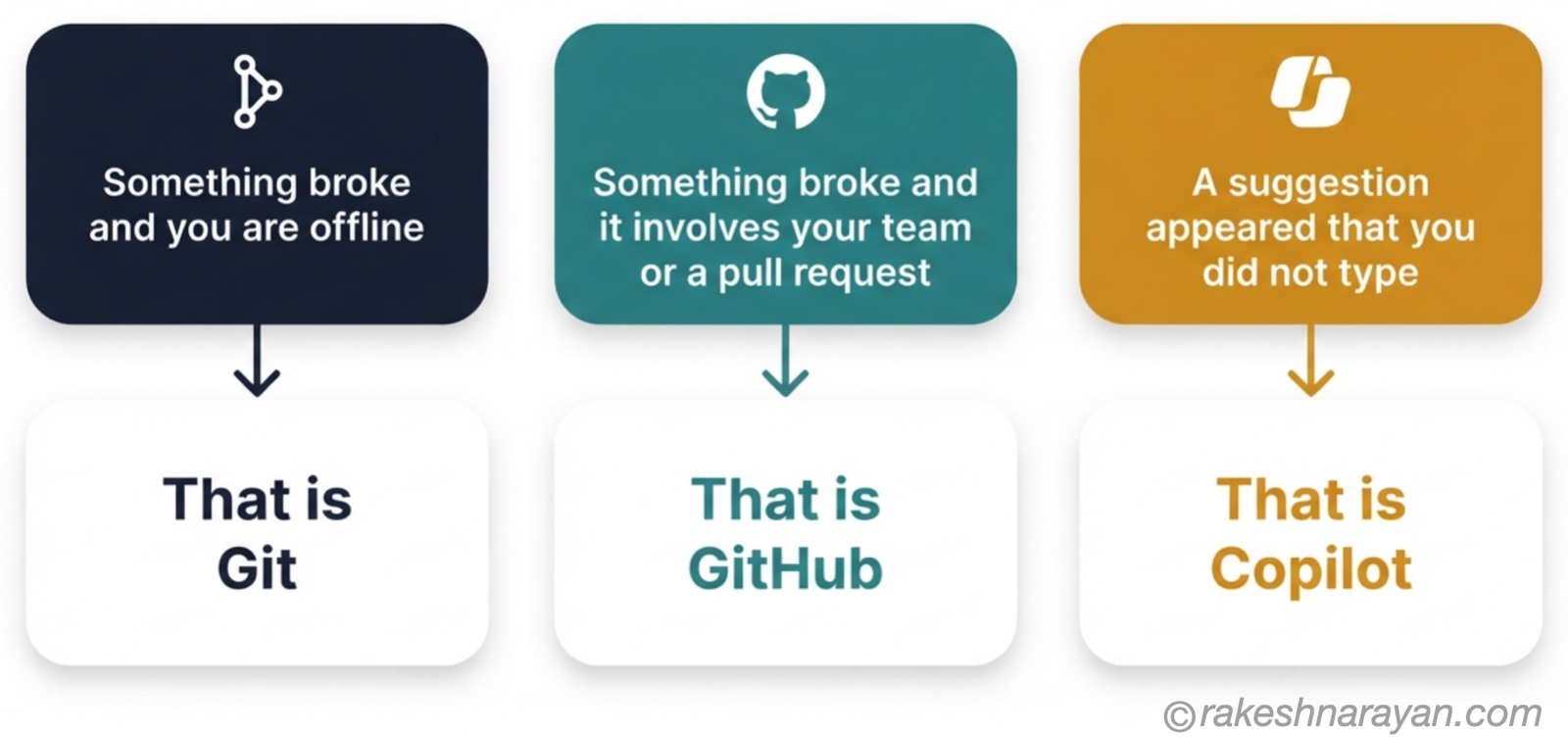
The next time something breaks, ask which layer it actually lives in before you start troubleshooting. Local and offline, it is Git. Shared and online, it is GitHub.
A suggestion that looks a little too smart, it is Copilot. That one question saves more time than any command you will learn from a cheat sheet.
🔗 Related reading
Git — The Mental Model — the deeper internals: commits, branches, HEAD and the DAG, once you have the three-tool shape from this post.
Git, GitHub and VS Code — A Complete Beginner’s Guide — the hands-on setup companion: installing, configuring and using all three day to day.
GitHub for SAP Developers — Actions, Issues and Pages Explained — what GitHub’s collaboration layer looks like once you are past the basics.
CI/CD — From Code Commit to Live in Production — what happens after the pull request in this post gets merged.
Published on rakeshnarayan.com — Articles
URL: https://rakeshnarayan.com/articles/git-vs-github-vs-github-copilot-what-each-one-actually-does/
Did you enjoy this article?
Let me know — it takes one click.
0 Comments
Leave a Comment
Looks like this one held your attention — I'd really appreciate a quick comment below.
Your comment has been submitted and will appear after review.