SAP HANA — The In-Memory Database Explained
A client once told me their nightly finance report used to take four hours on their old database. On HANA, it finished in eleven minutes.
Nobody on the project team could tell me why. They just said “because it’s in-memory” and treated that as a complete answer.
That phrase gets used constantly around SAP HANA, and it explains almost nothing. In-memory is the marketing headline. The real reason HANA is fast is architectural, and once you understand it, a lot of decisions around S/4HANA sizing, cost and performance start making sense.
This is the mental model. What changed, what HANA actually does differently to a normal database, and what it costs you that never makes it into the sales deck.
🔗 Foundation posts
HANA is the database underneath every S/4HANA system. Start with SAP S/4HANA — What It Is and How It Works if you have not read it yet. If databases in general feel shaky, SQL Fundamentals covers the basics HANA builds on.
Why disk was always the bottleneck
Every traditional database — Oracle, SQL Server, DB2, the systems most SAP landscapes ran on before HANA — stores data on disk. When you run a query, the database has to find the right blocks on disk, pull them into memory, process them, then hand back a result.
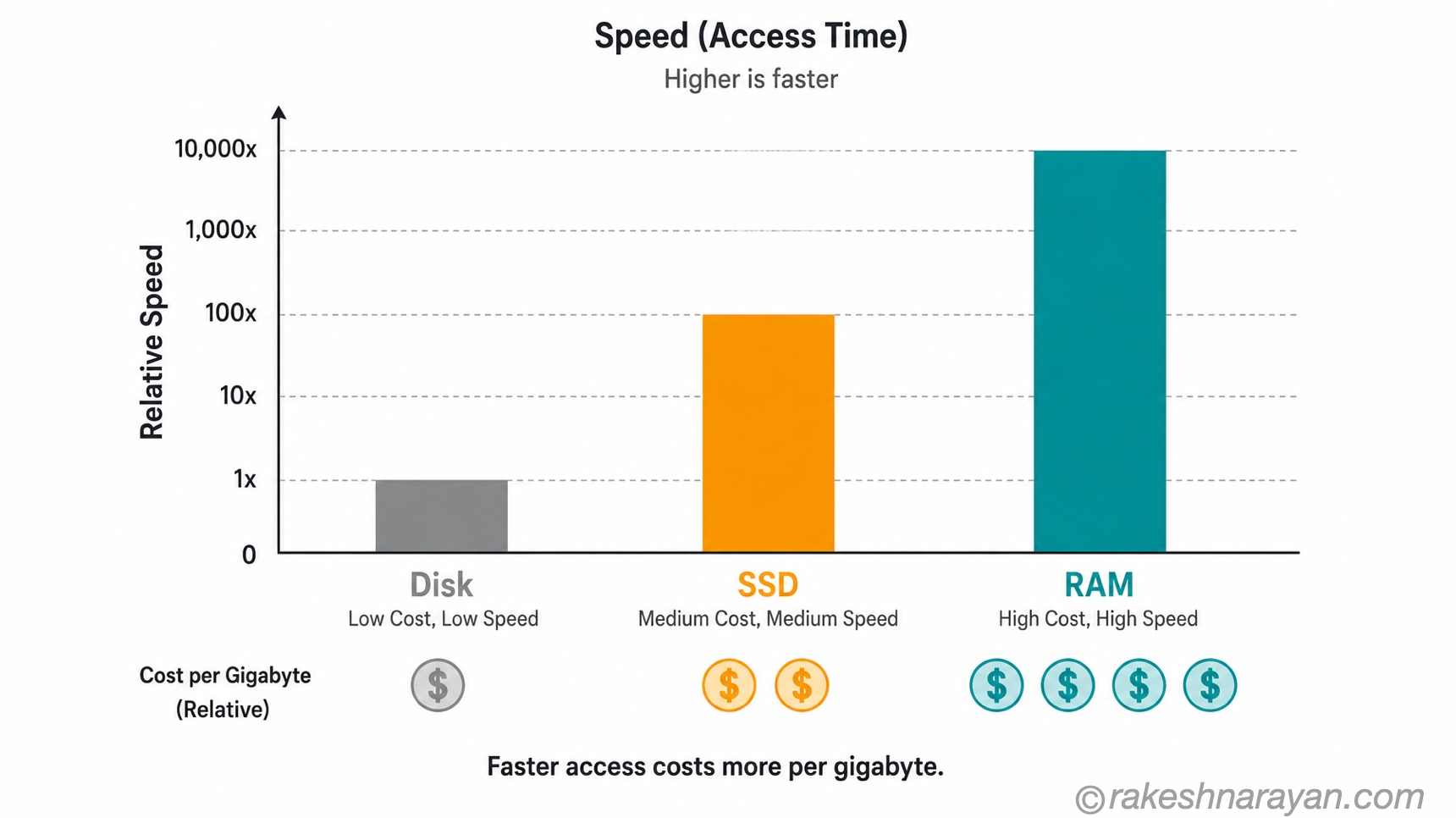
Disk access is slow compared to memory access. Not slightly slow — orders of magnitude slower. RAM operates at nanosecond speed.
Even fast SSDs work in milliseconds. That gap compounds across millions of rows and thousands of concurrent users.
This is why classic SAP systems needed pre-aggregated summary tables, materialised views and overnight batch jobs just to answer questions a business user wanted answered right now. The database was not built to think fast. It was built to store reliably and read when asked, disk-first.
Row storage forces you to read more than you need
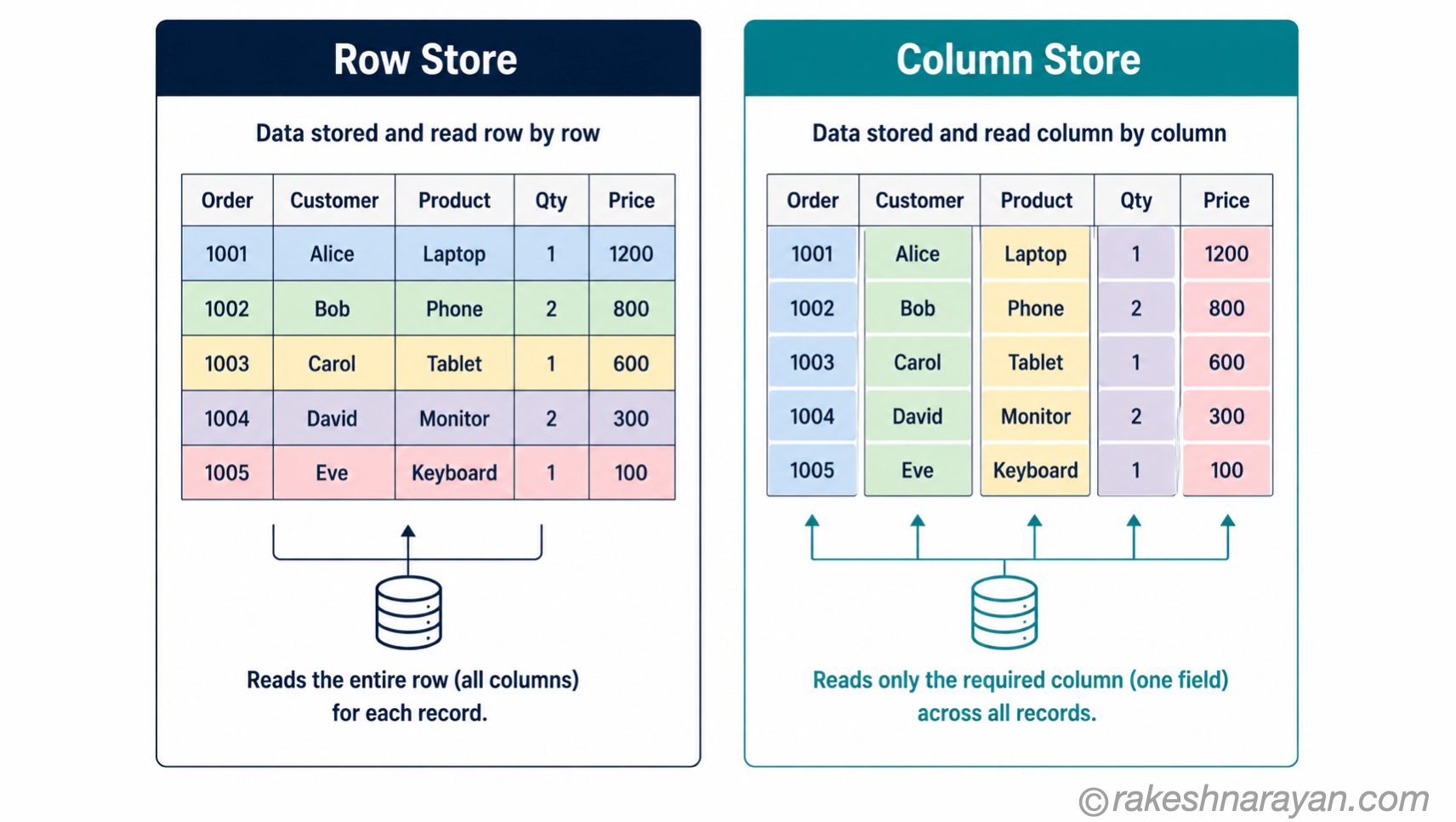
Picture a sales table: order number, customer, product, quantity, price, date. A row-based database stores every column of one row together on disk, like one full line in a spreadsheet.
That is efficient when you want the whole order — creating it, updating it, printing it. It is wasteful when you only want one column across millions of rows. If finance wants the total revenue for a quarter, the database has to read every column of every row just to reach the price field.
📌 Key Takeaway
Row storage is optimised for transactions — create, update, retrieve one record. It is not built for analytics — sum, average, group by across millions of records. Most SAP performance complaints before HANA came from asking a row-store system to behave like an analytics engine.
Columnar storage — HANA’s real innovation
HANA’s default storage model flips this around. Instead of storing a row together, it stores every value of one column together — every price, one after another, then every quantity, then every date.
For an analytical query that only needs the price column, HANA now reads only the price column. Nothing else gets touched. That alone removes most of the wasted I/O that row-based systems could never avoid.
Column storage also compresses far better than row storage. A column of dates or product codes repeats the same handful of values across millions of rows, and HANA’s compression algorithms exploit that pattern heavily. Less data to hold in memory means memory becomes affordable at a scale that would otherwise be unrealistic.
💡 Practical Tip
HANA still supports row store for tables that genuinely need it — small configuration tables, or tables with very high single-record insert and update rates. Column store is the default and the right choice for almost everything else. Do not assume every table needs manual tuning to pick one; SAP’s defaults are usually correct.
One engine, two workloads — OLTP and OLAP together
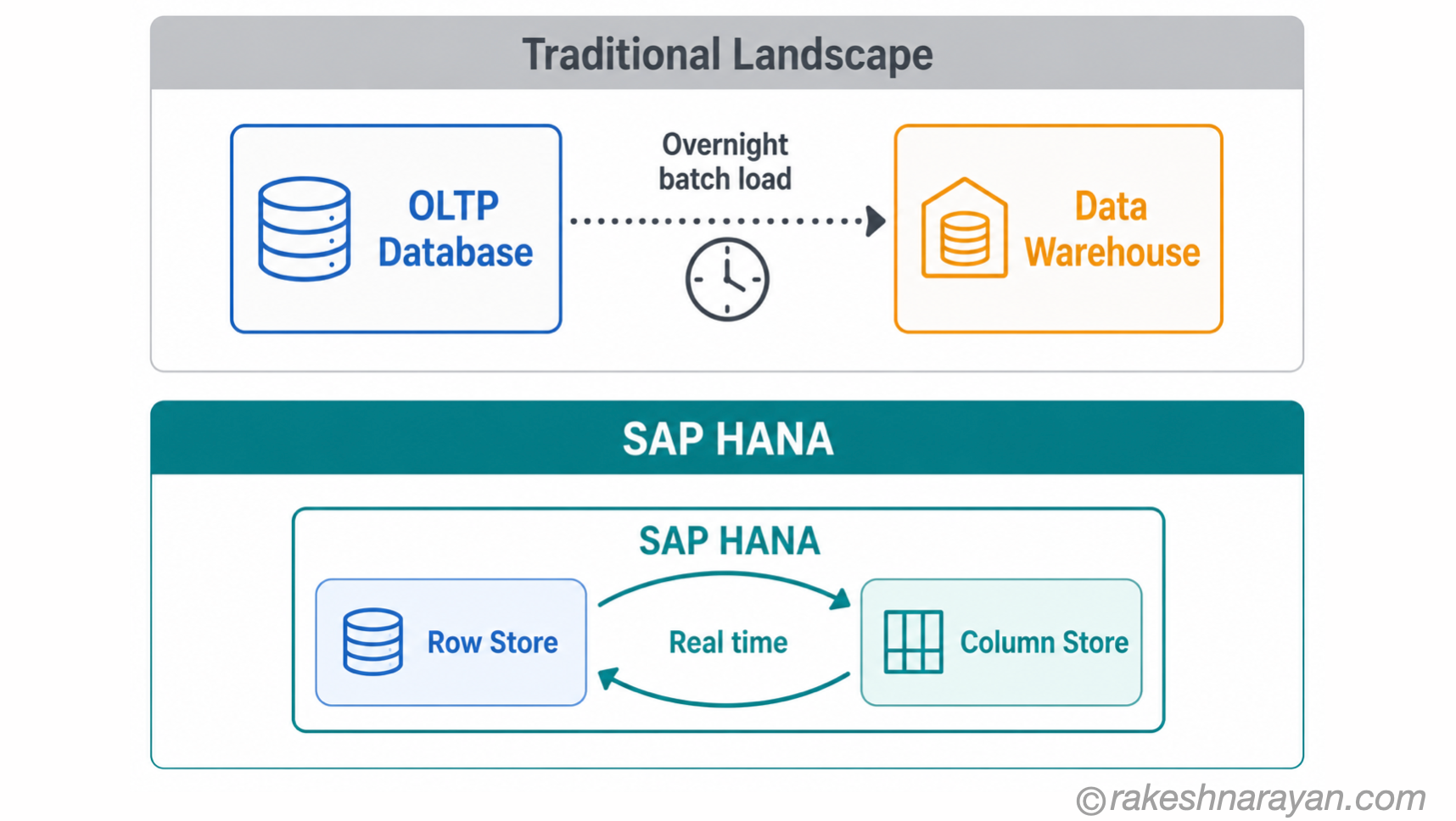
Before HANA, most SAP landscapes ran two separate systems. One handled transactions — creating sales orders, posting invoices, updating stock. That is OLTP.
A second system, usually a data warehouse like classic BW, handled reporting and analytics. That is OLAP. Data moved between them overnight.
That split existed because row-store databases were good at transactions and bad at analytics, and no single engine did both well. HANA’s combination of row store, column store and in-memory access lets it run both workloads on the same data, in the same system, without the overnight batch delay.
| Aspect | Traditional (pre-HANA) | SAP HANA |
|---|---|---|
| Transactional processing | Dedicated OLTP database, row-based | Row store, in-memory |
| Analytical processing | Separate data warehouse (e.g. classic BW) | Column store, same system |
| Data freshness for reporting | Delayed — batch loads, often overnight | Real time — same data, same moment |
| Infrastructure | Two systems to build, secure and maintain | One system, one landscape |
⚠️ Warning
“Real time reporting” does not mean every report becomes instant for free. Poorly designed data models, wildcard-heavy queries and badly built calculation views will still be slow on HANA. HANA removes the architectural bottleneck. It does not remove the need for decent design.
Where HANA actually shows up
You rarely buy SAP HANA on its own. It is almost always the database underneath something else.
| Where HANA runs | What it is | Typical use |
|---|---|---|
| SAP S/4HANA | ERP built to run only on HANA | Core business processes — finance, logistics, sales |
| SAP BW/4HANA | Data warehouse built for HANA | Enterprise reporting and analytics |
| SAP HANA Cloud | Fully managed, cloud-hosted HANA | New builds on SAP BTP, hybrid landscapes |
| Standalone HANA | HANA as a general-purpose database | Custom applications needing in-memory speed |
This matters for one practical reason. S/4HANA is not optional-database software.
Unlike ECC, which could run on Oracle, SQL Server, DB2 or HANA, S/4HANA runs on HANA only. If you are moving to S/4HANA, you are moving to HANA whether you planned to think about the database or not.
🔗 Related Reading
The S/4HANA vs ECC differences, including this database point, are covered properly in SAP S/4HANA vs ECC — The Real Difference .
What in-memory costs you
None of this is free, and the sales conversations rarely lead with the cost side.
RAM is expensive compared to disk. A database that needed ten terabytes on spinning disk does not need ten terabytes of RAM.
HANA’s compression usually brings that down significantly. But you are still pricing memory, not storage, and memory has always cost more per gigabyte.
Sizing a HANA system properly is a real exercise, not a checkbox. Undersize it and you get memory pressure, swapping and instability under load. SAP’s own guidance is that table data should not consistently exceed around half of available memory, which surprises people the first time they see a sizing report.
✅ Best Practice
Get a proper HANA sizing exercise done before committing to hardware or a cloud sizing tier, not after. I have seen more than one project retrofit larger instances mid-implementation because the original sizing assumed disk-era table growth patterns instead of memory-era ones.
At a glance — the mental model
| Concept | One-line summary |
|---|---|
| In-memory database | Stores and processes data in RAM instead of reading from disk for every operation |
| Row store | Stores each row together — efficient for creating and updating single records |
| Column store | Stores each column together — efficient for reading and aggregating across many records; HANA’s default |
| OLTP | Online Transaction Processing — day-to-day operations: create, update, post |
| OLAP | Online Analytical Processing — reporting and analytics: sum, average, group by |
| HTAP | Hybrid Transactional/Analytical Processing — running both workloads on one system, which is what HANA does |
| Compression | Column store’s ability to shrink repeated values, making in-memory storage practical at scale |
| SAP HANA Cloud | The managed, cloud-hosted version of HANA, commonly used with SAP BTP |
| Sizing | The exercise of matching RAM to actual data and workload — get this wrong and performance suffers |
What to take away
HANA is not fast because SAP says so in a slide deck. It is fast because it removed a physical bottleneck that every other database of its generation had to work around with summary tables, batch jobs and separate warehouses.
Once that clicks, a lot of things about S/4HANA start making more sense. Why the migration is not just a version upgrade.
Why sizing conversations matter more than they used to. Why “it’s in-memory” was never actually an answer, just a headline.
Next time someone tells you HANA is fast because it’s in-memory, ask them what happens to a badly designed query on it. The honest answer is that it is still slow, just for a shorter amount of time than it used to be.
🔗 Related posts on this site
SAP S/4HANA vs ECC — The Real Difference — the database question is one of the biggest real differences between the two.
SQL vs NoSQL Databases — What the Difference Actually Means — HANA is relational at its core; this covers the wider database landscape it sits in.
SAP BTP — The Platform Explained — SAP HANA Cloud runs on BTP; this post covers the platform itself.
SAP S/4HANA Migration: Greenfield, Brownfield, Bluefield — if a HANA migration is coming, this covers the approaches to it.
SAP Basis Explained — The Technical Layer Under Every SAP System — Basis is who actually operates and sizes the HANA database this post describes.
Published on rakeshnarayan.com — Articles
URL: https://rakeshnarayan.com/articles/sap-hana-the-in-memory-database-explained/

Did you enjoy this article?
Let me know — it takes one click.
0 Comments
Leave a Comment
Looks like this one held your attention — I'd really appreciate a quick comment below.
Your comment has been submitted and will appear after review.