GitHub for SAP Developers — Actions, Issues and Pages Explained
I have met SAP consultants who can write a flawless commit message and still think GitHub is just where the code lives after git push. That was me too, for longer than I want to admit.
Git is the tool. GitHub is what gets built on top of it — and most of what makes GitHub useful for a team has nothing to do with commits at all. Issues, Actions, Pages, security scanning — none of that is Git. It is GitHub.
If you already know your way around git add and git commit, this is the next step. No new Git commands here — just what GitHub actually adds once your code lands there.
🔗 Related Reading
This post builds on Git — The Mental Model and Git, GitHub and VS Code — A Complete Beginner’s Guide . If commits, branches or staging still feel shaky, start there first.
Git gets your code versioned. GitHub gives it a team.
Every Git command you run happens on your machine. git add, git commit, git branch — none of it touches a network. GitHub only enters the picture the moment you run git push.
That distinction matters more than it sounds. GitHub is not a bigger, cloud-hosted version of Git. It is a separate product built on top of Git that adds what a team needs and Git was never designed to provide — a place to discuss changes, track work, automate builds and publish results.
Git stores history. GitHub coordinates the people working against that history. Everything in the rest of this post lives on the GitHub side of that line.
GitHub Issues and Projects — task tracking without leaving your code
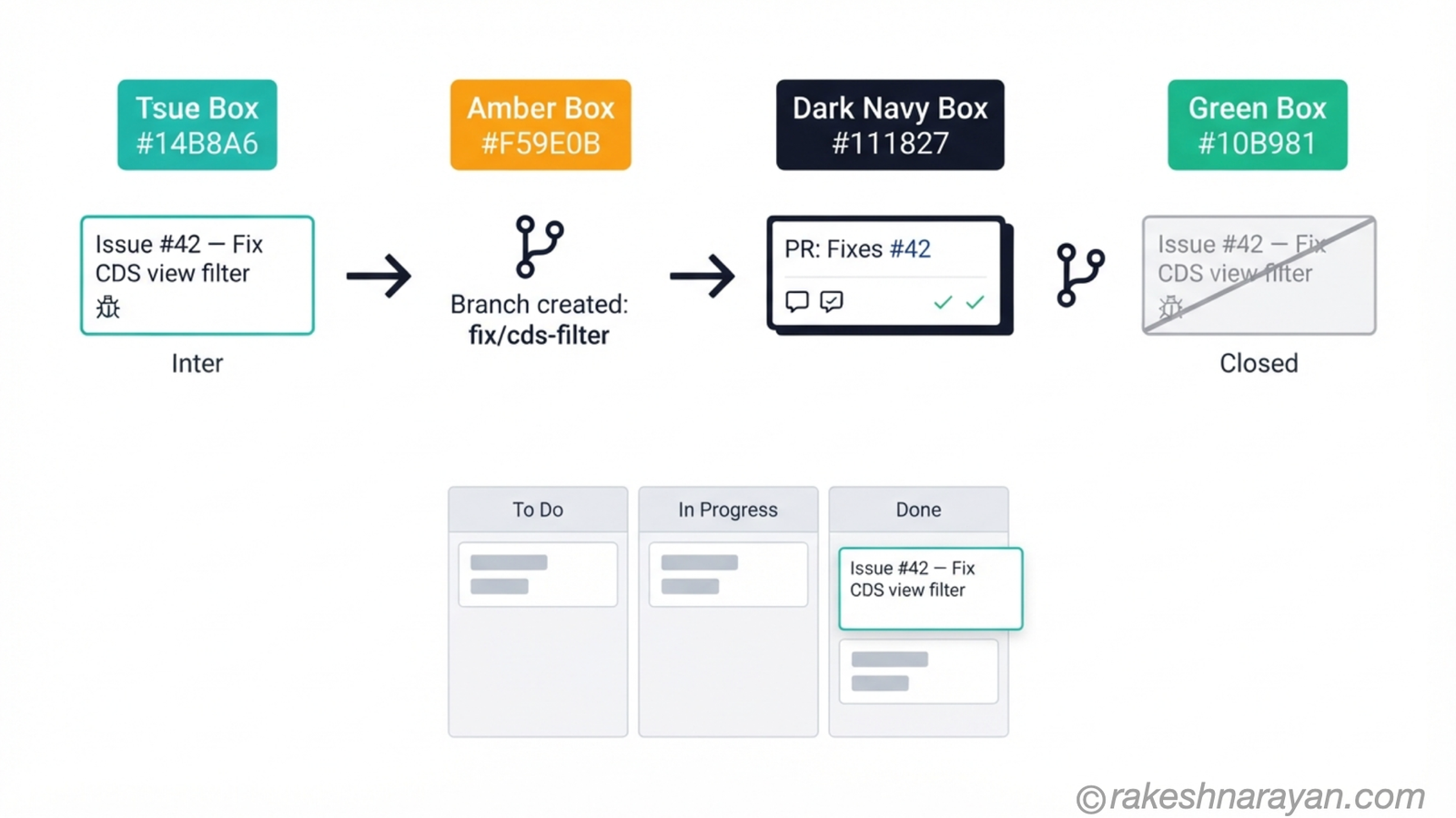
An issue is a trackable unit of work. A bug, a task, an idea — you open one, give it a title, and GitHub assigns it a number. That number is the whole trick.
Write Fixes #42 or Closes #42 in a pull request description, and GitHub links the two automatically. Merge the pull request, and issue #42 closes itself. No status update, no separate ticket to close by hand.
If you have ever tracked a backlog in a spreadsheet sitting next to your transport list, Issues replaces that spreadsheet for anything living in a GitHub repo — a CAP project, a UI5 app, a Node service on BTP.
💡 Practical Tip
Use labels (bug, enhancement, question) on every issue. A repo with fifty untagged issues is unusable within a month. A repo with fifty labelled issues is a working backlog.
Projects turns those issues into a Kanban board — To Do, In Progress, Done — without leaving GitHub. Move a card and the underlying issue updates. Merge the linked pull request and the card moves itself.
GitHub Actions — automation that runs itself
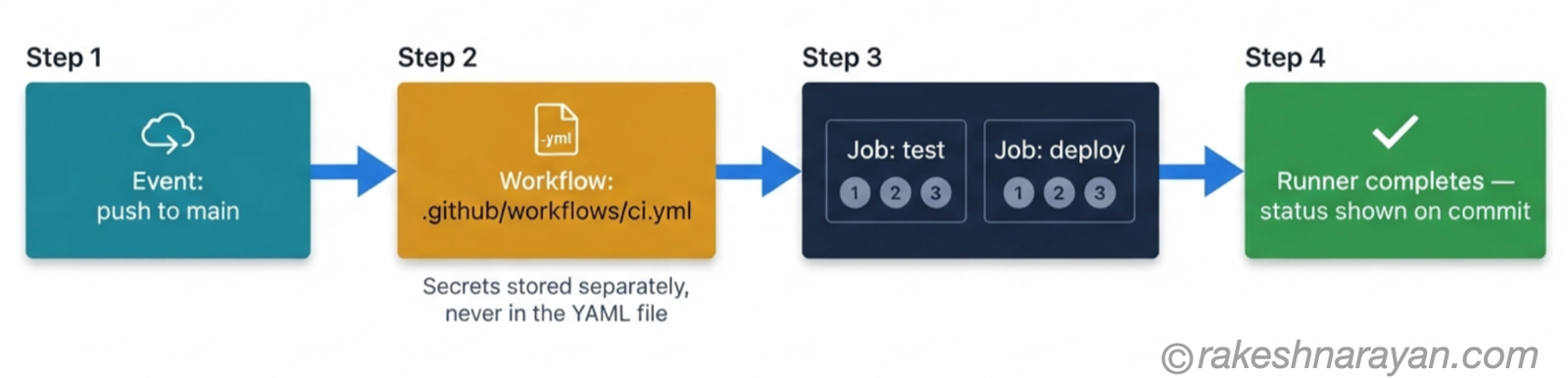
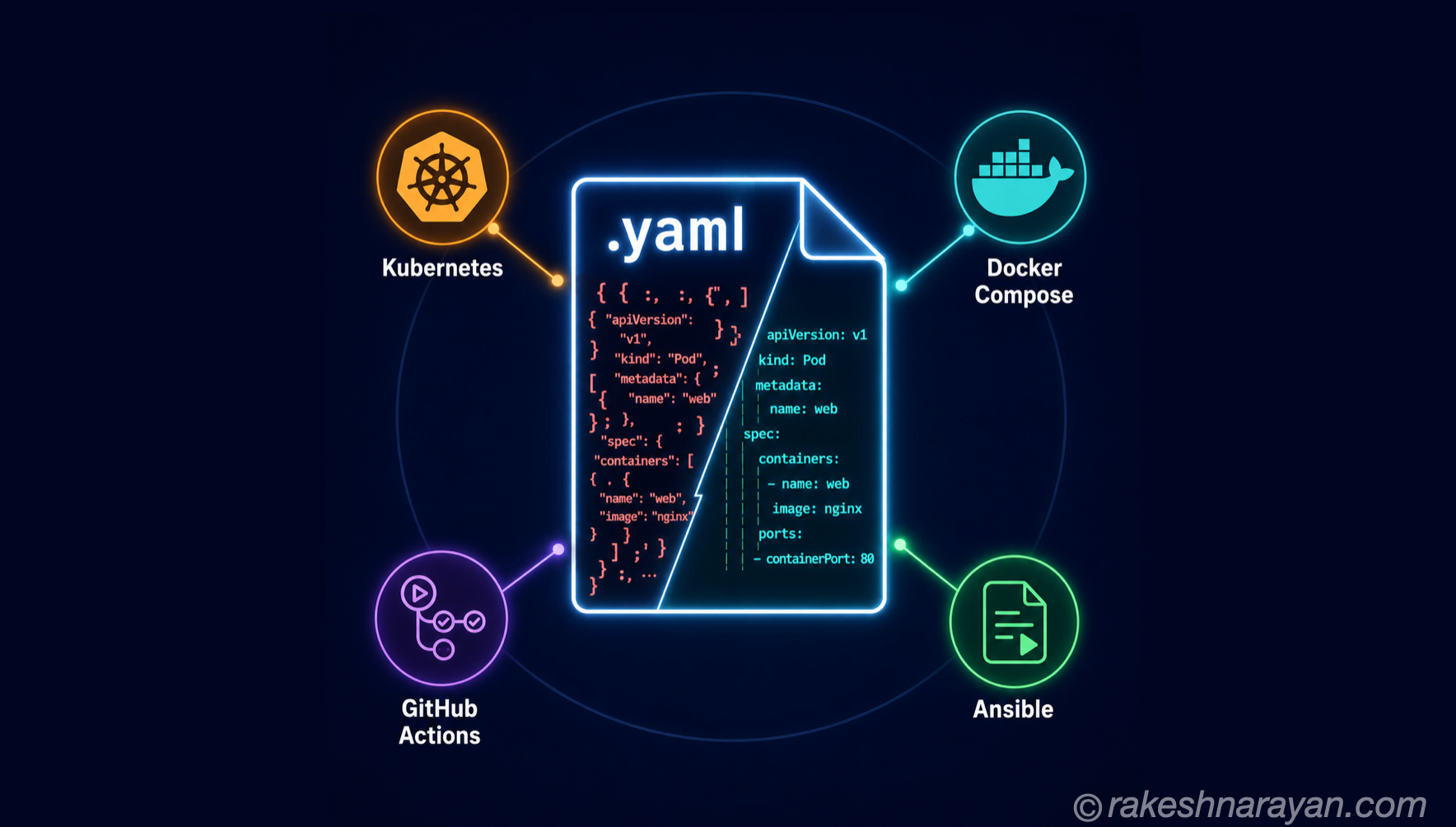
A workflow is a YAML file living in .github/workflows/ in your repo. It defines what should happen when something happens — a push, a pull request, a schedule. That trigger is called an event.
Each workflow runs one or more jobs, and each job runs a sequence of steps — a shell command, a test suite, a deployment script. GitHub runs the whole thing on a temporary virtual machine called a runner, then reports the result back on your commit or pull request.
| Component | What it is |
|---|---|
| Event | The trigger that starts a workflow — a push, a pull request, or a schedule |
| Workflow | The YAML file in .github/workflows/ that defines the automation |
| Job | A group of steps that runs on one runner — a workflow can have several, in parallel or in sequence |
| Step | A single command, script, or reusable action inside a job |
| Runner | The temporary virtual machine that actually executes the job |
If you have used the SAP Continuous Integration and Delivery service on BTP, or Project Piper for ABAP RAP pipelines, the shape will already feel familiar. Something happens, a pipeline reacts, steps run in order. GitHub Actions is the same idea — built directly into GitHub, and not limited to SAP tooling.
⚠️ Warning
Never hardcode a password, API key or SAP BTP service key inside a workflow YAML file. Store it in GitHub Secrets instead, and reference it as ${{ secrets.NAME }}. A key committed in plain text is exposed the moment the repo is pushed — deleting it in the next commit does not remove it from history.
📌 Key Takeaway
GitHub Actions does not replace SAP’s own CI/CD tooling. It complements it. Run linting and unit tests in Actions before code ever reaches your SAP Continuous Integration and Delivery pipeline, and you catch the cheap mistakes before the expensive pipeline runs.
GitHub Pages — free hosting for docs and demos
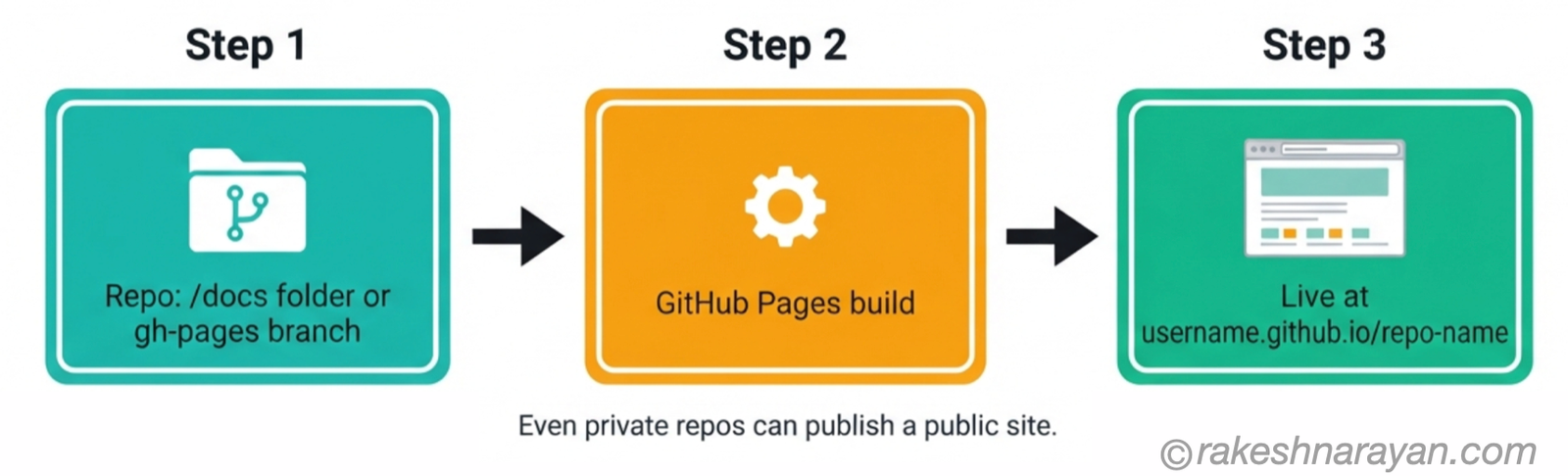
GitHub Pages takes a folder in your repo and turns it into a live website, free, at username.github.io/repo-name. Enable it from Settings → Pages, choose a branch to deploy from, and it is live within minutes.
For SAP-adjacent work this is more useful than it sounds. Host the OpenAPI documentation for a CAP project. Publish a UI5 demo build for a stakeholder to click through before it goes anywhere near a BTP subaccount. Put up a project README as an actual page instead of a wall of Markdown.
📝 Note
Even a private repository can publish a public Pages site. The code stays private — only what you put in the published folder is visible.
GitHub’s built-in security layer — Dependabot, secret scanning and CodeQL
SAP security runs on positive authorisation. Nothing is allowed unless a role explicitly grants it — I covered this in the SAP Security Roles post. GitHub’s security layer works the other way round. Everything is allowed by default, and these tools continuously watch for things that should not be there.
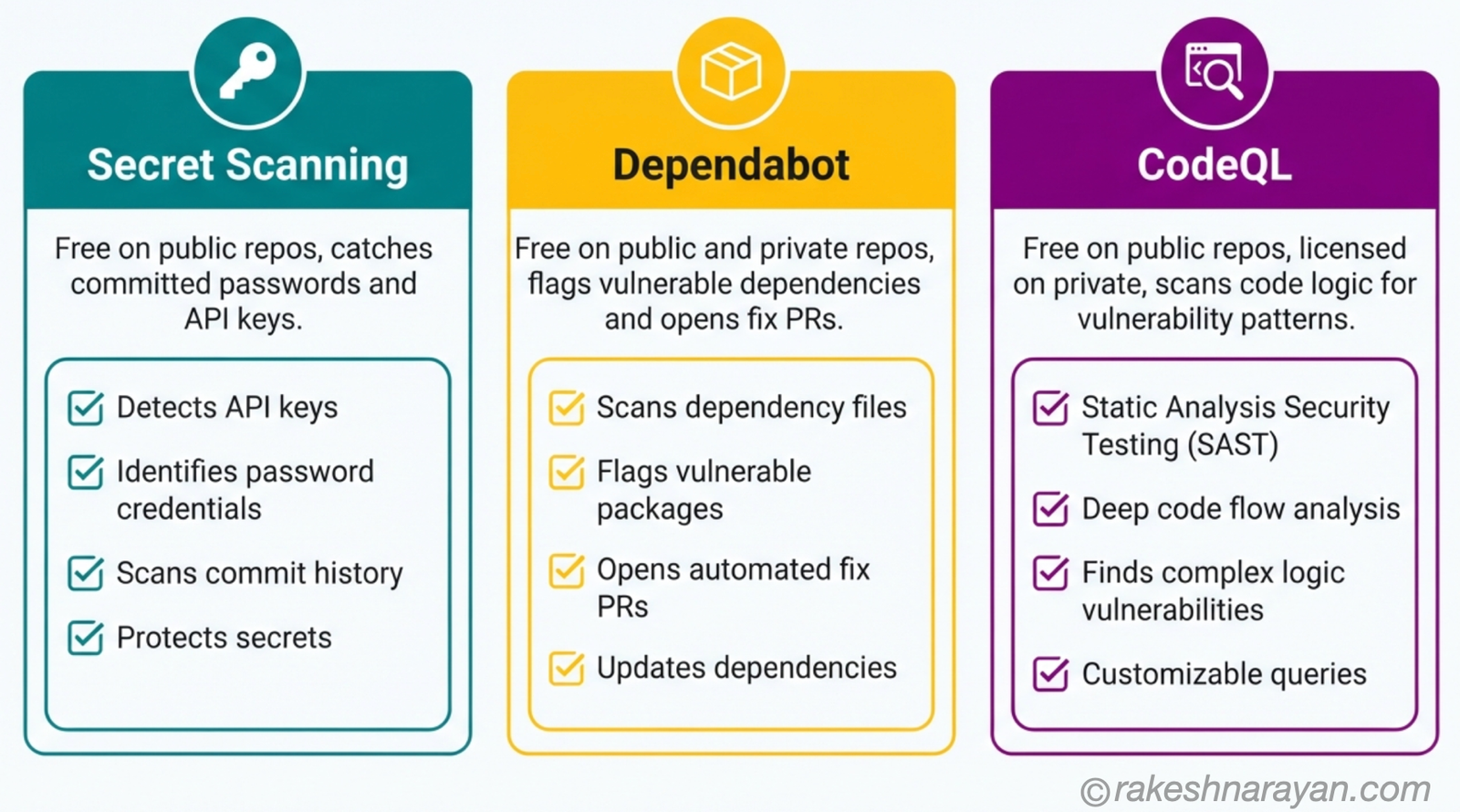
Three features do most of the work.
| Feature | What it catches | Cost model |
|---|---|---|
| Secret scanning | Passwords, API keys and tokens accidentally committed to a repo | Free and on by default on public repos |
| Dependabot | Dependencies with known vulnerabilities — opens a pull request to fix them | Free on both public and private repos |
| CodeQL / code scanning | Vulnerability patterns in your code’s own logic — injection, unsafe data flow | Free on public repos, licensed on private via GitHub Advanced Security |
✅ Best Practice
Turn on secret scanning and Dependabot for every repository you create, public or private. Both take one click in Settings → Code security, and Dependabot is free regardless of repository visibility.
⚠️ Warning
Deleting a secret from your latest commit does not remove it from Git history. Anyone who clones the repo can still find it in an earlier commit. If you commit a real credential, rotate it immediately — do not just delete the line and push again.
Where this actually fits into real SAP work
Put the pieces together and here is what it looks like on an actual SAP project.
| Scenario | How GitHub is used |
|---|---|
| Backlog and bug tracking | Issues and Projects replace a spreadsheet for anything already living in the repo |
| Pre-pipeline checks | Actions runs lint and unit tests before code reaches the SAP CI/CD pipeline |
| Stakeholder review | Pages hosts a UI5 demo or API docs before code touches a BTP subaccount |
| Credential safety | Secret scanning catches a leaked BTP service key before it reaches production |
None of this touches ABAP transports directly. GitHub Actions cannot push a change into an on-premise ECC or S/4HANA system on its own — that still goes through STMS and CTS, and it should. Where GitHub earns its place is everything that sits beside the ABAP stack: CAP projects, UI5 apps, and the growing amount of non-ABAP code every SAP landscape now carries.
SAP’s own Continuous Integration and Delivery service, part of BTP, already connects directly to a GitHub repository — it builds and deploys CAP projects to Cloud Foundry, and integrates with Cloud Transport Management to move code through your landscape. GitHub Actions sits in front of that pipeline, not instead of it.
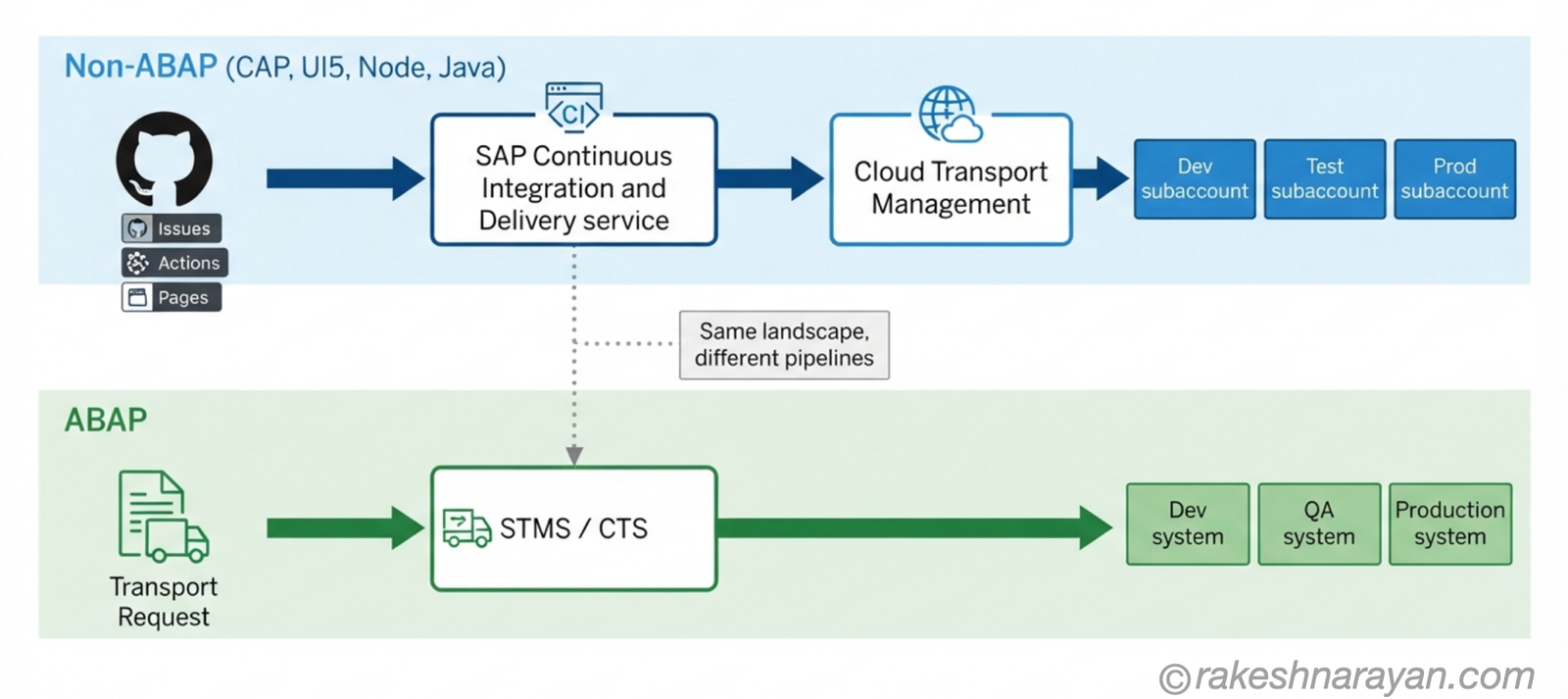
At a glance — GitHub for SAP developers
| Concept | One-line summary |
|---|---|
| Git vs GitHub | Git tracks history locally; GitHub hosts it and adds collaboration tools on top |
| Issue | A trackable unit of work — bug, task or idea — with its own number |
| Closing keyword | Words like Fixes #42 in a PR description that auto-close the linked issue on merge |
| Projects | A Kanban board that organises issues and pull requests by status |
| Workflow | A YAML file in .github/workflows/ that defines automation steps |
| Event | The trigger that starts a workflow — a push, a pull request, or a schedule |
| GitHub Actions | The built-in CI/CD and automation platform triggered by repo events |
| GitHub Pages | Free static site hosting straight from a repository |
| Secret scanning | Detects committed credentials — free and on by default on public repos |
| Dependabot | Flags vulnerable dependencies and opens pull requests to fix them |
| CodeQL | Semantic code scanning for vulnerability patterns in your own logic |
| GitHub Advanced Security | Licensed suite for private repos; most features are free on public repos |
| SAP Continuous Integration and Delivery | The BTP service that builds and deploys CAP projects, often triggered from a GitHub repo |
What to take away
Git answers one question: what changed. GitHub answers a different one: who is doing what, and is it safe to ship. Once you see GitHub as the second question rather than a bigger version of the first, every feature in this post stops looking like extra tooling.
It starts looking like the coordination layer every team already needed — SAP teams included, even if the transport list has quietly been doing a slice of that job for thirty years.
The real test is your own last side project. Open it and count how many of these are missing. A backlog in a spreadsheet, a manual deploy, a service key sitting in a commit somewhere — if any of that sounds familiar, you already know where to start.
🔗 Related Reading
CI/CD — From Code Commit to Live in Production — the broader CI/CD concepts that GitHub Actions is one implementation of.
Getting Started with SAP BTP — A Hands-On Guide — the platform these projects actually deploy to.
SAP Transport Requests — STMS, CTS and DEV to PRD — the ABAP-side pipeline GitHub Actions does not replace.
SAP Security Roles and Authorisation — the positive-authorisation model GitHub’s security layer works against.
YAML — How It Works and When to Use It Over JSON — every workflow file in .github/workflows/ is YAML; this post covers the format itself in full.
Published on rakeshnarayan.com — Articles
URL: https://rakeshnarayan.com/articles/github-for-sap-developers-actions-issues-and-pages-explained/

Did you enjoy this article?
Let me know — it takes one click.
0 Comments
Leave a Comment
Looks like this one held your attention — I'd really appreciate a quick comment below.
Your comment has been submitted and will appear after review.